Optimal command line tool
for SQL Server

SQLS*Plus

http://www.sqlsplus.com
Command line tools available
for SQL Server
SQLCMD – standard SQL Server command
line tool

SQLS*Plus – free advanced SQL Server
command line tool (www.sqlsplus.com)
OSQL – will be deprecated past SQL Server
2012
ISQL – deprecated as of SQL Server 2005
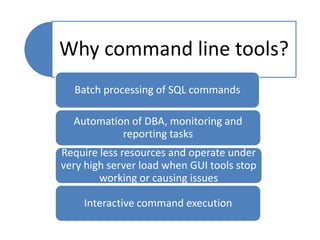
Why command line tools?
Batch processing of SQL commands
Automation of DBA, monitoring and
reporting tasks
Require less resources and operate under
very high server load when GUI tools stop
working or causing issues
Interactive command execution
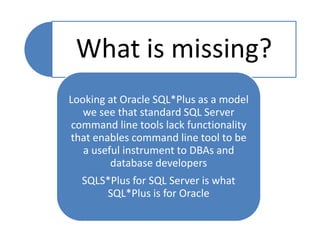
What is missing?
Looking at Oracle SQL*Plus as a model
we see that standard SQL Server
command line tools lack functionality
that enables command line tool to be
a useful instrument to DBAs and
database developers
SQLS*Plus for SQL Server is what
SQL*Plus is for Oracle
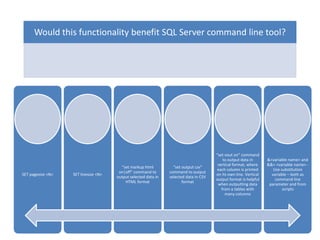
Would this functionality benefit SQL Server command line tool?

SET pagesize <N>

SET linesize <N>

“set markup html
on|off” command to
output selected data in
HTML format

“set output csv”
command to output
selected data in CSV
format

“set vout on” command
to output data in
vertical format, where
each column is printed
on its own line. Vertical
output format is helpful
when outputting data
from a tables with
many columns

&<variable name> and
&&< <variable name> Use substitution
variable – both as
command line
parameter and from
scripts
Would this functionality benefit SQL Server command line tool?

!!command –
interactive, rerun
command again

BTITLE - Places and
formats a specified
title at the bottom
of each report
page, or lists the
current BTITLE
definition

“cat <table_name>
-a” – select data
from a table

“col <name> format
<format>” - format
selected column
(like Oracle does)

“DEF[INE]
[variable]|[variable
= text]” – define
script variable

DEPS [NAME] –
show Object
dependencies and
references

DESCRIBE - Describe
a table or stored
procedure
Would this functionality benefit SQL Server command line tool?

EXEC Execute TSQL
procedure

FIND - Find a
line in T-SQL
procedure
source

GREP
<pattern
table [extra
clause]> Show rows
that match
pattern

HEAD - Show
first rows of
table

HISTORY Show history
items
matching
pattern (or
all)

HOST Execute host
OS command

Id – show
current user
and login id
Would this functionality benefit SQL Server command line tool?

LIST - List last SQL
statement

LS - List all objects
matching pattern

PAUSE - SET
PAUSE <TEXT> |
SET PAUSE
[ON|OFF] Enables to control
scrolling of
terminal when
executing reports

PRINTVAR - Print
bind variables

PURGE <table
where ...> Delete data from
(large) table in
chunks

RECOMPILE –
recompile objects

REFS - Display
referential
integrity
dependencies
Would this functionality benefit SQL Server command line tool?

RERUN
<history_number> Run command by
history number

SET COLSEP - Set
column separator
character for
reports

SET FEEDBACK
<on|off|N> Display number of
records returned by
a query when a
query selects at
least n records

SET HEADING - Set
heading value

SET HEADSEP - Set
heading separator

SET linesize <size> Set output line size

SET MARK[UP]
HTML [ON | OFF] Set output to HTML
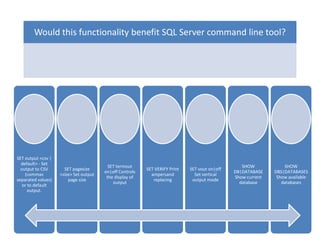
Would this functionality benefit SQL Server command line tool?

SET output <csv |
default> - Set
output to CSV
(commas
separated values)
or to default
output.

SET pagesize
<size> Set output
page size

SET termout
on|off Controls
the display of
output

SET VERIFY Print
ampersand
replacing

SET vout on|off
Set vertical
output mode

SHOW
DB|DATABASE
Show current
database

SHOW
DBS|DATABASES
Show available
databases
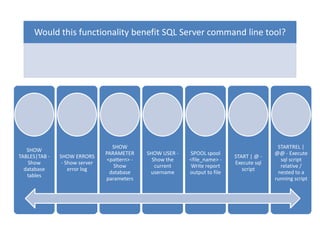
Would this functionality benefit SQL Server command line tool?

SHOW
TABLES|TAB Show
database
tables

SHOW ERRORS
- Show server
error log

SHOW
PARAMETER
<pattern> Show
database
parameters

SHOW USER Show the
current
username

SPOOL spool
<file_name> Write report
output to file

START | @ Execute sql
script

STARTREL |
@@ - Execute
sql script
relative /
nested to a
running script
Would this functionality benefit SQL Server command line tool?

TTITLE - Places and formats a specified
title at the top of each report page.

TSQL - Display T-SQL procedure code

VARIABLE - declare a bind variable
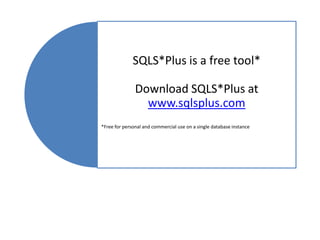
SQLS*Plus is a free tool*

Download SQLS*Plus at
www.sqlsplus.com
*Free for personal and commercial use on a single database instance

SQLS*Plus SQL Server command line tool

  • 1.
    Optimal command linetool for SQL Server SQLS*Plus http://www.sqlsplus.com
  • 2.
    Command line toolsavailable for SQL Server SQLCMD – standard SQL Server command line tool SQLS*Plus – free advanced SQL Server command line tool (www.sqlsplus.com) OSQL – will be deprecated past SQL Server 2012 ISQL – deprecated as of SQL Server 2005
  • 3.
    Why command linetools? Batch processing of SQL commands Automation of DBA, monitoring and reporting tasks Require less resources and operate under very high server load when GUI tools stop working or causing issues Interactive command execution
  • 4.
    What is missing? Lookingat Oracle SQL*Plus as a model we see that standard SQL Server command line tools lack functionality that enables command line tool to be a useful instrument to DBAs and database developers SQLS*Plus for SQL Server is what SQL*Plus is for Oracle
  • 5.
    Would this functionalitybenefit SQL Server command line tool? SET pagesize <N> SET linesize <N> “set markup html on|off” command to output selected data in HTML format “set output csv” command to output selected data in CSV format “set vout on” command to output data in vertical format, where each column is printed on its own line. Vertical output format is helpful when outputting data from a tables with many columns &<variable name> and &&< <variable name> Use substitution variable – both as command line parameter and from scripts
  • 6.
    Would this functionalitybenefit SQL Server command line tool? !!command – interactive, rerun command again BTITLE - Places and formats a specified title at the bottom of each report page, or lists the current BTITLE definition “cat <table_name> -a” – select data from a table “col <name> format <format>” - format selected column (like Oracle does) “DEF[INE] [variable]|[variable = text]” – define script variable DEPS [NAME] – show Object dependencies and references DESCRIBE - Describe a table or stored procedure
  • 7.
    Would this functionalitybenefit SQL Server command line tool? EXEC Execute TSQL procedure FIND - Find a line in T-SQL procedure source GREP <pattern table [extra clause]> Show rows that match pattern HEAD - Show first rows of table HISTORY Show history items matching pattern (or all) HOST Execute host OS command Id – show current user and login id
  • 8.
    Would this functionalitybenefit SQL Server command line tool? LIST - List last SQL statement LS - List all objects matching pattern PAUSE - SET PAUSE <TEXT> | SET PAUSE [ON|OFF] Enables to control scrolling of terminal when executing reports PRINTVAR - Print bind variables PURGE <table where ...> Delete data from (large) table in chunks RECOMPILE – recompile objects REFS - Display referential integrity dependencies
  • 9.
    Would this functionalitybenefit SQL Server command line tool? RERUN <history_number> Run command by history number SET COLSEP - Set column separator character for reports SET FEEDBACK <on|off|N> Display number of records returned by a query when a query selects at least n records SET HEADING - Set heading value SET HEADSEP - Set heading separator SET linesize <size> Set output line size SET MARK[UP] HTML [ON | OFF] Set output to HTML
  • 10.
    Would this functionalitybenefit SQL Server command line tool? SET output <csv | default> - Set output to CSV (commas separated values) or to default output. SET pagesize <size> Set output page size SET termout on|off Controls the display of output SET VERIFY Print ampersand replacing SET vout on|off Set vertical output mode SHOW DB|DATABASE Show current database SHOW DBS|DATABASES Show available databases
  • 11.
    Would this functionalitybenefit SQL Server command line tool? SHOW TABLES|TAB Show database tables SHOW ERRORS - Show server error log SHOW PARAMETER <pattern> Show database parameters SHOW USER Show the current username SPOOL spool <file_name> Write report output to file START | @ Execute sql script STARTREL | @@ - Execute sql script relative / nested to a running script
  • 12.
    Would this functionalitybenefit SQL Server command line tool? TTITLE - Places and formats a specified title at the top of each report page. TSQL - Display T-SQL procedure code VARIABLE - declare a bind variable
  • 13.
    SQLS*Plus is afree tool* Download SQLS*Plus at www.sqlsplus.com *Free for personal and commercial use on a single database instance