.SQL Portfolio Name Email
Introduction: Create a banking database to handle 2 account types at this time, savings and checking. Project Goals: Process transactions (withdraw, deposit, interest, fees), open, suspend, and reactivate accounts. Track customer information.
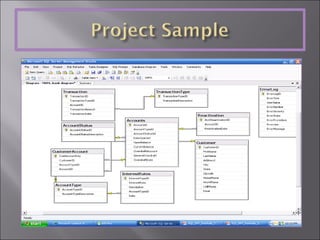
Create ERD Diagram Shred in XML data Stored Procedures to handle processes
 
<Customer ID=&quot;1&quot; FirstName=&quot;John&quot; LastName=&quot;Doe&quot; Street=&quot;123 Fake Street&quot; City=&quot;Anytown&quot; State=&quot;NY&quot; zipcode=&quot;11280&quot; HomePhone=&quot;555-123-4567&quot; WorkPhone=&quot;555-456-7890&quot; MobilePhone=&quot;555-111-2345&quot; EMail=&quot;jDoe@someweb.com&quot;> <Accounts> <Saving ID=&quot;100000&quot; Balance=&quot;548.25&quot; AccountStatusId=&quot;1&quot;> <Transaction>   <Transaction ID=&quot;1&quot; TransactionTypeID=&quot;Initial Deposit&quot; Date=&quot;4/01/2007&quot; TransactionAmount=&quot;500.00&quot; NewBalance=&quot;500.00&quot; />   <Transaction ID=&quot;5&quot; TransactionTypeID=&quot;Deposit&quot; Date=&quot;4/01/2007&quot; TransactionAmount=&quot;50.00&quot; NewBalance=&quot;550.00&quot; />   <Transaction ID=&quot;9&quot; TransactionTypeID=&quot;Withdraw&quot; Date=&quot;4/01/2007&quot; TransactionAmount=&quot;1.75&quot; NewBalance=&quot;548.25&quot; />   </Transaction> </Saving> <Checking ID=&quot;100001&quot; Balance=&quot;650.00&quot; AccountStatusId=&quot;1&quot; OverdraftAccount=&quot;100000&quot;> <Transaction>   <Transaction ID=&quot;4&quot; TransactionTypeID=&quot;Initial Deposit&quot; Date=&quot;4/01/2007&quot; TransactionAmount=&quot;450.00&quot; NewBalance=&quot;450.00&quot; />   <Transaction ID=&quot;6&quot; TransactionTypeID=&quot;Deposit&quot; Date=&quot;4/01/2007&quot; TransactionAmount=&quot;50.00&quot; NewBalance=&quot;500.00&quot; />   <Transaction ID=&quot;44&quot; TransactionTypeID=&quot;Deposit&quot; Date=&quot;4/01/2007&quot; TransactionAmount=&quot;150.00&quot; NewBalance=&quot;650.00&quot; />   </Transaction> </Checking> </Accounts> </Customer> -- Insert Customer information into Cust.Customer table set identity_insert dbo.Customer on  -- allow insert into identity column Insert into dbo.Customer (CustomerID, FirstName, LastName, Address1, City, State, ZipCode, HomePhone, WorkPhone, CellPhone, EMail) Select * from OPENXML (@docHandle, '/Bank/Customer', 1) with (ID int, FirstName nvarchar(15), LastName nvarchar(20), Street nvarchar(30), City nvarchar(20), State nchar(2), zipcode nchar(5), HomePhone nvarchar(13), WorkPhone nvarchar(13), MobilePhone nvarchar(13), EMail nvarchar(30) ) set identity_insert dbo.Customer off  -- Turn off identity insert after insert has been completed
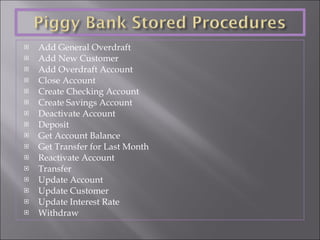
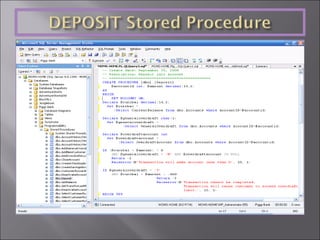
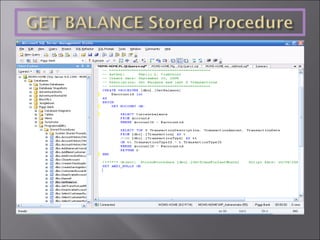
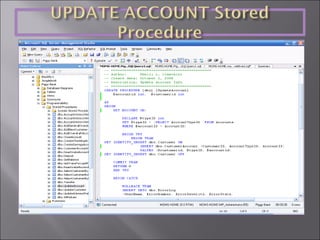
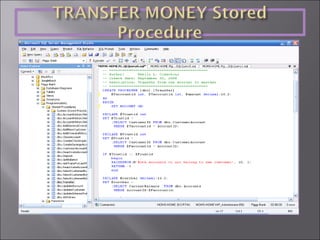
Add General Overdraft  Add New Customer Add Overdraft Account Close Account Create Checking Account Create Savings Account Deactivate Account Deposit Get Account Balance Get Transfer for Last Month Reactivate Account Transfer Update Account Update Customer Update Interest Rate Withdraw


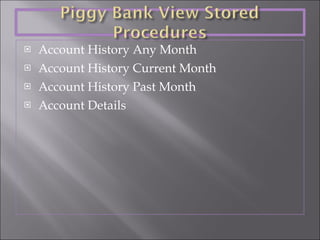
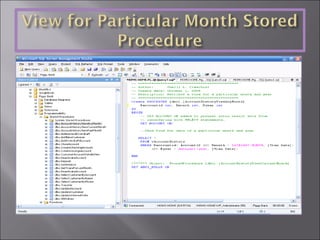
Account History Any Month Account History Current Month Account History Past Month Account Details


Sql portfolio piggy_bank

  • 1.
  • 2.
    Introduction: Create abanking database to handle 2 account types at this time, savings and checking. Project Goals: Process transactions (withdraw, deposit, interest, fees), open, suspend, and reactivate accounts. Track customer information.
  • 3.
    Create ERD DiagramShred in XML data Stored Procedures to handle processes
  • 4.
  • 5.
    <Customer ID=&quot;1&quot; FirstName=&quot;John&quot;LastName=&quot;Doe&quot; Street=&quot;123 Fake Street&quot; City=&quot;Anytown&quot; State=&quot;NY&quot; zipcode=&quot;11280&quot; HomePhone=&quot;555-123-4567&quot; WorkPhone=&quot;555-456-7890&quot; MobilePhone=&quot;555-111-2345&quot; EMail=&quot;jDoe@someweb.com&quot;> <Accounts> <Saving ID=&quot;100000&quot; Balance=&quot;548.25&quot; AccountStatusId=&quot;1&quot;> <Transaction> <Transaction ID=&quot;1&quot; TransactionTypeID=&quot;Initial Deposit&quot; Date=&quot;4/01/2007&quot; TransactionAmount=&quot;500.00&quot; NewBalance=&quot;500.00&quot; /> <Transaction ID=&quot;5&quot; TransactionTypeID=&quot;Deposit&quot; Date=&quot;4/01/2007&quot; TransactionAmount=&quot;50.00&quot; NewBalance=&quot;550.00&quot; /> <Transaction ID=&quot;9&quot; TransactionTypeID=&quot;Withdraw&quot; Date=&quot;4/01/2007&quot; TransactionAmount=&quot;1.75&quot; NewBalance=&quot;548.25&quot; /> </Transaction> </Saving> <Checking ID=&quot;100001&quot; Balance=&quot;650.00&quot; AccountStatusId=&quot;1&quot; OverdraftAccount=&quot;100000&quot;> <Transaction> <Transaction ID=&quot;4&quot; TransactionTypeID=&quot;Initial Deposit&quot; Date=&quot;4/01/2007&quot; TransactionAmount=&quot;450.00&quot; NewBalance=&quot;450.00&quot; /> <Transaction ID=&quot;6&quot; TransactionTypeID=&quot;Deposit&quot; Date=&quot;4/01/2007&quot; TransactionAmount=&quot;50.00&quot; NewBalance=&quot;500.00&quot; /> <Transaction ID=&quot;44&quot; TransactionTypeID=&quot;Deposit&quot; Date=&quot;4/01/2007&quot; TransactionAmount=&quot;150.00&quot; NewBalance=&quot;650.00&quot; /> </Transaction> </Checking> </Accounts> </Customer> -- Insert Customer information into Cust.Customer table set identity_insert dbo.Customer on -- allow insert into identity column Insert into dbo.Customer (CustomerID, FirstName, LastName, Address1, City, State, ZipCode, HomePhone, WorkPhone, CellPhone, EMail) Select * from OPENXML (@docHandle, '/Bank/Customer', 1) with (ID int, FirstName nvarchar(15), LastName nvarchar(20), Street nvarchar(30), City nvarchar(20), State nchar(2), zipcode nchar(5), HomePhone nvarchar(13), WorkPhone nvarchar(13), MobilePhone nvarchar(13), EMail nvarchar(30) ) set identity_insert dbo.Customer off -- Turn off identity insert after insert has been completed
  • 6.
    Add General Overdraft Add New Customer Add Overdraft Account Close Account Create Checking Account Create Savings Account Deactivate Account Deposit Get Account Balance Get Transfer for Last Month Reactivate Account Transfer Update Account Update Customer Update Interest Rate Withdraw
  • 7.
  • 8.
  • 9.
  • 10.
  • 11.
    Account History AnyMonth Account History Current Month Account History Past Month Account Details
  • 12.
  • 13.