
SPTechCon San Francisco 2014
How to Develop and Debug Client Side Code
Mark.Rackley@capSpire.com
April, Twenty Fourteen
Mark Rackley / Senior Consultant
• 19+ years software
architecture and development
experience
• SharePoint Junkie since 2007
• Event Organizer
• Blogger, Writer, Speaker
• Bacon aficionado
@mrackley
www.SharePointHillbilly.com
www.MarkRackley.net
www.SharePointaLooza.org
What this session is not
In this session I’ll give you the tools to start developing and
debugging JavaScript and jQuery in SharePoint. I will not be
creating SharePoint Apps, Solutions, or features. Visual Studio is
not needed for any of the functionality presented in this session.
To get started from a Visual Studio only approach check out Rob
Windsor's and David Mann’s Pluralsight videos on SharePoint
with JavaScript, CSOM, and REST.
http://www.pluralsight.com/training/Courses/TableOfContents/sharepoint-2013-client-object-
model-rest
Agenda
• Some Why’s
• These are a few of my favorite tools
• Common issues & Best practices
• Other helpful tools
• Let’s Do Some Stuff
• Deploy and reference scripts
• Development Basics
• Debugging Basics
All links from this session (and others)
http://bit.ly/POSTCON06
Code Samples Available at
https://github.com/mrackley/SPClientSideDev
Why bother with client side dev?
• Stay off the server
• Deployment and maintenance can be easier
• Upgrades can be painless
• You don’t have to be a development guru
• You don’t need expensive tools like Visual
Studio… well you don’t NEED any tools at all.
Why is JavaScript development so painful?
• It’s not compiled
• Simple errors hard to track down
• It’s difficult to debug
• Error messages are usually not helpful
• There’s a lot of ways to do the exact same
thing
• Performance can be an issue
• Non-developers are doing it
These are a few of my favorite tools
• jQuery (It’s just JavaScript)
• http://jquery.com/
• jQuery UI (Make it prettier and more
interactive)
• http://jqueryui.com/
• jQuery.cookie.js (because it works)
• http://plugins.jquery.com/cookie/
These are a few of my favorite tools
• FullCalendar (because sometimes you need
more than one date field)
• http://arshaw.com/fullcalendar/
• DataTables (quick, performant list views)
• http://www.datatables.net/
• SPServices / CSOM / REST (because, what
CAN’T you do??)
These are a few of my favorite tools
• SharePoint Designer (yes… really)
• IE and Chrome Developer Tools (It’s like real
debugging)
• Fiddler (Essential when you need to see
what’s really going on)
• http://fiddler2.com/
Oh yeah… so, what can’t you do?
• Event Receivers
• Timer Jobs
• Elevate Privileges
• Write to the file system
Development basics
• Store scripts in a document library
• To deploy a script across a site collection use a Custom Action
• Avoid directly adding scripts to Master Page
 Can be more difficult to maintain and debug
• To deploy script to a page, add a Content Editor Web Part
and link to script
• Avoid placing scripts directly in CEWP
 Scripts can get mangled and there is no reuse / backup.
Querying a list to populate a drop down box
REST / CSOM / SPSERVICES
SPServices Get List Items Query
$().SPServices({
operation: "GetListItems",
async: true,
listName: "Vendors",
CAMLViewFields: "<ViewFields><FieldRef Name='Vendor' /></ViewFields>",
CAMLQuery: "<Query><Where><Neq><FieldRef Name='ID' /><Value
Type='Number'>0</Value></Neq></Where></Query>";, completefunc: function(xData, Status) {
var options = "<option value='0'>(None)</option>";
$(xData.responseXML).SPFilterNode("z:row").each(function() {
var Vendor = ($(this).attr("ows_Vendor"));
var ID = $(this).attr("ows_ID");
options += "<option value='"+ ID +"'>"+Vendor+"</option>";
});
$("select[title='<Field Display Name>']").append(options);
}});
Client Side Object Model (CSOM) Get List Items
Query
context = SP.ClientContext.get_current();
var speakerList = context.get_web().get_lists().getByTitle("Vendors");
var camlQuery = SP.CamlQuery.createAllItemsQuery();
this.listItems = speakerList.getItems(camlQuery);
context.load(listItems);
context.executeQueryAsync(ReadListItemSucceeded, ReadListItemFailed);
function ReadListItemSucceeded(sender, args) {
var enumerator = listItems.getEnumerator();
var options = "<option value='0'>(None)</option>";
while (enumerator.moveNext()) {
var listItem = enumerator.get_current();
var Vendor = listItem.get_item('Vendor');
var ID = listItem.get_id();
options += "<option value='"+ ID +"'>"+Vendor+"</option>";
}
$("select[title='<Field Display Name>']").append(options);
}
function ReadListItemFailed(sender, args) {
alert('Request failed. ' + args.get_message() + 'n' + args.get_stackTrace());
}
SharePoint 2010 REST Get List Items Query
var call = $.ajax({
url: “http://<Url To Site>/_vti_bin/listdata.svc/Vendors?$select=Vendor,Id&$top=1000”,
type: "GET",
dataType: "json",
headers: {
Accept: "application/json;odata=verbose"
}
});
call.done(function (data,textStatus, jqXHR){
var options = "<option value='0'>(None)</option>";
for (index in data.d.results) //MIGHT BE IN data.d
{
options += "<option value='"+ data.d.results[index].Id
+"'>"+data.d.results[index].Title+"</option>";
}
$("select[title='<Field Display Name>']").append(options);
});
call.fail(function (jqXHR,textStatus,errorThrown){
alert("Error retrieving Tasks: " + jqXHR.responseText);
});
SharePoint 2013 REST Get List Items Query
var call = $.ajax({
url: _spPageContextInfo.webAbsoluteUrl + "/_api/Web/Lists/GetByTitle('ListName')/items",
type: "GET",
dataType: "json",
headers: {
Accept: "application/json;odata=verbose"
}
});
call.done(function (data,textStatus, jqXHR){
var options = "<option value='0'>(None)</option>";
for (index in data.d.results)
{
options += "<option value='"+ data.d.results[index].Id
+"'>"+data.d.results[index].Title+"</option>";
}
$("select[title='<Field Display Name>']").append(options);
});
call.fail(function (jqXHR,textStatus,errorThrown){
alert("Error retrieving Tasks: " + jqXHR.responseText);
});
Reading / Storing List Data
var objArray = [
{ID: 1, Title: "Title 1"},
{ID: 2, Title: "Title 2"},
{ID: 3, Title: "Title 3"},
{ID: 4, Title: "Title 4"},
];
for (index in objArray)
{
var thisTitle = objArray[index].Title;
}
 Use REST / CSOM / SPServices to read list data
 Store data in arrays and JSON objects
Reading / Storing List Data
var objects = {};
objects[1] = {Title: "Title 1"};
objects[2] = {Title: "Title 2"};
objects[3] = {Title: "Title 3"};
for (id in objects)
{
var thisTitle = objects[id].Title;
}
 Use REST / CSOM / SPServices to read list data
 Store data in arrays and JSON objects
Debugging Basics
• Alerts
• Quick sanity checks
• Are your scripts getting executed?
• Developer Tools
• Setting breakpoints
• Evaluating expressions
• Fiddler
• Is the data I’m expecting coming across the
wire?
How about some best practices?
• Avoid global variables
• Write scripts in small digestible chunks
• Code with performance in mind
• Minify files, but make updates in un-minified files
• Be consistent in structure and syntax ESPECIALLY if
developing as part of a team
• Document what you’ve done
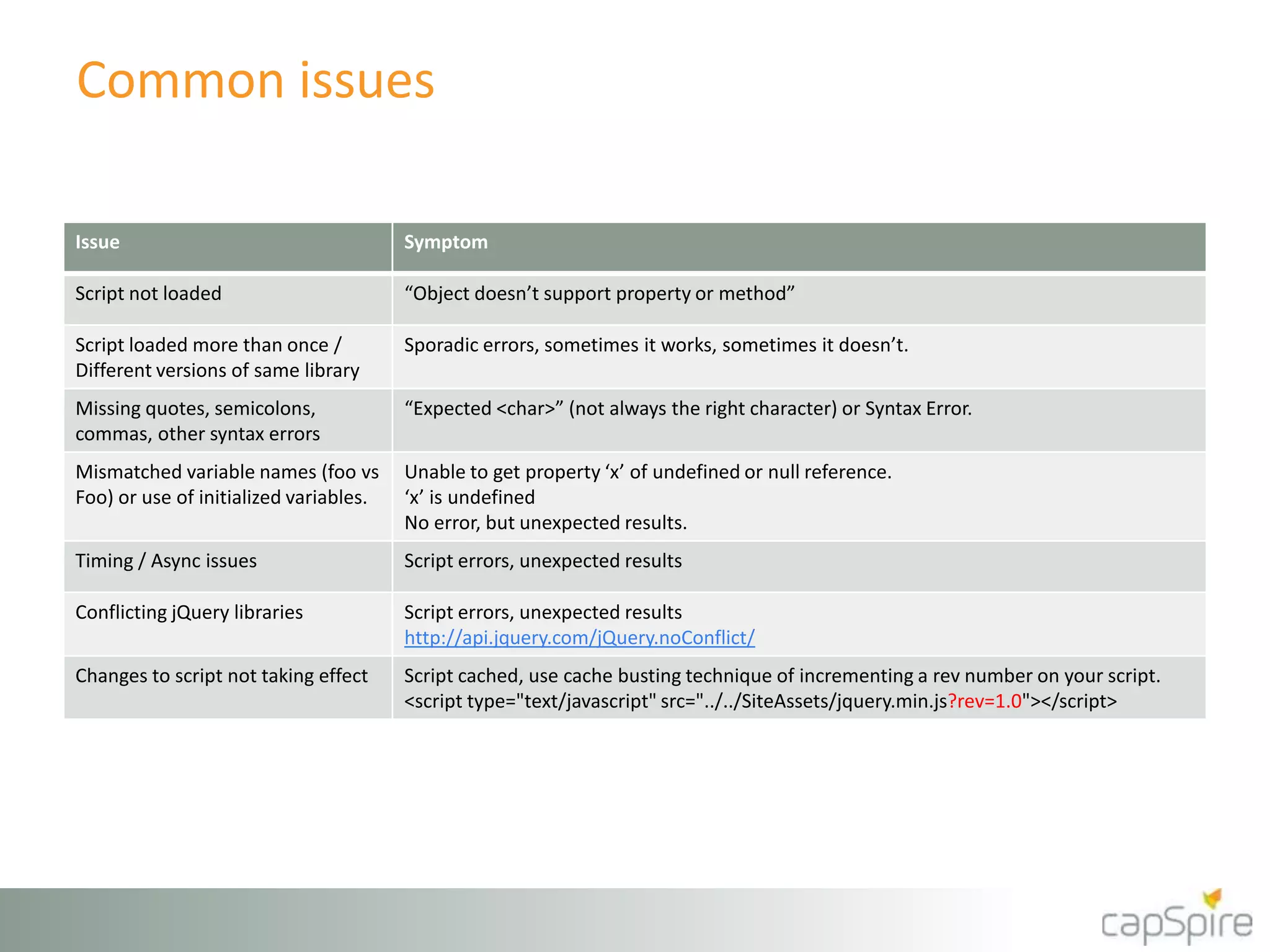
Common issues
Issue Symptom
Script not loaded “Object doesn’t support property or method”
Script loaded more than once /
Different versions of same library
Sporadic errors, sometimes it works, sometimes it doesn’t.
Missing quotes, semicolons,
commas, other syntax errors
“Expected <char>” (not always the right character) or Syntax Error.
Mismatched variable names (foo vs
Foo) or use of initialized variables.
Unable to get property ‘x’ of undefined or null reference.
‘x’ is undefined
No error, but unexpected results.
Timing / Async issues Script errors, unexpected results
Conflicting jQuery libraries Script errors, unexpected results
http://api.jquery.com/jQuery.noConflict/
Changes to script not taking effect Script cached, use cache busting technique of incrementing a rev number on your script.
<script type="text/javascript" src="../../SiteAssets/jquery.min.js?rev=1.0"></script>
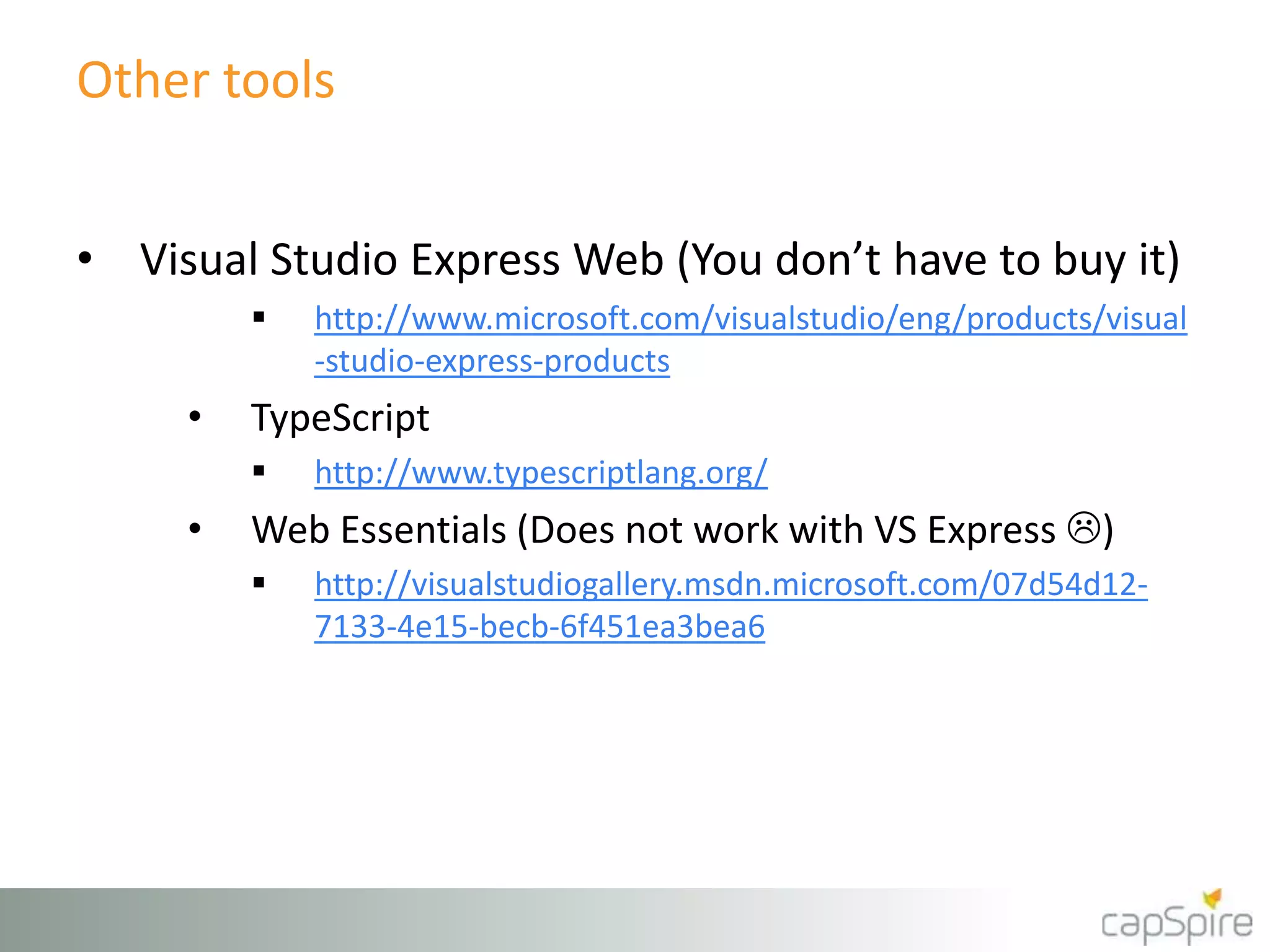
Other tools
• Visual Studio Express Web (You don’t have to buy it)
 http://www.microsoft.com/visualstudio/eng/products/visual
-studio-express-products
• TypeScript
 http://www.typescriptlang.org/
• Web Essentials (Does not work with VS Express )
 http://visualstudiogallery.msdn.microsoft.com/07d54d12-
7133-4e15-becb-6f451ea3bea6
Other tools
• jsLint & jsHint
• Syntax / Quality Checking
• Can be more frustrating than helpful
• http://www.jslint.com/
• http://www.jshint.com/
Let’s DO some stuff!!!
I know!! It’s about time? Right?
jQueryUI
http://jqueryui.com/
jQuery UI is a curated set of user interface
interactions, effects, widgets, and themes built
on top of the jQuery JavaScript Library.
Whether you're building highly interactive web
applications or you just need to add a date
picker to a form control, jQuery UI is the
perfect choice.
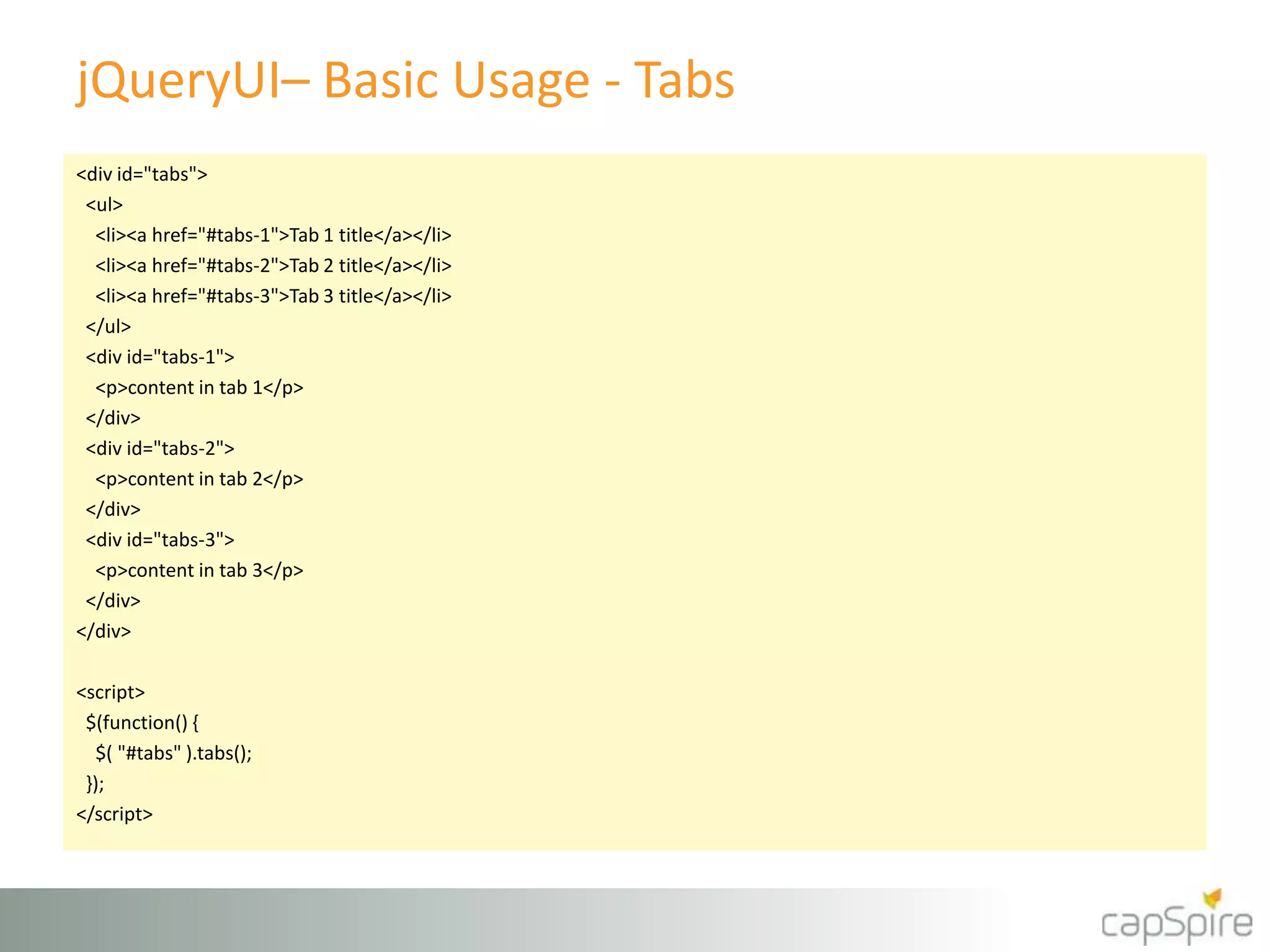
jQueryUI– Basic Usage - Tabs
<div id="tabs">
<ul>
<li><a href="#tabs-1">Tab 1 title</a></li>
<li><a href="#tabs-2">Tab 2 title</a></li>
<li><a href="#tabs-3">Tab 3 title</a></li>
</ul>
<div id="tabs-1">
<p>content in tab 1</p>
</div>
<div id="tabs-2">
<p>content in tab 2</p>
</div>
<div id="tabs-3">
<p>content in tab 3</p>
</div>
</div>
<script>
$(function() {
$( "#tabs" ).tabs();
});
</script>
jQueryUI demo
Tabs
DataTables
http://www.datatables.net/
DataTables is a plug-in for
the jQuery Javascript library. It is a highly
flexible tool, based upon the foundations of
progressive enhancement, which will add
advanced interaction controls to any HTML
table.
DataTables – Basic Usage
//array of arrays
$('#example').dataTable( {
"aaData": [
["row 1","value"],
["row 2","value 2"],
],
"aoColumns": [ //field count must match column count
{ "sTitle": "Column Name" },
{ "sTitle": "Column Name 2" }
]
});
//array of objects
$('#example').dataTable({
"bProcessing": true,
"aaData": vendors, //array of objects
"aoColumns": [
{ "mData": "Vendor" }
]
});
DataTables demo
Using SharePoint REST
Bluff Charts
http://bluff.jcoglan.com/
Bluff is a JavaScript port of the Gruff graphing
library for Ruby. It is designed to support all the
features of Gruff with minimal dependencies; the
only third-party scripts you need to run it are a
copy of JS.Class (2.6kB gzipped) and a copy of
Google’s ExCanvas to support canvas in Internet
Explorer. Both these scripts are supplied with the
Bluff download. Bluff itself is around 11kB
gzipped.
Bluff Charts – Basic Usage
var g = new Bluff.Bar('LineBarChart', '800x400');
g.title = 'Tasks By User';
g.tooltips = true;
g.theme_37signals();
for (index in tasks)
{
g.data(tasks[index].name, [tasks[index].Completed,
tasks[index].Deferred,tasks[index].NotStarted,
tasks[index].InProgress,tasks[index].Waitingonsomeoneelse]);
}
g.labels = {0: 'Completed', 1: 'Deferred', 2: 'Not Started',
3: 'In Progress', 4: 'Waiting'};
g.draw();
Bluff demo
Quick and dirty charts
What’s next??
SharePoint Hosted Apps
Single Page Apps (SPAs)
 AngularJS
 http://angularjs.org/
 Breeze
 http://www.breezejs.com/
April, Twenty Fourteen

SPTechCon 2014 How to develop and debug client side code in SharePoint

  • 1.
    SPTechCon San Francisco2014 How to Develop and Debug Client Side Code Mark.Rackley@capSpire.com April, Twenty Fourteen
  • 2.
    Mark Rackley /Senior Consultant • 19+ years software architecture and development experience • SharePoint Junkie since 2007 • Event Organizer • Blogger, Writer, Speaker • Bacon aficionado @mrackley www.SharePointHillbilly.com www.MarkRackley.net www.SharePointaLooza.org
  • 3.
    What this sessionis not In this session I’ll give you the tools to start developing and debugging JavaScript and jQuery in SharePoint. I will not be creating SharePoint Apps, Solutions, or features. Visual Studio is not needed for any of the functionality presented in this session. To get started from a Visual Studio only approach check out Rob Windsor's and David Mann’s Pluralsight videos on SharePoint with JavaScript, CSOM, and REST. http://www.pluralsight.com/training/Courses/TableOfContents/sharepoint-2013-client-object- model-rest
  • 4.
    Agenda • Some Why’s •These are a few of my favorite tools • Common issues & Best practices • Other helpful tools • Let’s Do Some Stuff • Deploy and reference scripts • Development Basics • Debugging Basics All links from this session (and others) http://bit.ly/POSTCON06 Code Samples Available at https://github.com/mrackley/SPClientSideDev
  • 5.
    Why bother withclient side dev? • Stay off the server • Deployment and maintenance can be easier • Upgrades can be painless • You don’t have to be a development guru • You don’t need expensive tools like Visual Studio… well you don’t NEED any tools at all.
  • 6.
    Why is JavaScriptdevelopment so painful? • It’s not compiled • Simple errors hard to track down • It’s difficult to debug • Error messages are usually not helpful • There’s a lot of ways to do the exact same thing • Performance can be an issue • Non-developers are doing it
  • 7.
    These are afew of my favorite tools • jQuery (It’s just JavaScript) • http://jquery.com/ • jQuery UI (Make it prettier and more interactive) • http://jqueryui.com/ • jQuery.cookie.js (because it works) • http://plugins.jquery.com/cookie/
  • 8.
    These are afew of my favorite tools • FullCalendar (because sometimes you need more than one date field) • http://arshaw.com/fullcalendar/ • DataTables (quick, performant list views) • http://www.datatables.net/ • SPServices / CSOM / REST (because, what CAN’T you do??)
  • 9.
    These are afew of my favorite tools • SharePoint Designer (yes… really) • IE and Chrome Developer Tools (It’s like real debugging) • Fiddler (Essential when you need to see what’s really going on) • http://fiddler2.com/
  • 10.
    Oh yeah… so,what can’t you do? • Event Receivers • Timer Jobs • Elevate Privileges • Write to the file system
  • 11.
    Development basics • Storescripts in a document library • To deploy a script across a site collection use a Custom Action • Avoid directly adding scripts to Master Page  Can be more difficult to maintain and debug • To deploy script to a page, add a Content Editor Web Part and link to script • Avoid placing scripts directly in CEWP  Scripts can get mangled and there is no reuse / backup.
  • 12.
    Querying a listto populate a drop down box REST / CSOM / SPSERVICES
  • 13.
    SPServices Get ListItems Query $().SPServices({ operation: "GetListItems", async: true, listName: "Vendors", CAMLViewFields: "<ViewFields><FieldRef Name='Vendor' /></ViewFields>", CAMLQuery: "<Query><Where><Neq><FieldRef Name='ID' /><Value Type='Number'>0</Value></Neq></Where></Query>";, completefunc: function(xData, Status) { var options = "<option value='0'>(None)</option>"; $(xData.responseXML).SPFilterNode("z:row").each(function() { var Vendor = ($(this).attr("ows_Vendor")); var ID = $(this).attr("ows_ID"); options += "<option value='"+ ID +"'>"+Vendor+"</option>"; }); $("select[title='<Field Display Name>']").append(options); }});
  • 14.
    Client Side ObjectModel (CSOM) Get List Items Query context = SP.ClientContext.get_current(); var speakerList = context.get_web().get_lists().getByTitle("Vendors"); var camlQuery = SP.CamlQuery.createAllItemsQuery(); this.listItems = speakerList.getItems(camlQuery); context.load(listItems); context.executeQueryAsync(ReadListItemSucceeded, ReadListItemFailed); function ReadListItemSucceeded(sender, args) { var enumerator = listItems.getEnumerator(); var options = "<option value='0'>(None)</option>"; while (enumerator.moveNext()) { var listItem = enumerator.get_current(); var Vendor = listItem.get_item('Vendor'); var ID = listItem.get_id(); options += "<option value='"+ ID +"'>"+Vendor+"</option>"; } $("select[title='<Field Display Name>']").append(options); } function ReadListItemFailed(sender, args) { alert('Request failed. ' + args.get_message() + 'n' + args.get_stackTrace()); }
  • 15.
    SharePoint 2010 RESTGet List Items Query var call = $.ajax({ url: “http://<Url To Site>/_vti_bin/listdata.svc/Vendors?$select=Vendor,Id&$top=1000”, type: "GET", dataType: "json", headers: { Accept: "application/json;odata=verbose" } }); call.done(function (data,textStatus, jqXHR){ var options = "<option value='0'>(None)</option>"; for (index in data.d.results) //MIGHT BE IN data.d { options += "<option value='"+ data.d.results[index].Id +"'>"+data.d.results[index].Title+"</option>"; } $("select[title='<Field Display Name>']").append(options); }); call.fail(function (jqXHR,textStatus,errorThrown){ alert("Error retrieving Tasks: " + jqXHR.responseText); });
  • 16.
    SharePoint 2013 RESTGet List Items Query var call = $.ajax({ url: _spPageContextInfo.webAbsoluteUrl + "/_api/Web/Lists/GetByTitle('ListName')/items", type: "GET", dataType: "json", headers: { Accept: "application/json;odata=verbose" } }); call.done(function (data,textStatus, jqXHR){ var options = "<option value='0'>(None)</option>"; for (index in data.d.results) { options += "<option value='"+ data.d.results[index].Id +"'>"+data.d.results[index].Title+"</option>"; } $("select[title='<Field Display Name>']").append(options); }); call.fail(function (jqXHR,textStatus,errorThrown){ alert("Error retrieving Tasks: " + jqXHR.responseText); });
  • 17.
    Reading / StoringList Data var objArray = [ {ID: 1, Title: "Title 1"}, {ID: 2, Title: "Title 2"}, {ID: 3, Title: "Title 3"}, {ID: 4, Title: "Title 4"}, ]; for (index in objArray) { var thisTitle = objArray[index].Title; }  Use REST / CSOM / SPServices to read list data  Store data in arrays and JSON objects
  • 18.
    Reading / StoringList Data var objects = {}; objects[1] = {Title: "Title 1"}; objects[2] = {Title: "Title 2"}; objects[3] = {Title: "Title 3"}; for (id in objects) { var thisTitle = objects[id].Title; }  Use REST / CSOM / SPServices to read list data  Store data in arrays and JSON objects
  • 19.
    Debugging Basics • Alerts •Quick sanity checks • Are your scripts getting executed? • Developer Tools • Setting breakpoints • Evaluating expressions • Fiddler • Is the data I’m expecting coming across the wire?
  • 20.
    How about somebest practices? • Avoid global variables • Write scripts in small digestible chunks • Code with performance in mind • Minify files, but make updates in un-minified files • Be consistent in structure and syntax ESPECIALLY if developing as part of a team • Document what you’ve done
  • 21.
    Common issues Issue Symptom Scriptnot loaded “Object doesn’t support property or method” Script loaded more than once / Different versions of same library Sporadic errors, sometimes it works, sometimes it doesn’t. Missing quotes, semicolons, commas, other syntax errors “Expected <char>” (not always the right character) or Syntax Error. Mismatched variable names (foo vs Foo) or use of initialized variables. Unable to get property ‘x’ of undefined or null reference. ‘x’ is undefined No error, but unexpected results. Timing / Async issues Script errors, unexpected results Conflicting jQuery libraries Script errors, unexpected results http://api.jquery.com/jQuery.noConflict/ Changes to script not taking effect Script cached, use cache busting technique of incrementing a rev number on your script. <script type="text/javascript" src="../../SiteAssets/jquery.min.js?rev=1.0"></script>
  • 22.
    Other tools • VisualStudio Express Web (You don’t have to buy it)  http://www.microsoft.com/visualstudio/eng/products/visual -studio-express-products • TypeScript  http://www.typescriptlang.org/ • Web Essentials (Does not work with VS Express )  http://visualstudiogallery.msdn.microsoft.com/07d54d12- 7133-4e15-becb-6f451ea3bea6
  • 23.
    Other tools • jsLint& jsHint • Syntax / Quality Checking • Can be more frustrating than helpful • http://www.jslint.com/ • http://www.jshint.com/
  • 24.
    Let’s DO somestuff!!! I know!! It’s about time? Right?
  • 25.
    jQueryUI http://jqueryui.com/ jQuery UI isa curated set of user interface interactions, effects, widgets, and themes built on top of the jQuery JavaScript Library. Whether you're building highly interactive web applications or you just need to add a date picker to a form control, jQuery UI is the perfect choice.
  • 26.
    jQueryUI– Basic Usage- Tabs <div id="tabs"> <ul> <li><a href="#tabs-1">Tab 1 title</a></li> <li><a href="#tabs-2">Tab 2 title</a></li> <li><a href="#tabs-3">Tab 3 title</a></li> </ul> <div id="tabs-1"> <p>content in tab 1</p> </div> <div id="tabs-2"> <p>content in tab 2</p> </div> <div id="tabs-3"> <p>content in tab 3</p> </div> </div> <script> $(function() { $( "#tabs" ).tabs(); }); </script>
  • 27.
  • 28.
    DataTables http://www.datatables.net/ DataTables is aplug-in for the jQuery Javascript library. It is a highly flexible tool, based upon the foundations of progressive enhancement, which will add advanced interaction controls to any HTML table.
  • 29.
    DataTables – BasicUsage //array of arrays $('#example').dataTable( { "aaData": [ ["row 1","value"], ["row 2","value 2"], ], "aoColumns": [ //field count must match column count { "sTitle": "Column Name" }, { "sTitle": "Column Name 2" } ] }); //array of objects $('#example').dataTable({ "bProcessing": true, "aaData": vendors, //array of objects "aoColumns": [ { "mData": "Vendor" } ] });
  • 30.
  • 31.
    Bluff Charts http://bluff.jcoglan.com/ Bluff isa JavaScript port of the Gruff graphing library for Ruby. It is designed to support all the features of Gruff with minimal dependencies; the only third-party scripts you need to run it are a copy of JS.Class (2.6kB gzipped) and a copy of Google’s ExCanvas to support canvas in Internet Explorer. Both these scripts are supplied with the Bluff download. Bluff itself is around 11kB gzipped.
  • 32.
    Bluff Charts –Basic Usage var g = new Bluff.Bar('LineBarChart', '800x400'); g.title = 'Tasks By User'; g.tooltips = true; g.theme_37signals(); for (index in tasks) { g.data(tasks[index].name, [tasks[index].Completed, tasks[index].Deferred,tasks[index].NotStarted, tasks[index].InProgress,tasks[index].Waitingonsomeoneelse]); } g.labels = {0: 'Completed', 1: 'Deferred', 2: 'Not Started', 3: 'In Progress', 4: 'Waiting'}; g.draw();
  • 33.
  • 34.
    What’s next?? SharePoint HostedApps Single Page Apps (SPAs)  AngularJS  http://angularjs.org/  Breeze  http://www.breezejs.com/
  • 35.