Performance Testing w/ SharePointSharePoint Saturday CharlotteJeff DaltonTwitter.com/jefferydaltonSharepoint.nailhead.net
About Me6/20/20092SharePoint Saturday Charlotte / Performance Testing with SharePoint
AgendaFoundationPerformance Testing w/ Visual Studio 2008SharePoint ConsiderationLessons Learned6/20/20093SharePoint Saturday Charlotte / Performance Testing with SharePoint
Performance Testing BasicsIdentify Environment - Capture Application and Infrastructure architectureIdentify Performance Acceptance Criteria - RequirementsDesign Tests – Capture Scenarios, Navigation Paths, Workload ModelConfigure Test EnvironmentConstruct TestsRun Tests / Analyze Results / Create Test ReportsRinse / Repeat as Needed6/20/20094SharePoint Saturday Charlotte / Performance Testing with SharePoint
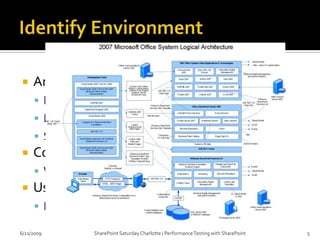
Identify EnvironmentArchitectureLogical PhysicalSystemCore Functions / Business ProcessWhat happens if this system is down?User ActivitesHow do people use this system?6/20/2009SharePoint Saturday Charlotte / Performance Testing with SharePoint5
Identify Performance Acceptance CriteriaEstablish RequirementsSLA / OLA, Regulations, ContractsRequest X must respond < 5 secondsPress Releases must be available with 2 minutes of releaseApplication RequirementsApplication must support 5 orders per second.Determine ThresholdsProcessor Utilization should not exceed 80% for 5 consecutive seconds.Establish Goals95% of page requests should execute in less than 2 seconds.6/20/2009SharePoint Saturday Charlotte / Performance Testing with SharePoint6
Design TestsDefine usage scenarios (web transactions)Requirements and Goals.Common Usage ScenariosBusiness Critical ScenariosTechnical ConcernsStakeholder ConcernsHigh Visibility usage.Strive for real word usageUser delays / think timesUser abandonmentCommon user errorsWork Load models6/20/2009SharePoint Saturday Charlotte / Performance Testing with SharePoint7
Configure Test EnvironmentSetup Test LabNetworkHardwareSetup / Configure load testing softwareSetup monitoring softwareConsiderationsHow much load before bottleneck on test generators.Synchronize System ClocksValidate Network components (Switches, Firewall, Load Balancer …)6/20/2009SharePoint Saturday Charlotte / Performance Testing with SharePoint8
Construct TestsPlan on this taking longer than expectedBuild scripts to create simulated data SharePoint Test Data Population Tool (CodePlex)SharePoint Site Builder (CodePlex)Ensure validation rules are working correctlyPlan on issues (usually test tools lag behind technology)6/20/2009SharePoint Saturday Charlotte / Performance Testing with SharePoint9
Run Tests / Analyze Results / Create Test ReportsMake sure proper people are in place when running tests.Collect / Analyze data as soon as tests are finished (everything is fresh in memory)Meticulous documenting start / stop times, special circumstance with test.Archive Test ResultsRun Tests Multiple times (to reduce chance of anomalies) Stakeholder Reports / Technical Reports Content is tailored to audience6/20/2009SharePoint Saturday Charlotte / Performance Testing with SharePoint10
AgendaFoundationPerformance Testing w/ Visual Studio 2008SharePoint ConsiderationLessons Learned6/20/200911SharePoint Saturday Charlotte / Performance Testing with SharePoint
Performance Testing w/ Visual Studio 2008Visual Studio 2005 or 2008 Team Test or Team SuiteVisual Studio Team System 2008 Test Load Agent Now let’s get out of slides6/20/2009SharePoint Saturday Charlotte / Performance Testing with SharePoint12
AgendaFoundationPerformance Testing w/ Visual Studio 2008SharePoint ConsiderationLessons Learned6/20/200913SharePoint Saturday Charlotte / Performance Testing with SharePoint
SharePoint ConsiderationsWeb Front EndsCaching Enabled / Content DB Size / Site Collection SizeIs Security included?SQL ServerDo Not IgnoreTimer JobsHow will these impact your operations? Have you included these in your tests?SSPSearch, BDC, User Profiles, Session State, Excel Services,…Solution Deployments6/20/2009SharePoint Saturday Charlotte / Performance Testing with SharePoint14
AgendaFoundationPerformance Testing w/ Visual Studio 2008SharePoint ConsiderationLessons Learned6/20/200915SharePoint Saturday Charlotte / Performance Testing with SharePoint
Lessons LearnedPlan, Plan, Plan Know your environmentEstablish your goals Know your tests Know your toolsTest, Test, Test (or search / destroy bottlenecks)Leave plenty of time to shake out the testsSize Matters (when Testing SharePoint)Witnessed 100% performance degradation between empty site collection and one with 22k webs.6/20/2009SharePoint Saturday Charlotte / Performance Testing with SharePoint16
Lessons LearnedThink Times Matter / End User Variations MatterPure load is nice, but it doesn’t reflect real worldTry to mix-up those IP-AddressesRunning all tests over 2 – 4 IP-Addresses does not simulate real world.Dedicated Test Labs Are Good, UmmmkayTesting in Production is Bad, Ummmkay6/20/2009SharePoint Saturday Charlotte / Performance Testing with SharePoint17
Lessons LearnedLoad Agents can max out quickly (do not want to over stress those machines)Over worked Load Agent will skew test results.Testing for under 30 minutes may cause you to miss out on major problems.Rule of thumb is about 1000 concurrent users for 1 VSTS Load Agent (most I’ve been able to run is around 300)6/20/2009SharePoint Saturday Charlotte / Performance Testing with SharePoint18

#Spsclt Performance Testing W Share Point

  • 1.
    Performance Testing w/SharePointSharePoint Saturday CharlotteJeff DaltonTwitter.com/jefferydaltonSharepoint.nailhead.net
  • 2.
    About Me6/20/20092SharePoint SaturdayCharlotte / Performance Testing with SharePoint
  • 3.
    AgendaFoundationPerformance Testing w/Visual Studio 2008SharePoint ConsiderationLessons Learned6/20/20093SharePoint Saturday Charlotte / Performance Testing with SharePoint
  • 4.
    Performance Testing BasicsIdentifyEnvironment - Capture Application and Infrastructure architectureIdentify Performance Acceptance Criteria - RequirementsDesign Tests – Capture Scenarios, Navigation Paths, Workload ModelConfigure Test EnvironmentConstruct TestsRun Tests / Analyze Results / Create Test ReportsRinse / Repeat as Needed6/20/20094SharePoint Saturday Charlotte / Performance Testing with SharePoint
  • 5.
    Identify EnvironmentArchitectureLogical PhysicalSystemCoreFunctions / Business ProcessWhat happens if this system is down?User ActivitesHow do people use this system?6/20/2009SharePoint Saturday Charlotte / Performance Testing with SharePoint5
  • 6.
    Identify Performance AcceptanceCriteriaEstablish RequirementsSLA / OLA, Regulations, ContractsRequest X must respond < 5 secondsPress Releases must be available with 2 minutes of releaseApplication RequirementsApplication must support 5 orders per second.Determine ThresholdsProcessor Utilization should not exceed 80% for 5 consecutive seconds.Establish Goals95% of page requests should execute in less than 2 seconds.6/20/2009SharePoint Saturday Charlotte / Performance Testing with SharePoint6
  • 7.
    Design TestsDefine usagescenarios (web transactions)Requirements and Goals.Common Usage ScenariosBusiness Critical ScenariosTechnical ConcernsStakeholder ConcernsHigh Visibility usage.Strive for real word usageUser delays / think timesUser abandonmentCommon user errorsWork Load models6/20/2009SharePoint Saturday Charlotte / Performance Testing with SharePoint7
  • 8.
    Configure Test EnvironmentSetupTest LabNetworkHardwareSetup / Configure load testing softwareSetup monitoring softwareConsiderationsHow much load before bottleneck on test generators.Synchronize System ClocksValidate Network components (Switches, Firewall, Load Balancer …)6/20/2009SharePoint Saturday Charlotte / Performance Testing with SharePoint8
  • 9.
    Construct TestsPlan onthis taking longer than expectedBuild scripts to create simulated data SharePoint Test Data Population Tool (CodePlex)SharePoint Site Builder (CodePlex)Ensure validation rules are working correctlyPlan on issues (usually test tools lag behind technology)6/20/2009SharePoint Saturday Charlotte / Performance Testing with SharePoint9
  • 10.
    Run Tests /Analyze Results / Create Test ReportsMake sure proper people are in place when running tests.Collect / Analyze data as soon as tests are finished (everything is fresh in memory)Meticulous documenting start / stop times, special circumstance with test.Archive Test ResultsRun Tests Multiple times (to reduce chance of anomalies) Stakeholder Reports / Technical Reports Content is tailored to audience6/20/2009SharePoint Saturday Charlotte / Performance Testing with SharePoint10
  • 11.
    AgendaFoundationPerformance Testing w/Visual Studio 2008SharePoint ConsiderationLessons Learned6/20/200911SharePoint Saturday Charlotte / Performance Testing with SharePoint
  • 12.
    Performance Testing w/Visual Studio 2008Visual Studio 2005 or 2008 Team Test or Team SuiteVisual Studio Team System 2008 Test Load Agent Now let’s get out of slides6/20/2009SharePoint Saturday Charlotte / Performance Testing with SharePoint12
  • 13.
    AgendaFoundationPerformance Testing w/Visual Studio 2008SharePoint ConsiderationLessons Learned6/20/200913SharePoint Saturday Charlotte / Performance Testing with SharePoint
  • 14.
    SharePoint ConsiderationsWeb FrontEndsCaching Enabled / Content DB Size / Site Collection SizeIs Security included?SQL ServerDo Not IgnoreTimer JobsHow will these impact your operations? Have you included these in your tests?SSPSearch, BDC, User Profiles, Session State, Excel Services,…Solution Deployments6/20/2009SharePoint Saturday Charlotte / Performance Testing with SharePoint14
  • 15.
    AgendaFoundationPerformance Testing w/Visual Studio 2008SharePoint ConsiderationLessons Learned6/20/200915SharePoint Saturday Charlotte / Performance Testing with SharePoint
  • 16.
    Lessons LearnedPlan, Plan,Plan Know your environmentEstablish your goals Know your tests Know your toolsTest, Test, Test (or search / destroy bottlenecks)Leave plenty of time to shake out the testsSize Matters (when Testing SharePoint)Witnessed 100% performance degradation between empty site collection and one with 22k webs.6/20/2009SharePoint Saturday Charlotte / Performance Testing with SharePoint16
  • 17.
    Lessons LearnedThink TimesMatter / End User Variations MatterPure load is nice, but it doesn’t reflect real worldTry to mix-up those IP-AddressesRunning all tests over 2 – 4 IP-Addresses does not simulate real world.Dedicated Test Labs Are Good, UmmmkayTesting in Production is Bad, Ummmkay6/20/2009SharePoint Saturday Charlotte / Performance Testing with SharePoint17
  • 18.
    Lessons LearnedLoad Agentscan max out quickly (do not want to over stress those machines)Over worked Load Agent will skew test results.Testing for under 30 minutes may cause you to miss out on major problems.Rule of thumb is about 1000 concurrent users for 1 VSTS Load Agent (most I’ve been able to run is around 300)6/20/2009SharePoint Saturday Charlotte / Performance Testing with SharePoint18