SPECIFICATION DOCUMENT FORAI-POWERED
MUSIC RECOMMENDATION WEB APPLICATION
Group 3
1. Introduction
1.1 Purpose
The purpose of this document is to define the functional and non-functional requirements of an
AI-powered music recommendation web application with its user interface. This platform allows
users to stream music while leveraging artificial intelligence to provide personalized song
recommendations.
1.2 Scope
The web application will allow users to:
Listen to music from an integrated music library.
Receive AI-driven music recommendations based on user behavior and preferences.
Create and manage personalized playlists.
Explore music by genre, mood, or activity.
Provide feedback on recommendations to improve future suggestions.
The system will be accessible via web browsers and will integrate with third-party music APIs
for content delivery.
1.3 Definitions, Acronyms, and Abbreviations
AI: Artificial Intelligence
UI/UX: User Interface/User Experience
API: Application Programming Interface
SRS: Software Requirements Specification
1.4 References
IEEE 830-1998 – Recommended Practice for Software Requirements Specifications
(ieeexplore, 2024)
Spotify API Documentation (spotify, 2024)
OWASP Security Best Practices (codacy, 2025)
2.
1.5 Document overview
ThisSoftware Requirements Specification (SRS) document is structured to provide a detailed
and organized description of the requirements for the development of the "Web Application for
Listening to Smart Music Suggestions with AI". The document is divided into the following
sections:
Introduction: Defines the purpose, scope, and key terms of the project, along with
references to relevant standards.
Overall Description: Provides a high-level overview of system functionality, user
characteristics, constraints, and dependencies.
Specific Requirements: Details functional and non-functional requirements, including
user authentication, music playback, AI recommendations, performance, security, and
scalability.
External Interface Requirements: Describes user interfaces, hardware/software needs,
and communication protocols.
Other Requirements: Covers additional system attributes, such as analytics and
administrative features.
Appendices: Includes supplementary materials like a glossary, UI mockups, and third-
party API references.
This structured approach ensures clarity and completeness, helping stakeholders understand
system goals and requirements effectively
2. Overall Description
2.1 Product Perspective
The web application is a standalone system that integrates with third-party music APIs (e.g.,
Spotify, YouTube Music) to provide music streaming and AI-driven recommendations. It will be
accessible via modern web browsers.
2.2 Product Functions
User registration and authentication.
Music playback with controls (play, pause, skip, volume).
AI-based music recommendation engine.
Playlist creation and management.
Search and filter music by genre, mood, or activity.
2.3 User Characteristics
Primary Users: Music enthusiasts who want personalized music recommendations.
These users are typically tech-savvy individuals who value discovering new music
3.
tailored to theirtastes and listening habits. They may include casual listeners,
audiophiles, or even professional musicians seeking inspiration.
Secondary Users: Developers and administrators who maintain the system. These users
are responsible for ensuring the platform runs smoothly, updating the recommendation
algorithms, and troubleshooting any technical issues. They may also analyze user data to
improve the system's performance and user experience.
2.4 Constraints
The system must comply with copyright laws and licensing agreements for music
content. This includes ensuring that all music tracks and metadata are legally sourced and
that proper royalties are paid to artists and copyright holders. Non-compliance could
result in legal penalties and damage to the platform's reputation.
The AI recommendation engine must operate in real-time with minimal latency. Users
expect instant recommendations as they interact with the platform, and any delays could
lead to frustration and a poor user experience.
The application must be compatible with major web browsers (Chrome, Firefox, Safari,
Edge).
2.5 Assumptions and Dependencies
The system assumes users have a stable internet connection. Without a reliable
connection, users may experience interruptions in music streaming or delays in receiving
recommendations. Offline functionality could be considered for future updates.
The system depends on third-party music APIs for content delivery. These APIs provide
access to a vast library of music tracks and metadata, but any changes or disruptions to
these services could impact the platform's functionality.
The AI recommendation engine relies on user data for accurate suggestions. This
includes data such as listening history, user preferences, and feedback. Ensuring data
privacy and security will be critical to maintaining user trust and complying with
regulations like GDPR.
3. Specific Requirements
3.1. Functional Requirements
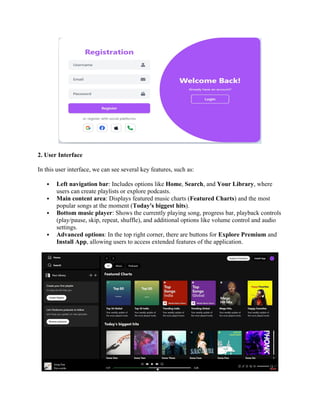
1. Login/Register Function
In the login function, the users click the “Account” textbox input to enter their username
and click the “Password” textbox input to enter their password.
When they finish entering information, they must click the “Login” button so the system
can check their account.
The users can click "Forget Password” if they don't remember their password to log in.
Users can log in to the website by using accounts via Google and Facebook
4.
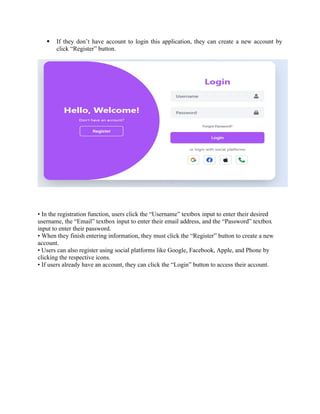
If theydon’t have account to login this application, they can create a new account by
click “Register” button.
• In the registration function, users click the “Username” textbox input to enter their desired
username, the “Email” textbox input to enter their email address, and the “Password” textbox
input to enter their password.
• When they finish entering information, they must click the “Register” button to create a new
account.
• Users can also register using social platforms like Google, Facebook, Apple, and Phone by
clicking the respective icons.
• If users already have an account, they can click the “Login” button to access their account.
5.
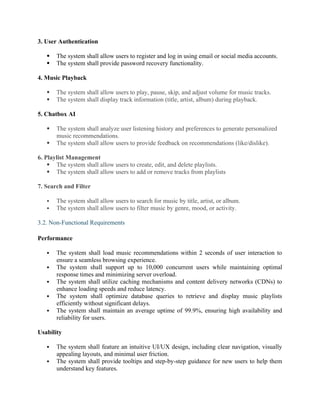
2. User Interface
Inthis user interface, we can see several key features, such as:
Left navigation bar: Includes options like Home, Search, and Your Library, where
users can create playlists or explore podcasts.
Main content area: Displays featured music charts (Featured Charts) and the most
popular songs at the moment (Today's biggest hits).
Bottom music player: Shows the currently playing song, progress bar, playback controls
(play/pause, skip, repeat, shuffle), and additional options like volume control and audio
settings.
Advanced options: In the top right corner, there are buttons for Explore Premium and
Install App, allowing users to access extended features of the application.
6.
3. User Authentication
The system shall allow users to register and log in using email or social media accounts.
The system shall provide password recovery functionality.
4. Music Playback
The system shall allow users to play, pause, skip, and adjust volume for music tracks.
The system shall display track information (title, artist, album) during playback.
5. Chatbox AI
The system shall analyze user listening history and preferences to generate personalized
music recommendations.
The system shall allow users to provide feedback on recommendations (like/dislike).
6. Playlist Management
The system shall allow users to create, edit, and delete playlists.
The system shall allow users to add or remove tracks from playlists
7. Search and Filter
The system shall allow users to search for music by title, artist, or album.
The system shall allow users to filter music by genre, mood, or activity.
3.2. Non-Functional Requirements
Performance
The system shall load music recommendations within 2 seconds of user interaction to
ensure a seamless browsing experience.
The system shall support up to 10,000 concurrent users while maintaining optimal
response times and minimizing server overload.
The system shall utilize caching mechanisms and content delivery networks (CDNs) to
enhance loading speeds and reduce latency.
The system shall optimize database queries to retrieve and display music playlists
efficiently without significant delays.
The system shall maintain an average uptime of 99.9%, ensuring high availability and
reliability for users.
Usability
The system shall feature an intuitive UI/UX design, including clear navigation, visually
appealing layouts, and minimal user friction.
The system shall provide tooltips and step-by-step guidance for new users to help them
understand key features.
7.
The systemshall allow customizable user preferences, such as theme selection (light/dark
mode) and personalized playlists, to improve user engagement.
The system shall implement keyboard shortcuts and accessibility features to
accommodate users with disabilities.
The system shall undergo regular usability testing and collect user feedback for
continuous improvement.
Security
The system shall encrypt user data using industry-standard protocols (e.g., TLS 1.3 for
transmission and AES-256 for storage) to protect sensitive information.
The system shall implement role-based access control (RBAC) to restrict administrative
privileges and prevent unauthorized access.
The system shall enforce multi-factor authentication (MFA) for high-privilege accounts
to enhance security.
The system shall perform regular security audits and vulnerability assessments to identify
and mitigate potential risks.
The system shall log all user activities for security monitoring and compliance with data
protection regulations.
Compatibility
The system shall be compatible with major web browsers, including Google Chrome,
Mozilla Firefox, Microsoft Edge, and Safari, ensuring a consistent experience across
platforms.
The system shall support multiple devices, including desktop, tablet, and mobile, with a
responsive design that adjusts based on screen size.
The system shall provide cross-platform synchronization, allowing users to access their
accounts and playlists seamlessly across different devices.
The system shall support native mobile applications for both Android and iOS, providing
optimized experiences for mobile users.
The system shall undergo compatibility testing to ensure smooth operation across various
operating systems and device configurations.
3.3 System Attributes
Reliability
The system shall maintain an uptime of 99.9%, ensuring minimal service interruptions
and high availability for users.
The system shall implement automated failover mechanisms to handle server failures and
prevent downtime.
The system shall have redundant data storage and backup systems to recover from
unexpected failures.
The system shall be capable of real-time monitoring to detect and resolve potential
performance issues proactively.
8.
Scalability
The systemshall support horizontal scaling, allowing additional servers to be added as
user demand increases.
The system shall utilize load balancing techniques to distribute traffic efficiently across
multiple servers.
The system shall support cloud-based deployment to ensure dynamic resource allocation
and cost-effective scaling.
The system shall be designed with microservices architecture, enabling independent
scaling of individual services.
The system shall accommodate growth from 10,000 to 100,000+ concurrent users
without significant performance degradation.
Maintainability
The system shall follow a modular architecture, making it easier to update, modify, and
maintain individual components.
The system shall have comprehensive documentation for developers and administrators
to streamline maintenance and troubleshooting.
The system shall be built with version control and automated deployment pipelines to
facilitate seamless updates.
The system shall allow for hotfixes and patches to be applied without significant
downtime.
The system shall include logging and monitoring tools to track errors, diagnose issues,
and improve system performance over time.
4. Specific Requirements
This section outlines additional requirements related to the operating and development
environments necessary for the successful implementation and deployment of the system, based
on the current tech stack.
4.1 Operating Environment
The system shall be deployed on a cloud-based infrastructure (e.g., AWS, Azure, or
Google Cloud) to ensure scalability and high availability.
The system shall support containerization using Docker and Kubernetes for efficient
deployment and orchestration.
The system shall be optimized for high-performance Node.js and Spring Boot backend
services to handle real-time data processing and API requests.
The system shall be accessible via modern web browsers (Chrome, Firefox, Edge, Safari)
and responsive on mobile devices.
9.
4.2 Development Environment
The development team shall use Node.js, React.js, and Spring Boot as the core
technology stack for backend and frontend development.
The database shall be managed using MongoDB, ensuring flexible and scalable data
storage.
The UI shall be built using Tailwind CSS for a modern and responsive design.
The project shall be managed using JIRA, with Agile methodologies (Scrum/Kanban) to
track progress and issue resolution.
The codebase shall be maintained with GitHub Desktop, following best practices in
branching (e.g., feature branches, pull requests, and code reviews).
The system shall support CI/CD pipelines to automate testing, integration, and
deployment processes.
5. Analysis Models
5.1. Data Flow Diagram
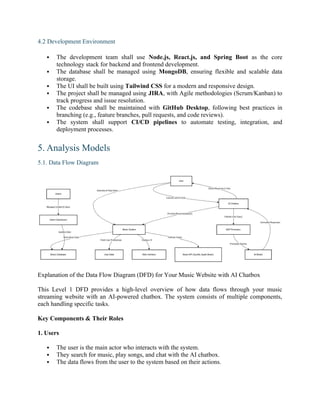
Explanation of the Data Flow Diagram (DFD) for Your Music Website with AI Chatbox
This Level 1 DFD provides a high-level overview of how data flows through your music
streaming website with an AI-powered chatbox. The system consists of multiple components,
each handling specific tasks.
Key Components & Their Roles
1. Users
The user is the main actor who interacts with the system.
They search for music, play songs, and chat with the AI chatbox.
The data flows from the user to the system based on their actions.
10.
2. Music System
Thecore of your platform, responsible for handling:
Music Search & Playback: Retrieves songs from the Music Database.
User Preferences: Fetches user data (like playlists, favorites) from the User Database.
Displaying Content: Sends the processed information to the UI/Web Interface.
3. Databases
Music Database: Stores song metadata (title, artist, album, genre, etc.).
User Data: Stores user-related data (preferences, history, playlists).
4. AI Chatbox
This is the smart assistant that interacts with users.
Processes user messages and understands intent.
Retrieves relevant recommendations from the Music System.
Sends responses back to the user.
Inside the AI chatbox:
1. NLP Processor: Understands user queries using Natural Language Processing (NLP).
2. AI Model: Uses machine learning to generate responses and recommendations.
5. External Integrations
Music API (Spotify, Apple Music, etc.): Fetches additional music data (like trending
songs, real-time lyrics).
Admin Dashboard: Allows admin users to manage songs, users, and content.
11.
5.2. Usecase Diagram
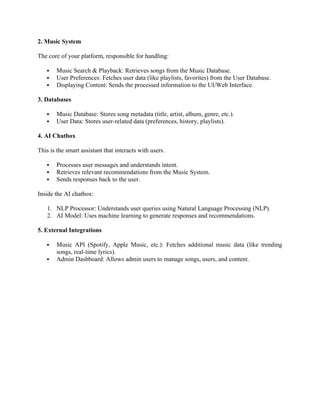
ThisUse Case Diagram represents a Website Music System with Chatbox AI. It includes various
functionalities related to music browsing, playlist management, AI-based recommendations, user
management, and authentication. Below is a breakdown of the key elements:
Actors:
1. User – The primary actor who interacts with the system.
2. Admin – Responsible for managing users and songs.
Use Cases and Relationships:
1. Music Browsing and Playback
Browse Music (includes):
o Search Music
o Song Recommendation
Chatbox AI interacts with music browsing.
Choose Song (includes):
o Play Song (extends):
12.
Skip tothe next song
Go to the previous song
Pause Music
View Lyrics Song
Play Playlist (extends Play Song)
Create Playlist
Add Song to Playlist
2. Authentication
Login (includes):
o Login with Facebook/Google
o Forget Password
Register (includes):
o Register with Facebook/Google
o Enter Username, Password, Email
3. Song Management (Admin)
Song Management (includes):
o Add Song
o Edit Song
o Remove Song
4. User Management (Admin)
User Management (includes):
o Add User
o Edit User
o Remove User
Relationships:
Includes ("<<include>>"): A mandatory dependency where one use case is required for
another.
Extends ("<<extend>>"): An optional dependency where one use case adds additional
behavior to another.
This diagram illustrates how users interact with the music system to browse, play, and manage
playlists, while admins handle user and song management. The Chatbox AI is integrated for
music recommendations and interactions, and authentication allows users to log in via various
methods.
13.
5.3. Activity Diagram
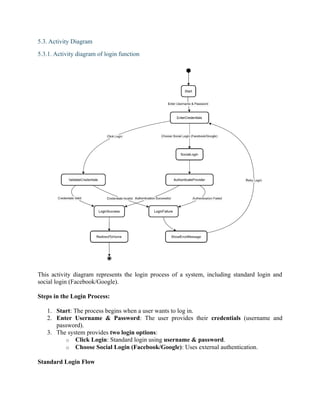
5.3.1.Activity diagram of login function
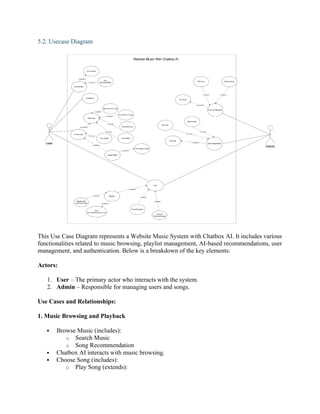
This activity diagram represents the login process of a system, including standard login and
social login (Facebook/Google).
Steps in the Login Process:
1. Start: The process begins when a user wants to log in.
2. Enter Username & Password: The user provides their credentials (username and
password).
3. The system provides two login options:
o Click Login: Standard login using username & password.
o Choose Social Login (Facebook/Google): Uses external authentication.
Standard Login Flow
14.
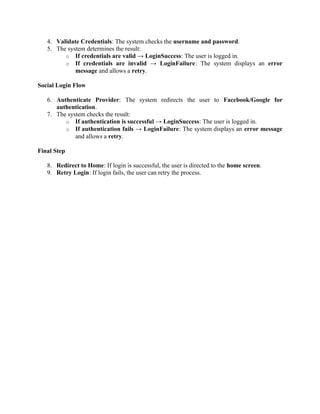
4. Validate Credentials:The system checks the username and password.
5. The system determines the result:
o If credentials are valid → LoginSuccess: The user is logged in.
o If credentials are invalid → LoginFailure: The system displays an error
message and allows a retry.
Social Login Flow
6. Authenticate Provider: The system redirects the user to Facebook/Google for
authentication.
7. The system checks the result:
o If authentication is successful → LoginSuccess: The user is logged in.
o If authentication fails → LoginFailure: The system displays an error message
and allows a retry.
Final Step
8. Redirect to Home: If login is successful, the user is directed to the home screen.
9. Retry Login: If login fails, the user can retry the process.
15.
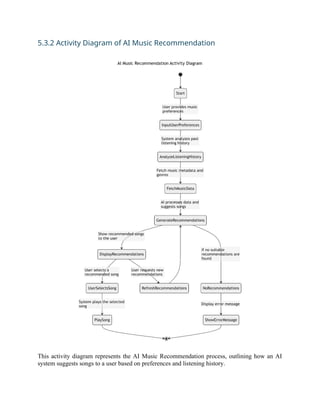
5.3.2 Activity Diagramof AI Music Recommendation
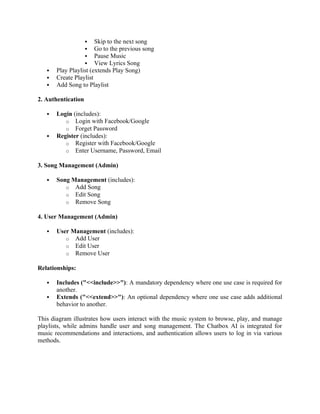
This activity diagram represents the AI Music Recommendation process, outlining how an AI
system suggests songs to a user based on preferences and listening history.
16.
Step-by-step Breakdown:
1. Start:
oThe process begins when the user interacts with the music recommendation
system.
2. User Provides Music Preferences:
o The user inputs their preferences, such as favorite genres, moods, or artists.
3. Analyze Listening History:
o The system reviews past listening behavior to better understand the user’s taste.
4. Fetch Music Metadata and Genres:
o The system retrieves information about available songs, including metadata such
as genre, artist, and popularity.
5. AI Processes Data and Suggests Songs:
o The AI algorithm analyzes the gathered data and generates personalized song
recommendations.
6. Display Recommended Songs to the User:
o The system presents the recommended list of songs to the user.
7. User Selects a Recommended Song:
o If the user picks a song, the system proceeds to play it.
8. System Plays the Selected Song:
o The chosen song starts playing.
9. User Requests New Recommendations (Optional):
o The user can ask for a refreshed set of recommendations, prompting the AI to
generate a new list.
10. No Suitable Recommendations Found (Error Handling):
o If the AI cannot generate valid recommendations, the system triggers an error.
11. Display Error Message:
o An error message is shown to the user if no recommendations are available.
12. End:
o The process completes once the song is played or an error is displayed.
This diagram provides a clear visual workflow of how AI-powered music recommendations
function in a music streaming application.
17.
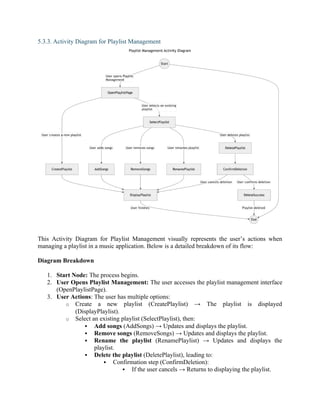
5.3.3. Activity Diagramfor Playlist Management
This Activity Diagram for Playlist Management visually represents the user’s actions when
managing a playlist in a music application. Below is a detailed breakdown of its flow:
Diagram Breakdown
1. Start Node: The process begins.
2. User Opens Playlist Management: The user accesses the playlist management interface
(OpenPlaylistPage).
3. User Actions: The user has multiple options:
o Create a new playlist (CreatePlaylist) → The playlist is displayed
(DisplayPlaylist).
o Select an existing playlist (SelectPlaylist), then:
Add songs (AddSongs) → Updates and displays the playlist.
Remove songs (RemoveSongs) → Updates and displays the playlist.
Rename the playlist (RenamePlaylist) → Updates and displays the
playlist.
Delete the playlist (DeletePlaylist), leading to:
Confirmation step (ConfirmDeletion):
If the user cancels → Returns to displaying the playlist.
18.
If theuser confirms (DeleteSuccess) → The playlist is
deleted.
4. User Finishes: Once the user is done managing the playlist, the process ends.
This SRS document provides a comprehensive overview of the requirements for the "Web
Application for Listening to Smart Music Suggestions with AI." It serves as a guide for
developers, stakeholders, and testers to ensure the system meets user needs and expectations.




![[OSMS] Final Presentation-old.pptx](https://cdn.slidesharecdn.com/ss_thumbnails/osmsfinalpresentation-old-230911053313-c69f9a87-thumbnail.jpg?width=640&height=640&fit=bounds)


![Chat Application [Full Documentation]](https://cdn.slidesharecdn.com/ss_thumbnails/finaldoconchatapp-170418182505-thumbnail.jpg?width=640&height=640&fit=bounds)


