• Introduction
• Objective
• Problem Statement
• Features
• Target Audience
• Technical Architecture
• Design Mock-ups
• Reference
2
• Imagine an app that not only plays your favorite
tracks but also learns your preferences, suggests
new artists, and connects you with a global
community of music lovers.
• our app boasts a sleek interface, intuitive
controls, and unparalleled audio quality.
• Whether you’re a casual listener or a professional
musician, our app is tuned to your needs, offering
features that hit the right note every time.
• Our app is not just a platform; it’s a journey
through the world of music, tailored just for you.
3
WELLCOME TO THE MUSICIA MUSIC APPLICATION
• Accessibility: To provide users with easy access to a vast library of music anytime and
anywhere.
• Personalization: To offer personalized music experiences through custom playlists and
recommendations.
• Engagement: To engage users with features like social sharing, live streaming, and
interactive elements.
• Innovation: To push the boundaries of technology in music, such as integrating AI for
music creation or discovery.
• Influence Music Creation: AI and machine learning will increasingly be used to create
music, potentially changing the role of artists and producers.
• Democratize Music Production: With the rise of affordable production software, more
creators can produce and share music directly through social media. 4
• The problem statement of a music
application typically addresses the need to
provide a solution for users to access,
discover, and enjoy music in a convenient
and personalized way.
• It often focuses on overcoming limitations in
current music services, such as improving
music discovery, offering higher quality
audio, providing a more user-friendly
interface, or enhancing personalization
through better recommendation algorithms.
5
• I love music, creating this app allows me to contribute to the music community and
help others enjoy music in new ways.
• Building a music app involves overcoming technical challenges, which can be a
great way to improve your coding skills and learn new technologies.
• A music app is a platform for creative expression, not just for the users but also for
you as a developer to design and implement features that enhance the music
experience.
• Engaging with the music and tech communities can open up networking
opportunities and potential collaborations.
6
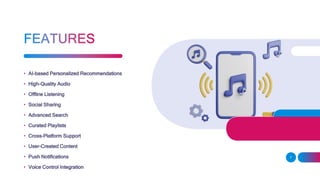
• AI-based Personalized Recommendations
• High-Quality Audio
• Offline Listening
• Social Sharing
• Advanced Search
• Curated Playlists
• Cross-Platform Support
• User-Created Content
• Push Notifications
• Voice Control Integration
7
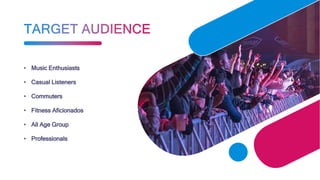
• Music Enthusiasts
• Casual Listeners
• Commuters
• Fitness Aficionados
• All Age Group
• Professionals
• Client Applications: These are the user-facing apps for various devices like smartphones,
tablets, and web browsers. They provide the interface through which users interact with
the service.
• Server-Side Application: This is the backend of the application where the business logic
resides. It handles requests from client applications, processes them, and sends back the
required data or responses.
• Database: A robust database is essential for storing user data, music files, metadata,
playlists, and other relevant information.
• Content Delivery Network (CDN): CDNs are used to deliver music content efficiently to
users across the globe with minimal latency.
• API Gateway: This serves as an entry point for clients to communicate with the backend
services. It often handles request routing, composition, and protocol translation.
9
• Authentication Service: To manage user accounts and handle secure sign-ins, sign-ups, and access
control.
• Music Streaming Service: The core service that streams audio content to the users. It may include
transcoding services to ensure compatibility across different devices and network conditions.
• Recommendation Engine: An AI-powered system that analyzes user behavior to suggest music and
create personalized playlists.
• Analytics and Monitoring: Systems to track usage patterns, performance metrics, and other vital
statistics to improve the service.
• Storage: For storing music files, usually in a compressed format to save space while maintaining
quality.
• Third-Party Integrations: For features like social media sharing, payment gateways, or integrating
with other services.
10
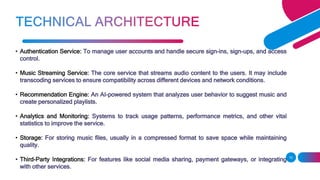
• Home Screen: Displays the main navigation,
featured playlists, and currently trending
music.
11
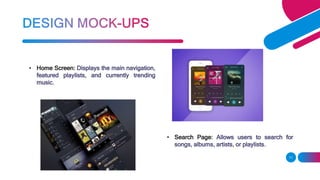
• Search Page: Allows users to search for
songs, albums, artists, or playlists.
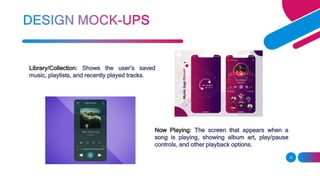
Library/Collection: Shows the user’s saved
music, playlists, and recently played tracks.
12
Now Playing: The screen that appears when a
song is playing, showing album art, play/pause
controls, and other playback options.
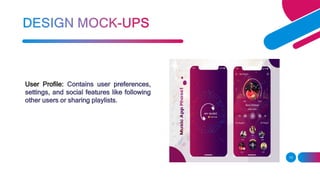
User Profile: Contains user preferences,
settings, and social features like following
other users or sharing playlists.
13
• Industry Overviews: Articles and guides that provide an overview of the music streaming app
industry, including market analysis and key players.
• Technical Guides: Step-by-step tutorials on how to build an audio streaming app, including the
technical stack and development stages.
• Content Management: Strategies for building a strong music library, managing digital files, and
organizing metadata.
• Legal Considerations: Guidance on licensing, copyright laws, and ensuring that your app
complies with legal requirements.
• Design Inspiration: Examples of design mockups and user interfaces from existing successful
music apps.
14
Lorem ipsum dolor sit amet, consectetuer adipiscing elit
ADD A FOOTER 15

music app with ai optimization end.pptx

  • 2.
    • Introduction • Objective •Problem Statement • Features • Target Audience • Technical Architecture • Design Mock-ups • Reference 2
  • 3.
    • Imagine anapp that not only plays your favorite tracks but also learns your preferences, suggests new artists, and connects you with a global community of music lovers. • our app boasts a sleek interface, intuitive controls, and unparalleled audio quality. • Whether you’re a casual listener or a professional musician, our app is tuned to your needs, offering features that hit the right note every time. • Our app is not just a platform; it’s a journey through the world of music, tailored just for you. 3 WELLCOME TO THE MUSICIA MUSIC APPLICATION
  • 4.
    • Accessibility: Toprovide users with easy access to a vast library of music anytime and anywhere. • Personalization: To offer personalized music experiences through custom playlists and recommendations. • Engagement: To engage users with features like social sharing, live streaming, and interactive elements. • Innovation: To push the boundaries of technology in music, such as integrating AI for music creation or discovery. • Influence Music Creation: AI and machine learning will increasingly be used to create music, potentially changing the role of artists and producers. • Democratize Music Production: With the rise of affordable production software, more creators can produce and share music directly through social media. 4
  • 5.
    • The problemstatement of a music application typically addresses the need to provide a solution for users to access, discover, and enjoy music in a convenient and personalized way. • It often focuses on overcoming limitations in current music services, such as improving music discovery, offering higher quality audio, providing a more user-friendly interface, or enhancing personalization through better recommendation algorithms. 5
  • 6.
    • I lovemusic, creating this app allows me to contribute to the music community and help others enjoy music in new ways. • Building a music app involves overcoming technical challenges, which can be a great way to improve your coding skills and learn new technologies. • A music app is a platform for creative expression, not just for the users but also for you as a developer to design and implement features that enhance the music experience. • Engaging with the music and tech communities can open up networking opportunities and potential collaborations. 6
  • 7.
    • AI-based PersonalizedRecommendations • High-Quality Audio • Offline Listening • Social Sharing • Advanced Search • Curated Playlists • Cross-Platform Support • User-Created Content • Push Notifications • Voice Control Integration 7
  • 8.
    • Music Enthusiasts •Casual Listeners • Commuters • Fitness Aficionados • All Age Group • Professionals
  • 9.
    • Client Applications:These are the user-facing apps for various devices like smartphones, tablets, and web browsers. They provide the interface through which users interact with the service. • Server-Side Application: This is the backend of the application where the business logic resides. It handles requests from client applications, processes them, and sends back the required data or responses. • Database: A robust database is essential for storing user data, music files, metadata, playlists, and other relevant information. • Content Delivery Network (CDN): CDNs are used to deliver music content efficiently to users across the globe with minimal latency. • API Gateway: This serves as an entry point for clients to communicate with the backend services. It often handles request routing, composition, and protocol translation. 9
  • 10.
    • Authentication Service:To manage user accounts and handle secure sign-ins, sign-ups, and access control. • Music Streaming Service: The core service that streams audio content to the users. It may include transcoding services to ensure compatibility across different devices and network conditions. • Recommendation Engine: An AI-powered system that analyzes user behavior to suggest music and create personalized playlists. • Analytics and Monitoring: Systems to track usage patterns, performance metrics, and other vital statistics to improve the service. • Storage: For storing music files, usually in a compressed format to save space while maintaining quality. • Third-Party Integrations: For features like social media sharing, payment gateways, or integrating with other services. 10
  • 11.
    • Home Screen:Displays the main navigation, featured playlists, and currently trending music. 11 • Search Page: Allows users to search for songs, albums, artists, or playlists.
  • 12.
    Library/Collection: Shows theuser’s saved music, playlists, and recently played tracks. 12 Now Playing: The screen that appears when a song is playing, showing album art, play/pause controls, and other playback options.
  • 13.
    User Profile: Containsuser preferences, settings, and social features like following other users or sharing playlists. 13
  • 14.
    • Industry Overviews:Articles and guides that provide an overview of the music streaming app industry, including market analysis and key players. • Technical Guides: Step-by-step tutorials on how to build an audio streaming app, including the technical stack and development stages. • Content Management: Strategies for building a strong music library, managing digital files, and organizing metadata. • Legal Considerations: Guidance on licensing, copyright laws, and ensuring that your app complies with legal requirements. • Design Inspiration: Examples of design mockups and user interfaces from existing successful music apps. 14
  • 15.
    Lorem ipsum dolorsit amet, consectetuer adipiscing elit ADD A FOOTER 15