SOURCE CODE CONTROL
For Microsoft Access Developers
09.02.2017 © Philipp Stiefel - www.ivercy.com 1
BENEFITS OF SOURCE CODE
CONTROL
09.02.2017 © Philipp Stiefel - www.ivercy.com 2
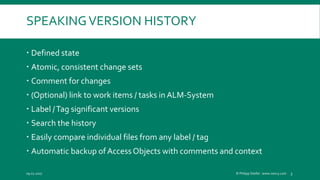
SPEAKINGVERSION HISTORY
 Defined state
 Atomic, consistent change sets
 Comment for changes
 (Optional) link to work items / tasks in ALM-System
 Label /Tag significant versions
 Search the history
 Easily compare individual files from any label / tag
 Automatic backup of AccessObjects with comments and context
09.02.2017 © Philipp Stiefel - www.ivercy.com 3
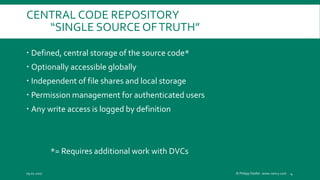
CENTRAL CODE REPOSITORY
“SINGLE SOURCE OFTRUTH”
 Defined, central storage of the source code*
 Optionally accessible globally
 Independent of file shares and local storage
 Permission management for authenticated users
 Any write access is logged by definition
*= Requires additional work with DVCs
09.02.2017 © Philipp Stiefel - www.ivercy.com 4
“GATED COMMITS”
ENFORCEMENT OF RULES, AUTOMATICTESTS
 Depend on features of your SCC-System
 Validate comments
 Check work item-/task-linked
 Validate formal coding standard
 Force code review
 Automatic build after each commit
 Run tests automatically after each build
09.02.2017 © Philipp Stiefel - www.ivercy.com 5
BASE FOR AUTOMATIC BUILDS
 Automatic builds based on the repository files
 Independent of the local developer computer
 After Commit or time controlled
 Continuous Delivery
09.02.2017 © Philipp Stiefel - www.ivercy.com 6
SUPPORT FOR PARALLEL DEVELOPMENT LINES
 Tools for parallel development lines
 Branch & Merge
 Diff & History
 Parallel development lines will be less painful, but they will not be
pleasant
09.02.2017 © Philipp Stiefel - www.ivercy.com 7
09.02.2017 © Philipp Stiefel - www.ivercy.com 8
ANY BENEFIT I DID
NOT
MENTION?
COORDINATION OF MULTIPLE DEVELOPERS
 All previously mentioned arguments are even more important
 Exclusive Check-Outs
 Display of SCC-Status (Checked-out / Out-of-date / Modified)
 Diff & Merge help to resolve conflicts
09.02.2017 © Philipp Stiefel - www.ivercy.com 9
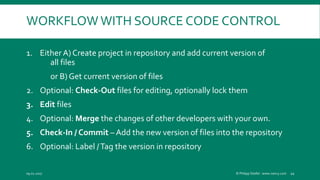
WORKFLOW WITH SOURCE CODE CONTROL
1. Either A) Create project in repository and add current version of
all files
or B) Get current version of files
2. Optional: Check-Out files for editing, optionally lock them
3. Edit files
4. Optional: Merge the changes of other developers with your own.
5. Check-In / Commit – Add the new version of files into the repository
6. Optional: Label /Tag the version in repository
09.02.2017 © Philipp Stiefel - www.ivercy.com 10
09.02.2017 © Philipp Stiefel - www.ivercy.com 11
FILES! - ?
09.02.2017 © Philipp Stiefel - www.ivercy.com 12
WELL, OK, ACCESS IS A FILE BASED
DATABASE
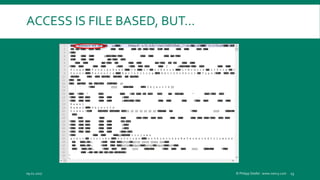
ACCESS IS FILE BASED, BUT…
09.02.2017 © Philipp Stiefel - www.ivercy.com 13
ACCESS-SCC-ADD-INS
 Microsoft Access 2010 Source Code Control – Add-In
 Ivercy
 OASIS
 Several open source projects
09.02.2017 © Philipp Stiefel - www.ivercy.com 14
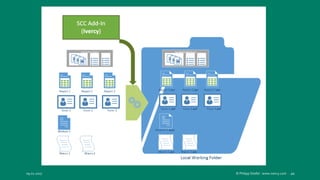
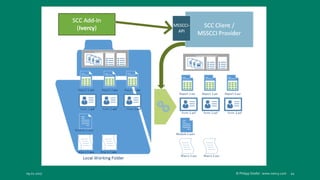
ACCESS-SCC-ADD-INS
 Export Access-Objects as text files
 Integrate Commands / Control the SCC-Clients
 Display SCC-Status (Exclusive to Ivercy + MS-SCC-Add-In)
 Checked-In, Checked-Out (Exclusive), New (Not controlled)
 Extended status information (Exclusive to Ivercy!)
 Out-of-Date, Modified (locally), Pinned, Deleted
09.02.2017 © Philipp Stiefel - www.ivercy.com 15
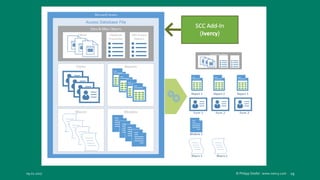
INDIVIDUAL ACCESS OBJECTS
 Access.Application.SaveAsText
 Forms, Reports, Queries, Modules and Macros in text format
 „Data and Misc Objects“
 Binary file
 Tables, Database properties,VBA-Project-Properties, References, and
Commandbars
09.02.2017 © Philipp Stiefel - www.ivercy.com 16
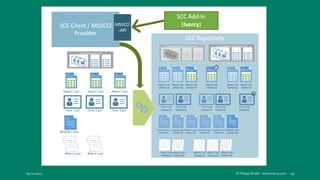
ACCESS SCC INTEGRATION
VISUALIZED
09.02.2017 © Philipp Stiefel - www.ivercy.com 17
09.02.2017 © Philipp Stiefel - www.ivercy.com 18
09.02.2017 © Philipp Stiefel - www.ivercy.com 19
09.02.2017 © Philipp Stiefel - www.ivercy.com 20
09.02.2017 © Philipp Stiefel - www.ivercy.com 21
09.02.2017 © Philipp Stiefel - www.ivercy.com 22
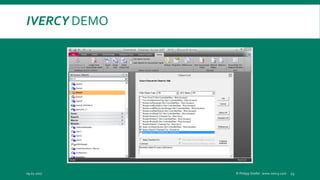
IVERCY DEMO
09.02.2017 © Philipp Stiefel - www.ivercy.com 23
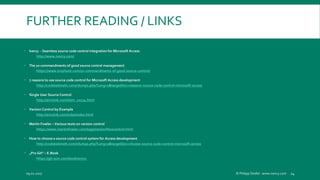
FURTHER READING / LINKS
 Ivercy - Seamless source code control integration for Microsoft Access
http://www.ivercy.com/
 The 10 commandments of good source control management
https://www.troyhunt.com/10-commandments-of-good-source-control/
 7 reasons to use source code control for Microsoft Access development
http://codekabinett.com/rdumps.php?Lang=2&targetDoc=reasons-source-code-control-microsoft-access
 Single User Source Control
http://ericsink.com/item_10134.html
 Version Control by Example
http://ericsink.com/vcbe/index.html
 Martin Fowler – Various texts on version control
https://www.martinfowler.com/tags/version%20control.html
 How to choose a source code control system for Access development
http://codekabinett.com/rdumps.php?Lang=2&targetDoc=choose-source-code-control-microsoft-access
 „Pro Git“ – E-Book
https://git-scm.com/book/en/v2
09.02.2017 © Philipp Stiefel - www.ivercy.com 24
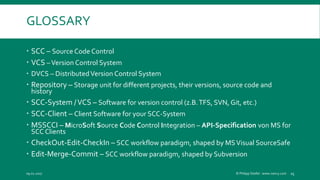
GLOSSARY
 SCC – Source Code Control
 VCS –Version Control System
 DVCS – DistributedVersion Control System
 Repository – Storage unit for different projects, their versions, source code and
history
 SCC-System /VCS – Software for version control (z.B.TFS, SVN, Git, etc.)
 SCC-Client – Client Software for your SCC-System
 MSSCCI – MicroSoft Source Code Control Integration – API-Specification von MS for
SCC Clients
 CheckOut-Edit-CheckIn – SCC workflow paradigm, shaped by MSVisual SourceSafe
 Edit-Merge-Commit – SCC workflow paradigm, shaped by Subversion
09.02.2017 © Philipp Stiefel - www.ivercy.com 25

Source Code Control for Microsoft Access Developers

  • 1.
    SOURCE CODE CONTROL ForMicrosoft Access Developers 09.02.2017 © Philipp Stiefel - www.ivercy.com 1
  • 2.
    BENEFITS OF SOURCECODE CONTROL 09.02.2017 © Philipp Stiefel - www.ivercy.com 2
  • 3.
    SPEAKINGVERSION HISTORY  Definedstate  Atomic, consistent change sets  Comment for changes  (Optional) link to work items / tasks in ALM-System  Label /Tag significant versions  Search the history  Easily compare individual files from any label / tag  Automatic backup of AccessObjects with comments and context 09.02.2017 © Philipp Stiefel - www.ivercy.com 3
  • 4.
    CENTRAL CODE REPOSITORY “SINGLESOURCE OFTRUTH”  Defined, central storage of the source code*  Optionally accessible globally  Independent of file shares and local storage  Permission management for authenticated users  Any write access is logged by definition *= Requires additional work with DVCs 09.02.2017 © Philipp Stiefel - www.ivercy.com 4
  • 5.
    “GATED COMMITS” ENFORCEMENT OFRULES, AUTOMATICTESTS  Depend on features of your SCC-System  Validate comments  Check work item-/task-linked  Validate formal coding standard  Force code review  Automatic build after each commit  Run tests automatically after each build 09.02.2017 © Philipp Stiefel - www.ivercy.com 5
  • 6.
    BASE FOR AUTOMATICBUILDS  Automatic builds based on the repository files  Independent of the local developer computer  After Commit or time controlled  Continuous Delivery 09.02.2017 © Philipp Stiefel - www.ivercy.com 6
  • 7.
    SUPPORT FOR PARALLELDEVELOPMENT LINES  Tools for parallel development lines  Branch & Merge  Diff & History  Parallel development lines will be less painful, but they will not be pleasant 09.02.2017 © Philipp Stiefel - www.ivercy.com 7
  • 8.
    09.02.2017 © PhilippStiefel - www.ivercy.com 8 ANY BENEFIT I DID NOT MENTION?
  • 9.
    COORDINATION OF MULTIPLEDEVELOPERS  All previously mentioned arguments are even more important  Exclusive Check-Outs  Display of SCC-Status (Checked-out / Out-of-date / Modified)  Diff & Merge help to resolve conflicts 09.02.2017 © Philipp Stiefel - www.ivercy.com 9
  • 10.
    WORKFLOW WITH SOURCECODE CONTROL 1. Either A) Create project in repository and add current version of all files or B) Get current version of files 2. Optional: Check-Out files for editing, optionally lock them 3. Edit files 4. Optional: Merge the changes of other developers with your own. 5. Check-In / Commit – Add the new version of files into the repository 6. Optional: Label /Tag the version in repository 09.02.2017 © Philipp Stiefel - www.ivercy.com 10
  • 11.
    09.02.2017 © PhilippStiefel - www.ivercy.com 11 FILES! - ?
  • 12.
    09.02.2017 © PhilippStiefel - www.ivercy.com 12 WELL, OK, ACCESS IS A FILE BASED DATABASE
  • 13.
    ACCESS IS FILEBASED, BUT… 09.02.2017 © Philipp Stiefel - www.ivercy.com 13
  • 14.
    ACCESS-SCC-ADD-INS  Microsoft Access2010 Source Code Control – Add-In  Ivercy  OASIS  Several open source projects 09.02.2017 © Philipp Stiefel - www.ivercy.com 14
  • 15.
    ACCESS-SCC-ADD-INS  Export Access-Objectsas text files  Integrate Commands / Control the SCC-Clients  Display SCC-Status (Exclusive to Ivercy + MS-SCC-Add-In)  Checked-In, Checked-Out (Exclusive), New (Not controlled)  Extended status information (Exclusive to Ivercy!)  Out-of-Date, Modified (locally), Pinned, Deleted 09.02.2017 © Philipp Stiefel - www.ivercy.com 15
  • 16.
    INDIVIDUAL ACCESS OBJECTS Access.Application.SaveAsText  Forms, Reports, Queries, Modules and Macros in text format  „Data and Misc Objects“  Binary file  Tables, Database properties,VBA-Project-Properties, References, and Commandbars 09.02.2017 © Philipp Stiefel - www.ivercy.com 16
  • 17.
    ACCESS SCC INTEGRATION VISUALIZED 09.02.2017© Philipp Stiefel - www.ivercy.com 17
  • 18.
    09.02.2017 © PhilippStiefel - www.ivercy.com 18
  • 19.
    09.02.2017 © PhilippStiefel - www.ivercy.com 19
  • 20.
    09.02.2017 © PhilippStiefel - www.ivercy.com 20
  • 21.
    09.02.2017 © PhilippStiefel - www.ivercy.com 21
  • 22.
    09.02.2017 © PhilippStiefel - www.ivercy.com 22
  • 23.
    IVERCY DEMO 09.02.2017 ©Philipp Stiefel - www.ivercy.com 23
  • 24.
    FURTHER READING /LINKS  Ivercy - Seamless source code control integration for Microsoft Access http://www.ivercy.com/  The 10 commandments of good source control management https://www.troyhunt.com/10-commandments-of-good-source-control/  7 reasons to use source code control for Microsoft Access development http://codekabinett.com/rdumps.php?Lang=2&targetDoc=reasons-source-code-control-microsoft-access  Single User Source Control http://ericsink.com/item_10134.html  Version Control by Example http://ericsink.com/vcbe/index.html  Martin Fowler – Various texts on version control https://www.martinfowler.com/tags/version%20control.html  How to choose a source code control system for Access development http://codekabinett.com/rdumps.php?Lang=2&targetDoc=choose-source-code-control-microsoft-access  „Pro Git“ – E-Book https://git-scm.com/book/en/v2 09.02.2017 © Philipp Stiefel - www.ivercy.com 24
  • 25.
    GLOSSARY  SCC –Source Code Control  VCS –Version Control System  DVCS – DistributedVersion Control System  Repository – Storage unit for different projects, their versions, source code and history  SCC-System /VCS – Software for version control (z.B.TFS, SVN, Git, etc.)  SCC-Client – Client Software for your SCC-System  MSSCCI – MicroSoft Source Code Control Integration – API-Specification von MS for SCC Clients  CheckOut-Edit-CheckIn – SCC workflow paradigm, shaped by MSVisual SourceSafe  Edit-Merge-Commit – SCC workflow paradigm, shaped by Subversion 09.02.2017 © Philipp Stiefel - www.ivercy.com 25