SOLIDWORKS Network License Manager
Options file for Inactive system
Karthick M
Application Engineer
Using an Options file for SOLIDWORKS 3D CAD Inactivity
.
•SNL allows for an options file that will give advanced control
•Timeout settings for inactive system
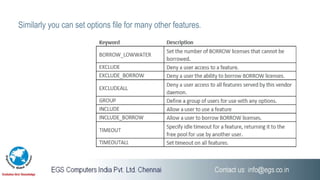
•List of options keywords with description
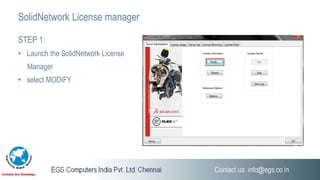
STEP 1:
• Launch the SolidNetwork License
Manager
• select MODIFY
SolidNetwork License manager
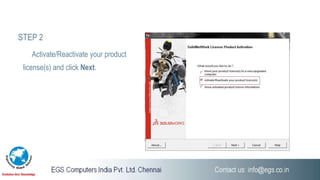
STEP 2
Activate/Reactivate your product
license(s) and click Next.
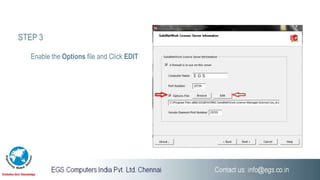
STEP 3
Enable the Options file and Click EDIT
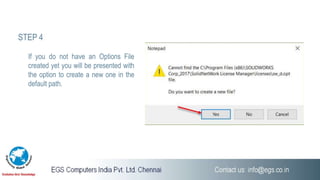
STEP 4
If you do not have an Options File
created yet you will be presented with
the option to create a new one in the
default path.
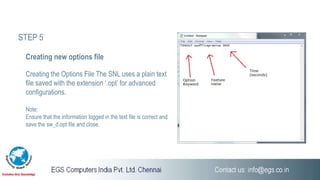
Creating the Options File The SNL uses a plain text
file saved with the extension ‘.opt’ for advanced
configurations.
Note:
Ensure that the information logged in the text file is correct and
save the sw_d.opt file and close.
Creating new options file
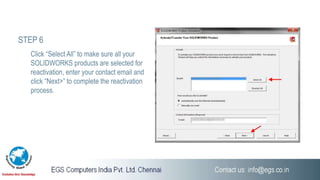
STEP 5
Click “Select All” to make sure all your
SOLIDWORKS products are selected for
reactivation, enter your contact email and
click “Next>” to complete the reactivation
process.
STEP 6
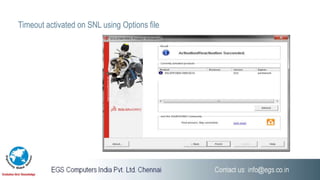
Timeout activated on SNL using Options file
Similarly you can set options file for many other features.
Chennai | Coimbatore | Trichy
Thank You..!
www.egsindia.com | www.egs.co.in
info@egs.co.in 044 2480 3370

SOLIDWORKS Network License Manager

  • 1.
    SOLIDWORKS Network LicenseManager Options file for Inactive system Karthick M Application Engineer
  • 2.
    Using an Optionsfile for SOLIDWORKS 3D CAD Inactivity . •SNL allows for an options file that will give advanced control •Timeout settings for inactive system •List of options keywords with description
  • 3.
    STEP 1: • Launchthe SolidNetwork License Manager • select MODIFY SolidNetwork License manager
  • 4.
    STEP 2 Activate/Reactivate yourproduct license(s) and click Next.
  • 5.
    STEP 3 Enable theOptions file and Click EDIT
  • 6.
    STEP 4 If youdo not have an Options File created yet you will be presented with the option to create a new one in the default path.
  • 7.
    Creating the OptionsFile The SNL uses a plain text file saved with the extension ‘.opt’ for advanced configurations. Note: Ensure that the information logged in the text file is correct and save the sw_d.opt file and close. Creating new options file STEP 5
  • 8.
    Click “Select All”to make sure all your SOLIDWORKS products are selected for reactivation, enter your contact email and click “Next>” to complete the reactivation process. STEP 6
  • 9.
    Timeout activated onSNL using Options file
  • 10.
    Similarly you canset options file for many other features.
  • 11.
    Chennai | Coimbatore| Trichy Thank You..! www.egsindia.com | www.egs.co.in info@egs.co.in 044 2480 3370