SOFTWARE EVALUATION

     Quia vs. Kubbu


      Erica Clough
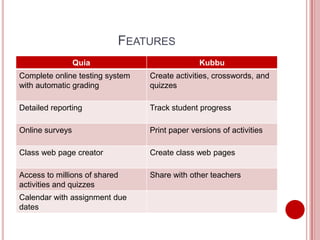
FEATURES
                 Quia                          Kubbu
Complete online testing system   Create activities, crosswords, and
with automatic grading           quizzes

Detailed reporting               Track student progress

Online surveys                   Print paper versions of activities

Class web page creator           Create class web pages

Access to millions of shared     Share with other teachers
activities and quizzes
Calendar with assignment due
dates
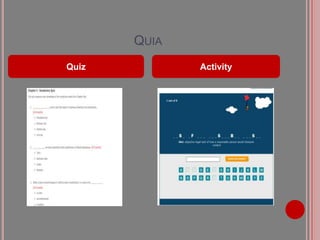
QUIA
Quiz          Activity
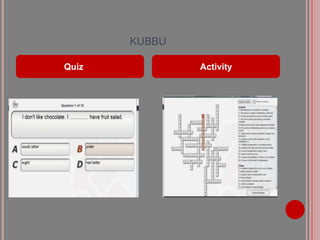
KUBBU

Quiz           Activity
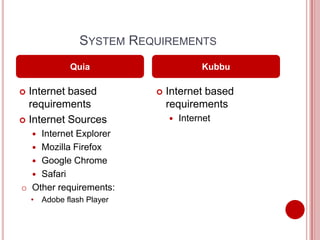
SYSTEM REQUIREMENTS
              Quia                      Kubbu

 Internet based              Internet based
  requirements                 requirements
 Internet Sources                Internet
    Internet Explorer
    
   Mozilla Firefox
   Google Chrome
   Safari
o Other requirements:
    • Adobe flash Player
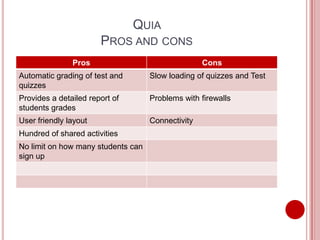
QUIA
                       PROS AND CONS
               Pros                                Cons
Automatic grading of test and       Slow loading of quizzes and Test
quizzes
Provides a detailed report of       Problems with firewalls
students grades
User friendly layout                Connectivity
Hundred of shared activities
No limit on how many students can
sign up
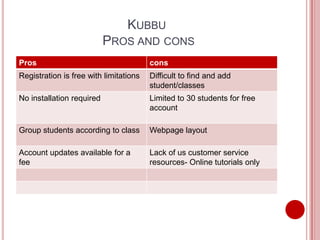
KUBBU
                           PROS AND CONS
Pros                                    cons
Registration is free with limitations   Difficult to find and add
                                        student/classes
No installation required                Limited to 30 students for free
                                        account

Group students according to class       Webpage layout

Account updates available for a         Lack of us customer service
fee                                     resources- Online tutorials only
PRICING
           Quia                    Kubbu
 30 day free trial        Free Subscription for

 $49 for a 1 year          30 students.
  subscription             $40 a year for 200
                            students.
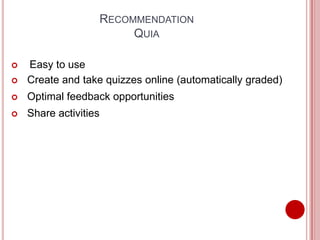
RECOMMENDATION
                            QUIA

   Easy to use
   Create and take quizzes online (automatically graded)
   Optimal feedback opportunities
   Share activities
SOURCES

 http://www.quia.com
 http://www.kubbu.com/

Software evaluation

  • 1.
    SOFTWARE EVALUATION Quia vs. Kubbu Erica Clough
  • 2.
    FEATURES Quia Kubbu Complete online testing system Create activities, crosswords, and with automatic grading quizzes Detailed reporting Track student progress Online surveys Print paper versions of activities Class web page creator Create class web pages Access to millions of shared Share with other teachers activities and quizzes Calendar with assignment due dates
  • 3.
    QUIA Quiz Activity
  • 4.
    KUBBU Quiz Activity
  • 5.
    SYSTEM REQUIREMENTS Quia Kubbu  Internet based  Internet based requirements requirements  Internet Sources  Internet Internet Explorer   Mozilla Firefox  Google Chrome  Safari o Other requirements: • Adobe flash Player
  • 6.
    QUIA PROS AND CONS Pros Cons Automatic grading of test and Slow loading of quizzes and Test quizzes Provides a detailed report of Problems with firewalls students grades User friendly layout Connectivity Hundred of shared activities No limit on how many students can sign up
  • 7.
    KUBBU PROS AND CONS Pros cons Registration is free with limitations Difficult to find and add student/classes No installation required Limited to 30 students for free account Group students according to class Webpage layout Account updates available for a Lack of us customer service fee resources- Online tutorials only
  • 8.
    PRICING Quia Kubbu  30 day free trial  Free Subscription for  $49 for a 1 year 30 students. subscription  $40 a year for 200 students.
  • 9.
    RECOMMENDATION QUIA  Easy to use  Create and take quizzes online (automatically graded)  Optimal feedback opportunities  Share activities
  • 10.