I X L
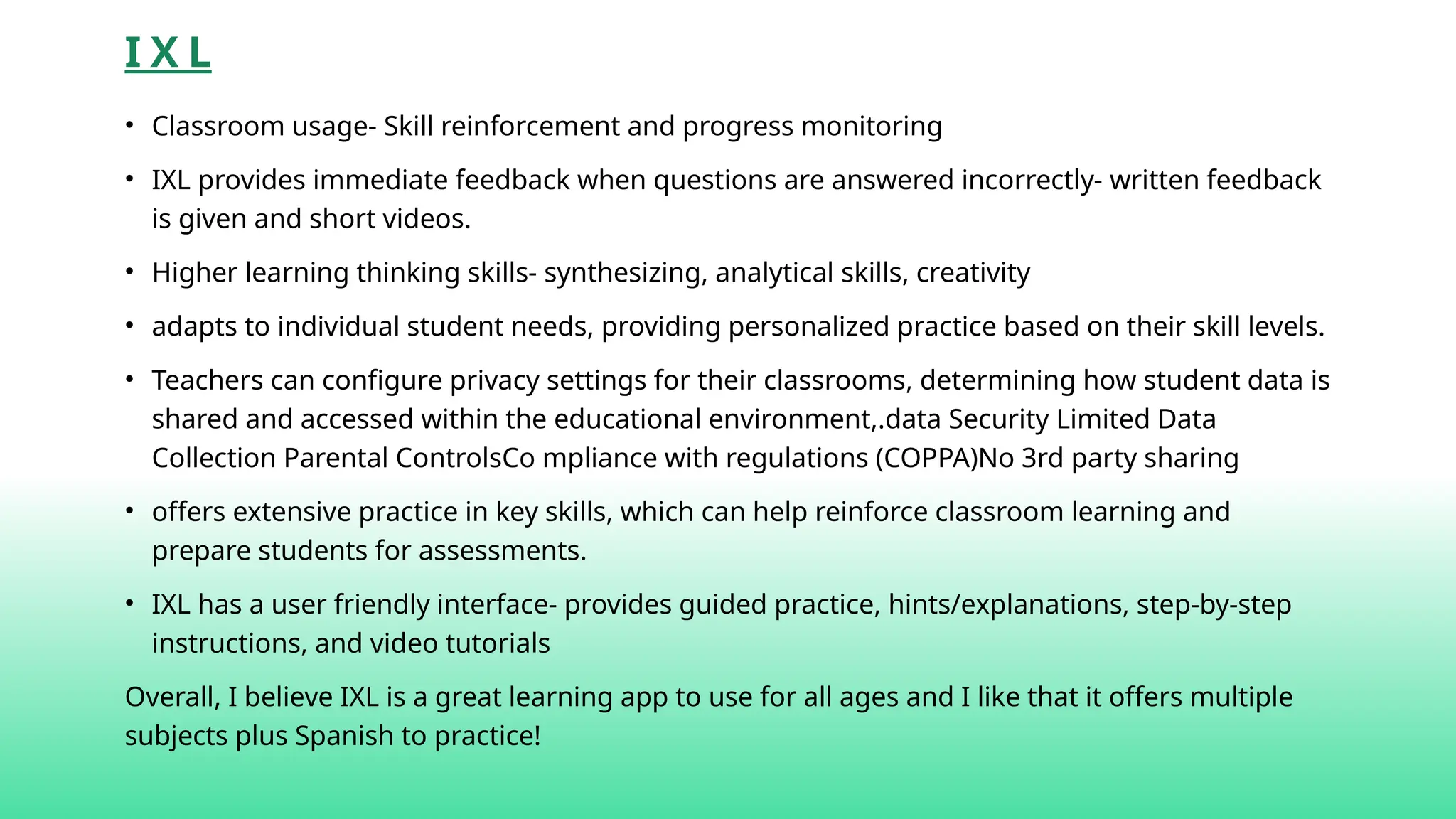
•Classroom usage- Skill reinforcement and progress monitoring
• IXL provides immediate feedback when questions are answered incorrectly- written feedback
is given and short videos.
• Higher learning thinking skills- synthesizing, analytical skills, creativity
• adapts to individual student needs, providing personalized practice based on their skill levels.
• Teachers can configure privacy settings for their classrooms, determining how student data is
shared and accessed within the educational environment,.data Security Limited Data
Collection Parental ControlsCo mpliance with regulations (COPPA)No 3rd party sharing
• offers extensive practice in key skills, which can help reinforce classroom learning and
prepare students for assessments.
• IXL has a user friendly interface- provides guided practice, hints/explanations, step-by-step
instructions, and video tutorials
Overall, I believe IXL is a great learning app to use for all ages and I like that it offers multiple
subjects plus Spanish to practice!
3.
P R OD I G Y
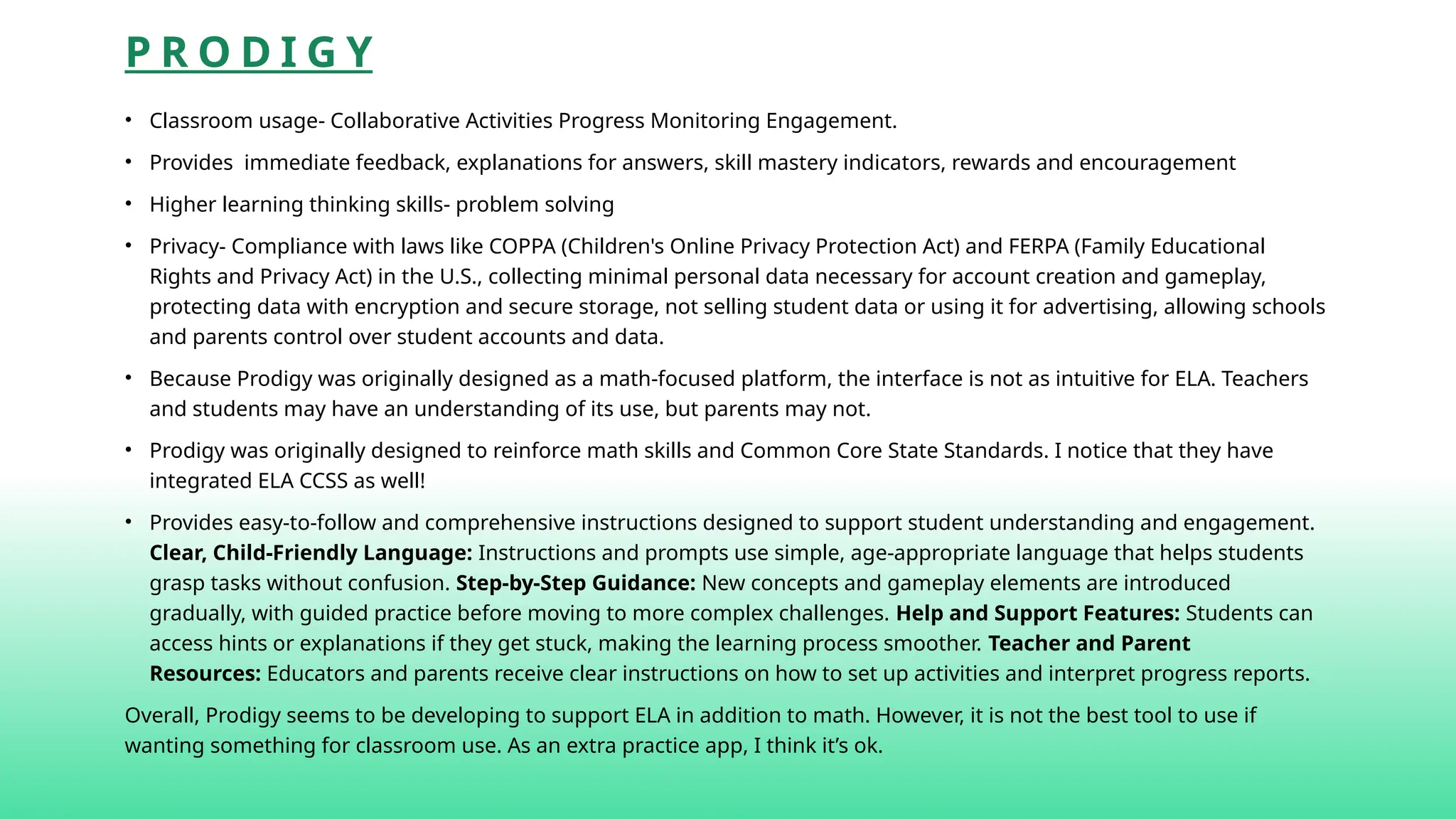
• Classroom usage- Collaborative Activities Progress Monitoring Engagement.
• Provides immediate feedback, explanations for answers, skill mastery indicators, rewards and encouragement
• Higher learning thinking skills- problem solving
• Privacy- Compliance with laws like COPPA (Children's Online Privacy Protection Act) and FERPA (Family Educational
Rights and Privacy Act) in the U.S., collecting minimal personal data necessary for account creation and gameplay,
protecting data with encryption and secure storage, not selling student data or using it for advertising, allowing schools
and parents control over student accounts and data.
• Because Prodigy was originally designed as a math-focused platform, the interface is not as intuitive for ELA. Teachers
and students may have an understanding of its use, but parents may not.
• Prodigy was originally designed to reinforce math skills and Common Core State Standards. I notice that they have
integrated ELA CCSS as well!
• Provides easy-to-follow and comprehensive instructions designed to support student understanding and engagement.
Clear, Child-Friendly Language: Instructions and prompts use simple, age-appropriate language that helps students
grasp tasks without confusion. Step-by-Step Guidance: New concepts and gameplay elements are introduced
gradually, with guided practice before moving to more complex challenges. Help and Support Features: Students can
access hints or explanations if they get stuck, making the learning process smoother. Teacher and Parent
Resources: Educators and parents receive clear instructions on how to set up activities and interpret progress reports.
Overall, Prodigy seems to be developing to support ELA in addition to math. However, it is not the best tool to use if
wanting something for classroom use. As an extra practice app, I think it’s ok.
4.
S P LA S H L E A R N
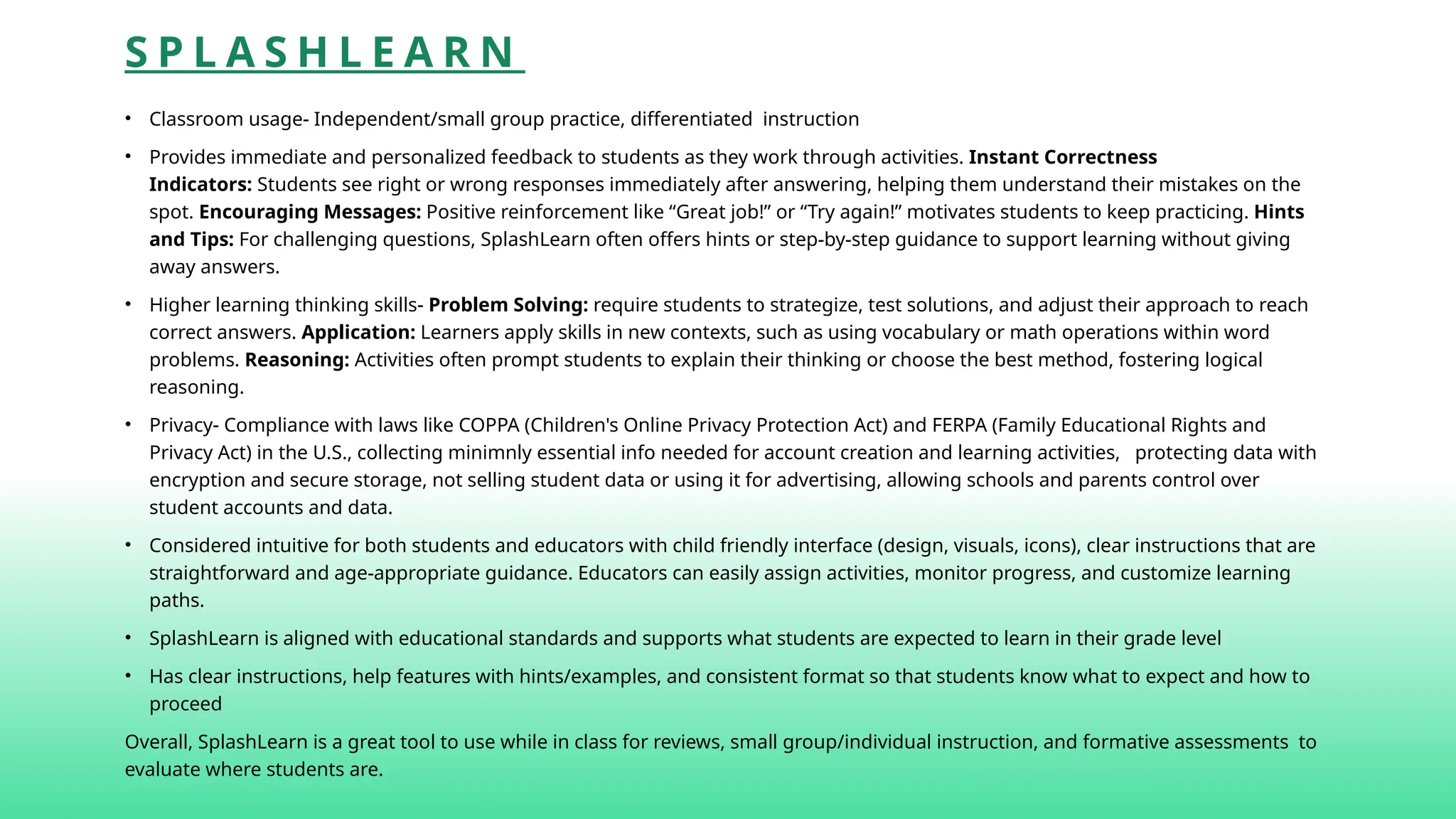
• Classroom usage- Independent/small group practice, differentiated instruction
• Provides immediate and personalized feedback to students as they work through activities. Instant Correctness
Indicators: Students see right or wrong responses immediately after answering, helping them understand their mistakes on the
spot. Encouraging Messages: Positive reinforcement like “Great job!” or “Try again!” motivates students to keep practicing. Hints
and Tips: For challenging questions, SplashLearn often offers hints or step-by-step guidance to support learning without giving
away answers.
• Higher learning thinking skills- Problem Solving: require students to strategize, test solutions, and adjust their approach to reach
correct answers. Application: Learners apply skills in new contexts, such as using vocabulary or math operations within word
problems. Reasoning: Activities often prompt students to explain their thinking or choose the best method, fostering logical
reasoning.
• Privacy- Compliance with laws like COPPA (Children's Online Privacy Protection Act) and FERPA (Family Educational Rights and
Privacy Act) in the U.S., collecting minimnly essential info needed for account creation and learning activities, protecting data with
encryption and secure storage, not selling student data or using it for advertising, allowing schools and parents control over
student accounts and data.
• Considered intuitive for both students and educators with child friendly interface (design, visuals, icons), clear instructions that are
straightforward and age-appropriate guidance. Educators can easily assign activities, monitor progress, and customize learning
paths.
• SplashLearn is aligned with educational standards and supports what students are expected to learn in their grade level
• Has clear instructions, help features with hints/examples, and consistent format so that students know what to expect and how to
proceed
Overall, SplashLearn is a great tool to use while in class for reviews, small group/individual instruction, and formative assessments to
evaluate where students are.
5.
W A YG R O U N D (Q U I Z Z I Z)
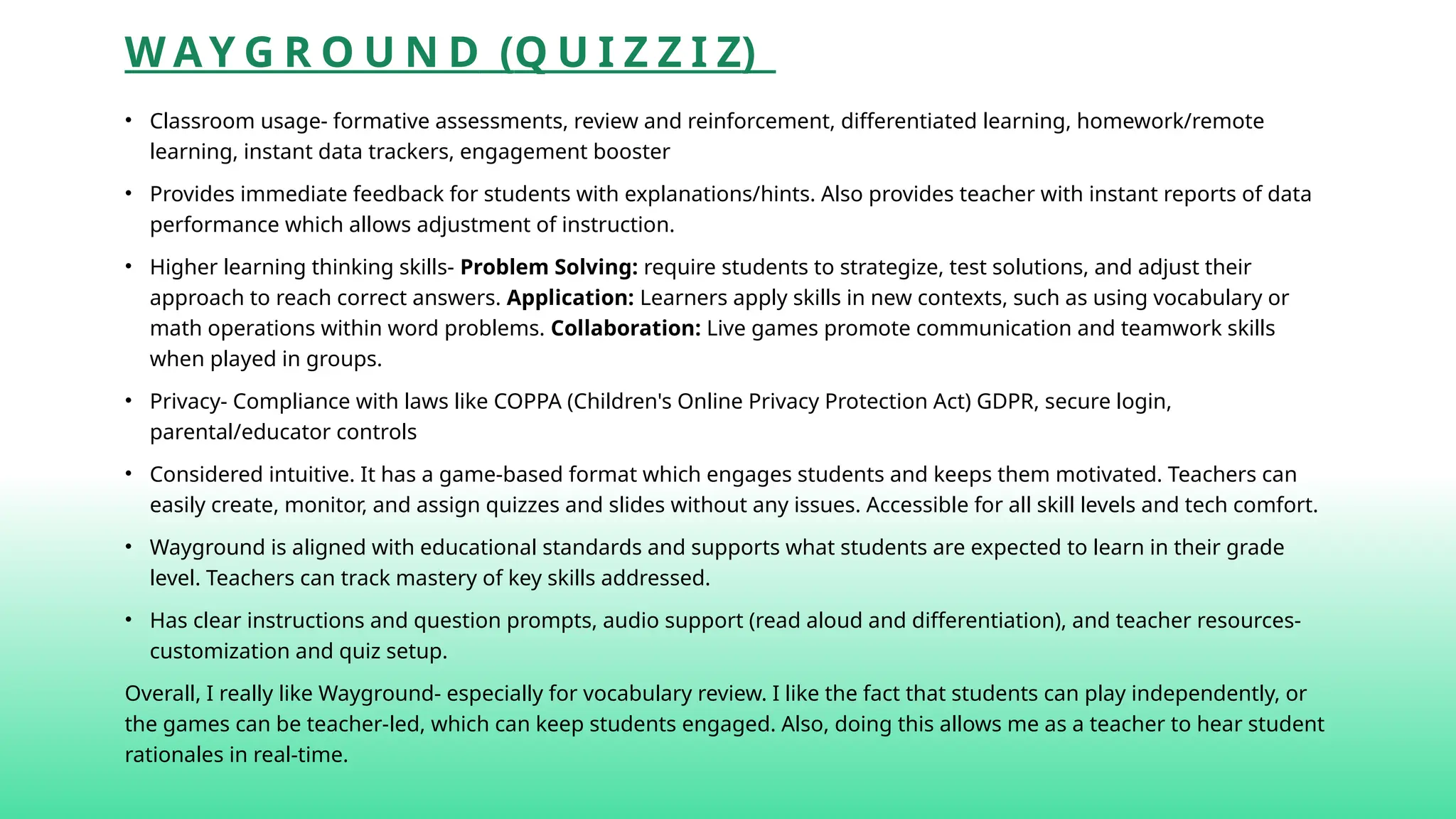
• Classroom usage- formative assessments, review and reinforcement, differentiated learning, homework/remote
learning, instant data trackers, engagement booster
• Provides immediate feedback for students with explanations/hints. Also provides teacher with instant reports of data
performance which allows adjustment of instruction.
• Higher learning thinking skills- Problem Solving: require students to strategize, test solutions, and adjust their
approach to reach correct answers. Application: Learners apply skills in new contexts, such as using vocabulary or
math operations within word problems. Collaboration: Live games promote communication and teamwork skills
when played in groups.
• Privacy- Compliance with laws like COPPA (Children's Online Privacy Protection Act) GDPR, secure login,
parental/educator controls
• Considered intuitive. It has a game-based format which engages students and keeps them motivated. Teachers can
easily create, monitor, and assign quizzes and slides without any issues. Accessible for all skill levels and tech comfort.
• Wayground is aligned with educational standards and supports what students are expected to learn in their grade
level. Teachers can track mastery of key skills addressed.
• Has clear instructions and question prompts, audio support (read aloud and differentiation), and teacher resources-
customization and quiz setup.
Overall, I really like Wayground- especially for vocabulary review. I like the fact that students can play independently, or
the games can be teacher-led, which can keep students engaged. Also, doing this allows me as a teacher to hear student
rationales in real-time.
6.
E P IC : K I D S ’ B O O K S & R E A D I N G
• Classroom usage- For, differentiation literacy, read-aloud support, thematic units
• Epic primarily provides immediate feedback through the interactive quizzes and activities linked to the books- but it
is not tailored to any activities that require feedback.
• Higher learning thinking skills- supports higher-order thinking by offering diverse texts that encourage critical
thinking, inference, application, synthesis, and reflection. Interactive quizzes and prompts deepen comprehension
and analytical skills .
• Privacy- Epic prioritizes privacy by complying with laws like COPPA, collecting only necessary data, securing
information with encryption, and not selling personal data. Parents and teachers have control over accounts and
monitoring.
• Intuitive because it contains features like easy search, personalized recommendations, and read-to-me options.
They help students independently find and enjoy books. Teachers and parents find it straightforward to set up and
manage accounts..
• Although teachers can find books to assign that align with standards or classroom curriculum, Epic is not
automatically geared toward this.
• Epic has easy navigation, clear icons, and helpful tools like read-to-me and personalized recommendations. This
makes it easy for young readers to find and enjoy books independently, while parents and teachers can manage
accounts and track progress with minimal effort.
I absolutely love Epic books! Students are excited to read, and they can listen to stories of their choice. This is another
option that students can engage in reading fluency practice- especially prosody.
7.
K A HO O T
• Classroom usage- formative assessment, review, homework, differentiation literacy, brain
breaks/icebreakers
• Kahoot provides immediate feedback during gameplay. After each question, students instantly see
whether their answers are correct, along with their scores and rankings. This real-time feedback helps
reinforce learning, keeps students engaged, and allows teachers to quickly gauge understanding.
Additionally, teachers can review detailed reports after the game to identify areas needing more support
• Higher learning thinking skills- Kahoot can support higher- order learning- it’s not automatically
designed to do so –but the quizzes can be individually designed and tailored to fit advance students.
• Privacy- Compliance with laws like COPPA (Children's Online Privacy Protection Act) and GDPR; Parental
Controls: Provides options for parents to manage their children’s accounts and data; Educator
Controls: Allows teachers to control student access and manage classroom data.
• Intuitive because the interface keeps kids engaged and is easy for them to join games and navigate the
platform. It’s also easy for teachers to create and manage quizzes quickly.
• Kahoot is not a content provider- but teachers can find quizzes that align with standards and curriculum.
• Kahoot provides support resources (FAQ’s and video tutorials), consistent format so that students quickly
grasp ho to participate, interactive interface, and clear on-screen prompts
Kahoot is fun for kids, and I like to use it for a quick end of the class recap of our lesson.
8.
S TA RF A L L
• Classroom usage- great for literacy and foundational skills. Use it for guided reading, phonics
practice, and independent learning. It supports small groups, centers, and whole-class activities.
• Gives instant feedback during activities—correct answers are reinforced with positive sounds and
visuals, while errors prompt gentle hints to guide learning.
• Starfall allows differentiated instruction by letting students progress at their own pace and choose
activities suited to their level
• Starfall complies with COPPA and other privacy laws, collects minimal data, secures information, and
does not sell personal data. Parental and teacher controls help manage accounts and monitor usage.
• Considered intuitive due to its colorful interface designed for young learners. Navigation is
straightforward with clear icons and consistent layouts that make it easy for children to use
independently.
• Aligns well with early education standards for reading and math, supporting Common Core and other
frameworks through its skill-based lessons.
• Very user friendly for both students/educators- has easy navigation, making it easy for all ages of
learners.
Overall, Starfall is a great tool to use to help students to strengthen challenging academic areas.
9.
K H AN A C A D E M Y
• Classroom usage- Khan Academy is widely used in classrooms as a supplemental learning tool. Teachers
can assign videos, exercises, and track student progress through a teacher dashboard.
• Provides immediate and personalized feedback on quizzes and exercises to students.
• Higher learning thinking skills- includes activities that promote critical thinking and problem-solving,
especially in math and science. I think they are slowly developing ELA tools!
• Privacy- has a strong privacy policy; it complies with COPPA and FERPA in the U.S., protecting student data
and limiting tracking.
• App and website are designed to be intuitive with clear navigation, simple layouts, and easy-to-access
resources for students and teachers.
• Khan Academy aligns its content with common educational standards such as Common Core, Next
Generation Science Standards (NGSS), and others, making it easy for teachers to integrate into lessons.
• User friendly through features like personalized learning dashboards, progress tracking, hints and step-
by-step solutions
• Overall, I really like Khan Academy because it gives supplemental tools that match what you’re covering in
class. Right now, I believe the company is building its ELA tool and lessons to be just as strong as their
math tools and lessons. Once this is done, Khan Academy will dominate a lot of its competitors!
10.
D U OL I N G O
• Classroom usage- supplementary language learning tool, assist ELLs and allow students to learn a new
language
• provides instant feedback on student answers, helping learners correct mistakes and reinforce learning
immediately.
• Higher learning thinking skills- Duolingo is used for skill-building vs deep thinking. It focuses mainly on
vocabulary, grammar, and comprehension.
• Privacy- policy designed to protect user data, adhering to regulations like COPPA for children. It limits
data sharing and offers controls over personal information.
• Considered highly intuitive with a gamified interface, clear instructions, and engaging visuals that make
it easy for learners of all ages to navigate and stay motivated.
• Duolingo is not directed to align with educational standards compared to many other platforms- but it
does cover many language objectives that can supplement curriculum objectives.
• user friendly- simple design, bite-sized lessons, progress tracking, rewards system, and multi-platform
availability (app and web).
• Overall, I wouldn’t use Duolingo as a standalone assignment interface, but definitely as a supplemental
tool to reinforce. It would be great practice for ELLs to access during small group, morning work time, or
even homework.
11.
S E ES A W
• Classroom usage- student-driven digital portfolio and communication platform. Teachers can assign
activities, collect student work, and engage families through the app.
• The app itself doesn’t provide feedback, but teachers can provide immediate, personalized feedback on
student submissions via comments, audio, or video responses
• Higher learning thinking skills- Seesaw supports higher-order thinking by allowing students to create, reflect,
and share multimedia projects, encouraging creativity, analysis, and self-assessment.
• Privacy- complies with COPPA and FERPA, student data protection and gives teachers control over sharing
settings.
• Considered intuitive for students, teachers, and families -simple navigation, clear instructions, and an
engaging interface.
• Seesaw is not automatically geared toward specific standards/curriculum, but teachers can use the tools to
tag activities with standards and curriculum goals.
• It took me a little while to navigate and really find a good user-friendly pattern, but the app markets that it
includes a user-friendly design includes drag-and-drop features, multimedia integration, easy assignment
creation, and accessible parent communication.
Overall, Seesaw is great for making a student portfolio that can be referenced when monitoring student’s
understanding. Because it’s digital, it cuts down on maintaining a lot of papers and gives easy access for
parents to also see their student’s work in real-time!