The Nature ofSoftware:
• Computer software plays a crucial dual role: it is both a product and a vehicle
for delivering products.
• As a product, it leverages the computing power of hardware and networks.
• As a vehicle, it controls computers (operating systems), enables communication
(networks), and facilitates the creation of other programs.
• Over the past fifty years, software has evolved to deliver the most valuable
commodity of our time—information.
3.
Defining Software: descriptionof software might take the following form:
Software is:
(1) Instructions (computer programs) that when executed provide desired features,
function, and performance.
(2) Data structures that enable the programs to adequately manipulate
information. and
(3) Descriptive information in both hard copy and virtual forms that describes the
operation and use of the programs.
4.
Characteristics of Softwarethat makes it different from
Hardware:
1. Software is developed or engineered; it is not manufactured in
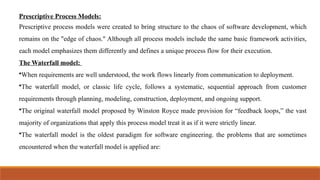
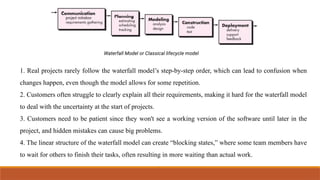
the classical sense - Both activities prioritize high quality, but
the relationship between people and work differs. Software
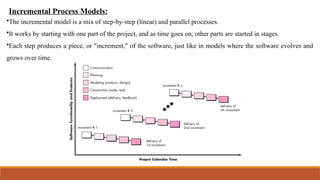
costs focus on engineering, meaning software projects cannot
be managed like manufacturing projects.
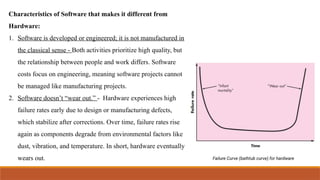
2. Software doesn’t “wear out.” - Hardware experiences high
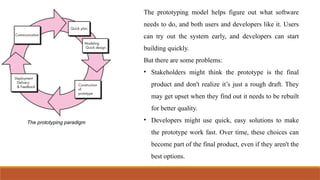
failure rates early due to design or manufacturing defects,
which stabilize after corrections. Over time, failure rates rise
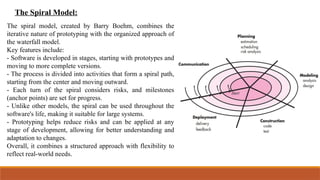
again as components degrade from environmental factors like
dust, vibration, and temperature. In short, hardware eventually
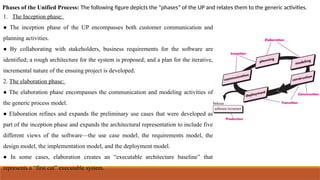
wears out.
5.
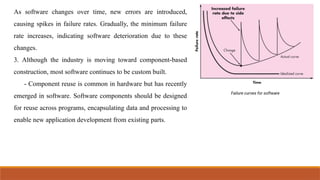
As software changesover time, new errors are introduced,
causing spikes in failure rates. Gradually, the minimum failure
rate increases, indicating software deterioration due to these
changes.
3. Although the industry is moving toward component-based
construction, most software continues to be custom built.
- Component reuse is common in hardware but has recently
emerged in software. Software components should be designed
for reuse across programs, encapsulating data and processing to
enable new application development from existing parts.
6.
Software Application Domains:Seven broad categories of computer software present continuing
challenges for software engineers.
● System software - System software consists of programs that support other programs. Some, like
compilers and file management utilities, handle complex, determinate information, while others, such
as operating systems and drivers, manage largely indeterminate data.
● Application Software - Stand-alone programs address specific business needs by processing
business or technical data to facilitate operations and support decision-making.
● Engineering/scientific software - Characterized by "number crunching" algorithms, these
applications span fields such as astronomy, volcanology, automotive stress analysis, space shuttle
orbital dynamics, molecular biology, and automated manufacturing.
● Embedded software - It is embedded within a product or system, managing and enabling features
and functions for the end user and the system itself.
7.
● Product-line software- Product-line software is created to deliver specific capabilities to a diverse
range of customers, targeting either specialized markets (e.g., inventory control) or broader
consumer markets (e.g., word processing, spreadsheets, and computer graphics).
● Web Applications - This network-centric software category includes various applications.
WebApps are becoming advanced computing environments that offer stand-alone features and
functions while integrating with corporate databases and business applications.
● Artificial Intelligence software - It utilizes nonnumerical algorithms to address complex problems
that resist straightforward computation or analysis. Applications include robotics, expert systems,
pattern recognition (image and voice), artificial neural networks, theorem proving, and game
playing.
8.
The unique natureof WebApps:
•Early World Wide Web websites were simple linked hypertext files with text and limited graphics.
•The introduction of tools like Java and XML enhanced HTML, allowing web engineers to add
computing capabilities to informational content.
•Web-based systems and applications (WebApps) are advanced tools that present stand-alone
information and integrate databases and business applications.
•Web-based systems involve a blend of print publishing and software development, marketing and
computing, internal communications and external relations, and art and technology.
9.
The following arethe common attributes for WebApps:
1. Network Intensiveness: A WebApp exists on a network (Internet or Intranet) and caters to the needs of
a diverse client community.
2. Concurrency: A large number of users may access the WebApp at one time.
3. Performance: If a WebApp user must wait too long, he or she may decide to go elsewhere.
4. Availability: Although the expectation of 100 percent availability is unreasonable, users of popular
WebApps often demand access on a 24/7/365 basis.
5. Data driven: The primary function of many WebApps is to use hypermedia to present text, graphics,
audio, and video content to the end user
6. Content sensitive: The quality and aesthetic nature of content remains an important determinant of the
quality of a WebApp.
7. Immediacy
8. Security
9. aesthetics
10.
Software Engineering:In order to build software that is ready to meet the challenges of the
twenty-first century, you must recognize a few simple realities:
➔ It follows that a concerted effort should be made to understand the problem before a software
solution is developed.
➔ It follows that design becomes a pivotal activity.
➔ It follows that software should exhibit high quality.
➔ It follows that software should be maintainable.
software in all of its forms and across all of its application domains should be engineered.
11.
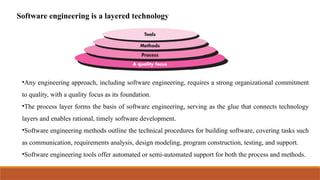
Software engineering isa layered technology
•Any engineering approach, including software engineering, requires a strong organizational commitment
to quality, with a quality focus as its foundation.
•The process layer forms the basis of software engineering, serving as the glue that connects technology
layers and enables rational, timely software development.
•Software engineering methods outline the technical procedures for building software, covering tasks such
as communication, requirements analysis, design modeling, program construction, testing, and support.
•Software engineering tools offer automated or semi-automated support for both the process and methods.
12.
The Software Process:
A process is a collection of activities, actions, and tasks that are performed when some work
product is to be created.
•Activity: A broad objective, such as communicating with stakeholders, applied universally across
projects, regardless of domain, size, or complexity.
•Action: A group of related tasks, like architectural design, that together produce a significant work
product, such as a design model.
•Task: A specific, well-defined goal, such as conducting a unit test, which results in a tangible and
measurable outcome.
A process is a flexible approach that allows the software team to select appropriate actions and
tasks, aiming to deliver quality software on time to meet the needs of sponsors and users.
13.
A processframework provides the foundation for software engineering by outlining key activities that
apply to all projects, regardless of size or complexity.
A generic process framework for software engineering encompasses five activities:
● Communication: Before starting technical work, it is crucial to communicate with the customer to
understand project objectives and gather requirements.
● Planning: A software project is complex, and planning creates a "map" or software project plan,
outlining technical tasks, potential risks, required resources, deliverables, and the work schedule.
● Modeling: Creating models to better understand software requirements and the design that will achieve
those requirements.
● Construction: This activity combines code generation and the testing that is required to uncover errors
in the code.
● Deployment: The software is delivered to the customer who evaluates the delivered product and
provides feedback based on the evaluation.
14.
Software Engineering Practice:
TheEssence of Practice: The essence of problem solving is essentially the essence of software engineering
practice.
Here we try to answer some of the questions under different phases of problem solving.
● Understand the problem (communication and analysis).
○ Who has a stake in the solution to the problem?
○ What are the unknowns?
○ Can the problem be compartmentalized?
○ Can the problem be represented graphically?
● Plan a solution (modeling and software design).
○ Have you seen similar problems before?
○ Has a similar problem been solved?
○ Can subproblems be defined?
○ Can subproblems be defined?
15.
● Carry outthe plan (code generation). ○ Does the solution conform to the plan?
○ Is each component part of the solution provably correct?
● Examine the result for accuracy (testing and quality assurance).
○ Is each component part of the solution provably correct?
○ Does the solution produce results that conform to the data, functions, and features that are required?
16.
General Principles ofSoftware Engineering:
The word principle is “an important underlying law or assumption required in a system of thought.”
David Hooker [Hoo96] has proposed seven principles that focus on software engineering practice as a
whole.
1. The First Principle: The Reason It All Exists A software system exists for one reason: to provide
value to its users. All decisions should be made with this in mind.
2. The Second Principle: KISS (Keep It Simple, Stupid!) All design should be as simple as possible,
but no simpler. This facilitates having a more easily understood and easily maintained system.
3. The Third Principle: Maintain the Vision A clear vision is essential to the success of a software
project. Without one, a project almost unfailingly ends up being “of two [or more] minds” about
itself.
17.
4. The FourthPrinciple: What You Produce, Others Will Consume always specify, design, and
implement knowing someone else will have to understand what you are doing. The audience for any
product of software development is potentially large.
5. The Fifth Principle: Be Open to the Future Never design yourself into a corner. Always ask “what if,”
and prepare for all possible answers by creating systems that solve the general problem, not just the
specific one.
6. The Sixth Principle: Plan Ahead for Reuse Planning ahead for reuse reduces the cost and increases
the value of both the reusable components and the systems into which they are incorporated.
7. The Seventh principle: Think! Placing clear, complete thought before action almost always produces
better results. When you think about something, you are more likely to do it right. You also gain
knowledge about how to do it right again.
18.
Software Myths:
Software mythsare false ideas people have about how software is made and how the process works.
These myths can cause confusion and problems during development. We can group them into three
types:
1. Management myths: These are wrong ideas that managers or leaders believe about software
development.
2. Customer myths: These are wrong beliefs that customers or users have about how software is
made.
3. Practitioner’s / Developer myths: These are false beliefs that software developers have about their
own work.
Each of these myths can lead to mistakes if not understood properly.
19.
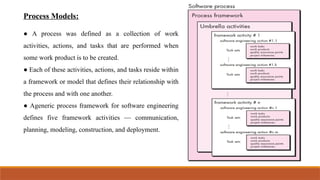
Process Models:
● Aprocess was defined as a collection of work
activities, actions, and tasks that are performed when
some work product is to be created.
● Each of these activities, actions, and tasks reside within
a framework or model that defines their relationship with
the process and with one another.
● Ageneric process framework for software engineering
defines five framework activities — communication,
planning, modeling, construction, and deployment.
20.
•Each software engineeringaction is defined by a task set, outlining the tasks to be completed, work products
to be produced, required quality assurance, and milestones to track progress.
•Process flow, a key aspect of the software process, describes how framework activities, actions, and tasks
are organized in sequence and time.
Defining a Framework Activity:
For a small software project with simple requirements from a remote stakeholder, the communication activity
may involve just a phone call. The work tasks for this action include:
1. Make contact with stakeholder via telephone.
2. Discuss requirements and take notes
3. Organize notes into a brief written statement of requirements.
4. E-mail to stakeholder for review and approval.
For a more complex project with multiple stakeholders and diverse requirements, the communication activity
may involve six actions: inception, elicitation, elaboration, negotiation, specification, and validation.
21.
Prescriptive Process Models:
Prescriptiveprocess models were created to bring structure to the chaos of software development, which
remains on the "edge of chaos." Although all process models include the same basic framework activities,
each model emphasizes them differently and defines a unique process flow for their execution.
The Waterfall model:
•When requirements are well understood, the work flows linearly from communication to deployment.
•The waterfall model, or classic life cycle, follows a systematic, sequential approach from customer
requirements through planning, modeling, construction, deployment, and ongoing support.
•The original waterfall model proposed by Winston Royce made provision for “feedback loops,” the vast
majority of organizations that apply this process model treat it as if it were strictly linear.
•The waterfall model is the oldest paradigm for software engineering. the problems that are sometimes
encountered when the waterfall model is applied are:
22.
1. Real projectsrarely follow the waterfall model’s step-by-step order, which can lead to confusion when
changes happen, even though the model allows for some repetition.
2. Customers often struggle to clearly explain all their requirements, making it hard for the waterfall model
to deal with the uncertainty at the start of projects.
3. Customers need to be patient since they won't see a working version of the software until later in the
project, and hidden mistakes can cause big problems.
4. The linear structure of the waterfall model can create “blocking states,” where some team members have
to wait for others to finish their tasks, often resulting in more waiting than actual work.
23.
Incremental Process Models:
•Theincremental model is a mix of step-by-step (linear) and parallel processes.
•It works by starting with one part of the project, and as time goes on, other parts are started in stages.
•Each step produces a piece, or "increment," of the software, just like in models where the software evolves and
grows over time.
24.
In the incrementalmodel:
• The first version (increment) is a basic product, covering core features, but not all.
• The customer uses or evaluates this core product, and feedback helps plan the next increment.
• Each new increment improves the core product and adds more features, repeating this process until
the full product is built.
• Each increment is a working product, even if it's a simpler version of the final one.
For example, in word processing software:
1. First increment: basic file management, editing, and document production.
2. Second increment: advanced editing and document production.
3. Third increment: spelling and grammar checking.
4. Fourth increment: advanced page layout.
This approach is useful when there's not enough staff to build the entire product by a tight deadline.
25.
Evolutionary Process Models:
Evolutionarymodels are iterative, meaning they allow you to develop the software step by step, creating more
complete versions with each iteration. Two common types of evolutionary process models are:
1.Prototyping Model:
- Sometimes, a customer provides general goals for software but doesn't specify detailed features.
- Developers may also be uncertain about certain aspects, like the performance of an algorithm or how the user
interface should work.
- In such cases, using a prototyping model can help.
- Prototyping is a useful technique that helps clarify what the final product should be, especially when the
requirements are unclear.
- It can be used on its own or within other development models to create a basic version for testing and
feedback.
26.
The prototyping processworks like this:
1. Communication: You meet with stakeholders to discuss the main goals of the software, identify known
requirements, and point out areas needing more clarity.
2. Quick Design: A simple design is created, focusing on parts of the software that the user will see and
interact with.
3. Prototype Creation: Using the quick design, a basic version (prototype) of the software is built.
4. Feedback: The prototype is tested and reviewed by stakeholders, who give feedback to improve it.
5. Iteration: The prototype is adjusted based on feedback, helping both the developers and stakeholders
better understand the final requirements.
This cycle repeats until the product meets everyone's needs.
27.
The prototyping modelhelps figure out what software
needs to do, and both users and developers like it. Users
can try out the system early, and developers can start
building quickly.
But there are some problems:
• Stakeholders might think the prototype is the final
product and don't realize it’s just a rough draft. They
may get upset when they find out it needs to be rebuilt
for better quality.
• Developers might use quick, easy solutions to make
the prototype work fast. Over time, these choices can
become part of the final product, even if they aren't the
best options.
28.
The Spiral Model:
Thespiral model, created by Barry Boehm, combines the
iterative nature of prototyping with the organized approach of
the waterfall model.
Key features include:
- Software is developed in stages, starting with prototypes and
moving to more complete versions.
- The process is divided into activities that form a spiral path,
starting from the center and moving outward.
- Each turn of the spiral considers risks, and milestones
(anchor points) are set for progress.
- Unlike other models, the spiral can be used throughout the
software's life, making it suitable for large systems.
- Prototyping helps reduce risks and can be applied at any
stage of development, allowing for better understanding and
adaptation to changes.
Overall, it combines a structured approach with flexibility to
reflect real-world needs.
29.
The Unified ProcessModel:
•In the early 1990s, James Rumbaugh, Grady Booch, and Ivar Jacobson collaborated to create a unified
method combining the best features of their individual object-oriented design methods.
•This effort resulted in UML (Unified Modeling Language), a robust notation for modeling and developing
object-oriented systems.
•By 1997, UML became the industry standard for object-oriented software development.
•UML provided technology support for object-oriented software engineering but lacked a process
framework for project guidance.
•Jacobson, Rumbaugh, and Booch later developed the Unified Process (UP) to provide this framework.
•The Unified Process uses an iterative, incremental model that can be adapted to specific project needs.
30.
Phases of theUnified Process: The following figure depicts the “phases” of the UP and relates them to the generic activities.
1. The Inception phase:
● The inception phase of the UP encompasses both customer communication and
planning activities.
● By collaborating with stakeholders, business requirements for the software are
identified; a rough architecture for the system is proposed; and a plan for the iterative,
incremental nature of the ensuing project is developed.
2. The elaboration phase:
● The elaboration phase encompasses the communication and modeling activities of
the generic process model.
● Elaboration refines and expands the preliminary use cases that were developed as
part of the inception phase and expands the architectural representation to include five
different views of the software—the use case model, the requirements model, the
design model, the implementation model, and the deployment model.
● In some cases, elaboration creates an “executable architecture baseline” that
represents a “first cut” executable system.
31.
3. The constructionphase:● The construction phase of the UP is identical to the construction activity defined for the generic
software process.
● Using the architectural model as input, the construction phase develops or acquires the software components that will
make each use case operational for end users.
● All necessary and required features and functions for the software increment are then implemented in source code.
● As components are being implemented, unit tests are designed and executed for each.
● In addition, integration activities (component assembly and integration testing) are conducted.
4. The transition phase:● The transition phase of the UP encompasses the latter stages of the generic construction activity
and the first part of the generic deployment (delivery and feedback) activity.
● Software is given to end users for beta testing and user feedback reports both defects and necessary changes.
● At the conclusion of the transition phase, the software increment becomes a usable software release.
5. The production phase: ● The production phase of the UP coincides with the deployment activity of the generic process.
● During this phase, the ongoing use of the software is monitored, support for the operating environment (infrastructure) is
provided, and defect reports and requests for changes are submitted and evaluated.

![General Principles of Software Engineering:
The word principle is “an important underlying law or assumption required in a system of thought.”
David Hooker [Hoo96] has proposed seven principles that focus on software engineering practice as a
whole.
1. The First Principle: The Reason It All Exists A software system exists for one reason: to provide
value to its users. All decisions should be made with this in mind.
2. The Second Principle: KISS (Keep It Simple, Stupid!) All design should be as simple as possible,
but no simpler. This facilitates having a more easily understood and easily maintained system.
3. The Third Principle: Maintain the Vision A clear vision is essential to the success of a software
project. Without one, a project almost unfailingly ends up being “of two [or more] minds” about
itself.](https://image.slidesharecdn.com/semodule1-250803153803-a888b965/85/Software-Engineering-and-management-project-development-16-320.jpg)