SOFTWARE ENGINEERING
Course Out Comes
CO1: Realize the concepts of software and software process models.
CO2: Analyze and model Software requirements
CO3: Apprise system design concepts and process
CO4: Apprehend software testing strategies
CO5: Comprehend post software deployment activities.
Unit 1
• Software Process
The Nature of Software, The software Process, Software Engineering
Practice, A Generic Process Model, Process Assessment and Improvement,
Prescriptive Process Models, Agile development: Agility, agile process and
principles, Extreme programming.
The Nature of Software
What is Software
• Software
 Computer programs and associated documentation.
 Software products may be developed for a particular customer or may be developed
for a general market.
Where can you find software?
Software is Almost
Everywhere.

Software can define as:

Instruction – executed provide desire features, function & performance.

Data structure – to adequately manipulate operation.

Documents – operation and use of the program.

Software products may be developed for a particular customer or may be developed for a
general market.

Software products may be

Generic - developed to be sold to a range of different customers e.g. PC software
such as Excel or Word.

custom - developed for a single customer according to their specification.
Evolving Role of Software
Software is a product
• Transforms information - produces, manages, acquires, modifies, displays, or
transmits information
• Delivers computing potential of hardware and networks
Software is a vehicle for delivering a product
• Controls other programs (operating system)
• Effects communications (networking software)
• Helps build other software (software tools & environments)
• What is Software Engineering?
Software Engineering is an engineering discipline that is concerned with all
aspects of software production.
Software engineers should adopt a systematic and organized approach to
their work and use appropriate tools and techniques depending on the
problem to be solved, the development constraints and the resources
available
Essential attributes of good software
• Maintainability
Software should be written in such a way so that it can evolve to meet the changing
needs of customers. This is a critical attribute because software change is an inevitable
requirement of a changing business environment.
• Dependability and security
Software dependability includes a range of characteristics including reliability,
security and safety. Dependable software should not cause physical or economic
damage in the event of system failure. Malicious users should not be able to access or
damage the system.
• Efficiency
Software should not make wasteful use of system resources such as
memory and processor cycles. Efficiency therefore includes responsiveness,
processing time, memory utilisation, etc.
• Acceptability
Software must be acceptable to the type of users for which it is designed.
This means that it must be understandable, usable and compatible with
other systems that they use.
Manufacturing vs. Development
(Software has characteristics that are considerably different than those of hardware)
• Once a hardware product has been manufactured, it is difficult or
impossible to modify. In contrast, software products are routinely
modified and upgraded.
• In hardware, hiring more people allows you to accomplish more
work, but the same does not necessarily hold true in software.
• Unlike hardware, software costs are concentrated in design rather
than production.
Software Characteristics

Software is developed or engineered; it is not manufactured in the classical
sense.

Software does not “wear out” but it does deteriorate.

Software continues to be custom built, as industry is moving toward
component based construction.
Failure curve for Hardware
Failure curve for Software
When a hardware component wears out, it is replaced by a spare part.
There are no software spare parts. Every software failure indicates an error in design or in the
process through which design was translated into machine executable code. Therefore, software
maintenance involves considerably more complexity
Software Application Domains
• System software
• Application software
• Engineering/scientific software
• Embedded software
• Product line software
• Web applications
• Artificial intelligence software
System Software:
• System software is a collection of programs written to service other programs.
• Software is determinate some are indeterminate
• It is characterized by heavy interaction with computer hardware; heavy usage by
multiple users; concurrent operation that requires scheduling, resource sharing, and
sophisticated process management; complex data structures; and multiple external
interfaces.
Ex. Compilers, operating system, drivers etc.
Application Software :
• Application software consists of standalone programs that solve a specific business
need.
• Application software is used to control the business function in real-time.
Engineering /Scientific software:
• Characterized by "number crunching" algorithms.
• Applications range from astronomy to volcanology, from automotive stress analysis to
space shuttle orbital dynamics, and from molecular biology to automated
manufacturing.
Ex: Computer Aided Design (CAD), system stimulation etc.
Embedded Software:
• It resides in read-only memory and is used to control products and systems
• Embedded software can perform limited and esoteric functions.
Ex: keypad control for a microwave oven.
Product line software:
• Designed to provide a specific capability for use by many different customers, product
line software can focus on a limited and esoteric marketplace.
Ex: Word processing, spreadsheet, CG, multimedia, etc.
Web Applications:
• Web apps can be little more than a set of linked hypertext files.
• It evolving into sophisticated computing environments that not only provide
standalone features, functions but also integrated with corporate database
and business applications.
Artificial Intelligence software
• AI software makes use of non-numerical algorithms to solve complex
problems that are not amenable to computation or straightforward analysis
Ex: Robotics, expert system, game playing, etc.
Legacy software
(Older Programs)
• The software must be adapted to meet the needs of new computing environment and
technology
• The software must be enhanced to implement new business requirement.
• The software must be extended to make it interoperable with modern systems or
databases.
• The software must be re-architected to make it viable within a network environment
Software Process
• A set of activities whose goal is the development or evolution of software.
Generic Process Framework Activities
• Communication:
– Heavy communication and collaboration with customers, stakeholders, team
– Encompasses requirements gathering and related activities
• Planning:
– Workflow that is to follow
– Describe technical task, likely risk, resources will require, work products to be produced and a
work schedule.
• Modeling:
– Help developer and customer to understand requirements (Analysis of requirements) & Design of
software
• Construction:
– Code generation: either manual or automated or both
– Testing – to uncover error in the code.
• Deployment:
– Delivery to the customer for evaluation
– Customer provide feedback
Umbrella Activities
• Software project tracking and control
– Assessing progress against the project plan.
– Take adequate action to maintain schedule.
• Formal technical reviews
– Assessing software work products in an effort to uncover and remove errors before
goes into next action or activity.
• Software quality assurance
– Define and conducts the activities required to ensure software quality.
• Software configuration management
– Manages the effects of change.
• Document preparation and production
– Help to create work products such as models, documents, logs, form and list.
• Reusability management
– Define criteria for work product reuse
– Mechanisms to achieve reusable components.
• Measurement
– Define and collects process, project, and product measures
– Assist the team in delivering software that meets customer’s needs.
• Risk management
– Assesses risks that may effect that outcome of project or quality of product (i.e. software)
Software Engineering Practice
The Essence of Practice:
• Understand the problem (communication and analysis).
• Plan a solution (Modeling and software design)
• Carry out the plan(code generation)
• Examine the result of accuracy(testing and quality assurance)
27
Understand the Problem
• Who has a stake in the solution to the problem? That is, who are the
stakeholders?
• What are the unknowns? What data, functions, and features are
required to properly solve the problem?
• Can the problem be compartmentalized? Is it possible to represent
smaller problems that may be easier to understand?
• Can the problem be represented graphically? Can an analysis model be
created?
28
Plan the Solution
• Have you seen similar problems before? Are there patterns that are recognizable in
a potential solution? Is there existing software that implements the data,
functions, and features that are required?
• Has a similar problem been solved? If so, are elements of the solution reusable?
• Can subproblems be defined? If so, are solutions readily apparent for the
subproblems?
• Can you represent a solution in a manner that leads to effective implementation? Can a
design model be created?
29
Carry Out the Plan
• Does the solution conform to the plan? Is source code traceable to the
design model?
• Is each component part of the solution provably correct? Has the design
and code been reviewed, or better, have correctness proofs been
applied to algorithm?
30
Examine the Result
• Is it possible to test each component part of the solution? Has a reasonable
testing strategy been implemented?
• Does the solution produce results that conform to the data, functions, and
features that are required? Has the software been validated against all
stakeholder requirements?
31
Hooker’s General Principles
• 1: The Reason It All Exists
• 2: Keep It Simple, Stupid!
• 3: Maintain the Vision
• 4: What You Produce, Others Will Consume
• 5: Be Open to the Future
• 6: Plan Ahead for Reuse
• 7: Think!
Software Processes in Software Engineering
• Software processes in software engineering refer to the methods and techniques used
to develop and maintain software. Some examples of software processes include:
• Waterfall: a linear, sequential approach to software development, with distinct phases
such as requirements gathering, design, implementation, testing, and maintenance.
• Agile: a flexible, iterative approach to software development, with an emphasis on
rapid prototyping and continuous delivery.
• Scrum: a popular Agile methodology that emphasizes teamwork, iterative development, and a
flexible, adaptive approach to planning and management.
• DevOps: a set of practices that aims to improve collaboration and communication between
development and operations teams, with an emphasis on automating the software delivery process.
• Each process has its own set of advantages and disadvantages, and the choice of which one to use
depends on the specific project and organization.
• Software is the set of instructions in the form of programs to govern the computer system and to
process the hardware components.
To produce a software product the set of activities is used. This set is called a software process.
• Software Development : In this process, designing, programming, documenting, testing, and bug
fixing is done.
There are three components of the software:
These are : Program, Documentation, and Operating Procedures.
1. Program –
A computer program is a list of instructions that tell a computer what to do.
2. Documentation –
Source information about the product contained in design documents, detailed code
comments, etc.
3. Operating Procedures –
Set of step-by-step instructions compiled by an organization to help workers carry out complex
routine operations.
Code: the instructions that a computer executes in order to perform a
specific task or set of tasks.
Data: the information that the software uses or manipulates.
User interface: the means by which the user interacts with the software,
such as buttons, menus, and text fields.
Libraries: pre-written code that can be reused by the software to perform common tasks.
Documentation: information that explains how to use and maintain the software, such as
user manuals and technical guides.
Test cases: a set of inputs, execution conditions, and expected outputs that are used to test
the software for correctness and reliability.
Configuration files: files that contain settings and parameters that are used to configure the
software to run in a specific environment.
Build and deployment scripts: scripts or tools that are used to build, package, and deploy the
software to different environments.
Metadata: information about the software, such as version numbers, authors, and copyright
information.
All these components are important for software development, testing and deployment.
There are four basic key process activities:
1. Software Specifications –
In this process, detailed description of a software system to be developed with its functional and
non-functional requirements.
2. Software Development –
In this process, designing, programming, documenting, testing, and bug fixing is done.
3. Software Validation –
In this process, evaluation software product is done to ensure that the software meets the
business requirements as well as the end users needs.
4. Software Evolution –
It is a process of developing software initially, then timely updating it for various reasons.
Software Crisis :
1. Size and Cost –
Day to day growing complexity and expectation out of software. Software are more
expensive and more complex.
2. Quality –
Software products must have good quality.
3. Delayed Delivery –
Software takes longer than the estimated time to develop, which in turn leads to cost
shooting up.
4. The term “software crisis” refers to a set of problems that were faced by the software
industry in the 1960s and 1970s, such as:
5. High costs and long development times: software projects were taking much longer and
costing much more than expected.
6. Low quality: software was often delivered late, with bugs and other defects that made it difficult
to use.
7. Lack of standardization: there were no established best practices or standards for software
development, making it difficult to compare and improve different approaches.
8. Lack of tools and methodologies: there were few tools and methodologies available to help with
software development, making it a difficult and time-consuming process.
These problems led to a growing realization that the traditional approaches to software
development were not effective and needed to be improved.
This led to the development of new software development methodologies, such as the Waterfall
and Agile methodologies, as well as the creation of new tools and technologies to support
software development.
• However, even today, software crisis could be seen in some form or the other, like for example
software projects going over budget, schedule and not meeting the requirement.
Need for Process Model:
• The software development team must decide the process model that is to be used for software
product development and then the entire team must adhere to it. This is necessary because the
software product development can then be done systematically.
• Each team member will understand what is the next activity and how to do it. Thus process model
will bring the definiteness and discipline in overall development process.
• Every process model consists of definite entry and exit criteria for each phase. Hence the transition
of the product through various phases is definite.
• If the process model is not followed for software development then any team member can perform
any software development activity, this will ultimately cause a chaos and software project will
definitely fail without using process model, it is difficult to monitor the progress of software
product.
• Thus process model plays an important rule in software engineering.
• Software process models are abstractions of the software development process, specifying the
stages and order of activities. Here are some popular ones:
1. Waterfall model
: A linear, sequential approach with distinct phases like requirements gathering, design, implement
ation, testing, and maintenance
1
.
2. Agile model: An iterative approach emphasizing rapid prototyping and continuous delivery1
.
3. Incremental model: Builds software in small increments, adding functionality gradually1
.
4. V model: A variation of the waterfall model, emphasizing testing at each stage1
5. RAD model: Rapid Application Development, focusing on quick development and user feedback1
.
6. Iterative model: Repeated cycles of development, refinement, and testing1
.
7. Spiral model: Combines iterative development with risk analysis and planning1
Process Models
Unit1
chapter2
A Generic Process Model
Definition of Software Process :
• A framework for the activities, actions, and tasks that are required to build
high-quality software.
• SP defines the approach that is taken as software is engineered.
• which also encompasses technologies that populate the process– technical
methods and automated tools.
A Software Process Framework
Process framework
Umbrella Activities
Framework activity 1
Framework activity n
Software Process
Framework activities
work tasks
work products
milestones & deliverables
Quality Assurance checkpoints
Process Framework
Umbrella Activities
• As we discussed before, a generic process framework for software
engineering defines five framework activities communication, planning,
modeling, construction, and deployment.
• In addition, a set of umbrella activities- project tracking and control, risk
management, quality assurance, configuration management, technical
reviews, and others are applied throughout the process.
• How the framework activities and the actions and tasks that occur
within each activity are organized with respect to sequence and time?
• Answer: See the process flow
PROCESS
FLOW
Process Flow
• Linear process flow executes each of the five activities in sequence.
• An iterative process flow repeats one or more of the activities before
proceeding to the next.
• An evolutionary process flow executes the activities in a circular manner.
Each circuit leads to a more complete version of the software.
• A parallel process flow executes one or more activities in parallel with other
activities ( modeling for one aspect of the software in parallel with
construction of another aspect of the software).
Identifying task set
• Before you can proceed with the process model, a key question: what actions
are appropriate for a framework activity given the nature of the problem, the
characteristics of the people and the stakeholders.
• A task set defines the actual work to be done to accomplish the objectives of
a software engineering action.
• A list of the task to be accomplished.
• A list of the work products to be produced.
• A list of the quality assurance filters to be applied.
• For example, a small software project requested by one person with simple
requirements, the communication activity might encompass little more than
a phone all with the stakeholder. Therefore, the only necessary action is
phone conversation, the work tasks of this action are:
1. Make contact with stakeholder via telephone.
2. Discuss requirements and take notes.
3. Organize notes into a brief written statement of requirements.
4. E-mail to stakeholder for review and approval.
The task sets for Requirements gathering action for a simple project may
include:
1. Make a list of stakeholders for the project.
2. Invite all stakeholders to an informal meeting.
3. Ask each stakeholder to make a list of features and functions required.
4. Discuss requirements and build a final list.
5. Prioritize requirements.
6. Note areas of uncertainty
Process Pattern
A process pattern
• describes a process-related problem that is encountered during software engineering
work,
• identifies the environment in which the problem has been encountered, and
• suggests one or more proven solutions to the problem.
• Stated in more general terms, a process pattern provides you with a template a
consistent method for describing problem solutions within the context of the
software process. (defined at different levels of abstraction)
1.Problems and solutions associated with a complete process model (e.g. prototyping).
2.Problems and solutions associated with a framework activity (e.g. planning) or
3.an action with a framework activity (e.g. project estimating).
Process Pattern Types
• Stage patterns—defines a problem associated with a framework activity for the
process. It includes multiple task patterns as well.
For example: Establishing Communication would incorporate the task pattern
Requirements Gathering and others.
• Task patterns—defines a problem associated with a software engineering action
or work task and relevant to successful software engineering practice.
• Phase patterns—define the sequence of framework activities that occur with the
process, even when the overall flow of activities is iterative in nature.
Example includes Sprial Model or Prototyping.
• Initial context – Describes the condition under which the pattern applies
• Problem – the specific problem solved by the pattern.
• Solution – describes how to implement process pattern
• Resulting context – describes the condition that will result once the pattern
has been successfully implemented.
• Related problem- Provides list of all process pattern that are directly
related to current pattern.
• Known uses-Indicate the specific instances in which the pattern and
examples applicable.
Process Assessment and Improvement
• Standard CMMI assessment method for process
improvement(SCAMPI)
- provides a five step process assessment model that incorporates initiating,
diagnosing, establishing, acting and learning.
• CMM based appraisal for internal process improvement (CBA IPI)
- provides a diagnostic technique for assessing the relative maturity of a
software organization using the SEI CMM.
• SPICE(ISO/IEC 15504)
- standard defines a set of requirements for software process assessment.
The intent of the standard is to assist organizations in developing an
objective evaluation of the efficacy of any defined software process.
• ISO 9001:2000 for software
- is a generic standard that applies to any organization that wants to
improve the overall quality of the products, systems, or services that it
provides. Therefore, the standard is directly applicable to software
organizations and companies.
Software Process Model
• A software process model is a road map that helps you create a timely,
high-quality software.
• Aim to produce a high quality software that meets customer expectation
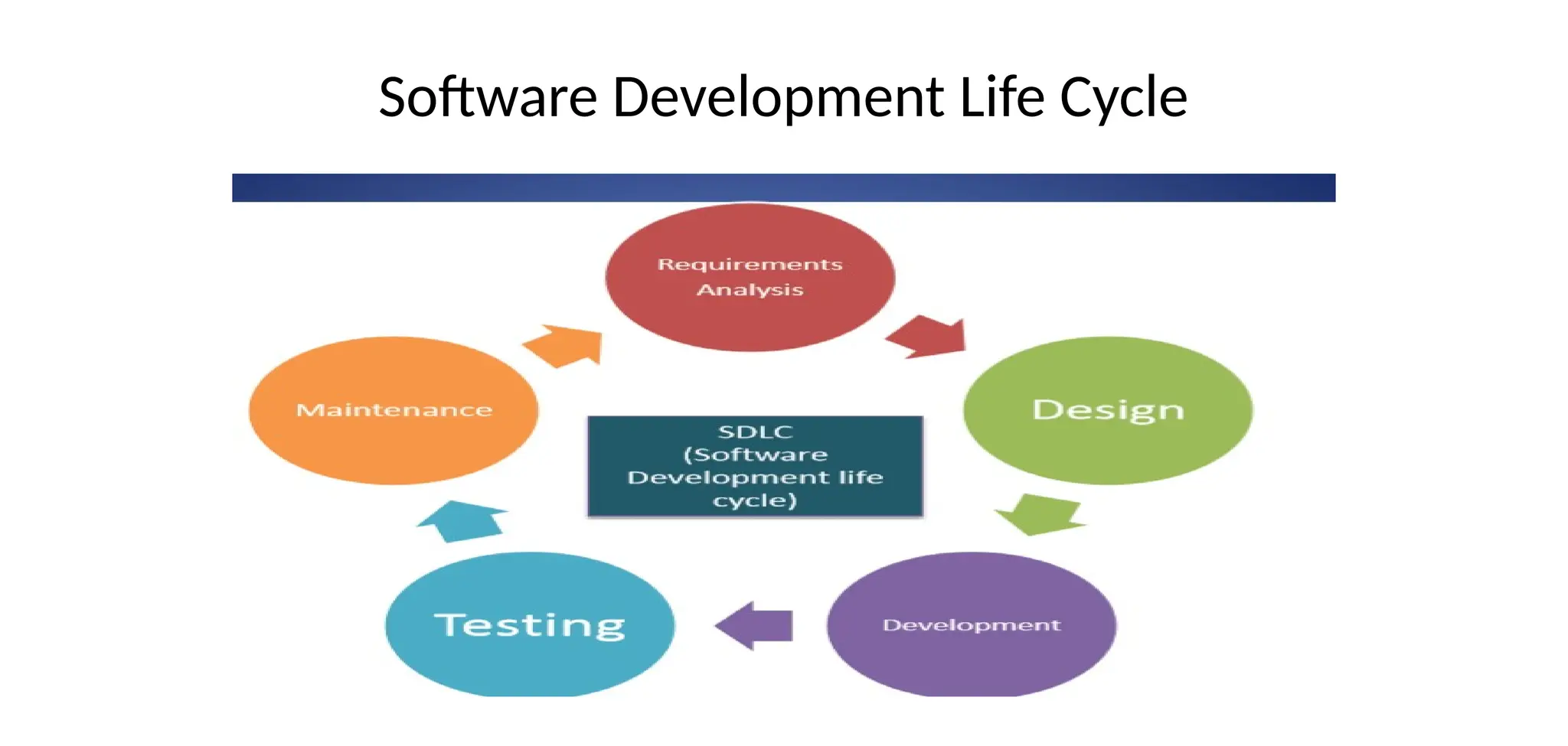
• Each process model followed the SDLC
• “Describing how to develop, maintain, replace and alter or enhance specific
software”
Software Development Life Cycle
Prescriptive Process Model
• Prescriptive process models advocate an orderly approach to software
engineering.
i.e Defines a distinct set of activities, actions, tasks, milestones, and work
products that are required to engineer high-quality software
• The activities may be linear, incremental, or evolutionary.
• Waterfall Model –represents elements of a linear process flow
• Incremental Model – combines elements of linear and parallel process
flows
• Evolutionary Model – follows the evolutionary process flow that combines
elements of linear and iterative process flows
• Prototyping
• Spiral model
• Concurrent Model – combines elements of iterative and parallel process
flows
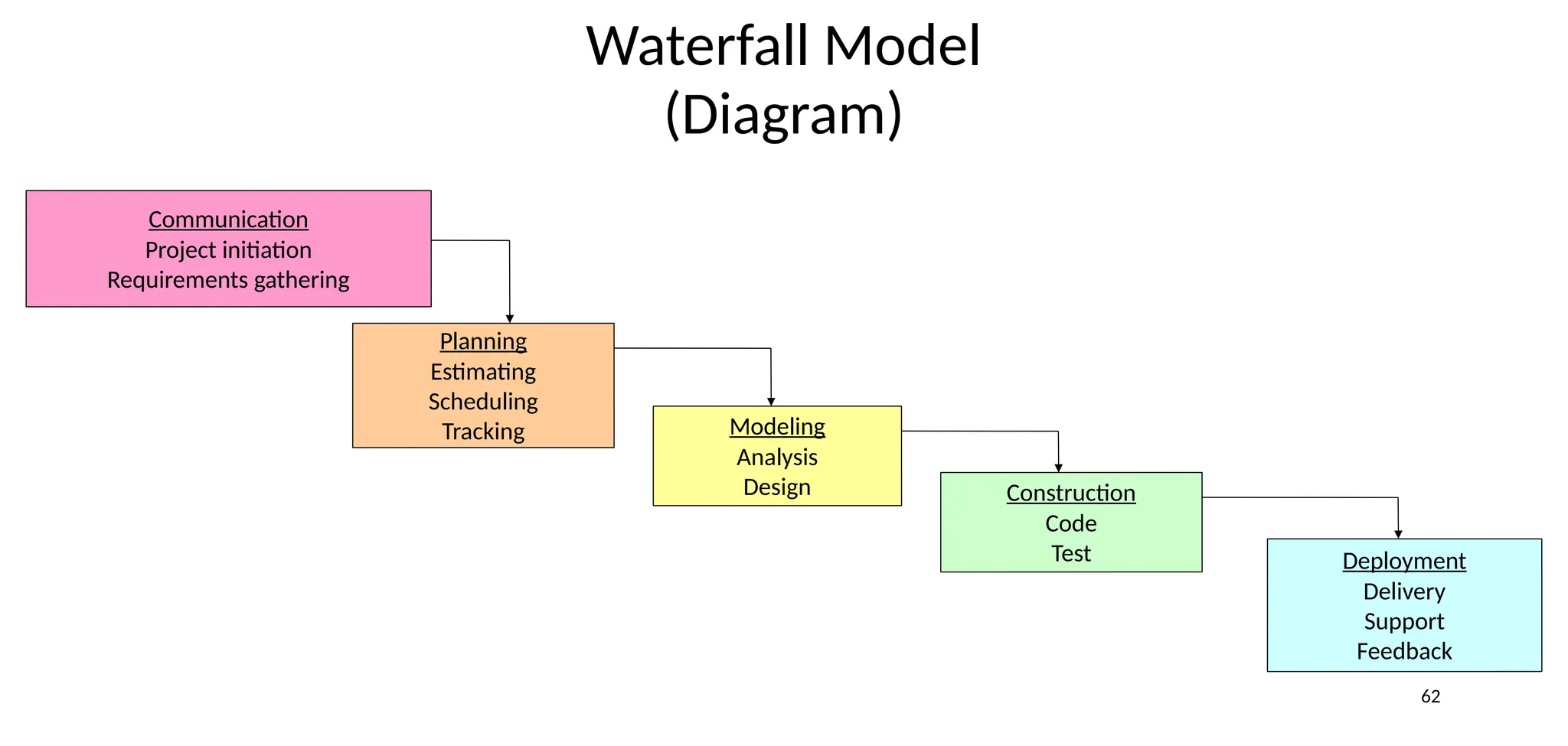
Waterfall Model
• Oldest software lifecycle model
• Proposed by Winston Royce in 1970
• Used when requirements are well understood and risk is low
• Work flow is in a linear (i.e., sequential) fashion
62
Waterfall Model
(Diagram)
Communication
Project initiation
Requirements gathering
Planning
Estimating
Scheduling
Tracking Modeling
Analysis
Design Construction
Code
Test Deployment
Delivery
Support
Feedback
Requirement gathering and Analysis.
• This is the first phase of waterfall model which includes a meeting
with the customer to understand his requirements.
• This is the most crucial phase as any misinterpretation at this
stage may give rise to validation issues later.
• The software definition must be detailed and accurate with no
ambiguities.
• It is very important to understand the customer requirements and
expectations so that the end product meets his specifications.
• Requirement gathering and Analysis phase the basic requirements
of the system must be understood by software engineer, who is also
called ANALYST.
• All this requirements are then well documented and discussed
further with the customer for reviewing.
DESIGN
• The customer requirements are broken down into logical modules for the
ease of implementation. Hardware and software requirements for every
module are Identified and designed accordingly.
• Also the inter relation between the various logical modules is established at
this stage. Algorithms and diagrams defining the scope and objective of
each logical model are developed.
• In short, this phase lays a fundamental for actual programming and
implementation
• It is an intermediate step between requirements analysis and coding.
Design focuses on program attribute such as-
• Data Structure.
• Software Architecture.
• Algorithm Details
etc…….
• The requirements are translated in some easy to represent form using which
coding can be done effectively and efficiently.
• The design needs to be documented for further use.
Coding
• Coding is a step in which design is translated into machine-readable form.
• If design is done in sufficient detail then coding can be done effectively.
Programs are created in this phase.
• In this phase all software divided into small module then after doing coding
for that small module rather than do coding whole software.
• According to design programmers do code and make class and structure of
whole software
Testing
• In this stage, both individual components and the integrated whole are methodically verified to
ensure that they are error-free and fully meet the requirements outlined in the first step.
• In this phase testing whole software into two parts
1) HARDWARE
2) SOFTWARE.
Maintenance
• This is the final phase of the waterfall model, in which the completed
software product is handed over to the client after alpha, beta testing.
• After the software has been deployed on the client site, it is the duty of the
software development team to undertake routine maintenance activities by
visiting the client site.
• If the customer suggests changes or enhancements the software process has
to be followed all over again right from the first phase i.e. requirement
analysis.
• The usually the longest stage of the software. In this phase the software is
updated to:
• Meet the changing customer needs
• Adapted to accommodate changes in the external environment
• Correct errors and oversights previously undetected in the testing phases
• Enhancing the efficiency of the software
Observe that feed back loops allow for corrections to be incorporated into the
model.
When to use the Waterfall Model
• Requirements are very well known
• Product definition is stable
• Technology is understood
• New version of an existing product
• Porting an existing product to a new platform.
72
Waterfall Model
(Problems)
• Doesn't support iteration, so changes can cause confusion
• Difficult for customers to state all requirements explicitly and up front
• Requires customer patience because a working version of the program
doesn't occur until the final phase
Advantages
• Easy to understand, easy to use
• Provides structure
• Milestones are clear
• Good for management control (plan, staff, track)
• Works well when quality is more important than cost or schedule
Disadvantages
• All requirements must be known upfront
• Deliverables created for each phase are considered frozen – inhibits flexibility
• Can give a false impression of progress
• Does not reflect problem-solving nature of software development , i.e.
iterations of phases
• One big integration at the end
• Little opportunity for customer to preview the system (until it may be too late)
V-Model
V Model:
• A variation of the waterfall model
• It is also known as Verification and Validation model.
• It is based on association of a testing phase for each corresponding
development stage.
• For every single phase in the development cycle there is a directly
associated testing phase.
• This is a highly disciplined model and next phase starts only after
completion of the previous phase.
• A variant of the Waterfall that emphasizes the verification and validation of
the product.
• Testing of the product is planned in parallel with a corresponding phase of
development.
STEPS
• Project and Requirements Planning – allocate resources
• Product Requirements and Specification Analysis – complete
specification of the software system
• Architecture or High-Level Design – defines how software functions
fulfill the design
• Detailed Design – develop algorithms for each architectural component.
• Production, operation and maintenance – provide for enhancement and
corrections.
• System and acceptance testing – check the entire software system in its
environment.
• Integration and Testing – check that modules interconnect correctly.
• Unit testing – check that each module acts as expected.
• Coding – transform algorithms into software.
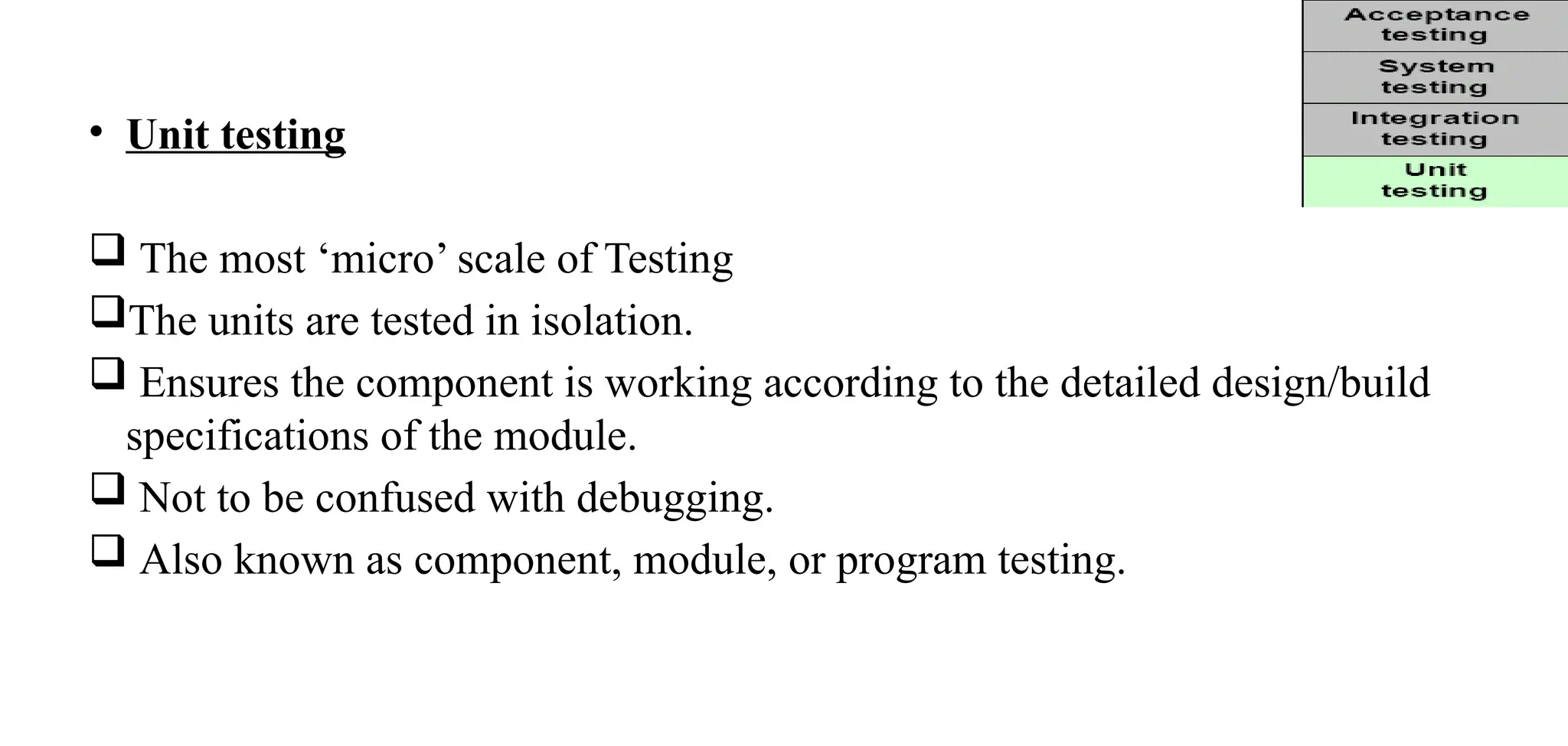
• Unit testing
 The most ‘micro’ scale of Testing
The units are tested in isolation.
 Ensures the component is working according to the detailed design/build
specifications of the module.
 Not to be confused with debugging.
 Also known as component, module, or program testing.
• Integration Testing
 Testing of more than one (tested) unit together to determine if they function correctly.
It is done using the integration test design prepared during the architecture design
phase.
 Helps assembling incrementally a whole system, ensuring the correct ‘flow’ of data
from the first through the final component.
 Done by developers/designers and testers in collaboration
 Also called Interface Testing or Assembly Testing.
System testing
Testing the system as a whole - Black-box type testing that is based on overall requirements
specifications; covers all combined parts of a system.
 Ensures that system meets all functional and business requirements.
 Focus
 Verifying that specifications are met
 Validating that the system can be used for the intended purpose
 The system test design is derived from the system design documents and is used in this phase.
 It can involve a number of specialized types of tests to check performance, stress, documentation
etc. Sometimes testing is automated using testing tools.
 Done by Independent testing group
• Acceptance testing
 To determine whether a system satisfies its acceptance criteria and business requirements or
not.
 Similar to System testing in that the whole system is checked, but the important difference
is the change in focus.
 Done by real business users.
 It enables the customer to determine whether to accept the system or not.
 Also called as Beta Testing, Application Testing or End User Testing.
 Approach
 Should be performed in real operating environment .
 Customer should be able to perform any test based on their business processes.
 Final Customer sign-off.
V-Shaped Strengths
• Emphasize planning for verification and validation of the product in early
stages of product development
• Each deliverable must be testable
• Project management can track progress by milestones
• Easy to use
V-Shaped Weaknesses
• Does not easily handle concurrent events
• Does not handle iterations
• Does not easily handle dynamic changes in requirements
• Does not contain risk analysis activities
When to use the V-Shaped Model
• Excellent choice for systems requiring high reliability – hospital patient
control applications
• All requirements are known up-front
• When it can be modified to handle changing requirements beyond analysis
phase
• Solution and technology are known.
• The V-shaped model should be used for small to medium sized projects
where requirements are clearly defined and fixed.
• The V-Shaped model should be chosen when technical resources are
available with needed technical expertise.
• High confidence of customer is required for choosing the V-Shaped
model approach.
• Since, no prototypes are produced, there is a very high risk involved in
meeting customer expectations.
Incremental Process Model
• All requirements are known
• Combines the advantages of both waterfall and prototype models.
• System will be delivered in parts.
• Work flow is in a linear (i.e., sequential) fashion within an increment
and is staggered between increments
Incremental Process Steps
1. Customer identification—services provided by the system.
2. Then identify which of the services are most important and which are least important.
3. No of delivery increments are then identified with sub-set of the system functionality .
4. Highest priority services delivered first.
5. Requirements for the first increment are defined in detail
6. First Increment is developed and delivered ..customer can put into service.(Benefit for
customer?)
7. During development ….further requirements analysis for later increments can take place
It basically:
• Divides the overall project into a number of increments.
• Then it applies the waterfall model to each increment.
• The system is put into production when the first increment is delivered.
• As time passes additional increments are completed and added to the working
system
Bui
ld2
bui
ld1
bui
ld3
Whole
requir
ement
• Software releases in increments
• 1st
increment constitutes Core product
• Basic requirements are addressed
• Core product undergoes detailed evaluation by the customer
• As a result, plan is developed for the next increment
Plan addresses the modification of core product to better meet the needs
of customer
• Process is repeated until the complete product is produced
Advantages:
• Generates working software quickly and early during the software life
cycle.
• This model is more flexible – less costly to change scope and requirements.
• It is easier to test and debug during a smaller iteration.
• In this model customer can respond to each built.
• Lowers initial delivery cost.
• Easier to manage risk because risky issues are identified and handled
during it’s iteration.
Disadvantages:
• Needs good planning and design.
• Needs a clear and complete definition of the whole system before it
can be broken down and built incrementally.
• Total cost is higher than waterfall.
When to use the Incremental model
• When the requirements of the complete system are clearly defined and
understood.
• Major requirements must be defined; however, some details can evolve
with time.
• There is a need to get a product to the market early.
• A new technology is being used Resources with needed skill set are not
available
Problem :
• User inconveniency
Evolutionary Process Model
Prototyping Model
• When a customer defines a set of general objectives for a software but does not identify detailed I/O or processing
requirements.
• A prototype is built to understand the requirements.
• By using this prototype, the client can get an “actual feel” of the system
• The interactions with prototype can enable the client to better understand the requirements of the desired system.
Prototyping is an attractive idea for complicated and large systems
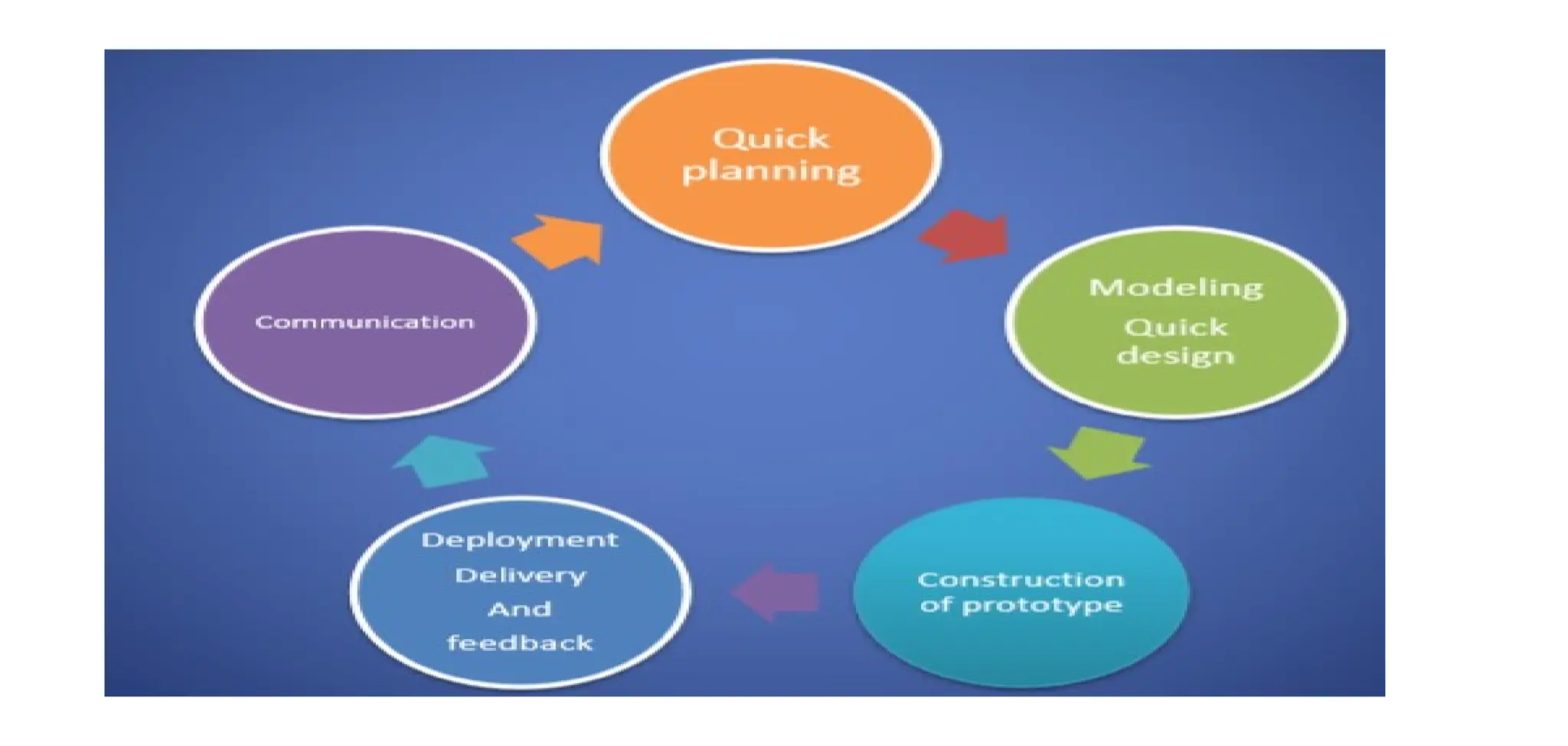
Consists of 4 iterating phases:
• Requirements gathering.
• Design and build SW prototype.
• Evaluate prototype with customer.
• Refine requirements.
• Follows an evolutionary and iterative approach
• Used when requirements are not well understood
• Serves as a mechanism for identifying software requirements
• Focuses on those aspects of the software that are visible to the
customer/user
• Feedback is used to refine the prototype
Advantages:
• Users are actively involved in the development
• Users get a better understanding of the system being developed.
• Errors can be detected much earlier.
• Quicker user feedback is available leading to better solutions.
Disadvantages:
• Practically, this methodology may increase the complexity of the system as
scope of the system may expand beyond original plans.
• Incomplete problem analysis.
Problems
• The customer sees a "working version" of the software, wants to stop all
development and then buy the prototype after a "few fixes" are made.
• Developers often make implementation compromises to get the software
running quickly (e.g., language choice, user interface, operating system
choice, inefficient algorithms)
When to use Prototype Model
• Prototype model should be used when the desired system needs to
have a lot of interaction with the end users.
• Typically, online systems, web interfaces have a very high amount of
interaction with end users, are best suited for Prototype model.
• They are excellent for designing good human computer interface
systems.
Spiral Model
• Invented by Dr. Barry Boehm in 1988
• Follows an evolutionary approach
• similar to the incremental model,
• It couples the iterative nature of prototyping with the controlled and
systematic aspects of the waterfall model and is a risk-driven process
model generator that is used to guide multi-stakeholder concurrent
engineering of software intensive systems.
• Two main distinguishing features: one is cyclic approach for incrementally
growing a system’s degree of definition and implementation while
decreasing its degree of risk. The other is a set of anchor point milestones
for ensuring stakeholder commitment to feasible and mutually satisfactory
system solutions.
Planning Phase
• Requirements are gathered(SRS)
Risk Analysis:
• a process is undertaken to identify risk and alternate solutions.
• A prototype is produced at the end of the risk analysis phase.
Engineering Phase :
• software is developed,
• Testing at the end of the phase
Evaluation phase:
• This phase allows the customer to evaluate the output of the project to date before
the project continues to the next spiral.
Advantages :
• High amount of risk analysis hence, avoidance of Risk is enhanced.
• Good for large and mission-critical projects.
• Strong approval and documentation control.
• Additional Functionality can be added at a later date.
• Software is produced early in the software life.
Disadvantages :
• Can be a costly model to use.
• Risk analysis requires highly specific expertise.
• Project’s success is highly dependent on the risk analysis phase.
• Doesn’t work well for smaller projects.
When to use Spiral model:
• When costs and risk evaluation is important
• For medium to high-risk projects
• Long-term project commitment because of potential changes to economic
priorities
• Users are unsure of their needs
• Requirements are complex
• New product line
• Significant changes are expected
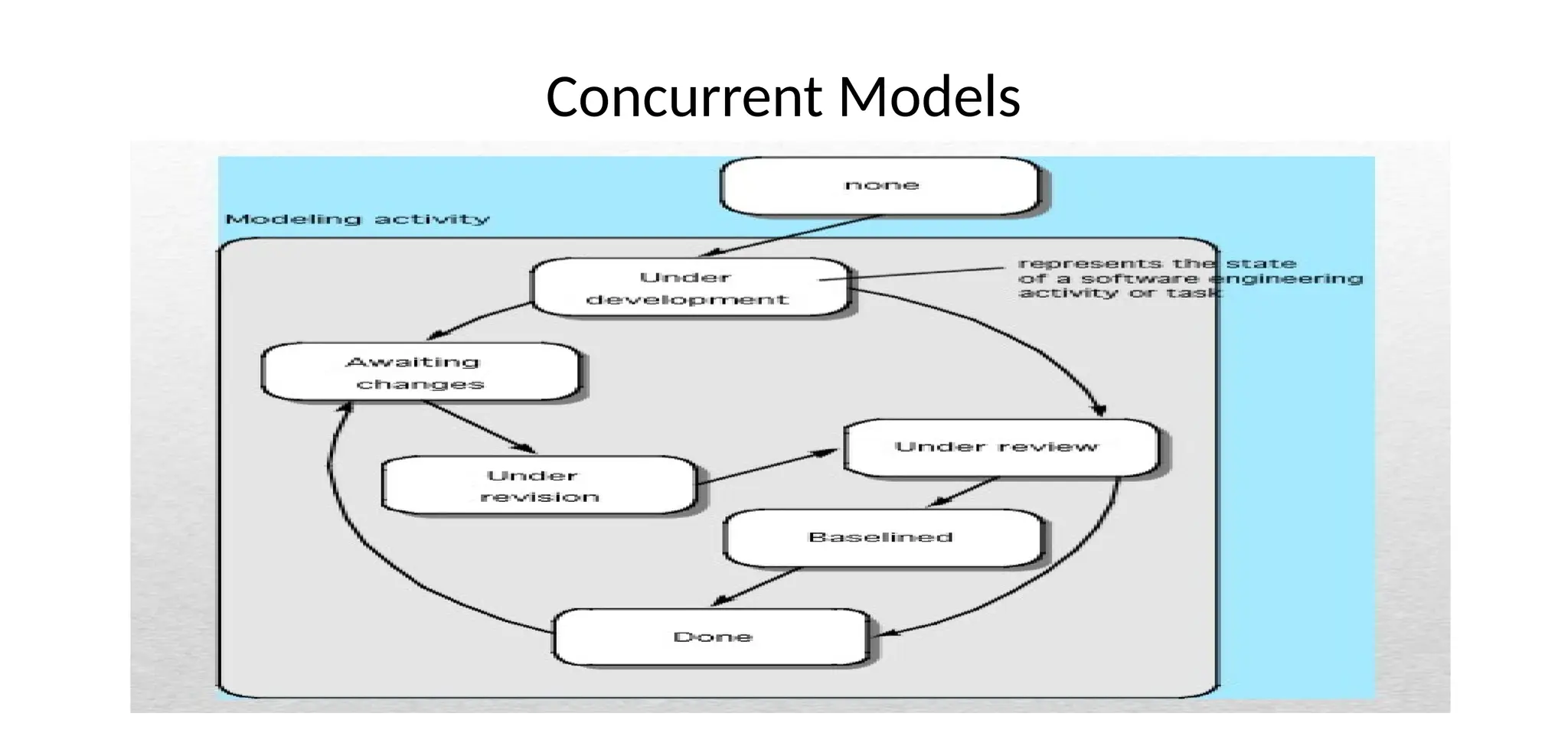
Concurrent Models
• The concurrent process model sometimes called concurrent engineering
allows to a software team to represent iterative and concurrent elements of
any process model.
• This model is suited to all types of software but is generally used for client
server applications
• In real life the software development activities do not take place in sequence.
• Most activities will be going on concurrently but reside in different states.
• The states will change when some event occurs. So in this model all the
activities are shown along with their states at any point of time.
• As time goes on the states of the activities will change.
• It provides an accurate picture of the current state of a project.
• It defines software engineering as a network of activities each in a different
state, each dependent on one another and each going on concurrently.
• Awaiting changes state – after the completion of the 1st iteration
(communication activity)
• None state – while initial communication is carried out (modeling activity)
• Under development state – after the communication is completed.
• Awaiting changes state – if any changes in the requirement must be made
Waterfall vs Spiral:
• The sequential nature of the waterfall model if a bug is found or an error is incurred for a
preliminary reason, we need to start from the scratch again.
• Whereas, under spiral model every prototype is tried and tested and hence the chances of find
errors at later stages are very rare.
• In spiral model, we can easily adjust the software development with the required changes.
• The prototypes which are created in every stage, enables us to roll back a few steps.
• Waterfall model the stages are executed under a sequential flow. Every new phase is processed
only after completing the previous phase.
Incremental Vs Spiral:
• Incremental Development is a practice where the system functionalities are sliced into increments
(small portions).
• In each increment, a vertical slice of functionality is delivered by going through all the activities
of the software development process, from the requirements to the deployment.
• Incremental Development (adding) is often used together with Iterative Development (redo) in
software development. This is referred to as Iterative and Incremental Development (IID).
• The spiral model is similar to the incremental model, with more emphases placed on risk analysis.
• A software project repeatedly passes through these phases in iterations (called Spirals in this
model). The baseline spiral, starting in the planning phase, requirements are gathered and risk is
assessed.
Prototype Model Vs Spiral Model:
• Prototype model is suitable when the requirement of the client is not clear and it is supposed to
be changed. It doesn’t cover any risk management. While Spiral model is an enhancement of the
prototyping model with so many extra features.
Spiral model is called a meta model. Spiral model is made with the features of Prototype model
and Waterfall model. Spiral model takes special care about Risk Analysis.
Where as it is not given importance in Prototype model.
• Prototype model that end when software is delivered after software deliver is not responsible for
any problem of software.
• The spiral model can be adaptable and to apply throughout the life of computer software.
115
Other Process Models
• Component based development—the process to apply when reuse is a
development objective
• Formal methods—emphasizes the mathematical specification of requirements
• Aspects Oriented Software Development—provides a process and
methodological approach for defining, specifying, designing, and constructing
aspects
• Unified Process—a “use-case driven, architecture-centric, iterative and
incremental” software process closely aligned with the Unified Modeling
Language (UML)

UNIT 1 - MPP.pptxdfvvnfuvbrrujfvbvndvnbn

  • 1.
  • 2.
    Course Out Comes CO1:Realize the concepts of software and software process models. CO2: Analyze and model Software requirements CO3: Apprise system design concepts and process CO4: Apprehend software testing strategies CO5: Comprehend post software deployment activities.
  • 3.
    Unit 1 • SoftwareProcess The Nature of Software, The software Process, Software Engineering Practice, A Generic Process Model, Process Assessment and Improvement, Prescriptive Process Models, Agile development: Agility, agile process and principles, Extreme programming.
  • 4.
    The Nature ofSoftware What is Software • Software  Computer programs and associated documentation.  Software products may be developed for a particular customer or may be developed for a general market.
  • 5.
    Where can youfind software? Software is Almost Everywhere.
  • 6.
     Software can defineas:  Instruction – executed provide desire features, function & performance.  Data structure – to adequately manipulate operation.  Documents – operation and use of the program.  Software products may be developed for a particular customer or may be developed for a general market.  Software products may be  Generic - developed to be sold to a range of different customers e.g. PC software such as Excel or Word.  custom - developed for a single customer according to their specification.
  • 7.
    Evolving Role ofSoftware Software is a product • Transforms information - produces, manages, acquires, modifies, displays, or transmits information • Delivers computing potential of hardware and networks Software is a vehicle for delivering a product • Controls other programs (operating system) • Effects communications (networking software) • Helps build other software (software tools & environments)
  • 8.
    • What isSoftware Engineering? Software Engineering is an engineering discipline that is concerned with all aspects of software production. Software engineers should adopt a systematic and organized approach to their work and use appropriate tools and techniques depending on the problem to be solved, the development constraints and the resources available
  • 9.
    Essential attributes ofgood software • Maintainability Software should be written in such a way so that it can evolve to meet the changing needs of customers. This is a critical attribute because software change is an inevitable requirement of a changing business environment. • Dependability and security Software dependability includes a range of characteristics including reliability, security and safety. Dependable software should not cause physical or economic damage in the event of system failure. Malicious users should not be able to access or damage the system.
  • 10.
    • Efficiency Software shouldnot make wasteful use of system resources such as memory and processor cycles. Efficiency therefore includes responsiveness, processing time, memory utilisation, etc. • Acceptability Software must be acceptable to the type of users for which it is designed. This means that it must be understandable, usable and compatible with other systems that they use.
  • 11.
    Manufacturing vs. Development (Softwarehas characteristics that are considerably different than those of hardware) • Once a hardware product has been manufactured, it is difficult or impossible to modify. In contrast, software products are routinely modified and upgraded. • In hardware, hiring more people allows you to accomplish more work, but the same does not necessarily hold true in software. • Unlike hardware, software costs are concentrated in design rather than production.
  • 12.
    Software Characteristics  Software isdeveloped or engineered; it is not manufactured in the classical sense.  Software does not “wear out” but it does deteriorate.  Software continues to be custom built, as industry is moving toward component based construction.
  • 13.
  • 14.
    Failure curve forSoftware When a hardware component wears out, it is replaced by a spare part. There are no software spare parts. Every software failure indicates an error in design or in the process through which design was translated into machine executable code. Therefore, software maintenance involves considerably more complexity
  • 15.
    Software Application Domains •System software • Application software • Engineering/scientific software • Embedded software • Product line software • Web applications • Artificial intelligence software
  • 16.
    System Software: • Systemsoftware is a collection of programs written to service other programs. • Software is determinate some are indeterminate • It is characterized by heavy interaction with computer hardware; heavy usage by multiple users; concurrent operation that requires scheduling, resource sharing, and sophisticated process management; complex data structures; and multiple external interfaces. Ex. Compilers, operating system, drivers etc.
  • 17.
    Application Software : •Application software consists of standalone programs that solve a specific business need. • Application software is used to control the business function in real-time. Engineering /Scientific software: • Characterized by "number crunching" algorithms. • Applications range from astronomy to volcanology, from automotive stress analysis to space shuttle orbital dynamics, and from molecular biology to automated manufacturing. Ex: Computer Aided Design (CAD), system stimulation etc.
  • 18.
    Embedded Software: • Itresides in read-only memory and is used to control products and systems • Embedded software can perform limited and esoteric functions. Ex: keypad control for a microwave oven. Product line software: • Designed to provide a specific capability for use by many different customers, product line software can focus on a limited and esoteric marketplace. Ex: Word processing, spreadsheet, CG, multimedia, etc.
  • 19.
    Web Applications: • Webapps can be little more than a set of linked hypertext files. • It evolving into sophisticated computing environments that not only provide standalone features, functions but also integrated with corporate database and business applications. Artificial Intelligence software • AI software makes use of non-numerical algorithms to solve complex problems that are not amenable to computation or straightforward analysis Ex: Robotics, expert system, game playing, etc.
  • 20.
    Legacy software (Older Programs) •The software must be adapted to meet the needs of new computing environment and technology • The software must be enhanced to implement new business requirement. • The software must be extended to make it interoperable with modern systems or databases. • The software must be re-architected to make it viable within a network environment
  • 21.
    Software Process • Aset of activities whose goal is the development or evolution of software. Generic Process Framework Activities • Communication: – Heavy communication and collaboration with customers, stakeholders, team – Encompasses requirements gathering and related activities
  • 22.
    • Planning: – Workflowthat is to follow – Describe technical task, likely risk, resources will require, work products to be produced and a work schedule. • Modeling: – Help developer and customer to understand requirements (Analysis of requirements) & Design of software • Construction: – Code generation: either manual or automated or both – Testing – to uncover error in the code. • Deployment: – Delivery to the customer for evaluation – Customer provide feedback
  • 23.
    Umbrella Activities • Softwareproject tracking and control – Assessing progress against the project plan. – Take adequate action to maintain schedule. • Formal technical reviews – Assessing software work products in an effort to uncover and remove errors before goes into next action or activity. • Software quality assurance – Define and conducts the activities required to ensure software quality.
  • 24.
    • Software configurationmanagement – Manages the effects of change. • Document preparation and production – Help to create work products such as models, documents, logs, form and list. • Reusability management – Define criteria for work product reuse – Mechanisms to achieve reusable components. • Measurement – Define and collects process, project, and product measures – Assist the team in delivering software that meets customer’s needs. • Risk management – Assesses risks that may effect that outcome of project or quality of product (i.e. software)
  • 25.
    Software Engineering Practice TheEssence of Practice: • Understand the problem (communication and analysis). • Plan a solution (Modeling and software design) • Carry out the plan(code generation) • Examine the result of accuracy(testing and quality assurance)
  • 26.
    27 Understand the Problem •Who has a stake in the solution to the problem? That is, who are the stakeholders? • What are the unknowns? What data, functions, and features are required to properly solve the problem? • Can the problem be compartmentalized? Is it possible to represent smaller problems that may be easier to understand? • Can the problem be represented graphically? Can an analysis model be created?
  • 27.
    28 Plan the Solution •Have you seen similar problems before? Are there patterns that are recognizable in a potential solution? Is there existing software that implements the data, functions, and features that are required? • Has a similar problem been solved? If so, are elements of the solution reusable? • Can subproblems be defined? If so, are solutions readily apparent for the subproblems? • Can you represent a solution in a manner that leads to effective implementation? Can a design model be created?
  • 28.
    29 Carry Out thePlan • Does the solution conform to the plan? Is source code traceable to the design model? • Is each component part of the solution provably correct? Has the design and code been reviewed, or better, have correctness proofs been applied to algorithm?
  • 29.
    30 Examine the Result •Is it possible to test each component part of the solution? Has a reasonable testing strategy been implemented? • Does the solution produce results that conform to the data, functions, and features that are required? Has the software been validated against all stakeholder requirements?
  • 30.
    31 Hooker’s General Principles •1: The Reason It All Exists • 2: Keep It Simple, Stupid! • 3: Maintain the Vision • 4: What You Produce, Others Will Consume • 5: Be Open to the Future • 6: Plan Ahead for Reuse • 7: Think!
  • 31.
    Software Processes inSoftware Engineering • Software processes in software engineering refer to the methods and techniques used to develop and maintain software. Some examples of software processes include: • Waterfall: a linear, sequential approach to software development, with distinct phases such as requirements gathering, design, implementation, testing, and maintenance. • Agile: a flexible, iterative approach to software development, with an emphasis on rapid prototyping and continuous delivery.
  • 32.
    • Scrum: apopular Agile methodology that emphasizes teamwork, iterative development, and a flexible, adaptive approach to planning and management. • DevOps: a set of practices that aims to improve collaboration and communication between development and operations teams, with an emphasis on automating the software delivery process. • Each process has its own set of advantages and disadvantages, and the choice of which one to use depends on the specific project and organization. • Software is the set of instructions in the form of programs to govern the computer system and to process the hardware components. To produce a software product the set of activities is used. This set is called a software process. • Software Development : In this process, designing, programming, documenting, testing, and bug fixing is done.
  • 33.
    There are threecomponents of the software: These are : Program, Documentation, and Operating Procedures. 1. Program – A computer program is a list of instructions that tell a computer what to do. 2. Documentation – Source information about the product contained in design documents, detailed code comments, etc. 3. Operating Procedures – Set of step-by-step instructions compiled by an organization to help workers carry out complex routine operations.
  • 34.
    Code: the instructionsthat a computer executes in order to perform a specific task or set of tasks. Data: the information that the software uses or manipulates. User interface: the means by which the user interacts with the software, such as buttons, menus, and text fields.
  • 35.
    Libraries: pre-written codethat can be reused by the software to perform common tasks. Documentation: information that explains how to use and maintain the software, such as user manuals and technical guides. Test cases: a set of inputs, execution conditions, and expected outputs that are used to test the software for correctness and reliability. Configuration files: files that contain settings and parameters that are used to configure the software to run in a specific environment. Build and deployment scripts: scripts or tools that are used to build, package, and deploy the software to different environments. Metadata: information about the software, such as version numbers, authors, and copyright information. All these components are important for software development, testing and deployment.
  • 36.
    There are fourbasic key process activities: 1. Software Specifications – In this process, detailed description of a software system to be developed with its functional and non-functional requirements. 2. Software Development – In this process, designing, programming, documenting, testing, and bug fixing is done. 3. Software Validation – In this process, evaluation software product is done to ensure that the software meets the business requirements as well as the end users needs. 4. Software Evolution – It is a process of developing software initially, then timely updating it for various reasons.
  • 37.
    Software Crisis : 1.Size and Cost – Day to day growing complexity and expectation out of software. Software are more expensive and more complex. 2. Quality – Software products must have good quality. 3. Delayed Delivery – Software takes longer than the estimated time to develop, which in turn leads to cost shooting up. 4. The term “software crisis” refers to a set of problems that were faced by the software industry in the 1960s and 1970s, such as: 5. High costs and long development times: software projects were taking much longer and costing much more than expected.
  • 38.
    6. Low quality:software was often delivered late, with bugs and other defects that made it difficult to use. 7. Lack of standardization: there were no established best practices or standards for software development, making it difficult to compare and improve different approaches. 8. Lack of tools and methodologies: there were few tools and methodologies available to help with software development, making it a difficult and time-consuming process. These problems led to a growing realization that the traditional approaches to software development were not effective and needed to be improved. This led to the development of new software development methodologies, such as the Waterfall and Agile methodologies, as well as the creation of new tools and technologies to support software development. • However, even today, software crisis could be seen in some form or the other, like for example software projects going over budget, schedule and not meeting the requirement.
  • 39.
    Need for ProcessModel: • The software development team must decide the process model that is to be used for software product development and then the entire team must adhere to it. This is necessary because the software product development can then be done systematically. • Each team member will understand what is the next activity and how to do it. Thus process model will bring the definiteness and discipline in overall development process. • Every process model consists of definite entry and exit criteria for each phase. Hence the transition of the product through various phases is definite. • If the process model is not followed for software development then any team member can perform any software development activity, this will ultimately cause a chaos and software project will definitely fail without using process model, it is difficult to monitor the progress of software product. • Thus process model plays an important rule in software engineering.
  • 40.
    • Software processmodels are abstractions of the software development process, specifying the stages and order of activities. Here are some popular ones: 1. Waterfall model : A linear, sequential approach with distinct phases like requirements gathering, design, implement ation, testing, and maintenance 1 . 2. Agile model: An iterative approach emphasizing rapid prototyping and continuous delivery1 . 3. Incremental model: Builds software in small increments, adding functionality gradually1 . 4. V model: A variation of the waterfall model, emphasizing testing at each stage1 5. RAD model: Rapid Application Development, focusing on quick development and user feedback1 . 6. Iterative model: Repeated cycles of development, refinement, and testing1 . 7. Spiral model: Combines iterative development with risk analysis and planning1
  • 41.
  • 42.
    A Generic ProcessModel Definition of Software Process : • A framework for the activities, actions, and tasks that are required to build high-quality software. • SP defines the approach that is taken as software is engineered. • which also encompasses technologies that populate the process– technical methods and automated tools.
  • 43.
    A Software ProcessFramework Process framework Umbrella Activities Framework activity 1 Framework activity n Software Process Framework activities work tasks work products milestones & deliverables Quality Assurance checkpoints Process Framework Umbrella Activities
  • 44.
    • As wediscussed before, a generic process framework for software engineering defines five framework activities communication, planning, modeling, construction, and deployment. • In addition, a set of umbrella activities- project tracking and control, risk management, quality assurance, configuration management, technical reviews, and others are applied throughout the process. • How the framework activities and the actions and tasks that occur within each activity are organized with respect to sequence and time? • Answer: See the process flow
  • 45.
  • 46.
    Process Flow • Linearprocess flow executes each of the five activities in sequence. • An iterative process flow repeats one or more of the activities before proceeding to the next. • An evolutionary process flow executes the activities in a circular manner. Each circuit leads to a more complete version of the software. • A parallel process flow executes one or more activities in parallel with other activities ( modeling for one aspect of the software in parallel with construction of another aspect of the software).
  • 47.
    Identifying task set •Before you can proceed with the process model, a key question: what actions are appropriate for a framework activity given the nature of the problem, the characteristics of the people and the stakeholders. • A task set defines the actual work to be done to accomplish the objectives of a software engineering action. • A list of the task to be accomplished. • A list of the work products to be produced. • A list of the quality assurance filters to be applied.
  • 48.
    • For example,a small software project requested by one person with simple requirements, the communication activity might encompass little more than a phone all with the stakeholder. Therefore, the only necessary action is phone conversation, the work tasks of this action are: 1. Make contact with stakeholder via telephone. 2. Discuss requirements and take notes. 3. Organize notes into a brief written statement of requirements. 4. E-mail to stakeholder for review and approval.
  • 49.
    The task setsfor Requirements gathering action for a simple project may include: 1. Make a list of stakeholders for the project. 2. Invite all stakeholders to an informal meeting. 3. Ask each stakeholder to make a list of features and functions required. 4. Discuss requirements and build a final list. 5. Prioritize requirements. 6. Note areas of uncertainty
  • 50.
    Process Pattern A processpattern • describes a process-related problem that is encountered during software engineering work, • identifies the environment in which the problem has been encountered, and • suggests one or more proven solutions to the problem. • Stated in more general terms, a process pattern provides you with a template a consistent method for describing problem solutions within the context of the software process. (defined at different levels of abstraction) 1.Problems and solutions associated with a complete process model (e.g. prototyping). 2.Problems and solutions associated with a framework activity (e.g. planning) or 3.an action with a framework activity (e.g. project estimating).
  • 51.
    Process Pattern Types •Stage patterns—defines a problem associated with a framework activity for the process. It includes multiple task patterns as well. For example: Establishing Communication would incorporate the task pattern Requirements Gathering and others. • Task patterns—defines a problem associated with a software engineering action or work task and relevant to successful software engineering practice. • Phase patterns—define the sequence of framework activities that occur with the process, even when the overall flow of activities is iterative in nature. Example includes Sprial Model or Prototyping.
  • 52.
    • Initial context– Describes the condition under which the pattern applies • Problem – the specific problem solved by the pattern. • Solution – describes how to implement process pattern • Resulting context – describes the condition that will result once the pattern has been successfully implemented. • Related problem- Provides list of all process pattern that are directly related to current pattern. • Known uses-Indicate the specific instances in which the pattern and examples applicable.
  • 53.
    Process Assessment andImprovement • Standard CMMI assessment method for process improvement(SCAMPI) - provides a five step process assessment model that incorporates initiating, diagnosing, establishing, acting and learning. • CMM based appraisal for internal process improvement (CBA IPI) - provides a diagnostic technique for assessing the relative maturity of a software organization using the SEI CMM.
  • 54.
    • SPICE(ISO/IEC 15504) -standard defines a set of requirements for software process assessment. The intent of the standard is to assist organizations in developing an objective evaluation of the efficacy of any defined software process. • ISO 9001:2000 for software - is a generic standard that applies to any organization that wants to improve the overall quality of the products, systems, or services that it provides. Therefore, the standard is directly applicable to software organizations and companies.
  • 55.
    Software Process Model •A software process model is a road map that helps you create a timely, high-quality software. • Aim to produce a high quality software that meets customer expectation • Each process model followed the SDLC • “Describing how to develop, maintain, replace and alter or enhance specific software”
  • 56.
  • 57.
    Prescriptive Process Model •Prescriptive process models advocate an orderly approach to software engineering. i.e Defines a distinct set of activities, actions, tasks, milestones, and work products that are required to engineer high-quality software • The activities may be linear, incremental, or evolutionary.
  • 58.
    • Waterfall Model–represents elements of a linear process flow • Incremental Model – combines elements of linear and parallel process flows • Evolutionary Model – follows the evolutionary process flow that combines elements of linear and iterative process flows • Prototyping • Spiral model • Concurrent Model – combines elements of iterative and parallel process flows
  • 59.
    Waterfall Model • Oldestsoftware lifecycle model • Proposed by Winston Royce in 1970 • Used when requirements are well understood and risk is low • Work flow is in a linear (i.e., sequential) fashion
  • 61.
    62 Waterfall Model (Diagram) Communication Project initiation Requirementsgathering Planning Estimating Scheduling Tracking Modeling Analysis Design Construction Code Test Deployment Delivery Support Feedback
  • 62.
    Requirement gathering andAnalysis. • This is the first phase of waterfall model which includes a meeting with the customer to understand his requirements. • This is the most crucial phase as any misinterpretation at this stage may give rise to validation issues later. • The software definition must be detailed and accurate with no ambiguities. • It is very important to understand the customer requirements and expectations so that the end product meets his specifications.
  • 63.
    • Requirement gatheringand Analysis phase the basic requirements of the system must be understood by software engineer, who is also called ANALYST. • All this requirements are then well documented and discussed further with the customer for reviewing.
  • 64.
    DESIGN • The customerrequirements are broken down into logical modules for the ease of implementation. Hardware and software requirements for every module are Identified and designed accordingly. • Also the inter relation between the various logical modules is established at this stage. Algorithms and diagrams defining the scope and objective of each logical model are developed. • In short, this phase lays a fundamental for actual programming and implementation • It is an intermediate step between requirements analysis and coding.
  • 65.
    Design focuses onprogram attribute such as- • Data Structure. • Software Architecture. • Algorithm Details etc……. • The requirements are translated in some easy to represent form using which coding can be done effectively and efficiently. • The design needs to be documented for further use.
  • 66.
    Coding • Coding isa step in which design is translated into machine-readable form. • If design is done in sufficient detail then coding can be done effectively. Programs are created in this phase. • In this phase all software divided into small module then after doing coding for that small module rather than do coding whole software. • According to design programmers do code and make class and structure of whole software
  • 67.
    Testing • In thisstage, both individual components and the integrated whole are methodically verified to ensure that they are error-free and fully meet the requirements outlined in the first step. • In this phase testing whole software into two parts 1) HARDWARE 2) SOFTWARE.
  • 68.
    Maintenance • This isthe final phase of the waterfall model, in which the completed software product is handed over to the client after alpha, beta testing. • After the software has been deployed on the client site, it is the duty of the software development team to undertake routine maintenance activities by visiting the client site. • If the customer suggests changes or enhancements the software process has to be followed all over again right from the first phase i.e. requirement analysis. • The usually the longest stage of the software. In this phase the software is updated to:
  • 69.
    • Meet thechanging customer needs • Adapted to accommodate changes in the external environment • Correct errors and oversights previously undetected in the testing phases • Enhancing the efficiency of the software Observe that feed back loops allow for corrections to be incorporated into the model.
  • 70.
    When to usethe Waterfall Model • Requirements are very well known • Product definition is stable • Technology is understood • New version of an existing product • Porting an existing product to a new platform.
  • 71.
    72 Waterfall Model (Problems) • Doesn'tsupport iteration, so changes can cause confusion • Difficult for customers to state all requirements explicitly and up front • Requires customer patience because a working version of the program doesn't occur until the final phase
  • 72.
    Advantages • Easy tounderstand, easy to use • Provides structure • Milestones are clear • Good for management control (plan, staff, track) • Works well when quality is more important than cost or schedule
  • 73.
    Disadvantages • All requirementsmust be known upfront • Deliverables created for each phase are considered frozen – inhibits flexibility • Can give a false impression of progress • Does not reflect problem-solving nature of software development , i.e. iterations of phases • One big integration at the end • Little opportunity for customer to preview the system (until it may be too late)
  • 74.
  • 75.
    V Model: • Avariation of the waterfall model • It is also known as Verification and Validation model. • It is based on association of a testing phase for each corresponding development stage. • For every single phase in the development cycle there is a directly associated testing phase. • This is a highly disciplined model and next phase starts only after completion of the previous phase.
  • 76.
    • A variantof the Waterfall that emphasizes the verification and validation of the product. • Testing of the product is planned in parallel with a corresponding phase of development. STEPS • Project and Requirements Planning – allocate resources • Product Requirements and Specification Analysis – complete specification of the software system • Architecture or High-Level Design – defines how software functions fulfill the design
  • 77.
    • Detailed Design– develop algorithms for each architectural component. • Production, operation and maintenance – provide for enhancement and corrections. • System and acceptance testing – check the entire software system in its environment. • Integration and Testing – check that modules interconnect correctly. • Unit testing – check that each module acts as expected. • Coding – transform algorithms into software.
  • 78.
    • Unit testing The most ‘micro’ scale of Testing The units are tested in isolation.  Ensures the component is working according to the detailed design/build specifications of the module.  Not to be confused with debugging.  Also known as component, module, or program testing.
  • 79.
    • Integration Testing Testing of more than one (tested) unit together to determine if they function correctly. It is done using the integration test design prepared during the architecture design phase.  Helps assembling incrementally a whole system, ensuring the correct ‘flow’ of data from the first through the final component.  Done by developers/designers and testers in collaboration  Also called Interface Testing or Assembly Testing.
  • 80.
    System testing Testing thesystem as a whole - Black-box type testing that is based on overall requirements specifications; covers all combined parts of a system.  Ensures that system meets all functional and business requirements.  Focus  Verifying that specifications are met  Validating that the system can be used for the intended purpose  The system test design is derived from the system design documents and is used in this phase.  It can involve a number of specialized types of tests to check performance, stress, documentation etc. Sometimes testing is automated using testing tools.  Done by Independent testing group
  • 81.
    • Acceptance testing To determine whether a system satisfies its acceptance criteria and business requirements or not.  Similar to System testing in that the whole system is checked, but the important difference is the change in focus.  Done by real business users.  It enables the customer to determine whether to accept the system or not.  Also called as Beta Testing, Application Testing or End User Testing.  Approach  Should be performed in real operating environment .  Customer should be able to perform any test based on their business processes.  Final Customer sign-off.
  • 82.
    V-Shaped Strengths • Emphasizeplanning for verification and validation of the product in early stages of product development • Each deliverable must be testable • Project management can track progress by milestones • Easy to use
  • 83.
    V-Shaped Weaknesses • Doesnot easily handle concurrent events • Does not handle iterations • Does not easily handle dynamic changes in requirements • Does not contain risk analysis activities
  • 84.
    When to usethe V-Shaped Model • Excellent choice for systems requiring high reliability – hospital patient control applications • All requirements are known up-front • When it can be modified to handle changing requirements beyond analysis phase • Solution and technology are known. • The V-shaped model should be used for small to medium sized projects where requirements are clearly defined and fixed.
  • 85.
    • The V-Shapedmodel should be chosen when technical resources are available with needed technical expertise. • High confidence of customer is required for choosing the V-Shaped model approach. • Since, no prototypes are produced, there is a very high risk involved in meeting customer expectations.
  • 86.
    Incremental Process Model •All requirements are known • Combines the advantages of both waterfall and prototype models. • System will be delivered in parts. • Work flow is in a linear (i.e., sequential) fashion within an increment and is staggered between increments
  • 88.
    Incremental Process Steps 1.Customer identification—services provided by the system. 2. Then identify which of the services are most important and which are least important. 3. No of delivery increments are then identified with sub-set of the system functionality . 4. Highest priority services delivered first. 5. Requirements for the first increment are defined in detail 6. First Increment is developed and delivered ..customer can put into service.(Benefit for customer?) 7. During development ….further requirements analysis for later increments can take place
  • 89.
    It basically: • Dividesthe overall project into a number of increments. • Then it applies the waterfall model to each increment. • The system is put into production when the first increment is delivered. • As time passes additional increments are completed and added to the working system Bui ld2 bui ld1 bui ld3 Whole requir ement
  • 90.
    • Software releasesin increments • 1st increment constitutes Core product • Basic requirements are addressed • Core product undergoes detailed evaluation by the customer • As a result, plan is developed for the next increment Plan addresses the modification of core product to better meet the needs of customer • Process is repeated until the complete product is produced
  • 91.
    Advantages: • Generates workingsoftware quickly and early during the software life cycle. • This model is more flexible – less costly to change scope and requirements. • It is easier to test and debug during a smaller iteration. • In this model customer can respond to each built. • Lowers initial delivery cost. • Easier to manage risk because risky issues are identified and handled during it’s iteration.
  • 92.
    Disadvantages: • Needs goodplanning and design. • Needs a clear and complete definition of the whole system before it can be broken down and built incrementally. • Total cost is higher than waterfall.
  • 93.
    When to usethe Incremental model • When the requirements of the complete system are clearly defined and understood. • Major requirements must be defined; however, some details can evolve with time. • There is a need to get a product to the market early. • A new technology is being used Resources with needed skill set are not available Problem : • User inconveniency
  • 94.
    Evolutionary Process Model PrototypingModel • When a customer defines a set of general objectives for a software but does not identify detailed I/O or processing requirements. • A prototype is built to understand the requirements. • By using this prototype, the client can get an “actual feel” of the system • The interactions with prototype can enable the client to better understand the requirements of the desired system. Prototyping is an attractive idea for complicated and large systems Consists of 4 iterating phases: • Requirements gathering. • Design and build SW prototype. • Evaluate prototype with customer. • Refine requirements.
  • 97.
    • Follows anevolutionary and iterative approach • Used when requirements are not well understood • Serves as a mechanism for identifying software requirements • Focuses on those aspects of the software that are visible to the customer/user • Feedback is used to refine the prototype
  • 98.
    Advantages: • Users areactively involved in the development • Users get a better understanding of the system being developed. • Errors can be detected much earlier. • Quicker user feedback is available leading to better solutions. Disadvantages: • Practically, this methodology may increase the complexity of the system as scope of the system may expand beyond original plans. • Incomplete problem analysis.
  • 99.
    Problems • The customersees a "working version" of the software, wants to stop all development and then buy the prototype after a "few fixes" are made. • Developers often make implementation compromises to get the software running quickly (e.g., language choice, user interface, operating system choice, inefficient algorithms)
  • 100.
    When to usePrototype Model • Prototype model should be used when the desired system needs to have a lot of interaction with the end users. • Typically, online systems, web interfaces have a very high amount of interaction with end users, are best suited for Prototype model. • They are excellent for designing good human computer interface systems.
  • 101.
    Spiral Model • Inventedby Dr. Barry Boehm in 1988 • Follows an evolutionary approach • similar to the incremental model,
  • 103.
    • It couplesthe iterative nature of prototyping with the controlled and systematic aspects of the waterfall model and is a risk-driven process model generator that is used to guide multi-stakeholder concurrent engineering of software intensive systems. • Two main distinguishing features: one is cyclic approach for incrementally growing a system’s degree of definition and implementation while decreasing its degree of risk. The other is a set of anchor point milestones for ensuring stakeholder commitment to feasible and mutually satisfactory system solutions.
  • 104.
    Planning Phase • Requirementsare gathered(SRS) Risk Analysis: • a process is undertaken to identify risk and alternate solutions. • A prototype is produced at the end of the risk analysis phase. Engineering Phase : • software is developed, • Testing at the end of the phase Evaluation phase: • This phase allows the customer to evaluate the output of the project to date before the project continues to the next spiral.
  • 105.
    Advantages : • Highamount of risk analysis hence, avoidance of Risk is enhanced. • Good for large and mission-critical projects. • Strong approval and documentation control. • Additional Functionality can be added at a later date. • Software is produced early in the software life.
  • 106.
    Disadvantages : • Canbe a costly model to use. • Risk analysis requires highly specific expertise. • Project’s success is highly dependent on the risk analysis phase. • Doesn’t work well for smaller projects.
  • 107.
    When to useSpiral model: • When costs and risk evaluation is important • For medium to high-risk projects • Long-term project commitment because of potential changes to economic priorities • Users are unsure of their needs • Requirements are complex • New product line • Significant changes are expected
  • 108.
  • 109.
    • The concurrentprocess model sometimes called concurrent engineering allows to a software team to represent iterative and concurrent elements of any process model. • This model is suited to all types of software but is generally used for client server applications • In real life the software development activities do not take place in sequence. • Most activities will be going on concurrently but reside in different states. • The states will change when some event occurs. So in this model all the activities are shown along with their states at any point of time. • As time goes on the states of the activities will change. • It provides an accurate picture of the current state of a project.
  • 110.
    • It definessoftware engineering as a network of activities each in a different state, each dependent on one another and each going on concurrently. • Awaiting changes state – after the completion of the 1st iteration (communication activity) • None state – while initial communication is carried out (modeling activity) • Under development state – after the communication is completed. • Awaiting changes state – if any changes in the requirement must be made
  • 111.
    Waterfall vs Spiral: •The sequential nature of the waterfall model if a bug is found or an error is incurred for a preliminary reason, we need to start from the scratch again. • Whereas, under spiral model every prototype is tried and tested and hence the chances of find errors at later stages are very rare. • In spiral model, we can easily adjust the software development with the required changes. • The prototypes which are created in every stage, enables us to roll back a few steps. • Waterfall model the stages are executed under a sequential flow. Every new phase is processed only after completing the previous phase.
  • 112.
    Incremental Vs Spiral: •Incremental Development is a practice where the system functionalities are sliced into increments (small portions). • In each increment, a vertical slice of functionality is delivered by going through all the activities of the software development process, from the requirements to the deployment. • Incremental Development (adding) is often used together with Iterative Development (redo) in software development. This is referred to as Iterative and Incremental Development (IID). • The spiral model is similar to the incremental model, with more emphases placed on risk analysis. • A software project repeatedly passes through these phases in iterations (called Spirals in this model). The baseline spiral, starting in the planning phase, requirements are gathered and risk is assessed.
  • 113.
    Prototype Model VsSpiral Model: • Prototype model is suitable when the requirement of the client is not clear and it is supposed to be changed. It doesn’t cover any risk management. While Spiral model is an enhancement of the prototyping model with so many extra features. Spiral model is called a meta model. Spiral model is made with the features of Prototype model and Waterfall model. Spiral model takes special care about Risk Analysis. Where as it is not given importance in Prototype model. • Prototype model that end when software is delivered after software deliver is not responsible for any problem of software. • The spiral model can be adaptable and to apply throughout the life of computer software.
  • 114.
    115 Other Process Models •Component based development—the process to apply when reuse is a development objective • Formal methods—emphasizes the mathematical specification of requirements • Aspects Oriented Software Development—provides a process and methodological approach for defining, specifying, designing, and constructing aspects • Unified Process—a “use-case driven, architecture-centric, iterative and incremental” software process closely aligned with the Unified Modeling Language (UML)
Editor's Notes

  • #54 Capability Maturity Model Integration (CMMI)
  • #55 SPICE-Software process improvement and capability determination