ACFacebookAppIdKey : APPID
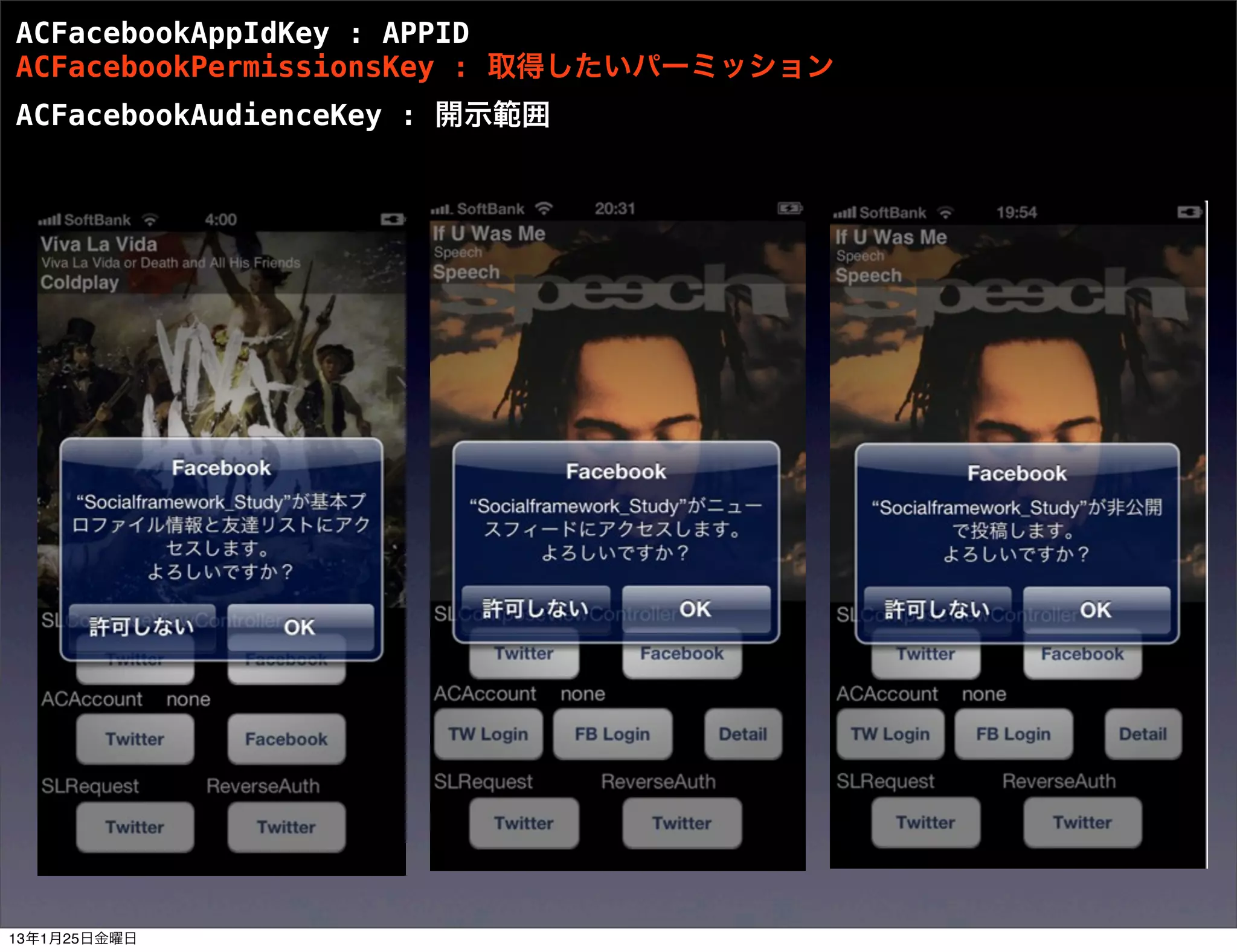
ACFacebookPermissionsKey: 取得したいパーミッション
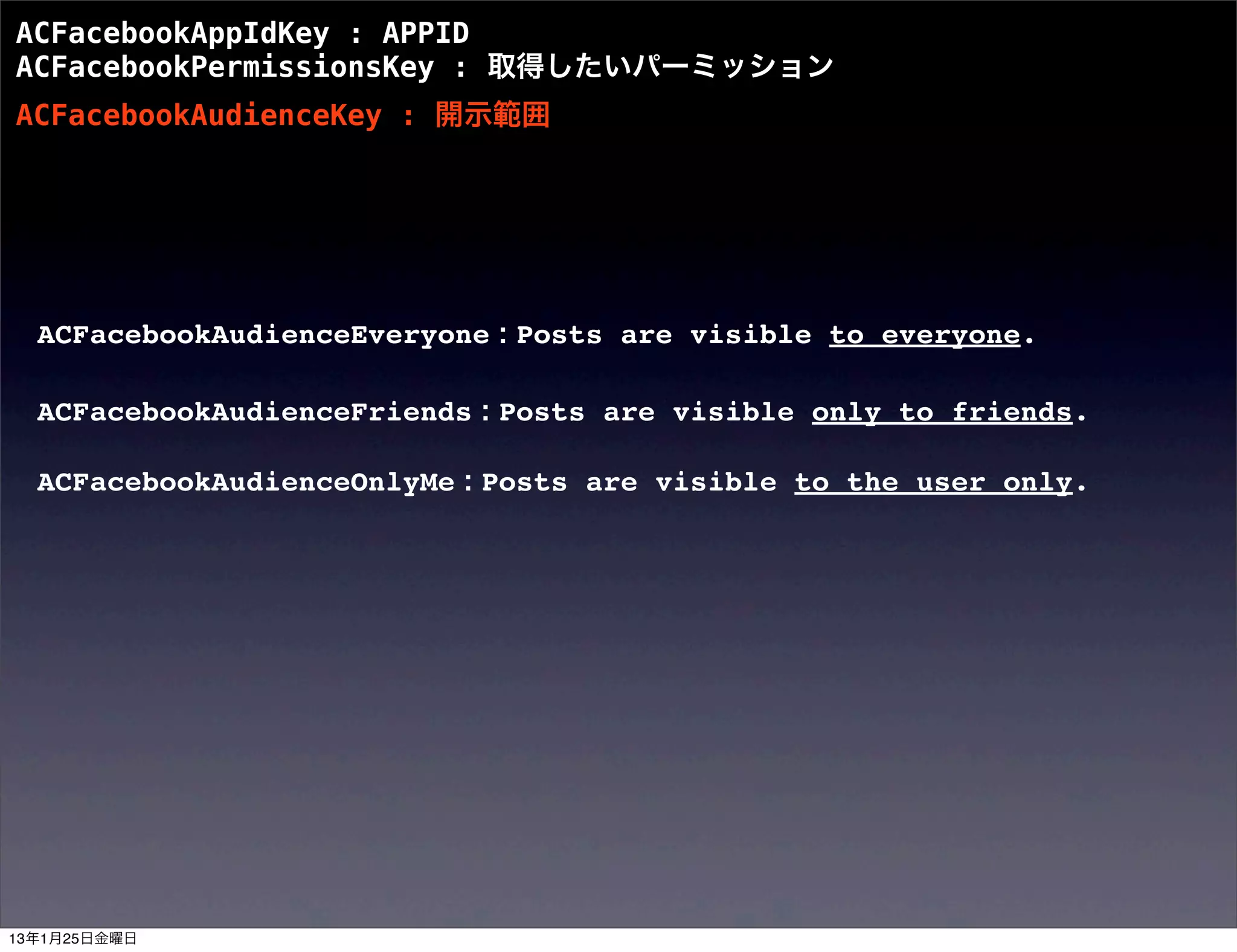
ACFacebookAudienceKey : 開示範囲
ACFacebookAudienceEveryone : Posts are visible to everyone.
ACFacebookAudienceFriends : Posts are visible only to friends.
ACFacebookAudienceOnlyMe : Posts are visible to the user only.
13年1月25日金曜日
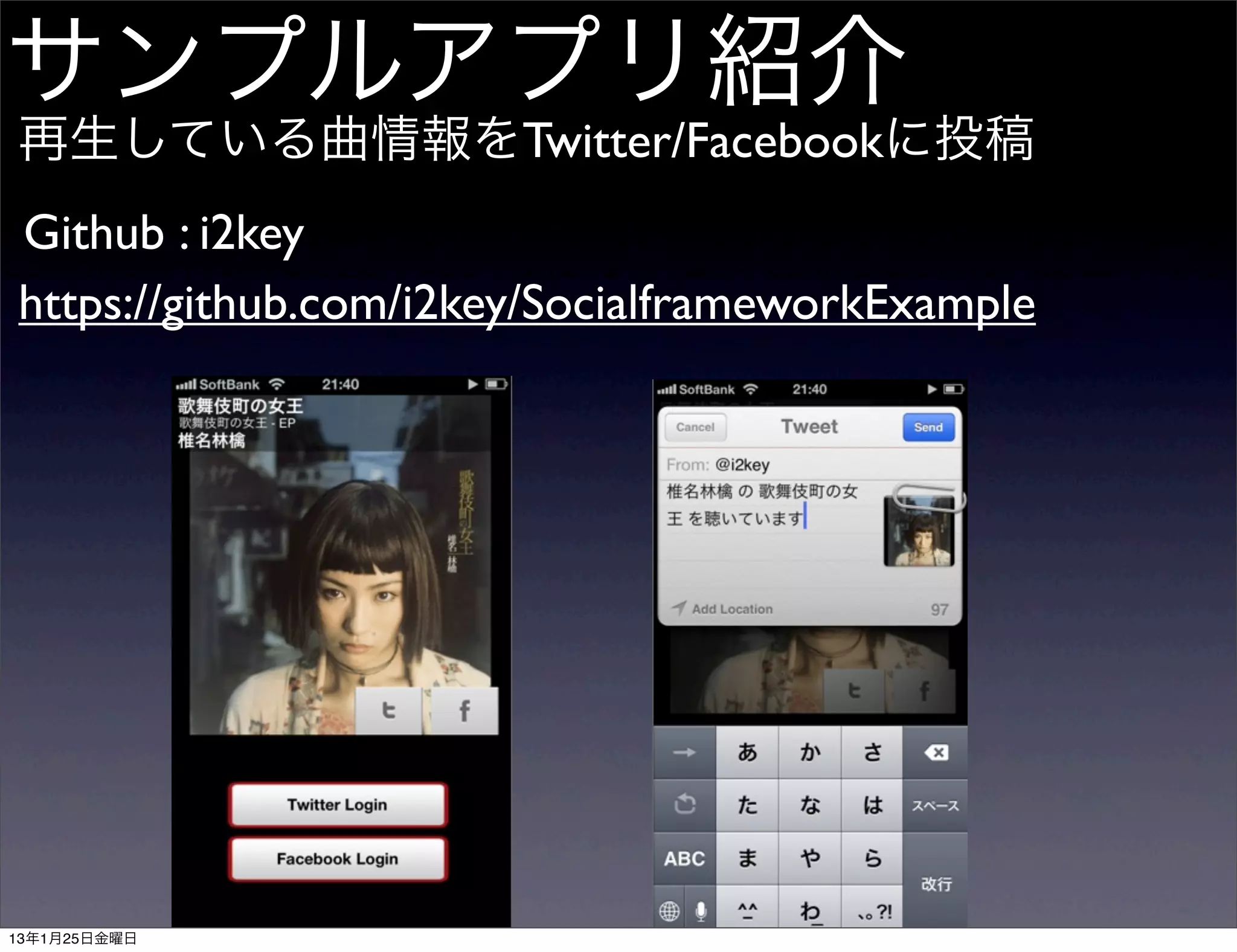
![Tweet/WallPost
SLComposeViewController
- (IBAction)tweet:(id)sender {
SLComposeViewController *twitterPostVC
= [SLComposeViewController composeViewControllerForServiceType:SLServiceTypeTwitter];
[twitterPostVC setInitialText:@”メッセージ本文”];
[twitterPostVC addImage:UIImageクラスによる画像データ];
[self presentViewController:twitterPostVC animated:YES completion:nil];
}
- (IBAction)postWall:(id)sender {
SLComposeViewController *facebookPostVC
= [SLComposeViewController composeViewControllerForServiceType:SLServiceTypeFacebook];
[facebookPostVC setInitialText:@”メッセージ本文”];
[facebookPostVC addImage: UIImageクラスによる画像データ];
[self presentViewController:facebookPostVC animated:YES completion:nil];
}
iOS5 : TWTweetComposeViewController
iOS6 : SLComposeViewController
13年1月25日金曜日](https://image.slidesharecdn.com/socialframeworkaccountframework-130124090852-phpapp01/75/Social-framework-Account-framework-twtr_hack-6-2048.jpg)
![Login(Twitter)
ACAccountStore, ACAccount
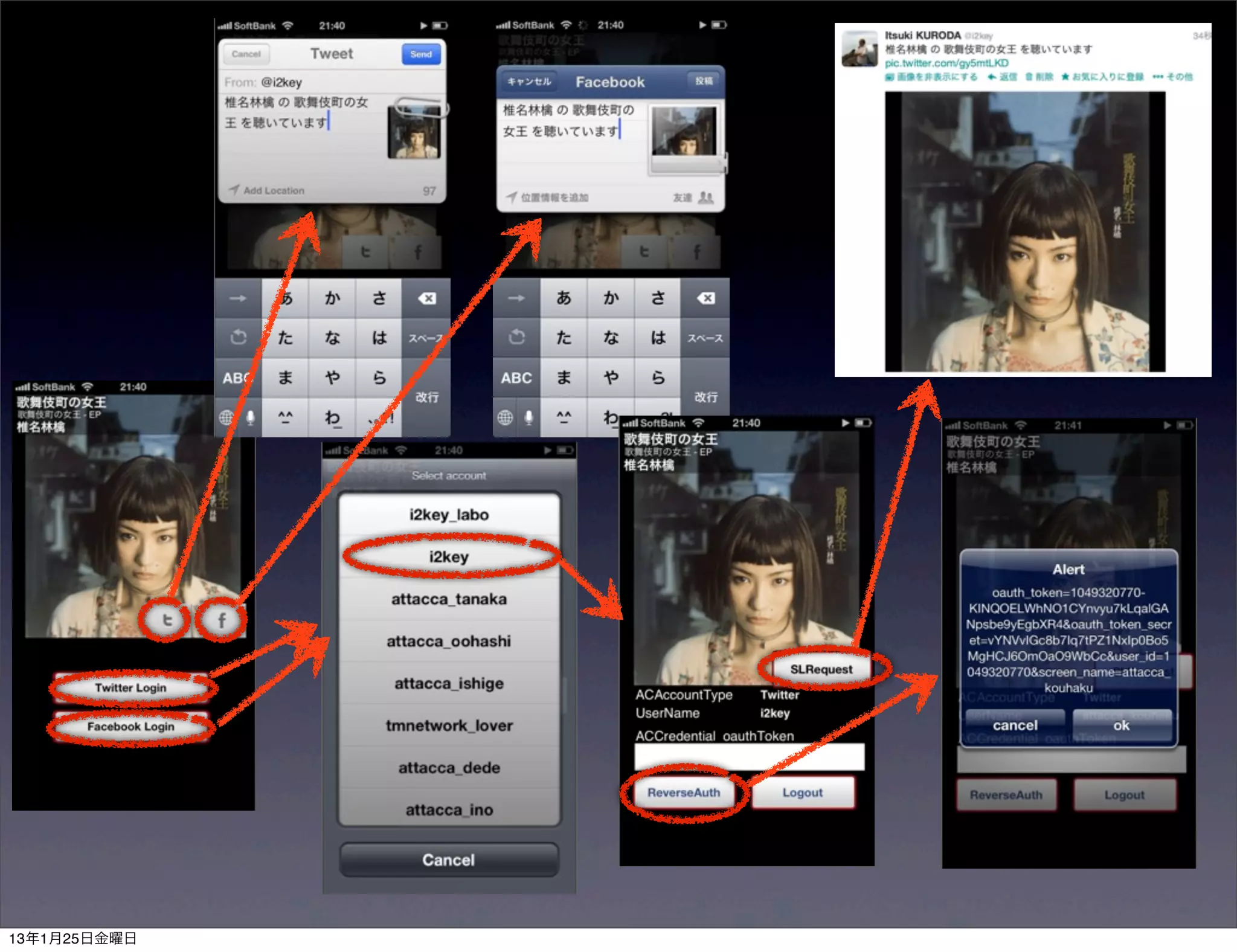
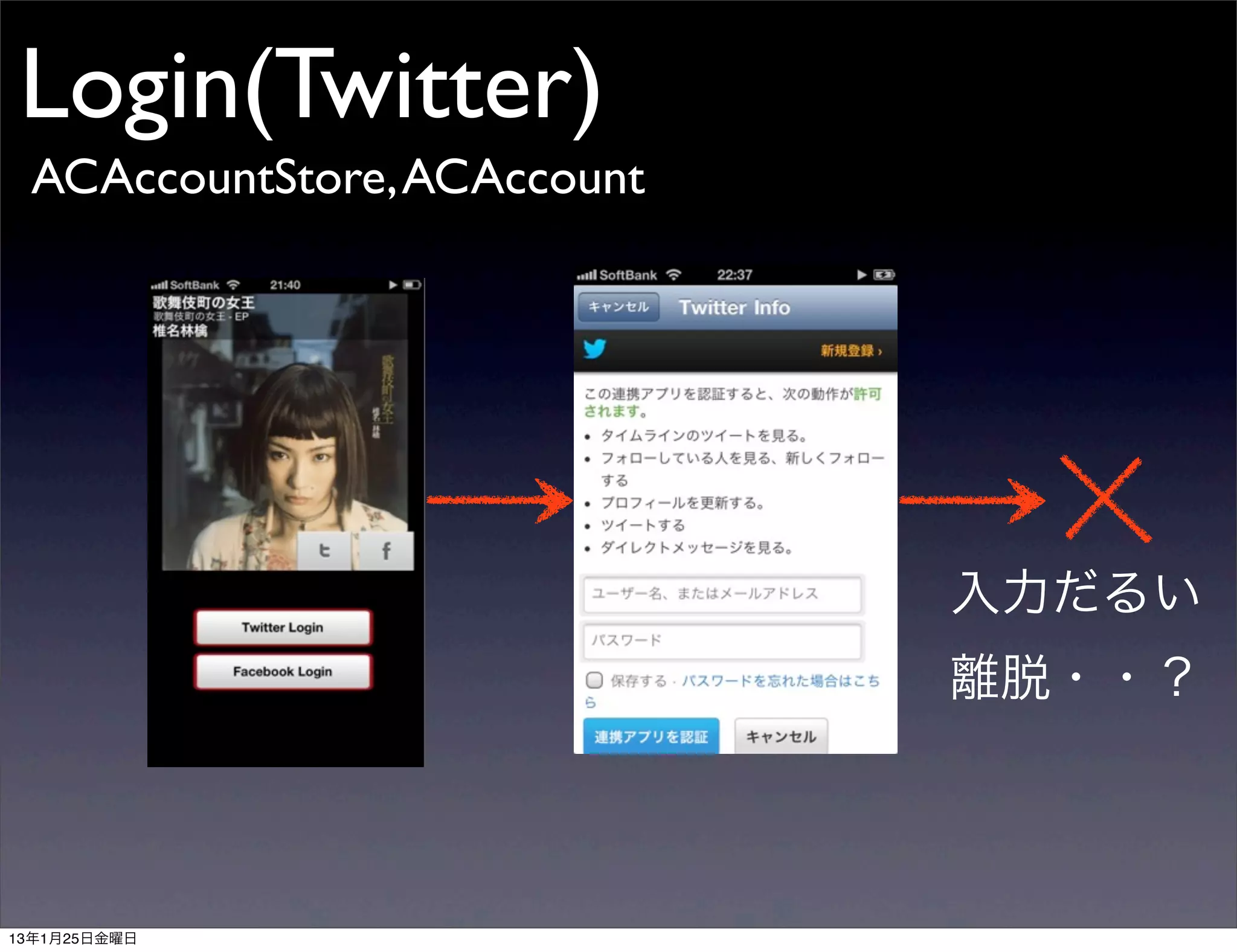
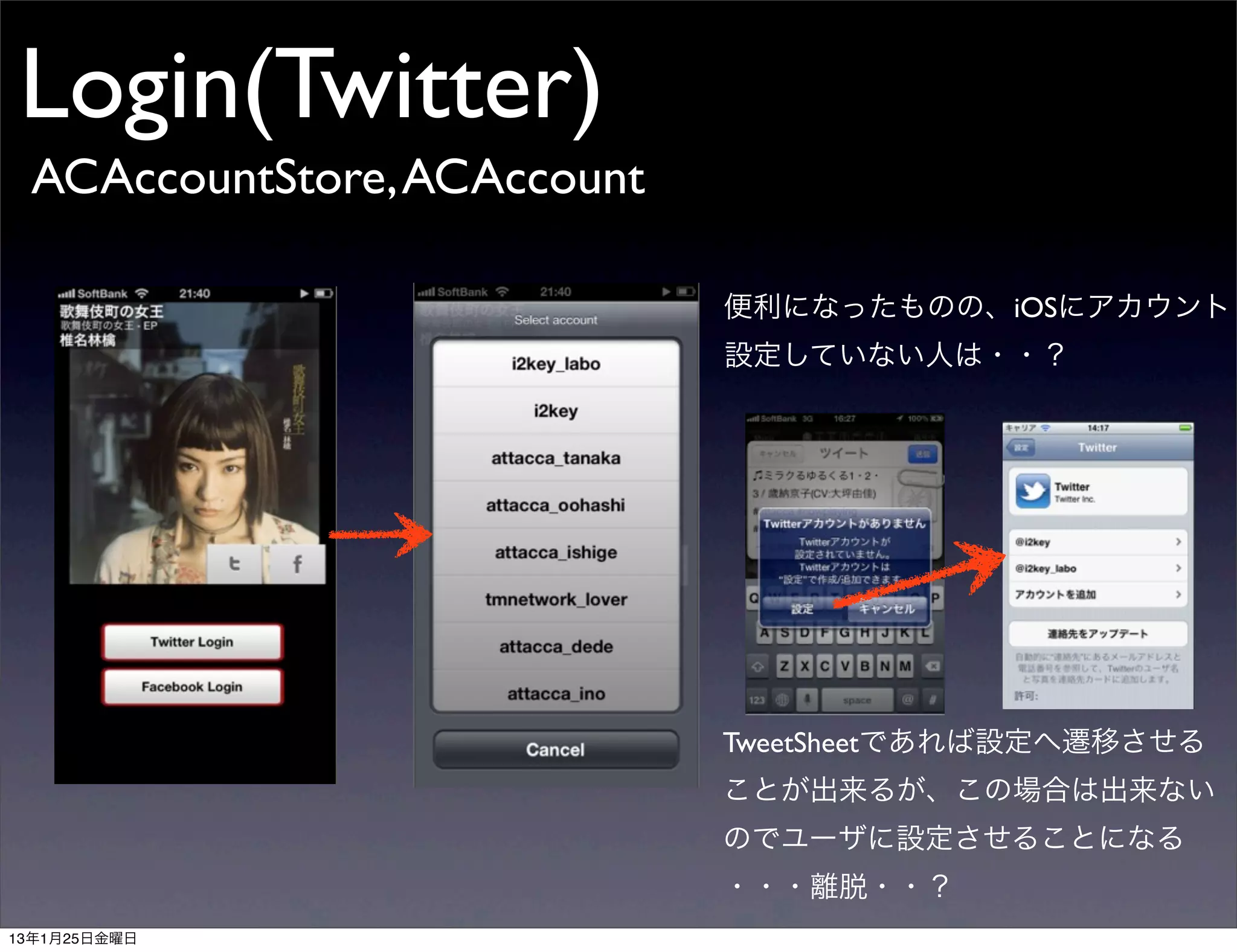
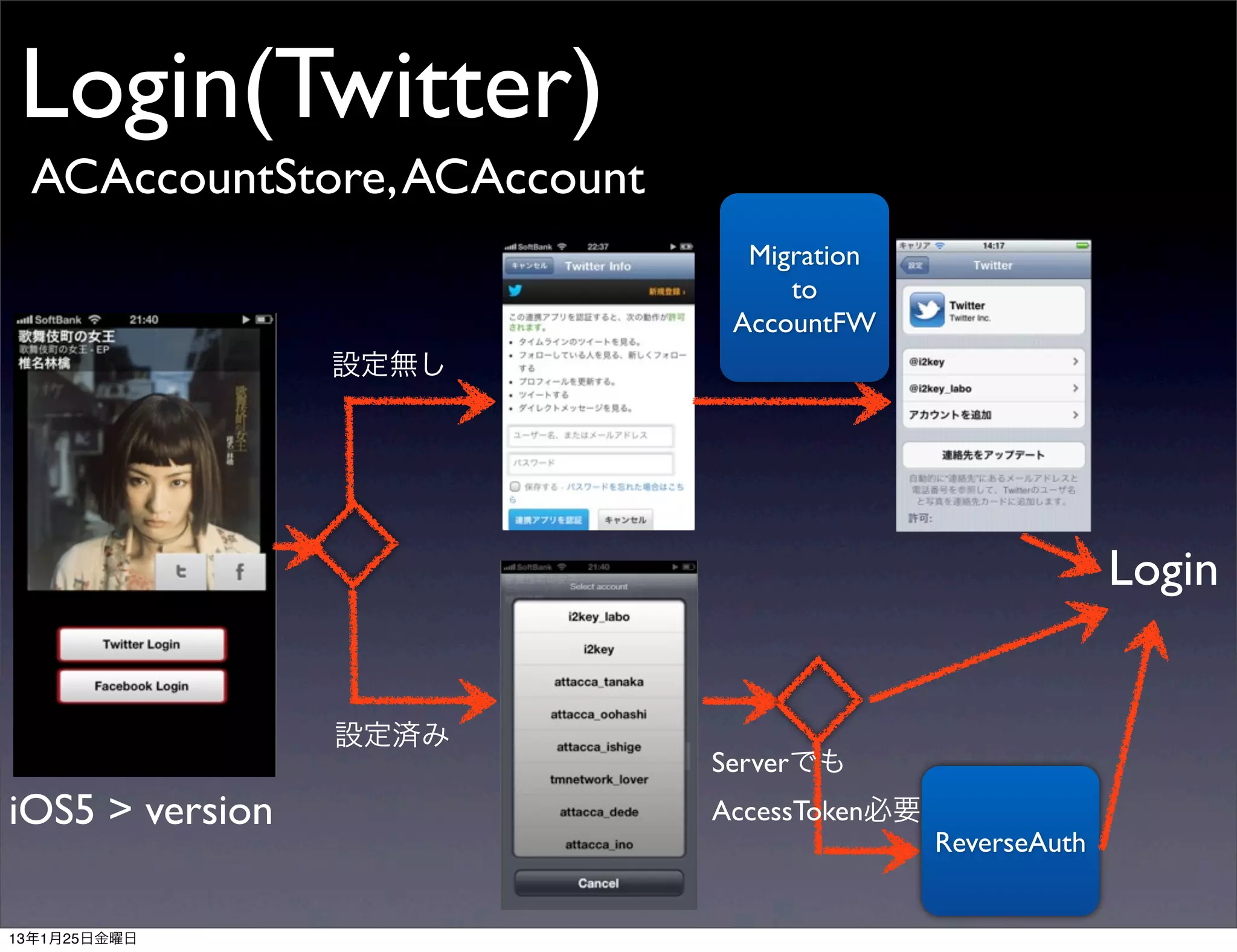
Accountへのアクセス要求
- (IBAction)showTwitterAccounts:(id)sender {
! ACAccountStore *accountStore = [[ACAccountStore alloc] init];
ACAccountType *twitterType
= [accountStore accountTypeWithAccountTypeIdentifier:ACAccountTypeIdentifierTwitter];
[accountStore requestAccessToAccountsWithType:twitterType
options:Nil
completion:^(BOOL granted, NSError *error) {
if (granted) {
! ! ! //ActionSheetを表示する処理
! ! }
}];
}
Accountを取り出す
self.accounts = [self.accountStore accountsWithAccountType:serviceType];
13年1月25日金曜日](https://image.slidesharecdn.com/socialframeworkaccountframework-130124090852-phpapp01/75/Social-framework-Account-framework-twtr_hack-7-2048.jpg)
![Login(Facebook)
ACAccountStore, ACAccount
Accountへのアクセス要求
- (IBAction)showFacebookAccounts:(id)sender {
ACAccountType *facebookType
= [self.accountStore accountTypeWithAccountTypeIdentifier:ACAccountTypeIdentifierFacebook];
NSDictionary *options = @{ACFacebookAppIdKey : @"AppID",
ACFacebookPermissionsKey : @[@"email"],
ACFacebookAudienceKey : ACFacebookAudienceOnlyMe};
[self.accountStore requestAccessToAccountsWithType:facebookType
options:options
completion:^(BOOL granted, NSError *error) {
if(granted){
//ActionSheet表示する処理
}
}];
}
Accountを取り出す
self.accounts = [self.accountStore accountsWithAccountType:serviceType];
13年1月25日金曜日](https://image.slidesharecdn.com/socialframeworkaccountframework-130124090852-phpapp01/75/Social-framework-Account-framework-twtr_hack-11-2048.jpg)
![Login(Facebook)
ACAccountStore, ACAccount
Accountへのアクセス要求
- (IBAction)showFacebookAccounts:(id)sender {
ACAccountType *facebookType
= [self.accountStore accountTypeWithAccountTypeIdentifier:ACAccountTypeIdentifierFacebook];
NSDictionary *options = @{ACFacebookAppIdKey : @"AppId",
ACFacebookPermissionsKey : @[@"email"],
ACFacebookAudienceKey : ACFacebookAudienceOnlyMe};
[self.accountStore requestAccessToAccountsWithType:facebookType
options:options
completion:^(BOOL granted, NSError *error) {
if(granted){
//ActionSheet表示する処理
ACFacebookAppIdKey : APPID
}
}];
ACFacebookPermissionsKey : 取得したいパーミッション
}
Accountを取り出す
ACFacebookAudienceKey : 開示範囲
self.accounts = [self.accountStore accountsWithAccountType:serviceType];
13年1月25日金曜日](https://image.slidesharecdn.com/socialframeworkaccountframework-130124090852-phpapp01/75/Social-framework-Account-framework-twtr_hack-12-2048.jpg)
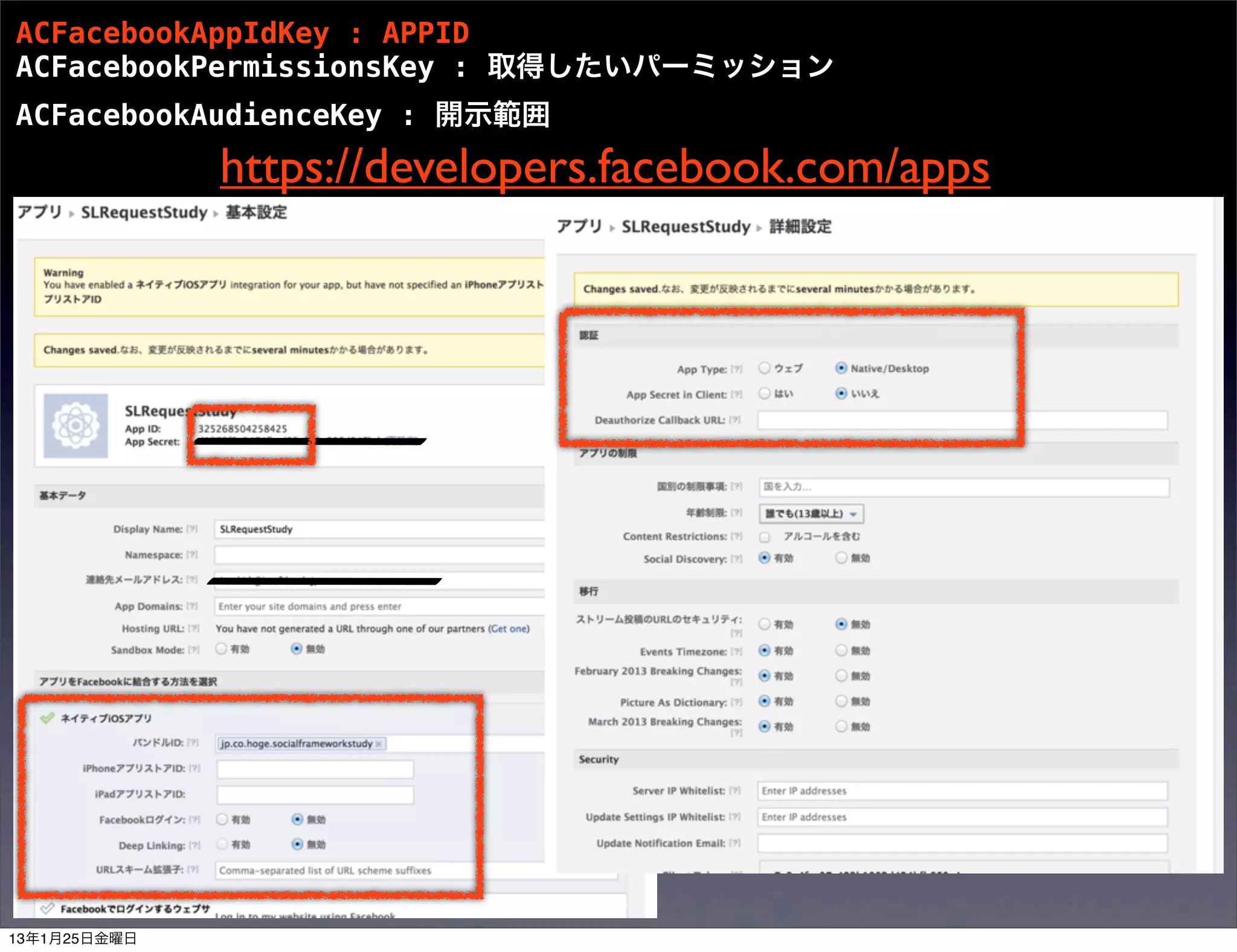
![ACFacebookAppIdKey : APPID
ACFacebookPermissionsKey : 取得したいパーミッション
ACFacebookAudienceKey : 開示範囲
https://developers.facebook.com/docs/howtos/ios-6/
Step 1: Request basic profile information
初めから書き込み権限、読み込み要求はNG
例1)ACFacebookPermissionsKey :
Step 2: Request read permissions
@[@”publish_actions”]
例2)ACFacebookPermissionsKey :
@[@”email”,@”read_stream”]
以下のようなエラーが出る
The Facebook server could not fulfill this
access request: The app must ask for a
basic read permission at install time.”
初めから基本情報権限要求のみはOK
ACFacebookPermissionsKey :
@[@”email”]
Step 3: Request publish permissions
基本情報権限要求後なら書き込み権限要求OK
ACFacebookPermissionsKey :
@[@”publish_action”]
13年1月25日金曜日](https://image.slidesharecdn.com/socialframeworkaccountframework-130124090852-phpapp01/75/Social-framework-Account-framework-twtr_hack-14-2048.jpg)
![Tweet/WallPost (Twitter)
SLRequest(iOS5 : TWRequest)
- (void)tweetUsingSLRequest{
if ([SLComposeViewController isAvailableForServiceType:SLServiceTypeTwitter]) {
NSURL *url = [NSURL URLWithString:@"http://api.twitter.com/1.1/statuses/update_with_media.json"];
NSDictionary *params = [NSDictionary dictionaryWithObject:[[MusicManager sharedManager] createShareMessage]
forKey:@"status"];
SLRequest *request = [SLRequest requestForServiceType:SLServiceTypeTwitter
requestMethod:SLRequestMethodPOST
URL:url
parameters:params];
NSData *imageData=UIImagePNGRepresentation([[MusicManager sharedManager] trackImage]);
[request addMultipartData:imageData withName:@"media[]" type:@"multipart/form-data" filename:@"hoge"];
[request setAccount:self.selectedAccount];
[request performRequestWithHandler:^(NSData *responseData, NSHTTPURLResponse *urlResponse, NSError *error) {
NSLog(@"responseData=%@", [[NSString alloc] initWithData:responseData encoding:NSUTF8StringEncoding]);
}];
}
}
13年1月25日金曜日](https://image.slidesharecdn.com/socialframeworkaccountframework-130124090852-phpapp01/75/Social-framework-Account-framework-twtr_hack-17-2048.jpg)
![Tweet/WallPost (Facebook)
SLRequest
- (void)postWallUsingSLRequest{
ACAccountStore *accountStore = [[ACAccountStore alloc] init];
ACAccountType *facebookType = [accountStore accountTypeWithAccountTypeIdentifier:ACAccountTypeIdentifierFacebook];
NSDictionary *options = @{ACFacebookAppIdKey : @"AppID",
ACFacebookPermissionsKey : @[@"publish_actions"],
ACFacebookAudienceKey : ACFacebookAudienceOnlyMe};
[accountStore requestAccessToAccountsWithType:facebookType options:options completion:^(BOOL granted, NSError *error) {
if(granted){
NSString *urlStr = [NSString stringWithFormat:@"https://graph.facebook.com/me/feed"];
NSURL *url = [NSURL URLWithString:urlStr];
NSDictionary *params = @{@"message" : [[MusicManager sharedManager] createShareMessage]};
SLRequest *request = [SLRequest requestForServiceType:SLServiceTypeFacebook
requestMethod:SLRequestMethodPOST
URL:url parameters:params];
[request setAccount:self.selectedAccount];
[request performRequestWithHandler:^(NSData *response, NSHTTPURLResponse *urlResponse, NSError *error){
NSLog(@"response:%@",[[NSString alloc]initWithData:response encoding:NSUTF8StringEncoding]);
}];
}else{
NSLog(@"error post:%@",[error description]);
}
}];
}
13年1月25日金曜日](https://image.slidesharecdn.com/socialframeworkaccountframework-130124090852-phpapp01/75/Social-framework-Account-framework-twtr_hack-18-2048.jpg)
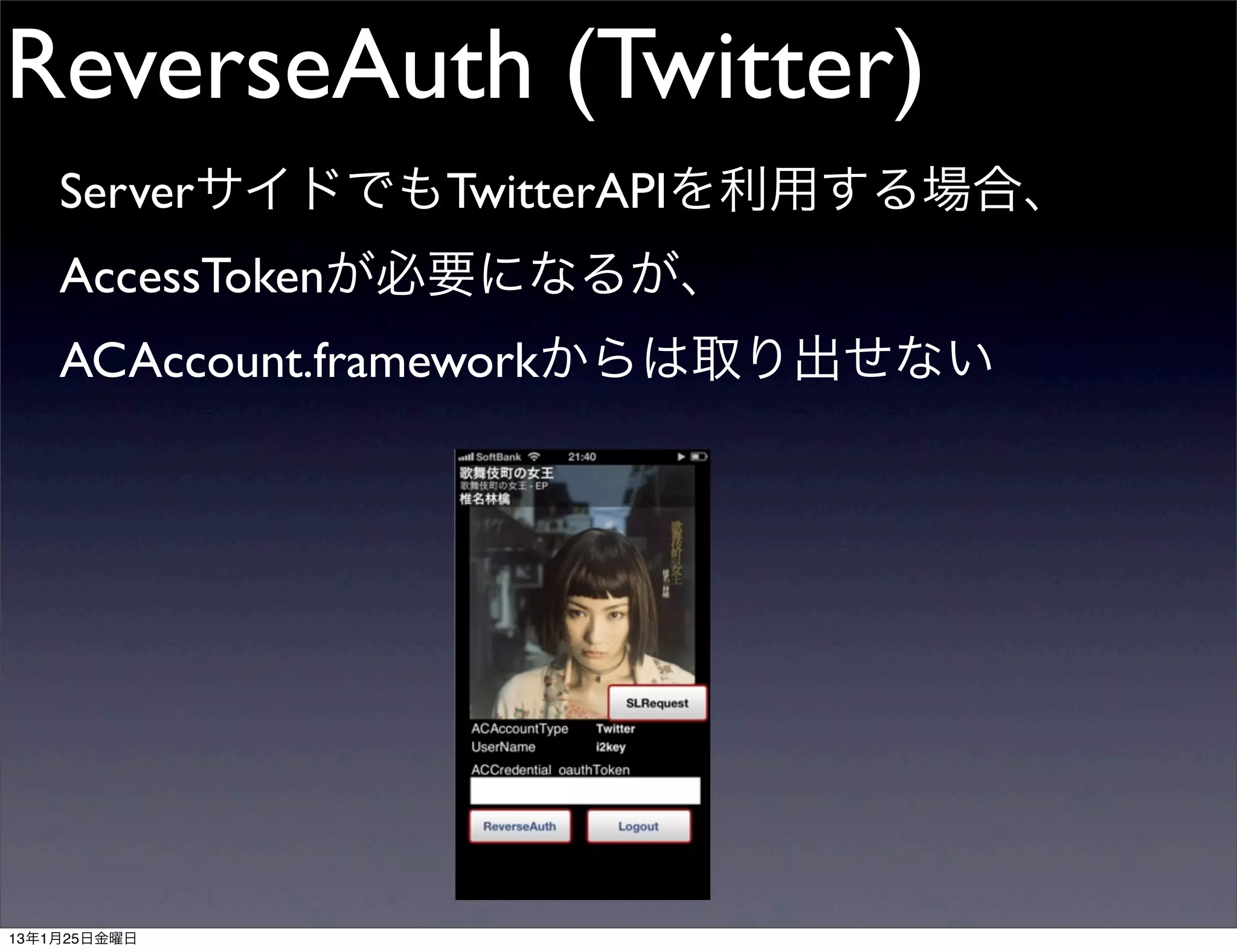
![ReverseAuth (Twitter)
- (IBAction)reverseAuth:(id)sender {
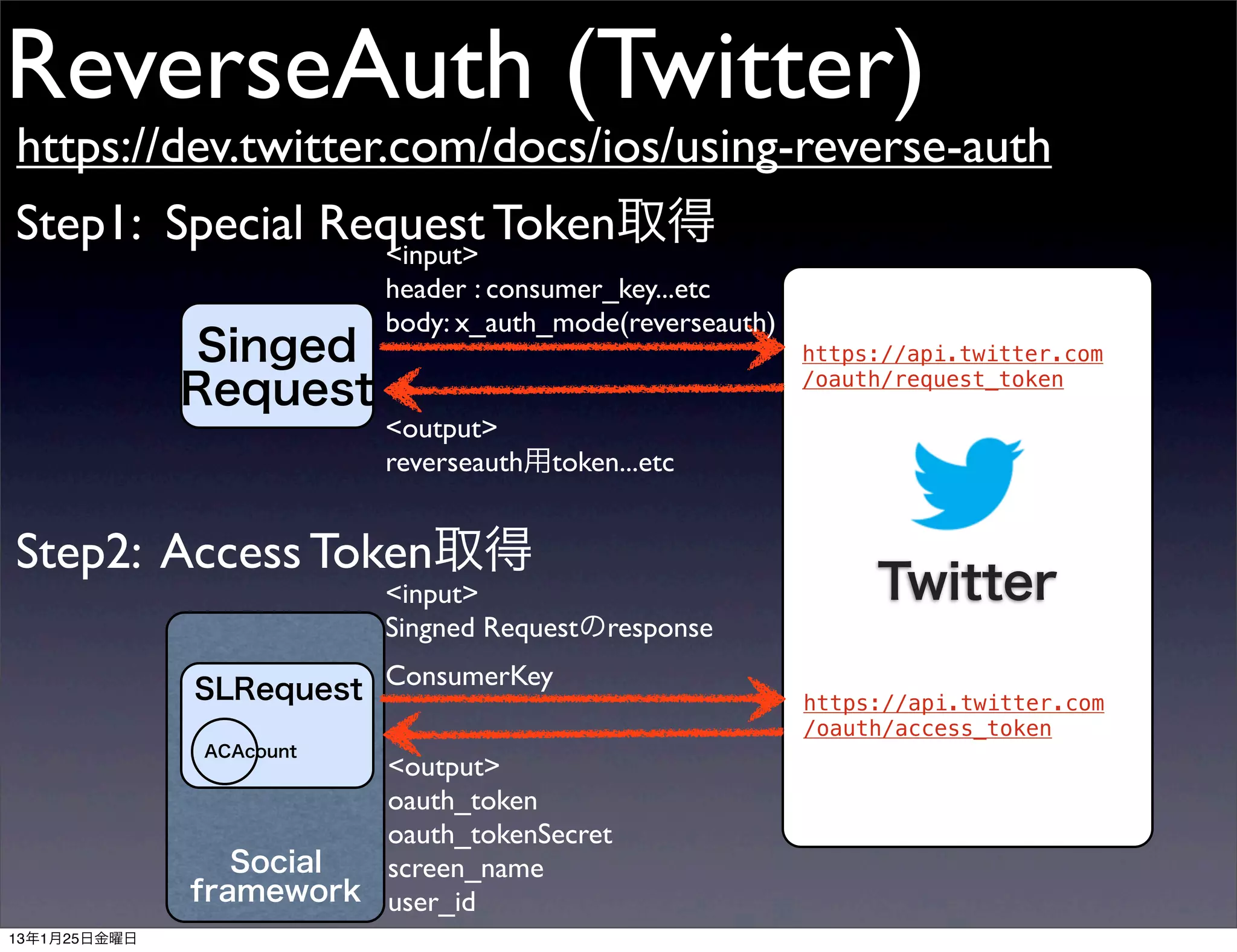
// Step 1) Ask Twitter for a special request_token for reverse auth
! NSURL *url = [NSURL URLWithString:TW_OAUTH_URL_REQUEST_TOKEN];
!
! // "reverse_auth" is a required parameter
! NSDictionary *dict = [NSDictionary dictionaryWithObject:TW_X_AUTH_MODE_REVERSE_AUTH forKey:TW_X_AUTH_MODE_KEY];
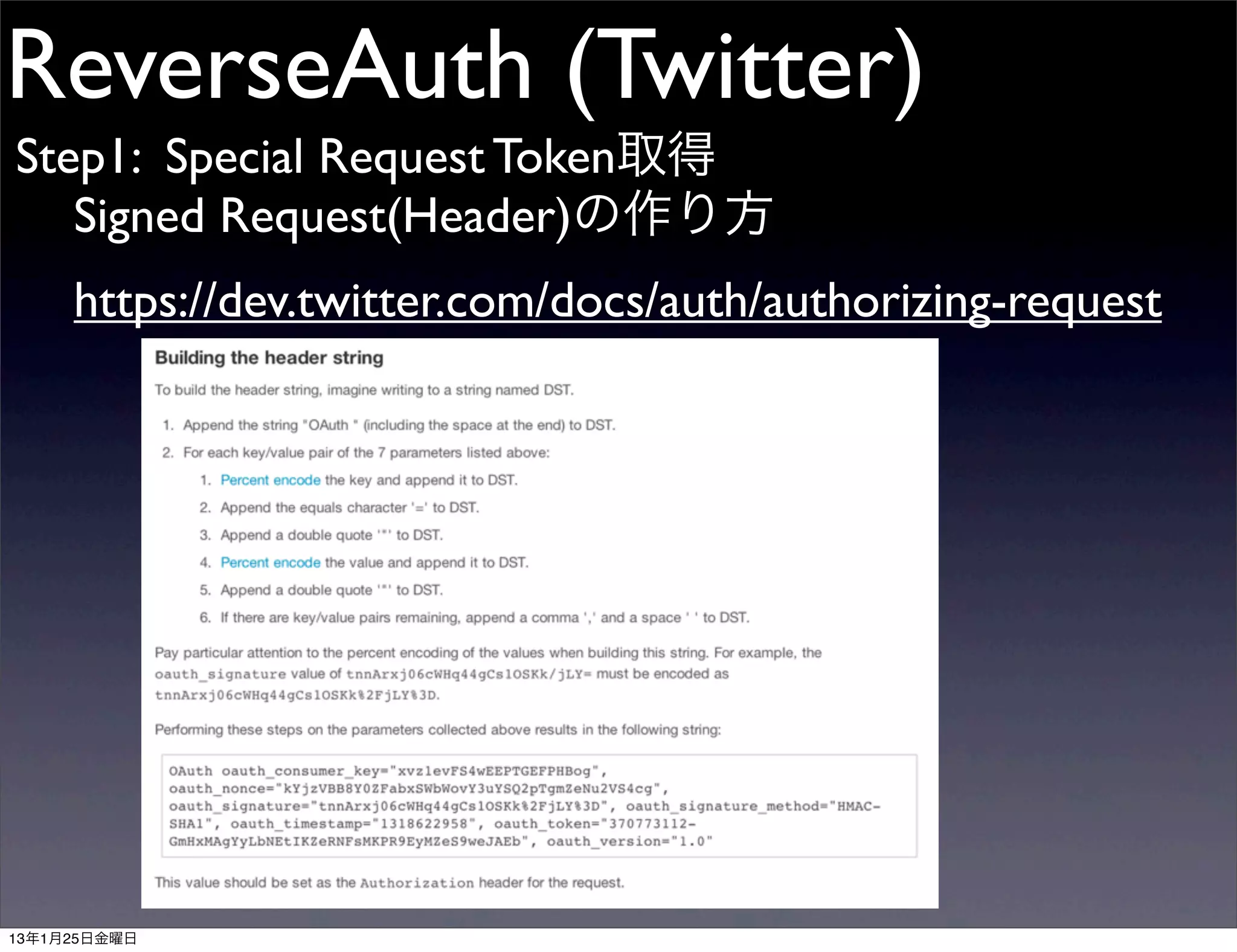
! TWSignedRequest *signedRequest = [[TWSignedRequest alloc] initWithURL:url parameters:dict requestMethod:TWSignedRequestMethodPOST];
!
! [signedRequest performRequestWithHandler:^(NSData *data, NSURLResponse *response, NSError *error) {
! ! if (!data) {
! ! ! [self dismissProgress:@"Error occurred in Step 1."];
! ! }
! ! else {
! ! ! NSString *signedReverseAuthSignature = [[NSString alloc] initWithData:data encoding:NSUTF8StringEncoding];
! ! !
! ! ! // Step 2) Ask Twitter for the user's auth token and secret
! ! ! // include x_reverse_auth_target=CK2 and x_reverse_auth_parameters=signedReverseAuthSignature parameters
! ! ! dispatch_async(dispatch_get_global_queue(DISPATCH_QUEUE_PRIORITY_DEFAULT, 0), ^{
! ! ! ! NSDictionary *step2Params = [NSDictionary dictionaryWithObjectsAndKeys:[TWSignedRequest consumerKey], TW_X_AUTH_REVERSE_TARGET,
signedReverseAuthSignature, TW_X_AUTH_REVERSE_PARMS, nil];
! ! ! ! NSURL *authTokenURL = [NSURL URLWithString:TW_OAUTH_URL_AUTH_TOKEN];
//-- iOS5 -----
! ! ! //TWRequest *step2Request = [[TWRequest alloc] initWithURL:authTokenURL parameters:step2Params requestMethod:TWRequestMethodPOST];
//-------------
//-- iOS6 -----
! ! ! ! SLRequest *step2Request = [SLRequest requestForServiceType:SLServiceTypeTwitter
requestMethod:SLRequestMethodPOST
URL:authTokenURL
parameters:step2Params];
//-------------
! ! ! ! [step2Request setAccount:self.selectedAccount];
! ! ! ! [step2Request performRequestWithHandler:^(NSData *responseData, NSHTTPURLResponse *urlResponse, NSError *error) {
! ! ! ! ! if (!responseData || ((NSHTTPURLResponse*)response).statusCode >= 400) {
! ! ! ! ! ! [self dismissProgress:@"Error occurred in Step 2."];
! ! ! ! ! } else {
! ! ! ! ! ! NSString *responseStr = [[NSString alloc] initWithData:responseData encoding:NSUTF8StringEncoding];
NSLog(@"AuthData : %@",responseStr);
! ! ! ! ! }
! ! ! ! }];
! ! ! });
! ! }
! }];
}
13年1月25日金曜日](https://image.slidesharecdn.com/socialframeworkaccountframework-130124090852-phpapp01/75/Social-framework-Account-framework-twtr_hack-23-2048.jpg)


