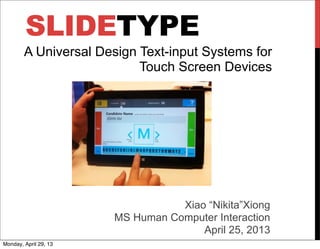
SLIDETYPE
Xiao “Nikita”Xiong
MS Human Computer Interaction
April 25, 2013
A Universal Design Text-input Systems for
Touch Screen Devices
Monday, April 29, 13
PROBLEM STATEMENT
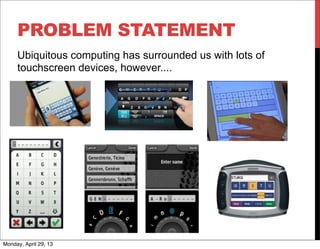
Ubiquitous computing has surrounded us with lots of
touchscreen devices, however....
Monday, April 29, 13
PROBLEM STATEMENT
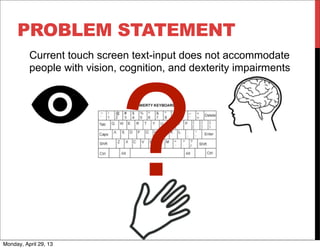
Current touch screen text-input does not accommodate
people with vision, cognition, and dexterity impairments
?
Monday, April 29, 13
PREVIOUS RESEARCH
Figure 1: Nolook
Monday, April 29, 13
PERSONA AND USE CASE
Tom
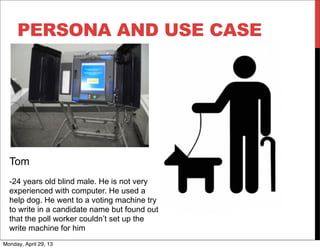
-24 years old blind male. He is not very
experienced with computer. He used a
help dog. He went to a voting machine try
to write in a candidate name but found out
that the poll worker couldn’t set up the
write machine for him
Monday, April 29, 13
DESIGN GOAL
One Text-input System for All
Universal Design Approach
Equitable Use
Monday, April 29, 13
DESIGN APPROACH
Accommodates range of preferences and abilities that
interact with text-input (Flexibility in Use)
- Cognition
- Simple and Intuitive Use
- Tolerance for Error
- Vision
- Perceptible Information
- Dexterity
- Low Physical Effort
- Size and Space for Approach and Use
Monday, April 29, 13
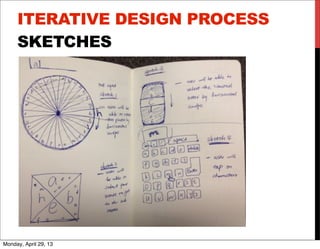
ITERATIVE DESIGN PROCESS
SKETCHES
V
Monday, April 29, 13
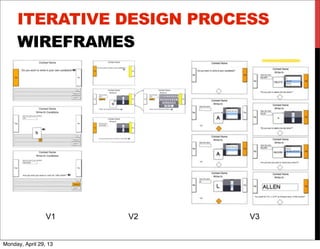
ITERATIVE DESIGN PROCESS
WIREFRAMES
V1 V2 V3
V
Monday, April 29, 13
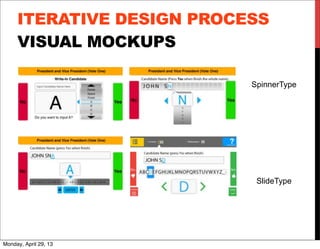
VISUAL MOCKUPS
SpinnerType
SlideType
V
ITERATIVE DESIGN PROCESS
Monday, April 29, 13
V
ITERATIVE DESIGN PROCESS
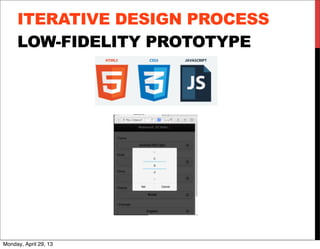
LOW-FIDELITY PROTOTYPE
Monday, April 29, 13
V
ITERATIVE DESIGN PROCESS
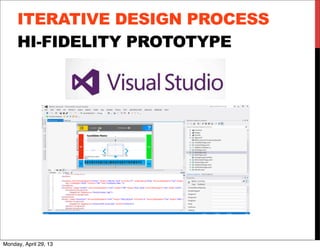
HI-FIDELITY PROTOTYPE
Monday, April 29, 13
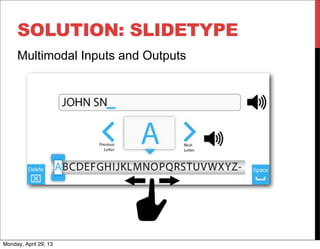
SOLUTION: SLIDETYPE
Multimodal Inputs and Outputs
Monday, April 29, 13
SOLUTION: SLIDETYPE
Live Demo
Monday, April 29, 13
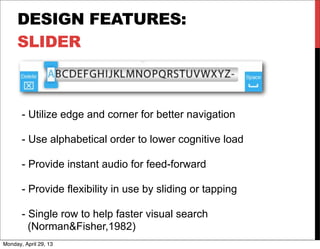
DESIGN FEATURES:
SLIDER
- Utilize edge and corner for better navigation
- Use alphabetical order to lower cognitive load
- Provide instant audio for feed-forward
- Provide flexibility in use by sliding or tapping
- Single row to help faster visual search
(Norman&Fisher,1982)
Monday, April 29, 13
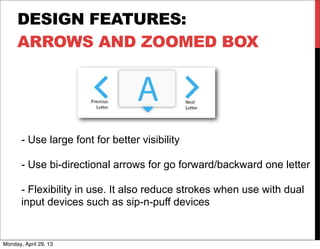
DESIGN FEATURES:
ARROWS AND ZOOMED BOX
- Use large font for better visibility
- Use bi-directional arrows for go forward/backward one letter
- Flexibility in use. It also reduce strokes when use with dual
input devices such as sip-n-puff devices
Monday, April 29, 13
USER STUDY
PARTICIPANTS
14 Adults (8 female 6 male):
• 8 vision disabilities(3 totally blind, 5 low vision)
• 3 mild cognitive disabilities.
• 3 dexterity disabilities
• 24-64 years old
• 4 Master’s degree or higher
• 3 Bachelor’s degree or higher,
• 4 had Some college or Associate’s degree
• 1 G.E.D.
• 2 High school
• Self report touchscreen experience range 1-10 with a mean of 5.3
Monday, April 29, 13
USER STUDY
METHODS
Pre-test interview:
• Background
• Computer and touchscreen experiences
Test (think out loud):
• 1. Type in “John Smith”
• 2. Delete and input a new name
Post-test interview
• Rate preferences and provide qualitative feedback
Duration: 20-30min
Monday, April 29, 13
USER STUDY
TWO PROTOTYPES
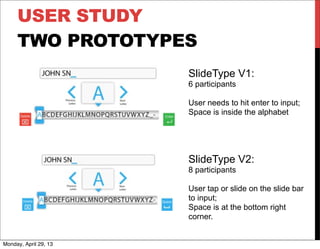
SlideType V1:
6 participants
User needs to hit enter to input;
Space is inside the alphabet
SlideType V2:
8 participants
User tap or slide on the slide bar
to input;
Space is at the bottom right
corner.
Monday, April 29, 13
USER STUDY 1
RESULTS
Audio feedback and large letter size
Bi-directional arrows: precise control, predictable
manner (a low vision user)
Double action process is repetitive (2 participants
with dexterity impairments)
1/6 fail to input text initially thinking they could directly tap
2/6 fail to input space cause they can’t see the space button
Monday, April 29, 13
USER STUDY 2
RESULTS
- 8/8 participants completed the task of typing and editing
- Participants rate average 3.875 / 5 (4 easy, 5 very easy)
- 3 participants with mild cognitive impairment finish the
task with no instruction
One totally blind user who is very experienced with
touchscreen had lots of error inputs since he wants to
touch anywhere on the screen to input text
“This is easier than using keyboard”- 37 years old male participant who is totally
blind
“ I like everything about it. The letter size is very nice. That's easy to see”- 24
years old male participant who have complete spin injury
Monday, April 29, 13
USER STUDY
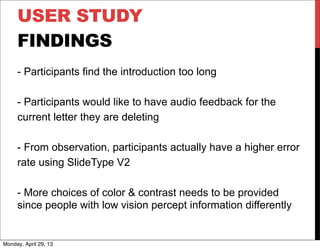
FINDINGS
- Participants find the introduction too long
- Participants would like to have audio feedback for the
current letter they are deleting
- From observation, participants actually have a higher error
rate using SlideType V2
- More choices of color & contrast needs to be provided
since people with low vision percept information differently
Monday, April 29, 13
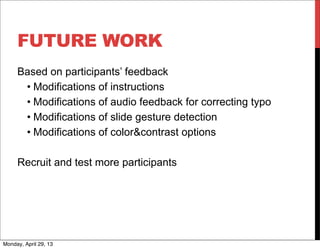
FUTURE WORK
Based on participants’ feedback
• Modifications of instructions
• Modifications of audio feedback for correcting typo
• Modifications of slide gesture detection
• Modifications of color&contrast options
Recruit and test more participants
Monday, April 29, 13
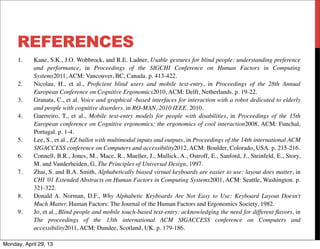
REFERENCES
1.	

 Kane, S.K., J.O. Wobbrock, and R.E. Ladner, Usable gestures for blind people: understanding preference
and performance, in Proceedings of the SIGCHI Conference on Human Factors in Computing
Systems2011, ACM: Vancouver, BC, Canada. p. 413-422.
2.	

 Nicolau, H., et al., Proficient blind users and mobile text-entry, in Proceedings of the 28th Annual
European Conference on Cognitive Ergonomics2010, ACM: Delft, Netherlands. p. 19-22.
3.	

 Granata, C., et al. Voice and graphical -based interfaces for interaction with a robot dedicated to elderly
and people with cognitive disorders. in RO-MAN, 2010 IEEE. 2010.
4.	

 Guerreiro, T., et al., Mobile text-entry models for people with disabilities, in Proceedings of the 15th
European conference on Cognitive ergonomics: the ergonomics of cool interaction2008, ACM: Funchal,
Portugal. p. 1-4.
5.	

 Lee, S., et al., EZ ballot with multimodal inputs and outputs, in Proceedings of the 14th international ACM
SIGACCESS conference on Computers and accessibility2012, ACM: Boulder, Colorado, USA. p. 215-216.
6.	

 Connell, B.R., Jones, M., Mace, R., Mueller, J., Mullick, A., Ostroff, E., Sanford, J., Steinfeld, E., Story,
M. and Vanderheiden, G, The Principles of Universal Design, 1997.
7.	

 Zhai, S. and B.A. Smith, Alphabetically biased virtual keyboards are easier to use: layout does matter, in
CHI '01 Extended Abstracts on Human Factors in Computing Systems2001, ACM: Seattle, Washington. p.
321-322.
8.	

 Donald A. Norman, D.F., Why Alphabetic Keyboards Are Not Easy to Use: Keyboard Layout Doesn't
Much Matter. Human Factors: The Journal of the Human Factors and Ergonomics Society, 1982.
9.	

 Jo, et al., Blind people and mobile touch-based text-entry: acknowledging the need for different flavors, in
The proceedings of the 13th international ACM SIGACCESS conference on Computers and
accessibility2011, ACM: Dundee, Scotland, UK. p. 179-186.
Monday, April 29, 13
ACKNOWLEDGMENT
Many thanks to Professor Jon A. Sanford from Center for Assistive
Technology and Environmental Access for advising me along the
development of the project. Many thanks to the EZ Ballot team Tina
Lee, Elaine Liu and Samrat Ambadekar.
Many thanks to Research Scientist Mr. Matthew E. Swarts for
answering technical questions.
Many thanks to the participants in the study.
This project was supported by the Election Assistance Commission
through a Grant to the Information Technology and Information
Foundation.
Monday, April 29, 13
THANKS FOR YOUR ATTENTION!
Q&A?
For more questions and play with demo, please contact me at:
xxiong6@gatech.edu
Monday, April 29, 13

Slidetype nikitaxiong

  • 1.
    SLIDETYPE Xiao “Nikita”Xiong MS HumanComputer Interaction April 25, 2013 A Universal Design Text-input Systems for Touch Screen Devices Monday, April 29, 13
  • 2.
    PROBLEM STATEMENT Ubiquitous computinghas surrounded us with lots of touchscreen devices, however.... Monday, April 29, 13
  • 3.
    PROBLEM STATEMENT Current touchscreen text-input does not accommodate people with vision, cognition, and dexterity impairments ? Monday, April 29, 13
  • 4.
    PREVIOUS RESEARCH Figure 1:Nolook Monday, April 29, 13
  • 5.
    PERSONA AND USECASE Tom -24 years old blind male. He is not very experienced with computer. He used a help dog. He went to a voting machine try to write in a candidate name but found out that the poll worker couldn’t set up the write machine for him Monday, April 29, 13
  • 6.
    DESIGN GOAL One Text-inputSystem for All Universal Design Approach Equitable Use Monday, April 29, 13
  • 7.
    DESIGN APPROACH Accommodates rangeof preferences and abilities that interact with text-input (Flexibility in Use) - Cognition - Simple and Intuitive Use - Tolerance for Error - Vision - Perceptible Information - Dexterity - Low Physical Effort - Size and Space for Approach and Use Monday, April 29, 13
  • 8.
  • 9.
    ITERATIVE DESIGN PROCESS WIREFRAMES V1V2 V3 V Monday, April 29, 13
  • 10.
  • 11.
    V ITERATIVE DESIGN PROCESS LOW-FIDELITYPROTOTYPE Monday, April 29, 13
  • 12.
    V ITERATIVE DESIGN PROCESS HI-FIDELITYPROTOTYPE Monday, April 29, 13
  • 13.
    SOLUTION: SLIDETYPE Multimodal Inputsand Outputs Monday, April 29, 13
  • 14.
  • 15.
    DESIGN FEATURES: SLIDER - Utilizeedge and corner for better navigation - Use alphabetical order to lower cognitive load - Provide instant audio for feed-forward - Provide flexibility in use by sliding or tapping - Single row to help faster visual search (Norman&Fisher,1982) Monday, April 29, 13
  • 16.
    DESIGN FEATURES: ARROWS ANDZOOMED BOX - Use large font for better visibility - Use bi-directional arrows for go forward/backward one letter - Flexibility in use. It also reduce strokes when use with dual input devices such as sip-n-puff devices Monday, April 29, 13
  • 17.
    USER STUDY PARTICIPANTS 14 Adults(8 female 6 male): • 8 vision disabilities(3 totally blind, 5 low vision) • 3 mild cognitive disabilities. • 3 dexterity disabilities • 24-64 years old • 4 Master’s degree or higher • 3 Bachelor’s degree or higher, • 4 had Some college or Associate’s degree • 1 G.E.D. • 2 High school • Self report touchscreen experience range 1-10 with a mean of 5.3 Monday, April 29, 13
  • 18.
    USER STUDY METHODS Pre-test interview: •Background • Computer and touchscreen experiences Test (think out loud): • 1. Type in “John Smith” • 2. Delete and input a new name Post-test interview • Rate preferences and provide qualitative feedback Duration: 20-30min Monday, April 29, 13
  • 19.
    USER STUDY TWO PROTOTYPES SlideTypeV1: 6 participants User needs to hit enter to input; Space is inside the alphabet SlideType V2: 8 participants User tap or slide on the slide bar to input; Space is at the bottom right corner. Monday, April 29, 13
  • 20.
    USER STUDY 1 RESULTS Audiofeedback and large letter size Bi-directional arrows: precise control, predictable manner (a low vision user) Double action process is repetitive (2 participants with dexterity impairments) 1/6 fail to input text initially thinking they could directly tap 2/6 fail to input space cause they can’t see the space button Monday, April 29, 13
  • 21.
    USER STUDY 2 RESULTS -8/8 participants completed the task of typing and editing - Participants rate average 3.875 / 5 (4 easy, 5 very easy) - 3 participants with mild cognitive impairment finish the task with no instruction One totally blind user who is very experienced with touchscreen had lots of error inputs since he wants to touch anywhere on the screen to input text “This is easier than using keyboard”- 37 years old male participant who is totally blind “ I like everything about it. The letter size is very nice. That's easy to see”- 24 years old male participant who have complete spin injury Monday, April 29, 13
  • 22.
    USER STUDY FINDINGS - Participantsfind the introduction too long - Participants would like to have audio feedback for the current letter they are deleting - From observation, participants actually have a higher error rate using SlideType V2 - More choices of color & contrast needs to be provided since people with low vision percept information differently Monday, April 29, 13
  • 23.
    FUTURE WORK Based onparticipants’ feedback • Modifications of instructions • Modifications of audio feedback for correcting typo • Modifications of slide gesture detection • Modifications of color&contrast options Recruit and test more participants Monday, April 29, 13
  • 24.
    REFERENCES 1. Kane, S.K.,J.O. Wobbrock, and R.E. Ladner, Usable gestures for blind people: understanding preference and performance, in Proceedings of the SIGCHI Conference on Human Factors in Computing Systems2011, ACM: Vancouver, BC, Canada. p. 413-422. 2. Nicolau, H., et al., Proficient blind users and mobile text-entry, in Proceedings of the 28th Annual European Conference on Cognitive Ergonomics2010, ACM: Delft, Netherlands. p. 19-22. 3. Granata, C., et al. Voice and graphical -based interfaces for interaction with a robot dedicated to elderly and people with cognitive disorders. in RO-MAN, 2010 IEEE. 2010. 4. Guerreiro, T., et al., Mobile text-entry models for people with disabilities, in Proceedings of the 15th European conference on Cognitive ergonomics: the ergonomics of cool interaction2008, ACM: Funchal, Portugal. p. 1-4. 5. Lee, S., et al., EZ ballot with multimodal inputs and outputs, in Proceedings of the 14th international ACM SIGACCESS conference on Computers and accessibility2012, ACM: Boulder, Colorado, USA. p. 215-216. 6. Connell, B.R., Jones, M., Mace, R., Mueller, J., Mullick, A., Ostroff, E., Sanford, J., Steinfeld, E., Story, M. and Vanderheiden, G, The Principles of Universal Design, 1997. 7. Zhai, S. and B.A. Smith, Alphabetically biased virtual keyboards are easier to use: layout does matter, in CHI '01 Extended Abstracts on Human Factors in Computing Systems2001, ACM: Seattle, Washington. p. 321-322. 8. Donald A. Norman, D.F., Why Alphabetic Keyboards Are Not Easy to Use: Keyboard Layout Doesn't Much Matter. Human Factors: The Journal of the Human Factors and Ergonomics Society, 1982. 9. Jo, et al., Blind people and mobile touch-based text-entry: acknowledging the need for different flavors, in The proceedings of the 13th international ACM SIGACCESS conference on Computers and accessibility2011, ACM: Dundee, Scotland, UK. p. 179-186. Monday, April 29, 13
  • 25.
    ACKNOWLEDGMENT Many thanks toProfessor Jon A. Sanford from Center for Assistive Technology and Environmental Access for advising me along the development of the project. Many thanks to the EZ Ballot team Tina Lee, Elaine Liu and Samrat Ambadekar. Many thanks to Research Scientist Mr. Matthew E. Swarts for answering technical questions. Many thanks to the participants in the study. This project was supported by the Election Assistance Commission through a Grant to the Information Technology and Information Foundation. Monday, April 29, 13
  • 26.
    THANKS FOR YOURATTENTION! Q&A? For more questions and play with demo, please contact me at: xxiong6@gatech.edu Monday, April 29, 13