Slideshare
Effective
Presentations
Valeria Saenz
Montserrat Zazueta
Jaquelyn Dominguez
Vianey Moreno
Alexandra Rodriguez
Elias Valencia
Advantages
Reach more people
It’s linked with LinkedIn, so your presentations
can be seen by many professionals.
Easy to share:
You can quickly share your presentations on
social media or websites.
Supports different formats
Upload PowerPoints, PDFs, and even videos.
Visulally engaging:
Presentations are easy to understand with
images and text.
Disadvantages
Limited editing and creation tools.
SlideShare does not offer tools for creating or
editing presentations directly on the platform.
.
Visibility and Discovery Issues
It may not provide the same visiibility as otber
social media or content sharing platforms.
Advertising and Promotions
The free version offers ads and does not allow for
customization of these elements.
File size and format restrictions
For free users, the maximum file size allowed is
typically up to 100MB.
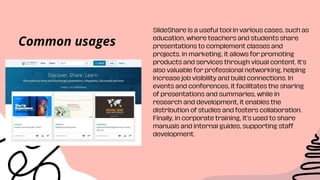
SlideShare is a useful tool in various cases, such as
education, where teachers and students share
presentations to complement classes and
projects. In marketing, it allows for promoting
products and services through visual content. It’s
also valuable for professional networking, helping
increase job visibility and build connections. In
events and conferences, it facilitates the sharing
of presentations and summaries, while in
research and development, it enables the
distribution of studies and fosters collaboration.
Finally, in corporate training, it’s used to share
manuals and internal guides, supporting staff
development.
Common usages
Examples:
Integration into your
Content Strategy:
Promote an Event: Organizing a Trip or
Vacation:
You can turn your blog posts
into engaging presentations
and share them on Slideshare.
This will help you reach a
different audience.
Design a presentation with
details about the date, place,
guests and activities. You can
send it by email or share the
link on social media.
Create a slideshow with details
about the destination,
recommended activities, places
of interest and travel tips.
SlideShare is ideal for professionals and
academics. Marketing and sales teams use
it to promote products, while students and
businesses share presentations, guides,
and training materials. It’s also useful for
speakers and researchers to share their
work or collaborate. It’s perfect for those
needing educational or professional
content.
Expected audience
Its an important tool in the sharing of information through visual images in
the sense of sharing with different levels of education important topics.
But, we also think that there are more competent resources in which you
can create your own presentation directly from the app without having to
have conflict while trying to upload a presentation which can be very heavy
for it to be correctly uploaded.
Conclusion
THANK YOU FOR
YOUR ATTENTION

Slideshare pdf key aspects to take into accountability

  • 1.
    Slideshare Effective Presentations Valeria Saenz Montserrat Zazueta JaquelynDominguez Vianey Moreno Alexandra Rodriguez Elias Valencia
  • 2.
    Advantages Reach more people It’slinked with LinkedIn, so your presentations can be seen by many professionals. Easy to share: You can quickly share your presentations on social media or websites. Supports different formats Upload PowerPoints, PDFs, and even videos. Visulally engaging: Presentations are easy to understand with images and text. Disadvantages Limited editing and creation tools. SlideShare does not offer tools for creating or editing presentations directly on the platform. . Visibility and Discovery Issues It may not provide the same visiibility as otber social media or content sharing platforms. Advertising and Promotions The free version offers ads and does not allow for customization of these elements. File size and format restrictions For free users, the maximum file size allowed is typically up to 100MB.
  • 3.
    SlideShare is auseful tool in various cases, such as education, where teachers and students share presentations to complement classes and projects. In marketing, it allows for promoting products and services through visual content. It’s also valuable for professional networking, helping increase job visibility and build connections. In events and conferences, it facilitates the sharing of presentations and summaries, while in research and development, it enables the distribution of studies and fosters collaboration. Finally, in corporate training, it’s used to share manuals and internal guides, supporting staff development. Common usages
  • 4.
    Examples: Integration into your ContentStrategy: Promote an Event: Organizing a Trip or Vacation: You can turn your blog posts into engaging presentations and share them on Slideshare. This will help you reach a different audience. Design a presentation with details about the date, place, guests and activities. You can send it by email or share the link on social media. Create a slideshow with details about the destination, recommended activities, places of interest and travel tips.
  • 5.
    SlideShare is idealfor professionals and academics. Marketing and sales teams use it to promote products, while students and businesses share presentations, guides, and training materials. It’s also useful for speakers and researchers to share their work or collaborate. It’s perfect for those needing educational or professional content. Expected audience
  • 6.
    Its an importanttool in the sharing of information through visual images in the sense of sharing with different levels of education important topics. But, we also think that there are more competent resources in which you can create your own presentation directly from the app without having to have conflict while trying to upload a presentation which can be very heavy for it to be correctly uploaded. Conclusion
  • 7.