Opening Your Classroom, Flattening
Walls with Skype and Google+
Stephanie Laird
Mitchellville Elementary
Contact Information:
Stephanie.Laird@southeastpolk.org
Lairdlearning.weebly.com
@SLaird2
Overview
• Introductions
• Why Skype or Hangout
• Examples
• Teacher as a Professional
• Classroom
• Interact with Students
• Other Lesson Ideas
• Helpful Resources
• Question/Answer and Sharing Time
• Work Time
Introductions
• Stephanie Laird
– 4th and 5th Grade Title 1
Math and Reading Specialist
– Co-teacher in 1:1 Classrooms
• 4th Grade 1:1 iPads
• 5th Grade 1:1 MacBooks
– Masters candidate in
Curriculum and Instructional
Technology at Iowa State
University
• 5th Grade Students:
– Abbie
– Jordan
– Lucas
– Via Skype
• Hanah
• Valley
• Kennedee
Why Skype or Hangout?
• Bring experts into classroom
• Virtual fieldtrips
• Collaborate with classes around the
world
• Student research and interviews
• Face to face editing a document
from a distance
Tied to ISTE NETS
ISTE NETS-Students
– Communication and Collaboration
– Research and Information Fluency
– Critical Thinking, Problem Solving and Decision
Making
– Digital Citizenship
Tied to ISTE NETS
ISTE NETS-Teachers
– Facilitate and Inspire Student Learning and
Creativity
– Design and Develop Digital Age Learning
Experiences
– Promote and Model Digital Citizenship
– Engage in Professional Growth and Leadership
Teacher Uses
• Parent Involvment
– Parent teacher conferences
– Quick showcase of work
• Readers Theatre
• Share a piece of writing
• Watch a student’s presentation
– Positive communication connection
– Celebration Planning
Teacher Uses
• Teacher Absence
• Present a lesson
• Showcase vacation information
• Catch up with what you’ve missed
• Supplemental Instruction
• After school
• Reteach or Demonstrate skills
• Absent Students
• Keep up with class
• Limits potential for information to be
misunderstood
• Maintains connection with students who are
frequently absent
Teacher Uses
• Teacher as a Professional
– PLC and PLN Meetings
• Book Discussions
• Goal Setting
• Support System
• Mentor Teacher Feedback
– Course Refreshers
– Virtually Attend Workshops
– Conference Speaking Opportunities
Slideshow of Skype and Google+
Poet Skype
• Skyped with four poets
o Caroline Starr Rose
o Irene Latham
o Mary Swander
o Debbie Levy
• Located through:
• Poet’s personal websites
• Poetry4Kids
• Skype an Author
• Students generated interview questions beforehand
Google+
Google Hangout Poetry Slam
• Connected with 3 classrooms at once
• Arranged through Twitter
• Students shared original poetry
• Provided an audience other than classroom
peers
• Learned new poetry types
What is Mystery Skype?
Video Created by: Jennifer Regruth
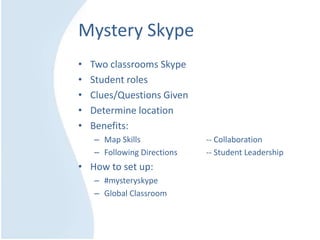
Mystery Skype
• Two classrooms Skype
• Student roles
• Clues/Questions Given
• Determine location
• Benefits:
– Map Skills -- Collaboration
– Following Directions -- Student Leadership
• How to set up:
– #mysteryskype
– Global Classroom
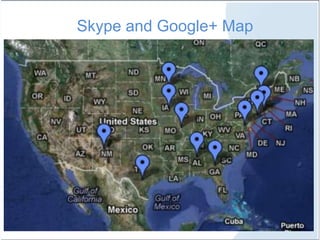
Skype and Google+ Map
Iowa History Skype
• A unique and motivating way to learn Iowa
History
• Arranged by Miranda Kral, Wellman Elementary
• Goal to Skype with all 99 Iowa counties
• We represented Polk county
– Students generated research questions
– Located information
– Shared facts and learning with Wellman 5th
graders
• Kral’s class shared about Washington County
Student Connections
• Over Skype, two wheelchair bound students
shared
– stories
– common experiences
– future hopes
• Resulted from our Google Hangout
• A great way to connect and support all
students
What Students Think…
Other Skype/Google Hangout Ideas
• Fellow Educators have suggested:
– Readers Theatre/Plays
– Mystery Reader
– Book Clubs
– Foreign Language Learning
– Social Studies Region of the U.S.
– Science or Technology Fairs
Helpful Resources
Twitter:
@SkypeClassroom
#mysteryskype
Websites:
Skype in Education
CybraryMan’s Website
Global Classroom’s Wiki
Mystery State Wiki
Blogs:
TheEduBlogger
The Global Classroom Project
Blogging through the Fourth Dimension
Skype Blogs
Tips
• Set a goal
• Test the Technology
• Prepare Students
• Provide Jobs and Expectations
• Debrief After
• Enjoy Collaborating!
Skype Add ons:
• Call Graph
• Record Skype Calls
• Talk n Write
• Free writing/screen sharing
• Unyte Application Sharing
• Screen sharing
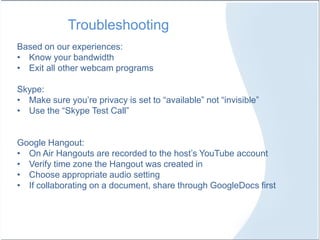
Troubleshooting
Based on our experiences:
• Know your bandwidth
• Exit all other webcam programs
Skype:
• Make sure you’re privacy is set to “available” not “invisible”
• Use the “Skype Test Call”
Google Hangout:
• On Air Hangouts are recorded to the host’s YouTube account
• Verify time zone the Hangout was created in
• Choose appropriate audio setting
• If collaborating on a document, share through GoogleDocs first
Questions? Ideas to Share?
Take this time to explore and sign up for:
Contact Information:
Stephanie.Laird@southeastpolk.org
Lairdlearning.weebly.com
@SLaird2
Collaboration and Work Time
• Resources included on 1:1
wiki
• Skype Classrooms
• Global Classrooms
• Twitter

Opening Your Classroom, Flattening Walls with Skype & Google +

  • 1.
    Opening Your Classroom,Flattening Walls with Skype and Google+ Stephanie Laird Mitchellville Elementary Contact Information: Stephanie.Laird@southeastpolk.org Lairdlearning.weebly.com @SLaird2
  • 2.
    Overview • Introductions • WhySkype or Hangout • Examples • Teacher as a Professional • Classroom • Interact with Students • Other Lesson Ideas • Helpful Resources • Question/Answer and Sharing Time • Work Time
  • 3.
    Introductions • Stephanie Laird –4th and 5th Grade Title 1 Math and Reading Specialist – Co-teacher in 1:1 Classrooms • 4th Grade 1:1 iPads • 5th Grade 1:1 MacBooks – Masters candidate in Curriculum and Instructional Technology at Iowa State University • 5th Grade Students: – Abbie – Jordan – Lucas – Via Skype • Hanah • Valley • Kennedee
  • 4.
    Why Skype orHangout? • Bring experts into classroom • Virtual fieldtrips • Collaborate with classes around the world • Student research and interviews • Face to face editing a document from a distance
  • 5.
    Tied to ISTENETS ISTE NETS-Students – Communication and Collaboration – Research and Information Fluency – Critical Thinking, Problem Solving and Decision Making – Digital Citizenship
  • 6.
    Tied to ISTENETS ISTE NETS-Teachers – Facilitate and Inspire Student Learning and Creativity – Design and Develop Digital Age Learning Experiences – Promote and Model Digital Citizenship – Engage in Professional Growth and Leadership
  • 7.
    Teacher Uses • ParentInvolvment – Parent teacher conferences – Quick showcase of work • Readers Theatre • Share a piece of writing • Watch a student’s presentation – Positive communication connection – Celebration Planning
  • 8.
    Teacher Uses • TeacherAbsence • Present a lesson • Showcase vacation information • Catch up with what you’ve missed • Supplemental Instruction • After school • Reteach or Demonstrate skills • Absent Students • Keep up with class • Limits potential for information to be misunderstood • Maintains connection with students who are frequently absent
  • 9.
    Teacher Uses • Teacheras a Professional – PLC and PLN Meetings • Book Discussions • Goal Setting • Support System • Mentor Teacher Feedback – Course Refreshers – Virtually Attend Workshops – Conference Speaking Opportunities
  • 10.
    Slideshow of Skypeand Google+
  • 11.
    Poet Skype • Skypedwith four poets o Caroline Starr Rose o Irene Latham o Mary Swander o Debbie Levy • Located through: • Poet’s personal websites • Poetry4Kids • Skype an Author • Students generated interview questions beforehand
  • 12.
    Google+ Google Hangout PoetrySlam • Connected with 3 classrooms at once • Arranged through Twitter • Students shared original poetry • Provided an audience other than classroom peers • Learned new poetry types
  • 13.
    What is MysterySkype? Video Created by: Jennifer Regruth
  • 14.
    Mystery Skype • Twoclassrooms Skype • Student roles • Clues/Questions Given • Determine location • Benefits: – Map Skills -- Collaboration – Following Directions -- Student Leadership • How to set up: – #mysteryskype – Global Classroom
  • 15.
  • 16.
    Iowa History Skype •A unique and motivating way to learn Iowa History • Arranged by Miranda Kral, Wellman Elementary • Goal to Skype with all 99 Iowa counties • We represented Polk county – Students generated research questions – Located information – Shared facts and learning with Wellman 5th graders • Kral’s class shared about Washington County
  • 17.
    Student Connections • OverSkype, two wheelchair bound students shared – stories – common experiences – future hopes • Resulted from our Google Hangout • A great way to connect and support all students
  • 18.
  • 19.
    Other Skype/Google HangoutIdeas • Fellow Educators have suggested: – Readers Theatre/Plays – Mystery Reader – Book Clubs – Foreign Language Learning – Social Studies Region of the U.S. – Science or Technology Fairs
  • 20.
    Helpful Resources Twitter: @SkypeClassroom #mysteryskype Websites: Skype inEducation CybraryMan’s Website Global Classroom’s Wiki Mystery State Wiki Blogs: TheEduBlogger The Global Classroom Project Blogging through the Fourth Dimension Skype Blogs
  • 21.
    Tips • Set agoal • Test the Technology • Prepare Students • Provide Jobs and Expectations • Debrief After • Enjoy Collaborating! Skype Add ons: • Call Graph • Record Skype Calls • Talk n Write • Free writing/screen sharing • Unyte Application Sharing • Screen sharing
  • 22.
    Troubleshooting Based on ourexperiences: • Know your bandwidth • Exit all other webcam programs Skype: • Make sure you’re privacy is set to “available” not “invisible” • Use the “Skype Test Call” Google Hangout: • On Air Hangouts are recorded to the host’s YouTube account • Verify time zone the Hangout was created in • Choose appropriate audio setting • If collaborating on a document, share through GoogleDocs first
  • 23.
  • 24.
    Take this timeto explore and sign up for: Contact Information: Stephanie.Laird@southeastpolk.org Lairdlearning.weebly.com @SLaird2 Collaboration and Work Time • Resources included on 1:1 wiki • Skype Classrooms • Global Classrooms • Twitter