SharePoint Learning KitRichard Willis
Agenda or Content SlideAbout the SpeakerWhat is SharePoint Learning Kit?What’s New?Basic WorkflowSLK In ActionBest PracticesThe FutureAny Questions?
About the SpeakerRichard Willis,Project Coordinator SharePoint Learning KitProject Coordinator Microsoft Learning GatewayManaging Director SalamanderSoft Ltdhttp://blog.salamandersoft.co.ukrichardwillis@salamandersoft.co.ukTwitter - @rpwillisWorking in education integration for 7 years
What is SharePoint Learning KitSLK is a simplebutpowerful SharePoint tool that gives teachers the flexibility to deliver almost any computer document as an eLearning resourceAllows assignment, tracking and grading of workSCORM CertifiedSupports Class Server contentOpen SourceFully integrated into SharePointWSS 3 / MOSS 2007SharePoint 2010
What isn’t SharePoint Learning KitA Virtual Learning EnvironmentBut can be part of a VLE solutionA content creation tool
What’s New?Version 1.4Drop BoxTeacher Review ModeFirefox SupportVersion 1.5SharePoint 2010 SupportNew quick assignment actions
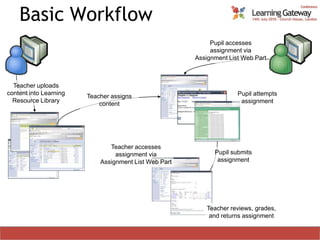
Basic WorkflowPupil accesses assignment via Assignment List Web PartTeacher uploads content into Learning Resource LibraryPupil attempts assignmentTeacher assigns contentTeacher accesses assignment via Assignment List Web PartPupil submits assignmentTeacher reviews, grades, and returns assignment
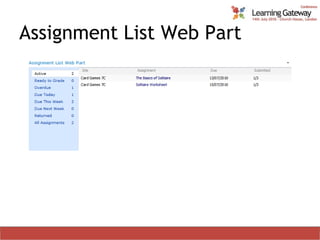
Assignment List Web Part
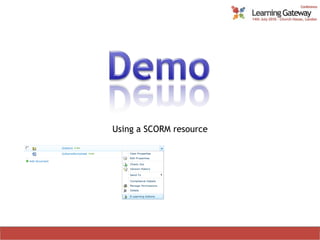
Using a SCORM resource
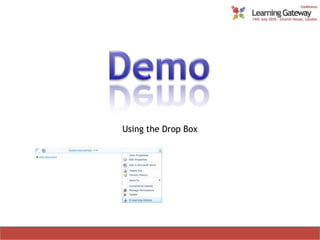
Using the Drop Box
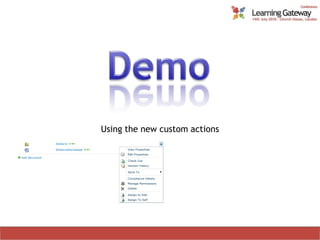
Using the new custom actions
Best PracticesCreate a site per class/learning groupAutomatically populate the teacher’s list of classesArchive class sites each yearUse resource libraries to share contentAvoid using AD or SharePoint groups for permissionsDon’t use large groupsProvision the SLK sites around the teachers’ needs
The FutureCurrently working onSLK Members Web PartReportingBeyond thatEmail alertsSupport for large groupsSCORM 2004 v3 & 4 compliance
Any Questions?
Thank you for attending!@rpwillishttp://blog.salamandersoft.co.uk

SharePoint Learning Kit - Learning Gateway Conference 2010

  • 1.
  • 2.
    Agenda or ContentSlideAbout the SpeakerWhat is SharePoint Learning Kit?What’s New?Basic WorkflowSLK In ActionBest PracticesThe FutureAny Questions?
  • 3.
    About the SpeakerRichardWillis,Project Coordinator SharePoint Learning KitProject Coordinator Microsoft Learning GatewayManaging Director SalamanderSoft Ltdhttp://blog.salamandersoft.co.ukrichardwillis@salamandersoft.co.ukTwitter - @rpwillisWorking in education integration for 7 years
  • 4.
    What is SharePointLearning KitSLK is a simplebutpowerful SharePoint tool that gives teachers the flexibility to deliver almost any computer document as an eLearning resourceAllows assignment, tracking and grading of workSCORM CertifiedSupports Class Server contentOpen SourceFully integrated into SharePointWSS 3 / MOSS 2007SharePoint 2010
  • 5.
    What isn’t SharePointLearning KitA Virtual Learning EnvironmentBut can be part of a VLE solutionA content creation tool
  • 6.
    What’s New?Version 1.4DropBoxTeacher Review ModeFirefox SupportVersion 1.5SharePoint 2010 SupportNew quick assignment actions
  • 7.
    Basic WorkflowPupil accessesassignment via Assignment List Web PartTeacher uploads content into Learning Resource LibraryPupil attempts assignmentTeacher assigns contentTeacher accesses assignment via Assignment List Web PartPupil submits assignmentTeacher reviews, grades, and returns assignment
  • 8.
  • 9.
  • 10.
  • 11.
    Using the newcustom actions
  • 12.
    Best PracticesCreate asite per class/learning groupAutomatically populate the teacher’s list of classesArchive class sites each yearUse resource libraries to share contentAvoid using AD or SharePoint groups for permissionsDon’t use large groupsProvision the SLK sites around the teachers’ needs
  • 13.
    The FutureCurrently workingonSLK Members Web PartReportingBeyond thatEmail alertsSupport for large groupsSCORM 2004 v3 & 4 compliance
  • 14.
  • 15.
    Thank you forattending!@rpwillishttp://blog.salamandersoft.co.uk

Editor's Notes

  • #5 SharePoint Learning Kit has 2 main types of resources which can be assigned:Rich Resource – SCORM or Class Server package. This is a self-contained package containing contents defined by the SCORM standard or Class Server for web based e-learning. This can include sequencing and automatic marking of tests.Any other electronic document. A teacher can assign any document within a SharePoint learning resource library to learners. The learners can then upload the completed assignment and any supporting files back to SharePoint when they have completed it.Details1. SCORM Certified – Supports SCORM 1.2 and 2004 standards.2. Supports Class Server content – Will play content created using Class Server.3. Fully integrated into SharePoint – Implemented as a web part with roles and classes based around SharePoint roles and sites. Requires SharePoint to run.
  • #6 On it’s own SLK does not turn SharePoint into a VLE. It can however be a key component of a VLE as an assignment tool. What will turn SharePoint into a VLE is how you use it, more than any technical tools.SLK does not include a content creation tool for SCORM content. Content to assign from SLK needs to be created in another tool, of which there are many on the market.
  • #7 Drop Box – An integrated way for learners to return non-SCORM content to the instructors. Prior to 1.4 various hacks were developed to enable the completed work to be returned to SharePoint, but now it is all part of an integrated process. This is the high point of the release.FireFox Support – Previous releases did not support any browser apart from IE. Now FireFox is also supported.SharePoint 2010 – Fully supported on SharePoint 2010Quick Assignment actions – Self assign and assign to current site from the drop down edit menu
  • #9 The Assignment List Web Part is the main interface into the SLK functionality. It displays a list of your assignments, grouped into queries. It will detect whether you are an instructor or learner by looking at the permissions on the site it is placed on, and display the appropriate assignments.The set of queries on the left hand side is configurable by your SharePoint administrator. This ones as pictured are the standard out of the box ones.It can be set to display all assignments across the entire site collection, or just those for the current site. In addition you can set it to display just one type of assignment from those in the left hand pane or other custom queries, if you want a more targeted list.