Session 3. JavaScript
ProgramacióMultiplataforma i Distribuïda
Grau d'informàtica. EPSEVG
Setembre 2020
Jordi Esteve jesteve@cs.upc.edu
2.
JavaScript
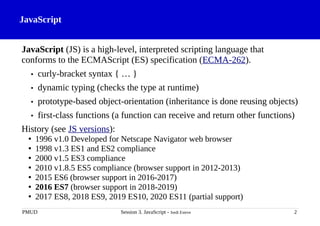
JavaScript (JS) isa high-level, interpreted scripting language that
conforms to the ECMAScript (ES) specification (ECMA-262).
• curly-bracket syntax { … }
• dynamic typing (checks the type at runtime)
• prototype-based object-orientation (inheritance is done reusing objects)
• first-class functions (a function can receive and return other functions)
History (see JS versions):
• 1996 v1.0 Developed for Netscape Navigator web browser
• 1998 v1.3 ES1 and ES2 compliance
• 2000 v1.5 ES3 compliance
• 2010 v1.8.5 ES5 compliance (browser support in 2012-2013)
• 2015 ES6 (browser support in 2016-2017)
• 2016 ES7 (browser support in 2018-2019)
• 2017 ES8, 2018 ES9, 2019 ES10, 2020 ES11 (partial support)
PMUD Session 3. JavaScript - Jordi Esteve 2
3.
JavaScript. Scalar types
•number: 25, -3, 0, 3.14, 5.2e7, -4.8E-3
• string: "Hello my friend", 'Libèl·lula "caçada"', `See you later`
• boolean: true, false
• undefined: The type of a variable that has never had a value.
• symbol (ES6): A unique value different from any other.
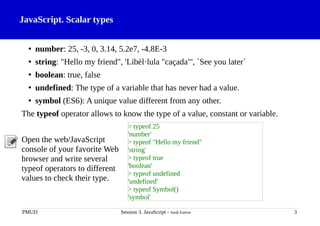
The typeof operator allows to know the type of a value, constant or variable.
Open the web/JavaScript
console of your favorite Web
browser and write several
typeof operators to different
values to check their type.
PMUD Session 3. JavaScript - Jordi Esteve 3
> typeof 25
'number'
> typeof "Hello my friend"
'string'
> typeof true
'boolean'
> typeof undefined
'undefined'
> typeof Symbol()
'symbol'
4.
JavaScript. Object andFunction types
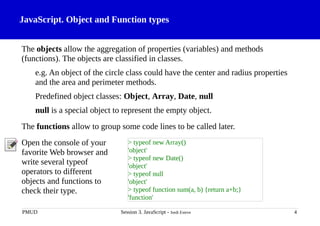
The objects allow the aggregation of properties (variables) and methods
(functions). The objects are classified in classes.
e.g. An object of the circle class could have the center and radius properties
and the area and perimeter methods.
Predefined object classes: Object, Array, Date, null
null is a special object to represent the empty object.
The functions allow to group some code lines to be called later.
Open the console of your
favorite Web browser and
write several typeof
operators to different
objects and functions to
check their type.
PMUD Session 3. JavaScript - Jordi Esteve 4
> typeof new Array()
'object'
> typeof new Date()
'object'
> typeof null
'object'
> typeof function sum(a, b) {return a+b;}
'function'
5.
JavaScript. Number literalsand operators
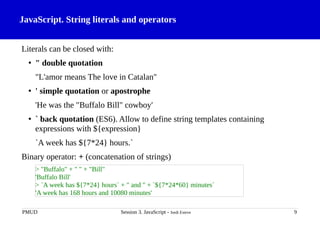
Literals:
• Integers: 13, 0, -5
• Fixed decimal point: 3.14, .15
• Floating decimal point (exponential): 4.12e-5
• Hexadecimal: 0xF3AA, 0Xf3aa
• Binary (ES6): 0b1100101, 0B11
• Octal (ES6): 0o4712, 0O7711
Unary operators: +, - (change of the sign), ++ (increment), -- (decrement)
Binary operators: +, -, *, /, % (addition, subtraction, multiply, divide, remainder)
( ) can be used to change the operator precedence (e.g. addition before multiply).
PMUD Session 3. JavaScript - Jordi Esteve 5
> 13 % 2 * (5 - 2)
3
> 0x10 + 0o10 + 0b10
26
6.
JavaScript. Number methods
https://developer.mozilla.org/en-US/docs/Web/JavaScript/Reference/Global_Objects/Number
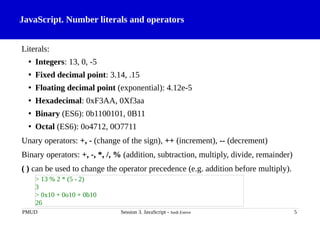
Allthese number methods returns a string representing the number:
.toFixed(n) in fixed point notation rounded to n decimals.
.toExponential(n) in exponential notation rounded to n decimals.
.toPrecision(n) rounded to n digits.
.toString([b]) converted to b base (b is optional, by default b=10).
PMUD Session 3. JavaScript - Jordi Esteve 6
> (3.14).toFixed(3)
'3.140'
> (3.14).toFixed(1)
'3.1'
> (3.14).toExponential(1)
'3.1e+0'
> (3.14).toPrecision(1)
'3'
> (15).toString(16)
'f'
> (15).toString(2)
'1111'
JavaScript. Special numbers:Infinity, NaN
Infinity, -Infinity: The mathematical ∞ and -∞.
NaN: Not a Number. For complex numbers or strings not converted to numbers.
Number(s): Converts string s to a number.
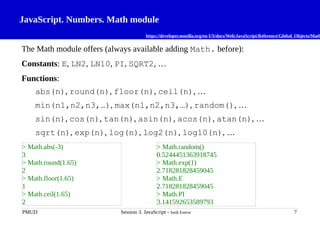
Math.sqrt(n): Returns the square root of number n.
PMUD Session 3. JavaScript - Jordi Esteve 8
> 2/0
Infinity
> -2/0
-Infinity
> Number("15")
15
> Number("A15")
NaN
> Math.sqrt(2)
1.4142135623730951
> Math.sqrt(-2)
NaN
9.
JavaScript. String literalsand operators
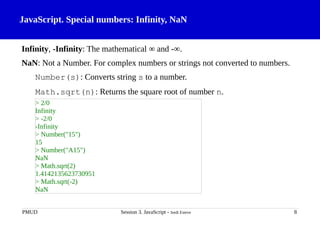
Literals can be closed with:
• " double quotation
"L'amor means The love in Catalan"
• ' simple quotation or apostrophe
'He was the "Buffalo Bill" cowboy'
• ` back quotation (ES6). Allow to define string templates containing
expressions with ${expression}
`A week has ${7*24} hours.`
Binary operator: + (concatenation of strings)
PMUD Session 3. JavaScript - Jordi Esteve 9
> "Buffalo" + " " + "Bill"
'Buffalo Bill'
> `A week has ${7*24} hours` + " and " + `${7*24*60} minutes`
'A week has 168 hours and 10080 minutes'
10.
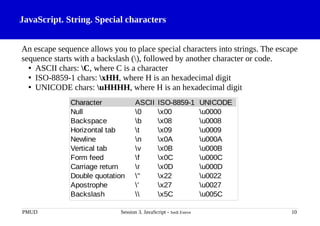
JavaScript. String. Specialcharacters
An escape sequence allows you to place special characters into strings. The escape
sequence starts with a backslash (), followed by another character or code.
• ASCII chars: C, where C is a character
• ISO-8859-1 chars: xHH, where H is an hexadecimal digit
• UNICODE chars: uHHHH, where H is an hexadecimal digit
PMUD Session 3. JavaScript - Jordi Esteve 10
Character ASCII ISO-8859-1 UNICODE
Null 0 x00 u0000
Backspace b x08 u0008
Horizontal tab t x09 u0009
Newline n x0A u000A
Vertical tab v x0B u000B
Form feed f x0C u000C
Carriage return r x0D u000D
Double quotation " x22 u0022
Apostrophe ' x27 u0027
Backslash x5C u005C
11.
JavaScript. String methods
https://developer.mozilla.org/en-US/docs/Web/JavaScript/Reference/Global_Objects/String
.lengthproperty with the number of the characters of the string.
.charAt(i) return the char at index i (the same result as string[i]).
.charCodeAt(i) return the char code at index i.
.substring(i,[j]) return the substring between i and the one before j indexes.
.slice(i,[j]) extracts the text between i and the one before j indexes.
.toLowerCase(), .toUpperCase()return the lowercase/uppercase string.
PMUD Session 3. JavaScript - Jordi Esteve 11
> "Hello".length
5
> "Hello".charAt(1)
'e'
> "Hello".charCodeAt(1)
101
> "Hello".substring(1, 3)
'el'
> "Hello".toUpperCase()
'HELLO'
12.
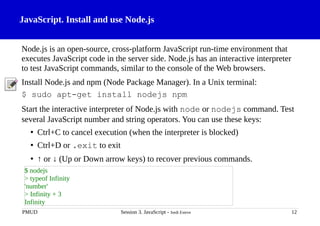
JavaScript. Install anduse Node.js
Node.js is an open-source, cross-platform JavaScript run-time environment that
executes JavaScript code in the server side. Node.js has an interactive interpreter
to test JavaScript commands, similar to the console of the Web browsers.
Install Node.js and npm (Node Package Manager). In a Unix terminal:
$ sudo apt-get install nodejs npm
Start the interactive interpreter of Node.js with node or nodejs command. Test
several JavaScript number and string operators. You can use these keys:
• Ctrl+C to cancel execution (when the interpreter is blocked)
• Ctrl+D or .exit to exit
• ↑ or ↓ (Up or Down arrow keys) to recover previous commands.
PMUD Session 3. JavaScript - Jordi Esteve 12
$ nodejs
> typeof Infinity
'number'
> Infinity + 3
Infinity
13.
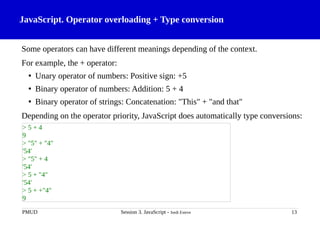
JavaScript. Operator overloading+ Type conversion
Some operators can have different meanings depending of the context.
For example, the + operator:
• Unary operator of numbers: Positive sign: +5
• Binary operator of numbers: Addition: 5 + 4
• Binary operator of strings: Concatenation: "This" + "and that"
Depending on the operator priority, JavaScript does automatically type conversions:
PMUD Session 3. JavaScript - Jordi Esteve 13
> 5 + 4
9
> "5" + "4"
'54'
> "5" + 4
'54'
> 5 + "4"
'54'
> 5 + +"4"
9
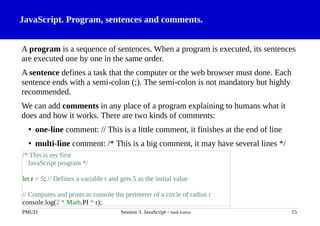
JavaScript. Program, sentencesand comments.
A program is a sequence of sentences. When a program is executed, its sentences
are executed one by one in the same order.
A sentence defines a task that the computer or the web browser must done. Each
sentence ends with a semi-colon (;). The semi-colon is not mandatory but highly
recommended.
We can add comments in any place of a program explaining to humans what it
does and how it works. There are two kinds of comments:
• one-line comment: // This is a little comment, it finishes at the end of line
• multi-line comment: /* This is a big comment, it may have several lines */
PMUD Session 3. JavaScript - Jordi Esteve 15
/* This is my first
JavaScript program */
let r = 5; // Defines a variable r and gets 5 as the initial value
// Computes and prints to console the perimeter of a circle of radius r
console.log(2 * Math.PI * r);
16.
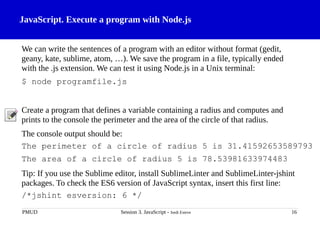
JavaScript. Execute aprogram with Node.js
We can write the sentences of a program with an editor without format (gedit,
geany, kate, sublime, atom, …). We save the program in a file, typically ended
with the .js extension. We can test it using Node.js in a Unix terminal:
$ node programfile.js
Create a program that defines a variable containing a radius and computes and
prints to the console the perimeter and the area of the circle of that radius.
The console output should be:
The perimeter of a circle of radius 5 is 31.41592653589793
The area of a circle of radius 5 is 78.53981633974483
Tip: If you use the Sublime editor, install SublimeLinter and SublimeLinter-jshint
packages. To check the ES6 version of JavaScript syntax, insert this first line:
/*jshint esversion: 6 */
PMUD Session 3. JavaScript - Jordi Esteve 16
17.
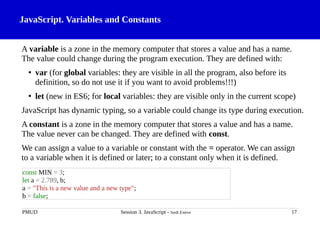
JavaScript. Variables andConstants
A variable is a zone in the memory computer that stores a value and has a name.
The value could change during the program execution. They are defined with:
• var (for global variables: they are visible in all the program, also before its
definition, so do not use it if you want to avoid problems!!!)
• let (new in ES6; for local variables: they are visible only in the current scope)
JavaScript has dynamic typing, so a variable could change its type during execution.
A constant is a zone in the memory computer that stores a value and has a name.
The value never can be changed. They are defined with const.
We can assign a value to a variable or constant with the = operator. We can assign
to a variable when it is defined or later; to a constant only when it is defined.
PMUD Session 3. JavaScript - Jordi Esteve 17
const MIN = 3;
let a = 2.789, b;
a = "This is a new value and a new type";
b = false;
18.
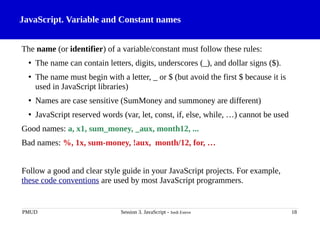
JavaScript. Variable andConstant names
The name (or identifier) of a variable/constant must follow these rules:
• The name can contain letters, digits, underscores (_), and dollar signs ($).
• The name must begin with a letter, _ or $ (but avoid the first $ because it is
used in JavaScript libraries)
• Names are case sensitive (SumMoney and summoney are different)
• JavaScript reserved words (var, let, const, if, else, while, …) cannot be used
Good names: a, x1, sum_money, _aux, month12, ...
Bad names: %, 1x, sum-money, !aux, month/12, for, …
Follow a good and clear style guide in your JavaScript projects. For example,
these code conventions are used by most JavaScript programmers.
PMUD Session 3. JavaScript - Jordi Esteve 18
19.
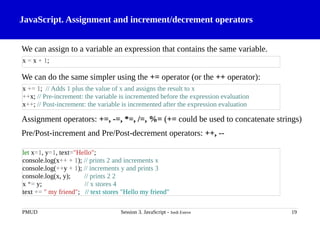
JavaScript. Assignment andincrement/decrement operators
We can assign to a variable an expression that contains the same variable.
We can do the same simpler using the += operator (or the ++ operator):
Assignment operators: +=, -=, *=, /=, %= (+= could be used to concatenate strings)
Pre/Post-increment and Pre/Post-decrement operators: ++, --
PMUD Session 3. JavaScript - Jordi Esteve 19
x = x + 1;
x += 1; // Adds 1 plus the value of x and assigns the result to x
++x; // Pre-increment: the variable is incremented before the expression evaluation
x++; // Post-increment: the variable is incremented after the expression evaluation
let x=1, y=1, text="Hello";
console.log(x++ + 1); // prints 2 and increments x
console.log(++y + 1); // increments y and prints 3
console.log(x, y); // prints 2 2
x *= y; // x stores 4
text += " my friend"; // text stores "Hello my friend"
20.
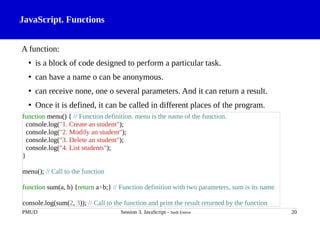
JavaScript. Functions
A function:
•is a block of code designed to perform a particular task.
• can have a name o can be anonymous.
• can receive none, one o several parameters. And it can return a result.
• Once it is defined, it can be called in different places of the program.
PMUD Session 3. JavaScript - Jordi Esteve 20
function menu() { // Function definition. menu is the name of the function.
console.log("1. Create an student");
console.log("2. Modify an student");
console.log("3. Delete an student");
console.log("4. List students");
}
menu(); // Call to the function
function sum(a, b) {return a+b;} // Function definition with two parameters, sum is its name
console.log(sum(2, 3)); // Call to the function and print the result returned by the function
21.
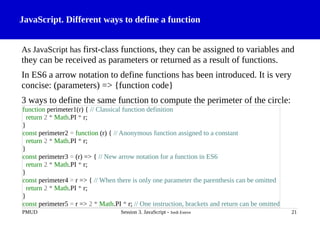
JavaScript. Different waysto define a function
As JavaScript has first-class functions, they can be assigned to variables and
they can be received as parameters or returned as a result of functions.
In ES6 a arrow notation to define functions has been introduced. It is very
concise: (parameters) => {function code}
3 ways to define the same function to compute the perimeter of the circle:
PMUD Session 3. JavaScript - Jordi Esteve 21
function perimeter1(r) { // Classical function definition
return 2 * Math.PI * r;
}
const perimeter2 = function (r) { // Anonymous function assigned to a constant
return 2 * Math.PI * r;
}
const perimeter3 = (r) => { // New arrow notation for a function in ES6
return 2 * Math.PI * r;
}
const perimeter4 = r => { // When there is only one parameter the parenthesis can be omitted
return 2 * Math.PI * r;
}
const perimeter5 = r => 2 * Math.PI * r; // One instruction, brackets and return can be omitted
22.
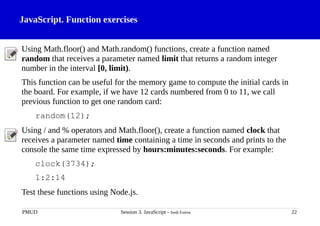
JavaScript. Function exercises
UsingMath.floor() and Math.random() functions, create a function named
random that receives a parameter named limit that returns a random integer
number in the interval [0, limit).
This function can be useful for the memory game to compute the initial cards in
the board. For example, if we have 12 cards numbered from 0 to 11, we call
previous function to get one random card:
random(12);
Using / and % operators and Math.floor(), create a function named clock that
receives a parameter named time containing a time in seconds and prints to the
console the same time expressed by hours:minutes:seconds. For example:
clock(3734);
1:2:14
Test these functions using Node.js.
PMUD Session 3. JavaScript - Jordi Esteve 22
23.
JavaScript. Flexible functionparameters
If a function parameter does not receive a value, it gets the undefined value.
A function can receive a variable number of parameters and we can collect them
using the spread operator (…) (new in ES6) or using the arguments word.
PMUD Session 3. JavaScript - Jordi Esteve 23
const ask = (name, title) => {
console.log(title + " " + name + ", are you right?");
}
ask("Smith", "Mr."); // Mr. Smith, are you right?
ask("Ford"); // undefined Ford, are you right?
const ask = (...texts) => { // New ES6 notation
console.log(texts[1] + " " + texts[0] + ", are you right?");
}
const ask = function () { // Old notation previous ES6
console.log(arguments[1] + " " + arguments[0] + ", are you right?");
}
24.
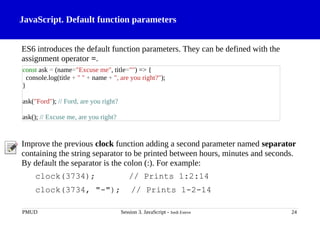
JavaScript. Default functionparameters
ES6 introduces the default function parameters. They can be defined with the
assignment operator =.
Improve the previous clock function adding a second parameter named separator
containing the string separator to be printed between hours, minutes and seconds.
By default the separator is the colon (:). For example:
clock(3734); // Prints 1:2:14
clock(3734, "-"); // Prints 1-2-14
PMUD Session 3. JavaScript - Jordi Esteve 24
const ask = (name="Excuse me", title="") => {
console.log(title + " " + name + ", are you right?");
}
ask("Ford"); // Ford, are you right?
ask(); // Excuse me, are you right?
25.
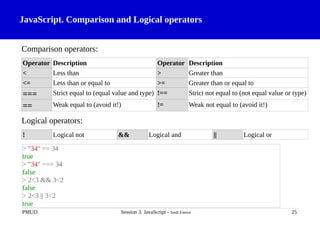
JavaScript. Comparison andLogical operators
Comparison operators:
Operator Description Operator Description
< Less than > Greater than
<= Less than or equal to >= Greater than or equal to
=== Strict equal to (equal value and type) !== Strict not equal to (not equal value or type)
== Weak equal to (avoid it!) != Weak not equal to (avoid it!)
Logical operators:
! Logical not && Logical and || Logical or
PMUD Session 3. JavaScript - Jordi Esteve 25
> "34" == 34
true
> "34" === 34
false
> 2<3 && 3<2
false
> 2<3 || 3<2
true
26.
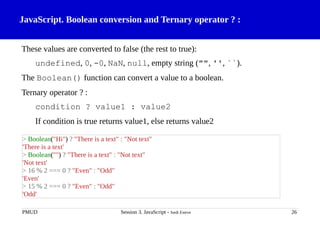
JavaScript. Boolean conversionand Ternary operator ? :
These values are converted to false (the rest to true):
undefined, 0, -0, NaN, null, empty string ("", '', ``).
The Boolean() function can convert a value to a boolean.
Ternary operator ? :
condition ? value1 : value2
If condition is true returns value1, else returns value2
PMUD Session 3. JavaScript - Jordi Esteve 26
> Boolean("Hi") ? "There is a text" : "Not text"
'There is a text'
> Boolean("") ? "There is a text" : "Not text"
'Not text'
> 16 % 2 === 0 ? "Even" : "Odd"
'Even'
> 15 % 2 === 0 ? "Even" : "Odd"
'Odd'
27.
JavaScript. Array
An arrayallows to store multiple values in a single variable and to access to the
values with an index number (first element has index 0).
Array creation (with the [] literal or creating a new Array object):
Array access with an index (the length property contains the number of elements):
Array modification:
PMUD Session 3. JavaScript - Jordi Esteve 27
> let primes = [2, 3, 5, 7, 11, 13, 17, 19];
> let fruits = new Array("Apple", "Orange", "Pineapple", "Coconut");
> "The two first primes are " + primes[0] + " and " + primes[1] // First element has index 0
'The two first primes are 2 and 3'
> "I like " + fruits[0] + " and " + fruits[fruits.length-1]
'I like Apple and Coconut'
> fruits[0] = "Banana";
> fruits.push("Pear"); // Adds element at the end (pop() removes the last element)
> fruits
[ 'Banana', 'Orange', 'Pineapple', 'Coconut', 'Pear' ]
> fruits.length = 2;
> fruits
[ 'Banana', 'Orange' ]
28.
JavaScript. Array (II)
Anarray can store elements of different type.
An array can store other arrays (useful to create a matrix).
We can use the spread operator (...) to add elements from one array to another.
The access to a non existing element returns undefined.
PMUD Session 3. JavaScript - Jordi Esteve 28
> let tailor_drawer = [23, "Button", false, "Thread", x => x*x];
> tailor_drawer[4](3); // Executes the function stored in the last element of tailor_drawer
9
> let m = [ [1, 3, 5], [2, 4, 6]];
> m[0][0] + m[1][2]
7
> let vegetables = [...fruits, "Tomatoe", "Patatoe"];
> vegetables
[ 'Banana', 'Orange', 'Tomatoe', 'Patatoe' ]
> vegetables[5]
undefined
29.
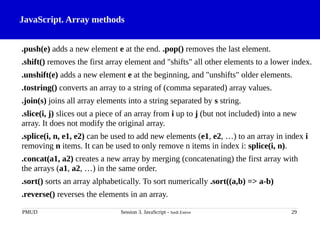
JavaScript. Array methods
.push(e)adds a new element e at the end. .pop() removes the last element.
.shift() removes the first array element and "shifts" all other elements to a lower index.
.unshift(e) adds a new element e at the beginning, and "unshifts" older elements.
.tostring() converts an array to a string of (comma separated) array values.
.join(s) joins all array elements into a string separated by s string.
.slice(i, j) slices out a piece of an array from i up to j (but not included) into a new
array. It does not modify the original array.
.splice(i, n, e1, e2) can be used to add new elements (e1, e2, …) to an array in index i
removing n items. It can be used to only remove n items in index i: splice(i, n).
.concat(a1, a2) creates a new array by merging (concatenating) the first array with
the arrays (a1, a2, …) in the same order.
.sort() sorts an array alphabetically. To sort numerically .sort((a,b) => a-b)
.reverse() reverses the elements in an array.
PMUD Session 3. JavaScript - Jordi Esteve 29
30.
JavaScript. Array exercise
.indexOf(e,offset) returns the index of the first occurrence of e starting at offset.
We can mix the array methods that return other array. For example:
Given an array with these students ["John", "Mary", "Frank", "Nicole", "Joseph"],
add "Jane" and "George", remove "John", order alphabetically and remove the
first two remaining students with a single command. The result must be
[ 'Jane', 'Joseph', 'Mary', 'Nicole' ]
Create a function that receives several arrays (use the spread operator ...) and
returns the result of sorting the concatenation of all these arrays.
PMUD Session 3. JavaScript - Jordi Esteve 30
> ['a', 'e', 'i', 'o', 'u'].slice(0,3).concat('a', 'b')
[ 'a', 'e', 'i', 'a', 'b' ]
> ['a', 'e', 'i', 'o', 'u'].slice(0,3).concat('a', 'b').sort().reverse()
[ 'i', 'e', 'b', 'a', 'a' ]
> concat_sort([7], [3,2], [5,6,4], [1])
[ 1, 2, 3, 4, 5, 6, 7 ]
31.
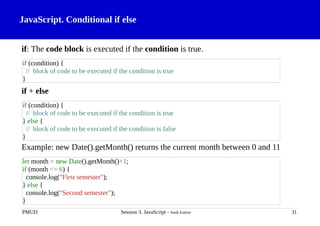
JavaScript. Conditional ifelse
if: The code block is executed if the condition is true.
if + else
Example: new Date().getMonth() returns the current month between 0 and 11
PMUD Session 3. JavaScript - Jordi Esteve 31
if (condition) {
// block of code to be executed if the condition is true
}
if (condition) {
// block of code to be executed if the condition is true
} else {
// block of code to be executed if the condition is false
}
let month = new Date().getMonth()+1;
if (month <= 6) {
console.log("First semester");
} else {
console.log("Second semester");
}
32.
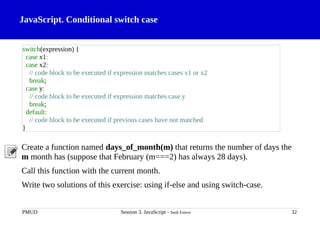
JavaScript. Conditional switchcase
Create a function named days_of_month(m) that returns the number of days the
m month has (suppose that February (m===2) has always 28 days).
Call this function with the current month.
Write two solutions of this exercise: using if-else and using switch-case.
PMUD Session 3. JavaScript - Jordi Esteve 32
switch(expression) {
case x1:
case x2:
// code block to be executed if expression matches cases x1 or x2
break;
case y:
// code block to be executed if expression matches case y
break;
default:
// code block to be executed if previous cases have not matched
}
33.
JavaScript. Loop while
Thecode block is executed while the condition is true.
Example: Sum the elements of an array:
Create a function named average(v) that returns the average of the values of v
vector.
PMUD Session 3. JavaScript - Jordi Esteve 33
while (condition) {
// code block to be executed
}
let v = [5,4,3], sum = 0;
let i = 0;
while (i < v.length) {
sum += v[i];
i++;
}
34.
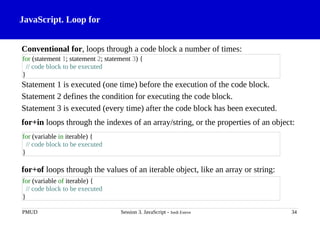
JavaScript. Loop for
Conventionalfor, loops through a code block a number of times:
Statement 1 is executed (one time) before the execution of the code block.
Statement 2 defines the condition for executing the code block.
Statement 3 is executed (every time) after the code block has been executed.
for+in loops through the indexes of an array/string, or the properties of an object:
for+of loops through the values of an iterable object, like an array or string:
PMUD Session 3. JavaScript - Jordi Esteve 34
for (statement 1; statement 2; statement 3) {
// code block to be executed
}
for (variable of iterable) {
// code block to be executed
}
for (variable in iterable) {
// code block to be executed
}
35.
JavaScript. Loop for.Examples
Example: Three different solutions to sum the elements of an array:
Create a function named initial_cards(n) that returns an array of n elements
containing n/2 pairs of cards in random positions (the array values are integers
between 1 and n/2, each one repeated twice). For example, if n=12 could return
[ 4, 2, 1, 5, 2, 5, 6, 3, 1, 4, 6, 3 ] Tip: Use the previous random(limit) function.
PMUD Session 3. JavaScript - Jordi Esteve 35
let v = [5,4,3], sum = 0;
for(let i=0; i < v.length; i++)
sum += v[i];
let i;
for (i in v)
sum += v[i];
for (e of v)
sum += e;
36.
JavaScript. Array iterationmethods: forEach
Array iteration methods: Methods that execute a function for each array element.
They are like a loop starting from element of index 0 to element of index length-1.
.forEach(function)
where function can have one parameter or three parameters:
(element, index, array) => {…} // current element, current index and array
element => {…} // current element
Example of .forEach(): Two different solutions to sum the elements of an array:
PMUD Session 3. JavaScript - Jordi Esteve 36
let v = [5,4,3], sum = 0;
v.forEach(e => sum += e);
v.forEach((e, i, a) => sum += a[i]);
37.
JavaScript. Array iterationmethods: find, findIndex, filter, map
.forEach(function) Execute the function for each element.
.find(function) Return the first element where the function is true.
.findIndex(function) Return the index of first element where the function is true.
.every(function) Checks if all array elements pass the function test.
.some(function) Checks if some array elements pass the function test.
.filter(function) Remove array elements where the function returns false.
.map(function) Replace each array element with the result of calling the function.
PMUD Session 3. JavaScript - Jordi Esteve 37
> [1, 2, 3, 4].find(e => e % 2 === 0) // Finds the first even number
2
> [1, 2, 3, 4].findIndex(e => e % 2 === 0) // Finds the index of the first even number
1
> [1, 2, 3, 4].filter(e => e % 2 === 0) // Filters the even numbers
[ 2, 4 ]
> [1, 2, 3, 4].map(e => e * e) // Computes the squares of each number
[ 1, 4, 9, 16 ]
> [1, 2, 3, 4].forEach(e => console.log(e)) // Prints the numbers to console
38.
JavaScript. Array iterationmethods: reduce
.reduce((result, element, index, array) => {…}, initial_value)
Reduces the array elements to a single result: It starts storing initial_value in
result and iterates throw the array elements from the first to the last updating
result with the value returned by the function.
.reduce((result, element, index, array) => {…})
Reduces the array elements to a single result: It starts storing array[0] in result
and iterates throw the array elements from the second to the last updating result
with the value returned by the function.
As in the other array iteration methods, index and array parameters are optional.
PMUD Session 3. JavaScript - Jordi Esteve 38
> [5,4,3].reduce((acc, e) => acc +=e, 0); // Other way to sum the elements of an array
12
// Simple way to remove the duplicated elements of a sorted array
> [1, 1, 1, 2, 2, 3].reduce((acc, e, i, a) => e !== a[i-1] ? acc.concat(e) : acc, []);
[ 1, 2, 3 ]
39.
Exercises: Online JavaScriptquiz & JavaScript exercises
Let's go to simplify the function named initial_cards(n) that returns an array of n
elements containing n/2 pairs of cards in random positions.
new Array(n).fill(0); // Creates an array of n elems [0, 0, 0, …, 0]
How do you can get this array from the previous one using .map() method (n=12)?
[ 1, 1, 2, 2, 3, 3, 4, 4, 5, 5, 6, 6 ]
If we get the previous result, how we can exchange the values in random positions
using .forEach() method and the random(limit) function?
You can review your knowledge about JavaScript doing these online
resources:
• JavaScript quiz
• JavaScript exercises
PMUD Session 3. JavaScript - Jordi Esteve 39

![JavaScript. Number methods
https://developer.mozilla.org/en-US/docs/Web/JavaScript/Reference/Global_Objects/Number
All these number methods returns a string representing the number:
.toFixed(n) in fixed point notation rounded to n decimals.
.toExponential(n) in exponential notation rounded to n decimals.
.toPrecision(n) rounded to n digits.
.toString([b]) converted to b base (b is optional, by default b=10).
PMUD Session 3. JavaScript - Jordi Esteve 6
> (3.14).toFixed(3)
'3.140'
> (3.14).toFixed(1)
'3.1'
> (3.14).toExponential(1)
'3.1e+0'
> (3.14).toPrecision(1)
'3'
> (15).toString(16)
'f'
> (15).toString(2)
'1111'](https://image.slidesharecdn.com/session3javascript-251221131248-acc338e5/85/session3_javascript_FORNUEWUSERSTOKNOW-pdf-6-320.jpg)
![JavaScript. String methods
https://developer.mozilla.org/en-US/docs/Web/JavaScript/Reference/Global_Objects/String
.length property with the number of the characters of the string.
.charAt(i) return the char at index i (the same result as string[i]).
.charCodeAt(i) return the char code at index i.
.substring(i,[j]) return the substring between i and the one before j indexes.
.slice(i,[j]) extracts the text between i and the one before j indexes.
.toLowerCase(), .toUpperCase()return the lowercase/uppercase string.
PMUD Session 3. JavaScript - Jordi Esteve 11
> "Hello".length
5
> "Hello".charAt(1)
'e'
> "Hello".charCodeAt(1)
101
> "Hello".substring(1, 3)
'el'
> "Hello".toUpperCase()
'HELLO'](https://image.slidesharecdn.com/session3javascript-251221131248-acc338e5/85/session3_javascript_FORNUEWUSERSTOKNOW-pdf-11-320.jpg)
![JavaScript. Operator precedence
Operator type Individual operators
member . []
call / create instance () new
negation/increment ! ~ - + ++ -- typeof void delete
multiply/divide * / %
addition/subtraction + -
bitwise shift << >> >>>
relational < <= > >= in instanceof
equality == != === !==
bitwise-and &
bitwise-xor ^
bitwise-or |
logical-and &&
logical-or ||
conditional ?:
assignment = += -= *= /= %= <<= >>= >>>= &= ^= |=
comma ,
Font: https://developer.mozilla.org/en-US/docs/Web/JavaScript/Guide/Expressions_and_Operators
PMUD Session 3. JavaScript - Jordi Esteve 14](https://image.slidesharecdn.com/session3javascript-251221131248-acc338e5/85/session3_javascript_FORNUEWUSERSTOKNOW-pdf-14-320.jpg)
![JavaScript. Flexible function parameters
If a function parameter does not receive a value, it gets the undefined value.
A function can receive a variable number of parameters and we can collect them
using the spread operator (…) (new in ES6) or using the arguments word.
PMUD Session 3. JavaScript - Jordi Esteve 23
const ask = (name, title) => {
console.log(title + " " + name + ", are you right?");
}
ask("Smith", "Mr."); // Mr. Smith, are you right?
ask("Ford"); // undefined Ford, are you right?
const ask = (...texts) => { // New ES6 notation
console.log(texts[1] + " " + texts[0] + ", are you right?");
}
const ask = function () { // Old notation previous ES6
console.log(arguments[1] + " " + arguments[0] + ", are you right?");
}](https://image.slidesharecdn.com/session3javascript-251221131248-acc338e5/85/session3_javascript_FORNUEWUSERSTOKNOW-pdf-23-320.jpg)
![JavaScript. Array
An array allows to store multiple values in a single variable and to access to the
values with an index number (first element has index 0).
Array creation (with the [] literal or creating a new Array object):
Array access with an index (the length property contains the number of elements):
Array modification:
PMUD Session 3. JavaScript - Jordi Esteve 27
> let primes = [2, 3, 5, 7, 11, 13, 17, 19];
> let fruits = new Array("Apple", "Orange", "Pineapple", "Coconut");
> "The two first primes are " + primes[0] + " and " + primes[1] // First element has index 0
'The two first primes are 2 and 3'
> "I like " + fruits[0] + " and " + fruits[fruits.length-1]
'I like Apple and Coconut'
> fruits[0] = "Banana";
> fruits.push("Pear"); // Adds element at the end (pop() removes the last element)
> fruits
[ 'Banana', 'Orange', 'Pineapple', 'Coconut', 'Pear' ]
> fruits.length = 2;
> fruits
[ 'Banana', 'Orange' ]](https://image.slidesharecdn.com/session3javascript-251221131248-acc338e5/85/session3_javascript_FORNUEWUSERSTOKNOW-pdf-27-320.jpg)
![JavaScript. Array (II)
An array can store elements of different type.
An array can store other arrays (useful to create a matrix).
We can use the spread operator (...) to add elements from one array to another.
The access to a non existing element returns undefined.
PMUD Session 3. JavaScript - Jordi Esteve 28
> let tailor_drawer = [23, "Button", false, "Thread", x => x*x];
> tailor_drawer[4](3); // Executes the function stored in the last element of tailor_drawer
9
> let m = [ [1, 3, 5], [2, 4, 6]];
> m[0][0] + m[1][2]
7
> let vegetables = [...fruits, "Tomatoe", "Patatoe"];
> vegetables
[ 'Banana', 'Orange', 'Tomatoe', 'Patatoe' ]
> vegetables[5]
undefined](https://image.slidesharecdn.com/session3javascript-251221131248-acc338e5/85/session3_javascript_FORNUEWUSERSTOKNOW-pdf-28-320.jpg)
![JavaScript. Array exercise
.indexOf(e, offset) returns the index of the first occurrence of e starting at offset.
We can mix the array methods that return other array. For example:
Given an array with these students ["John", "Mary", "Frank", "Nicole", "Joseph"],
add "Jane" and "George", remove "John", order alphabetically and remove the
first two remaining students with a single command. The result must be
[ 'Jane', 'Joseph', 'Mary', 'Nicole' ]
Create a function that receives several arrays (use the spread operator ...) and
returns the result of sorting the concatenation of all these arrays.
PMUD Session 3. JavaScript - Jordi Esteve 30
> ['a', 'e', 'i', 'o', 'u'].slice(0,3).concat('a', 'b')
[ 'a', 'e', 'i', 'a', 'b' ]
> ['a', 'e', 'i', 'o', 'u'].slice(0,3).concat('a', 'b').sort().reverse()
[ 'i', 'e', 'b', 'a', 'a' ]
> concat_sort([7], [3,2], [5,6,4], [1])
[ 1, 2, 3, 4, 5, 6, 7 ]](https://image.slidesharecdn.com/session3javascript-251221131248-acc338e5/85/session3_javascript_FORNUEWUSERSTOKNOW-pdf-30-320.jpg)
![JavaScript. Loop while
The code block is executed while the condition is true.
Example: Sum the elements of an array:
Create a function named average(v) that returns the average of the values of v
vector.
PMUD Session 3. JavaScript - Jordi Esteve 33
while (condition) {
// code block to be executed
}
let v = [5,4,3], sum = 0;
let i = 0;
while (i < v.length) {
sum += v[i];
i++;
}](https://image.slidesharecdn.com/session3javascript-251221131248-acc338e5/85/session3_javascript_FORNUEWUSERSTOKNOW-pdf-33-320.jpg)
![JavaScript. Loop for. Examples
Example: Three different solutions to sum the elements of an array:
Create a function named initial_cards(n) that returns an array of n elements
containing n/2 pairs of cards in random positions (the array values are integers
between 1 and n/2, each one repeated twice). For example, if n=12 could return
[ 4, 2, 1, 5, 2, 5, 6, 3, 1, 4, 6, 3 ] Tip: Use the previous random(limit) function.
PMUD Session 3. JavaScript - Jordi Esteve 35
let v = [5,4,3], sum = 0;
for(let i=0; i < v.length; i++)
sum += v[i];
let i;
for (i in v)
sum += v[i];
for (e of v)
sum += e;](https://image.slidesharecdn.com/session3javascript-251221131248-acc338e5/85/session3_javascript_FORNUEWUSERSTOKNOW-pdf-35-320.jpg)
![JavaScript. Array iteration methods: forEach
Array iteration methods: Methods that execute a function for each array element.
They are like a loop starting from element of index 0 to element of index length-1.
.forEach(function)
where function can have one parameter or three parameters:
(element, index, array) => {…} // current element, current index and array
element => {…} // current element
Example of .forEach(): Two different solutions to sum the elements of an array:
PMUD Session 3. JavaScript - Jordi Esteve 36
let v = [5,4,3], sum = 0;
v.forEach(e => sum += e);
v.forEach((e, i, a) => sum += a[i]);](https://image.slidesharecdn.com/session3javascript-251221131248-acc338e5/85/session3_javascript_FORNUEWUSERSTOKNOW-pdf-36-320.jpg)
![JavaScript. Array iteration methods: find, findIndex, filter, map
.forEach(function) Execute the function for each element.
.find(function) Return the first element where the function is true.
.findIndex(function) Return the index of first element where the function is true.
.every(function) Checks if all array elements pass the function test.
.some(function) Checks if some array elements pass the function test.
.filter(function) Remove array elements where the function returns false.
.map(function) Replace each array element with the result of calling the function.
PMUD Session 3. JavaScript - Jordi Esteve 37
> [1, 2, 3, 4].find(e => e % 2 === 0) // Finds the first even number
2
> [1, 2, 3, 4].findIndex(e => e % 2 === 0) // Finds the index of the first even number
1
> [1, 2, 3, 4].filter(e => e % 2 === 0) // Filters the even numbers
[ 2, 4 ]
> [1, 2, 3, 4].map(e => e * e) // Computes the squares of each number
[ 1, 4, 9, 16 ]
> [1, 2, 3, 4].forEach(e => console.log(e)) // Prints the numbers to console](https://image.slidesharecdn.com/session3javascript-251221131248-acc338e5/85/session3_javascript_FORNUEWUSERSTOKNOW-pdf-37-320.jpg)
![JavaScript. Array iteration methods: reduce
.reduce((result, element, index, array) => {…}, initial_value)
Reduces the array elements to a single result: It starts storing initial_value in
result and iterates throw the array elements from the first to the last updating
result with the value returned by the function.
.reduce((result, element, index, array) => {…})
Reduces the array elements to a single result: It starts storing array[0] in result
and iterates throw the array elements from the second to the last updating result
with the value returned by the function.
As in the other array iteration methods, index and array parameters are optional.
PMUD Session 3. JavaScript - Jordi Esteve 38
> [5,4,3].reduce((acc, e) => acc +=e, 0); // Other way to sum the elements of an array
12
// Simple way to remove the duplicated elements of a sorted array
> [1, 1, 1, 2, 2, 3].reduce((acc, e, i, a) => e !== a[i-1] ? acc.concat(e) : acc, []);
[ 1, 2, 3 ]](https://image.slidesharecdn.com/session3javascript-251221131248-acc338e5/85/session3_javascript_FORNUEWUSERSTOKNOW-pdf-38-320.jpg)
![Exercises: Online JavaScript quiz & JavaScript exercises
Let's go to simplify the function named initial_cards(n) that returns an array of n
elements containing n/2 pairs of cards in random positions.
new Array(n).fill(0); // Creates an array of n elems [0, 0, 0, …, 0]
How do you can get this array from the previous one using .map() method (n=12)?
[ 1, 1, 2, 2, 3, 3, 4, 4, 5, 5, 6, 6 ]
If we get the previous result, how we can exchange the values in random positions
using .forEach() method and the random(limit) function?
You can review your knowledge about JavaScript doing these online
resources:
• JavaScript quiz
• JavaScript exercises
PMUD Session 3. JavaScript - Jordi Esteve 39](https://image.slidesharecdn.com/session3javascript-251221131248-acc338e5/85/session3_javascript_FORNUEWUSERSTOKNOW-pdf-39-320.jpg)


