SDMX
at the
International
Labour
Organization
SDMX Global Conference
16 – 19 September, 2019 – Budapest, Hungary
SDMX Global Conference
ILO Department of Statistics 2
Once upon a time…
 Dissemination WS for ILOSTAT – 1st generation: 2013
 Limited number of artefacts and formats delivered
 «Virtual registry» approach: all artefacts generated «on-the-fly»
based on the structural metadata information in ILOSTAT
 Internal «consumers»
 ILO Knowledge Gateway: very easy integration of statistical DWI
 Country profiles: Desktop and Mobile applications
 Data Mapper: IMF product adapted to consume SDMX API
 WESO and YouthSTATS dashboards
SDMX Global Conference
ILO Department of Statistics 3
Expanding the use of SDMX
 SDMX Query builder
 On line «wizard» to access ILOSTAT data and metadata in SDMX
 ILOSTAT Excel Add-in
 Superseeded (with new functionalities) the former «KILM» Excel Add-in
 Replaced the old proprietary WS by the SDMX standard API
 ILOSTAT Data Publisher
 Simple to use desktop tool to extract data and metadata from ILOSTAT
 Downloads information for one country ready to upload to .Stat v7
SDMX Global Conference
ILO Department of Statistics 4
Expanding the use of SDMX
 Second generation WS: 2018
 Same architecture as the previous version (on-the-fly virtual
registry)
 Based on .Net NSIWS by Eurostat
 Implements all artefacts and complies with RESTful API v. 1.4
specification
 Delivers all available formats: SDMX-ML, SDMX-csv and SDMX-json
 ILO.Stat based in SIS-CC Data Explorer
 DE «connects» to ILOSTAT by consuming the new WS
 No changes in ILOSTAT’s backend
SDMX Global Conference
ILO Department of Statistics 5
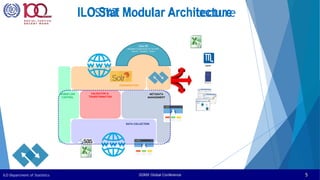
ILOSTAT Modular Architecture
WORKFLOW
CONTROL
DISSEMINATION
VALIDATION &
TRANSFORMATION
DATA COLLECTION
METADATA
MANAGEMENT
.Stat DE
Reusable Components for the Web
Search | Visualise | Share
ILO.Stat Modular Architecture
SMART
SDMX Global Conference
ILO Department of Statistics 6
Community work
 SDMX v 2.1 plug-in for .Stat v7
 Same architecture as ILOSTAT’s API
 Provides a full SDMX compliant API to .Stat v7 platforms
 Enables a smooth migration to .Stat Suite
 Data and Metadata download
 Data Explorer connected to v.7 backend
 Global DSD for
 Price statistics
 Labour statistics
 SDG reporting
 Definition of MSD mapping Global MCS to IHSN DDI-C
template (work in progress)
SDMX Global Conference
ILO Department of Statistics 7
Tools
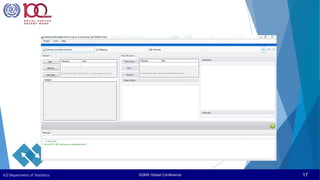
 SMART
 Use of SDMX structural metadata to define calculations and data
recoding and reformatting
 SDMX-driven data conversion (including microdata)
 Batch utility SMARTcmd.exe allows scripting
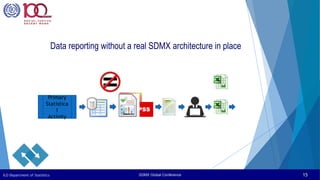
 Data reporting without a real SDMX architecture in place
 DSD Constructor
 Easy to use tool for creating/editing DSD by combining concepts
 Online connection to any SDMX Registry
 Codelists and annotations management
 Perfect SMART companion tool
SDMX Global Conference
ILO Department of Statistics 8
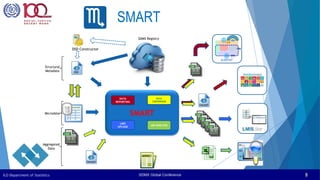
SMART
DSD
DATA
REPORTING
LMIS
UPLOAD
LMI ANALYSIS
MAPPING
Dataset
DATA
CONVERSION
Dataset
Microdata
Aggregated
Data
Structural
Metadata
SMART
SDMX Registry
ILOSTAT
DSD Constructor
SDMX Global Conference
ILO Department of Statistics 9
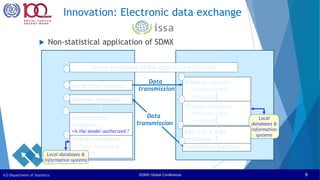
Innovation: Electronic data exchange
 Non-statistical application of SDMX
Institution 2
Institution 1
Define the model of the data to be exchanged
Send data request
Receive request
• Authenticate
requester
Process request:
• Prepare data
response
Send data response
Receive response
Process response:
• Insert into local
system
2
3
4
5
7
9
1
Data
transmission
Data
transmission
Local
databases &
information
systems
Local databases &
information systems
Encrypt & Sign
response
Authenticate
response
•Is the sender authorized ?
8
6
SDMX Global Conference
ILO Department of Statistics 10
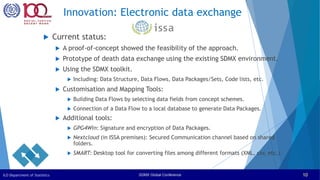
 Current status:
 A proof-of-concept showed the feasibility of the approach.
 Prototype of death data exchange using the existing SDMX environment.
 Using the SDMX toolkit.
 Including: Data Structure, Data Flows, Data Packages/Sets, Code lists, etc.
 Customisation and Mapping Tools:
 Building Data Flows by selecting data fields from concept schemes.
 Connection of a Data Flow to a local database to generate Data Packages.
 Additional tools:
 GPG4Win: Signature and encryption of Data Packages.
 Nextcloud (in ISSA premises): Secured Communication channel based on shared
folders.
 SMART: Desktop tool for converting files among different formats (XML, csv, etc.)
Innovation: Electronic data exchange
SDMX Global Conference
ILO Department of Statistics 11
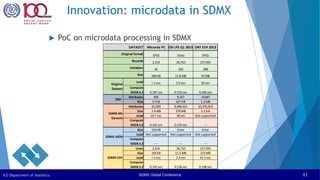
Innovation: microdata in SDMX
 PoC on microdata processing in SDMX
Miranda PC CRI LFS Q1 2015 URY ECH 2013
SPSS Stata SPSS
2,214 26,710 127,925
26 292 398
184 KB 12.8 MB 97 MB
Load < 1 sec 2.5 sec 32 sec
Compute
SDG8.5.2 0.187 sec 0.153 sec 0.166 sec
Attributes 895 9,567 19,887
Size 57 KB 627 KB 1.3 MB
Attributes 62,009 9,996,451 10,259,923
Size 2.4 MB 370 MB 2.1 GB
Load 10.7 sec 38 sec Not supported
Compute
SDG8.5.2 0.141 sec 0.135 sec ---
Size 153 KB Error Error
Load Not supported Not supported Not supported
Compute
SDG8.5.2 --- --- ---
Lines 2,214 26,710 127,925
Size 193 KB 11.5 MB 213 MB
Load < 1 sec 2.3 sec 31.5 sec
Compute
SDG8.5.2 0.145 sec 0.136 sec 0.148 sec
DSD
SDMX-ML
Generic
SDMX-JSON
SDMX-CSV
DATASET
Original format
Records
Variables
Size
Original
Dataset
SDMX Global Conference
ILO Department of Statistics 12
Innovation: CSV Structural Metadata
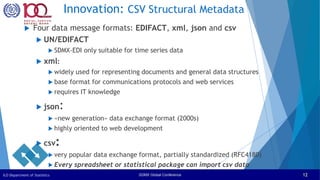
 Four data message formats: EDIFACT, xml, json and csv
 UN/EDIFACT
 SDMX-EDI only suitable for time series data
 xml:
 widely used for representing documents and general data structures
 base format for communications protocols and web services
 requires IT knowledge
 json:
 «new generation» data exchange format (2000s)
 highly oriented to web development
 csv:
 very popular data exchange format, partially standardized (RFC4180)
 Every spreadsheet or statistical package can import csv data
SDMX Global Conference
ILO Department of Statistics 13
Innovation: CSV Structural Metadata
 SDMX-csv format supported for data messages only
 csv datasets are very efficient for statistical processing
 The lack of structural metadata messages in csv makes it
difficult to access to categories’ valid codes and labels in
these packages
 Code lists can be represented in csv without effort.
 An structural metadata artefact in csv format is required
to link the dataflow to its DSD, conceptSchemes and
codelists (work in progress)
SDMX Global Conference
ILO Department of Statistics 14
Thank you !
Edgardo Greising
Head of Knowledge Management and Solutions Unit
STATISTICS - ILO
greising@ilo.org
sdmx@ilo.org
Visit us at https://ilostat.ilo.org
SDMX Global Conference
ILO Department of Statistics 15
Data Reporting
Primary
Statistica
l
Activity
Data reporting without a real SDMX architecture in place
SDMX Global Conference
ILO Department of Statistics 16
ILOSTAT SMART facts
 No indicators’ database is required
 Tables defined dynamically via a DSD
 Selectable classifications’ versions and variants
 Flexible mapping
 Conditions applied on-the-fly to tally/sum/avg
 Mapping can be saved and re-used
 Multi-language
 ILO standard routines for derived variables (*)
 Stand alone + on line access to any SDMX registry and/or Data API
 Process microdata or aggregate datasets in Stata, SPSS, SDMX and csv
 Several output formats: .xls, pdf, csv, sdmx
 Desktop and Online(*) versions
(*) Coming soon
SDMX Global Conference
ILO Department of Statistics 17
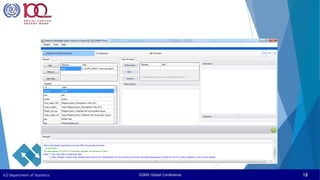
SDMX Global Conference
ILO Department of Statistics 18
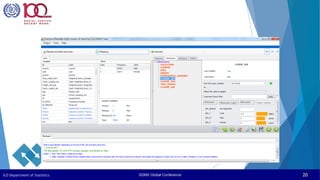
SDMX Global Conference
ILO Department of Statistics 19
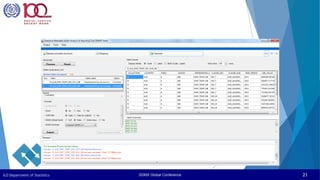
SDMX Global Conference
ILO Department of Statistics 20
SDMX Global Conference
ILO Department of Statistics 21
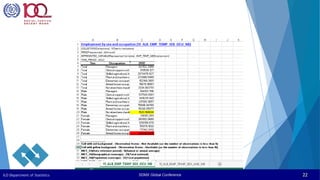
SDMX Global Conference
ILO Department of Statistics 22
SDMX Global Conference
ILO Department of Statistics 23
Thank you !
Edgardo Greising
Head of Knowledge Management and Solutions Unit
STATISTICS - ILO
greising@ilo.org
sdmx@ilo.org

Session 6 ILO Edgardo SDMX-at-ILO pptx

  • 1.
    SDMX at the International Labour Organization SDMX GlobalConference 16 – 19 September, 2019 – Budapest, Hungary
  • 2.
    SDMX Global Conference ILODepartment of Statistics 2 Once upon a time…  Dissemination WS for ILOSTAT – 1st generation: 2013  Limited number of artefacts and formats delivered  «Virtual registry» approach: all artefacts generated «on-the-fly» based on the structural metadata information in ILOSTAT  Internal «consumers»  ILO Knowledge Gateway: very easy integration of statistical DWI  Country profiles: Desktop and Mobile applications  Data Mapper: IMF product adapted to consume SDMX API  WESO and YouthSTATS dashboards
  • 3.
    SDMX Global Conference ILODepartment of Statistics 3 Expanding the use of SDMX  SDMX Query builder  On line «wizard» to access ILOSTAT data and metadata in SDMX  ILOSTAT Excel Add-in  Superseeded (with new functionalities) the former «KILM» Excel Add-in  Replaced the old proprietary WS by the SDMX standard API  ILOSTAT Data Publisher  Simple to use desktop tool to extract data and metadata from ILOSTAT  Downloads information for one country ready to upload to .Stat v7
  • 4.
    SDMX Global Conference ILODepartment of Statistics 4 Expanding the use of SDMX  Second generation WS: 2018  Same architecture as the previous version (on-the-fly virtual registry)  Based on .Net NSIWS by Eurostat  Implements all artefacts and complies with RESTful API v. 1.4 specification  Delivers all available formats: SDMX-ML, SDMX-csv and SDMX-json  ILO.Stat based in SIS-CC Data Explorer  DE «connects» to ILOSTAT by consuming the new WS  No changes in ILOSTAT’s backend
  • 5.
    SDMX Global Conference ILODepartment of Statistics 5 ILOSTAT Modular Architecture WORKFLOW CONTROL DISSEMINATION VALIDATION & TRANSFORMATION DATA COLLECTION METADATA MANAGEMENT .Stat DE Reusable Components for the Web Search | Visualise | Share ILO.Stat Modular Architecture SMART
  • 6.
    SDMX Global Conference ILODepartment of Statistics 6 Community work  SDMX v 2.1 plug-in for .Stat v7  Same architecture as ILOSTAT’s API  Provides a full SDMX compliant API to .Stat v7 platforms  Enables a smooth migration to .Stat Suite  Data and Metadata download  Data Explorer connected to v.7 backend  Global DSD for  Price statistics  Labour statistics  SDG reporting  Definition of MSD mapping Global MCS to IHSN DDI-C template (work in progress)
  • 7.
    SDMX Global Conference ILODepartment of Statistics 7 Tools  SMART  Use of SDMX structural metadata to define calculations and data recoding and reformatting  SDMX-driven data conversion (including microdata)  Batch utility SMARTcmd.exe allows scripting  Data reporting without a real SDMX architecture in place  DSD Constructor  Easy to use tool for creating/editing DSD by combining concepts  Online connection to any SDMX Registry  Codelists and annotations management  Perfect SMART companion tool
  • 8.
    SDMX Global Conference ILODepartment of Statistics 8 SMART DSD DATA REPORTING LMIS UPLOAD LMI ANALYSIS MAPPING Dataset DATA CONVERSION Dataset Microdata Aggregated Data Structural Metadata SMART SDMX Registry ILOSTAT DSD Constructor
  • 9.
    SDMX Global Conference ILODepartment of Statistics 9 Innovation: Electronic data exchange  Non-statistical application of SDMX Institution 2 Institution 1 Define the model of the data to be exchanged Send data request Receive request • Authenticate requester Process request: • Prepare data response Send data response Receive response Process response: • Insert into local system 2 3 4 5 7 9 1 Data transmission Data transmission Local databases & information systems Local databases & information systems Encrypt & Sign response Authenticate response •Is the sender authorized ? 8 6
  • 10.
    SDMX Global Conference ILODepartment of Statistics 10  Current status:  A proof-of-concept showed the feasibility of the approach.  Prototype of death data exchange using the existing SDMX environment.  Using the SDMX toolkit.  Including: Data Structure, Data Flows, Data Packages/Sets, Code lists, etc.  Customisation and Mapping Tools:  Building Data Flows by selecting data fields from concept schemes.  Connection of a Data Flow to a local database to generate Data Packages.  Additional tools:  GPG4Win: Signature and encryption of Data Packages.  Nextcloud (in ISSA premises): Secured Communication channel based on shared folders.  SMART: Desktop tool for converting files among different formats (XML, csv, etc.) Innovation: Electronic data exchange
  • 11.
    SDMX Global Conference ILODepartment of Statistics 11 Innovation: microdata in SDMX  PoC on microdata processing in SDMX Miranda PC CRI LFS Q1 2015 URY ECH 2013 SPSS Stata SPSS 2,214 26,710 127,925 26 292 398 184 KB 12.8 MB 97 MB Load < 1 sec 2.5 sec 32 sec Compute SDG8.5.2 0.187 sec 0.153 sec 0.166 sec Attributes 895 9,567 19,887 Size 57 KB 627 KB 1.3 MB Attributes 62,009 9,996,451 10,259,923 Size 2.4 MB 370 MB 2.1 GB Load 10.7 sec 38 sec Not supported Compute SDG8.5.2 0.141 sec 0.135 sec --- Size 153 KB Error Error Load Not supported Not supported Not supported Compute SDG8.5.2 --- --- --- Lines 2,214 26,710 127,925 Size 193 KB 11.5 MB 213 MB Load < 1 sec 2.3 sec 31.5 sec Compute SDG8.5.2 0.145 sec 0.136 sec 0.148 sec DSD SDMX-ML Generic SDMX-JSON SDMX-CSV DATASET Original format Records Variables Size Original Dataset
  • 12.
    SDMX Global Conference ILODepartment of Statistics 12 Innovation: CSV Structural Metadata  Four data message formats: EDIFACT, xml, json and csv  UN/EDIFACT  SDMX-EDI only suitable for time series data  xml:  widely used for representing documents and general data structures  base format for communications protocols and web services  requires IT knowledge  json:  «new generation» data exchange format (2000s)  highly oriented to web development  csv:  very popular data exchange format, partially standardized (RFC4180)  Every spreadsheet or statistical package can import csv data
  • 13.
    SDMX Global Conference ILODepartment of Statistics 13 Innovation: CSV Structural Metadata  SDMX-csv format supported for data messages only  csv datasets are very efficient for statistical processing  The lack of structural metadata messages in csv makes it difficult to access to categories’ valid codes and labels in these packages  Code lists can be represented in csv without effort.  An structural metadata artefact in csv format is required to link the dataflow to its DSD, conceptSchemes and codelists (work in progress)
  • 14.
    SDMX Global Conference ILODepartment of Statistics 14 Thank you ! Edgardo Greising Head of Knowledge Management and Solutions Unit STATISTICS - ILO greising@ilo.org sdmx@ilo.org Visit us at https://ilostat.ilo.org
  • 15.
    SDMX Global Conference ILODepartment of Statistics 15 Data Reporting Primary Statistica l Activity Data reporting without a real SDMX architecture in place
  • 16.
    SDMX Global Conference ILODepartment of Statistics 16 ILOSTAT SMART facts  No indicators’ database is required  Tables defined dynamically via a DSD  Selectable classifications’ versions and variants  Flexible mapping  Conditions applied on-the-fly to tally/sum/avg  Mapping can be saved and re-used  Multi-language  ILO standard routines for derived variables (*)  Stand alone + on line access to any SDMX registry and/or Data API  Process microdata or aggregate datasets in Stata, SPSS, SDMX and csv  Several output formats: .xls, pdf, csv, sdmx  Desktop and Online(*) versions (*) Coming soon
  • 17.
    SDMX Global Conference ILODepartment of Statistics 17
  • 18.
    SDMX Global Conference ILODepartment of Statistics 18
  • 19.
    SDMX Global Conference ILODepartment of Statistics 19
  • 20.
    SDMX Global Conference ILODepartment of Statistics 20
  • 21.
    SDMX Global Conference ILODepartment of Statistics 21
  • 22.
    SDMX Global Conference ILODepartment of Statistics 22
  • 23.
    SDMX Global Conference ILODepartment of Statistics 23 Thank you ! Edgardo Greising Head of Knowledge Management and Solutions Unit STATISTICS - ILO greising@ilo.org sdmx@ilo.org

Editor's Notes

  • #6 IT considerations   Modular design following GSBPM Oracle RDBMS and development tools Automated procedure for xQ and SDMX uploading with structural consistency E-Questionnaire online data collection Single set of metadata Single interactive consistency procedure regardless of data collection means «False positives» handling thru allowance issuing Full screen data editor Dynamic content dissemination website Data workflow management module Data is stored in a relational database mounted on Oracle 11g DBMS administered by ITCOM (the centralized ILO information technologies service). Two postulates have been established for the design of the new data structure: a) the data structure for the data collection database should be the same for all kind of time series data regardless of the periodicity, units of measure, classification breakdown and way of collection; and b) the main (atomic) unit is the “cell” of each table collected, which will be called VALUE and will keep associated dimensions and other attributes.   Although it is a Data Compilation system (and not a proper statistical activity producing microdata), the system has a modular design following the recommendations of the GSBPM, including modules for Data Collection, Data Cleaning, Dissemination, Workflow tracking, Code lists maintenance, User Profiling and Access Control and Source & Methods (See Figure 3: ILOSTAT Information System modular design) Not included in the diagram Program development is based on Oracle APEX (Oracle Application Express) for the interactive applications, complemented with some PL/SQL packages and Java classes for specific tasks. Intensive data processing tasks, like consistency checking and Excel questionnaire generation are developed in SAS, accessing the Oracle database. The Workflow control dashboard and dissemination tables and charts are built using Oracle BI Enterprise Edition (OBIEE).   The User Profiling and Access Control module, developed in APEX, includes a dynamic menu that lists the applications available for the user based on his user profile. Examples of them are Statistical Assistants, Analysts, Managers and External Users.   The Data Collection module kept the automatic generation and upload of Excel questionnaires as in the former system, but it has been redesigned as to make use of a single set of metadata fully parameterized and common to both the collection and dissemination processes. The upload procedure (fully automated) performs basic consistency checking and routes the error report to the assigned SA for correction.   The e-Questionnaire application (under development) will be an interactive full screen editor for value and annotations on the data collected developed in APEX and accessible thru the web. It will work on the “Data Collection” work tables and will operate based on the single set of metadata for the QTables.   Electronic Data Interchange, probably using SDMX is in the roadmap for 2012, as a way of reducing the overburden to countries due to the request for information they already have in their databases and has to be transcript to offline or online questionnaires.   The QTable Consistency process, developed in SAS, can be run as a batch process to analyze all records marked “for consistency” in the “Data Collection database” or can be launched on-demand by the SA. This process will pass the correct QTables to “Dissemination” database and mark those erroneous with the respective error codes, remaining in the repository. The assigned SA is notified of the results, and the status of each QTable is updated in the data management system (See Figure 4: Workflow status diagram).   The Editor program is used by the SA to correct the errors detected in the data. This program displays the QTable being edited and the error messages related to it. When using off-line data collection methods, the country user can include annotations in the questionnaire that the Editor will display for the SA to code into notes associated to the data at the right level.
  • #9 ILOSTAT-ART is a free basic statistical processor that can compute statistical tables (reported indicators) defined by DSD’s, either by processing microdata sets or transcoding aggregate input data. It relies strongly on mappings between input variables and DSD's concepts, which can be saved and reused. This approach ensures the consistency of the output codes since they match the structure of the DSD. Different file formats can be processed (e.g. Stata, SPSS, csv, SDMX), and produces output “data packages” in Excel, csv or SDMX formats, ready to fulfil the data reporting requirements or feed a .Stat dissemination platform.
  • #16 One year ago, during the “Meeting of Experts 2016” in Aguascalientes, MEX, we discussed during the Breakout Session 2 “How to design and build an SDMX Enterprise Architecture”. Amongst the three basic scenarios presented, the so called “Light” intended for data reporting only and without a real SDMX architecture in place, happened to be recognized as a quite common situation along data producers in developing countries. Many of them lack a central repository of indicators, and the information to be reported is “spread” inside the institution in a number of different formats and media. Some tools are available from the SDMX community to help initiating the data reporting in SDMX, like the SDMX-RI Mapping tools to generate a “PUSH” mode flow, or the SDMX Converter if no database where SDMX-RI can be plugged in. Nonetheless, quite often (just to make it a bit more difficult) the structure of the indicators calculated by the data producer for its internal use differs from the specification of the information to be reported which, for example, uses a different variant of a classification breakdown. In this case, the microdata needs to be re-processed to generate the outputs with the right structure. Questionnaires in Excel, require manual transcription of data (and metadata)  Experts won’t do this job. Questionnaires arrive late, when the survey has already been processed and published  Experts are likely to be engaged in another project. Breakdowns are different from those used at national level  Requires re-processing including new mappings Variables definitions may differ from those used at national level  Requires re-processing including new calculations