CMDB,CSDM and Product Models
Foundational Data Usage across the ServiceNow platform
Asset: 0003633
Mary Vanatta
© 2023 ServiceNow, Inc. All Rights Reserved. Confidential. 2
Speaker introduction
• Experience: 9 years in ServiceNow ecosystem
• Expertise: Configuration Management, ITOM
• Location: USA – Wichita, KS
• Contact: mary.vanatta@servicenow.com
• Name: Mary Vanatta
• Title: Principal Portfolio Manager - ITOM
• Function: Leading Practices – Now Create
• Company: ServiceNow
© 2023 ServiceNow, Inc. All Rights Reserved. Confidential. 3
A product model is a specific version or
configuration of a product. Defines whether a
product is tracked as an asset, a CI or both.
The product model is captured on
the configuration or asset record and is
maintained in the Product catalog.
© 2023 ServiceNow, Inc. All Rights Reserved. Confidential. 4
Disclaimer:
Some of the capabilities depend on whether APM or
SAM, SAM Pro is licensed. Some capabilities like
Manage the Technology features and TPM are not
available without a license.
© 2024 ServiceNow, Inc. All Rights Reserved
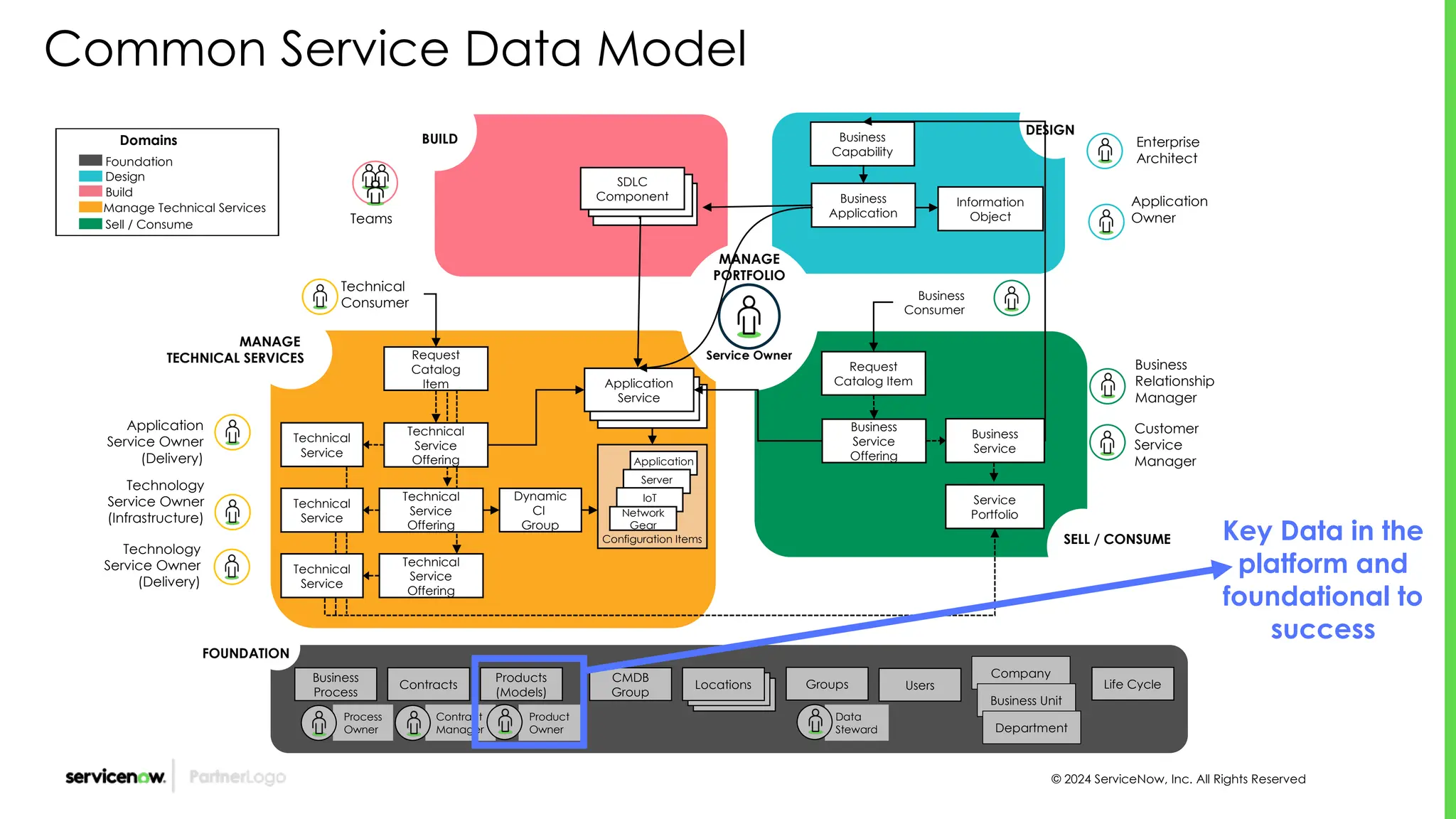
Common Service Data Model
Business
Consumer
Business
Capability
Business
Application
Information
Object
Enterprise
Architect
Application
Owner
Business
Relationship
Manager
Customer
Service
Manager
DESIGN
Request
Catalog Item
Business
Service
Offering
Business
Service
Service
Portfolio
Locations
Business
Process
Process
Owner
Contract
Manager
Product
Owner
Data
Steward
Company
Business Unit
Department
Contracts
Products
(Models)
CMDB
Group Locations
Locations Groups Users Life Cycle
Configuration Items
Request
Catalog
Item
Technical
Service
Application
Service
Dynamic
CI
Group
Technical
Service
Offering
Technical
Service
Offering
Application
Server
IoT
Network
Gear
Technical
Consumer
Technology
Service Owner
(Infrastructure)
Technology
Service Owner
(Delivery)
Application
Service Owner
(Delivery)
MANAGE
TECHNICAL SERVICES
Technical
Service
Technical
Service
Technical
Service
Offering
Service Owner
MANAGE
PORTFOLIO
SELL / CONSUME
BUILD
SDLC
Component
SDLC
Component
SDLC
Component
Teams
FOUNDATION
Domains
Foundation
Design
Build
Manage Technical Services
Sell / Consume
Key Data in the
platform and
foundational to
success
© 2024 ServiceNow, Inc. All Rights Reserved
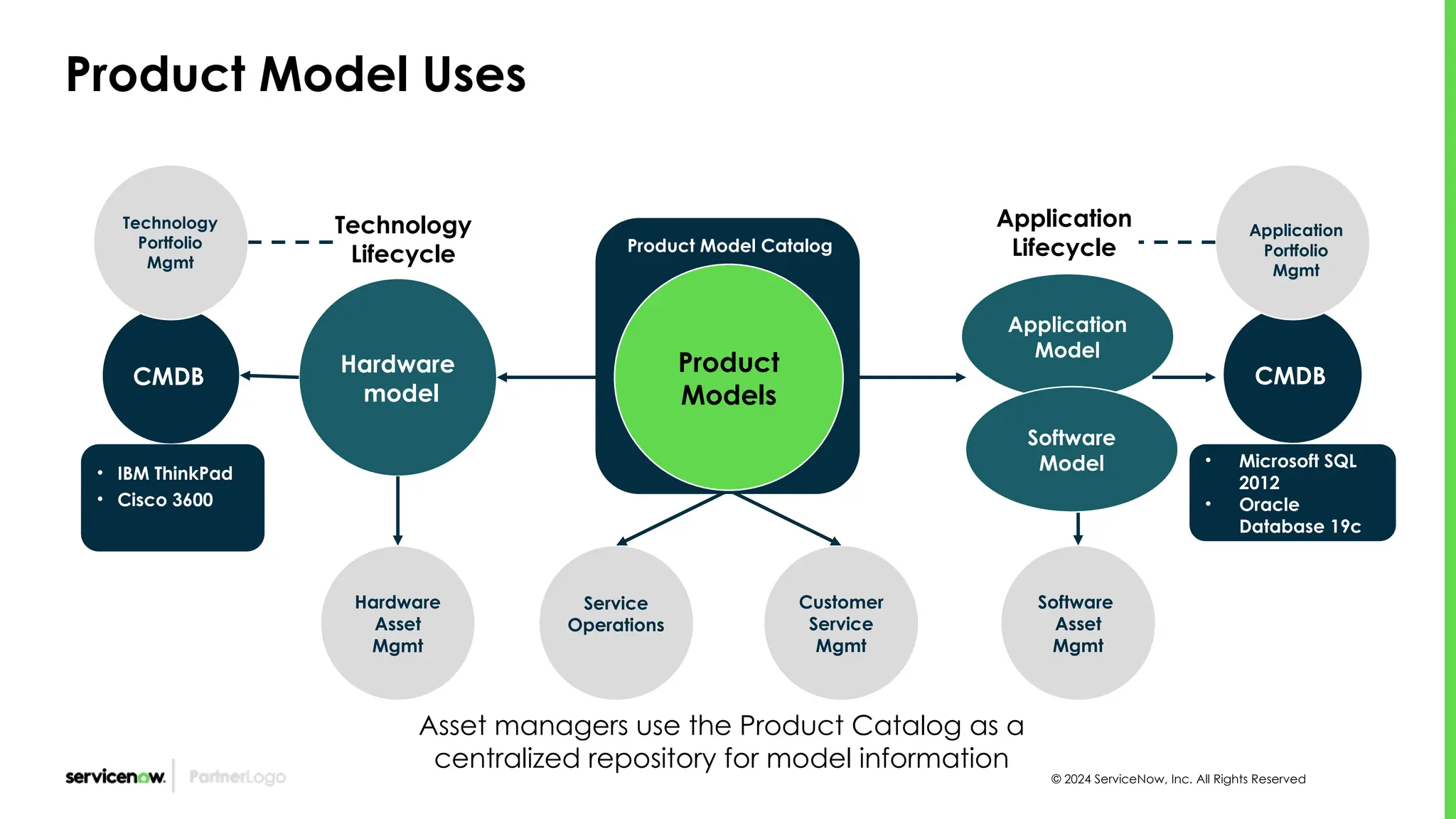
Product Model Uses
• Microsoft SQL
2012
• Oracle
Database 19c
Hardware
model
Hardware
Asset
Mgmt
Software
Asset
Mgmt
CMDB CMDB
Application
Lifecycle
Technology
Lifecycle
Customer
Service
Mgmt
Application
Portfolio
Mgmt
Technology
Portfolio
Mgmt
• IBM ThinkPad
• Cisco 3600
Asset managers use the Product Catalog as a
centralized repository for model information
Product Model Catalog
Product
Models
Service
Operations
Application
Model
Software
Model
© 2024 ServiceNow, Inc. All Rights Reserved
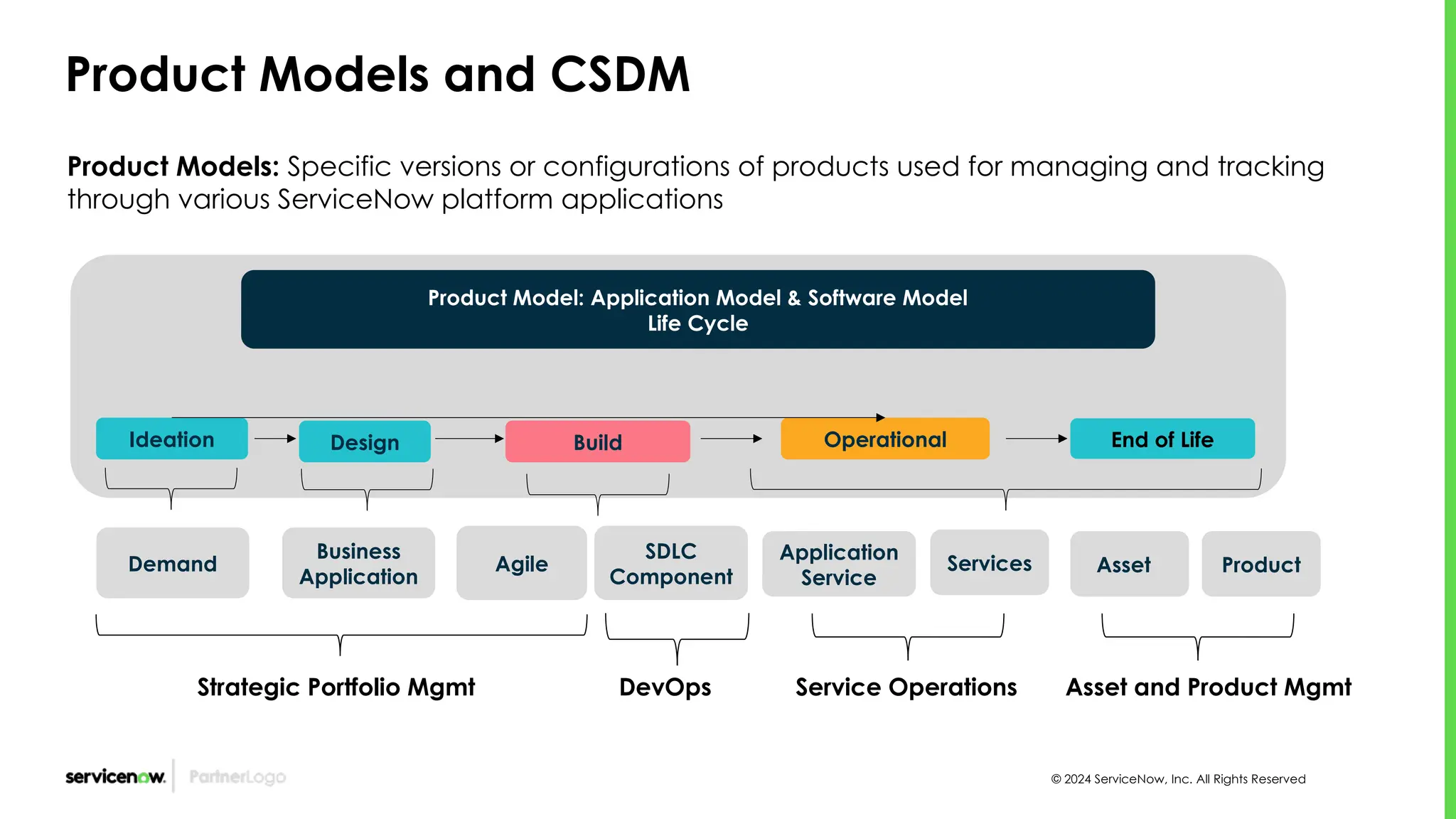
Product Models and CSDM
Product Models: Specific versions or configurations of products used for managing and tracking
through various ServiceNow platform applications
Ideation Operational End of Life
Design
SDLC
Component
Product Model: Application Model & Software Model
Life Cycle
Build
Application
Service
Business
Application
Services
Strategic Portfolio Mgmt DevOps Service Operations
Asset Product
Asset and Product Mgmt
Agile
Demand
© 2023 ServiceNow, Inc. All Rights Reserved. Confidential. 8
Model Data Hierarchy
Virtual Servers or Workstations/VDIs are not assets
Product Models
Software Model
[cmdb_software_product_model]
Hardware Model
[cmdb_hardware_product_model]
Consumable Model
[cmdb_consumable_product_model]
Service Model
cmdb_service_product_model
Application Model
[cmdb_application_product_model]
Windows
Server
Model Category
PowerEdge
R940xa
Model
CI Only
Dell PowerEdge
T140
Model
Dal-Win-File01
Asset and CI
DC1-Win-App01
Contract Model
cmdb_contract_product_model
Facility Model
[cmdb_facility_product_model]
Model Categories
© 2023 ServiceNow, Inc. All Rights Reserved. Confidential. 9
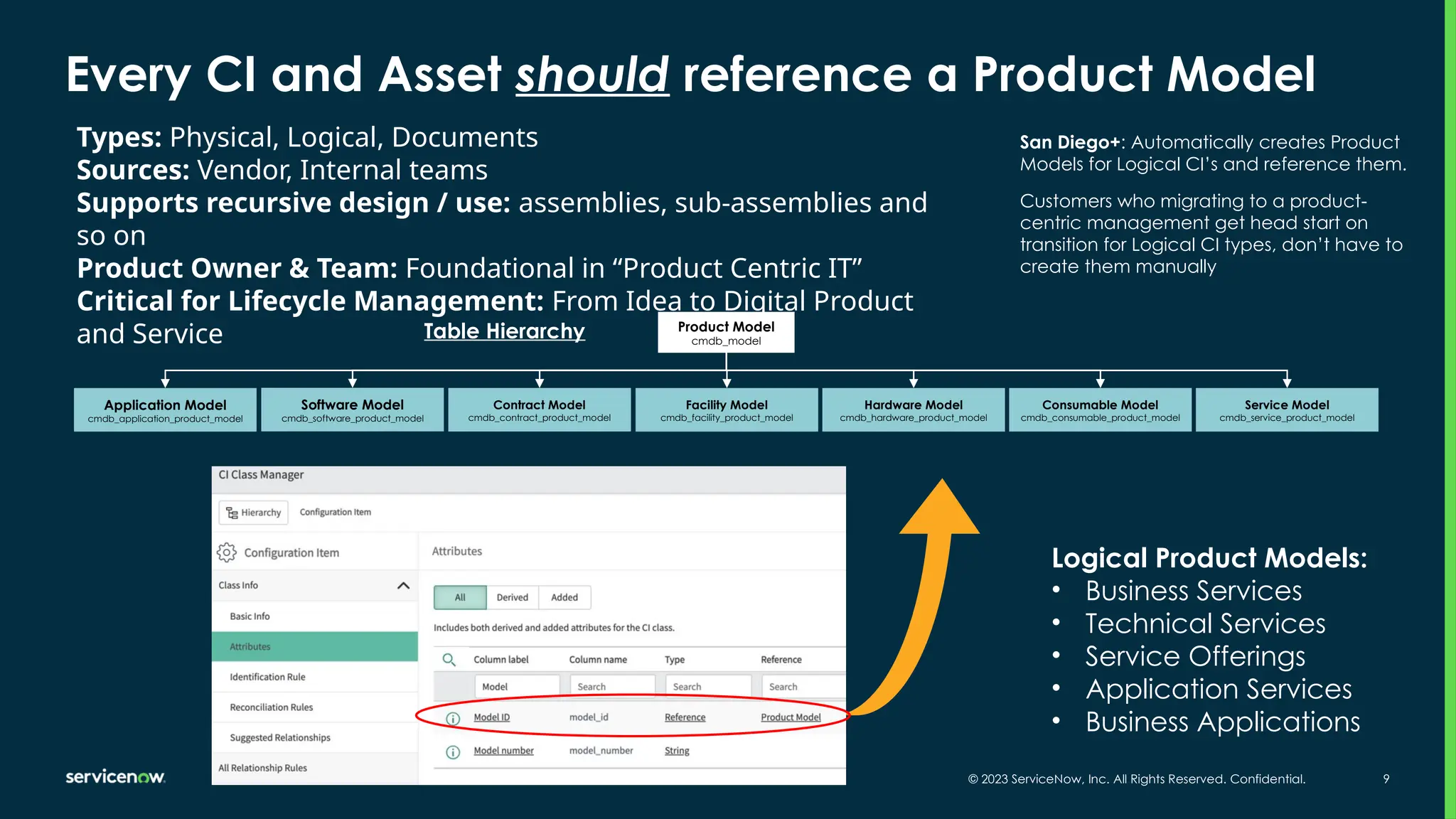
Every CI and Asset should reference a Product Model
Product Model
cmdb_model
Software Model
cmdb_software_product_model
Contract Model
cmdb_contract_product_model
Facility Model
cmdb_facility_product_model
Hardware Model
cmdb_hardware_product_model
Consumable Model
cmdb_consumable_product_model
Service Model
cmdb_service_product_model
Application Model
cmdb_application_product_model
Table Hierarchy
Types: Physical, Logical, Documents
Sources: Vendor, Internal teams
Supports recursive design / use: assemblies, sub-assemblies and
so on
Product Owner & Team: Foundational in “Product Centric IT”
Critical for Lifecycle Management: From Idea to Digital Product
and Service
Logical Product Models:
• Business Services
• Technical Services
• Service Offerings
• Application Services
• Business Applications
San Diego+: Automatically creates Product
Models for Logical CI’s and reference them.
Customers who migrating to a product-
centric management get head start on
transition for Logical CI types, don’t have to
create them manually
© 2024 ServiceNow, Inc. All Rights Reserved
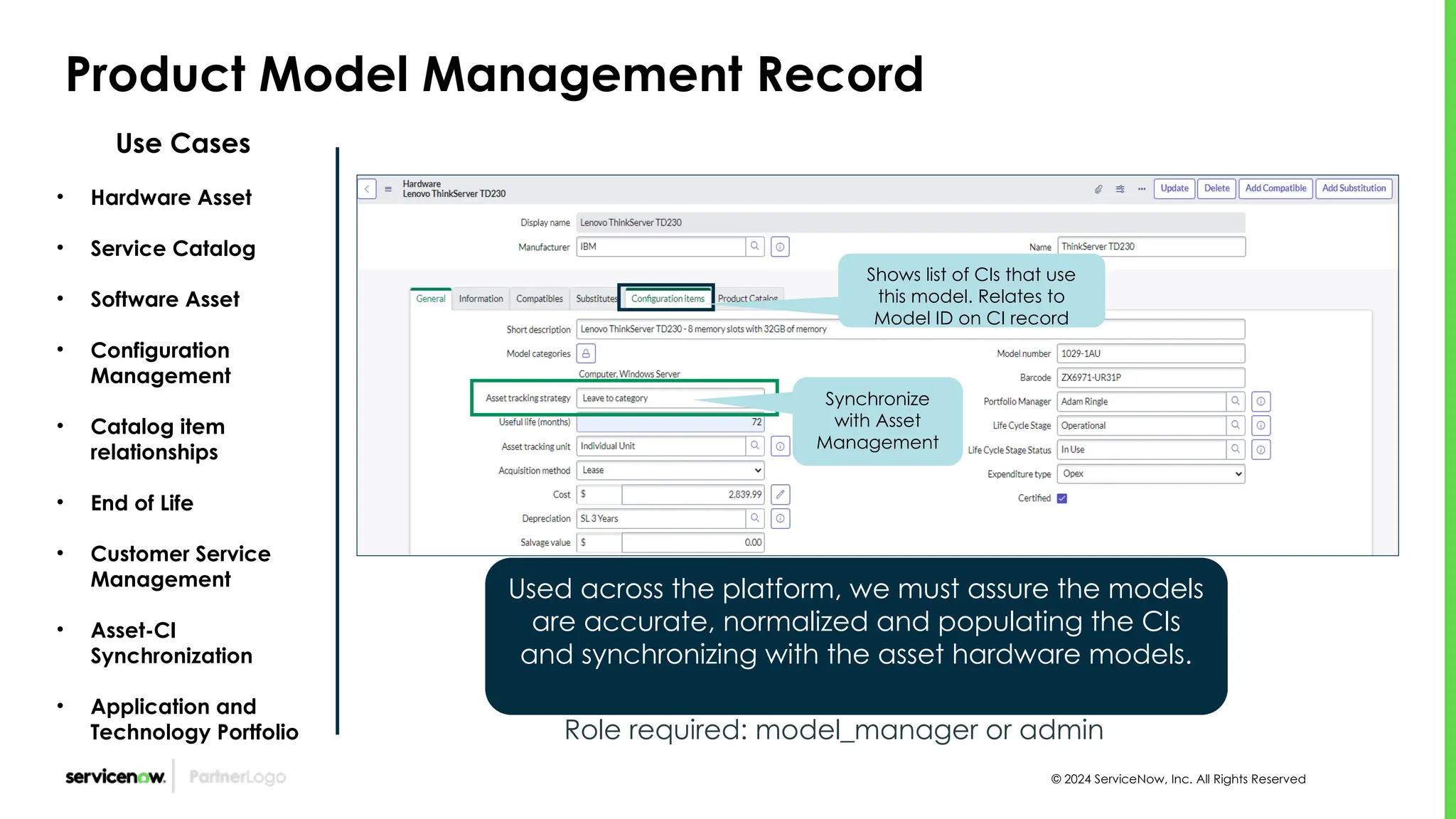
Product Model Management Record
Use Cases
• Hardware Asset
• Service Catalog
• Software Asset
• Configuration
Management
• Catalog item
relationships
• End of Life
• Customer Service
Management
• Asset-CI
Synchronization
• Application and
Technology Portfolio Role required: model_manager or admin
Used across the platform, we must assure the models
are accurate, normalized and populating the CIs
and synchronizing with the asset hardware models.
Shows list of CIs that use
this model. Relates to
Model ID on CI record
Synchronize
with Asset
Management
© 2024 ServiceNow, Inc. All Rights Reserved
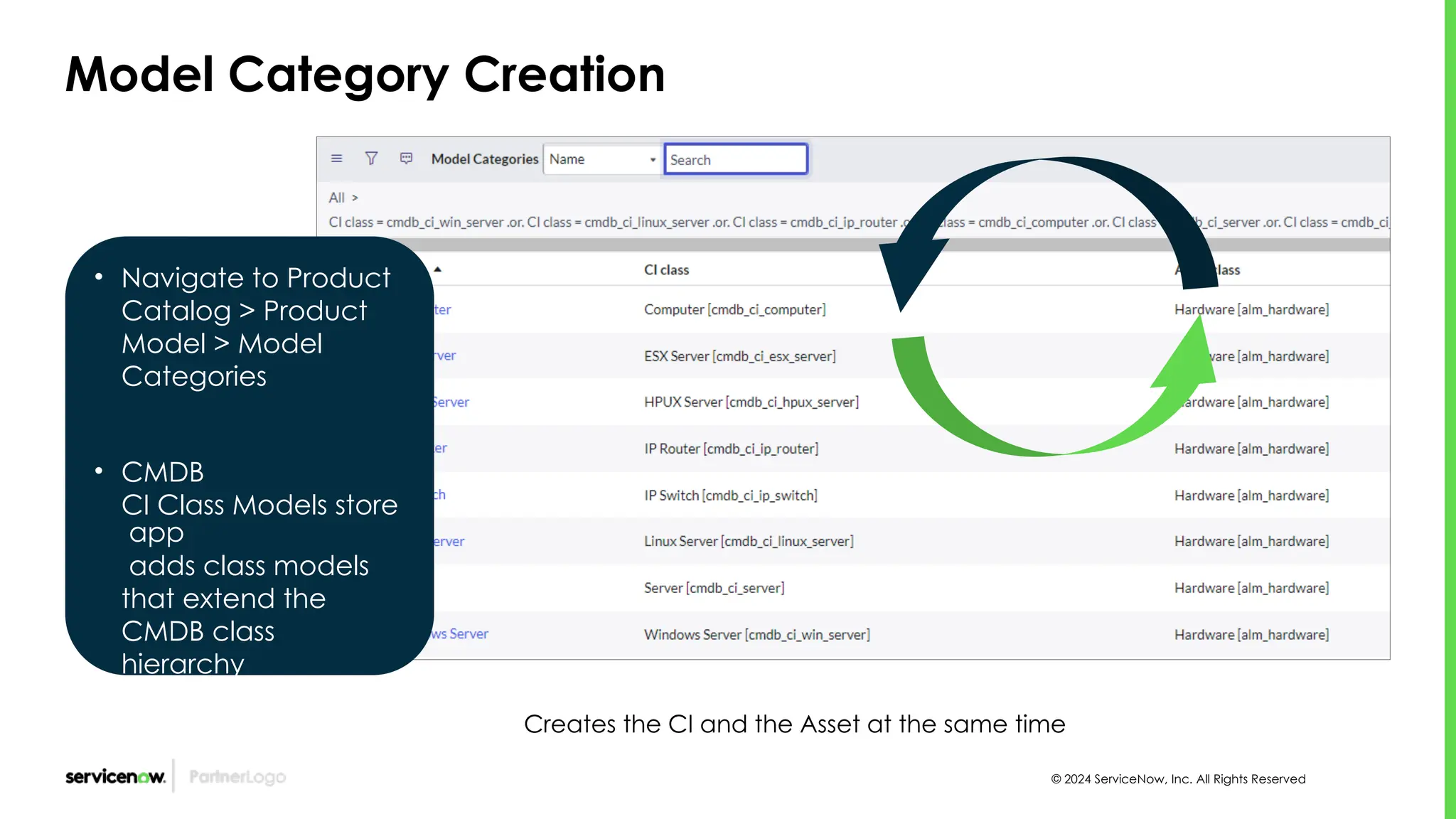
Model Category Creation
• Navigate to Product
Catalog > Product
Model > Model
Categories
• CMDB
CI Class Models store
app
adds class models
that extend the
CMDB class
hierarchy
Creates the CI and the Asset at the same time
© 2024 ServiceNow, Inc. All Rights Reserved
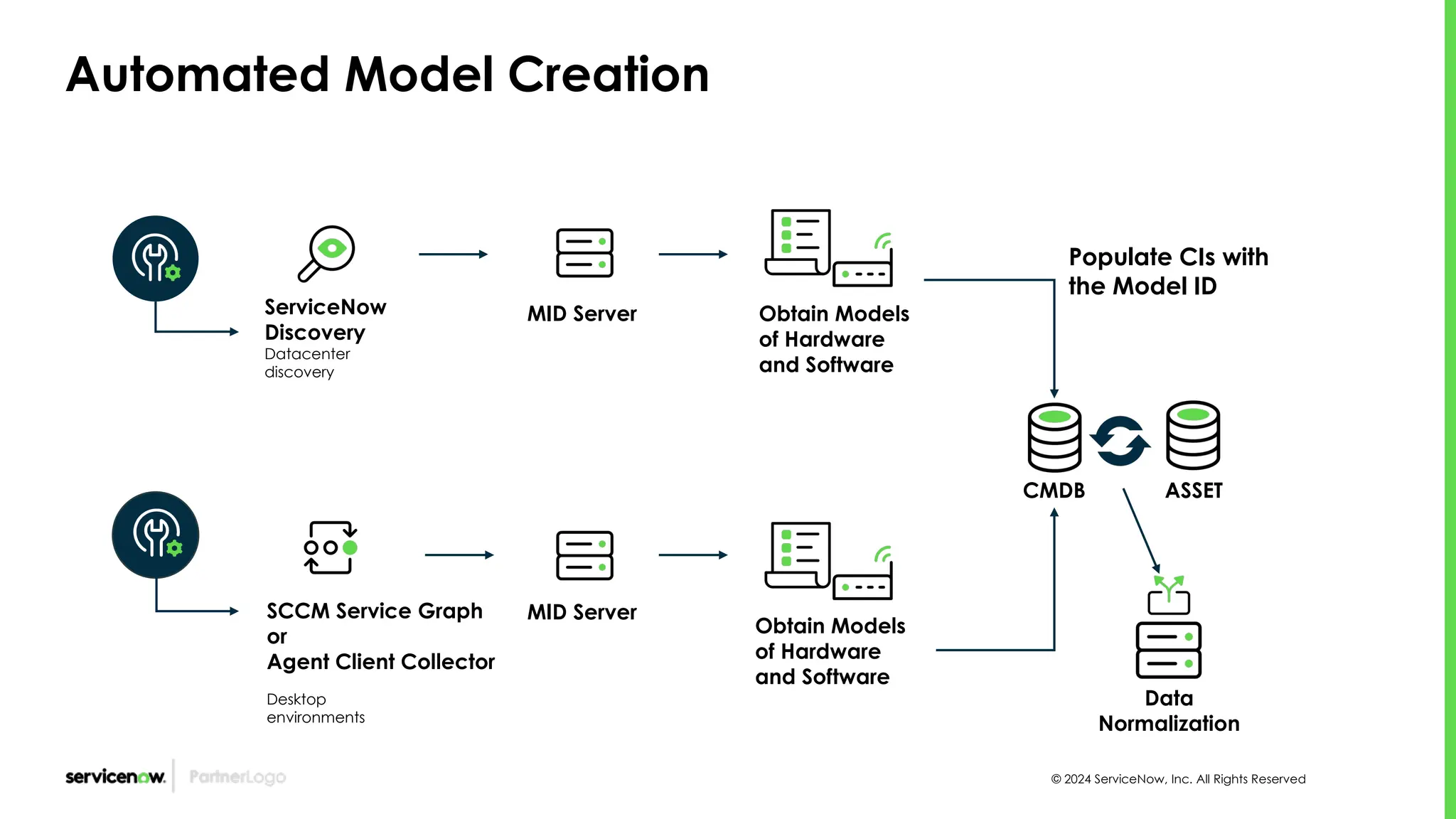
Automated Model Creation
ServiceNow
Discovery
Datacenter
discovery
MID Server Obtain Models
of Hardware
and Software
Populate CIs with
the Model ID
CMDB ASSET
SCCM Service Graph
or
Agent Client Collector
Desktop
environments
Data
Normalization
MID Server
Obtain Models
of Hardware
and Software
© 2024 ServiceNow, Inc. All Rights Reserved
Product Model Management Lifecycle Stages and Status
Foundational Data Domain
• Build • In Use
Design Operational
• Retired
• Sold
End of Life
Software Model
[cmdb_software_product_model]
Hardware Model
[cmdb_hardware_product_model]
Application Model
[cmdb_application_product_model]
The Product Model is often the “Model
ID” attribute on the CI Record.
Ideation
• Under
Evaluation
• Pilot
Strategic
Portfolio
Mgmt
Product Catalog
Digital Product Mgmt
Contract Model
cmdb_contract_product_model
Product Model
Usage Across the
Platform - CSDM
Application Portfolio
Management
© 2024 ServiceNow, Inc. All Rights Reserved 16
Business Application Record - Upgraded Instance
[cmdb_ci_business_app] table
Relationships
Product Model
Upgraded from a pre-Kingston instance
• Points to the model
management record
• Instances upgraded
from Pre-Kingston uses
the Software Model
Table attribute
• Re-configure these
instances to remove
the “Software Model”
attribute and add the
Model ID attribute
• The model attribute will
need to be populated
with the product
model “Application
Model”
© 2024 ServiceNow, Inc. All Rights Reserved 17
Business Application Record
[cmdb_ci_business_app] table
Application Product Model
*Click to gather
Software models
Application Service
models and
Hardware for TPM
Manage
the TRM technical
debts that are created
for the products that
aren’t aligned with
the TRM phases and
standards.
Auto-created in
Vancouver (see
next slide)
*Requires activativation of
Software Asset Management
Professional (com.snc.samp)
plugin.
© 2024 ServiceNow, Inc. All Rights Reserved 18
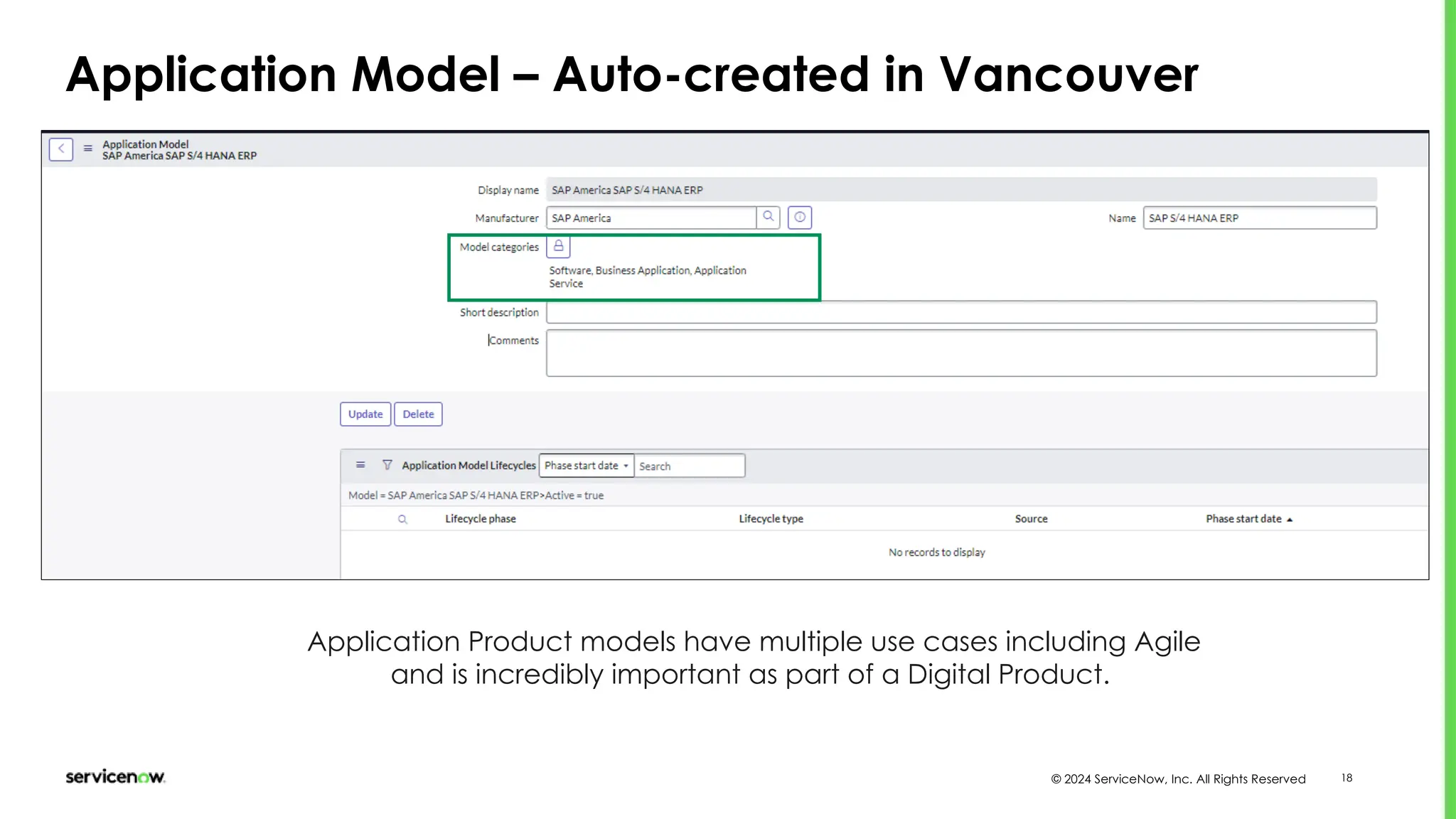
Application Model – Auto-created in Vancouver
Application Product models have multiple use cases including Agile
and is incredibly important as part of a Digital Product.
DevOps
© 2024 ServiceNow, Inc. All Rights Reserved 20
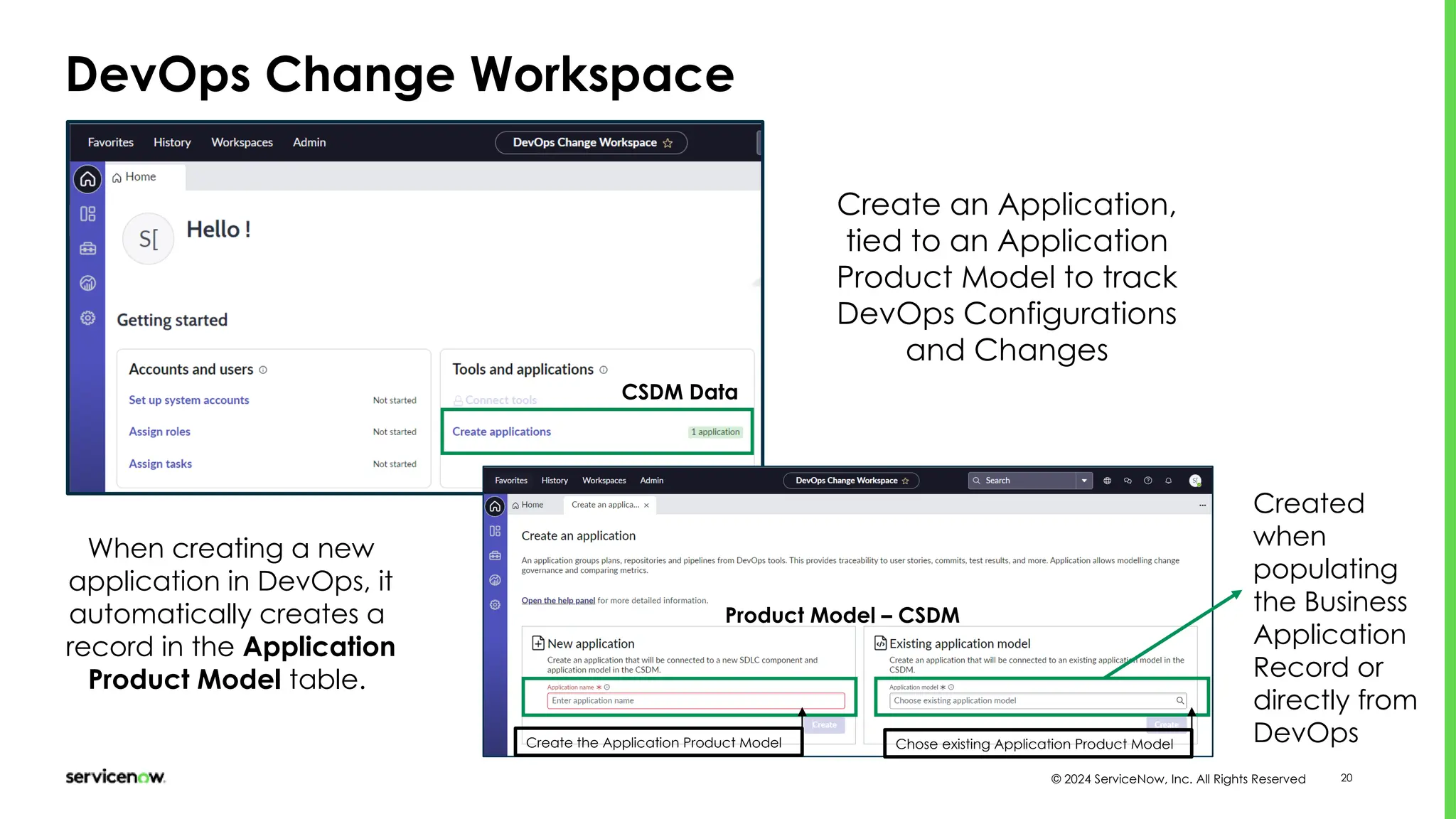
DevOps Change Workspace
CSDM Data
Create an Application,
tied to an Application
Product Model to track
DevOps Configurations
and Changes
When creating a new
application in DevOps, it
automatically creates a
record in the Application
Product Model table.
Product Model – CSDM
Create the Application Product Model Chose existing Application Product Model
Created
when
populating
the Business
Application
Record or
directly from
DevOps
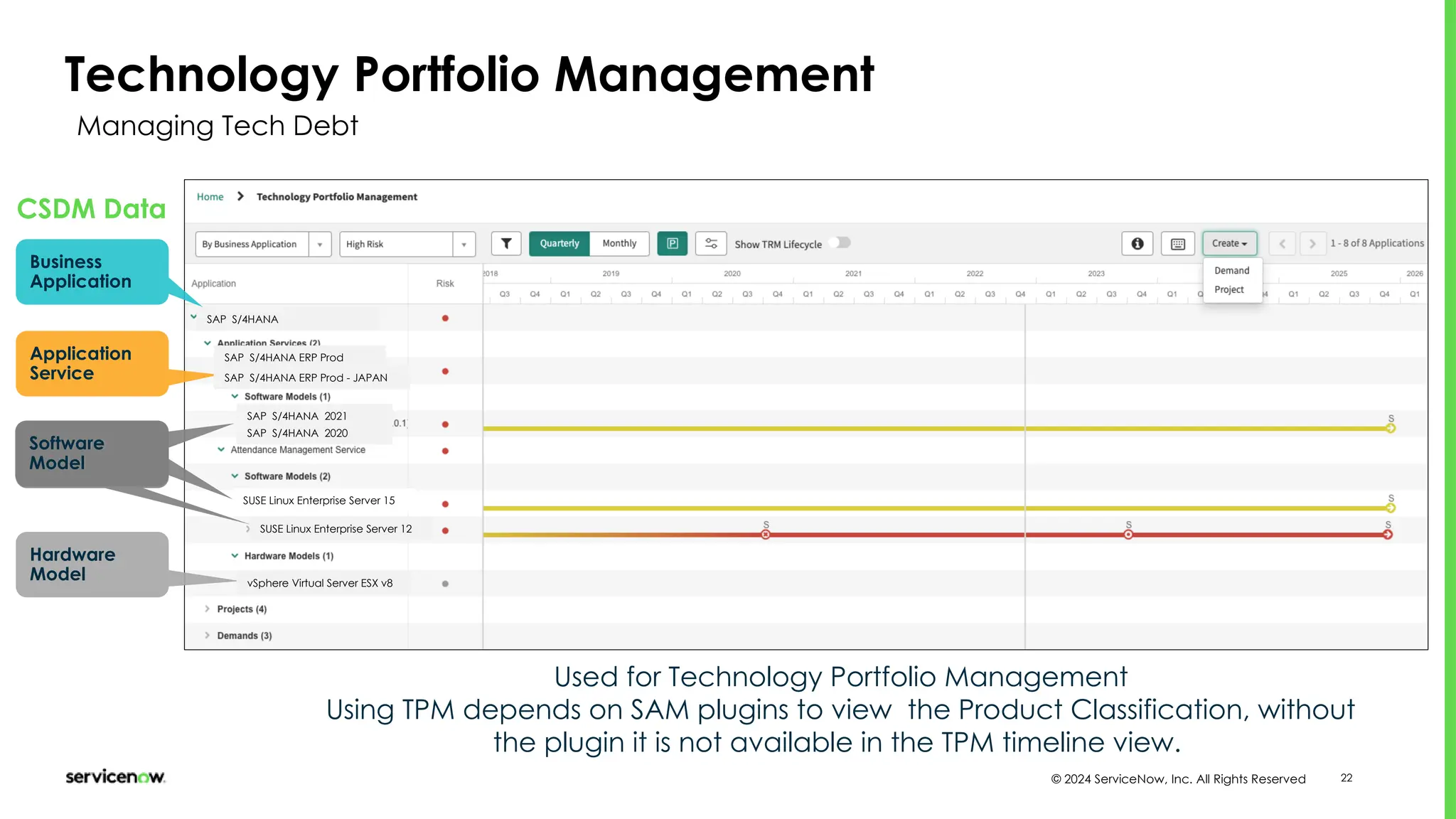
Technology Portfolio
Management
© 2024 ServiceNow, Inc. All Rights Reserved 22
Software
Model
Technology Portfolio Management
Software
Model
Software
Model
Hardware
Model
CSDM Data
SAP S/4HANA
SAP S/4HANA 2021
SUSE Linux Enterprise Server 15
SAP S/4HANA ERP Prod
SUSE Linux Enterprise Server 12
vSphere Virtual Server ESX v8
Used for Technology Portfolio Management
Using TPM depends on SAM plugins to view the Product Classification, without
the plugin it is not available in the TPM timeline view.
Business
Application
Application
Service SAP S/4HANA ERP Prod - JAPAN
SAP S/4HANA 2020
Managing Tech Debt
Agile Development
© 2024 ServiceNow, Inc. All Rights Reserved 24
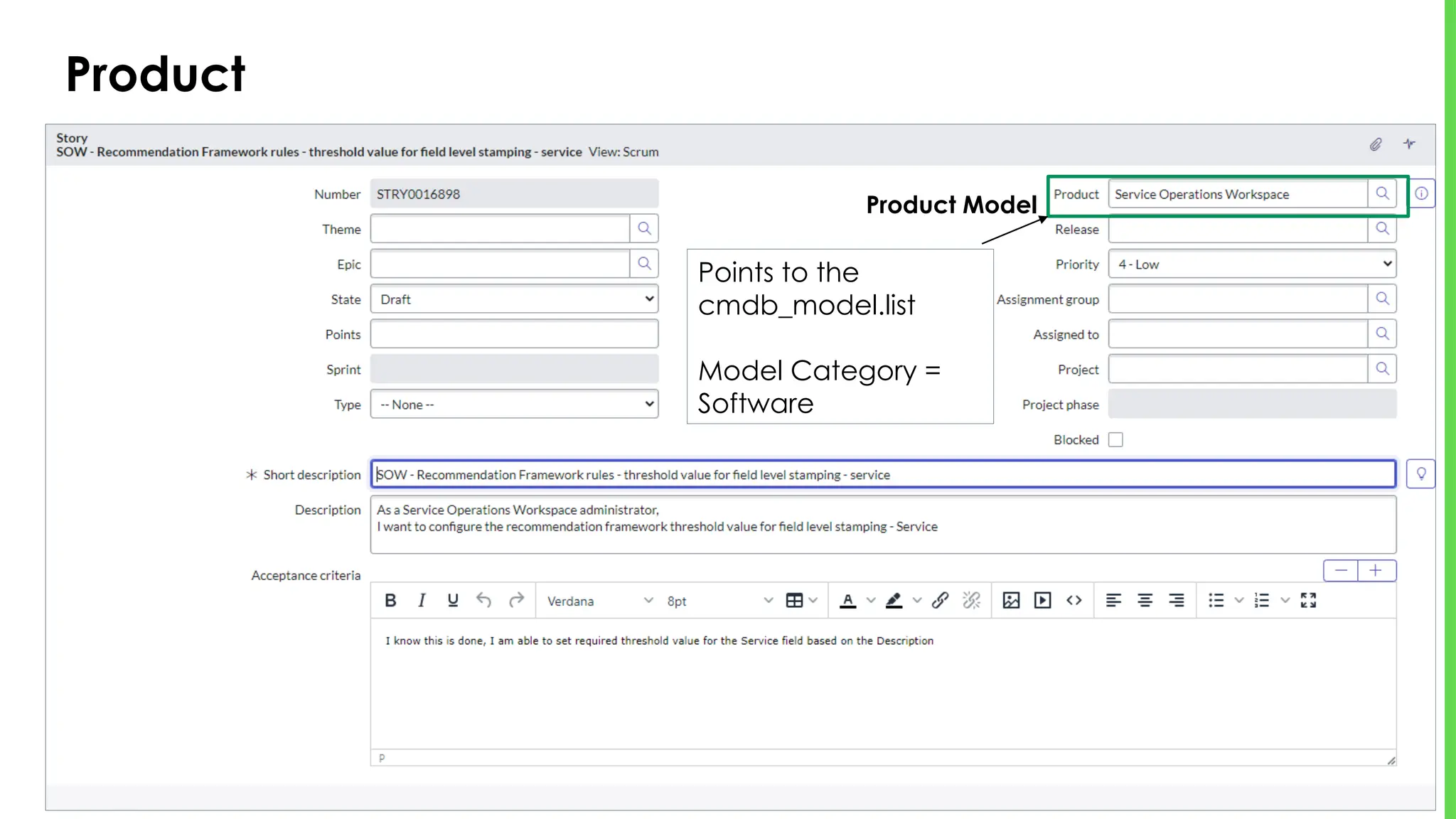
Product
Product Model
Points to the
cmdb_model.list
Model Category =
Software
IT Operations Management
© 2024 ServiceNow, Inc. All Rights Reserved 26
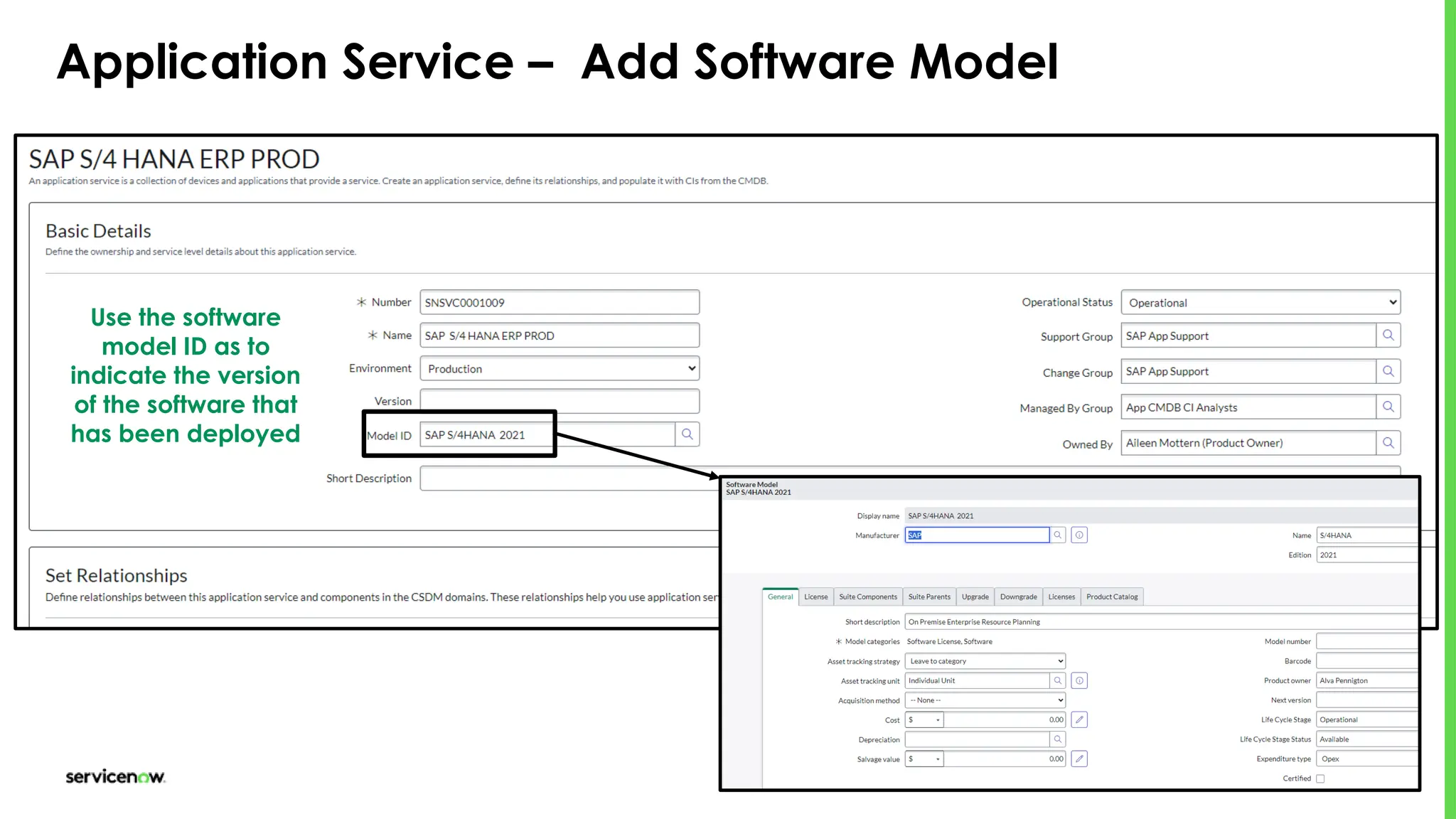
Application Service – Add Software Model
Use the software
model ID as to
indicate the version
of the software that
has been deployed
Asset Management
Hardware and Software Asset Management
© 2024 ServiceNow, Inc. All Rights Reserved 28
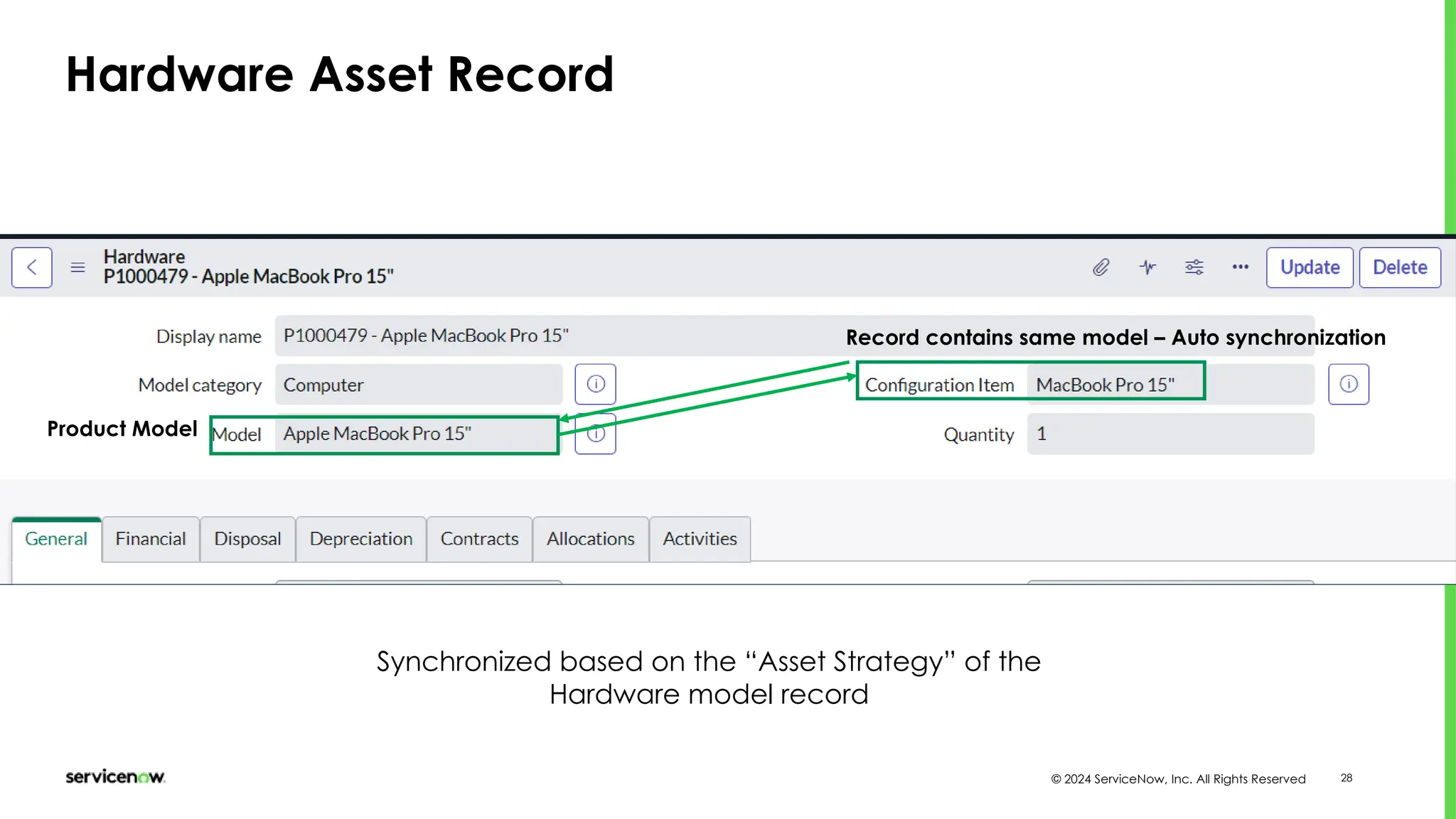
Hardware Asset Record
Product Model
Record contains same model – Auto synchronization
Synchronized based on the “Asset Strategy” of the
Hardware model record
© 2024 ServiceNow, Inc. All Rights Reserved 29
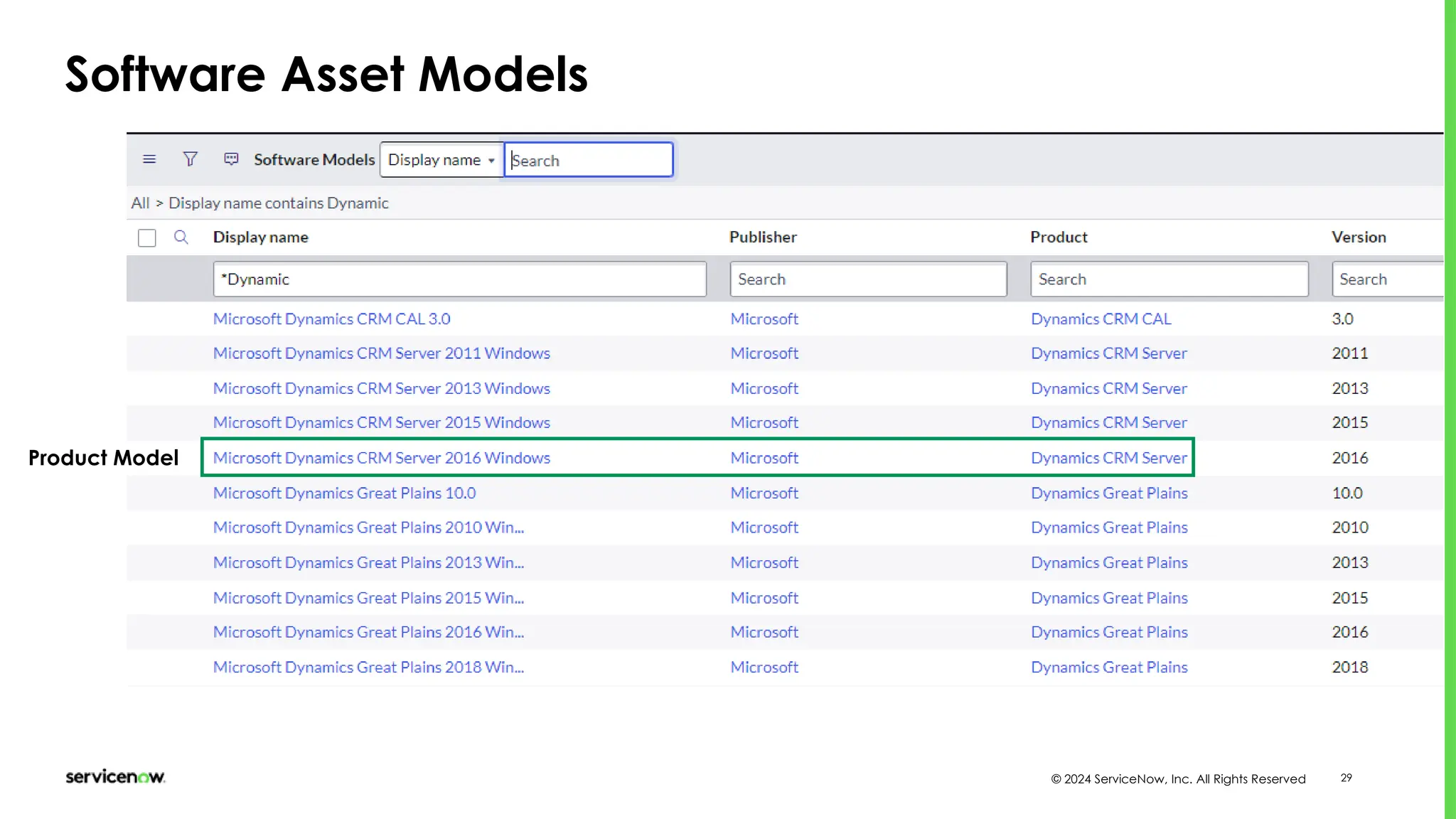
Software Asset Models
Product Model
© 2024 ServiceNow, Inc. All Rights Reserved 30
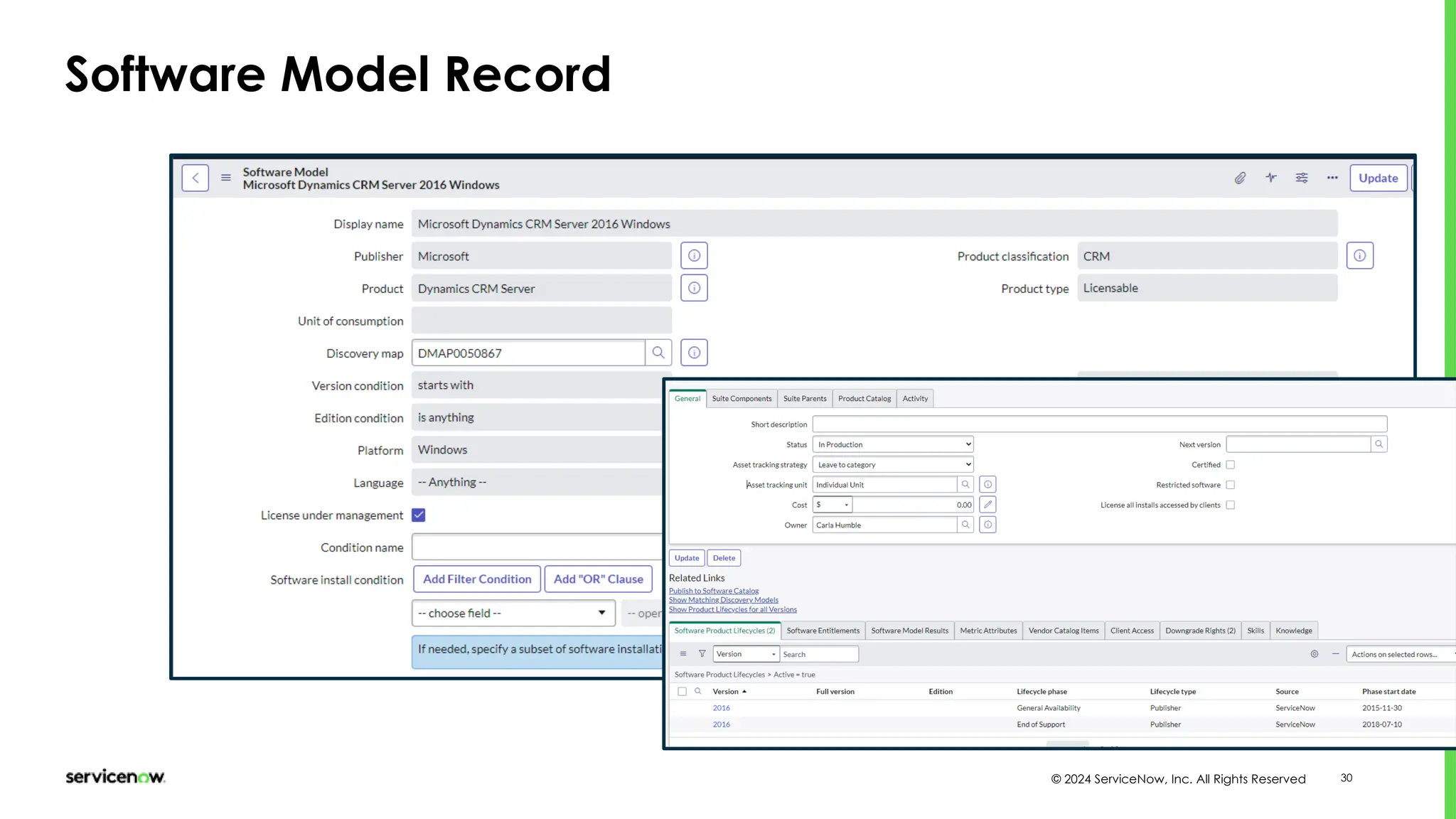
Software Model Record
© 2024 ServiceNow, Inc. All Rights Reserved 31
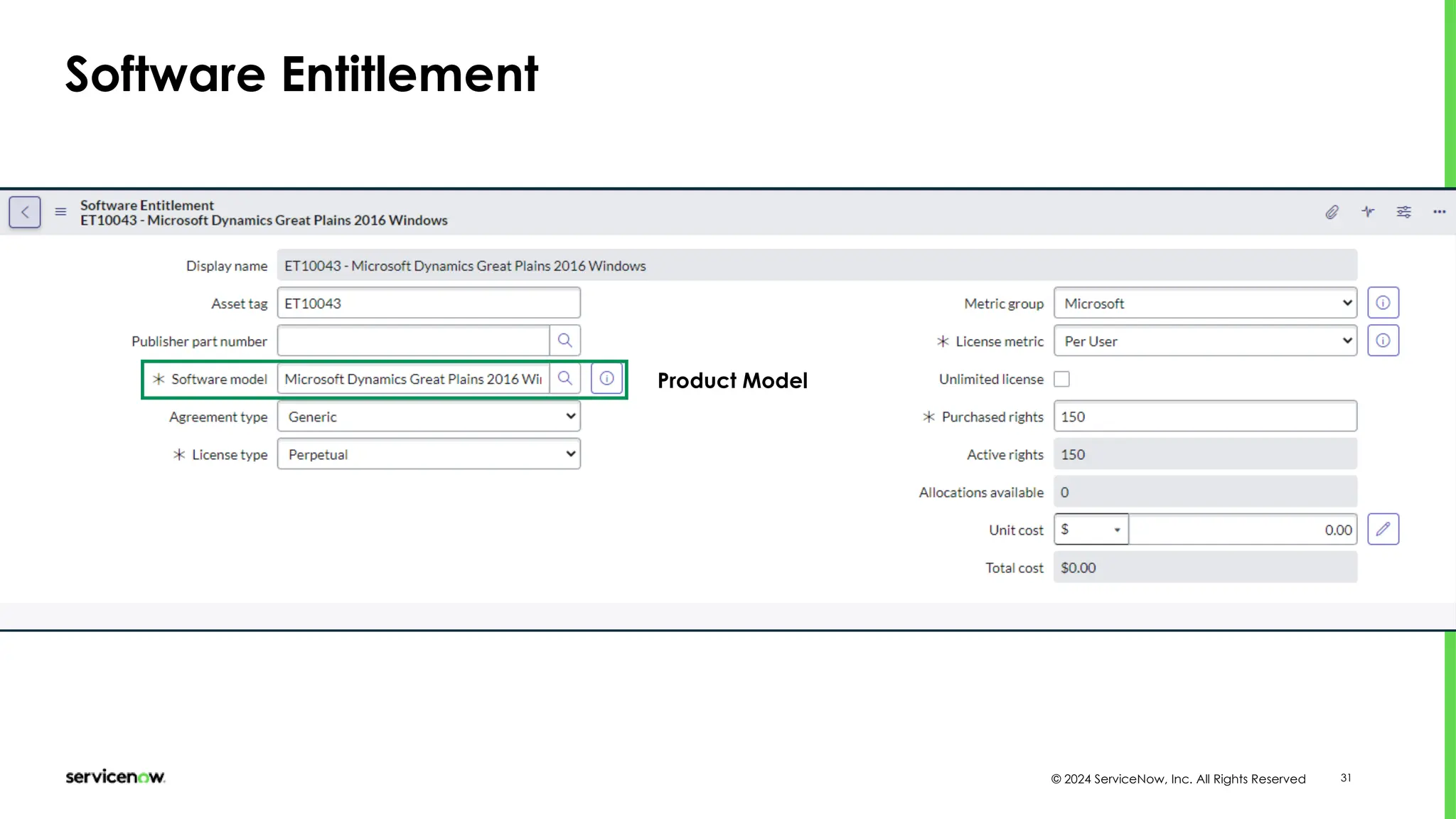
Software Entitlement
Product Model
Configuration
Management [CMDB]
© 2024 ServiceNow, Inc. All Rights Reserved 33
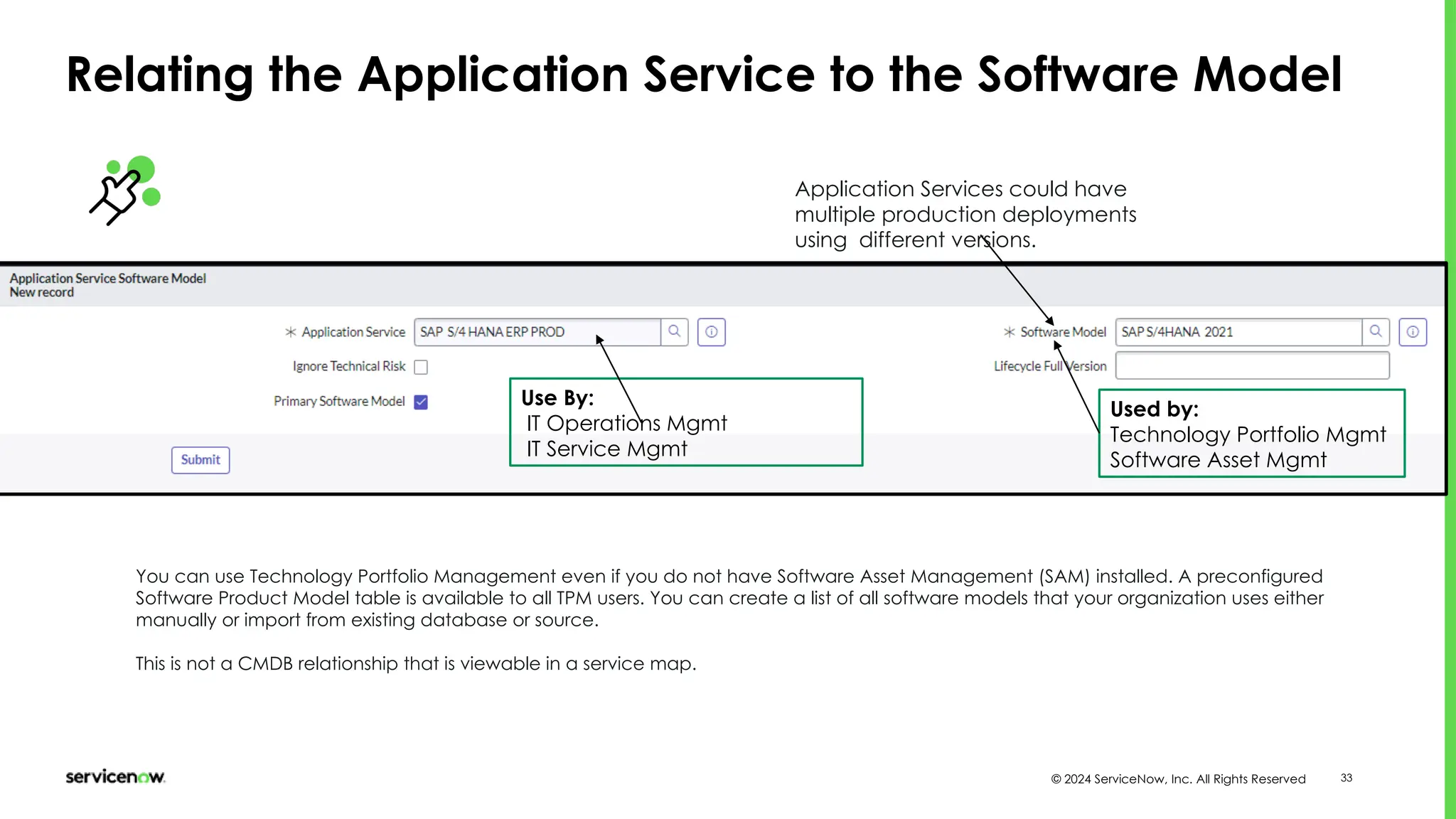
Relating the Application Service to the Software Model
You can use Technology Portfolio Management even if you do not have Software Asset Management (SAM) installed. A preconfigured
Software Product Model table is available to all TPM users. You can create a list of all software models that your organization uses either
manually or import from existing database or source.
This is not a CMDB relationship that is viewable in a service map.
Application Services could have
multiple production deployments
using different versions.
Use By:
IT Operations Mgmt
IT Service Mgmt
Used by:
Technology Portfolio Mgmt
Software Asset Mgmt
© 2024 ServiceNow, Inc. All Rights Reserved 34
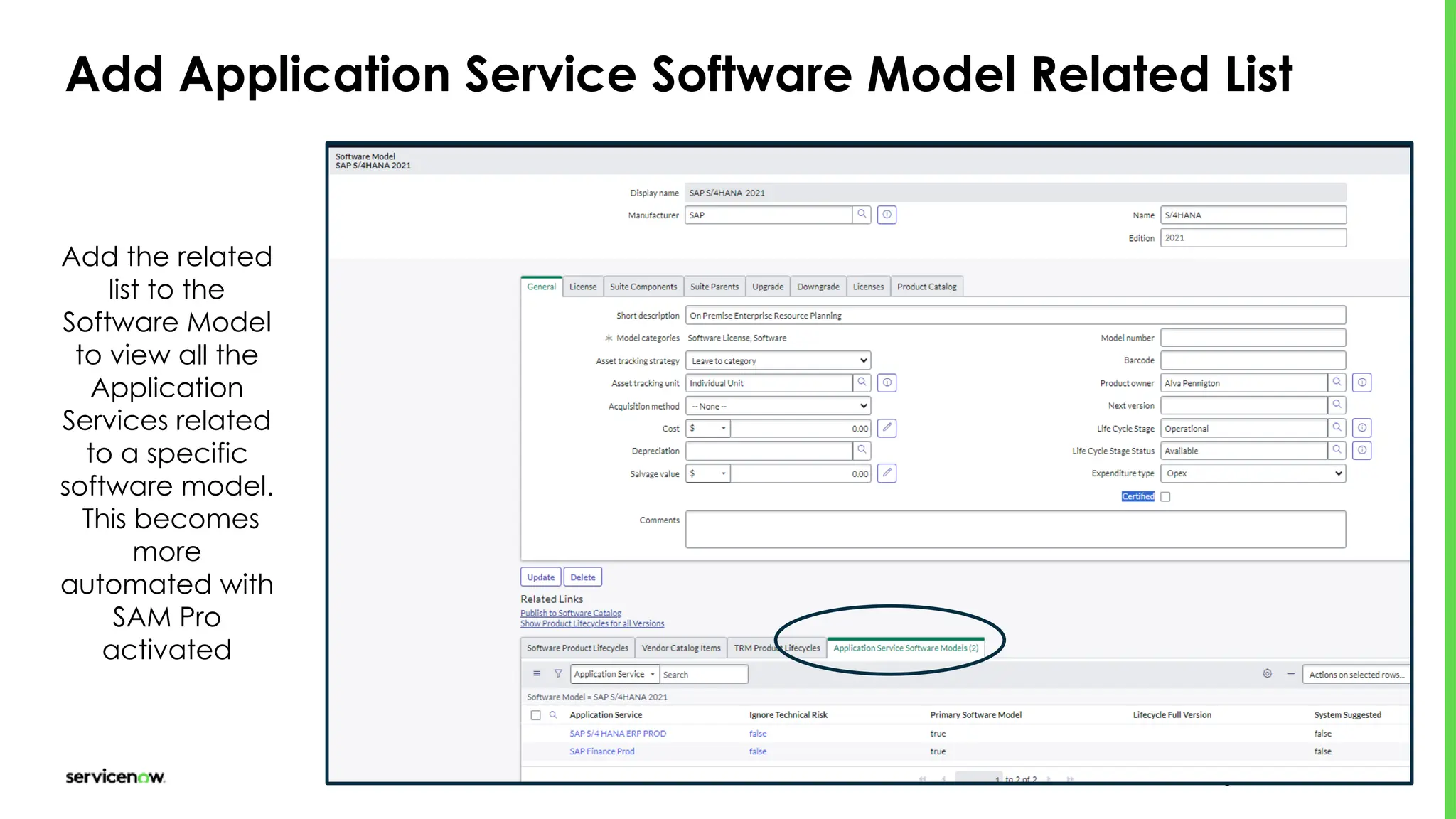
Add Application Service Software Model Related List
Add the related
list to the
Software Model
to view all the
Application
Services related
to a specific
software model.
This becomes
more
automated with
SAM Pro
activated
© 2024 ServiceNow, Inc. All Rights Reserved 35
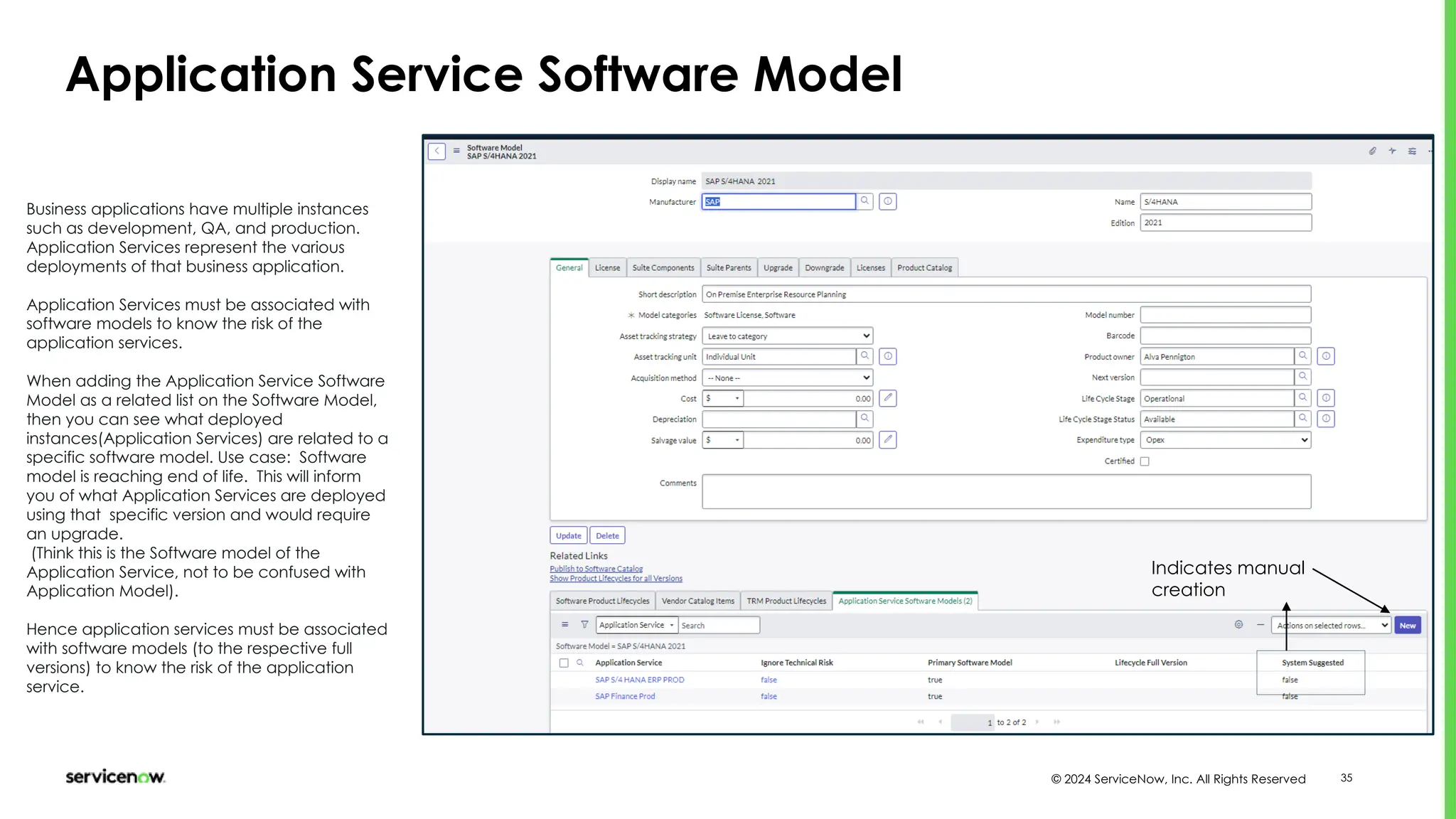
Application Service Software Model
Business applications have multiple instances
such as development, QA, and production.
Application Services represent the various
deployments of that business application.
Application Services must be associated with
software models to know the risk of the
application services.
When adding the Application Service Software
Model as a related list on the Software Model,
then you can see what deployed
instances(Application Services) are related to a
specific software model. Use case: Software
model is reaching end of life. This will inform
you of what Application Services are deployed
using that specific version and would require
an upgrade.
(Think this is the Software model of the
Application Service, not to be confused with
Application Model).
Hence application services must be associated
with software models (to the respective full
versions) to know the risk of the application
service.
Indicates manual
creation
© 2024 ServiceNow, Inc. All Rights Reserved 36
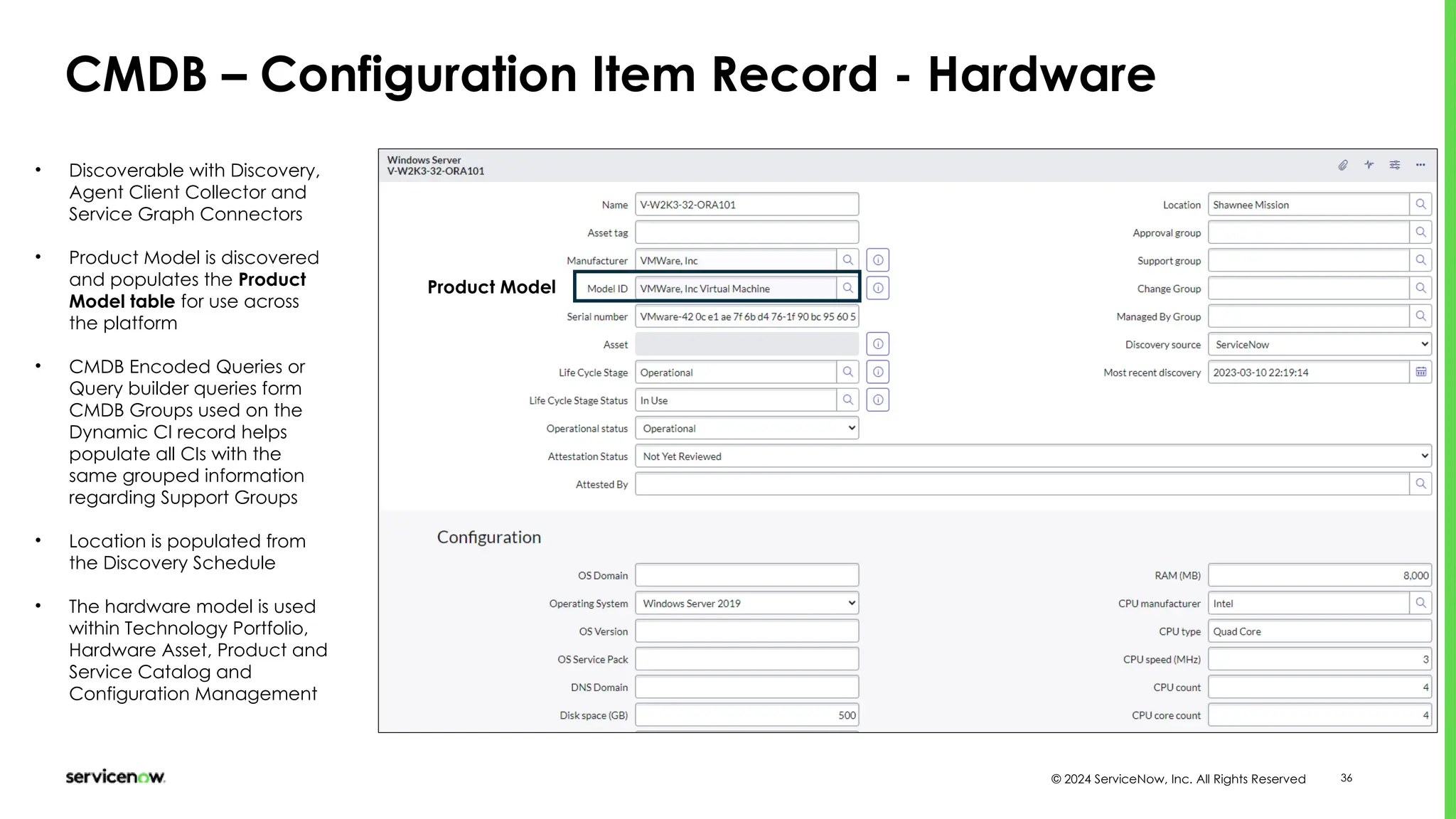
CMDB – Configuration Item Record - Hardware
Product Model
• Discoverable with Discovery,
Agent Client Collector and
Service Graph Connectors
• Product Model is discovered
and populates the Product
Model table for use across
the platform
• CMDB Encoded Queries or
Query builder queries form
CMDB Groups used on the
Dynamic CI record helps
populate all CIs with the
same grouped information
regarding Support Groups
• Location is populated from
the Discovery Schedule
• The hardware model is used
within Technology Portfolio,
Hardware Asset, Product and
Service Catalog and
Configuration Management
Customer Service
Management
© 2024 ServiceNow, Inc. All Rights Reserved 38
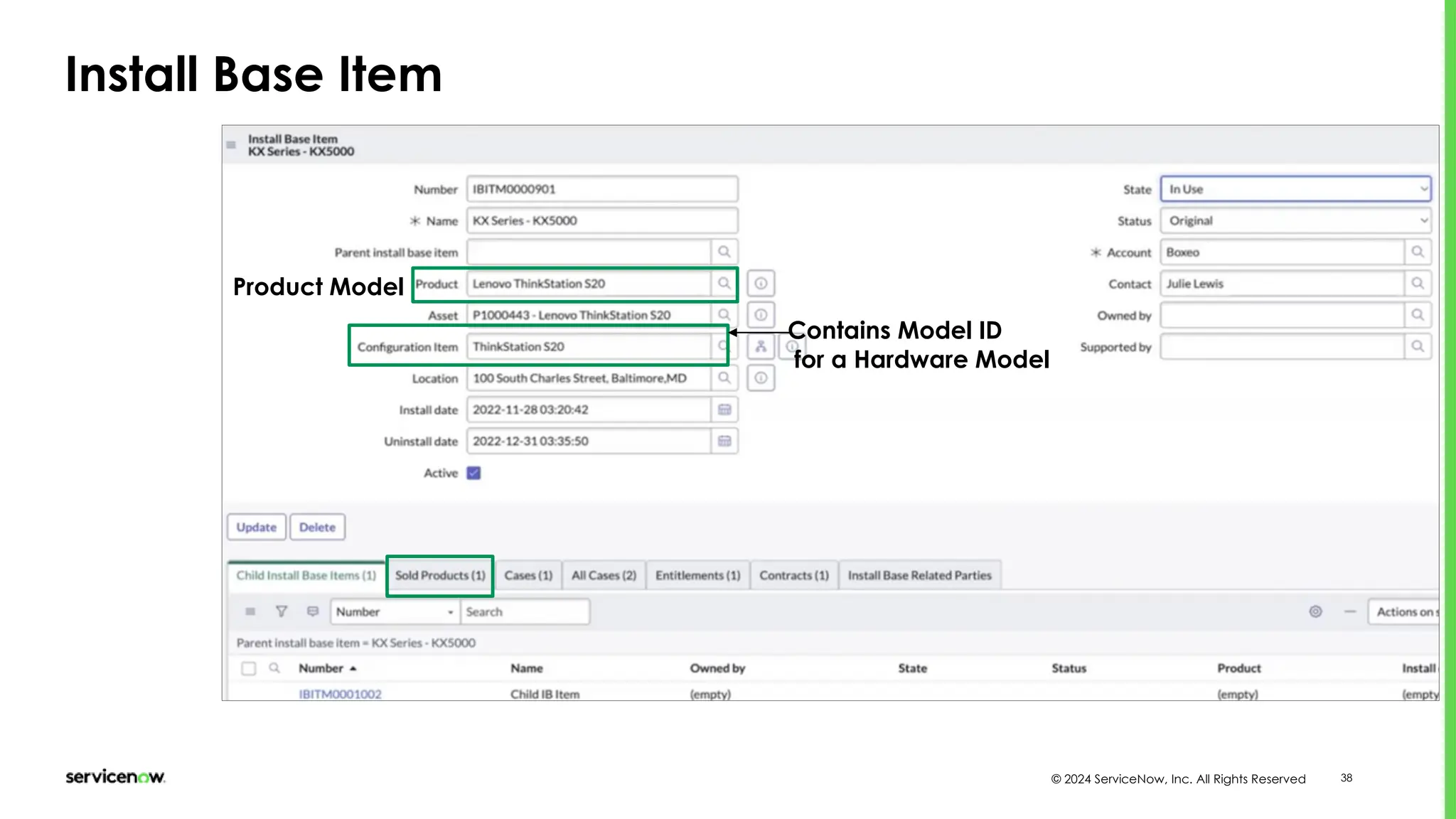
Install Base Item
Contains Model ID
for a Hardware Model
Product Model
© 2024 ServiceNow, Inc. All Rights Reserved 39
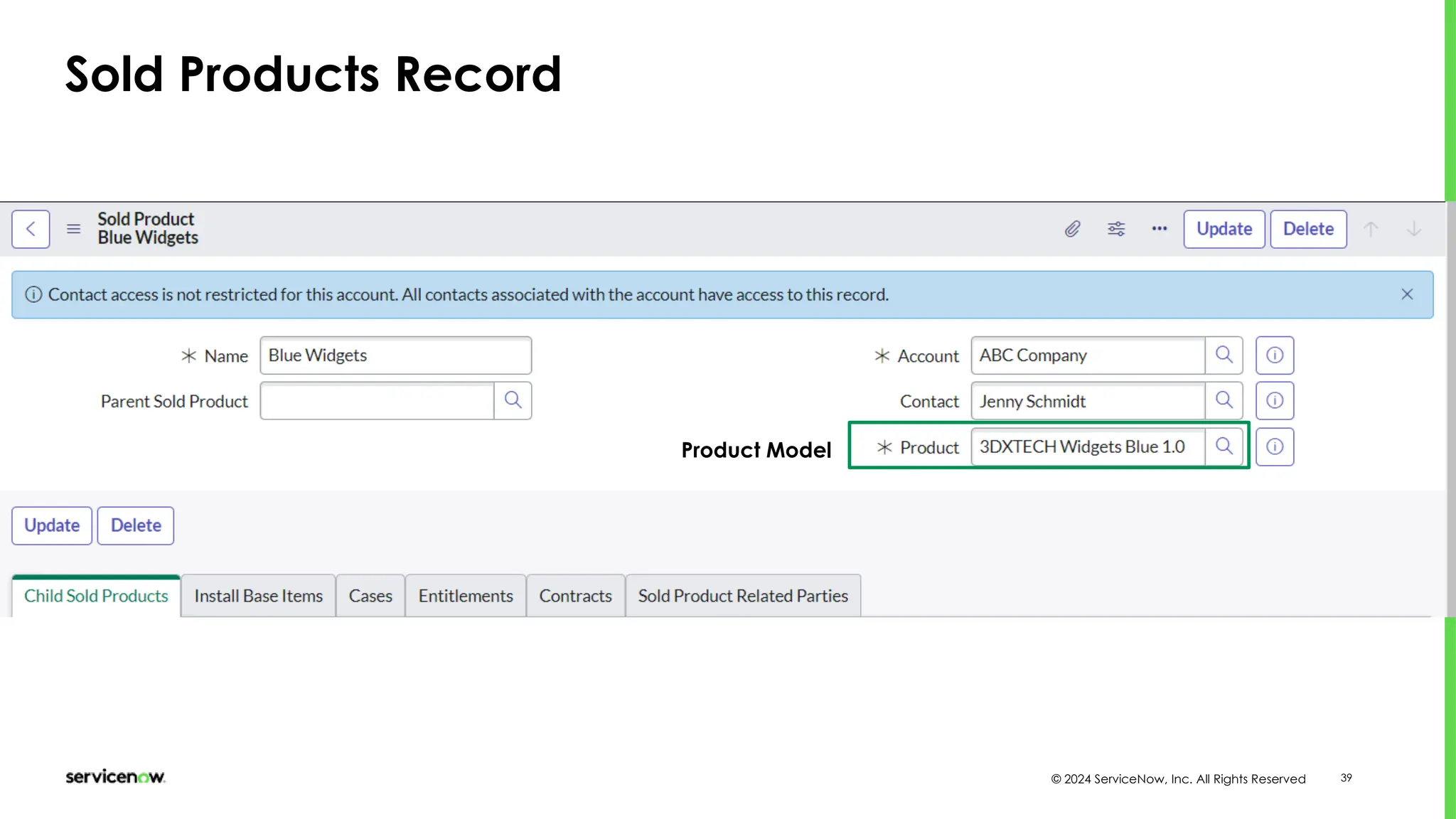
Sold Products Record
Product Model
Product and Service
Catalog Management
© 2024 ServiceNow, Inc. All Rights Reserved 41
Software Product Models
[cmdb_software_product_model] table
Manufacturer + Name =
Model ID for use in CMDB
and Service Catalog
CSDM related
Lifecycle
Stage and
Status
• Software Models are
auto-populated by
Discovery
• Creates software
licenses, suites,
upgrades and
downgrades for use in
Software Asset
Management
• Use CSDM related
Lifecycle Stage and
Status – Technology
Portfolio Mgmt
• Manufacturer + Name
= Model ID for use in
CMDB and CSDM
related tables
Will create an asset in
the Software Asset Table
Track Software License
information
See how this is used in the Service Catalog Software Catalog Item Record
© 2024 ServiceNow, Inc. All Rights Reserved 42
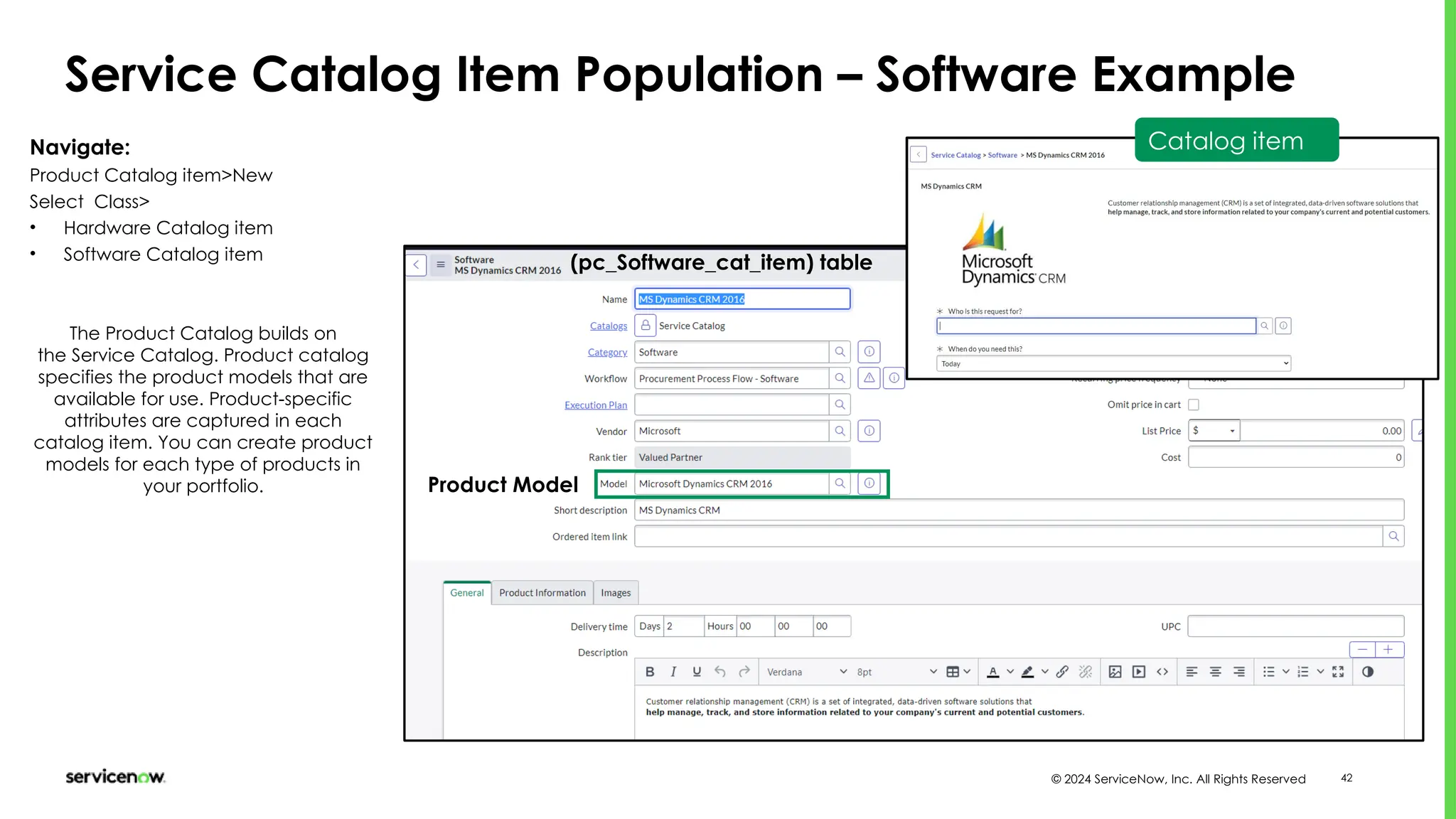
Service Catalog Item Population – Software Example
(pc_Software_cat_item) table
Navigate:
Product Catalog item>New
Select Class>
• Hardware Catalog item
• Software Catalog item
The Product Catalog builds on
the Service Catalog. Product catalog
specifies the product models that are
available for use. Product-specific
attributes are captured in each
catalog item. You can create product
models for each type of products in
your portfolio.
Catalog item
Product Model
© 2024 ServiceNow, Inc. All Rights Reserved 43
Hardware Product Models
[cmdb_hardware_product_model] table
Manufacturer + Name =
Model ID for use in CMDB
and Service Catalog
CSDM related
Lifecycle
Stage and
Status
• Hardware Models are
auto-populated by
Discovery
• Creates hardware
assets for Hardware
Asset Management
• Use CSDM related
Lifecycle Stage and
Status – Technology
Portfolio Mgmt
• Manufacturer + Name
= Model ID for use in
CMDB and CSDM
related tables
Will create an asset in
the Hardware Asset
Table
© 2024 ServiceNow, Inc. All Rights Reserved 44
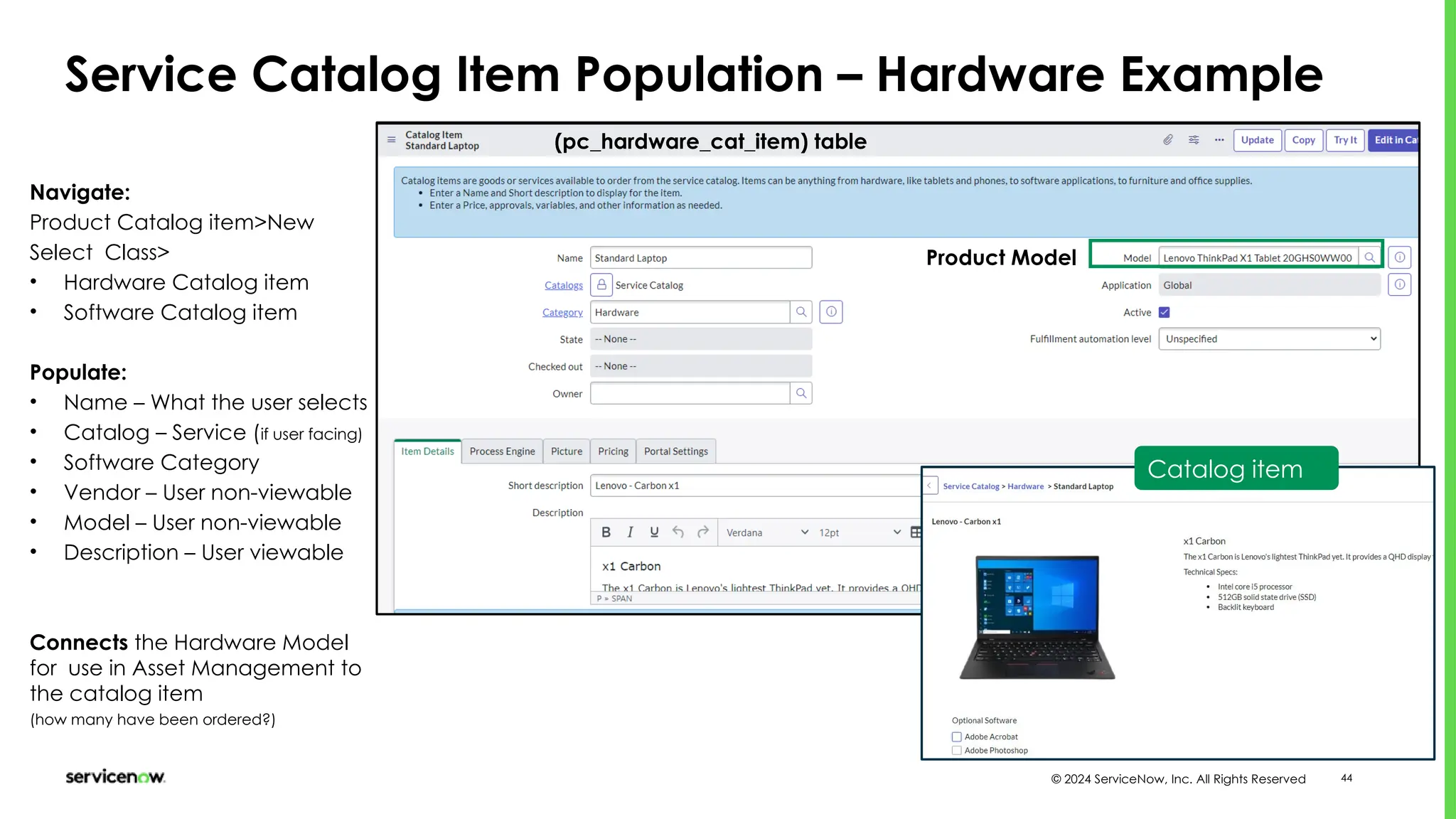
Service Catalog Item Population – Hardware Example
(pc_hardware_cat_item) table
Navigate:
Product Catalog item>New
Select Class>
• Hardware Catalog item
• Software Catalog item
Populate:
• Name – What the user selects
• Catalog – Service (if user facing)
• Software Category
• Vendor – User non-viewable
• Model – User non-viewable
• Description – User viewable
Connects the Hardware Model
for use in Asset Management to
the catalog item
(how many have been ordered?)
Catalog item
Product Model
© 2024 ServiceNow, Inc. All Rights Reserved 45
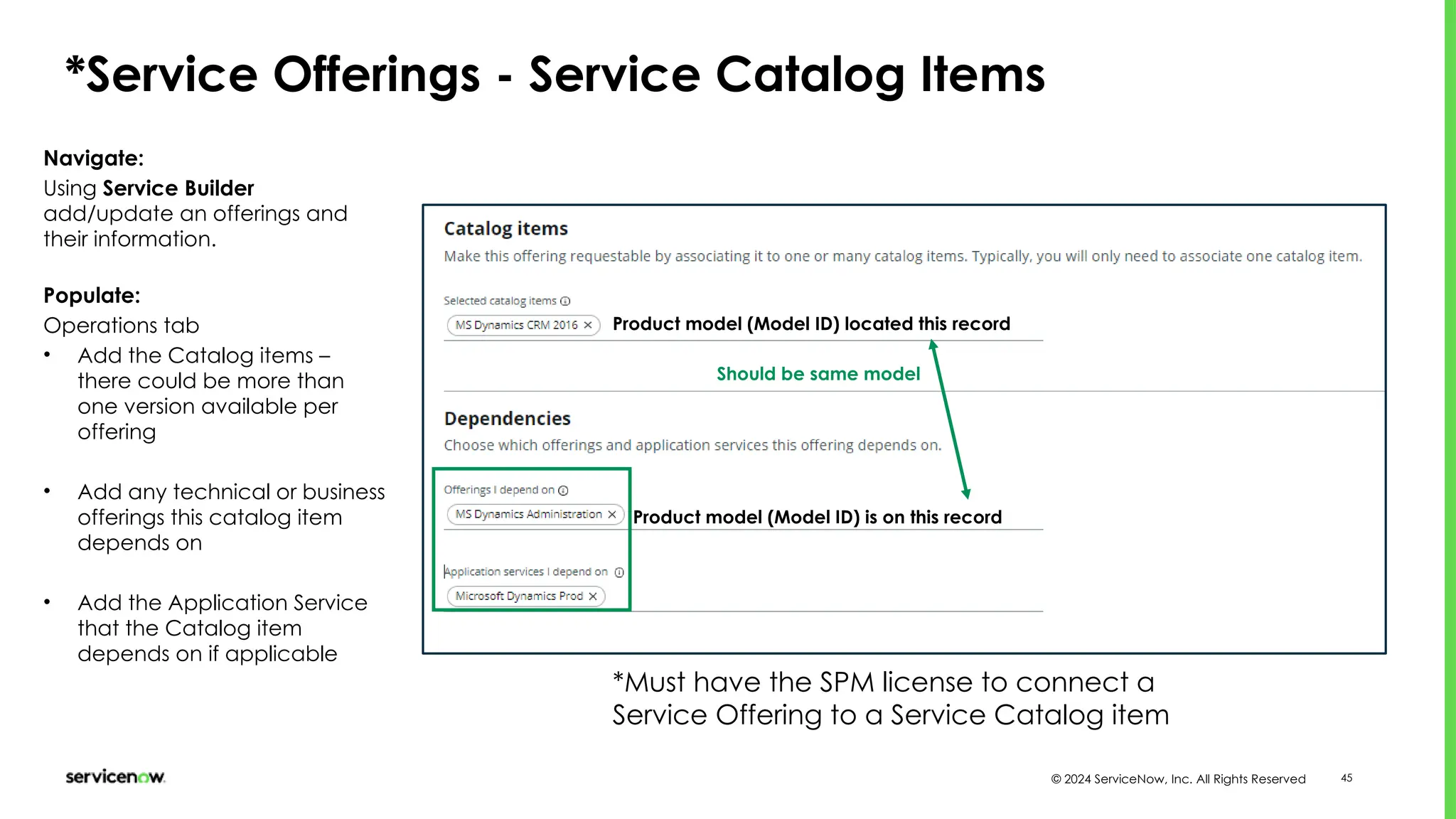
*Service Offerings - Service Catalog Items
Navigate:
Using Service Builder
add/update an offerings and
their information.
Populate:
Operations tab
• Add the Catalog items –
there could be more than
one version available per
offering
• Add any technical or business
offerings this catalog item
depends on
• Add the Application Service
that the Catalog item
depends on if applicable
Product model (Model ID) located this record
Product model (Model ID) is on this record
Should be same model
*Must have the SPM license to connect a
Service Offering to a Service Catalog item
© 2024 ServiceNow, Inc. All Rights Reserved 46
When to use
To provide a Product Owner (the Owner of a Product: Application
Model, Software Model, HW Model, etc.) insight into the life cycle
and value of their product(s). We are encouraging referencing
Models to their appropriate non-discoverable CIs as such:
•Business Application - Application Model (version agnostic)
•SDLC Component - Application Model (version agnostic)
•Business Service/Offering - Service Model
•Technical Service/Offering - Service Model
•Application Service - Software Model (version specific, child of
Application Model)
Service NOW CSDM and Product Models 1.pptx

Service NOW CSDM and Product Models 1.pptx

  • 1.
    CMDB,CSDM and ProductModels Foundational Data Usage across the ServiceNow platform Asset: 0003633 Mary Vanatta
  • 2.
    © 2023 ServiceNow,Inc. All Rights Reserved. Confidential. 2 Speaker introduction • Experience: 9 years in ServiceNow ecosystem • Expertise: Configuration Management, ITOM • Location: USA – Wichita, KS • Contact: mary.vanatta@servicenow.com • Name: Mary Vanatta • Title: Principal Portfolio Manager - ITOM • Function: Leading Practices – Now Create • Company: ServiceNow
  • 3.
    © 2023 ServiceNow,Inc. All Rights Reserved. Confidential. 3 A product model is a specific version or configuration of a product. Defines whether a product is tracked as an asset, a CI or both. The product model is captured on the configuration or asset record and is maintained in the Product catalog.
  • 4.
    © 2023 ServiceNow,Inc. All Rights Reserved. Confidential. 4 Disclaimer: Some of the capabilities depend on whether APM or SAM, SAM Pro is licensed. Some capabilities like Manage the Technology features and TPM are not available without a license.
  • 5.
    © 2024 ServiceNow,Inc. All Rights Reserved Common Service Data Model Business Consumer Business Capability Business Application Information Object Enterprise Architect Application Owner Business Relationship Manager Customer Service Manager DESIGN Request Catalog Item Business Service Offering Business Service Service Portfolio Locations Business Process Process Owner Contract Manager Product Owner Data Steward Company Business Unit Department Contracts Products (Models) CMDB Group Locations Locations Groups Users Life Cycle Configuration Items Request Catalog Item Technical Service Application Service Dynamic CI Group Technical Service Offering Technical Service Offering Application Server IoT Network Gear Technical Consumer Technology Service Owner (Infrastructure) Technology Service Owner (Delivery) Application Service Owner (Delivery) MANAGE TECHNICAL SERVICES Technical Service Technical Service Technical Service Offering Service Owner MANAGE PORTFOLIO SELL / CONSUME BUILD SDLC Component SDLC Component SDLC Component Teams FOUNDATION Domains Foundation Design Build Manage Technical Services Sell / Consume Key Data in the platform and foundational to success
  • 6.
    © 2024 ServiceNow,Inc. All Rights Reserved Product Model Uses • Microsoft SQL 2012 • Oracle Database 19c Hardware model Hardware Asset Mgmt Software Asset Mgmt CMDB CMDB Application Lifecycle Technology Lifecycle Customer Service Mgmt Application Portfolio Mgmt Technology Portfolio Mgmt • IBM ThinkPad • Cisco 3600 Asset managers use the Product Catalog as a centralized repository for model information Product Model Catalog Product Models Service Operations Application Model Software Model
  • 7.
    © 2024 ServiceNow,Inc. All Rights Reserved Product Models and CSDM Product Models: Specific versions or configurations of products used for managing and tracking through various ServiceNow platform applications Ideation Operational End of Life Design SDLC Component Product Model: Application Model & Software Model Life Cycle Build Application Service Business Application Services Strategic Portfolio Mgmt DevOps Service Operations Asset Product Asset and Product Mgmt Agile Demand
  • 8.
    © 2023 ServiceNow,Inc. All Rights Reserved. Confidential. 8 Model Data Hierarchy Virtual Servers or Workstations/VDIs are not assets Product Models Software Model [cmdb_software_product_model] Hardware Model [cmdb_hardware_product_model] Consumable Model [cmdb_consumable_product_model] Service Model cmdb_service_product_model Application Model [cmdb_application_product_model] Windows Server Model Category PowerEdge R940xa Model CI Only Dell PowerEdge T140 Model Dal-Win-File01 Asset and CI DC1-Win-App01 Contract Model cmdb_contract_product_model Facility Model [cmdb_facility_product_model] Model Categories
  • 9.
    © 2023 ServiceNow,Inc. All Rights Reserved. Confidential. 9 Every CI and Asset should reference a Product Model Product Model cmdb_model Software Model cmdb_software_product_model Contract Model cmdb_contract_product_model Facility Model cmdb_facility_product_model Hardware Model cmdb_hardware_product_model Consumable Model cmdb_consumable_product_model Service Model cmdb_service_product_model Application Model cmdb_application_product_model Table Hierarchy Types: Physical, Logical, Documents Sources: Vendor, Internal teams Supports recursive design / use: assemblies, sub-assemblies and so on Product Owner & Team: Foundational in “Product Centric IT” Critical for Lifecycle Management: From Idea to Digital Product and Service Logical Product Models: • Business Services • Technical Services • Service Offerings • Application Services • Business Applications San Diego+: Automatically creates Product Models for Logical CI’s and reference them. Customers who migrating to a product- centric management get head start on transition for Logical CI types, don’t have to create them manually
  • 10.
    © 2024 ServiceNow,Inc. All Rights Reserved Product Model Management Record Use Cases • Hardware Asset • Service Catalog • Software Asset • Configuration Management • Catalog item relationships • End of Life • Customer Service Management • Asset-CI Synchronization • Application and Technology Portfolio Role required: model_manager or admin Used across the platform, we must assure the models are accurate, normalized and populating the CIs and synchronizing with the asset hardware models. Shows list of CIs that use this model. Relates to Model ID on CI record Synchronize with Asset Management
  • 11.
    © 2024 ServiceNow,Inc. All Rights Reserved Model Category Creation • Navigate to Product Catalog > Product Model > Model Categories • CMDB CI Class Models store app adds class models that extend the CMDB class hierarchy Creates the CI and the Asset at the same time
  • 12.
    © 2024 ServiceNow,Inc. All Rights Reserved Automated Model Creation ServiceNow Discovery Datacenter discovery MID Server Obtain Models of Hardware and Software Populate CIs with the Model ID CMDB ASSET SCCM Service Graph or Agent Client Collector Desktop environments Data Normalization MID Server Obtain Models of Hardware and Software
  • 13.
    © 2024 ServiceNow,Inc. All Rights Reserved Product Model Management Lifecycle Stages and Status Foundational Data Domain • Build • In Use Design Operational • Retired • Sold End of Life Software Model [cmdb_software_product_model] Hardware Model [cmdb_hardware_product_model] Application Model [cmdb_application_product_model] The Product Model is often the “Model ID” attribute on the CI Record. Ideation • Under Evaluation • Pilot Strategic Portfolio Mgmt Product Catalog Digital Product Mgmt Contract Model cmdb_contract_product_model
  • 14.
    Product Model Usage Acrossthe Platform - CSDM
  • 15.
  • 16.
    © 2024 ServiceNow,Inc. All Rights Reserved 16 Business Application Record - Upgraded Instance [cmdb_ci_business_app] table Relationships Product Model Upgraded from a pre-Kingston instance • Points to the model management record • Instances upgraded from Pre-Kingston uses the Software Model Table attribute • Re-configure these instances to remove the “Software Model” attribute and add the Model ID attribute • The model attribute will need to be populated with the product model “Application Model”
  • 17.
    © 2024 ServiceNow,Inc. All Rights Reserved 17 Business Application Record [cmdb_ci_business_app] table Application Product Model *Click to gather Software models Application Service models and Hardware for TPM Manage the TRM technical debts that are created for the products that aren’t aligned with the TRM phases and standards. Auto-created in Vancouver (see next slide) *Requires activativation of Software Asset Management Professional (com.snc.samp) plugin.
  • 18.
    © 2024 ServiceNow,Inc. All Rights Reserved 18 Application Model – Auto-created in Vancouver Application Product models have multiple use cases including Agile and is incredibly important as part of a Digital Product.
  • 19.
  • 20.
    © 2024 ServiceNow,Inc. All Rights Reserved 20 DevOps Change Workspace CSDM Data Create an Application, tied to an Application Product Model to track DevOps Configurations and Changes When creating a new application in DevOps, it automatically creates a record in the Application Product Model table. Product Model – CSDM Create the Application Product Model Chose existing Application Product Model Created when populating the Business Application Record or directly from DevOps
  • 21.
  • 22.
    © 2024 ServiceNow,Inc. All Rights Reserved 22 Software Model Technology Portfolio Management Software Model Software Model Hardware Model CSDM Data SAP S/4HANA SAP S/4HANA 2021 SUSE Linux Enterprise Server 15 SAP S/4HANA ERP Prod SUSE Linux Enterprise Server 12 vSphere Virtual Server ESX v8 Used for Technology Portfolio Management Using TPM depends on SAM plugins to view the Product Classification, without the plugin it is not available in the TPM timeline view. Business Application Application Service SAP S/4HANA ERP Prod - JAPAN SAP S/4HANA 2020 Managing Tech Debt
  • 23.
  • 24.
    © 2024 ServiceNow,Inc. All Rights Reserved 24 Product Product Model Points to the cmdb_model.list Model Category = Software
  • 25.
  • 26.
    © 2024 ServiceNow,Inc. All Rights Reserved 26 Application Service – Add Software Model Use the software model ID as to indicate the version of the software that has been deployed
  • 27.
    Asset Management Hardware andSoftware Asset Management
  • 28.
    © 2024 ServiceNow,Inc. All Rights Reserved 28 Hardware Asset Record Product Model Record contains same model – Auto synchronization Synchronized based on the “Asset Strategy” of the Hardware model record
  • 29.
    © 2024 ServiceNow,Inc. All Rights Reserved 29 Software Asset Models Product Model
  • 30.
    © 2024 ServiceNow,Inc. All Rights Reserved 30 Software Model Record
  • 31.
    © 2024 ServiceNow,Inc. All Rights Reserved 31 Software Entitlement Product Model
  • 32.
  • 33.
    © 2024 ServiceNow,Inc. All Rights Reserved 33 Relating the Application Service to the Software Model You can use Technology Portfolio Management even if you do not have Software Asset Management (SAM) installed. A preconfigured Software Product Model table is available to all TPM users. You can create a list of all software models that your organization uses either manually or import from existing database or source. This is not a CMDB relationship that is viewable in a service map. Application Services could have multiple production deployments using different versions. Use By: IT Operations Mgmt IT Service Mgmt Used by: Technology Portfolio Mgmt Software Asset Mgmt
  • 34.
    © 2024 ServiceNow,Inc. All Rights Reserved 34 Add Application Service Software Model Related List Add the related list to the Software Model to view all the Application Services related to a specific software model. This becomes more automated with SAM Pro activated
  • 35.
    © 2024 ServiceNow,Inc. All Rights Reserved 35 Application Service Software Model Business applications have multiple instances such as development, QA, and production. Application Services represent the various deployments of that business application. Application Services must be associated with software models to know the risk of the application services. When adding the Application Service Software Model as a related list on the Software Model, then you can see what deployed instances(Application Services) are related to a specific software model. Use case: Software model is reaching end of life. This will inform you of what Application Services are deployed using that specific version and would require an upgrade. (Think this is the Software model of the Application Service, not to be confused with Application Model). Hence application services must be associated with software models (to the respective full versions) to know the risk of the application service. Indicates manual creation
  • 36.
    © 2024 ServiceNow,Inc. All Rights Reserved 36 CMDB – Configuration Item Record - Hardware Product Model • Discoverable with Discovery, Agent Client Collector and Service Graph Connectors • Product Model is discovered and populates the Product Model table for use across the platform • CMDB Encoded Queries or Query builder queries form CMDB Groups used on the Dynamic CI record helps populate all CIs with the same grouped information regarding Support Groups • Location is populated from the Discovery Schedule • The hardware model is used within Technology Portfolio, Hardware Asset, Product and Service Catalog and Configuration Management
  • 37.
  • 38.
    © 2024 ServiceNow,Inc. All Rights Reserved 38 Install Base Item Contains Model ID for a Hardware Model Product Model
  • 39.
    © 2024 ServiceNow,Inc. All Rights Reserved 39 Sold Products Record Product Model
  • 40.
  • 41.
    © 2024 ServiceNow,Inc. All Rights Reserved 41 Software Product Models [cmdb_software_product_model] table Manufacturer + Name = Model ID for use in CMDB and Service Catalog CSDM related Lifecycle Stage and Status • Software Models are auto-populated by Discovery • Creates software licenses, suites, upgrades and downgrades for use in Software Asset Management • Use CSDM related Lifecycle Stage and Status – Technology Portfolio Mgmt • Manufacturer + Name = Model ID for use in CMDB and CSDM related tables Will create an asset in the Software Asset Table Track Software License information See how this is used in the Service Catalog Software Catalog Item Record
  • 42.
    © 2024 ServiceNow,Inc. All Rights Reserved 42 Service Catalog Item Population – Software Example (pc_Software_cat_item) table Navigate: Product Catalog item>New Select Class> • Hardware Catalog item • Software Catalog item The Product Catalog builds on the Service Catalog. Product catalog specifies the product models that are available for use. Product-specific attributes are captured in each catalog item. You can create product models for each type of products in your portfolio. Catalog item Product Model
  • 43.
    © 2024 ServiceNow,Inc. All Rights Reserved 43 Hardware Product Models [cmdb_hardware_product_model] table Manufacturer + Name = Model ID for use in CMDB and Service Catalog CSDM related Lifecycle Stage and Status • Hardware Models are auto-populated by Discovery • Creates hardware assets for Hardware Asset Management • Use CSDM related Lifecycle Stage and Status – Technology Portfolio Mgmt • Manufacturer + Name = Model ID for use in CMDB and CSDM related tables Will create an asset in the Hardware Asset Table
  • 44.
    © 2024 ServiceNow,Inc. All Rights Reserved 44 Service Catalog Item Population – Hardware Example (pc_hardware_cat_item) table Navigate: Product Catalog item>New Select Class> • Hardware Catalog item • Software Catalog item Populate: • Name – What the user selects • Catalog – Service (if user facing) • Software Category • Vendor – User non-viewable • Model – User non-viewable • Description – User viewable Connects the Hardware Model for use in Asset Management to the catalog item (how many have been ordered?) Catalog item Product Model
  • 45.
    © 2024 ServiceNow,Inc. All Rights Reserved 45 *Service Offerings - Service Catalog Items Navigate: Using Service Builder add/update an offerings and their information. Populate: Operations tab • Add the Catalog items – there could be more than one version available per offering • Add any technical or business offerings this catalog item depends on • Add the Application Service that the Catalog item depends on if applicable Product model (Model ID) located this record Product model (Model ID) is on this record Should be same model *Must have the SPM license to connect a Service Offering to a Service Catalog item
  • 46.
    © 2024 ServiceNow,Inc. All Rights Reserved 46 When to use To provide a Product Owner (the Owner of a Product: Application Model, Software Model, HW Model, etc.) insight into the life cycle and value of their product(s). We are encouraging referencing Models to their appropriate non-discoverable CIs as such: •Business Application - Application Model (version agnostic) •SDLC Component - Application Model (version agnostic) •Business Service/Offering - Service Model •Technical Service/Offering - Service Model •Application Service - Software Model (version specific, child of Application Model)

Editor's Notes

  • #2 Who is customers presenter? Years with ServiceNow and in the ecosystem Expertise should help establish the credentials of the presenter as an expert in this topic If multiple presenters, repeat this slide for each presenter
  • #3 Simply put, it is a data repository that contains more than just configuration items that operate in your data center. A Configuration Management database is not to be confused with a Asset management database, both with very different capabilities and functions inside the ServiceNow platform. With infrastructure in the cloud, on-prem datacenters, services, applications and their many environments, a CMDB will store the attributes like application owners, support groups, locations, operational status of these resources and show you their relationships to your core business services. These logical service configurations are mapped to the physical layout data of the supporting network and application infrastructure in each of your respective domains. They track the physical and logical state of IT service elements and associate incidents to the state of service elements, which helps in analyzing trends and reducing problems and incidents.
  • #5 The following figure illustrates the CSDM conceptual model.. It also shows how each domain works together to manage your ServiceNow applications and services. Additionally, this figure shows the Manage Portfolio domain that encompasses portions of all the five domains and how different roles, and user personas can use this data model. You can use as a blueprint to map your services to the ServiceNow platform. The boxes represent tables in ServiceNow CMDB. The Foundation data in the gray section represents data that is referenced on the records that contain CSDM data points. The lines are relationships between the data tables that span in entire platform. The color-coded domain loosely represents one or more ServiceNow products. Also, the CSDM is the standard for all ServiceNow products that use the CMDB. Following the CSDM data model ensures that the data your ServiceNow application requires maps correctly to the appropriate CMDB tables and references the appropriate data that is foundational to the platform – like users and groups.
  • #6 Product Models exist in every organization. Think of the different models of laptops, different versions of software or application. Maybe you have different service models you offer your customers. When a new product model, typically a new version of software has been introduced into the environment. In the Design, phase the Product model can be created in the Product Catalog. Another way for a product model to be created is through ServiceNow Discovery, it populates the product model table when the different versions and models are discovered. This data will populate the CI Record in the “Model ID” attribute. The Product model becomes Operational and “In Use.” After the product is no longer needed or wanted in the organization this model may be retired or sold. When the CMDB references a product model, it can then be used other ServiceNow Products like Application and Technology Portfolio Management, Hardware and Software Asset Management, Digital Product Mgmt and Customer Service Management. Product models are extended into 7 base types: Application (version agnostic), Software (version specific), Contract, Facility, Hardware, Consumable, Service. Product Models are stored in the [cmdb_model] table or its extended tables aligned to the 7 base types. *Note: Difference between software (something that runs on a server, computer the code and Application – Applications what the person uses. Applications, that people “apply” to their every day work, the software is a particular version of that software. What types of models are you using for your servers, network gear, laptops? Software?
  • #7 Product models are referenced across Strategic Portfolio Mgmt, DevOps, Service Operations and Asset and Product Mgmt, the product model is contatin in the Application Model and Software model Lifecycle
  • #8 Build hierarchical product models that represent the set of products that your organization offers to its customers and define relationships between different product models. The model category configuration determines if the ServiceNow platform creates an asset from a CI, and, if so, what class of asset. Asset classes in the base system are Hardware, Software License, and Consumable. You can associate a model category to many models and a model to many model categories. Types: Physical, Logical, Documents Sources: Vendor, Internal teams Supports recursive design / use: assemblies, sub-assemblies and so on Product Owner & Team: Foundational in “Product Centric IT” Critical for Lifecycle Management: From Idea to Digital Product and Service If you have a product model that is not represented in the Enterprise Asset Management Content Service yet, you can create a custom product model. This in found in the Enterprise Asset Workspace>Normalization Example of a Consumable model in the health care industry: The Medication product model [sn_hcls_medication_product] table stores the information about substances that are used to treat diseases, to relieve complaints, or to prevent such diseases or complaints in the first place. It is extende from the Consumable Model [cmdb_consumable_product_model]
  • #9 CIs and Assets share the Model ID
  • #10 Model management will assure the models that are created by Discovery is usable for Hardware, Asset and Configuration Management processes. Knowing when the lifecycle ends of a utilized model in your organization helps with planning the purchases of new models. Do not set the Asset tracking strategy to Don't create assets, unless it is a virtual server. That will override the Model Category creation of the assets for the virtual CIs you discover. This is driven from Model data even though you may have some Physical Windows CI which needs an asset - So changes are only limited to Model Data. VMware Virtual Platform" and 2. "VMware7,1" -- Modify those Hardware Model records "Asset tracking strategy" to "Don't create assets" -- Export those Hardware Records in .XML format and import them on higher instances -- Run Discovery on higher instances and assets for hardware models that you've imported (and previously modified not to create assets) will not be created. Unfortunately this approach will not work if you already ran discovery in higher instances because asset records have already been created. Navigate to All > Customer Service > Products > Product Models. Click New. Select the type of product model to create: Application Model Consumable Model Contract Model Facility Hardware Service Software Fill in the fields for the selected product model, as appropriateSee Model form fields for field descriptions. Click Submit.
  • #11 Typically, you should not be manually creating models in the product catalog. Using an automated means of data population provides better accuracy and maintenance. There are many data points across the platform that interconnect and are threads in the digital fabric. Missing and inaccurate data leads to holes in that fabric. You can download new class models that will create the CI class, model, and all the supporting data when downloading the CI Class models from the store app. These get updated monthly
  • #12 Models are best created first with external automated population, the data goes through the MID server to your instance, the mid server runs standard industry code, like PowerShell, ssh, SNMP queries to find out the make, model and manufacturer, that data is then entered into the platform record in the product catalog, used on asset and ci record as referential data. The data may not always be the same, Data normalization is required between a CMDB project and SAM/HAM project. An example of data normalization is: Microsoft vs Microsoft, Inc or HP vs Hewlett Packard, if data normalization is not turned the companies table a foundational data record may be inaccurate and not easy to report on.
  • #13 Product Models exist in every organization. Think of the different models of laptops, different versions of software or application. Maybe you have different service models you offer your customers. When a new product model, typically a new version of software has been introduced into the environment. In the Design, phase the Product model can be created in the Product Catalog. Another way for a product model to be created is through ServiceNow Discovery, it populates the product model table when the different versions and models are discovered. This data will populate the CI Record in the “Model ID” attribute. The Product model becomes Operational and “In Use.” After the product is no longer needed or wanted in the organization this model may be retired or sold. When the CMDB references a product model, it can then be used other ServiceNow Products like Application and Technology Portfolio Management, Hardware and Software Asset Management, Digital Product Mgmt and Customer Service Management. Product models are extended into 7 base types: Application (version agnostic), Software (version specific), Contract, Facility, Hardware, Consumable, Service. Product Models are stored in the [cmdb_model] table or its extended tables aligned to the 7 base types. *Note: Difference between software (something that runs on a server, computer the code and Application – Applications what the person uses. Applications, that people “apply” to their every day work, the software is a particular version of that software.
  • #16 With the Kingston release, the Business Application record became available to the platform for use as a key data point in the CSDM data model. At a point in time, the Software Model attribute was exposed on the Business Application record. Due to this, when an organization upgrades this attribute stays exposed on the record. Software models are include a release or version on the record. Whereas, the Application product model is release or version agnostic. We recommend that the Model ID attribute is added and aligned to the Application Product Model. Here we see that Microsoft Dynamics Software Product Model is specific to Microsoft Dynamic CRM 2016. The switch to the Model ID attribute will ensure that a Business Application Record doesn’t have to be created for every version of a business application within the environment.
  • #17 Here is the Business Application Record in a new instance of ServiceNow. The Model ID field is exposed and upon clicking on the magnifying glass you are prompted to add an Application Product Model. The Application Product Model is version agnostic. The Hardware and Software Models check box appears when you activate Software Asset Management Professional (com.snc.samp) plugin. Technology Reference Model - TRM - Define standards for all software applications that are used in your organization. You can define the software, and software versions to be used in the production. Add new software products to the TRM library, and approve or reject requests submitted by other stakeholders. Use the technical debts page to find out unapproved software products that are being used in production. If you want to associate Application Service models to a Software model without activation of SAM Pro, then you will need to manually create.
  • #18 The Application model has model categories that are already created in Vancouver release, if you are not on Vancouver then there is a manual effort to create the application model and add it to these model categories
  • #20 In DevOps Change Velocity, an application collects all the up-to-date data that connected tools send about plans, repositories, and pipelines. You must create an application to enable traceability for user stories, commits, test results, and more. Associating plans, repositories, and pipelines to an application also enables pipeline modeling, change governance, and metric reporting. Use the DevOps Change workspace to create a DevOps application record, which is stored in the [sn_devops_app] table. An application is needed to group plans, repositories and pipelines together which will enable tracking automatically and provide associations for DevOps data such as commits linked to work items. Procedure Navigate to Workspaces > DevOps Change > Applications ().
  • #22 Once you have your application portfolios built out, you will be able to manage your technology lifecycle at the business level. Here you can see the software and hardware lifecycle events. When software reaches end of life, it becomes prone to hacks which increases risk to your business. When hardware reaches end of life, it is less performant which can lead to degradations and outages. TPM enables you to create demands or projects to address the pending end-of-life situation in advance. In doing so, you will be able to reduce risk, improve your security posture, and save money on unnecessary extended maintenance contracts and potential fines.
  • #26 Create an application service to adhere to CSDM standards and to standardize the organization, maintenance, and monitoring of services in your organization. An application service is a set of interconnected applications and hosts which are configured to offer a service to the organization. Application services can be internal, like an organization email system or customer-facing, like an organization website. An application service has an entry point, which lets users access the application service. If you are at the planning stage and do not know what the entry points are for an application service, you can create the application service without entry points. Such an application service is referred to as an empty application service, to which you can add entry points at any later time. A discovered application service contains the CIs and the connections between them that Service Mapping discovered and mapped. All application services created in the Application Service wizard, are set with the application service service classification. Note the Model ID points to a version of a software model. Ideally, one deployed instance of software is a specific version. We can see here the Software Product Model that was created during discovery is used here. You may have 2 versions of Applications running in your environment. You will need an record for both versions pointing to the correct product model version. Using the CSDM Menu> Application Services Wizard you are able to create an application service A Calculated Application Service [cmdb_ci_service_calculated] is a type of the Application Service that is populated automatically based on the CMDB relationships Logical representation of a deployed application stack Populate the Software Product Model, this tracks the version of the deployed instance Non-Discoverable Data Manual Input Used to connect to CIs in Service Mapping
  • #36 Discovery, Agent Client Collector – Visibility, Service Graph connectors populate the CMDB record. The same types or classes of CIs are grouped together on the same table. The configurations are stored in a configuration management database (ServiceNow CMDB) which consists of entities, called Configuration Items (CI), that are part of your environment. This record shows a Hardware CI – Virtual server. In each case, there are attributes about the CI that you want to maintain, and there is control you want to have over the CI. There are changes that may need to be made and tracked against the CI. Also, a CI does not exist on its own. CIs have dependencies and relationship with other CIs. Understanding the dependencies and other relationships among your CIs can tell you, for example, exactly who and what is affected by the loss of that bank of disk drives. When you find out that a router has failed, you will be able to assess the effect of that outage. When you decide to upgrade the processor in a server, you can tell who or what will be affected during the outage. There are some attributes that are not populated by discovery, the foundational data requires human intervention. You can easily populate the Groups by using dynamic CI groups. The Operational status is auto- populated by Discovery, for the time being. However, you can begin to use the new lifecycle stage and status so that you are aligned to Technology Portfolio Management and Asset Management products. The product model is populated in the Model ID, this is typically “discovered” and populated.. This is populated in this field and in the product model table for the Hardware models.
  • #38 Install Base Item record stores plenty of attributes, as displayed here. Related Lists and data fields are highlighted You can create hierarchies of install base items. In the example here, Sports Car is the parent with children: tires, navigation system, power steering, and front air bags. And tires have 2 further children: left and right tires This parent-child hierarchy allows you to be granular and assign specific access-control to users You can associate an install base item to a product, asset, CI, and location as shown on the screenshot as data fields The ‘state’ field shown here is automatically updated based on the ‘uninstalled date'. This is achieved through a couple of flows provided in the baseline At the bottom, you can see Related Lists for: sold products, cases, entitlements, contracts, and related parties (further explained on the next slide) With the parent-child hierarchies implemented, the cases and other Related Lists will include the child item’s related cases, entitlements, etc. as well Child base item will inherit the owner and related parties from the parent. So, therefore, they will not be editable on a child base item record It can also be associated with households, if being implemented. Households concept was covered in the previous section on B2C CI field is no longer mandatory as an ‘install base item’ can be associated with an asset or an external asset mgt. system and does not necessarily require to be associated with a CI Status: original or replacement? It’s where in the lifecycle it is Active: means cases can be created for it. Example: an install base item arrives defective and therefore will be inactive. In the baseline, default is active, and auto syncing of ‘active’ with ‘state’ field is provided, which can be tweaked
  • #39 Associate service offerings to product models to enable customers to choose service offerings for products. One service model can have multiple service offerings.
  • #41 A product model is a specific version or configuration of a product. Build hierarchical product models that represent the set of products that your organization offers to its customers and define relationships between different product models. Define whether a product is tracked as an asset, a CI or both as well as identifying or creating the CI and asset class that captures the configuration information for product models.
  • #42 Enable self-service for customers to request services on products by creating relationships between product models and catalog items. Here is an example of a service catalog item for software, the software model table is used to record the software version and build out the catalog item, using product information and adding images. Key features of the Service Catalog use case Service Owner Workspace uses the CSDM framework to navigate the Service Portfolio. You can then use the Service Portfolio to locate the services and their related service offerings, catalog items, dependents, dependencies, metric roll-ups, costs and initiatives. The associated metrics are aggregated using the CSDM framework with the related tables. Results of Product Catalog use case The CSDM framework ensures that product models are available in the catalog and that there are processes defined to consume the models.
  • #43 This use case hardware product lets you add hardware product information as items in the Product Catalog. The hardware model is often created through Discovery, a product model is ready for used in the Service Catalog, Asset and CI management.
  • #44 A catalog item is an item or a service that you can request from the catalog. A service can contain multiple catalog items (for example, the employee onboarding catalog). Catalog items are listed on the service portal and are available to the users who need them (either through subscription or job responsibility). Each catalog item is linked to one service offering. Here is an example of a catalog item for a standard laptop. The catalog item uses the hardware model that relates to that model or version that is being offered.
  • #45 Associate service offerings to product models to enable customers to choose service offerings for products. One service model can have multiple service offerings. Best practices for defining your service Give your service a unique name that resonates with end users Instead of “patching server operating system,” try “managed server.” A service is defined by the outcome it enables the user, customer or business to achieve, and the value that it provides. The service definition should be technology agnostic   While a service may provide support for an application or be enabled by an application, the service definition should be based on the outcome the end user receives and the activities associated with providing the service. Services should persist over time For instance, an organization may provide “Email and Calendaring” as long as the company is in operation, but the way those services are provided (desktop vs. mobile), or the technology that enables them (Microsoft vs. Google) should evolve. Consistent services that are outcome-focused and technology agnostic will persist over time. The way the service is provided, the price, the technology, etc. should evolve and constantly be assessed and improved. A service needs to have at least one offering A service must have at least one offering in order to be published. Offerings are also called “child offerings” of the service. Offerings are explained in more detail in the Manage Offerings tab. Best practices for defining your service team There is no right or wrong way to define a service team. Each role may be filled by different people, or one person may assume multiple roles. Arguably, the most important role to define is the service owner in the Owned by field, as that role will act as the main point of accountability for this service.  One other consideration is that the Owned by and Delegate fields provide those users with edit access for this service. Best practices for defining service performance The following metrics are provided by default to measure service performance: Availability Incidents CSAT (Customer Satisfaction) Subscribers These Key Performance Indicators (KPIs) are included with the base system and are associated to services and offerings using KPI Groups. KPI Groups allow you to consistently measure similar services.