Serverless 

Media Workflow
Speaker
• Serverless Lover 

• Software Engineer @ Vingle

• Freelancer Software Engineer
@ Artistscard

• Software Engineer @
Law&Company

• https://github.com/mooyoul

• https://mooyoul.github.io
A journey to

Video Service 🎥
Video is becoming 

the most important content

🔥🔥🔥
Let’s add video feature
on Vingle! 😎
…but how?
Common VOD
workflow
Common Video workflow
Building Ingest block
Ingest Step Requirements
• Support File-based workflow only for now

• Simple upload workflow for clients

• Fast upload speeds anywhere in the world

• Durable, scalable, fast storage

• No additional disk storage required for upload

• No maintenance required
Ingest Step Requirements
• Support File-based workflow only for now

• Simple upload workflow for clients

• Fast upload speeds anywhere in the world

• Durable, scalable, fast storage

• No additional disk storage required for upload

• No maintenance required
S3 Upload using pre-signed
URL
• Allows client can upload
directly to S3 using pre-
signed URL

• AWS-SDK supports pre-
signed url generation
S3 Upload using pre-signed
URL
…but we are using 

us-east-1 region
some regional ISPs have
bandwidth issue on
international network transfer 💩
Slow Upload on some ISPs
Upload speed is so
slow!🐢🐢🐢
Submarine cables 

in South Korea
Submarine cables 

in South Korea
Two options to
accelerate S3 transfer 🚀
Two options to accelerate S3 transfer
• Proxy file transfer traffic through CloudFront

• Cloudfront can accelerate dynamic content

• Uses Cloudfront Edge locations to optimize route path

• Enable S3 Transfer Acceleration

• Takes advantage of CloudFront’s globally distributed
edge locations

• More transfer optimizations
S3 Transfer Acceleration is faster than Cloudfront as
Proxy
S3 Transfer Acceleration makes throughput
faster
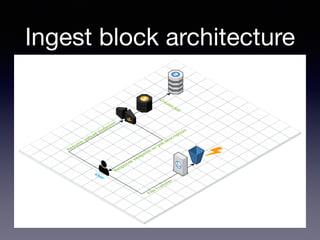
Ingest block architecture
Problem solved! ✅
Building Processing
block
Processing Requirements
• use fully-managed service if possible

• scalable, reliable

• adaptive bitrate streaming

• Important: compatible with various platforms, devices

• Desktop Web - IE 10+, Edge, Chrome, Firefox

• Mobile Web - Mobile Safari, Chrome Mobie

• Android - 4.1 ICS+

• iOS - 9+

• Most Important: Delivery video to users ASAP
Wait! 

What is Adaptive Bitrate
Streaming?
Adaptive Bitrate Streaming
• From Wikipedia:

• Adaptive bitrate streaming is a technique used in
streaming multimedia over computer networks. 

• It works by detecting a user's bandwidth and
CPU capacity in real time and adjusting the
quality of a video stream accordingly.
• The result: very little buffering, fast start time and a
good experience for both high-end and low-end
connections.
Adaptive Bitrate Streaming
Choosing 

Streaming Protocol
Choosing Streaming
Protocol
• Non-HTTP based protocols like RTMP are not in our interest

• Looked for HTTP-based protocols, or methods

• Progressive Download Single File via HTTP

• 1st request: Range: 0-255

• 2st request: Range: 256-511

• 3rd request: Range: 512-767

• …

• Apple HLS

• MPEG-DASH
Choosing Streaming
Protocol
• Progressive Download Single File via HTTP

• Apple HLS

• MPEG-DASH
Choosing Streaming
Protocol
• Progressive Download Single File via HTTP

• Apple HLS - Winner!
• MPEG-DASH
Why we choose HLS
Progressive Download

Single File via HTTP
• Pros

• Easy to implement

• Cons

• Implementing Adaptive Bitrate Streaming is so hard (almost
impossible) without getting “choppy” frames, or “pop” gap
sound between streams

• Slow seeking/starting since container requires metadata reading

• Large binary can occur lower cache hit

• No Live Stream compatibility
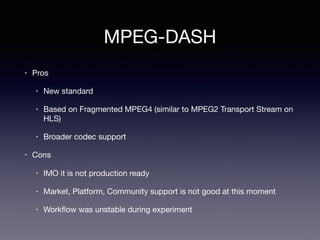
MPEG-DASH
• Pros

• New standard

• Based on Fragmented MPEG4 (similar to MPEG2 Transport Stream on
HLS)

• Broader codec support

• Cons

• IMO it is not production ready

• Market, Platform, Community support is not good at this moment

• Workflow was unstable during experiment
First Video
Specification
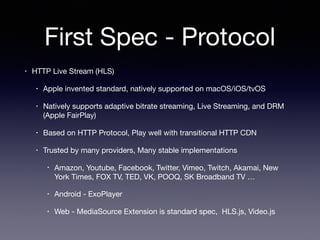
First Spec - Protocol
• HTTP Live Stream (HLS)

• Apple invented standard, natively supported on macOS/iOS/tvOS

• Natively supports adaptive bitrate streaming, Live Streaming, and DRM
(Apple FairPlay)

• Based on HTTP Protocol, Play well with transitional HTTP CDN

• Trusted by many providers, Many stable implementations

• Amazon, Youtube, Facebook, Twitter, Vimeo, Twitch, Akamai, New
York Times, FOX TV, TED, VK, POOQ, SK Broadband TV …

• Android - ExoPlayer

• Web - MediaSource Extension is standard spec, HLS.js, Video.js
First Spec - Input
• No codec limitation of input source


… but expects most input source are H.264/AVC
+ AAC based

• Max acceptable resolution: 1080p

• Max acceptable bitrate: 10Mbps

• Max acceptable duration: 5 minutes
First Spec - Output
• Common

• H.264/AVC1 + AAC LC

• Many graphic chipset supports hardware accelerated decoding

• Most popular codec in market

• Apple HLS

• Three variants for adaptive bitrate streaming

• High Quality: Up to 1080p, 60p, High/4.1, 4Mbps

• Medium Quality: Up to 720p, 30p, Main/4.0, 2Mbps

• Low Quality: Up to 480p, 30p, Baseline/3.1 800kbps

• Progressive Download Single File via HTTP for HLS fallback

• Medium Quality only
First Spec - Output
• 4 Outputs

• HLS HQ

• HLS MQ

• HLS LQ

• HTTP Progressive MP4 MQ
Check requirements
Requirements
• use fully-managed service if possible

• scalable, reliable

• adaptive bitrate streaming

• Important: compatible with various platforms, devices

• Desktop Web - IE 10+, Edge, Chrome, Firefox

• Mobile Web - Mobile Safari, Chrome Mobie

• Android - 4.1 ICS+

• iOS - 9+

• Important: Delivery video to users ASAP
Requirements
• use fully-managed service if possible

• scalable, reliable

• adaptive bitrate streaming

• Important: compatible with various platforms, devices

• Desktop Web - IE 10+, Edge, Chrome, Firefox

• Mobile Web - Mobile Safari, Chrome Mobie

• Android - 4.1 ICS+

• iOS - 9+

• Important: Delivery video to users ASAP
Requirements
• use fully-managed service if possible

• scalable, reliable

• Important: Delivery video to users ASAP
AWS provides bunch
of media products 🎉
Video Encoding Products
• AWS Elastic Transcoder

• Fully-managed service, pay only for what you use (per minute of output video)

• HLS Support

• Configurable Presets

• AWS Elemental MediaConvert

• Newly launched, Fully-managed service, pay only for what you use (per minute of output video)

• HLS Support

• Broadcasting-grade, high quality output, Professional Codec Support (e.g. ProRes)

• Configurable Presets

• In some scenarios, MediaConvert is cheaper than Elastic Transcoder

• New! Basic Tier for Simple Web Videos
…or build your own
video encoding service
Most time-consuming
task is video encoding
Tested two products
Test conditions
• Input

• f(x) 4 Walls M/V (3m 33s)

• H.264/AVC, 1080p, 23.97fps, 8Mbps, High/4.1

• AAC LC, 192k, 48KHz, 2 Channels

• Mr. Robot Clip (52m 54s)

• H.264/AVC, 720p, 23.97fps, 1.5Mbps, High/4.1

• AC3, 384k, 48KHz, 6 Channels

• Output

• Single HLS Output

• H.264/AVC, 1080p, 23.97fps, ABR 3Mbps (Max 4.5Mbps), High/4.1

• AAC LC, 128k, 48KHz, 2 Channels

• No Thumbnail Generation
Elastic Transcoder
Elastic Transcoder
Elemental MediaConvert
Results
• Overall workflow was stable

• Quality

• The output quality of both was similar

• Fixed GOP => Consistant segment duration

• Processing Speed (sorted by faster)

• Elastic Transcoder

• MediaConvert Basic

• MediaConvert Pro


Problems
• Pricing is quite expensive

• Needed more faster encoding speed without losing quality

• Missing CRF (Constant Rate Factor) bitrate mode support

• Can’t control encoder options

• MediaConvert has better encoder option (e.g . quantize algorithm -
CABAC)

• Can’t control video filters

(e.g. lanczos for resizing, yadif for deinterlacing, color filters like
instagram)

• There’s no way to remux video
Make our own
processing workflow 💥
Three ways to run job
• Batch - EC2

• Fargate - ECS

• Step Functions + Lambda
Three ways to run job
• Batch - EC2

• Fargate - ECS

• Step Functions + Lambda - WINNER!
Three ways to run job
• Batch - EC2

• Requires additional instance provisioning time (extremely slow)

• Fargate - ECS

• Requires additional container provisioning time

(about 30sec~60sec)

• Setting High CPU power requires High Memory Size

• Lambda 

• Computing Power is quite slower than EC2/Fargate instances

• …but now we have 3008MB Memory option, which has faster processing power

• No additional provisioning time required
Video Processing
Workflow
Video Processing Workflow
Single Video Processing
Function
Issue #1
How to get encoding
software running on AWS
Lambda?
Lambda-runtime compatible
build
• Linux program

• Lambda execution runtime is based on Amazon Linux AMI (amzn-ami-hvm-2017.03.1.20170812-
x86_64-gp2)

• Instead of using build instance, just make build image which is based on amazon linux docker
image

• docker pull amazonlinux:2017.03.1.20170812

• vim Dockerfile # Be careful updating openssl. it can make incompatible shared library issue

• docker build . -t my-awesome-lambda-build-env

• docker run --rm -v $PWD:/workspace my-awesome-lambda-build-env /workspace/build.sh

• Test built binaries or libraries using lambci lambda image

• docker pull lambci/lambda:nodejs8.10

• docker run --rm -v $PWD:/workspace --entrypoint bash lambci/lambda:nodejs8.10 /
workspace/test.sh
Lambda-runtime compatible
build
• Node.js Native Addons

• lambci provides docker images to rebuild
native addons

• docker pull lambci/lambda:build-nodejs8.10

• docker run --rm -v $PWD:/var/task lambci/
lambda:build-nodejs8.10 # runs “npm
rebuild”
Issue #2
Timeout issues

Hard to organize each
steps
Step functions
• Makes workflow simple to orchestrate AWS Lambda functions

• Supports Parallel state

• built-in error handling, retry, fallback conditions

• Useful patterns

• Delay execution for X seconds or until specific date/time

• Recursive Execution using Choice State

• Scan all records from DynamoDB table

• dequeue messages from SQS until queue is empty
Single Video Processing
Function
Break logics
State Machine - 1st version
Issue #3
VPC makes trouble
VPC Issue
• Assigning Lambda to VPC introduces long cold-start time

• about 10 sec, even used 3008MB memory size

• impacts overall video processing time

• Occasionally we had “connection timeout” issues

• AWS Support confirmed sometimes ENI may not have
internet connectivity

• we had to implement our own retry logic
VPC Issue
• Scaling Issue when invocation spikes
VPC Issue
• VPC was required for S3 access through S3
Endpoint only (to authenticate s3 access using VPCE
ID)

• Removed VPC configuration

• Switched to stream data using pre-signed urls or
download object using AWS-SDK

• reduced cold-start time (<40ms)

• “connection timeout” issue has gone
Issue #4
Tiny ephemeral
storage (/tmp)
Tiny ephemeral storage (/
tmp)
• Ephemeral storage capacity is 512MB, too small for media processing

• You can’t add block device to lambda

• NFS / EFS

• Lambda does not provide root permission

• so you cannot mount disks - you cannot use NFS in Lambda

• Ramdisk

• Ramdisk like /dev/shm is not available on Lambda

• Lambda does not provide root permission

• so you cannot create or mount ramdisk
Tiny ephemeral storage (/
tmp)
• S3 - only available option for now

• stream everything if possible
• use s3 as temporary storage

• Video Input - S3 supports seeking object using Range request header => can be streamed

• Video Output - may vary depending on container

• MP4 - requires seekable output => you cannot pipe output => you cannot stream outputs

• HLS - does not support writing outputs to pipes, since HLS consists of several files

• Watch file system (e.g. chokidar)

• Upload segments to s3 if generated

• Removed uploaded file

• Note: Higher memory size option provides faster Disk I/O and Network I/O
• Note: S3 Object keys are stored in UTF-8 binary ordering across multiple partitions in the index

=> UUID key prefix helps to reduce first byte latency
Issue #5
Optimize container
reusability
Optimize container
reusability
• Invoking different functions 

=> lambda container cannot be reused
Optimize container
reusability
• HACK: Group multiple lambda functions to single lambda
function

• Inject task name using Pass State
Processing Pipeline
Architecture - 1st version
Building Delivery block
Delivery block
• Currently we don’t need any DRM or AD
insertion solution

• Simple architecture

• Use S3 as origin, Cloudfront as CDN

• Use maximum TTL to maximize cache hit
Delivery block architecture
Connect blocks to
make pipeline
Media Pipeline Architecture
Launch
Appearing video uploads
Wait! There’s more!
2nd Version
• Improves encoding speed, output quality

• Support Parallel Encoding

• Split video streams to small chunks

• Split Video/Audio encoding process

• Encode streams per each preset, not outputs

• HLS HQ / HLS MQ / HLS LQ / MP4 MQ

=> Encode streams to HQ / MQ / LQ and assemble them

• Bypass encoding if input is compatible with our spec

• Skip HLS encoding process if source quality is not good, or duration is too short

• Support GIF input/output
Parallel Encoding
Break logics
State Machine - 2nd version
Results
• Fast processing without losing quality

• now processing f(x) M/V (1080p, 3m 33s) just takes 60 sec

• if input source is compatible with our spec, processing can be done within <10 sec

• Great output quality

• Saving cost

• encoding is not required if input source is compatible with our spec

• Stable workflow

• There’s no resource to manage

• Acceptable max bitrate: Up to 300Mbps (Tested with ProRes source)

Acceptable max resolution: 4K

Acceptable codec: HEVC, ProRes

Acceptable max duration: 1 hour
Further Steps
• Support 1 hour+ video processing using Elastic Transcoder

• Support Live Streaming

• MediaLive? Fargate?

• Finding solution for WebRTC gateway to relay live video stream

• Video Advertisement

• MediaTailor?

• Metrics, Management Tools …

• NSFW filtering - rekognition video or rekognition
Postmortem
•


• Elastic Transcode Elemental MediaConvert


• Processing pipeline
VOD 

• Lambda 

• Lambda
How about other media
types?

(Audio, GIF, Image…)
We’re hiring!

https://careers.vingle.net
Thank you

* * *

Serverless Media Workflow

  • 1.
  • 2.
    Speaker • Serverless Lover • Software Engineer @ Vingle • Freelancer Software Engineer @ Artistscard • Software Engineer @ Law&Company • https://github.com/mooyoul • https://mooyoul.github.io
  • 4.
  • 5.
    Video is becoming
 the most important content
 🔥🔥🔥
  • 6.
    Let’s add videofeature on Vingle! 😎
  • 7.
  • 8.
  • 9.
  • 10.
  • 11.
  • 12.
  • 13.
  • 14.
    Ingest Step Requirements •Support File-based workflow only for now • Simple upload workflow for clients • Fast upload speeds anywhere in the world • Durable, scalable, fast storage • No additional disk storage required for upload • No maintenance required
  • 15.
    Ingest Step Requirements •Support File-based workflow only for now • Simple upload workflow for clients • Fast upload speeds anywhere in the world • Durable, scalable, fast storage • No additional disk storage required for upload • No maintenance required
  • 16.
    S3 Upload usingpre-signed URL • Allows client can upload directly to S3 using pre- signed URL • AWS-SDK supports pre- signed url generation
  • 17.
    S3 Upload usingpre-signed URL
  • 18.
    …but we areusing 
 us-east-1 region
  • 19.
    some regional ISPshave bandwidth issue on international network transfer 💩
  • 20.
    Slow Upload onsome ISPs
  • 21.
    Upload speed isso slow!🐢🐢🐢
  • 22.
  • 23.
  • 24.
    Two options to accelerateS3 transfer 🚀
  • 25.
    Two options toaccelerate S3 transfer • Proxy file transfer traffic through CloudFront • Cloudfront can accelerate dynamic content • Uses Cloudfront Edge locations to optimize route path • Enable S3 Transfer Acceleration • Takes advantage of CloudFront’s globally distributed edge locations • More transfer optimizations
  • 26.
    S3 Transfer Accelerationis faster than Cloudfront as Proxy
  • 27.
    S3 Transfer Accelerationmakes throughput faster
  • 28.
  • 29.
  • 30.
  • 31.
    Processing Requirements • usefully-managed service if possible • scalable, reliable • adaptive bitrate streaming • Important: compatible with various platforms, devices • Desktop Web - IE 10+, Edge, Chrome, Firefox • Mobile Web - Mobile Safari, Chrome Mobie • Android - 4.1 ICS+ • iOS - 9+ • Most Important: Delivery video to users ASAP
  • 32.
    Wait! 
 What isAdaptive Bitrate Streaming?
  • 33.
    Adaptive Bitrate Streaming •From Wikipedia: • Adaptive bitrate streaming is a technique used in streaming multimedia over computer networks. • It works by detecting a user's bandwidth and CPU capacity in real time and adjusting the quality of a video stream accordingly. • The result: very little buffering, fast start time and a good experience for both high-end and low-end connections.
  • 34.
  • 35.
  • 36.
    Choosing Streaming Protocol • Non-HTTPbased protocols like RTMP are not in our interest • Looked for HTTP-based protocols, or methods • Progressive Download Single File via HTTP • 1st request: Range: 0-255 • 2st request: Range: 256-511 • 3rd request: Range: 512-767 • … • Apple HLS • MPEG-DASH
  • 37.
    Choosing Streaming Protocol • ProgressiveDownload Single File via HTTP • Apple HLS • MPEG-DASH
  • 38.
    Choosing Streaming Protocol • ProgressiveDownload Single File via HTTP • Apple HLS - Winner! • MPEG-DASH
  • 39.
  • 40.
    Progressive Download
 Single Filevia HTTP • Pros • Easy to implement • Cons • Implementing Adaptive Bitrate Streaming is so hard (almost impossible) without getting “choppy” frames, or “pop” gap sound between streams • Slow seeking/starting since container requires metadata reading • Large binary can occur lower cache hit • No Live Stream compatibility
  • 41.
    MPEG-DASH • Pros • Newstandard • Based on Fragmented MPEG4 (similar to MPEG2 Transport Stream on HLS) • Broader codec support • Cons • IMO it is not production ready • Market, Platform, Community support is not good at this moment • Workflow was unstable during experiment
  • 42.
  • 43.
    First Spec -Protocol • HTTP Live Stream (HLS) • Apple invented standard, natively supported on macOS/iOS/tvOS • Natively supports adaptive bitrate streaming, Live Streaming, and DRM (Apple FairPlay) • Based on HTTP Protocol, Play well with transitional HTTP CDN • Trusted by many providers, Many stable implementations • Amazon, Youtube, Facebook, Twitter, Vimeo, Twitch, Akamai, New York Times, FOX TV, TED, VK, POOQ, SK Broadband TV … • Android - ExoPlayer • Web - MediaSource Extension is standard spec, HLS.js, Video.js
  • 44.
    First Spec -Input • No codec limitation of input source
 
 … but expects most input source are H.264/AVC + AAC based • Max acceptable resolution: 1080p • Max acceptable bitrate: 10Mbps • Max acceptable duration: 5 minutes
  • 45.
    First Spec -Output • Common • H.264/AVC1 + AAC LC • Many graphic chipset supports hardware accelerated decoding • Most popular codec in market • Apple HLS • Three variants for adaptive bitrate streaming • High Quality: Up to 1080p, 60p, High/4.1, 4Mbps • Medium Quality: Up to 720p, 30p, Main/4.0, 2Mbps • Low Quality: Up to 480p, 30p, Baseline/3.1 800kbps • Progressive Download Single File via HTTP for HLS fallback • Medium Quality only
  • 46.
    First Spec -Output • 4 Outputs • HLS HQ • HLS MQ • HLS LQ • HTTP Progressive MP4 MQ
  • 47.
  • 48.
    Requirements • use fully-managedservice if possible • scalable, reliable • adaptive bitrate streaming • Important: compatible with various platforms, devices • Desktop Web - IE 10+, Edge, Chrome, Firefox • Mobile Web - Mobile Safari, Chrome Mobie • Android - 4.1 ICS+ • iOS - 9+ • Important: Delivery video to users ASAP
  • 49.
    Requirements • use fully-managedservice if possible • scalable, reliable • adaptive bitrate streaming • Important: compatible with various platforms, devices • Desktop Web - IE 10+, Edge, Chrome, Firefox • Mobile Web - Mobile Safari, Chrome Mobie • Android - 4.1 ICS+ • iOS - 9+ • Important: Delivery video to users ASAP
  • 50.
    Requirements • use fully-managedservice if possible • scalable, reliable • Important: Delivery video to users ASAP
  • 51.
    AWS provides bunch ofmedia products 🎉
  • 52.
    Video Encoding Products •AWS Elastic Transcoder • Fully-managed service, pay only for what you use (per minute of output video) • HLS Support • Configurable Presets • AWS Elemental MediaConvert • Newly launched, Fully-managed service, pay only for what you use (per minute of output video) • HLS Support • Broadcasting-grade, high quality output, Professional Codec Support (e.g. ProRes) • Configurable Presets • In some scenarios, MediaConvert is cheaper than Elastic Transcoder • New! Basic Tier for Simple Web Videos
  • 53.
    …or build yourown video encoding service
  • 54.
  • 55.
  • 56.
    Test conditions • Input •f(x) 4 Walls M/V (3m 33s) • H.264/AVC, 1080p, 23.97fps, 8Mbps, High/4.1 • AAC LC, 192k, 48KHz, 2 Channels • Mr. Robot Clip (52m 54s) • H.264/AVC, 720p, 23.97fps, 1.5Mbps, High/4.1 • AC3, 384k, 48KHz, 6 Channels • Output • Single HLS Output • H.264/AVC, 1080p, 23.97fps, ABR 3Mbps (Max 4.5Mbps), High/4.1 • AAC LC, 128k, 48KHz, 2 Channels • No Thumbnail Generation
  • 57.
  • 58.
  • 59.
  • 60.
  • 61.
    Results • Overall workflowwas stable • Quality • The output quality of both was similar • Fixed GOP => Consistant segment duration • Processing Speed (sorted by faster) • Elastic Transcoder • MediaConvert Basic • MediaConvert Pro 


  • 62.
    Problems • Pricing isquite expensive • Needed more faster encoding speed without losing quality • Missing CRF (Constant Rate Factor) bitrate mode support • Can’t control encoder options • MediaConvert has better encoder option (e.g . quantize algorithm - CABAC) • Can’t control video filters
 (e.g. lanczos for resizing, yadif for deinterlacing, color filters like instagram) • There’s no way to remux video
  • 63.
  • 64.
    Three ways torun job • Batch - EC2 • Fargate - ECS • Step Functions + Lambda
  • 65.
    Three ways torun job • Batch - EC2 • Fargate - ECS • Step Functions + Lambda - WINNER!
  • 66.
    Three ways torun job • Batch - EC2 • Requires additional instance provisioning time (extremely slow) • Fargate - ECS • Requires additional container provisioning time
 (about 30sec~60sec) • Setting High CPU power requires High Memory Size • Lambda • Computing Power is quite slower than EC2/Fargate instances • …but now we have 3008MB Memory option, which has faster processing power • No additional provisioning time required
  • 67.
  • 68.
  • 69.
  • 70.
  • 71.
    How to getencoding software running on AWS Lambda?
  • 72.
    Lambda-runtime compatible build • Linuxprogram • Lambda execution runtime is based on Amazon Linux AMI (amzn-ami-hvm-2017.03.1.20170812- x86_64-gp2) • Instead of using build instance, just make build image which is based on amazon linux docker image • docker pull amazonlinux:2017.03.1.20170812 • vim Dockerfile # Be careful updating openssl. it can make incompatible shared library issue • docker build . -t my-awesome-lambda-build-env • docker run --rm -v $PWD:/workspace my-awesome-lambda-build-env /workspace/build.sh • Test built binaries or libraries using lambci lambda image • docker pull lambci/lambda:nodejs8.10 • docker run --rm -v $PWD:/workspace --entrypoint bash lambci/lambda:nodejs8.10 / workspace/test.sh
  • 73.
    Lambda-runtime compatible build • Node.jsNative Addons • lambci provides docker images to rebuild native addons • docker pull lambci/lambda:build-nodejs8.10 • docker run --rm -v $PWD:/var/task lambci/ lambda:build-nodejs8.10 # runs “npm rebuild”
  • 74.
  • 75.
    Timeout issues Hard toorganize each steps
  • 76.
    Step functions • Makesworkflow simple to orchestrate AWS Lambda functions • Supports Parallel state • built-in error handling, retry, fallback conditions • Useful patterns • Delay execution for X seconds or until specific date/time • Recursive Execution using Choice State • Scan all records from DynamoDB table • dequeue messages from SQS until queue is empty
  • 77.
  • 78.
  • 79.
    State Machine -1st version
  • 80.
  • 81.
  • 82.
    VPC Issue • AssigningLambda to VPC introduces long cold-start time • about 10 sec, even used 3008MB memory size • impacts overall video processing time • Occasionally we had “connection timeout” issues • AWS Support confirmed sometimes ENI may not have internet connectivity • we had to implement our own retry logic
  • 83.
    VPC Issue • ScalingIssue when invocation spikes
  • 84.
    VPC Issue • VPCwas required for S3 access through S3 Endpoint only (to authenticate s3 access using VPCE ID) • Removed VPC configuration • Switched to stream data using pre-signed urls or download object using AWS-SDK • reduced cold-start time (<40ms) • “connection timeout” issue has gone
  • 85.
  • 86.
  • 87.
    Tiny ephemeral storage(/ tmp) • Ephemeral storage capacity is 512MB, too small for media processing • You can’t add block device to lambda • NFS / EFS • Lambda does not provide root permission • so you cannot mount disks - you cannot use NFS in Lambda • Ramdisk • Ramdisk like /dev/shm is not available on Lambda • Lambda does not provide root permission • so you cannot create or mount ramdisk
  • 88.
    Tiny ephemeral storage(/ tmp) • S3 - only available option for now • stream everything if possible • use s3 as temporary storage • Video Input - S3 supports seeking object using Range request header => can be streamed • Video Output - may vary depending on container • MP4 - requires seekable output => you cannot pipe output => you cannot stream outputs • HLS - does not support writing outputs to pipes, since HLS consists of several files • Watch file system (e.g. chokidar) • Upload segments to s3 if generated • Removed uploaded file • Note: Higher memory size option provides faster Disk I/O and Network I/O • Note: S3 Object keys are stored in UTF-8 binary ordering across multiple partitions in the index
 => UUID key prefix helps to reduce first byte latency
  • 89.
  • 90.
  • 91.
    Optimize container reusability • Invokingdifferent functions 
 => lambda container cannot be reused
  • 92.
    Optimize container reusability • HACK:Group multiple lambda functions to single lambda function • Inject task name using Pass State
  • 93.
  • 94.
  • 95.
    Delivery block • Currentlywe don’t need any DRM or AD insertion solution • Simple architecture • Use S3 as origin, Cloudfront as CDN • Use maximum TTL to maximize cache hit
  • 96.
  • 97.
  • 98.
  • 99.
  • 100.
  • 101.
  • 102.
  • 103.
  • 104.
  • 105.
    2nd Version • Improvesencoding speed, output quality • Support Parallel Encoding • Split video streams to small chunks • Split Video/Audio encoding process • Encode streams per each preset, not outputs • HLS HQ / HLS MQ / HLS LQ / MP4 MQ
 => Encode streams to HQ / MQ / LQ and assemble them • Bypass encoding if input is compatible with our spec • Skip HLS encoding process if source quality is not good, or duration is too short • Support GIF input/output
  • 106.
  • 107.
  • 108.
    State Machine -2nd version
  • 109.
    Results • Fast processingwithout losing quality • now processing f(x) M/V (1080p, 3m 33s) just takes 60 sec • if input source is compatible with our spec, processing can be done within <10 sec • Great output quality • Saving cost • encoding is not required if input source is compatible with our spec • Stable workflow • There’s no resource to manage • Acceptable max bitrate: Up to 300Mbps (Tested with ProRes source)
 Acceptable max resolution: 4K
 Acceptable codec: HEVC, ProRes
 Acceptable max duration: 1 hour
  • 110.
    Further Steps • Support1 hour+ video processing using Elastic Transcoder • Support Live Streaming • MediaLive? Fargate? • Finding solution for WebRTC gateway to relay live video stream • Video Advertisement • MediaTailor? • Metrics, Management Tools … • NSFW filtering - rekognition video or rekognition
  • 111.
  • 112.
    • • Elastic TranscodeElemental MediaConvert • Processing pipeline VOD • Lambda • Lambda
  • 113.
    How about othermedia types?
 (Audio, GIF, Image…)
  • 114.
  • 115.