Download to read offline


![13
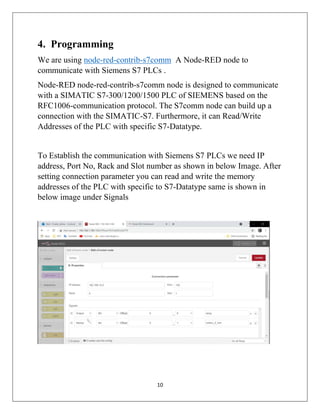
After Subscribing the topic we will get the data which is being published
on the topic (i.e. data from Siemens S7-PLCs). In below Image The
“value”:[false] and “value”:[true] is actual status Q0.0 in Siemens
PLC which is being received by MQTT client Over Internet.](https://image.slidesharecdn.com/sendingsiemenss7controllerdatatocloudovermqttusingnode-redwithrevolutionpi-210809112535/85/Sending-Siemens-S7-Controller-Data-to-Cloud-Over-MQTT-Using-Node-Red-With-Revolution-Pi-13-320.jpg)
![14
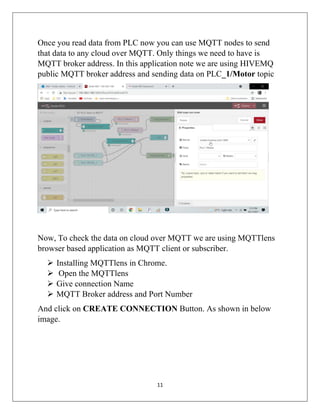
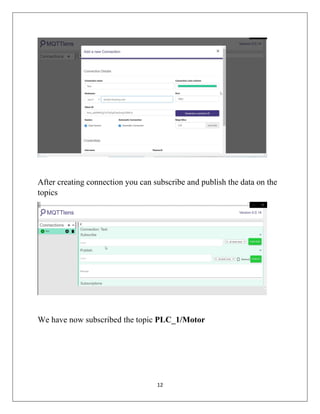
Use below Json to use this program readily
[{"id":"9555a608.bdef78","type":"tab","label":"S7 PLC data to
MQTT","disabled":false,"info":""},{"id":"eda5b488.0567e8","typ
e":"s7comm
read","z":"9555a608.bdef78","connection":"3622a876.d4faf8","pa
yload":"{"S7_Type":"Q","S7_DBnum":"0","S7_Datatype"
:"X","S7_Offset":"0","S7_BitOffset":"0","S7_Quantity":
"1","S7_Name":"lamp"}","s7Name":"lamp","topic":"","nam
e":"","signalSetted":false,"none":"true","repeat":"","once":false,
"x":320,"y":20,"wires":[["135afe7f.0180d2"]]},{"id":"a328b28e.5b
605","type":"s7comm
write","z":"9555a608.bdef78","connection":"3622a876.d4faf8","p
ayload":"{"S7_Type":"M","S7_DBnum":"0","S7_Datatype
":"X","S7_Offset":"0","S7_BitOffset":"1","S7_Quantity"
:"1","S7_Name":"button_2_hmi"}","s7Name":"button_2_hmi
","topic":"","name":"","signalSetted":false,"x":351,"y":281,"wir
es":[["3b5f3fb0.141af"]]},{"id":"3b5f3fb0.141af","type":"debug",
"z":"9555a608.bdef78","name":"","active":true,"tosidebar":true,
"console":false,"tostatus":false,"complete":"false","x":561,"y":36
1,"wires":[]},{"id":"135afe7f.0180d2","type":"mqtt
out","z":"9555a608.bdef78","name":"","topic":"PLC
1/Motor","qos":"","retain":"","broker":"7431e2cf.3dd69c","x":5
50,"y":20,"wires":[]},{"id":"1ba4da5d.e9b336","type":"mqtt
in","z":"9555a608.bdef78","name":"","topic":"PLC
1/Motor","qos":"2","datatype":"auto","broker":"7431e2cf.3dd69
c","x":270,"y":100,"wires":[["29b92629.99272a"]]},{"id":"29b926
29.99272a","type":"debug","z":"9555a608.bdef78","name":"","a
ctive":true,"tosidebar":true,"console":false,"complete":"false","x
":590,"y":100,"wires":[]},{"id":"523d22cb.1fadfc","type":"ui_but
ton","z":"9555a608.bdef78","name":"","group":"8aa3fc07.43f25"
,"order":0,"width":0,"height":0,"passthru":false,"label":"Turn
Off](https://image.slidesharecdn.com/sendingsiemenss7controllerdatatocloudovermqttusingnode-redwithrevolutionpi-210809112535/85/Sending-Siemens-S7-Controller-Data-to-Cloud-Over-MQTT-Using-Node-Red-With-Revolution-Pi-14-320.jpg)
![15
DO_1","tooltip":"","color":"","bgcolor":"Red","icon":"","paylo
ad":"{"value":[false]}","payloadType":"json","topic":"","x":17
1,"y":401,"wires":[["a328b28e.5b605","6b5ec5b3.00c9ec"]]},{"id":
"7d89600b.9fd55","type":"ui_button","z":"9555a608.bdef78","na
me":"","group":"8aa3fc07.43f25","order":0,"width":0,"height":0
,"passthru":false,"label":"Turn On
DO_1","tooltip":"","color":"","bgcolor":"Green","icon":"","pay
load":"{"value":[true]}","payloadType":"json","topic":"","x":1
71,"y":361,"wires":[["a328b28e.5b605","6b5ec5b3.00c9ec"]]},{"id
":"6b5ec5b3.00c9ec","type":"ui_led","z":"9555a608.bdef78","ord
er":2,"group":"8aa3fc07.43f25","width":0,"height":0,"label":"S-7
PLC
Q0.0","labelPlacement":"left","labelAlignment":"left","colorFor
Value":[{"color":"#ff0000","value":"{"value":[false]}","valueTy
pe":"json"},{"color":"#008000","value":"{"value":[true]}","val
ueType":"json"}],"allowColorForValueInMessage":false,"shape":
"circle","showGlow":true,"name":"","x":561,"y":261,"wires":[]},
{"id":"6f7076ee.7488f8","type":"inject","z":"9555a608.bdef78","
name":"","topic":"","payload":"","payloadType":"date","repeat
":"15","crontab":"","once":false,"x":90,"y":40,"wires":[["eda5b
488.0567e8"]]},{"id":"3622a876.d4faf8","type":"s7comm","z":"",
"ip":"192.168.10.2","port":"102","rack":"0","slot":"1","payload
":[{"S7_Type":"Q","S7_DBnum":"0","S7_Datatype":"X","S7_O
ffset":"0","S7_BitOffset":"0","S7_Quantity":"1","S7_Name":"la
mp"},{"S7_Type":"M","S7_DBnum":"0","S7_Datatype":"X","S7
_Offset":"0","S7_BitOffset":"1","S7_Quantity":"1","S7_Name":
"button_2_hmi"}]},{"id":"7431e2cf.3dd69c","type":"mqtt-
broker","z":"","name":"","broker":"mqtt.contineonx.com","por
t":"41883","clientid":"","usetls":false,"compatmode":true,"keepa
live":"60","cleansession":true,"birthTopic":"","birthQos":"0","b
irthPayload":"","closeTopic":"","closePayload":"","willTopic":"
","willQos":"0","willPayload":""},{"id":"8aa3fc07.43f25","type":](https://image.slidesharecdn.com/sendingsiemenss7controllerdatatocloudovermqttusingnode-redwithrevolutionpi-210809112535/85/Sending-Siemens-S7-Controller-Data-to-Cloud-Over-MQTT-Using-Node-Red-With-Revolution-Pi-15-320.jpg)
![16
"ui_group","z":"","name":"Control S7
PLC","tab":"4f1db04a.9f253","order":1,"disp":true,"width":"6",
"collapse":false},{"id":"4f1db04a.9f253","type":"ui_tab","z":"","
name":"Siemens 1200 PLC
data","icon":"dashboard","disabled":false,"hidden":false}]](https://image.slidesharecdn.com/sendingsiemenss7controllerdatatocloudovermqttusingnode-redwithrevolutionpi-210809112535/85/Sending-Siemens-S7-Controller-Data-to-Cloud-Over-MQTT-Using-Node-Red-With-Revolution-Pi-16-320.jpg)

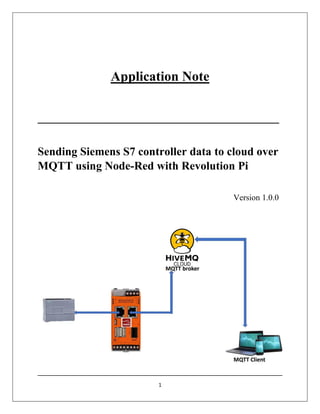
This application note demonstrates how to send data from a Siemens S7 Profinet controller to the cloud via MQTT using Node-RED and Revolution Pi. It includes details on required hardware and software components, system architecture, and programming steps to establish communication and data transfer. The document provides technical instructions for users familiar with Linux-based PLC programming and specifies the necessary configurations for MQTT integration.


