© Copyright SELA software & Education Labs Ltd. | 14-18 Baruch Hirsch St Bnei Brak, 51202 Israel | www.selagroup.com
SELA DEVELOPER PRACTICE
JUNE 29 – JULY 3, 2014
Sebastian Pederiva
Senior Consultant
sebastianp@sela.co.il
@spederiva
tiny.cc/SebastianBlog
Sencha Touch
Agenda
The Native Challenge
What is Sencha Touch
Why use Sencha Touch
Application Pattern
Concepts
Getting Started
The Native Challenge
Write once, run anywhere
Programmers already know HTML/CSS/JavaScript
Short term investment – No new SDK
Native Events?
Device capabilities/access
What is Sencha Touch
Build Mobile Web Apps with HTML5
High-performance mobile application framework
Rich UI application
Over 50 built-in components
Since 2010
Cousin of ExtJs
Why Sencha Touch
Why Sencha Touch
Total solution
Cross platform support – Mobile, Tablets
Best documentation
Open Source and Commercial Versions
Easy PhoneGap integration
Other Frameworks
MVC and Managing Dependencies
Getting Started with Sencha Touch
Sencha Touch SDK
http://www.sencha.com/products/touch/download
Sencha Cmd
http://www.sencha.com/products/sencha-cmd/download
http://sass-lang.com/download.html
http://compass-style.org/install
Demo
Create MySenchaApp
Basic Concepts
The Class System
Touch Events
Components
Containers
Layouts
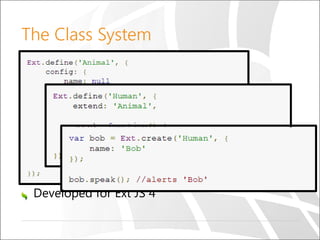
The Class System
Make our JavaScript life easy
create new classes
provide inheritance
dependency loading
mixins
powerful configuration options
Automatically generated getter and setters
Developed for Ext JS 4
Touch Events
Built on native events
Best performance
More events
Tap
Double Tap
Tap and Hold
Swipe
Components – General
Ext.Panel
Ext.Img
Ext.Map
Ext.Audio
Ext.Video
Ext.Sheet
Ext.MessageBox
Ext.Chart
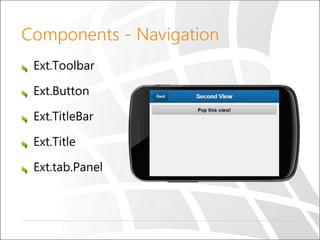
Components - Navigation
Ext.Toolbar
Ext.Button
Ext.TitleBar
Ext.Title
Ext.tab.Panel
Components – Store-Bound
Ext.dataview.DataView
Ext.List
Ext.NestedList
Ext.Carousel
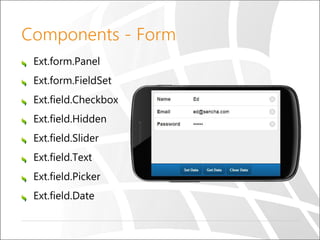
Components - Form
Ext.form.Panel
Ext.form.FieldSet
Ext.field.Checkbox
Ext.field.Hidden
Ext.field.Slider
Ext.field.Text
Ext.field.Picker
Ext.field.Date
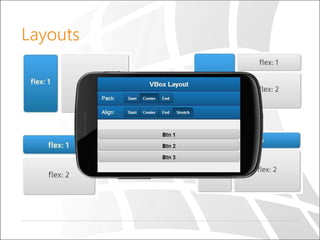
Layouts
Demo
Summary
Sencha provides the best framework to
develop web for mobile
Native integration with PhoneGap
Theming
Bonus – Sencha Architect
References
http://docs.sencha.com/touch
https://www.youtube.com/watch?v=ho4qkN7
WmgQ
http://www.techferry.com/articles/ExtJS-vs-
AngularJS.html
Questions

Sencha Touch

Editor's Notes

  • #4 Challenge = אתגר Native Events? – Use PhoneGap TripCase Hockey Community Twitter LinkedIn
  • #5 Best framework for html5 mobile applications Sencha Touch, a high-performance HTML5 mobile application framework, is the cornerstone of the Sencha HTML5 platform. Ext JS 2.0 since 2007 In 2010, ExtJS merged with jQTouch (jquery touch plugin) and Raphaël (library - Vector graphics)
  • #6 Over 50% of the Fortune 100 are Sencha customers
  • #7 Cross platform support – Mobile, Tablets, Etc. *** Touch Events *** Easy – write HTML, CSS, JavaScript Affordable – use open source technologies to build Short term investment – no need to learn a new SDK, programming language, app submission process, OS updates Fragmentation – of the mobile app market has led to mobile web development Users don’t care if the app is native or web as long as it’s fast and responsive Best documentation
  • #8 Kendo UI mobile is a paid Sencha has more than 50 components Sencha is far more extensive than its competitors Sencha is also the only Web framework with built-in support for objects that stay put (like a toolbar) while others scroll (like a list). Documentation and Community Graphing Styling & Theming
  • #9 There are two main places that dependencies can be defined in a Sencha Touch app - on the application itself or inside the application classes. This guide gives some advice on how and where to declare dependencies in your app.
  • #10 An app is a collection of Models, Views, Controllers, Stores, and Profiles, plus additional metadata for app-related entities, such as application icons and launch screen images.
  • #13 Components: SubClasses of Ext.Component Containers: Contains child components Specify Layouts
  • #14 MasterClass