SDM220 Modbus user manual V1.3 2014
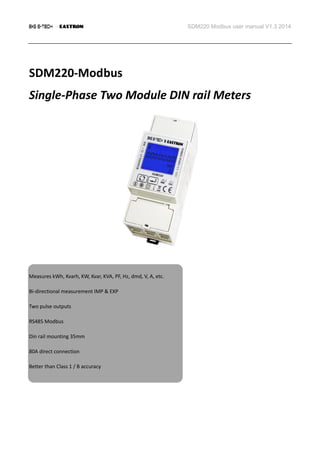
SDM220-Modbus
Single-Phase Two Module DIN rail Meters
Measures kWh, Kvarh, KW, Kvar, KVA, PF, Hz, dmd, V, A, etc.
Bi-directional measurement IMP & EXP
Two pulse outputs
RS485 Modbus
Din rail mounting 35mm
80A direct connection
Better than Class 1 / B accuracy
SDM220 Modbus user manual V1.3 2014
Application
The energy-meters “with a blue back-lighted LCD screen for prefect reading” are used to measure single-phase like
residential, Utility and Industrial application. The unit measures and displays various important electrical
parameters, and provide a communication port for remote reading and monitoring. Bi-directional energy
measurement makes the unit a good choice for solar PV energy metering.
PART 1 Specification
General Specifications
Voltage AC (Un) 230V
Voltage Range 176~276V AC
Base Current (Ib) 10A
Max. Current (Imax) 80A
Mini Current (Imin) 0.5A
Starting current 0.4% of Ib
Power consumption <2W/10VA
Frequency 50/60Hz(±10%)
AC voltage withstand 4KV for 1 minute
Impulse voltage withstand 6KV-1.2uS wavform
Overcurrent withstand 30Imax for 0.01s
Pulse output rate 1000imp/kWh (default)
100/10/1 imp/kWh/kVarh (configurable)
Display LCD with blue backlit
Max. Reading 99999.99kWh
SDM220 Modbus user manual V1.3 2014
Accuracy
Voltage 0.5% of range maximum
Current 0.5% of nominal
Frequency 0.2% of mid-frequency
Power factor 1% of Unity
Active power 1% of range maximum
Reactive power 1% of range maximum
Apparent power 1% of range maximum
Active energy Class 1 IEC62053-21
Class B EN50470-3
Reactive energy 1% of range maximum
Environment
Operating temperature -25℃ to +55℃
Storage and transportation temperature -40℃ to +70℃
Reference temperature 23℃±2℃
Relative humidity 0 to 95%, non-condensing
Altitude up to 2500m
Warm up time 10s
Installation category CAT III
Mechanical Environment M1
Electromagnetic environment E2
Degree of pollution 2
SDM220 Modbus user manual V1.3 2014
Output
Pulse Output
The meter provides two pulse outputs. Both pulse outputs are passive type.
Pulse output 1 is configurable. The pulse output can be set to generate pulses to represent total / import/export
kWh or kVarh.
The pulse constant can be set to generate 1 pulse per: 0.001(default) /0.01/0.1/1kWh/kVarh.
Pulse width: 200/100/60ms
Pulse output 2 is non-configurable. It is fixed up with total kwh. The constant is 1000imp/kWh.
RS485 output for Modbus RTU
The meter provides a RS485 port for remote communication. Modbus RTU is the protocol applied. For Modbus
RTU, the following RS485 communication parameters can be configured from the Set-up menu.
Baud rate: 1200, 2400, 4800, 9600
Parity: NONE/EVEN/ODD
Stop bits: 1 or 2
Modbus Address: 1 to 247
Mechanics
Din rail dimensions 36x92x65 (WxHxD) DIN 43880
Mounting DIN rail 35mm
Sealing IP51 (indoor)
Material self-extinguishing UL94V-0
SDM220 Modbus user manual V1.3 2014
LCD display
Item Descriptions
1 7 digits used to display measured values or RTC
2 Total value
4 Import information, Export information
5 Max. Demand for Power or Current
6 Pulse output 1 and Pulse output 2
7 Measurement units
8 PF = power factor Hz = frequency
9 Bar display of Power
10 Communication indicator
11 Time information
12 Low battery warning
13 Lock symbol
PART 2 Operation
Initialization Display
When it is powered on, the meter will initialize and do self-checking.
Full screen  software version  Modbus ID  Baud rate  total kWh
SDM220 Modbus user manual V1.3 2014
Scroll display by Button
After initialization and self-checking program, the meter display the measured values. The default page is total
kWh. If the user wants to check other information, he needs to press the scroll button on the front panel.
The display order by scroll button :
Total kWh import kWhexport kWh total kVarh import kVarh export kVarh
Max. power demand voltage currentW Var VA power factor 
frequency  pulse constant Modbus ID  baudrate.
Page Display Descriptions
1 Total active energy
Example:70.00kWh
2 Import active energy
Example: 50.00kWh
3 Export active energy
Example: 20.00kWh
4 Total reactive energy
Example: 10.00kVarh
The display order by scroll button :
Total kWh import kWhexport kWh total kVarh import kVarh export kVarh
Max. power demand voltage currentW Var VA power factor 
frequency  pulse constant Modbus ID  baudrate.
SDM220 Modbus user manual V1.3 2014
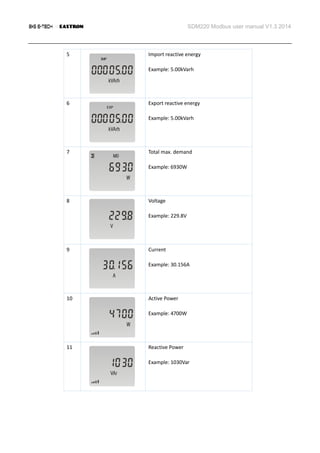
5 Import reactive energy
Example: 5.00kVarh
6 Export reactive energy
Example: 5.00kVarh
7 Total max. demand
Example: 6930W
8 Voltage
Example: 229.8V
9 Current
Example: 30.156A
10 Active Power
Example: 4700W
11 Reactive Power
Example: 1030Var
SDM220 Modbus user manual V1.3 2014
12 Apparent power
Example: 4811VA
13 Power factor
Example: 1.000
14 Frequency
Example: 49.99Hz
15 Pulse Constant
Example: 1000
16 Modbus Address
Example: 001
17 Baud rate
Example: 9600
Set-up Mode
To get into Set-up Mode, the user need press the “Enter” button for 3 second.
SDM220 Modbus user manual V1.3 2014
Page Display Descriptions
The setting is done correctly
The entering information is wrong. The
operation fails.
1 Password
To get into Set-up mode, it asks a password
confirmation.
Default password: 1000
2 Address ID
Default ID is 001
Range: 001~247
2-1 Press the “Enter” button, the first digit
flash.
Press the “Scroll” button to change the
value. After choose the new address value,
the user need pressing the “Enter” button
to confirm the setting.
3 Baud rate
Default value: 9600bps
Range: 1200, 2400, 4800, 9600bps.
SDM220 Modbus user manual V1.3 2014
3-1 Press the “Enter” button, the red digit flash.
Press the “Scroll” button to change the
value.
After choose the new baud rate, the user
need pressing the “Enter” button to
confirm the setting.
4 Parity
Default: None
Option:None, Even, Odd
4-1 Press the “Enter” button, the red part flash.
Press the “Scroll” button to change the
option.
After choose the new Parity, the user need
pressing the “Enter” button to confirm the
setting.
5 Pulse Output
Default: kWh
Option : kWh / KVarh / Imp. Kwh /
Exp.kWh / Imp.kVarh / Exp.kVarh
5-1 Press the “Enter” button, the red part flash.
Press the “Scroll” button to change the
option.
After choose the new Pulse output option,
the user need pressing the “Enter” button
to confirm the setting.
SDM220 Modbus user manual V1.3 2014
6 Pulse Constant
Default: 1000
Option: 1000 / 100 / 10 / 1
6-1 Press the “Enter” button, the red part flash.
Press the “Scroll” button to change the
option.
After choose the new Pulse constant
option, the user need pressing the “Enter”
button to confirm the setting.
7 Pulse duration
Default: 100mS
Option: 200 / 100 / 60ms
7-1 Press the “Enter” button, the red part flash.
Press the “Scroll” button to change the
option.
After choose the new Pulse duration
option, the user need pressing the “Enter”
button to confirm the setting.
8 Demand Integration Time
Default: 15 minutes
Option: 0 / 5 / 10 / 15 / 20 / 30 / 60
SDM220 Modbus user manual V1.3 2014
8-1 Press the “Enter” button, the red part flash.
Press the “Scroll” button to change the
option.
After choose the new DIT option, the user
need pressing the “Enter” button to
confirm the setting.
9 Automatic Scroll Time Interval
Default: 0 S
Option: 0 ~ 60S
9-1 Press the “Enter” button, the red part flash.
Press the “Scroll” button to change the
option.
After choose the new “Scrl” option, the
user need pressing the “Enter” button to
confirm the setting.
10 Password
Default: 1000
10-1 Press the “Enter” button, the red part flash.
Press the “Scroll” button to change the
value.
After choose the new password, the user
need pressing the “Enter” button to
confirm the setting.
SDM220 Modbus user manual V1.3 2014
Wiring diagram
Dimensions
Installation
SDM220 Modbus user manual V1.3 2014
Sales & Support of device is done by
B+G E-Tech GmbH
Franz – Mehring Str. 36
01979 Lauchhammer
Tel.: 03574 – 467550
Fax: 03574 – 4675519
eM@il: info@bg-etech.de
web: www.bg-etech.de

SDM 220 (Single Phase)

  • 1.
    SDM220 Modbus usermanual V1.3 2014 SDM220-Modbus Single-Phase Two Module DIN rail Meters Measures kWh, Kvarh, KW, Kvar, KVA, PF, Hz, dmd, V, A, etc. Bi-directional measurement IMP & EXP Two pulse outputs RS485 Modbus Din rail mounting 35mm 80A direct connection Better than Class 1 / B accuracy
  • 2.
    SDM220 Modbus usermanual V1.3 2014 Application The energy-meters “with a blue back-lighted LCD screen for prefect reading” are used to measure single-phase like residential, Utility and Industrial application. The unit measures and displays various important electrical parameters, and provide a communication port for remote reading and monitoring. Bi-directional energy measurement makes the unit a good choice for solar PV energy metering. PART 1 Specification General Specifications Voltage AC (Un) 230V Voltage Range 176~276V AC Base Current (Ib) 10A Max. Current (Imax) 80A Mini Current (Imin) 0.5A Starting current 0.4% of Ib Power consumption <2W/10VA Frequency 50/60Hz(±10%) AC voltage withstand 4KV for 1 minute Impulse voltage withstand 6KV-1.2uS wavform Overcurrent withstand 30Imax for 0.01s Pulse output rate 1000imp/kWh (default) 100/10/1 imp/kWh/kVarh (configurable) Display LCD with blue backlit Max. Reading 99999.99kWh
  • 3.
    SDM220 Modbus usermanual V1.3 2014 Accuracy Voltage 0.5% of range maximum Current 0.5% of nominal Frequency 0.2% of mid-frequency Power factor 1% of Unity Active power 1% of range maximum Reactive power 1% of range maximum Apparent power 1% of range maximum Active energy Class 1 IEC62053-21 Class B EN50470-3 Reactive energy 1% of range maximum Environment Operating temperature -25℃ to +55℃ Storage and transportation temperature -40℃ to +70℃ Reference temperature 23℃±2℃ Relative humidity 0 to 95%, non-condensing Altitude up to 2500m Warm up time 10s Installation category CAT III Mechanical Environment M1 Electromagnetic environment E2 Degree of pollution 2
  • 4.
    SDM220 Modbus usermanual V1.3 2014 Output Pulse Output The meter provides two pulse outputs. Both pulse outputs are passive type. Pulse output 1 is configurable. The pulse output can be set to generate pulses to represent total / import/export kWh or kVarh. The pulse constant can be set to generate 1 pulse per: 0.001(default) /0.01/0.1/1kWh/kVarh. Pulse width: 200/100/60ms Pulse output 2 is non-configurable. It is fixed up with total kwh. The constant is 1000imp/kWh. RS485 output for Modbus RTU The meter provides a RS485 port for remote communication. Modbus RTU is the protocol applied. For Modbus RTU, the following RS485 communication parameters can be configured from the Set-up menu. Baud rate: 1200, 2400, 4800, 9600 Parity: NONE/EVEN/ODD Stop bits: 1 or 2 Modbus Address: 1 to 247 Mechanics Din rail dimensions 36x92x65 (WxHxD) DIN 43880 Mounting DIN rail 35mm Sealing IP51 (indoor) Material self-extinguishing UL94V-0
  • 5.
    SDM220 Modbus usermanual V1.3 2014 LCD display Item Descriptions 1 7 digits used to display measured values or RTC 2 Total value 4 Import information, Export information 5 Max. Demand for Power or Current 6 Pulse output 1 and Pulse output 2 7 Measurement units 8 PF = power factor Hz = frequency 9 Bar display of Power 10 Communication indicator 11 Time information 12 Low battery warning 13 Lock symbol PART 2 Operation Initialization Display When it is powered on, the meter will initialize and do self-checking. Full screen  software version  Modbus ID  Baud rate  total kWh
  • 6.
    SDM220 Modbus usermanual V1.3 2014 Scroll display by Button After initialization and self-checking program, the meter display the measured values. The default page is total kWh. If the user wants to check other information, he needs to press the scroll button on the front panel. The display order by scroll button : Total kWh import kWhexport kWh total kVarh import kVarh export kVarh Max. power demand voltage currentW Var VA power factor  frequency  pulse constant Modbus ID  baudrate. Page Display Descriptions 1 Total active energy Example:70.00kWh 2 Import active energy Example: 50.00kWh 3 Export active energy Example: 20.00kWh 4 Total reactive energy Example: 10.00kVarh The display order by scroll button : Total kWh import kWhexport kWh total kVarh import kVarh export kVarh Max. power demand voltage currentW Var VA power factor  frequency  pulse constant Modbus ID  baudrate.
  • 7.
    SDM220 Modbus usermanual V1.3 2014 5 Import reactive energy Example: 5.00kVarh 6 Export reactive energy Example: 5.00kVarh 7 Total max. demand Example: 6930W 8 Voltage Example: 229.8V 9 Current Example: 30.156A 10 Active Power Example: 4700W 11 Reactive Power Example: 1030Var
  • 8.
    SDM220 Modbus usermanual V1.3 2014 12 Apparent power Example: 4811VA 13 Power factor Example: 1.000 14 Frequency Example: 49.99Hz 15 Pulse Constant Example: 1000 16 Modbus Address Example: 001 17 Baud rate Example: 9600 Set-up Mode To get into Set-up Mode, the user need press the “Enter” button for 3 second.
  • 9.
    SDM220 Modbus usermanual V1.3 2014 Page Display Descriptions The setting is done correctly The entering information is wrong. The operation fails. 1 Password To get into Set-up mode, it asks a password confirmation. Default password: 1000 2 Address ID Default ID is 001 Range: 001~247 2-1 Press the “Enter” button, the first digit flash. Press the “Scroll” button to change the value. After choose the new address value, the user need pressing the “Enter” button to confirm the setting. 3 Baud rate Default value: 9600bps Range: 1200, 2400, 4800, 9600bps.
  • 10.
    SDM220 Modbus usermanual V1.3 2014 3-1 Press the “Enter” button, the red digit flash. Press the “Scroll” button to change the value. After choose the new baud rate, the user need pressing the “Enter” button to confirm the setting. 4 Parity Default: None Option:None, Even, Odd 4-1 Press the “Enter” button, the red part flash. Press the “Scroll” button to change the option. After choose the new Parity, the user need pressing the “Enter” button to confirm the setting. 5 Pulse Output Default: kWh Option : kWh / KVarh / Imp. Kwh / Exp.kWh / Imp.kVarh / Exp.kVarh 5-1 Press the “Enter” button, the red part flash. Press the “Scroll” button to change the option. After choose the new Pulse output option, the user need pressing the “Enter” button to confirm the setting.
  • 11.
    SDM220 Modbus usermanual V1.3 2014 6 Pulse Constant Default: 1000 Option: 1000 / 100 / 10 / 1 6-1 Press the “Enter” button, the red part flash. Press the “Scroll” button to change the option. After choose the new Pulse constant option, the user need pressing the “Enter” button to confirm the setting. 7 Pulse duration Default: 100mS Option: 200 / 100 / 60ms 7-1 Press the “Enter” button, the red part flash. Press the “Scroll” button to change the option. After choose the new Pulse duration option, the user need pressing the “Enter” button to confirm the setting. 8 Demand Integration Time Default: 15 minutes Option: 0 / 5 / 10 / 15 / 20 / 30 / 60
  • 12.
    SDM220 Modbus usermanual V1.3 2014 8-1 Press the “Enter” button, the red part flash. Press the “Scroll” button to change the option. After choose the new DIT option, the user need pressing the “Enter” button to confirm the setting. 9 Automatic Scroll Time Interval Default: 0 S Option: 0 ~ 60S 9-1 Press the “Enter” button, the red part flash. Press the “Scroll” button to change the option. After choose the new “Scrl” option, the user need pressing the “Enter” button to confirm the setting. 10 Password Default: 1000 10-1 Press the “Enter” button, the red part flash. Press the “Scroll” button to change the value. After choose the new password, the user need pressing the “Enter” button to confirm the setting.
  • 13.
    SDM220 Modbus usermanual V1.3 2014 Wiring diagram Dimensions Installation
  • 14.
    SDM220 Modbus usermanual V1.3 2014 Sales & Support of device is done by B+G E-Tech GmbH Franz – Mehring Str. 36 01979 Lauchhammer Tel.: 03574 – 467550 Fax: 03574 – 4675519 eM@il: info@bg-etech.de web: www.bg-etech.de