1 | P a g e
AN
INTERNSHIP REPORT
ON
SCIENTIFIC CALCULATOR PROJECT
BY
KAMAL ACHARYA
(Tribhuvan University)
Date: 2023/12/21
2 | P a g e
INTRODUCTION OF THE PROJECT
The project Scientific Calculator is designed to automate the calculation procedure. Making less
paper work and automate the process of calculation.
3 | P a g e
PROBLEM DEFINITION
A scientific calculator is a type of electronic calculator, usually but not always handheld,
designed to calculate problems in science (especially physics),engineering, and mathematics.
They have almost completely replaced slide rules in almost all traditional applications, and are
widely used in both education and professional settings.
In certain contexts such as higher education, scientific calculators have been superseded
by graphing calculators, which offer a superset of scientific calculator functionality along with
the ability to graph input data and write and store programs for the device. There is also some
overlap with the financial calculator market.
Functions
Modern scientific calculators generally have many more features than a standard four or five-
function calculator, and the feature set differs between manufacturers and models; however, the
defining features of a scientific calculator include:
 scientific notation
 floating point arithmetic
 logarithmic functions, using both base 10 and base e
 trigonometric functions (some including hyperbolic trigonometry)
 exponential functions and roots beyond the square root
 quick access to constants such as pi and e
 In addition, high-end scientific calculators will include:
 hexadecimal, binary, and octal calculations, including basic Boolean math
 complex numbers
 fractions
 statistics and probability calculations
 programmability — see Programmable calculator
 equation solving
 calculus
 conversion of units
 physical constants
While most scientific models have traditionally used a single-line display similar to traditional
pocket calculators, many of them have at the very least more digits (10 to 12), sometimes with
extra digits for the floating point exponent. A few have multi-line displays, with some recent
models from Hewlett-Packard,Texas Instruments, Casio, Sharp, and Canon using dot
matrix displays similar to those found on graphing calculators.
4 | P a g e
Uses
Scientific calculators are used widely in any situation where quick access to certain mathematical
functions is needed, especially those such as trigonometric functions that were once traditionally
looked up in tables; they are also used in situations requiring back-of-the-envelope calculations
of very large numbers, as in some aspects of astronomy, physics, and chemistry.
They are very often required for math classes from the junior high school level through college,
and are generally either permitted or required on manystandardized tests covering math and
science subjects; as a result, many are sold into educational markets to cover this demand, and
some high-end models include features making it easier to translate the problem on a textbook
page into calculator input, from allowing explicit operator precedence using parentheses to
providing a method for the user to enter an entire problem in as it is written on the page using
simple formatting tools.
History
The first scientific calculator that included all of the basic features above was the
programmable Hewlett-Packard HP-9100A, released in 1968, though theWang LOCI-2 and the
Mathatronics Mathatron had some features later identified with scientific calculator designs. The
HP-9100 series was built entirely from discrete transistor logic with no integrated circuits, and
was one of the first uses of the CORDIC algorithm for trigonometric computation in a personal
computing device, as well as the first calculator based on reverse Polish notation entry. HP
became closely identified with RPN calculators from then on, and even today some of their high-
end calculators (particularly the long-lived HP-12C financial calculator and the HP-48 series of
graphing calculators) still offer RPN as their default input mode due to having garnered a very
large following.
The HP-35, introduced on February 1, 1972, was Hewlett-Packard's first pocket calculator and
the world's first handheld scientific calculator. Like some of HP's desktop calculators it
used reverse Polish notation. Introduced at US$395, the HP-35 was available from 1972 to 1975.
HP continues to develop and market high-end scientific calculators, like the HP-35s and HP-49
series, which have been favored by scientists and engineers, in labs, offices, as well as in the
field.
Texas Instruments, after the introduction of several units with scientific notation, came out with a
handheld scientific calculator on January 15, 1974 in the form of the SR-50. TI continues to be a
major player in the calculator market, with their long-running TI-30 series being one of the most
widely used scientific calculators in classrooms.
5 | P a g e
FEASIBILITY STUDY
A feasibility study is an evaluation of a proposal designed to determine the difficulty in carrying
out a designated task. Generally, a feasibility study precedes technical development and project
implementation. In other words, a feasibility study is an evaluation or analysis of the potential
impact of a proposed project.
Five common factors (TELOS)
Technology and system feasibility
The assessment is based on an outline design of system requirements in terms of Input,
Processes, Output, Fields, Programs, and Procedures. This can be quantified in terms of volumes
of data, trends, frequency of updating, etc. in order to estimate whether the new system will
perform adequately or not. Technological feasibility is carried out to determine whether the
company has the capability, in terms of software, hardware, personnel and expertise, to handle
the completion of the project.
Economic feasibility
Economic analysis is the most frequently used method for evaluating the effectiveness of a new
system. More commonly known as cost/benefit analysis, the procedure is to determine the
benefits and savings that are expected from a candidate system and compare them with costs. If
benefits outweigh costs, then the decision is made to design and implement the system. An
entrepreneur must accurately weigh the cost versus benefits before taking an action.
Cost Based Study: It is important to identify cost and benefit factors, which can be categorized as
follows: 1. Development costs; and 2. Operating costs. This is an analysis of the costs to be
incurred in the system and the benefits derivable out of the system.
Time Based Study: This is an analysis of the time required to achieve a return on investments.
The benefits derived from the system. The future value of a project is also a factor.
Legal feasibility
Determines whether the proposed system conflicts with legal requirements, e.g. a data processing
system must comply with the local Data Protection Acts.
Operational feasibility
Is a measure of how well a proposed system solves the problems, and takes advantage of the
opportunities identified during scope definition and how it satisfies the requirements identified in
the requirements analysis phase of system development.
6 | P a g e
Schedule feasibility
A project will fail if it takes too long to be completed before it is useful. Typically this means
estimating how long the system will take to develop, and if it can be completed in a given time
period using some methods like payback period. Schedule feasibility is a measure of how
reasonable the project timetable is. Given our technical expertise, are the project deadlines
reasonable? Some projects are initiated with specific deadlines. You need to determine whether
the deadlines are mandatory or desirable...
Other feasibility factors
Market and real estate feasibility
Market Feasibility Study typically involves testing geographic locations for a real estate
development project, and usually involves parcels of real estate land. Developers often conduct
market studies to determine the best location within a jurisdiction, and to test alternative land
uses for given parcels. Jurisdictions often require developers to complete feasibility studies
before they will approve a permit application for retail, commercial, industrial, manufacturing,
housing, office or mixed-use project. Market Feasibility takes into account the importance of the
business in the selected area.
Resource feasibility
This involves questions such as how much time is available to build the new system, when it can
be built, whether it interferes with normal business operations, type and amount of resources
required, dependencies, etc. Contingency and mitigation plans should also be stated here.
Cultural feasibility
In this stage, the project's alternatives are evaluated for their impact on the local and general
culture. For example, environmental factors need to be considered and these factors are to be
well known. Further an enterprise's own culture can clash with the results of the project.
Output
The feasibility study outputs the feasibility study report, a report detailing the evaluation criteria,
the study findings, and the recommendations.
7 | P a g e
PROPOSED SYSTEM
1. It is automated computerized web based software system.
2. It uses latest technologies like Visual Basic.
3. It is easy to operate.
4. Attractive User Interface
8 | P a g e
SYSTEM REQUIREMENTS
This Scientific Calculator can be used in Windows 98, Windows2000, Windows XP and
Windows NT.
Hardware Specification
Computer
 IBM PC/AT Computer or above
 Processor
 Intel Pentium Core 2 Duo or above
 Memory
 RAM 1 GB or above
 HDD 80.0 GB or above
Software Specification
 Front End : Visual Basic 6.0
 Back End : Microsoft Access 2003
9 | P a g e
ABOUT FRONTEND
WHY VISUAL BASIC
Graphical user interfaces, or GUI has revolutionized the microcomputer industry. They
demonstrate that the proverb "A picture is worth a thousand words", hasn't lost its truth to most
computer users. Instead of the cryptic C :> prompt that DOS user has long seen, we are
presenting with a desktop filled with icons and with programs that use mice and menus.
For a long time there few such tools for developing Windows applications. Before Visual Basic
was introduced in 1991, developing Windows applications was much harder than developing
DOS applications. Programmers had too much to worry about where the user was inside a menu,
and whether he or she was clicking or double clicking at a given place, developing a windows
application required experts C programmers and hundreds of lines of code for the simplest task,
even the experts had trouble.
Visual Basic version 6 is the newest addition to the family of VB products. It allows us to
quickly & easily develop windows application for our PC without being expert in any
programming language. VB provides a graphical environment in which we visually design the
forms & controls that becomes the building blocks of your applications. VB supports many
useful tools that will help us too more productive. These provide, but are not limited to projects,
forms, class, objects, templates, custom controls, add-ins & database managers.
Visual Basic let us add menus, text boxes, command buttons, option buttons (for making
exclusive choices), check boxes (for non-exclusive choices), list boxes, scroll bars, file and
directory boxes to blank windows. We can use grids to handle tabular data. We can communicate
with other windows applications, and perhaps most importantly, we'll have an easy method to let
users’ control and access databases.
We can have multiple windows on a screen. These windows have full access to the clipboard and
to the information are most other windows applications running at the same time.
We can use visual basic to communicate with other applications running under windows,
using the most modern version of Microsoft's COM/OLE technology.
Visual Basic provides a graphical environment in which we visually design the forms and
controls that become the building blocks of our application. Visual Basic supports many useful
tools that will help us to be more productive. These include, but are not limited to projects,
forms, class objects, templates, custom controls, add-ins and database managers. We can use
these tools together to create complete applications in months, weeks or even days, producing an
application using another language can take much larger.
10 | P a g e
Version 6 of Visual Basic is specifically design to utilize the Internet. It comes with several
controls that allow us to create web-based applications called ActiveX executables. These works
just like standalone Visual Basic applications, but they are accessed through the Microsoft
Internet explorer 4-web browser. Using this new style of application, we use revise our existing
Visual Basic applications and distribute them through the internet. New to Visual Basic 6 are the
ISAPI application and dynamic H1ML project templates. These templates provide us with a
framework to develop server-side components as well as "Smart" Web pages and applications.
Visual Basic continues to sport the Explorer style development environment, modeled after
Windows Explorer. This makes it easy for a computer user to jump right into creating
applications with Visual Basic. Almost all of the objects and tools on the screen can be
manipulated through a right-click. We set properties, add controls, and even view context
sensitive help with this single action.
In a nutshell the answer is that Visual Basic 6 offers us more: more internet features, better
support for database development, more language features to make your programming jobs
easier, more wizards, more, more, and more.
Visual Basic was derived from BASIC, and is an event driven programming language.
Programming in Visual Basic is done visually, which means that as you design, you will know
how your application will look on execution. User can therefore,
Change and experiment with the design to meet your requirement.
Three editions of Visual Basic are available.
Standard
Professional
Enterprise
STANDARD EDITION:-
The Visual Basic Standard edition:
Allows user to create powerful 32 bit applications for Microsoft Windows 9xs and Windows NT.
Includes intrinsic controls, as well as grid, tab, and data-bound controls.
Includes Microsoft Developer Network CDs containing full online documentation.
11 | P a g e
PROFESSIONAL EDITION:-
The Professional edition, in addition to the features provided in the Standard edition, includes:
ActiveX controls, including internet control.
Internet Information Server Application Designer.
Integrated Data Tools and Data Environment.
Dynamic HTML Page Designer.
ENTERPRISE EDITION:-
The Enterprise edition, in addition to the features available in the Professional edition, allows
creation of robust distributed application and includes:
Application Performance Explorer.
Internet Information Services.
Support for Microsoft Transaction Server 2.0.
Stored Procedure Editor.
SQL Debugging.
Visual Component Manager.
Visual Database Tools.
Visual SourceSafe.
12 | P a g e
DATA FLOW DIAGRAM
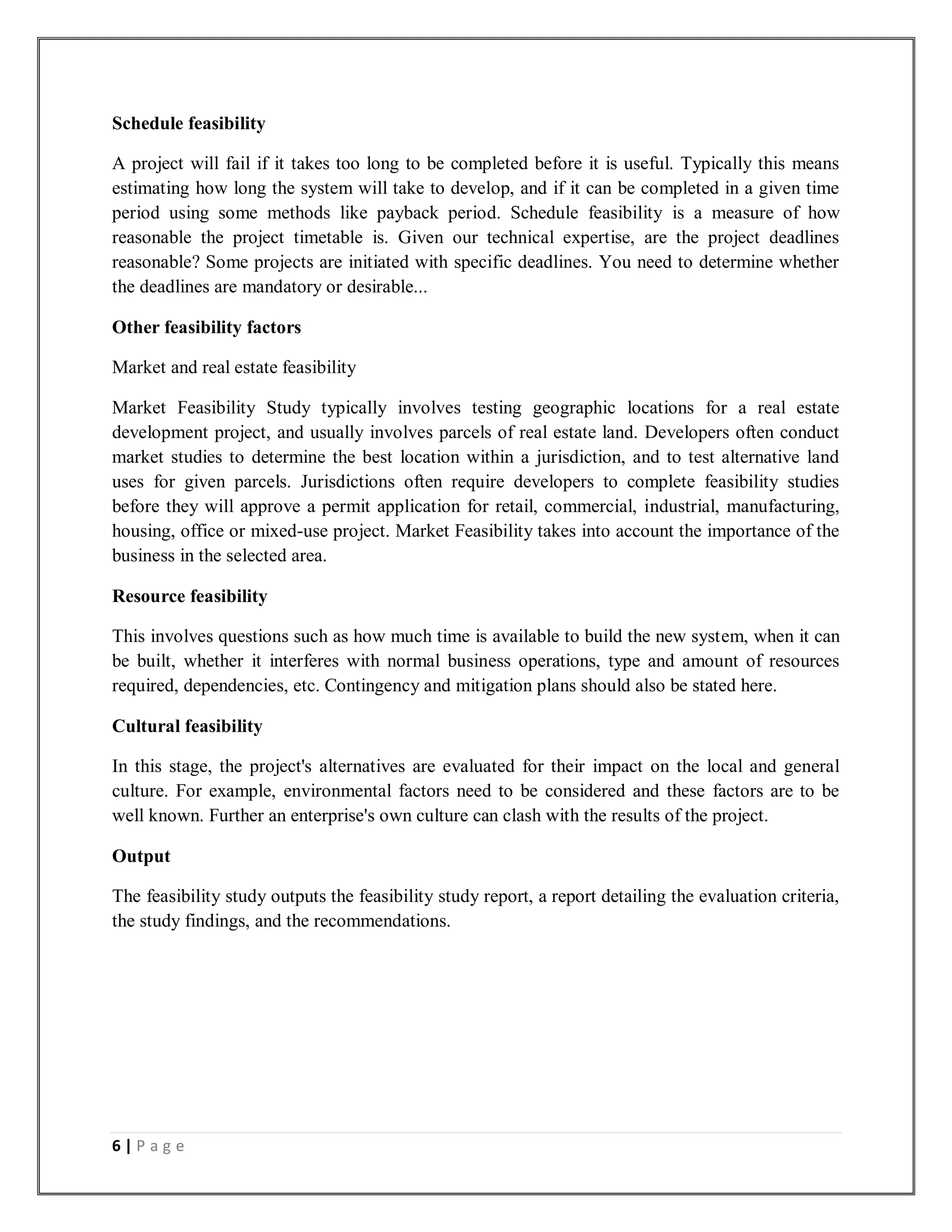
Data flow diagram
Data flow diagram example.
A data flow diagram (DFD) is a graphical representation of the "flow" of data through
an information system, modelling its processaspects. Often they are a preliminary step used to
create an overview of the system which can later be elaborated. DFDs can also be used for
the visualization of data processing (structured design).
A DFD shows what kinds of data will be input to and output from the system, where the data will
come from and go to, and where the data will be stored. It does not show information about the
timing of processes, or information about whether processes will operate in sequence or in
parallel (which is shown on a flowchart).
13 | P a g e
Overview
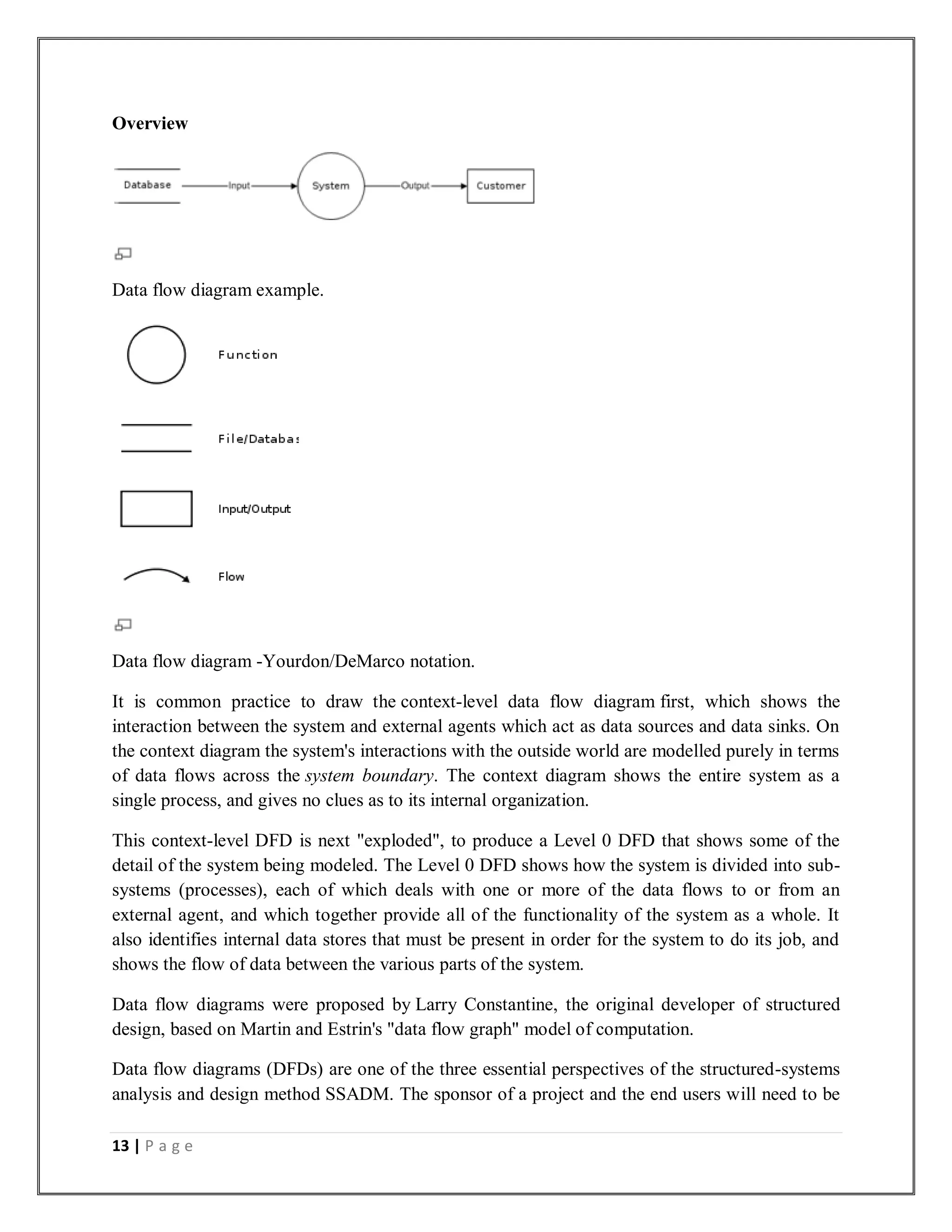
Data flow diagram example.
Data flow diagram -Yourdon/DeMarco notation.
It is common practice to draw the context-level data flow diagram first, which shows the
interaction between the system and external agents which act as data sources and data sinks. On
the context diagram the system's interactions with the outside world are modelled purely in terms
of data flows across the system boundary. The context diagram shows the entire system as a
single process, and gives no clues as to its internal organization.
This context-level DFD is next "exploded", to produce a Level 0 DFD that shows some of the
detail of the system being modeled. The Level 0 DFD shows how the system is divided into sub-
systems (processes), each of which deals with one or more of the data flows to or from an
external agent, and which together provide all of the functionality of the system as a whole. It
also identifies internal data stores that must be present in order for the system to do its job, and
shows the flow of data between the various parts of the system.
Data flow diagrams were proposed by Larry Constantine, the original developer of structured
design, based on Martin and Estrin's "data flow graph" model of computation.
Data flow diagrams (DFDs) are one of the three essential perspectives of the structured-systems
analysis and design method SSADM. The sponsor of a project and the end users will need to be
14 | P a g e
briefed and consulted throughout all stages of a system's evolution. With a data flow diagram,
users are able to visualize how the system will operate, what the system will accomplish, and
how the system will be implemented. The old system's dataflow diagrams can be drawn up and
compared with the new system's data flow diagrams to draw comparisons to implement a more
efficient system. Data flow diagrams can be used to provide the end user with a physical idea of
where the data they input ultimately has an effect upon the structure of the whole system from
order to dispatch to report. How any system is developed can be determined through a data flow
diagram.
In the course of developing a set of levelled data flow diagrams the analyst/designers is forced to
address how the system may be decomposed into component sub-systems, and to identify
the transaction data in the data model.
There are different notations to draw data flow diagrams (Yourdon & Coad and Gane & Sarson),
defining different visual representations for processes, data stores, data flow, and external
entities.
15 | P a g e
DATA DICTIONARY
A data dictionary, or metadata repository, as defined in the IBM Dictionary of Computing, is a
"centralized repository of information about data such as meaning, relationships to other data,
origin, usage, and format." The term may have one of several closely related meanings pertaining
to databases and database management systems (DBMS):
a document describing a database or collection of databases
an integral component of a DBMS that is required to determine its structure
a piece of middleware that extends or supplants the native data dictionary of a DBMS
Documentation
The term Data Dictionary and Data Repository are used to indicate a more general software
utility than a catalogue. A Catalogue is closely coupled with the DBMS Software; it provides the
information stored in it to user and the DBA, but it is mainly accessed by the various software
modules of the DBMS itself, such as DDL and DML compilers, the query optimiser, the
transaction processor, report generators, and the constraint enforcer. On the other hand, a Data
Dictionary is a data structure that stores meta-data, i.e., data about data. The Software package
for a stand-aloneData Dictionary or Data Repository may interact with the software modules of
the DBMS, but it is mainly used by the Designers, Users and Administrators of a computer
system for information resource management. These systems are used to maintain information
on system hardware and software configuration, documentation, application and users as well as
other information relevant to system administration.
If a data dictionary system is used only by the designers, users, and administrators and not by the
DBMS Software , it is called a Passive Data Dictionary; otherwise, it is called an Active Data
Dictionary or Data Dictionary. An Active Data Dictionary is automatically updated as changes
occur in the database. A Passive Data Dictionary must be manually updated.
The data Dictionary consists of record types (tables) created in the database by systems
generated command files, tailored for each supported back-end DBMS. Command files contain
SQL Statements for CREATE TABLE, CREATE UNIQUE INDEX, ALTER TABLE (for
referential integrity), etc., using the specific statement required by that type of database.
Database users and application developers can benefit from an authoritative data dictionary
document that catalogs the organization, contents, and conventions of one or more
databases. This typically includes the names and descriptions of various tables and fields in each
database, plus additional details, like the type and length of each data element. There is no
universal standard as to the level of detail in such a document, but it is primarily a weak kind of
data.
16 | P a g e
ENTITY-RELATIONSHIP MODEL
A sample Entity-relationship diagram using Chen's notation
In software engineering, an entity-relationship model (ERM) is an abstract and conceptual
representation of data. Entity-relationship modeling is a database modeling method, used to
produce a type of conceptual schema or semantic data model of a system, often arelational
database, and its requirements in a top-down fashion. Diagrams created by this process are
called entity-relationship diagrams,ER diagrams, or ERDs.
This article refers to the techniques proposed in Peter Chen's 1976 paper. However, variants of
the idea existed previously, and have been devised subsequently.
Overview
The first stage of information system design uses these models during the requirements
analysis to describe information needs or the type of information that is to be stored in
a database. The data modeling technique can be used to describe any ontology (i.e. an overview
and classifications of used terms and their relationships) for a certain area of interest. In the case
of the design of an information system that is based on a database, the conceptual data model is,
at a later stage (usually called logical design), mapped to a logical data model, such as
the relational model; this in turn is mapped to a physical model during physical design. Note that
sometimes, both of these phases are referred to as "physical design".
17 | P a g e
SYSTEM PHYSICAL DESIGN
18 | P a g e
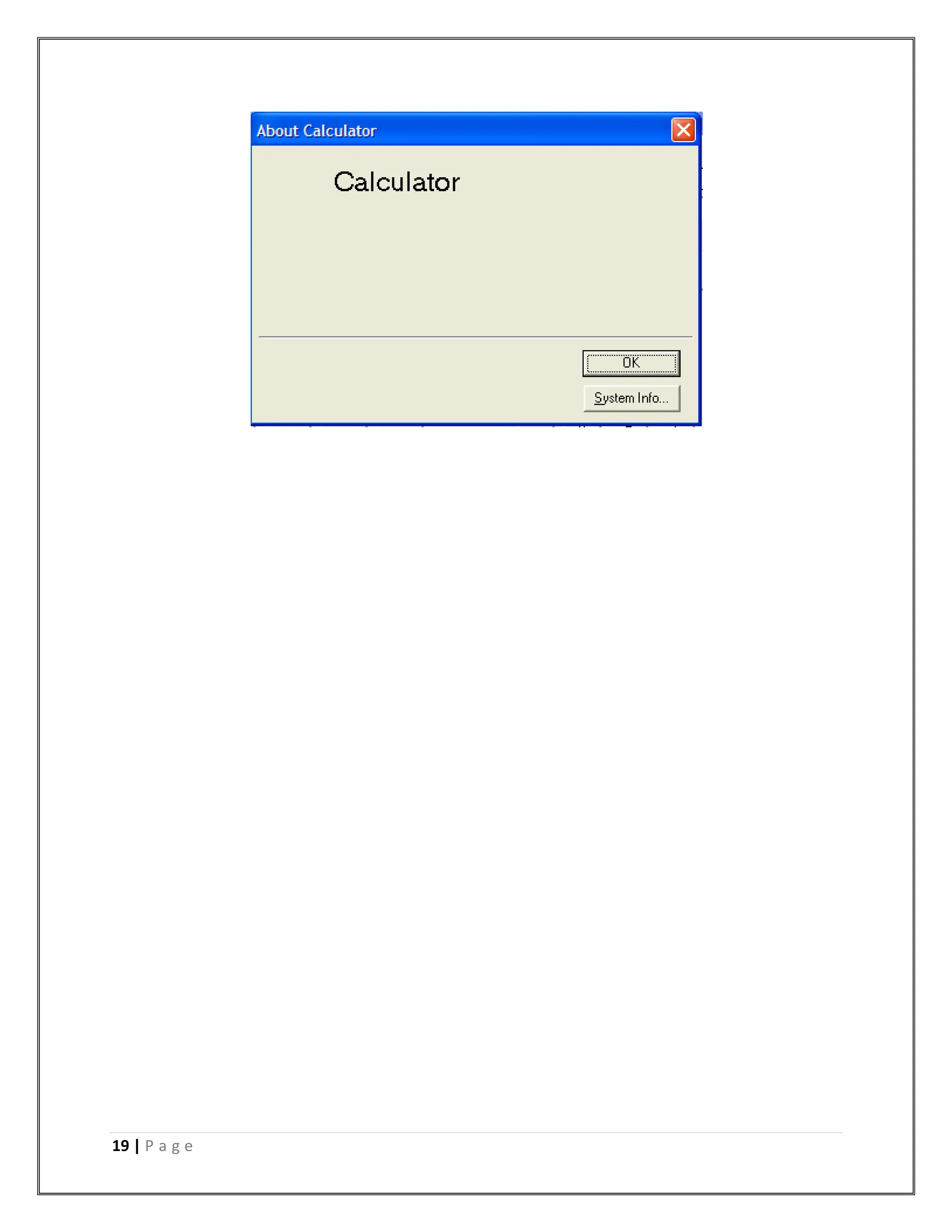
19 | P a g e
20 | P a g e
CODING
Calc.frm
Public no1 As Double, no2 As Double, WhichNo As Boolean, Dot As Boolean, op As String,
answer As Double, DotVal As Long
Sub textvalue(num As Long)
On Error GoTo OvrFlowError
If (Not WhichNo) Then
If (Dot) Then
DotVal = DotVal + 1
temp = num
For i = 1 To DotVal
temp = (temp / 10)
Next
no1 = no1 + temp
Else
temp = no1 * 10
no1 = temp + num
End If
Text1.Text = no1
Else
If (Dot) Then
DotVal = DotVal + 1
temp = num
For i = 1 To DotVal
temp = (temp / 10)
21 | P a g e
Next
no2 = no2 + temp
Else
temp = no2 * 10
no2 = temp + num
End If
Text1.Text = no2
End If
txtNO1.Text = no1
txtNO2.Text = no2
txtOP.Text = op
txtANS.Text = answer
Exit Sub
OvrFlowError:
MsgBox "Overflow occured!" & Chr(13) & "Please restart your job.", vbExclamation, "Error -
Ameya's Calculator"
End Sub
Sub calc()
On Error GoTo aritherror
Select Case op
Case "+"
answer = (no1 + no2)
Case "-"
answer = (no1 - no2)
Case "*"
22 | P a g e
answer = (no1 * no2)
Case "/"
answer = (no1 / no2)
Case "%"
'answer = (no1 % no2)
Case "&"
answer = (no1 & no2)
Case "|"
answer = (no1 & no2)
Case "~"
answer = (Not no1)
Case "sin"
answer = (Sin(no1))
Case "cos"
answer = (Cos(no1))
Case "tan"
answer = (Tan(no1))
Case "cosec"
answer = (1 / Sin(no1))
Case "sec"
answer = (1 / Cos(no1))
Case "cot"
answer = (1 / Tan(no1))
Case "ln"
answer = (Log(no1))
23 | P a g e
Case "log"
answer = (Log(no1) / 2.30258509299405)
Case "^"
answer = (no1 ^ no2)
Case "!"
answer = 1
For i = 2 To no1
answer = answer * i
Next
End Select
txtOP.Text = ""
WhichNo = False
Text1.Text = answer
txtNO1.Text = no1
txtNO2.Text = no2
txtOP.Text = op
txtANS.Text = answer
no1 = answer
Exit Sub
aritherror:
MsgBox "Arithmetic error occured!. Possibly Overflow." & Chr(13) & "Please restart your
job.", vbExclamation, "Error - Ameya's Calculator"
End Sub
Private Sub error(errorno As Long)
Select Case errorno
24 | P a g e
Case 1
MsgBox "Divide by zero error!"
Case 2
MsgBox "Operator Overflow!"
End Select
End Sub
Private Sub about_Click()
frmAbout.Show
End Sub
Private Sub btn1_Click()
textvalue (1)
End Sub
Private Sub btn2_Click()
textvalue (2)
End Sub
Private Sub btn3_Click()
textvalue (3)
End Sub
Private Sub btn4_Click()
textvalue (4)
End Sub
Private Sub btn5_Click()
textvalue (5)
25 | P a g e
End Sub
Private Sub btn6_Click()
textvalue (6)
End Sub
Private Sub btn7_Click()
textvalue (7)
End Sub
Private Sub btn8_Click()
textvalue (8)
End Sub
Private Sub btn9_Click()
textvalue (9)
End Sub
Private Sub btn0_Click()
textvalue (0)
End Sub
Private Sub btnADD_Click()
op = "+"
WhichNo = True
Text1.Text = ""
DotVal = 0
Dot = False
no2 = 0
End Sub
Private Sub btnSUB_Click()
26 | P a g e
op = "-"
WhichNo = True
Text1.Text = ""
DotVal = 0
Dot = False
no2 = 0
End Sub
Private Sub btnMUL_Click()
op = "*"
WhichNo = True
Text1.Text = ""
DotVal = 0
Dot = False
no2 = 0
End Sub
Private Sub btnDIV_Click()
op = "/"
WhichNo = True
Text1.Text = ""
DotVal = 0
Dot = False
no2 = 0
End Sub
Private Sub btnAND_Click()
op = "&"
27 | P a g e
WhichNo = True
Text1.Text = ""
DotVal = 0
Dot = False
End Sub
Private Sub btnOR_Click()
op = "|"
WhichNo = True
Text1.Text = ""
DotVal = 0
Dot = False
End Sub
Private Sub btnMOD_Click()
op = "%"
WhichNo = True
Text1.Text = ""
DotVal = 0
Dot = False
End Sub
Private Sub btnNOT_Click()
op = "~"
WhichNo = True
Text1.Text = ""
DotVal = 0
Dot = False
28 | P a g e
calc
End Sub
Private Sub btnSIN_Click()
op = ""
If (chkINV.Value = 1) Then
op = "a"
End If
op = op & "sin"
If (chkHYP.Value = 1) Then
op = op & "h"
End If
DotVal = 0
Dot = False
calc
End Sub
Private Sub btnCOS_Click()
op = ""
If (chkINV.Value = 1) Then
op = "a"
End If
op = op & "cos"
If (chkHYP.Value = 1) Then
op = op & "h"
End If
DotVal = 0
29 | P a g e
Dot = False
calc
End Sub
Private Sub btnTAN_Click()
op = ""
If (chkINV.Value = 1) Then
op = "a"
End If
op = op & "tan"
If (chkHYP.Value = 1) Then
op = op & "h"
End If
DotVal = 0
Dot = False
calc
End Sub
Private Sub btnCOSEC_Click()
op = ""
If (chkINV.Value = 1) Then
op = "a"
End If
op = op & "cosec"
If (chkHYP.Value = 1) Then
op = op & "h"
End If
30 | P a g e
DotVal = 0
Dot = False
calc
End Sub
Private Sub btnSEC_Click()
op = ""
If (chkINV.Value = 1) Then
op = "a"
End If
op = op & "sec"
If (chkHYP.Value = 1) Then
op = op & "h"
End If
Text1.Text = ""
DotVal = 0
Dot = False
calc
End Sub
Private Sub btnCOT_Click()
op = ""
If (chkINV.Value = 1) Then
op = "a"
End If
op = op & "cot"
If (chkHYP.Value = 1) Then
31 | P a g e
op = op & "h"
End If
Text1.Text = ""
DotVal = 0
Dot = False
calc
End Sub
Private Sub btnLN_Click()
If (no1 <= 0) Then
MsgBox ("logarithm is only defined for positive numbers." & Chr(13) & "Please enter a
valid no and then take logarithm.")
Else
op = "ln"
Text1.Text = ""
DotVal = 0
Dot = False
calc
End If
End Sub
Private Sub btnLOG_Click()
If (no1 <= 0) Then
MsgBox ("logarithm is only defined for positive numbers." & Chr(13) & "Please enter a
valid no and then take logarithm.")
Else
op = "log"
Text1.Text = ""
32 | P a g e
DotVal = 0
Dot = False
calc
End If
End Sub
Private Sub btnPOW_Click()
op = "^"
WhichNo = True
Text1.Text = ""
DotVal = 0
Dot = False
End Sub
Private Sub btnPOW2_Click()
op = "^"
no2 = 2
Text1.Text = ""
DotVal = 0
Dot = False
calc
End Sub
Private Sub btnPOW3_Click()
op = "^"
no2 = 3
Text1.Text = ""
DotVal = 0
33 | P a g e
Dot = False
calc
End Sub
Private Sub btnINV_Click()
op = "^"
no2 = -1
Text1.Text = ""
DotVal = 0
Dot = False
calc
End Sub
Private Sub btnFACTORIAL_Click()
op = "!"
Text1.Text = ""
DotVal = 0
Dot = False
calc
End Sub
Private Sub btnSQRT_Click()
If (no1 < 0) Then
MsgBox ("Square Root is not defined for negative numbers.")
Else
op = "^"
no2 = 0.5
Text1.Text = ""
34 | P a g e
DotVal = 0
Dot = False
calc
End If
End Sub
Private Sub btnEXP_Click()
op = "^"
no2 = no1
no1 = 2.30258509299405
Text1.Text = ""
DotVal = 0
Dot = False
calc
End Sub
Private Sub btnPI_Click()
If (Not WhichNo) Then
no1 = 3.14159265358979
Else
no2 = 3.14159265358979
End If
Text1.Text = "3.14159265358979"
DotVal = 0
Dot = False
End Sub
Private Sub btnC_Click()
35 | P a g e
no1 = 0
no2 = 0
answer = 0
Text1.Text = "0"
op = ""
DotVal = 0
Dot = False
WhichNo = False
txtNO1.Text = no1
txtNO2.Text = no2
txtOP.Text = op
txtANS.Text = answer
End Sub
Private Sub btnCE_Click()
If (temp) Then
no1 = 0
Else
no2 = 0
End If
Text1.Text = ""
DotVal = 0
Dot = False
End Sub
Private Sub btnbksp_Click()
If (Not WhichNo) Then
36 | P a g e
If (Len(Str(no1)) > 1) Then
no1 = FormatNumber(Left(Str(no1), Len(Text1.Text) - 1))
Text1.Text = no1
End If
Else
If (Len(Str(no2)) > 0) Then
no2 = FormatNumber(Left(Str(no2), Len(Text1.Text) - 1))
Text1.Text = no2
End If
End If
If (DotVal > 0) Then
DotVal = ditval - 1
End If
txtNO1.Text = no1
txtNO2.Text = no2
txtOP.Text = op
txtANS.Text = answer
End Sub
Private Sub btnDOT_Click()
If (Dot = False) Then
Dot = True
Text1.Text = Text1.Text & "."
DotVal = 0
End If
End Sub
37 | P a g e
Private Sub btnEqual_Click()
calc
no1 = answer
WhichNo = False
DotVal = 0
Dot = False
End Sub
Private Sub Command2_Click()
MsgBox ("Temp=" & Str(temp) & " No1=" & Str(no1) & " No2=" & Str(no2) & " op=" & op)
End Sub
Private Sub copy_Click()
Clipboard.SetText (Text1.Text)
End Sub
Private Sub cut_Click()
Clipboard.SetText (Text1.Text)
Text1.Text = ""
End Sub
Private Sub exit_Click()
Unload Me
End Sub
Private Sub Form_Load()
Dim no1, no2, op, WhichNo, Dot, temp
no1 = 0
no2 = 0
answer = 0
38 | P a g e
Dot = False
DotVal = 0
WhichNo = False
btnC_Click
End Sub
Private Sub helptopic_Click()
MsgBox ("No help found." & Chr(13) & "We are SORRY for the inconvenience!")
End Sub
Private Sub Text1_KeyUp(KeyCode As Integer, Shift As Integer)
If (IsNumeric(Text1.Text)) Then
If (Not WhichNo) Then
no1 = FormatNumber(Text1.Text)
Else
no2 = FormatNumber(Text1.Text)
End If
End If
txtNO1.Text = no1
txtNO2.Text = no2
txtOP.Text = op
txtANS.Text = answer
End Sub
39 | P a g e
Frmabout.frm
Option Explicit
' Reg Key Security Options...
Const READ_CONTROL = &H20000
Const KEY_QUERY_VALUE = &H1
Const KEY_SET_VALUE = &H2
Const KEY_CREATE_SUB_KEY = &H4
Const KEY_ENUMERATE_SUB_KEYS = &H8
Const KEY_NOTIFY = &H10
Const KEY_CREATE_LINK = &H20
Const KEY_ALL_ACCESS = KEY_QUERY_VALUE + KEY_SET_VALUE + _
KEY_CREATE_SUB_KEY + KEY_ENUMERATE_SUB_KEYS + _
KEY_NOTIFY + KEY_CREATE_LINK + READ_CONTROL
' Reg Key ROOT Types...
Const HKEY_LOCAL_MACHINE = &H80000002
Const ERROR_SUCCESS = 0
Const REG_SZ = 1 ' Unicode nul terminated string
Const REG_DWORD = 4 ' 32-bit number
Const gREGKEYSYSINFOLOC = "SOFTWAREMicrosoftShared Tools Location"
Const gREGVALSYSINFOLOC = "MSINFO"
Const gREGKEYSYSINFO = "SOFTWAREMicrosoftShared ToolsMSINFO"
Const gREGVALSYSINFO = "PATH"
40 | P a g e
Private Declare Function RegOpenKeyEx Lib "advapi32" Alias "RegOpenKeyExA" (ByVal
hKey As Long, ByVal lpSubKey As String, ByVal ulOptions As Long, ByVal samDesired As
Long, ByRef phkResult As Long) As Long
Private Declare Function RegQueryValueEx Lib "advapi32" Alias "RegQueryValueExA"
(ByVal hKey As Long, ByVal lpValueName As String, ByVal lpReserved As Long, ByRef
lpType As Long, ByVal lpData As String, ByRef lpcbData As Long) As Long
Private Declare Function RegCloseKey Lib "advapi32" (ByVal hKey As Long) As Long
Private Sub cmdSysInfo_Click()
Call StartSysInfo
End Sub
Private Sub cmdOK_Click()
Unload Me
End Sub
Private Sub Form_Load()
Me.Caption = "About " & App.Title
'lblVersion.Caption = "Version " & App.Major & "." & App.Minor & "." & App.Revision
lblTitle.Caption = App.Title
End Sub
Public Sub StartSysInfo()
On Error GoTo SysInfoErr
Dim rc As Long
41 | P a g e
Dim SysInfoPath As String
' Try To Get System Info Program PathName From Registry...
If GetKeyValue(HKEY_LOCAL_MACHINE, gREGKEYSYSINFO, gREGVALSYSINFO,
SysInfoPath) Then
' Try To Get System Info Program Path Only From Registry...
ElseIf GetKeyValue(HKEY_LOCAL_MACHINE, gREGKEYSYSINFOLOC,
gREGVALSYSINFOLOC, SysInfoPath) Then
' Validate Existance Of Known 32 Bit File Version
If (Dir(SysInfoPath & "MSINFO32.EXE") <> "") Then
SysInfoPath = SysInfoPath & "MSINFO32.EXE"
' Error - File Can Not Be Found...
Else
GoTo SysInfoErr
End If
' Error - Registry Entry Can Not Be Found...
Else
GoTo SysInfoErr
End If
Call Shell(SysInfoPath, vbNormalFocus)
Exit Sub
SysInfoErr:
MsgBox "System Information Is Unavailable At This Time", vbOKOnly
42 | P a g e
End Sub
Public Function GetKeyValue(KeyRoot As Long, KeyName As String, SubKeyRef As String,
ByRef KeyVal As String) As Boolean
Dim i As Long ' Loop Counter
Dim rc As Long ' Return Code
Dim hKey As Long ' Handle To An Open Registry Key
Dim hDepth As Long '
Dim KeyValType As Long ' Data Type Of A Registry Key
Dim tmpVal As String ' Tempory Storage For A Registry Key Value
Dim KeyValSize As Long ' Size Of Registry Key Variable
'------------------------------------------------------------
' Open RegKey Under KeyRoot {HKEY_LOCAL_MACHINE...}
'------------------------------------------------------------
rc = RegOpenKeyEx(KeyRoot, KeyName, 0, KEY_ALL_ACCESS, hKey) ' Open Registry
Key
If (rc <> ERROR_SUCCESS) Then GoTo GetKeyError ' Handle Error...
tmpVal = String$(1024, 0) ' Allocate Variable Space
KeyValSize = 1024 ' Mark Variable Size
'------------------------------------------------------------
' Retrieve Registry Key Value...
'------------------------------------------------------------
rc = RegQueryValueEx(hKey, SubKeyRef, 0, _
43 | P a g e
KeyValType, tmpVal, KeyValSize) ' Get/Create Key Value
If (rc <> ERROR_SUCCESS) Then GoTo GetKeyError ' Handle Errors
If (Asc(Mid(tmpVal, KeyValSize, 1)) = 0) Then ' Win95 Adds Null Terminated String...
tmpVal = Left(tmpVal, KeyValSize - 1) ' Null Found, Extract From String
Else ' WinNT Does NOT Null Terminate String...
tmpVal = Left(tmpVal, KeyValSize) ' Null Not Found, Extract String Only
End If
'------------------------------------------------------------
' Determine Key Value Type For Conversion...
'------------------------------------------------------------
Select Case KeyValType ' Search Data Types...
Case REG_SZ ' String Registry Key Data Type
KeyVal = tmpVal ' Copy String Value
Case REG_DWORD ' Double Word Registry Key Data Type
For i = Len(tmpVal) To 1 Step -1 ' Convert Each Bit
KeyVal = KeyVal + Hex(Asc(Mid(tmpVal, i, 1))) ' Build Value Char. By Char.
Next
KeyVal = Format$("&h" + KeyVal) ' Convert Double Word To String
End Select
GetKeyValue = True ' Return Success
rc = RegCloseKey(hKey) ' Close Registry Key
Exit Function ' Exit
44 | P a g e
GetKeyError: ' Cleanup After An Error Has Occured...
KeyVal = "" ' Set Return Val To Empty String
GetKeyValue = False ' Return Failure
rc = RegCloseKey(hKey) ' Close Registry Key
End Function
45 | P a g e
FRMSPLASH.FRM
Option Explicit
Public i As Long
Private Sub Form_KeyPress(KeyAscii As Integer)
Unload Me
End Sub
Private Sub Form_Load()
i = 0
lblVersion.Caption = "Version " & App.Major & "." & App.Minor & "." & App.Revision
'lblProductName.Caption = App.Title
Form1.Show
End Sub
Private Sub Frame1_Click()
Unload Me
End Sub
Private Sub Text1_Change()
End Sub
Private Sub lblCompanyProduct_Click()
46 | P a g e
End Sub
Private Sub Timer1_Timer()
If (i < 10) Then
i = i + 1
Shape1.Width = (i) * 300
Label2.Caption = Str(((i + 1) * 10) - 10) & "%"
End If
If (i >= 10) Then
i = i + 1
End If
If (i > 20) Then
Unload Me
End If
End Sub
47 | P a g e
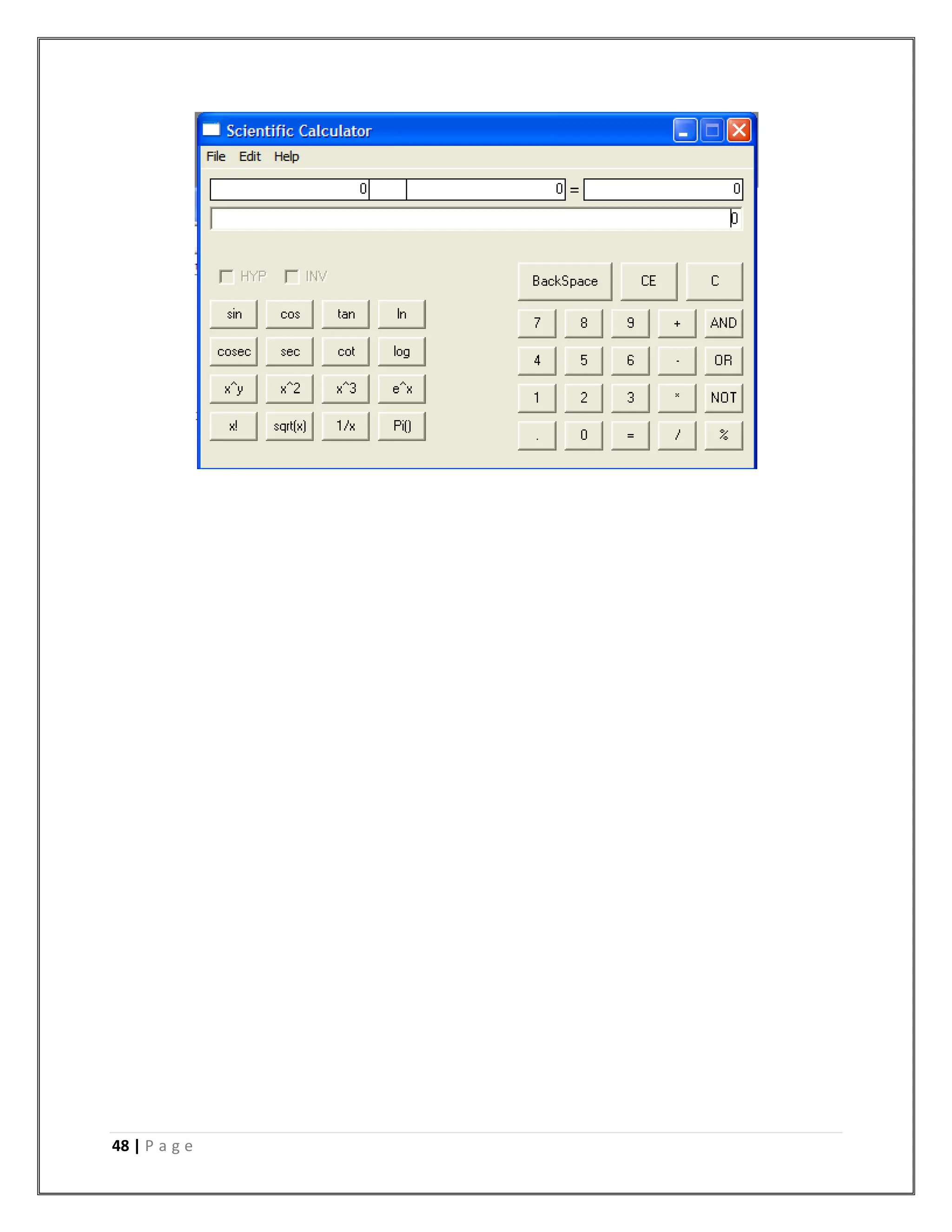
INPUT/OUTPUT SCREEN
48 | P a g e
49 | P a g e
50 | P a g e
51 | P a g e
52 | P a g e
SYSTEM TESTING
System testing of software or hardware is testing conducted on a complete, integrated system to
evaluate the system's compliance with its specified requirements. System testing falls within the
scope of black box testing, and as such, should require no knowledge of the inner design of the
code or logic.
As a rule, system testing takes, as its input, all of the "integrated" software components that have
successfully passed integration testing and also the software system itself integrated with any
applicable hardware system(s). The purpose of integration testing is to detect any inconsistencies
between the software units that are integrated together (called assemblages) or between any of
the assemblages and the hardware. System testing is a more limited type of testing; it seeks to
detect defects both within the "inter-assemblages" and also within the system as a whole.
Testing the whole system
System testing is performed on the entire system in the context of a Functional Requirement
Specification(s) (FRS) and/or a System Requirement Specification (SRS). System testing tests
not only the design, but also the behaviour and even the believed expectations of the customer. It
is also intended to test up to and beyond the bounds defined in the software/hardware
requirements specification(s).
Types of tests to include in system testing
The following examples are different types of testing that should be considered during System
testing:
 Graphical user interface testing
 Usability testing
 Performance testing
 Compatibility testing
 Error handling testing
 Load testing
 Volume testing
 Stress testing
 Security testing
 Scalability testing
 Sanity testing
 Smoke testing
 Exploratory testing
 Ad hoc testing
 Regression testing
53 | P a g e
 Reliability testing
 Installation testing
 Maintenance testing
 Recovery testing and failover testing.
Accessibility testing, including compliance with:
Americans with Disabilities Act of 1990
Section 508 Amendment to the Rehabilitation Act of 1973
Web Accessibility Initiative (WAI) of the World Wide Web Consortium (W3C)
54 | P a g e
IMPLEMENTATION
This system is implemented on one levels
 Direct functioning to the application.
55 | P a g e
LIMITATION AND FUTURE SCOPE
This software has limited functionality like
 Single user
 Cannot be implemented on networks.
 No login screens.
This software has lots of future scope like
 Multi user
 Implementation on network
56 | P a g e
References
1. Acharya, Kamal, Attendance Management System Project (April 28, 2024).
Available at
SSRN: https://ssrn.com/abstract=4810251 or http://dx.doi.org/10.2139/ssrn.4810251
2. Acharya, Kamal, Online Food Order System (May 2, 2024). Available at
SSRN: https://ssrn.com/abstract=4814732 or http://dx.doi.org/10.2139/ssrn.4814732
3. Acharya, Kamal, University management system project. (May 1, 2024). Available at
SSRN: https://ssrn.com/abstract=4814103 or http://dx.doi.org/10.2139/ssrn.4814103
4. Acharya, Kamal, Online banking management system. (May 1, 2024). Available at
SSRN: https://ssrn.com/abstract=4813597 or http://dx.doi.org/10.2139/ssrn.4813597
5. Acharya, Kamal, Online Job Portal Management System (May 5, 2024). Available at
SSRN: https://ssrn.com/abstract=4817534 or http://dx.doi.org/10.2139/ssrn.4817534
6. Acharya, Kamal, Employee leave management system. (May 7, 2024). Available
at SSRN: https://ssrn.com/abstract=4819626 or http://dx.doi.org/10.2139/ssrn.4819626
7. Acharya, Kamal, Online electricity billing project report. (May 7, 2024). Available at
SSRN: https://ssrn.com/abstract=4819630 or http://dx.doi.org/10.2139/ssrn.4819630
8. Acharya, Kamal, POLICY MANAGEMENT SYSTEM PROJECT REPORT. (December
10, 2023). Available at
SSRN: https://ssrn.com/abstract=4831694 or http://dx.doi.org/10.2139/ssrn.4831694
9. Acharya, Kamal, Online job placement system project report. (January 10, 2023).
Available at
SSRN: https://ssrn.com/abstract=4831638 or http://dx.doi.org/10.2139/ssrn.4831638
10. Acharya, Kamal, Software testing for project report. (May 16, 2023). Available at
SSRN: https://ssrn.com/abstract=4831028 or http://dx.doi.org/10.2139/ssrn.4831028
11. Acharya, Kamal, ONLINE CRIME REPORTING SYSTEM PROJECT. (August 10, 2022).
Available at
SSRN: https://ssrn.com/abstract=4831015 or http://dx.doi.org/10.2139/ssrn.4831015
12. Acharya, Kamal, Burger ordering system project report. (October 10, 2022). Available at
SSRN: https://ssrn.com/abstract=4832704 or http://dx.doi.org/10.2139/ssrn.4832704
13. Acharya, Kamal, Teachers Record Management System Project Report (December 10,
2023). Available at
SSRN: https://ssrn.com/abstract=4833821 or http://dx.doi.org/10.2139/ssrn.4833821
14. Acharya, Kamal, Dairy Management System Project Report (December 20, 2020).
Available at
SSRN: https://ssrn.com/abstract=4835231 or http://dx.doi.org/10.2139/ssrn.4835231
15. Acharya, Kamal, Electrical Shop Management System Project (December 10, 2019).
Available at
SSRN: https://ssrn.com/abstract=4835238 or http://dx.doi.org/10.2139/ssrn.4835238
57 | P a g e
16. Acharya, Kamal, Online book store management system project report. (Febuary 10,
2020). Available at
SSRN: https://ssrn.com/abstract=4835277 or http://dx.doi.org/10.2139/ssrn.4835277
17. Acharya, Kamal, Paint shop management system project report. (January 10, 2019).
Available at
SSRN: https://ssrn.com/abstract=4835441 or http://dx.doi.org/10.2139/ssrn.4835441
18. Acharya, Kamal, Supermarket billing system project report. (August 10, 2021). Available
at SSRN: https://ssrn.com/abstract=4835474 or http://dx.doi.org/10.2139/ssrn.4835474
19. Acharya, Kamal, Online taxi booking system project report. (March 10, 2022). Available
at SSRN: https://ssrn.com/abstract=4837729 or http://dx.doi.org/10.2139/ssrn.4837729
20. Acharya, Kamal, Online car servicing system project report. (March 10, 2023). Available
at SSRN: https://ssrn.com/abstract=4837832 or http://dx.doi.org/10.2139/ssrn.4837832
21. Acharya, Kamal, School management system project report. (July 10, 2021). Available at
SSRN: https://ssrn.com/abstract=4837837 or http://dx.doi.org/10.2139/ssrn.4837837
22. Acharya, Kamal, Furniture Showroom Management System Project Report (March 21,
2021). Available at
SSRN: https://ssrn.com/abstract=4839422 or http://dx.doi.org/10.2139/ssrn.4839422
23. Acharya, Kamal, Online Vehicle Rental System Project Report (March 21, 2019).
Available at
SSRN: https://ssrn.com/abstract=4839429 or http://dx.doi.org/10.2139/ssrn.4839429
24. Acharya, Kamal, Fruit Shop Management System Project Report (August 10, 2023).
Available at
SSRN: https://ssrn.com/abstract=4841048 or http://dx.doi.org/10.2139/ssrn.4841048
25. Acharya, Kamal, Hall Booking Management System Project Report (December 21,
2023). Available at
SSRN: https://ssrn.com/abstract=4841055 or http://dx.doi.org/10.2139/ssrn.4841055
26. Acharya, Kamal, Lundry Management System Project Report (October 21, 2023).
Available at
SSRN: https://ssrn.com/abstract=4841059 or http://dx.doi.org/10.2139/ssrn.4841059
27. Acharya, Kamal, A CASE STUDY OF CINEMA MANAGEMENT SYSTEM PROJECT
(September 25, 2023). Available at
SSRN: https://ssrn.com/abstract=4841209 or http://dx.doi.org/10.2139/ssrn.4841209
28. Acharya, Kamal, A CASE STUDY ON ONLINE TICKET BOOKING SYSTEM PROJECT
(May 25, 2024). Available at
SSRN: https://ssrn.com/abstract=4841210 or http://dx.doi.org/10.2139/ssrn.4841210
29. Acharya, Kamal, ONLINE DATING MANAGEMENT SYSTEM PROJECT REPORT.
(April 25, 2023). Available at
SSRN: https://ssrn.com/abstract=4842066 or http://dx.doi.org/10.2139/ssrn.4842066
30. Acharya, Kamal, ONLINE RESUME BUILDER MANAGEMENT SYSTEM PROJECT
REPORT. (April 25, 2021). Available at
SSRN: https://ssrn.com/abstract=4842071 or http://dx.doi.org/10.2139/ssrn.4842071
58 | P a g e
31. Acharya, Kamal, TOLL TEX MANAGEMENT SYSTEM PROJECT REPORT (August 21,
2023). Available at
SSRN: https://ssrn.com/abstract=4842082 or http://dx.doi.org/10.2139/ssrn.4842082
32. Acharya, Kamal, Chat Application Through Client Server Management System Project
Report (June 25, 2023). Available at
SSRN: https://ssrn.com/abstract=4842761 or http://dx.doi.org/10.2139/ssrn.4842761
33. Acharya, Kamal, Web Chatting Application Management System Project Report (April
25, 2022). Available at
SSRN: https://ssrn.com/abstract=4842771 or http://dx.doi.org/10.2139/ssrn.4842771
34. Acharya, Kamal, Automobile management system project report (May 25, 2022).
Available at
SSRN: https://ssrn.com/abstract=4846917 or http://dx.doi.org/10.2139/ssrn.4846917
35. Acharya, Kamal, College bus management system project report (April 25, 2023).
Available at
SSRN: https://ssrn.com/abstract=4846920 or http://dx.doi.org/10.2139/ssrn.4846920
36. Acharya, Kamal, Courier management system project report (May 25, 2023). Available
at SSRN: https://ssrn.com/abstract=4846922 or http://dx.doi.org/10.2139/ssrn.4846922
37. Acharya, Kamal, Event management system project report (April 25, 2021). Available at
SSRN: https://ssrn.com/abstract=4846927 or http://dx.doi.org/10.2139/ssrn.4846927
38. Acharya, Kamal, Library management system project report II (May 25, 2020). Available
at SSRN: https://ssrn.com/abstract=4848857 or http://dx.doi.org/10.2139/ssrn.4848857
39. Kamal Acharya. Teacher record management system project report. Authorea. August
02, 2024.
DOI: https://doi.org/10.22541/au.172261514.46787329/v1
40. Kamal Acharya. POST OFFICE MANAGEMENT SYSTEM PROJECT
REPORT. Authorea. August 02, 2024.
DOI: https://doi.org/10.22541/au.172261514.44494375/v1
41. Kamal Acharya. Fruit shop management system project report. Authorea. August 02,
2024.
DOI: https://doi.org/10.22541/au.172261514.42227675/v1
42. Kamal Acharya. Dairy management system project report. Authorea. August 02, 2024.
DOI: https://doi.org/10.22541/au.172261513.39402347/v1
43. Kamal Acharya. DATA COMMUNICATION AND COMPUTER NETWORK
MANAGEMENT SYSTEM PROJECT REPORT. Authorea. August 01, 2024.
DOI: https://doi.org/10.22541/au.172254873.37480177/v1
44. Kamal Acharya. School management system project report. Authorea. August 01, 2024.
DOI: https://doi.org/10.22541/au.172254873.34023165/v1
45. Kamal Acharya. A CASE STUDY OF CINEMA MANAGEMENT SYSTEM
PROJECT. Authorea. August 01, 2024.
DOI: https://doi.org/10.22541/au.172254873.30191075/v1
46. Kamal Acharya. A CASE STUDY ON ONLINE TICKET BOOKING SYSTEM
PROJECT. Authorea. August 01, 2024
DOI: https://doi.org/10.22541/au.172254872.26972790/v1
59 | P a g e
47. Kamal Acharya. Web chatting application project report management
system. Authorea. August 01, 2024.
DOI: https://doi.org/10.22541/au.172254871.18588592/v1
48. Kamal Acharya. RETAIL STORE MANAGEMENT SYSTEM PROJECT
REPORT. Authorea. August 01, 2024.
DOI: https://doi.org/10.22541/au.172254871.14590154/v1
49. Kamal Acharya. SUPERMARKET MANAGEMENT SYSTEM PROJECT
REPORT. Authorea. August 01, 2024.
DOI: https://doi.org/10.22541/au.172252491.19145062/v1
50. Kamal Acharya. SOCIAL MEDIA MANAGEMENT SYSTEM PROJECT
REPORT. Authorea. August 01, 2024.
DOI: https://doi.org/10.22541/au.172252491.11210579/v1
51. Kamal Acharya. Online music portal management system project
report. Authorea. August 01, 2024.
DOI: https://doi.org/10.22541/au.172252488.89734698/v1
52. Kamal Acharya. COLLEGE BUS MANAGEMENT SYSTEM PROJECT
REPORT. Authorea. July 31, 2024.
DOI: https://doi.org/10.22541/au.172245277.70798942/v1
53. Kamal Acharya. AUTOMOBILE MANAGEMENT SYSTEM PROJECT
REPORT. Authorea. July 31, 2024.
DOI: https://doi.org/10.22541/au.172245276.67982593/v1
54. Kamal Acharya. Ludo management system project report. Authorea. July 31, 2024
DOI: https://doi.org/10.22541/au.172243999.98091616/v1
55. Kamal Acharya. Literature online quiz system project report. Authorea. July 31,
2024
DOI: https://doi.org/10.22541/au.172243825.53562953/v1
56. Kamal Acharya. Avoid waste management system project. Authorea. July 29, 2024
DOI: https://doi.org/10.22541/au.172228528.85022205/v1
57. Kamal Acharya. CHAT APPLICATION THROUGH CLIENT SERVER MANAGEMENT
SYSTEM PROJECT. Authorea. July 29, 2024.
DOI: https://doi.org/10.22541/au.172228527.74316529/v1
58. Kamal Acharya. Parking allotment system project report. Authorea. July 29, 2024.
DOI: https://doi.org/10.22541/au.172227078.89966943/v1
59. Kamal Acharya. HEALTH INSURANCE CLAIM MANAGEMENT
SYSTEM. Authorea. July 26, 2024.
DOI: https://doi.org/10.22541/au.172202020.06707762/v1
60. Kamal Acharya. ONLINE TRAIN BOOKING SYSTEM PROJECT
REPORT. Authorea. July 22, 2024.
DOI: https://doi.org/10.22541/au.172167914.45160406/v1
61. Kamal Acharya. COVID MANAGEMENT SYSTEM PROJECT REPORT. Authorea. July
16, 2024.
DOI: https://doi.org/10.22541/au.172116616.60220024/v1
62. Kamal Acharya. COVID MANAGEMENT SYSTEM PROJECT REPORT. Authorea. July
16, 2024.
DOI: https://doi.org/10.22541/au.172116616.60220024/v1

Scientific calculator project report.pdf

  • 1.
    1 | Pa g e AN INTERNSHIP REPORT ON SCIENTIFIC CALCULATOR PROJECT BY KAMAL ACHARYA (Tribhuvan University) Date: 2023/12/21
  • 2.
    2 | Pa g e INTRODUCTION OF THE PROJECT The project Scientific Calculator is designed to automate the calculation procedure. Making less paper work and automate the process of calculation.
  • 3.
    3 | Pa g e PROBLEM DEFINITION A scientific calculator is a type of electronic calculator, usually but not always handheld, designed to calculate problems in science (especially physics),engineering, and mathematics. They have almost completely replaced slide rules in almost all traditional applications, and are widely used in both education and professional settings. In certain contexts such as higher education, scientific calculators have been superseded by graphing calculators, which offer a superset of scientific calculator functionality along with the ability to graph input data and write and store programs for the device. There is also some overlap with the financial calculator market. Functions Modern scientific calculators generally have many more features than a standard four or five- function calculator, and the feature set differs between manufacturers and models; however, the defining features of a scientific calculator include:  scientific notation  floating point arithmetic  logarithmic functions, using both base 10 and base e  trigonometric functions (some including hyperbolic trigonometry)  exponential functions and roots beyond the square root  quick access to constants such as pi and e  In addition, high-end scientific calculators will include:  hexadecimal, binary, and octal calculations, including basic Boolean math  complex numbers  fractions  statistics and probability calculations  programmability — see Programmable calculator  equation solving  calculus  conversion of units  physical constants While most scientific models have traditionally used a single-line display similar to traditional pocket calculators, many of them have at the very least more digits (10 to 12), sometimes with extra digits for the floating point exponent. A few have multi-line displays, with some recent models from Hewlett-Packard,Texas Instruments, Casio, Sharp, and Canon using dot matrix displays similar to those found on graphing calculators.
  • 4.
    4 | Pa g e Uses Scientific calculators are used widely in any situation where quick access to certain mathematical functions is needed, especially those such as trigonometric functions that were once traditionally looked up in tables; they are also used in situations requiring back-of-the-envelope calculations of very large numbers, as in some aspects of astronomy, physics, and chemistry. They are very often required for math classes from the junior high school level through college, and are generally either permitted or required on manystandardized tests covering math and science subjects; as a result, many are sold into educational markets to cover this demand, and some high-end models include features making it easier to translate the problem on a textbook page into calculator input, from allowing explicit operator precedence using parentheses to providing a method for the user to enter an entire problem in as it is written on the page using simple formatting tools. History The first scientific calculator that included all of the basic features above was the programmable Hewlett-Packard HP-9100A, released in 1968, though theWang LOCI-2 and the Mathatronics Mathatron had some features later identified with scientific calculator designs. The HP-9100 series was built entirely from discrete transistor logic with no integrated circuits, and was one of the first uses of the CORDIC algorithm for trigonometric computation in a personal computing device, as well as the first calculator based on reverse Polish notation entry. HP became closely identified with RPN calculators from then on, and even today some of their high- end calculators (particularly the long-lived HP-12C financial calculator and the HP-48 series of graphing calculators) still offer RPN as their default input mode due to having garnered a very large following. The HP-35, introduced on February 1, 1972, was Hewlett-Packard's first pocket calculator and the world's first handheld scientific calculator. Like some of HP's desktop calculators it used reverse Polish notation. Introduced at US$395, the HP-35 was available from 1972 to 1975. HP continues to develop and market high-end scientific calculators, like the HP-35s and HP-49 series, which have been favored by scientists and engineers, in labs, offices, as well as in the field. Texas Instruments, after the introduction of several units with scientific notation, came out with a handheld scientific calculator on January 15, 1974 in the form of the SR-50. TI continues to be a major player in the calculator market, with their long-running TI-30 series being one of the most widely used scientific calculators in classrooms.
  • 5.
    5 | Pa g e FEASIBILITY STUDY A feasibility study is an evaluation of a proposal designed to determine the difficulty in carrying out a designated task. Generally, a feasibility study precedes technical development and project implementation. In other words, a feasibility study is an evaluation or analysis of the potential impact of a proposed project. Five common factors (TELOS) Technology and system feasibility The assessment is based on an outline design of system requirements in terms of Input, Processes, Output, Fields, Programs, and Procedures. This can be quantified in terms of volumes of data, trends, frequency of updating, etc. in order to estimate whether the new system will perform adequately or not. Technological feasibility is carried out to determine whether the company has the capability, in terms of software, hardware, personnel and expertise, to handle the completion of the project. Economic feasibility Economic analysis is the most frequently used method for evaluating the effectiveness of a new system. More commonly known as cost/benefit analysis, the procedure is to determine the benefits and savings that are expected from a candidate system and compare them with costs. If benefits outweigh costs, then the decision is made to design and implement the system. An entrepreneur must accurately weigh the cost versus benefits before taking an action. Cost Based Study: It is important to identify cost and benefit factors, which can be categorized as follows: 1. Development costs; and 2. Operating costs. This is an analysis of the costs to be incurred in the system and the benefits derivable out of the system. Time Based Study: This is an analysis of the time required to achieve a return on investments. The benefits derived from the system. The future value of a project is also a factor. Legal feasibility Determines whether the proposed system conflicts with legal requirements, e.g. a data processing system must comply with the local Data Protection Acts. Operational feasibility Is a measure of how well a proposed system solves the problems, and takes advantage of the opportunities identified during scope definition and how it satisfies the requirements identified in the requirements analysis phase of system development.
  • 6.
    6 | Pa g e Schedule feasibility A project will fail if it takes too long to be completed before it is useful. Typically this means estimating how long the system will take to develop, and if it can be completed in a given time period using some methods like payback period. Schedule feasibility is a measure of how reasonable the project timetable is. Given our technical expertise, are the project deadlines reasonable? Some projects are initiated with specific deadlines. You need to determine whether the deadlines are mandatory or desirable... Other feasibility factors Market and real estate feasibility Market Feasibility Study typically involves testing geographic locations for a real estate development project, and usually involves parcels of real estate land. Developers often conduct market studies to determine the best location within a jurisdiction, and to test alternative land uses for given parcels. Jurisdictions often require developers to complete feasibility studies before they will approve a permit application for retail, commercial, industrial, manufacturing, housing, office or mixed-use project. Market Feasibility takes into account the importance of the business in the selected area. Resource feasibility This involves questions such as how much time is available to build the new system, when it can be built, whether it interferes with normal business operations, type and amount of resources required, dependencies, etc. Contingency and mitigation plans should also be stated here. Cultural feasibility In this stage, the project's alternatives are evaluated for their impact on the local and general culture. For example, environmental factors need to be considered and these factors are to be well known. Further an enterprise's own culture can clash with the results of the project. Output The feasibility study outputs the feasibility study report, a report detailing the evaluation criteria, the study findings, and the recommendations.
  • 7.
    7 | Pa g e PROPOSED SYSTEM 1. It is automated computerized web based software system. 2. It uses latest technologies like Visual Basic. 3. It is easy to operate. 4. Attractive User Interface
  • 8.
    8 | Pa g e SYSTEM REQUIREMENTS This Scientific Calculator can be used in Windows 98, Windows2000, Windows XP and Windows NT. Hardware Specification Computer  IBM PC/AT Computer or above  Processor  Intel Pentium Core 2 Duo or above  Memory  RAM 1 GB or above  HDD 80.0 GB or above Software Specification  Front End : Visual Basic 6.0  Back End : Microsoft Access 2003
  • 9.
    9 | Pa g e ABOUT FRONTEND WHY VISUAL BASIC Graphical user interfaces, or GUI has revolutionized the microcomputer industry. They demonstrate that the proverb "A picture is worth a thousand words", hasn't lost its truth to most computer users. Instead of the cryptic C :> prompt that DOS user has long seen, we are presenting with a desktop filled with icons and with programs that use mice and menus. For a long time there few such tools for developing Windows applications. Before Visual Basic was introduced in 1991, developing Windows applications was much harder than developing DOS applications. Programmers had too much to worry about where the user was inside a menu, and whether he or she was clicking or double clicking at a given place, developing a windows application required experts C programmers and hundreds of lines of code for the simplest task, even the experts had trouble. Visual Basic version 6 is the newest addition to the family of VB products. It allows us to quickly & easily develop windows application for our PC without being expert in any programming language. VB provides a graphical environment in which we visually design the forms & controls that becomes the building blocks of your applications. VB supports many useful tools that will help us too more productive. These provide, but are not limited to projects, forms, class, objects, templates, custom controls, add-ins & database managers. Visual Basic let us add menus, text boxes, command buttons, option buttons (for making exclusive choices), check boxes (for non-exclusive choices), list boxes, scroll bars, file and directory boxes to blank windows. We can use grids to handle tabular data. We can communicate with other windows applications, and perhaps most importantly, we'll have an easy method to let users’ control and access databases. We can have multiple windows on a screen. These windows have full access to the clipboard and to the information are most other windows applications running at the same time. We can use visual basic to communicate with other applications running under windows, using the most modern version of Microsoft's COM/OLE technology. Visual Basic provides a graphical environment in which we visually design the forms and controls that become the building blocks of our application. Visual Basic supports many useful tools that will help us to be more productive. These include, but are not limited to projects, forms, class objects, templates, custom controls, add-ins and database managers. We can use these tools together to create complete applications in months, weeks or even days, producing an application using another language can take much larger.
  • 10.
    10 | Pa g e Version 6 of Visual Basic is specifically design to utilize the Internet. It comes with several controls that allow us to create web-based applications called ActiveX executables. These works just like standalone Visual Basic applications, but they are accessed through the Microsoft Internet explorer 4-web browser. Using this new style of application, we use revise our existing Visual Basic applications and distribute them through the internet. New to Visual Basic 6 are the ISAPI application and dynamic H1ML project templates. These templates provide us with a framework to develop server-side components as well as "Smart" Web pages and applications. Visual Basic continues to sport the Explorer style development environment, modeled after Windows Explorer. This makes it easy for a computer user to jump right into creating applications with Visual Basic. Almost all of the objects and tools on the screen can be manipulated through a right-click. We set properties, add controls, and even view context sensitive help with this single action. In a nutshell the answer is that Visual Basic 6 offers us more: more internet features, better support for database development, more language features to make your programming jobs easier, more wizards, more, more, and more. Visual Basic was derived from BASIC, and is an event driven programming language. Programming in Visual Basic is done visually, which means that as you design, you will know how your application will look on execution. User can therefore, Change and experiment with the design to meet your requirement. Three editions of Visual Basic are available. Standard Professional Enterprise STANDARD EDITION:- The Visual Basic Standard edition: Allows user to create powerful 32 bit applications for Microsoft Windows 9xs and Windows NT. Includes intrinsic controls, as well as grid, tab, and data-bound controls. Includes Microsoft Developer Network CDs containing full online documentation.
  • 11.
    11 | Pa g e PROFESSIONAL EDITION:- The Professional edition, in addition to the features provided in the Standard edition, includes: ActiveX controls, including internet control. Internet Information Server Application Designer. Integrated Data Tools and Data Environment. Dynamic HTML Page Designer. ENTERPRISE EDITION:- The Enterprise edition, in addition to the features available in the Professional edition, allows creation of robust distributed application and includes: Application Performance Explorer. Internet Information Services. Support for Microsoft Transaction Server 2.0. Stored Procedure Editor. SQL Debugging. Visual Component Manager. Visual Database Tools. Visual SourceSafe.
  • 12.
    12 | Pa g e DATA FLOW DIAGRAM Data flow diagram Data flow diagram example. A data flow diagram (DFD) is a graphical representation of the "flow" of data through an information system, modelling its processaspects. Often they are a preliminary step used to create an overview of the system which can later be elaborated. DFDs can also be used for the visualization of data processing (structured design). A DFD shows what kinds of data will be input to and output from the system, where the data will come from and go to, and where the data will be stored. It does not show information about the timing of processes, or information about whether processes will operate in sequence or in parallel (which is shown on a flowchart).
  • 13.
    13 | Pa g e Overview Data flow diagram example. Data flow diagram -Yourdon/DeMarco notation. It is common practice to draw the context-level data flow diagram first, which shows the interaction between the system and external agents which act as data sources and data sinks. On the context diagram the system's interactions with the outside world are modelled purely in terms of data flows across the system boundary. The context diagram shows the entire system as a single process, and gives no clues as to its internal organization. This context-level DFD is next "exploded", to produce a Level 0 DFD that shows some of the detail of the system being modeled. The Level 0 DFD shows how the system is divided into sub- systems (processes), each of which deals with one or more of the data flows to or from an external agent, and which together provide all of the functionality of the system as a whole. It also identifies internal data stores that must be present in order for the system to do its job, and shows the flow of data between the various parts of the system. Data flow diagrams were proposed by Larry Constantine, the original developer of structured design, based on Martin and Estrin's "data flow graph" model of computation. Data flow diagrams (DFDs) are one of the three essential perspectives of the structured-systems analysis and design method SSADM. The sponsor of a project and the end users will need to be
  • 14.
    14 | Pa g e briefed and consulted throughout all stages of a system's evolution. With a data flow diagram, users are able to visualize how the system will operate, what the system will accomplish, and how the system will be implemented. The old system's dataflow diagrams can be drawn up and compared with the new system's data flow diagrams to draw comparisons to implement a more efficient system. Data flow diagrams can be used to provide the end user with a physical idea of where the data they input ultimately has an effect upon the structure of the whole system from order to dispatch to report. How any system is developed can be determined through a data flow diagram. In the course of developing a set of levelled data flow diagrams the analyst/designers is forced to address how the system may be decomposed into component sub-systems, and to identify the transaction data in the data model. There are different notations to draw data flow diagrams (Yourdon & Coad and Gane & Sarson), defining different visual representations for processes, data stores, data flow, and external entities.
  • 15.
    15 | Pa g e DATA DICTIONARY A data dictionary, or metadata repository, as defined in the IBM Dictionary of Computing, is a "centralized repository of information about data such as meaning, relationships to other data, origin, usage, and format." The term may have one of several closely related meanings pertaining to databases and database management systems (DBMS): a document describing a database or collection of databases an integral component of a DBMS that is required to determine its structure a piece of middleware that extends or supplants the native data dictionary of a DBMS Documentation The term Data Dictionary and Data Repository are used to indicate a more general software utility than a catalogue. A Catalogue is closely coupled with the DBMS Software; it provides the information stored in it to user and the DBA, but it is mainly accessed by the various software modules of the DBMS itself, such as DDL and DML compilers, the query optimiser, the transaction processor, report generators, and the constraint enforcer. On the other hand, a Data Dictionary is a data structure that stores meta-data, i.e., data about data. The Software package for a stand-aloneData Dictionary or Data Repository may interact with the software modules of the DBMS, but it is mainly used by the Designers, Users and Administrators of a computer system for information resource management. These systems are used to maintain information on system hardware and software configuration, documentation, application and users as well as other information relevant to system administration. If a data dictionary system is used only by the designers, users, and administrators and not by the DBMS Software , it is called a Passive Data Dictionary; otherwise, it is called an Active Data Dictionary or Data Dictionary. An Active Data Dictionary is automatically updated as changes occur in the database. A Passive Data Dictionary must be manually updated. The data Dictionary consists of record types (tables) created in the database by systems generated command files, tailored for each supported back-end DBMS. Command files contain SQL Statements for CREATE TABLE, CREATE UNIQUE INDEX, ALTER TABLE (for referential integrity), etc., using the specific statement required by that type of database. Database users and application developers can benefit from an authoritative data dictionary document that catalogs the organization, contents, and conventions of one or more databases. This typically includes the names and descriptions of various tables and fields in each database, plus additional details, like the type and length of each data element. There is no universal standard as to the level of detail in such a document, but it is primarily a weak kind of data.
  • 16.
    16 | Pa g e ENTITY-RELATIONSHIP MODEL A sample Entity-relationship diagram using Chen's notation In software engineering, an entity-relationship model (ERM) is an abstract and conceptual representation of data. Entity-relationship modeling is a database modeling method, used to produce a type of conceptual schema or semantic data model of a system, often arelational database, and its requirements in a top-down fashion. Diagrams created by this process are called entity-relationship diagrams,ER diagrams, or ERDs. This article refers to the techniques proposed in Peter Chen's 1976 paper. However, variants of the idea existed previously, and have been devised subsequently. Overview The first stage of information system design uses these models during the requirements analysis to describe information needs or the type of information that is to be stored in a database. The data modeling technique can be used to describe any ontology (i.e. an overview and classifications of used terms and their relationships) for a certain area of interest. In the case of the design of an information system that is based on a database, the conceptual data model is, at a later stage (usually called logical design), mapped to a logical data model, such as the relational model; this in turn is mapped to a physical model during physical design. Note that sometimes, both of these phases are referred to as "physical design".
  • 17.
    17 | Pa g e SYSTEM PHYSICAL DESIGN
  • 18.
    18 | Pa g e
  • 19.
    19 | Pa g e
  • 20.
    20 | Pa g e CODING Calc.frm Public no1 As Double, no2 As Double, WhichNo As Boolean, Dot As Boolean, op As String, answer As Double, DotVal As Long Sub textvalue(num As Long) On Error GoTo OvrFlowError If (Not WhichNo) Then If (Dot) Then DotVal = DotVal + 1 temp = num For i = 1 To DotVal temp = (temp / 10) Next no1 = no1 + temp Else temp = no1 * 10 no1 = temp + num End If Text1.Text = no1 Else If (Dot) Then DotVal = DotVal + 1 temp = num For i = 1 To DotVal temp = (temp / 10)
  • 21.
    21 | Pa g e Next no2 = no2 + temp Else temp = no2 * 10 no2 = temp + num End If Text1.Text = no2 End If txtNO1.Text = no1 txtNO2.Text = no2 txtOP.Text = op txtANS.Text = answer Exit Sub OvrFlowError: MsgBox "Overflow occured!" & Chr(13) & "Please restart your job.", vbExclamation, "Error - Ameya's Calculator" End Sub Sub calc() On Error GoTo aritherror Select Case op Case "+" answer = (no1 + no2) Case "-" answer = (no1 - no2) Case "*"
  • 22.
    22 | Pa g e answer = (no1 * no2) Case "/" answer = (no1 / no2) Case "%" 'answer = (no1 % no2) Case "&" answer = (no1 & no2) Case "|" answer = (no1 & no2) Case "~" answer = (Not no1) Case "sin" answer = (Sin(no1)) Case "cos" answer = (Cos(no1)) Case "tan" answer = (Tan(no1)) Case "cosec" answer = (1 / Sin(no1)) Case "sec" answer = (1 / Cos(no1)) Case "cot" answer = (1 / Tan(no1)) Case "ln" answer = (Log(no1))
  • 23.
    23 | Pa g e Case "log" answer = (Log(no1) / 2.30258509299405) Case "^" answer = (no1 ^ no2) Case "!" answer = 1 For i = 2 To no1 answer = answer * i Next End Select txtOP.Text = "" WhichNo = False Text1.Text = answer txtNO1.Text = no1 txtNO2.Text = no2 txtOP.Text = op txtANS.Text = answer no1 = answer Exit Sub aritherror: MsgBox "Arithmetic error occured!. Possibly Overflow." & Chr(13) & "Please restart your job.", vbExclamation, "Error - Ameya's Calculator" End Sub Private Sub error(errorno As Long) Select Case errorno
  • 24.
    24 | Pa g e Case 1 MsgBox "Divide by zero error!" Case 2 MsgBox "Operator Overflow!" End Select End Sub Private Sub about_Click() frmAbout.Show End Sub Private Sub btn1_Click() textvalue (1) End Sub Private Sub btn2_Click() textvalue (2) End Sub Private Sub btn3_Click() textvalue (3) End Sub Private Sub btn4_Click() textvalue (4) End Sub Private Sub btn5_Click() textvalue (5)
  • 25.
    25 | Pa g e End Sub Private Sub btn6_Click() textvalue (6) End Sub Private Sub btn7_Click() textvalue (7) End Sub Private Sub btn8_Click() textvalue (8) End Sub Private Sub btn9_Click() textvalue (9) End Sub Private Sub btn0_Click() textvalue (0) End Sub Private Sub btnADD_Click() op = "+" WhichNo = True Text1.Text = "" DotVal = 0 Dot = False no2 = 0 End Sub Private Sub btnSUB_Click()
  • 26.
    26 | Pa g e op = "-" WhichNo = True Text1.Text = "" DotVal = 0 Dot = False no2 = 0 End Sub Private Sub btnMUL_Click() op = "*" WhichNo = True Text1.Text = "" DotVal = 0 Dot = False no2 = 0 End Sub Private Sub btnDIV_Click() op = "/" WhichNo = True Text1.Text = "" DotVal = 0 Dot = False no2 = 0 End Sub Private Sub btnAND_Click() op = "&"
  • 27.
    27 | Pa g e WhichNo = True Text1.Text = "" DotVal = 0 Dot = False End Sub Private Sub btnOR_Click() op = "|" WhichNo = True Text1.Text = "" DotVal = 0 Dot = False End Sub Private Sub btnMOD_Click() op = "%" WhichNo = True Text1.Text = "" DotVal = 0 Dot = False End Sub Private Sub btnNOT_Click() op = "~" WhichNo = True Text1.Text = "" DotVal = 0 Dot = False
  • 28.
    28 | Pa g e calc End Sub Private Sub btnSIN_Click() op = "" If (chkINV.Value = 1) Then op = "a" End If op = op & "sin" If (chkHYP.Value = 1) Then op = op & "h" End If DotVal = 0 Dot = False calc End Sub Private Sub btnCOS_Click() op = "" If (chkINV.Value = 1) Then op = "a" End If op = op & "cos" If (chkHYP.Value = 1) Then op = op & "h" End If DotVal = 0
  • 29.
    29 | Pa g e Dot = False calc End Sub Private Sub btnTAN_Click() op = "" If (chkINV.Value = 1) Then op = "a" End If op = op & "tan" If (chkHYP.Value = 1) Then op = op & "h" End If DotVal = 0 Dot = False calc End Sub Private Sub btnCOSEC_Click() op = "" If (chkINV.Value = 1) Then op = "a" End If op = op & "cosec" If (chkHYP.Value = 1) Then op = op & "h" End If
  • 30.
    30 | Pa g e DotVal = 0 Dot = False calc End Sub Private Sub btnSEC_Click() op = "" If (chkINV.Value = 1) Then op = "a" End If op = op & "sec" If (chkHYP.Value = 1) Then op = op & "h" End If Text1.Text = "" DotVal = 0 Dot = False calc End Sub Private Sub btnCOT_Click() op = "" If (chkINV.Value = 1) Then op = "a" End If op = op & "cot" If (chkHYP.Value = 1) Then
  • 31.
    31 | Pa g e op = op & "h" End If Text1.Text = "" DotVal = 0 Dot = False calc End Sub Private Sub btnLN_Click() If (no1 <= 0) Then MsgBox ("logarithm is only defined for positive numbers." & Chr(13) & "Please enter a valid no and then take logarithm.") Else op = "ln" Text1.Text = "" DotVal = 0 Dot = False calc End If End Sub Private Sub btnLOG_Click() If (no1 <= 0) Then MsgBox ("logarithm is only defined for positive numbers." & Chr(13) & "Please enter a valid no and then take logarithm.") Else op = "log" Text1.Text = ""
  • 32.
    32 | Pa g e DotVal = 0 Dot = False calc End If End Sub Private Sub btnPOW_Click() op = "^" WhichNo = True Text1.Text = "" DotVal = 0 Dot = False End Sub Private Sub btnPOW2_Click() op = "^" no2 = 2 Text1.Text = "" DotVal = 0 Dot = False calc End Sub Private Sub btnPOW3_Click() op = "^" no2 = 3 Text1.Text = "" DotVal = 0
  • 33.
    33 | Pa g e Dot = False calc End Sub Private Sub btnINV_Click() op = "^" no2 = -1 Text1.Text = "" DotVal = 0 Dot = False calc End Sub Private Sub btnFACTORIAL_Click() op = "!" Text1.Text = "" DotVal = 0 Dot = False calc End Sub Private Sub btnSQRT_Click() If (no1 < 0) Then MsgBox ("Square Root is not defined for negative numbers.") Else op = "^" no2 = 0.5 Text1.Text = ""
  • 34.
    34 | Pa g e DotVal = 0 Dot = False calc End If End Sub Private Sub btnEXP_Click() op = "^" no2 = no1 no1 = 2.30258509299405 Text1.Text = "" DotVal = 0 Dot = False calc End Sub Private Sub btnPI_Click() If (Not WhichNo) Then no1 = 3.14159265358979 Else no2 = 3.14159265358979 End If Text1.Text = "3.14159265358979" DotVal = 0 Dot = False End Sub Private Sub btnC_Click()
  • 35.
    35 | Pa g e no1 = 0 no2 = 0 answer = 0 Text1.Text = "0" op = "" DotVal = 0 Dot = False WhichNo = False txtNO1.Text = no1 txtNO2.Text = no2 txtOP.Text = op txtANS.Text = answer End Sub Private Sub btnCE_Click() If (temp) Then no1 = 0 Else no2 = 0 End If Text1.Text = "" DotVal = 0 Dot = False End Sub Private Sub btnbksp_Click() If (Not WhichNo) Then
  • 36.
    36 | Pa g e If (Len(Str(no1)) > 1) Then no1 = FormatNumber(Left(Str(no1), Len(Text1.Text) - 1)) Text1.Text = no1 End If Else If (Len(Str(no2)) > 0) Then no2 = FormatNumber(Left(Str(no2), Len(Text1.Text) - 1)) Text1.Text = no2 End If End If If (DotVal > 0) Then DotVal = ditval - 1 End If txtNO1.Text = no1 txtNO2.Text = no2 txtOP.Text = op txtANS.Text = answer End Sub Private Sub btnDOT_Click() If (Dot = False) Then Dot = True Text1.Text = Text1.Text & "." DotVal = 0 End If End Sub
  • 37.
    37 | Pa g e Private Sub btnEqual_Click() calc no1 = answer WhichNo = False DotVal = 0 Dot = False End Sub Private Sub Command2_Click() MsgBox ("Temp=" & Str(temp) & " No1=" & Str(no1) & " No2=" & Str(no2) & " op=" & op) End Sub Private Sub copy_Click() Clipboard.SetText (Text1.Text) End Sub Private Sub cut_Click() Clipboard.SetText (Text1.Text) Text1.Text = "" End Sub Private Sub exit_Click() Unload Me End Sub Private Sub Form_Load() Dim no1, no2, op, WhichNo, Dot, temp no1 = 0 no2 = 0 answer = 0
  • 38.
    38 | Pa g e Dot = False DotVal = 0 WhichNo = False btnC_Click End Sub Private Sub helptopic_Click() MsgBox ("No help found." & Chr(13) & "We are SORRY for the inconvenience!") End Sub Private Sub Text1_KeyUp(KeyCode As Integer, Shift As Integer) If (IsNumeric(Text1.Text)) Then If (Not WhichNo) Then no1 = FormatNumber(Text1.Text) Else no2 = FormatNumber(Text1.Text) End If End If txtNO1.Text = no1 txtNO2.Text = no2 txtOP.Text = op txtANS.Text = answer End Sub
  • 39.
    39 | Pa g e Frmabout.frm Option Explicit ' Reg Key Security Options... Const READ_CONTROL = &H20000 Const KEY_QUERY_VALUE = &H1 Const KEY_SET_VALUE = &H2 Const KEY_CREATE_SUB_KEY = &H4 Const KEY_ENUMERATE_SUB_KEYS = &H8 Const KEY_NOTIFY = &H10 Const KEY_CREATE_LINK = &H20 Const KEY_ALL_ACCESS = KEY_QUERY_VALUE + KEY_SET_VALUE + _ KEY_CREATE_SUB_KEY + KEY_ENUMERATE_SUB_KEYS + _ KEY_NOTIFY + KEY_CREATE_LINK + READ_CONTROL ' Reg Key ROOT Types... Const HKEY_LOCAL_MACHINE = &H80000002 Const ERROR_SUCCESS = 0 Const REG_SZ = 1 ' Unicode nul terminated string Const REG_DWORD = 4 ' 32-bit number Const gREGKEYSYSINFOLOC = "SOFTWAREMicrosoftShared Tools Location" Const gREGVALSYSINFOLOC = "MSINFO" Const gREGKEYSYSINFO = "SOFTWAREMicrosoftShared ToolsMSINFO" Const gREGVALSYSINFO = "PATH"
  • 40.
    40 | Pa g e Private Declare Function RegOpenKeyEx Lib "advapi32" Alias "RegOpenKeyExA" (ByVal hKey As Long, ByVal lpSubKey As String, ByVal ulOptions As Long, ByVal samDesired As Long, ByRef phkResult As Long) As Long Private Declare Function RegQueryValueEx Lib "advapi32" Alias "RegQueryValueExA" (ByVal hKey As Long, ByVal lpValueName As String, ByVal lpReserved As Long, ByRef lpType As Long, ByVal lpData As String, ByRef lpcbData As Long) As Long Private Declare Function RegCloseKey Lib "advapi32" (ByVal hKey As Long) As Long Private Sub cmdSysInfo_Click() Call StartSysInfo End Sub Private Sub cmdOK_Click() Unload Me End Sub Private Sub Form_Load() Me.Caption = "About " & App.Title 'lblVersion.Caption = "Version " & App.Major & "." & App.Minor & "." & App.Revision lblTitle.Caption = App.Title End Sub Public Sub StartSysInfo() On Error GoTo SysInfoErr Dim rc As Long
  • 41.
    41 | Pa g e Dim SysInfoPath As String ' Try To Get System Info Program PathName From Registry... If GetKeyValue(HKEY_LOCAL_MACHINE, gREGKEYSYSINFO, gREGVALSYSINFO, SysInfoPath) Then ' Try To Get System Info Program Path Only From Registry... ElseIf GetKeyValue(HKEY_LOCAL_MACHINE, gREGKEYSYSINFOLOC, gREGVALSYSINFOLOC, SysInfoPath) Then ' Validate Existance Of Known 32 Bit File Version If (Dir(SysInfoPath & "MSINFO32.EXE") <> "") Then SysInfoPath = SysInfoPath & "MSINFO32.EXE" ' Error - File Can Not Be Found... Else GoTo SysInfoErr End If ' Error - Registry Entry Can Not Be Found... Else GoTo SysInfoErr End If Call Shell(SysInfoPath, vbNormalFocus) Exit Sub SysInfoErr: MsgBox "System Information Is Unavailable At This Time", vbOKOnly
  • 42.
    42 | Pa g e End Sub Public Function GetKeyValue(KeyRoot As Long, KeyName As String, SubKeyRef As String, ByRef KeyVal As String) As Boolean Dim i As Long ' Loop Counter Dim rc As Long ' Return Code Dim hKey As Long ' Handle To An Open Registry Key Dim hDepth As Long ' Dim KeyValType As Long ' Data Type Of A Registry Key Dim tmpVal As String ' Tempory Storage For A Registry Key Value Dim KeyValSize As Long ' Size Of Registry Key Variable '------------------------------------------------------------ ' Open RegKey Under KeyRoot {HKEY_LOCAL_MACHINE...} '------------------------------------------------------------ rc = RegOpenKeyEx(KeyRoot, KeyName, 0, KEY_ALL_ACCESS, hKey) ' Open Registry Key If (rc <> ERROR_SUCCESS) Then GoTo GetKeyError ' Handle Error... tmpVal = String$(1024, 0) ' Allocate Variable Space KeyValSize = 1024 ' Mark Variable Size '------------------------------------------------------------ ' Retrieve Registry Key Value... '------------------------------------------------------------ rc = RegQueryValueEx(hKey, SubKeyRef, 0, _
  • 43.
    43 | Pa g e KeyValType, tmpVal, KeyValSize) ' Get/Create Key Value If (rc <> ERROR_SUCCESS) Then GoTo GetKeyError ' Handle Errors If (Asc(Mid(tmpVal, KeyValSize, 1)) = 0) Then ' Win95 Adds Null Terminated String... tmpVal = Left(tmpVal, KeyValSize - 1) ' Null Found, Extract From String Else ' WinNT Does NOT Null Terminate String... tmpVal = Left(tmpVal, KeyValSize) ' Null Not Found, Extract String Only End If '------------------------------------------------------------ ' Determine Key Value Type For Conversion... '------------------------------------------------------------ Select Case KeyValType ' Search Data Types... Case REG_SZ ' String Registry Key Data Type KeyVal = tmpVal ' Copy String Value Case REG_DWORD ' Double Word Registry Key Data Type For i = Len(tmpVal) To 1 Step -1 ' Convert Each Bit KeyVal = KeyVal + Hex(Asc(Mid(tmpVal, i, 1))) ' Build Value Char. By Char. Next KeyVal = Format$("&h" + KeyVal) ' Convert Double Word To String End Select GetKeyValue = True ' Return Success rc = RegCloseKey(hKey) ' Close Registry Key Exit Function ' Exit
  • 44.
    44 | Pa g e GetKeyError: ' Cleanup After An Error Has Occured... KeyVal = "" ' Set Return Val To Empty String GetKeyValue = False ' Return Failure rc = RegCloseKey(hKey) ' Close Registry Key End Function
  • 45.
    45 | Pa g e FRMSPLASH.FRM Option Explicit Public i As Long Private Sub Form_KeyPress(KeyAscii As Integer) Unload Me End Sub Private Sub Form_Load() i = 0 lblVersion.Caption = "Version " & App.Major & "." & App.Minor & "." & App.Revision 'lblProductName.Caption = App.Title Form1.Show End Sub Private Sub Frame1_Click() Unload Me End Sub Private Sub Text1_Change() End Sub Private Sub lblCompanyProduct_Click()
  • 46.
    46 | Pa g e End Sub Private Sub Timer1_Timer() If (i < 10) Then i = i + 1 Shape1.Width = (i) * 300 Label2.Caption = Str(((i + 1) * 10) - 10) & "%" End If If (i >= 10) Then i = i + 1 End If If (i > 20) Then Unload Me End If End Sub
  • 47.
    47 | Pa g e INPUT/OUTPUT SCREEN
  • 48.
    48 | Pa g e
  • 49.
    49 | Pa g e
  • 50.
    50 | Pa g e
  • 51.
    51 | Pa g e
  • 52.
    52 | Pa g e SYSTEM TESTING System testing of software or hardware is testing conducted on a complete, integrated system to evaluate the system's compliance with its specified requirements. System testing falls within the scope of black box testing, and as such, should require no knowledge of the inner design of the code or logic. As a rule, system testing takes, as its input, all of the "integrated" software components that have successfully passed integration testing and also the software system itself integrated with any applicable hardware system(s). The purpose of integration testing is to detect any inconsistencies between the software units that are integrated together (called assemblages) or between any of the assemblages and the hardware. System testing is a more limited type of testing; it seeks to detect defects both within the "inter-assemblages" and also within the system as a whole. Testing the whole system System testing is performed on the entire system in the context of a Functional Requirement Specification(s) (FRS) and/or a System Requirement Specification (SRS). System testing tests not only the design, but also the behaviour and even the believed expectations of the customer. It is also intended to test up to and beyond the bounds defined in the software/hardware requirements specification(s). Types of tests to include in system testing The following examples are different types of testing that should be considered during System testing:  Graphical user interface testing  Usability testing  Performance testing  Compatibility testing  Error handling testing  Load testing  Volume testing  Stress testing  Security testing  Scalability testing  Sanity testing  Smoke testing  Exploratory testing  Ad hoc testing  Regression testing
  • 53.
    53 | Pa g e  Reliability testing  Installation testing  Maintenance testing  Recovery testing and failover testing. Accessibility testing, including compliance with: Americans with Disabilities Act of 1990 Section 508 Amendment to the Rehabilitation Act of 1973 Web Accessibility Initiative (WAI) of the World Wide Web Consortium (W3C)
  • 54.
    54 | Pa g e IMPLEMENTATION This system is implemented on one levels  Direct functioning to the application.
  • 55.
    55 | Pa g e LIMITATION AND FUTURE SCOPE This software has limited functionality like  Single user  Cannot be implemented on networks.  No login screens. This software has lots of future scope like  Multi user  Implementation on network
  • 56.
    56 | Pa g e References 1. Acharya, Kamal, Attendance Management System Project (April 28, 2024). Available at SSRN: https://ssrn.com/abstract=4810251 or http://dx.doi.org/10.2139/ssrn.4810251 2. Acharya, Kamal, Online Food Order System (May 2, 2024). Available at SSRN: https://ssrn.com/abstract=4814732 or http://dx.doi.org/10.2139/ssrn.4814732 3. Acharya, Kamal, University management system project. (May 1, 2024). Available at SSRN: https://ssrn.com/abstract=4814103 or http://dx.doi.org/10.2139/ssrn.4814103 4. Acharya, Kamal, Online banking management system. (May 1, 2024). Available at SSRN: https://ssrn.com/abstract=4813597 or http://dx.doi.org/10.2139/ssrn.4813597 5. Acharya, Kamal, Online Job Portal Management System (May 5, 2024). Available at SSRN: https://ssrn.com/abstract=4817534 or http://dx.doi.org/10.2139/ssrn.4817534 6. Acharya, Kamal, Employee leave management system. (May 7, 2024). Available at SSRN: https://ssrn.com/abstract=4819626 or http://dx.doi.org/10.2139/ssrn.4819626 7. Acharya, Kamal, Online electricity billing project report. (May 7, 2024). Available at SSRN: https://ssrn.com/abstract=4819630 or http://dx.doi.org/10.2139/ssrn.4819630 8. Acharya, Kamal, POLICY MANAGEMENT SYSTEM PROJECT REPORT. (December 10, 2023). Available at SSRN: https://ssrn.com/abstract=4831694 or http://dx.doi.org/10.2139/ssrn.4831694 9. Acharya, Kamal, Online job placement system project report. (January 10, 2023). Available at SSRN: https://ssrn.com/abstract=4831638 or http://dx.doi.org/10.2139/ssrn.4831638 10. Acharya, Kamal, Software testing for project report. (May 16, 2023). Available at SSRN: https://ssrn.com/abstract=4831028 or http://dx.doi.org/10.2139/ssrn.4831028 11. Acharya, Kamal, ONLINE CRIME REPORTING SYSTEM PROJECT. (August 10, 2022). Available at SSRN: https://ssrn.com/abstract=4831015 or http://dx.doi.org/10.2139/ssrn.4831015 12. Acharya, Kamal, Burger ordering system project report. (October 10, 2022). Available at SSRN: https://ssrn.com/abstract=4832704 or http://dx.doi.org/10.2139/ssrn.4832704 13. Acharya, Kamal, Teachers Record Management System Project Report (December 10, 2023). Available at SSRN: https://ssrn.com/abstract=4833821 or http://dx.doi.org/10.2139/ssrn.4833821 14. Acharya, Kamal, Dairy Management System Project Report (December 20, 2020). Available at SSRN: https://ssrn.com/abstract=4835231 or http://dx.doi.org/10.2139/ssrn.4835231 15. Acharya, Kamal, Electrical Shop Management System Project (December 10, 2019). Available at SSRN: https://ssrn.com/abstract=4835238 or http://dx.doi.org/10.2139/ssrn.4835238
  • 57.
    57 | Pa g e 16. Acharya, Kamal, Online book store management system project report. (Febuary 10, 2020). Available at SSRN: https://ssrn.com/abstract=4835277 or http://dx.doi.org/10.2139/ssrn.4835277 17. Acharya, Kamal, Paint shop management system project report. (January 10, 2019). Available at SSRN: https://ssrn.com/abstract=4835441 or http://dx.doi.org/10.2139/ssrn.4835441 18. Acharya, Kamal, Supermarket billing system project report. (August 10, 2021). Available at SSRN: https://ssrn.com/abstract=4835474 or http://dx.doi.org/10.2139/ssrn.4835474 19. Acharya, Kamal, Online taxi booking system project report. (March 10, 2022). Available at SSRN: https://ssrn.com/abstract=4837729 or http://dx.doi.org/10.2139/ssrn.4837729 20. Acharya, Kamal, Online car servicing system project report. (March 10, 2023). Available at SSRN: https://ssrn.com/abstract=4837832 or http://dx.doi.org/10.2139/ssrn.4837832 21. Acharya, Kamal, School management system project report. (July 10, 2021). Available at SSRN: https://ssrn.com/abstract=4837837 or http://dx.doi.org/10.2139/ssrn.4837837 22. Acharya, Kamal, Furniture Showroom Management System Project Report (March 21, 2021). Available at SSRN: https://ssrn.com/abstract=4839422 or http://dx.doi.org/10.2139/ssrn.4839422 23. Acharya, Kamal, Online Vehicle Rental System Project Report (March 21, 2019). Available at SSRN: https://ssrn.com/abstract=4839429 or http://dx.doi.org/10.2139/ssrn.4839429 24. Acharya, Kamal, Fruit Shop Management System Project Report (August 10, 2023). Available at SSRN: https://ssrn.com/abstract=4841048 or http://dx.doi.org/10.2139/ssrn.4841048 25. Acharya, Kamal, Hall Booking Management System Project Report (December 21, 2023). Available at SSRN: https://ssrn.com/abstract=4841055 or http://dx.doi.org/10.2139/ssrn.4841055 26. Acharya, Kamal, Lundry Management System Project Report (October 21, 2023). Available at SSRN: https://ssrn.com/abstract=4841059 or http://dx.doi.org/10.2139/ssrn.4841059 27. Acharya, Kamal, A CASE STUDY OF CINEMA MANAGEMENT SYSTEM PROJECT (September 25, 2023). Available at SSRN: https://ssrn.com/abstract=4841209 or http://dx.doi.org/10.2139/ssrn.4841209 28. Acharya, Kamal, A CASE STUDY ON ONLINE TICKET BOOKING SYSTEM PROJECT (May 25, 2024). Available at SSRN: https://ssrn.com/abstract=4841210 or http://dx.doi.org/10.2139/ssrn.4841210 29. Acharya, Kamal, ONLINE DATING MANAGEMENT SYSTEM PROJECT REPORT. (April 25, 2023). Available at SSRN: https://ssrn.com/abstract=4842066 or http://dx.doi.org/10.2139/ssrn.4842066 30. Acharya, Kamal, ONLINE RESUME BUILDER MANAGEMENT SYSTEM PROJECT REPORT. (April 25, 2021). Available at SSRN: https://ssrn.com/abstract=4842071 or http://dx.doi.org/10.2139/ssrn.4842071
  • 58.
    58 | Pa g e 31. Acharya, Kamal, TOLL TEX MANAGEMENT SYSTEM PROJECT REPORT (August 21, 2023). Available at SSRN: https://ssrn.com/abstract=4842082 or http://dx.doi.org/10.2139/ssrn.4842082 32. Acharya, Kamal, Chat Application Through Client Server Management System Project Report (June 25, 2023). Available at SSRN: https://ssrn.com/abstract=4842761 or http://dx.doi.org/10.2139/ssrn.4842761 33. Acharya, Kamal, Web Chatting Application Management System Project Report (April 25, 2022). Available at SSRN: https://ssrn.com/abstract=4842771 or http://dx.doi.org/10.2139/ssrn.4842771 34. Acharya, Kamal, Automobile management system project report (May 25, 2022). Available at SSRN: https://ssrn.com/abstract=4846917 or http://dx.doi.org/10.2139/ssrn.4846917 35. Acharya, Kamal, College bus management system project report (April 25, 2023). Available at SSRN: https://ssrn.com/abstract=4846920 or http://dx.doi.org/10.2139/ssrn.4846920 36. Acharya, Kamal, Courier management system project report (May 25, 2023). Available at SSRN: https://ssrn.com/abstract=4846922 or http://dx.doi.org/10.2139/ssrn.4846922 37. Acharya, Kamal, Event management system project report (April 25, 2021). Available at SSRN: https://ssrn.com/abstract=4846927 or http://dx.doi.org/10.2139/ssrn.4846927 38. Acharya, Kamal, Library management system project report II (May 25, 2020). Available at SSRN: https://ssrn.com/abstract=4848857 or http://dx.doi.org/10.2139/ssrn.4848857 39. Kamal Acharya. Teacher record management system project report. Authorea. August 02, 2024. DOI: https://doi.org/10.22541/au.172261514.46787329/v1 40. Kamal Acharya. POST OFFICE MANAGEMENT SYSTEM PROJECT REPORT. Authorea. August 02, 2024. DOI: https://doi.org/10.22541/au.172261514.44494375/v1 41. Kamal Acharya. Fruit shop management system project report. Authorea. August 02, 2024. DOI: https://doi.org/10.22541/au.172261514.42227675/v1 42. Kamal Acharya. Dairy management system project report. Authorea. August 02, 2024. DOI: https://doi.org/10.22541/au.172261513.39402347/v1 43. Kamal Acharya. DATA COMMUNICATION AND COMPUTER NETWORK MANAGEMENT SYSTEM PROJECT REPORT. Authorea. August 01, 2024. DOI: https://doi.org/10.22541/au.172254873.37480177/v1 44. Kamal Acharya. School management system project report. Authorea. August 01, 2024. DOI: https://doi.org/10.22541/au.172254873.34023165/v1 45. Kamal Acharya. A CASE STUDY OF CINEMA MANAGEMENT SYSTEM PROJECT. Authorea. August 01, 2024. DOI: https://doi.org/10.22541/au.172254873.30191075/v1 46. Kamal Acharya. A CASE STUDY ON ONLINE TICKET BOOKING SYSTEM PROJECT. Authorea. August 01, 2024 DOI: https://doi.org/10.22541/au.172254872.26972790/v1
  • 59.
    59 | Pa g e 47. Kamal Acharya. Web chatting application project report management system. Authorea. August 01, 2024. DOI: https://doi.org/10.22541/au.172254871.18588592/v1 48. Kamal Acharya. RETAIL STORE MANAGEMENT SYSTEM PROJECT REPORT. Authorea. August 01, 2024. DOI: https://doi.org/10.22541/au.172254871.14590154/v1 49. Kamal Acharya. SUPERMARKET MANAGEMENT SYSTEM PROJECT REPORT. Authorea. August 01, 2024. DOI: https://doi.org/10.22541/au.172252491.19145062/v1 50. Kamal Acharya. SOCIAL MEDIA MANAGEMENT SYSTEM PROJECT REPORT. Authorea. August 01, 2024. DOI: https://doi.org/10.22541/au.172252491.11210579/v1 51. Kamal Acharya. Online music portal management system project report. Authorea. August 01, 2024. DOI: https://doi.org/10.22541/au.172252488.89734698/v1 52. Kamal Acharya. COLLEGE BUS MANAGEMENT SYSTEM PROJECT REPORT. Authorea. July 31, 2024. DOI: https://doi.org/10.22541/au.172245277.70798942/v1 53. Kamal Acharya. AUTOMOBILE MANAGEMENT SYSTEM PROJECT REPORT. Authorea. July 31, 2024. DOI: https://doi.org/10.22541/au.172245276.67982593/v1 54. Kamal Acharya. Ludo management system project report. Authorea. July 31, 2024 DOI: https://doi.org/10.22541/au.172243999.98091616/v1 55. Kamal Acharya. Literature online quiz system project report. Authorea. July 31, 2024 DOI: https://doi.org/10.22541/au.172243825.53562953/v1 56. Kamal Acharya. Avoid waste management system project. Authorea. July 29, 2024 DOI: https://doi.org/10.22541/au.172228528.85022205/v1 57. Kamal Acharya. CHAT APPLICATION THROUGH CLIENT SERVER MANAGEMENT SYSTEM PROJECT. Authorea. July 29, 2024. DOI: https://doi.org/10.22541/au.172228527.74316529/v1 58. Kamal Acharya. Parking allotment system project report. Authorea. July 29, 2024. DOI: https://doi.org/10.22541/au.172227078.89966943/v1 59. Kamal Acharya. HEALTH INSURANCE CLAIM MANAGEMENT SYSTEM. Authorea. July 26, 2024. DOI: https://doi.org/10.22541/au.172202020.06707762/v1 60. Kamal Acharya. ONLINE TRAIN BOOKING SYSTEM PROJECT REPORT. Authorea. July 22, 2024. DOI: https://doi.org/10.22541/au.172167914.45160406/v1 61. Kamal Acharya. COVID MANAGEMENT SYSTEM PROJECT REPORT. Authorea. July 16, 2024. DOI: https://doi.org/10.22541/au.172116616.60220024/v1 62. Kamal Acharya. COVID MANAGEMENT SYSTEM PROJECT REPORT. Authorea. July 16, 2024. DOI: https://doi.org/10.22541/au.172116616.60220024/v1