SUBMIT
INPUT STACK
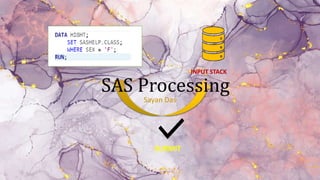
SAS Processing
Sayan Das
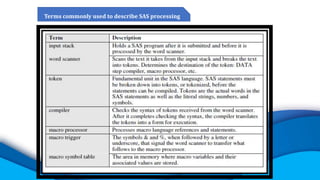
Terms commonly used to describe SAS processing
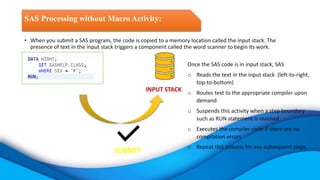
• When you submit a SAS program, the code is copied to a memory location called the input stack. The
presence of text in the input stack triggers a component called the word scanner to begin its work.
SAS Processing without Macro Activity:
SUBMIT
INPUT STACK
Once the SAS code is in input stack, SAS
o Reads the text in the input stack (left-to-right,
top-to-bottom)
o Routes text to the appropriate compiler upon
demand
o Suspends this activity when a step boundary
such as RUN statement is reached
o Executes the compiler code if there are no
compilation errors
o Repeat this process for any subsequent steps
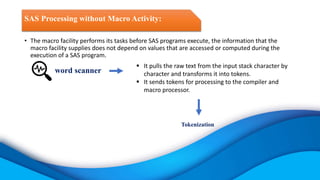
• The macro facility performs its tasks before SAS programs execute, the information that the
macro facility supplies does not depend on values that are accessed or computed during the
execution of a SAS program.
SAS Processing without Macro Activity:
word scanner
 It pulls the raw text from the input stack character by
character and transforms it into tokens.
 It sends tokens for processing to the compiler and
macro processor.
Tokenization
SAS Processing without Macro Activity:
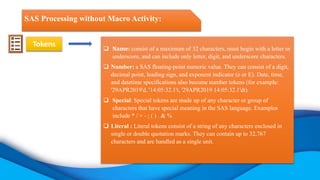
Tokens
 Name: consist of a maximum of 32 characters, must begin with a letter or
underscore, and can include only letter, digit, and underscore characters.
 Number: a SAS floating-point numeric value. They can consist of a digit,
decimal point, leading sign, and exponent indicator (e or E). Date, time,
and datetime specifications also become number tokens (for example:
'29APR2019'd, '14:05:32.1't, '29APR2019 14:05:32.1'dt).
 Special: Special tokens are made up of any character or group of
characters that have special meaning in the SAS language. Examples
include * / + - ; ( ) . & %
 Literal : Literal tokens consist of a string of any characters enclosed in
single or double quotation marks. They can contain up to 32,767
characters and are handled as a single unit.
SAS Processing without Macro Activity:
Tokenization:
INPUT STACK
WORD SCANNER
COMPILER
SAS Processing without Macro Activity:
Tokenization:
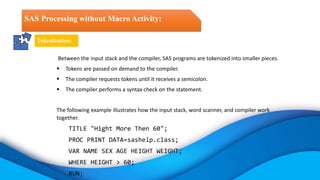
Between the input stack and the compiler, SAS programs are tokenized into smaller pieces.
 Tokens are passed on demand to the compiler.
 The compiler requests tokens until it receives a semicolon.
 The compiler performs a syntax check on the statement.
The following example illustrates how the input stack, word scanner, and compiler work
together.
TITLE "Hight More Then 60";
PROC PRINT DATA=sashelp.class;
VAR NAME SEX AGE HEIGHT WEIGHT;
WHERE HEIGHT > 60;
RUN;
Tokenization:
TITLE "Hight More Then 60";
PROC PRINT DATA=sashelp.class noobs;
VAR NAME SEX AGE HEIGHT WEIGHT;
WHERE HEIGHT > 60;
RUN;
INPUT STACK
WORD SCANNER
COMPILER
When the code is copied to the input stack, the word scanner retrieves one character at a time until it
reaches the first delimiter, a blank. When TITLE is recognized as a name token, the word scanner tags it and
passes it to the compiler.
Tokenization:
"Hight More Then 60";
PROC PRINT DATA=sashelp.class noobs;
VAR NAME SEX AGE HEIGHT WEIGHT;
WHERE HEIGHT > 60;
RUN;
INPUT STACK
Literal “
WORD SCANNER
Title
COMPILER
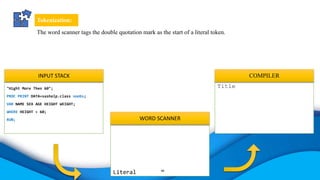
The word scanner tags the double quotation mark as the start of a literal token.
Tokenization:
;
PROC PRINT DATA=sashelp.class noobs;
VAR NAME SEX AGE HEIGHT WEIGHT;
WHERE HEIGHT > 60;
RUN;
INPUT STACK
Literal Start “
Name Hight
Name More
Name then
Number 60
Literal End ”
WORD SCANNER
Title
COMPILER
When the code is copied to the input stack, the word scanner retrieves one character at a time until it
reaches the first delimiter, a blank. When TITLE is recognized as a name token, the word scanner tags it and
passes it to the compiler.
Tokenization:
;
PROC PRINT DATA=sashelp.class noobs;
VAR NAME SEX AGE HEIGHT WEIGHT;
WHERE HEIGHT > 60;
RUN;
INPUT STACK
Spacial ;
WORD SCANNER
Title “Hight More Then 60“
COMPILER
It then retrieves, tokenizes, and holds additional text until it retrieves another double quotation mark. It passes
the text as a single literal token to the compiler, and then tokenization continues. The semicolon is a special
token, and the end-of-line character is a delimiter.
Tokenization:
INPUT STACK
WORD SCANNER
Title “Hight More Then 60“;
PROC PRINT DATA=sashelp.class
noobs;
VAR NAME SEX AGE HEIGHT WEIGHT;
WHERE HEIGHT > 60;
RUN;
COMPILER
• The semicolon is sent to the compiler, ending the TITLE statement. The compiler checks the syntax, and
because TITLE is a global statement, it is executed immediately. The tokenization process continues with
the PROC PRINT step. The compiler performs a syntax check at the end of each statement.
• The code executes when it encounters a step boundary, in this case the RUN statement.
execute
Processing a SAS Program with Macro Language:
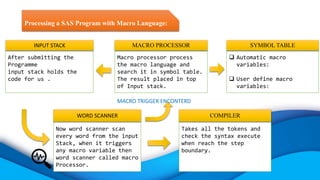
After submitting the
Programme
input stack holds the
code for us .
INPUT STACK
Now word scanner scan
every word from the input
Stack, when it triggers
any macro variable then
word scanner called macro
Processor.
WORD SCANNER
Takes all the tokens and
check the syntax execute
when reach the step
boundary.
COMPILER
Macro processor process
the macro language and
search it in symbol table.
The result placed in top
of Input stack.
MACRO PROCESSOR
 Automatic macro
variables:
 User define macro
variables:
SYMBOL TABLE
MACRO TRIGGER ENCONTERD
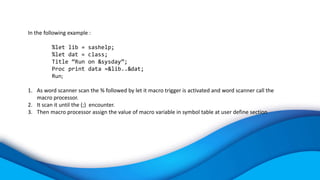
In the following example :
%let lib = sashelp;
%let dat = class;
Title “Run on &sysday”;
Proc print data =&lib..&dat;
Run;
1. As word scanner scan the % followed by let it macro trigger is activated and word scanner call the
macro processor.
2. It scan it until the (;) encounter.
3. Then macro processor assign the value of macro variable in symbol table at user define section
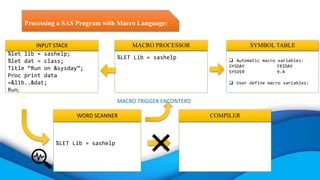
Processing a SAS Program with Macro Language:
%let lib = sashelp;
%let dat = class;
Title “Run on &sysday”;
Proc print data
=&lib..&dat;
Run;
INPUT STACK
%LET Lib = sashelp
WORD SCANNER COMPILER
%LET Lib = sashelp
MACRO PROCESSOR
 Automatic macro variables:
SYSDAY FRIDAY
SYSVER 9.4
 User define macro variables:
SYMBOL TABLE
MACRO TRIGGER ENCONTERD
Processing a SAS Program with Macro Language:
Title “Run on &sysday”;
Proc print data
=&lib..&dat;
Run;
INPUT STACK
%let dat = class;
WORD SCANNER COMPILER
%let dat = class;
MACRO PROCESSOR
 Automatic macro variables:
SYSDAY FRIDAY
SYSVER 9.4
 User define macro variables:
LIB sashelp
Dat class
SYMBOL TABLE
MACRO TRIGGER ENCONTERD
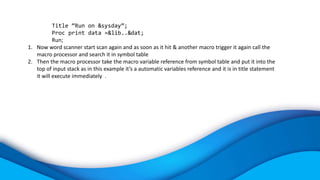
Title “Run on &sysday”;
Proc print data =&lib..&dat;
Run;
1. Now word scanner start scan again and as soon as it hit & another macro trigger it again call the
macro processor and search it in symbol table
2. Then the macro processor take the macro variable reference from symbol table and put it into the
top of input stack as in this example it’s a automatic variables reference and it is in title statement
it will execute immediately .
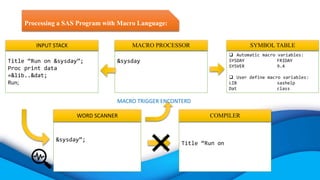
Processing a SAS Program with Macro Language:
Title “Run on &sysday”;
Proc print data
=&lib..&dat;
Run;
INPUT STACK
&sysday”;
WORD SCANNER
Title “Run on
COMPILER
&sysday
MACRO PROCESSOR
 Automatic macro variables:
SYSDAY FRIDAY
SYSVER 9.4
 User define macro variables:
LIB sashelp
Dat class
SYMBOL TABLE
MACRO TRIGGER ENCONTERD
Processing a SAS Program with Macro Language:
friday”;
Proc print data
=&lib..&dat;
Run;
INPUT STACK
friday”;
WORD SCANNER
Title “Run on friday”;
COMPILER
&sysday
MACRO PROCESSOR
 Automatic macro variables:
SYSDAY FRIDAY
SYSVER 9.4
 User define macro variables:
LIB sashelp
Dat class
SYMBOL TABLE
MACRO TRIGGER ENCONTERD
Proc print data =&lib..&dat;
Run;
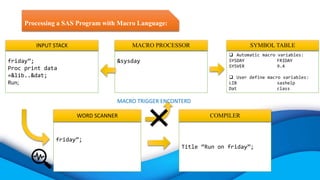
1. Now word scanner start scan again and as soon as it hit & another macro trigger it again call the
macro processor and search it in symbol table.
2. Then the macro processor take the macro variable reference from symbol table and put it into the
top of input stack.
3. Again the word scanner scan it until it hit (;).
After resolving :
Proc print data=Sashelp.class;
Run;
Processing a SAS Program with Macro Language:
Proc print data
=&lib..&dat;
Run;
INPUT STACK
&lib..&dat;
WORD SCANNER
Title “Run on Friday”;
Proc print data=
COMPILER
&lib..&dat;
MACRO PROCESSOR
 Automatic macro variables:
SYSDAY FRIDAY
SYSVER 9.4
 User define macro variables:
LIB sashelp
Dat class
SYMBOL TABLE
MACRO TRIGGER ENCONTERD
Processing a SAS Program with Macro Language:
Sashelp.class;
Run;
INPUT STACK
Sashelp.class;
WORD SCANNER
Title “Run on Friday”;
Proc print data=Sashelp.class;
COMPILER
&lib..&dat
MACRO PROCESSOR
 Automatic macro variables:
SYSDAY FRIDAY
SYSVER 9.4
 User define macro variables:
LIB sashelp
Dat class
SYMBOL TABLE
MACRO TRIGGER ENCONTERD
Run;
1. Now word scanner start scan again and as soon as it hit the step boundary it will execute.
Processing a SAS Program with Macro Language:
INPUT STACK
Run;
WORD SCANNER
Title “Run on Friday”;
Proc print data=Sashelp.class;
Run;
COMPILER
MACRO PROCESSOR
 Automatic macro variables:
SYSDAY FRIDAY
SYSVER 9.4
 User define macro variables:
LIB sashelp
Dat class
SYMBOL TABLE
MACRO TRIGGER ENCONTERD
execute
THANK
YOU!

SAS macro processing vs with out macro processing

  • 1.
  • 2.
    Terms commonly usedto describe SAS processing
  • 3.
    • When yousubmit a SAS program, the code is copied to a memory location called the input stack. The presence of text in the input stack triggers a component called the word scanner to begin its work. SAS Processing without Macro Activity: SUBMIT INPUT STACK Once the SAS code is in input stack, SAS o Reads the text in the input stack (left-to-right, top-to-bottom) o Routes text to the appropriate compiler upon demand o Suspends this activity when a step boundary such as RUN statement is reached o Executes the compiler code if there are no compilation errors o Repeat this process for any subsequent steps
  • 4.
    • The macrofacility performs its tasks before SAS programs execute, the information that the macro facility supplies does not depend on values that are accessed or computed during the execution of a SAS program. SAS Processing without Macro Activity: word scanner  It pulls the raw text from the input stack character by character and transforms it into tokens.  It sends tokens for processing to the compiler and macro processor. Tokenization
  • 5.
    SAS Processing withoutMacro Activity: Tokens  Name: consist of a maximum of 32 characters, must begin with a letter or underscore, and can include only letter, digit, and underscore characters.  Number: a SAS floating-point numeric value. They can consist of a digit, decimal point, leading sign, and exponent indicator (e or E). Date, time, and datetime specifications also become number tokens (for example: '29APR2019'd, '14:05:32.1't, '29APR2019 14:05:32.1'dt).  Special: Special tokens are made up of any character or group of characters that have special meaning in the SAS language. Examples include * / + - ; ( ) . & %  Literal : Literal tokens consist of a string of any characters enclosed in single or double quotation marks. They can contain up to 32,767 characters and are handled as a single unit.
  • 6.
    SAS Processing withoutMacro Activity: Tokenization: INPUT STACK WORD SCANNER COMPILER
  • 7.
    SAS Processing withoutMacro Activity: Tokenization: Between the input stack and the compiler, SAS programs are tokenized into smaller pieces.  Tokens are passed on demand to the compiler.  The compiler requests tokens until it receives a semicolon.  The compiler performs a syntax check on the statement. The following example illustrates how the input stack, word scanner, and compiler work together. TITLE "Hight More Then 60"; PROC PRINT DATA=sashelp.class; VAR NAME SEX AGE HEIGHT WEIGHT; WHERE HEIGHT > 60; RUN;
  • 8.
    Tokenization: TITLE "Hight MoreThen 60"; PROC PRINT DATA=sashelp.class noobs; VAR NAME SEX AGE HEIGHT WEIGHT; WHERE HEIGHT > 60; RUN; INPUT STACK WORD SCANNER COMPILER When the code is copied to the input stack, the word scanner retrieves one character at a time until it reaches the first delimiter, a blank. When TITLE is recognized as a name token, the word scanner tags it and passes it to the compiler.
  • 9.
    Tokenization: "Hight More Then60"; PROC PRINT DATA=sashelp.class noobs; VAR NAME SEX AGE HEIGHT WEIGHT; WHERE HEIGHT > 60; RUN; INPUT STACK Literal “ WORD SCANNER Title COMPILER The word scanner tags the double quotation mark as the start of a literal token.
  • 10.
    Tokenization: ; PROC PRINT DATA=sashelp.classnoobs; VAR NAME SEX AGE HEIGHT WEIGHT; WHERE HEIGHT > 60; RUN; INPUT STACK Literal Start “ Name Hight Name More Name then Number 60 Literal End ” WORD SCANNER Title COMPILER When the code is copied to the input stack, the word scanner retrieves one character at a time until it reaches the first delimiter, a blank. When TITLE is recognized as a name token, the word scanner tags it and passes it to the compiler.
  • 11.
    Tokenization: ; PROC PRINT DATA=sashelp.classnoobs; VAR NAME SEX AGE HEIGHT WEIGHT; WHERE HEIGHT > 60; RUN; INPUT STACK Spacial ; WORD SCANNER Title “Hight More Then 60“ COMPILER It then retrieves, tokenizes, and holds additional text until it retrieves another double quotation mark. It passes the text as a single literal token to the compiler, and then tokenization continues. The semicolon is a special token, and the end-of-line character is a delimiter.
  • 12.
    Tokenization: INPUT STACK WORD SCANNER Title“Hight More Then 60“; PROC PRINT DATA=sashelp.class noobs; VAR NAME SEX AGE HEIGHT WEIGHT; WHERE HEIGHT > 60; RUN; COMPILER • The semicolon is sent to the compiler, ending the TITLE statement. The compiler checks the syntax, and because TITLE is a global statement, it is executed immediately. The tokenization process continues with the PROC PRINT step. The compiler performs a syntax check at the end of each statement. • The code executes when it encounters a step boundary, in this case the RUN statement. execute
  • 13.
    Processing a SASProgram with Macro Language: After submitting the Programme input stack holds the code for us . INPUT STACK Now word scanner scan every word from the input Stack, when it triggers any macro variable then word scanner called macro Processor. WORD SCANNER Takes all the tokens and check the syntax execute when reach the step boundary. COMPILER Macro processor process the macro language and search it in symbol table. The result placed in top of Input stack. MACRO PROCESSOR  Automatic macro variables:  User define macro variables: SYMBOL TABLE MACRO TRIGGER ENCONTERD
  • 14.
    In the followingexample : %let lib = sashelp; %let dat = class; Title “Run on &sysday”; Proc print data =&lib..&dat; Run; 1. As word scanner scan the % followed by let it macro trigger is activated and word scanner call the macro processor. 2. It scan it until the (;) encounter. 3. Then macro processor assign the value of macro variable in symbol table at user define section
  • 15.
    Processing a SASProgram with Macro Language: %let lib = sashelp; %let dat = class; Title “Run on &sysday”; Proc print data =&lib..&dat; Run; INPUT STACK %LET Lib = sashelp WORD SCANNER COMPILER %LET Lib = sashelp MACRO PROCESSOR  Automatic macro variables: SYSDAY FRIDAY SYSVER 9.4  User define macro variables: SYMBOL TABLE MACRO TRIGGER ENCONTERD
  • 16.
    Processing a SASProgram with Macro Language: Title “Run on &sysday”; Proc print data =&lib..&dat; Run; INPUT STACK %let dat = class; WORD SCANNER COMPILER %let dat = class; MACRO PROCESSOR  Automatic macro variables: SYSDAY FRIDAY SYSVER 9.4  User define macro variables: LIB sashelp Dat class SYMBOL TABLE MACRO TRIGGER ENCONTERD
  • 17.
    Title “Run on&sysday”; Proc print data =&lib..&dat; Run; 1. Now word scanner start scan again and as soon as it hit & another macro trigger it again call the macro processor and search it in symbol table 2. Then the macro processor take the macro variable reference from symbol table and put it into the top of input stack as in this example it’s a automatic variables reference and it is in title statement it will execute immediately .
  • 18.
    Processing a SASProgram with Macro Language: Title “Run on &sysday”; Proc print data =&lib..&dat; Run; INPUT STACK &sysday”; WORD SCANNER Title “Run on COMPILER &sysday MACRO PROCESSOR  Automatic macro variables: SYSDAY FRIDAY SYSVER 9.4  User define macro variables: LIB sashelp Dat class SYMBOL TABLE MACRO TRIGGER ENCONTERD
  • 19.
    Processing a SASProgram with Macro Language: friday”; Proc print data =&lib..&dat; Run; INPUT STACK friday”; WORD SCANNER Title “Run on friday”; COMPILER &sysday MACRO PROCESSOR  Automatic macro variables: SYSDAY FRIDAY SYSVER 9.4  User define macro variables: LIB sashelp Dat class SYMBOL TABLE MACRO TRIGGER ENCONTERD
  • 20.
    Proc print data=&lib..&dat; Run; 1. Now word scanner start scan again and as soon as it hit & another macro trigger it again call the macro processor and search it in symbol table. 2. Then the macro processor take the macro variable reference from symbol table and put it into the top of input stack. 3. Again the word scanner scan it until it hit (;). After resolving : Proc print data=Sashelp.class; Run;
  • 21.
    Processing a SASProgram with Macro Language: Proc print data =&lib..&dat; Run; INPUT STACK &lib..&dat; WORD SCANNER Title “Run on Friday”; Proc print data= COMPILER &lib..&dat; MACRO PROCESSOR  Automatic macro variables: SYSDAY FRIDAY SYSVER 9.4  User define macro variables: LIB sashelp Dat class SYMBOL TABLE MACRO TRIGGER ENCONTERD
  • 22.
    Processing a SASProgram with Macro Language: Sashelp.class; Run; INPUT STACK Sashelp.class; WORD SCANNER Title “Run on Friday”; Proc print data=Sashelp.class; COMPILER &lib..&dat MACRO PROCESSOR  Automatic macro variables: SYSDAY FRIDAY SYSVER 9.4  User define macro variables: LIB sashelp Dat class SYMBOL TABLE MACRO TRIGGER ENCONTERD
  • 23.
    Run; 1. Now wordscanner start scan again and as soon as it hit the step boundary it will execute.
  • 24.
    Processing a SASProgram with Macro Language: INPUT STACK Run; WORD SCANNER Title “Run on Friday”; Proc print data=Sashelp.class; Run; COMPILER MACRO PROCESSOR  Automatic macro variables: SYSDAY FRIDAY SYSVER 9.4  User define macro variables: LIB sashelp Dat class SYMBOL TABLE MACRO TRIGGER ENCONTERD execute
  • 25.