2014
Judonne Greham
Contractor, Maryland Department of
Transportation (MDOT)
4/30/2014
Business Requirements Document (BRD)
Capital Program Management System (CPMS)
CPMS
Business Requirements Document (BRD)
pg. 1
Document Revision History
Document Version – Date Description of Revisions
04/29/2014 1st Draft
04/30/2014 2nd Draft updated with new requirements, and MDOT
feedback.
Contributors to this Document
Contributor Name Department - Role
Judonne Greham MDOT Office of Planning & Capital Programming – Contract Business Analyst
Dan Favarulo MDOT Office of Planning & Capital Programming – Project Manager
Bill Appold MDOT Office of Planning & Capital Programming – Project Owner
Brian Martin MDOT Office of Planning & Capital Programming – Project Owner
Robert DiPietro MDOT Office of Planning & Capital Programming – Subject Matter Expert
Andrea Anderson MDOT Office of Planning & Capital Programming – Subject Matter Expert
Jerry Navratil Contract Lead Developer
Kerri Griffin Contract Developer
Don Sellner MDOT Finance - Subject Matter Expert
Michael Mikolajczyk MDOT Finance - Subject Matter Expert
Brenda Cachuela MDOT Audit - Subject Matter Expert
Tony Moore Maryland Port Administration (MPA) - Subject Matter Expert
Merrilyn Williams Maryland Aviation Administration (MAA) - Subject Matter Expert
Suhair Alkhatib Maryland Transportation Authority (MDTA) - Subject Matter Expert
Felicia Alexander Maryland State Highway Administration (SHA) - Subject Matter Expert
Paul Wenck Maryland State Highway Administration (SHA) - Subject Matter Expert
Perry Smith Maryland State Highway Administration (SHA) - Subject Matter Expert
Brian Wilbur Maryland State Highway Administration (SHA) - Subject Matter Expert
Holly Arnold Maryland Transit Administration (MTA) – Subject Matter Expert
Mike Helta Maryland Transit Administration (MTA) – Subject Matter Expert
Tim Herman Maryland Motor Vehicle Administration (MVA) - Subject Matter Expert
Cristin Tolen Washington Metropolitan Area Transit Authority (WMATA) - Subject Matter Expert
Jonathan Martin Maryland Department of Legislative Services (DLS) - Subject Matter Expert
Steve McCulloch Maryland Department of Legislative Services (DLS) - Subject Matter Expert
CPMS
Business Requirements Document (BRD)
pg. 2
Acronyms / Definitions
Term Description
Consolidated Transportation Program (CTP) Maryland's six-year capital budget for transportation projects.
The CTP contains projects and programs across the Department,
including the Maryland Aviation Administration, the Motor
Vehicle Administration, the Maryland Transit Administration,
the Washington Metropolitan Area Transit Authority, the
Maryland State Highway Administration, the Maryland Port
Administration, and the Maryland Transportation Authority.
Comprehensive Work Schedule (CWS) The quarterly reporting process administered by MDOT’s Office
of Capital Planning and Programming to monitor and approve
state transportation capital projects and programs.
CWS Worksheet Briefing document compiled in Microsoft Excel used by the
Office of Planning and Capital Programming to illustrate
quarterly capital cash flow changes and reasons for those
changes.
Financial Management Information System
(FMIS)
MDOT’s financial management system used by MVA, SHA, MPA,
MAA, and MTA.
Maryland Aviation Administration (MAA) Modal administration within MDOT that operates
Baltimore/Washington International Thurgood Marshall Airport
(BWI Marshall) and Martin State Airport as well as provides
grant funding to regional airports.
Maryland Department of Transportation
(MDOT)
State department that has direct coordination and oversight of
all modes of transportation in Maryland.
Maryland Port Administration (MPA) Modal administration within MDOT that is responsible for the
operation of various public marine terminals in Baltimore as well
as promotes the Port of Baltimore as a leading hub for cargo and
for cruise activity.
Maryland Transit Administration (MTA) Modal administration within MDOT that is responsible for
providing local and regional public transit services on bus and
rail, as well as grant funding and technical assistance to Locally-
Operated Transit Systems (LOTS) across Maryland.
Motor Vehicle Administration (MVA) Is a modal administration within MDOT that provides services
for drivers and vehicles in Maryland, including registration and
licensing.
Maryland Transportation Authority (MDTA) Independent agency responsible for operating and maintaining
the State’s eight toll facilities. The MDOT Secretary serves as
Chairman of the MDTA.
Solomon Maryland Transportation Authority (MDTA)’s financial
management system. This system is used solely by MDTA.
State Highway Administration (SHA) Modal administration within MDOT that is responsible for
managing the State’s highway system.
Washington Metropolitan Area Transit
Authority (WMATA)
Independent transportation agency responsible for operating
Metrorail and Metrobus in the Washington Metropolitan Area.
MDOT supports WMATA through annual operating grants in
accordance with the interstate compact.
CPMS
Business Requirements Document (BRD)
pg. 3
Table of Contents
1.0 MANAGEMENT SUMMARY...............................................................................................................5
1.1 Objectives to be Met.....................................................................................................................6
1.2 Functional Capabilities to be Addressed.......................................................................................6
1.3 Organizational Areas Affected ......................................................................................................6
1.4 Reason for Project & Project Methodology..................................................................................6
2.0 STAKEHOLDERS .................................................................................................................................8
3.0 RISK ASSESSMENT.............................................................................................................................9
4.0 ASSUMPTIONS ..................................................................................................................................9
5.0 STATEMENT OF BUSINESS REQUIREMENTS......................................................................................9
5.1 Background ...................................................................................................................................9
5.2 Current Environment ..................................................................................................................10
5.2.1 Transportation Mode CWS, Draft CTP & Final CTP Preparation.............................................12
5.2.1.1 MPA General Process & Sub Process Identification................................................................12
5.2.1.2 MAA General Processes & Sub Process Identification............................................................14
5.2.1.3 MDTA General Processes & Sub Process Identification..........................................................16
5.2.1.4 SHA General Processes & Sub Process Identification .............................................................19
5.2.1.5 MTA General Processes & Sub Process Identification............................................................22
5.2.1.6 MVA General Processes & Sub Process Identification............................................................24
5.2.1.7 WMATA General Processes & Sub Process Identification ......................................................27
5.2.1.8 TSO General Processes & Sub Process Identification .............................................................28
5.2.1.9 MDOT HQ General Processes & Sub Process Identification ...................................................29
5.3 Relevant Business Problems .......................................................................................................31
5.4 Major Functions and Capabilities Required................................................................................32
5.5 Impact to Other Systems and / or Processes..............................................................................32
5.6 Limitations, Constraints, and / or Dependencies........................................................................34
5.7 Definition of Completion ............................................................................................................34
6.0 SCOPE..............................................................................................................................................34
6.1 Specific Functional Capabilities to be Addressed .......................................................................34
6.1.1 Statement of Business Requirements.....................................................................................34
6.2 Options to Satisfy Requirements ................................................................................................43
6.3 Other Options Considered ..........................................................................................................45
CPMS
Business Requirements Document (BRD)
pg. 4
7.0 IMAPCT URGENCY...........................................................................................................................45
8.0 RESOURCES .....................................................................................................................................45
9.0 APPROVALS .....................................................................................................................................46
CPMS
Business Requirements Document (BRD)
pg. 5
1.0 MANAGEMENT SUMMARY
The Maryland Department of Transportation (MDOT HQ) is responsible for the management of the state
transportation capital program funding across various modal administrations. MDOT HQ and the
various modal administrations currently use the Capital Program Management System (CPMS) to
manage and report their capital program.
CPMS is a series of Microsoft Access databases consisting of SQL statements and macros that control
calculations, queries, reports, and other functionality. MDOT HQ is responsible for the management of
CPMS through a maintenance contract with Computer Sciences Corporation (CSC). MDOT HQ inputs
data and extracts data from CPMS to compile quarterly reports. Each quarter a Comprehensive Work
Schedule (CWS) document is prepared. The 1st
quarter a draft Consolidated Transportation Program
(CTP) report is created and the 3rd
quarter a final Consolidated Transportation Program (CTP) report is
created from data provided from each transportation mode.
The following modal administrations are represented in the CWS, draft CTP, and final CTP:
Maryland Port Administration (MPA)
Maryland Aviation Administration (MAA)
Maryland Transportation Authority (MDTA)
Maryland State Highway Administration (SHA)
Maryland Transit Administration (MTA)
Maryland Motor Vehicle Administration (MVA)
Washington Metropolitan Area Transit Authority (WMATA)
Transportation Secretary’s Office (TSO)
The modes provide MDOT HQ with data that is used in the creation of the CWS, draft CTP, and the final
CTP. Additionally, many modes use CPMS for the day-to-day management of their capital program to
monitor and track project cash flow, status, and schedules.
CPMS was created by contract developers associated with Computer Sciences Corporation (CSC). The
original intent of CPMS was to:
 Manage project data and schedules
 Develop the draft CTP and final CTP
 Create the quarterly CWS
 Perform quarterly Federal Aid assumption analysis
 Forecast project cash flows
 Move data to and from other non-CPMS systems
Each mode is assigned a Microsoft Access Database and related utilities. The mode is responsible to
input project data and cash flow information into the database each quarter. The mode saves the data
and provides MDOT HQ with a copy of the saved database file. MDOT HQ manually uploads the
database file into the MDOT HQ CPMS Application (access database). MDOT HQ reviews the mode
information and creates a CWS, a draft CTP, and / or a final CTP.
CPMS
Business Requirements Document (BRD)
pg. 6
1.1 Objectives to be Met
 Describe CPMS current state
 List future CPMS business requirements
 Propose solution(s) to replace existing system
1.2 Functional Capabilities to be Addressed
 Business Use Current State
 Future Business Requirements
1.3 Organizational Areas Affected
Maryland Department of Transportation (MDOT) Office of Planning & Capital Programming
Maryland Department of Transportation (MDOT) Finance
Maryland Department of Transportation (MDOT) Audit
Maryland Port Administration (MPA)
Maryland Aviation Administration (MAA)
Maryland Transportation Authority (MDTA)
Maryland State Highway Administration (SHA)
Maryland Transit Administration (MTA)
Maryland Motor Vehicle Administration (MVA)
Washington Metropolitan Area Transit Authority (WMATA)
Transportation Secretary’s Office (TSO)
Maryland Department of Legislative Services (DLS)
1.4 Reason for Project & Project Methodology
CPMS was originally developed in the early 2000’s. Recent years various modifications and upgrades
have provided temporary solutions to the growing need for a more robust and modern platform to
manage the transportation capital program. MDOT is experiencing various technical glitches due to
Microsoft Access software upgrades. Additionally, MDOT experienced difficulty finding contract support
to maintain this legacy system. These growing issues have compromised the functionality and reliability
of the system.
Initially, a case study was requested. The case study was to explore in detail the current CPMS
environment and based on findings suggest possible strategies to either retain the current system,
modify the current system, and / or replace the current system. MDOT engaged Infojini (contractor) to
provide a business analyst to create a case study.
At the start of the project, MDOT HQ leadership determined that a case study was not needed to
explore the current CPMS environment. MDOT HQ leadership reasoned they already understood that
retaining or modifying the current system would not be viable solutions. This reasoning was explained
because Microsoft Access was already determined to be an inadequate structure for their ongoing and
future needs. MDOT HQ leadership and the contractor agreed to modify the project deliverable from a
case study to a Business Requirements Document (BRD).
CPMS
Business Requirements Document (BRD)
pg. 7
A BRD provides each stakeholder the opportunity to indicate how they currently use CPMS. The BRD
captures future system requirements suggested by stakeholders. The CPMS BRD will provide future
analysts, project managers, and developers with a path to follow when organizing development efforts.
The contractor used the following strategies to create the CPMS BRD and communicate project updates:
 Researched existing systems
 Researched possible vendors
 Reviewed existing CPMS documentation
 Reviewed current CPMS functionality
 Arranged meetings to document stakeholder current CPMS usage
 Arranged meetings to document stakeholder future CPMS business requirements
 Provided CPMS project owners with weekly project updates
 Facilitated formal and informal project update meetings
Before the end of the project MDOT HQ requested the contractor to add case study elements into the
CPMS BRD. The final deliverable is a hybrid document that provides some case study elements and BRD
elements.
The contractor suggests government organizations who consider new system development use the
following steps:
1. Conduct internal formal and informal information gathering / sharing discussions regarding the
current system
2. Perform business process modeling efforts for those areas / individuals who contribute to the
current system and / or depend on information from the current system
3. Engage Procurement to determine appropriate vehicles for any anticipated vendor engagement
if internal skill set is not available
4. Conduct a formal case study and / or formal needs analysis
5. Create a BRD written with a development audience in mind that captures the current state and
captures future business requirements (the document should focus on what the business would
like the new system to do not how the system should do it)
6. Send the BRD out to external vendors and to internal IT groups for request for information and /
or request for quote (the deliverable should indicate what technologies the organization will use
to develop the new system and general costs estimates that include when appropriate,
hardware, software, server(s), customized development, project oversight, etc.)
7. If appropriate send out for request for proposal requesting awarded vendor to provide the
following deliverables: functional requirements document, technical specifications document,
system development, periodic system demo’s, system technical QA, system User Acceptance
Testing, system roll out to production plan, system documentation, user system training
materials, and if appropriate system maintenance plan
CPMS
Business Requirements Document (BRD)
pg. 8
2.0 STAKEHOLDERS
Stakeholder Participants
Maryland Department of Transportation (MDOT) Office of Planning &
Capital Programming
Brian Martin, Assistant Director
William Appold, Manager, Consolidated Transportation
Program
Andrea Anderson, Capital Program Analyst
Robert DiPietro, Capital Program Analyst
Dan Favarulo, Capital Program Analyst
Contract Developers Jerry Navratil
Kerri Griffin
Maryland Department of Transportation (MDOT) Finance Don Sellner, Policy Analyst
Michael Mikolajczyk, Policy Analyst
Maryland Department of Transportation (MDOT) Audit Brenda Cachuela, Director, MDOT Office of Audits
Maryland Port Administration (MPA) Tony Moore
Special Assistant , Office of Capital Planning
Maryland Aviation Administration (MAA) Merrilyn Williams
Director, Office of Capital Programs
Maryland Transportation Authority (MDTA) Suhair Alkhatib
Capital Program Manager, Division of Capital Planning
Maryland State Highway Administration (SHA) Felicia Alexander, Office of Planning & Preliminary
Engineering
Paul Wenck, Office of Planning & Preliminary
Engineering
Perry Smith, Program Development
Brian Wilbur, Program Development
Maryland Transit Administration (MTA) Holly Arnold, Manager, Office of Capital Programming
Mike Helta, Chief, Office of Capital Programming
Maryland Motor Vehicle Administration (MVA) Tim Herman, Senior Planner, Office of Planning &
Programming
Washington Metropolitan Area Transit Authority (WMATA) Cristin Tolen, Acting Director, Washington Area Transit
Programs
Transportation Secretary’s Office (TSO) Dan Favarulo, Capital Program Analyst
Maryland Department of Legislative Services (DLS) Jonathan Martin, Policy Analyst
Steve McCulloch, Policy Analyst
CPMS
Business Requirements Document (BRD)
pg. 9
3.0 RISK ASSESSMENT
The Department of Transportation Secretary’s Office Audit Report dated November 2012 cited the
following CPMS risks:
 MDOT had not established adequate procedures to verify the accuracy of expenditure and
estimated cost data recorded in CPMS by MDOT’s modals to help ensure the reliability of data
used for decision making purposes.
 Access to CPMS was not adequately documented or monitored as there was no formal process
for documenting user access requests and approvals.
The contractor, MDOT Audit, and MDOT HQ indicate the following risks:
 Maryland Department of Transportation (MDOT) Office of Planning & Capital Programming
(OPCP) inexperience in the management of IT system contracts. OPCP is a transportation
planning and programming office and lacks the necessary expertise to continue the
management of IT systems.
 CPMS is not integrated into MDOT HQ systems or modal administration systems. As a result,
there is often conflicting capital program information between the modal databases, the various
MDOT CPMS modules, and other financial systems.
4.0 ASSUMPTIONS
Section 6.1.1 Statement of Business Requirements contains duplicate business requirements under the
‘Business Requirements Detail’ area. Many of the modal administrations and MDOT HQ suggested
similar business requirements.
5.0 STATEMENT OF BUSINESS REQUIREMENTS
5.1 Background
Computer Sciences Corporation (CSC) created CPMS for the Maryland Department of Transportation
(MDOT) Office of Planning & Capital Programming. CSC developed CPMS to:
 Manage project data and schedules
 Develop the draft CTP and final CTP
 Create the quarterly CWS
 Perform quarterly Federal Aid assumption analysis
 Forecast project cash flows
 Move date to and from other non-CPMS systems
CSC provides system maintenance and programs new system updates. MDOT and each mode has the
ability to request CSC to perform system fixes and upgrades.
CSC defined CPMS as a core system with customized subsystems.
CPMS
Business Requirements Document (BRD)
pg. 10
Name Core Subsystem Description / Function
CPMS Application X A customizable mode specific Microsoft Access Database.
Allows user direct input into the database through a series
of Microsoft Access custom built input areas (forms).
CPMS Version
Update Utility
X A Microsoft Access Database Macro. Allows user to run a
manual macro that retrieves the latest version of the CPMS
Application that resides on a shared / network server.
Ad Hoc Reporting
Database
X A Microsoft Access Database series of open queries and
reports. Allows user to query and / or pull Microsoft
Access Reports from database tables found in the CPMS
Application.
Quarterly
Snapshot
X A Microsoft Access Database series of defined queries /
reports. Allows user to pull and save a Microsoft Access
Report specific to a defined time period.
Analyze X A Microsoft Access Database defined query / reporting
tool. Allows user to query and / or pull Microsoft Access
Reports from database tables found in the CPMS
Application with defined formulas / calculations applied.
Initially, CSC created 4 distinct CPMS modules and describes them in the following manner:
MDOT CPMS - consists of 1 Headquarters CPMS application, 1 version update utility, and 1 Ad Hoc
subsystem.
MTA CPMS – consists of 1 MTA CPMS application, 1 version update utility, 1 Ad Hoc subsystem, 1
quarterly snapshot subsystem, 1 analyze subsystem, and 1 import FA subsystem.
SHA CPMS – consists of 1 SHA CPMS application, 1 version update utility, 1 Ad Hoc subsystem.
Generic CPMS – consists of 1 generic CPMS application, 1 version update utility, 1 Ad Hoc subsystem, 1
quarterly snapshot subsystem.
CSC created the Generic CPMS application for use by all modes except MTA and SHA. Generic CPMS
versions were later transitioned into specific CPMS modules for MDTA, and MVA.
CSC created and describes these updated generic CPMS modules in the following manner:
MDTA – consists of 1 generic CPMS application, 1 generic version update utility, 1 customized Ad Hoc
subsystem, 1 generic quarterly snapshot subsystem.
MVA - consists of 1 generic CPMS application, 1 generic CPMS application used for CTIPP data, 1 generic
version update utility, 1 generic Ad Hoc subsystem, 1 generic quarterly snapshot subsystem.
5.2 Current Environment
CPMS is a data input and reporting tool. However, many transportation modes use CPMS for the day-to-
day management of their capital program to monitor and track project status and schedules.
Currently, each modal administration (except WMATA) is assigned a CPMS Module. Each mode is
responsible to input project data and cash flow information into their CPMS Application (access
CPMS
Business Requirements Document (BRD)
pg. 11
database) each quarter. The mode saves their data and then manually provides MDOT HQ with a copy
of the saved database file. MDOT HQ manually uploads the database file into the MDOT HQ CPMS
Application (access database).
Depending on the quarter, MDOT HQ prepares the following:
 A quarterly Comprehensive Work Schedule (CWS) document
 A 1st
quarter draft Consolidated Transportation Program (CTP) report
 A 3rd
quarter final Consolidated Transportation Program (CTP) report
MPA
Access DB
(MPA CPMS
Application)
MAA
Access DB
(MAA CPMS
Application)
MDTA
Access DB
(MDTA CPMS
Application)
SHA
Access DB
(SHA CPMS
Application)
MTA
Access DB
(MTA CPMS
Application)
MVA
Access DB
(MVA CPMS
Application)
WMATA
manual data
TSO
Access DB
(TSO CPMS
Application)
MDOT HQ
Access DB
(MDOT HQ CPMS Application)
Saved data
manually
uploaded to
MDOT
Access DB
Saved data
manually
uploaded to
MDOT
Access DB
Saved data
manually
uploaded to
MDOT
Access DB
Saved data
manually
uploaded to
MDOT
Access DB
Saved data
manually
uploaded to
MDOT
Access DB
Saved data
manually
uploaded to
MDOT
Access DB
Saved data
manually
uploaded to
MDOT
Access DB
Saved data
manually
uploaded to
MDOT
Access DB
Current CPMS Overview
Quarterly Outputs:
CWS
Draft CTP
Final CTP
CPMS
Business Requirements Document (BRD)
pg. 12
CSC currently supports the following CPMS Modules:
MDOT CPMS - consists of 1 Headquarters CPMS application, 1 version update utility, and 1 Ad Hoc
subsystem.
Generic CPMS – consists of 1 generic CPMS application, 1 version update utility, 1 Ad Hoc subsystem, 1
quarterly snapshot subsystem. The Generic CPMS Module is used by MPA and MAA.
MTA CPMS – consists of 1 MTA CPMS application, 1 version update utility, 1 Ad Hoc subsystem, 1
quarterly snapshot subsystem, 1 analyze subsystem, and 1 import FA subsystem.
SHA CPMS – consists of 1 SHA CPMS application, 1 version update utility, 1 Ad Hoc subsystem.
MDTA CPMS – consists of 1 generic CPMS application, 1 generic version update utility, 1 customized Ad
Hoc subsystem, 1 generic quarterly snapshot subsystem.
MVA - consists of 1 generic CPMS application, 1 generic CPMS application used for CTIPP data, 1 generic
version update utility, 1 generic Ad Hoc subsystem, 1 generic quarterly snapshot subsystem.
TSO CPMS - consists of 1 generic CPMS application, 1 generic version update utility, 1 customized Ad
Hoc subsystem, 1 generic quarterly snapshot subsystem. MDOT HQ is the only user of the TSO CPMS
Module.
MDOT HQ manually inputs WMATA CWS, Draft CTP, and Final CTP data into the MDOT HQ CPMS
Application.
Additionally, the MDOT IT Group maintains Oracle Servers and has an employee knowledge base related
to Oracle servers and databases.
5.2.1 Transportation Mode CWS, Draft CTP & Final CTP Preparation
Each mode prepares information to be included in the MDOT HQ deliverables: quarterly CWS, the draft
CTP, and the final CTP.
5.2.1.1 MPA General Process & Sub Process Identification
MPA inputs data manually into CPMS on a quarterly basis. Several MPA data sources contribute to the
information needed for the CWS, draft CTP, and final CTP. Many of the data sources consists of MPA
specific internal steps (sub processes). These sub processes are not specific to the MDOT HQ CPMS
general process. However, the MPA sub processes may benefit by being explored in future CPMS
development efforts.
Data Source(s)
 MPA Spreadsheet (sub process)
 Financial data downloads (administered by Web Focus) from FMIS (sub process)
 Bid, Notice to Intent, Notice to Proceed
 Bi-Monthly Meetings with Executive Director, Operations, and Engineering
MPA CPMS User(s)
1 (admin. level security)
Steps (CWS)
CPMS
Business Requirements Document (BRD)
pg. 13
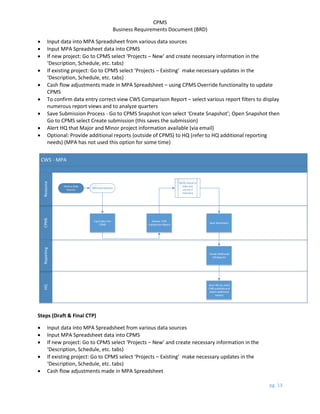
 Input data into MPA Spreadsheet from various data sources
 Input MPA Spreadsheet data into CPMS
 If new project: Go to CPMS select ‘Projects – New’ and create necessary information in the
‘Description, Schedule, etc. tabs)
 If existing project: Go to CPMS select ‘Projects – Existing’ make necessary updates in the
‘Description, Schedule, etc. tabs)
 Cash flow adjustments made in MPA Spreadsheet – using CPMS Override functionality to update
CPMS
 To confirm data entry correct view CWS Comparison Report – select various report filters to display
numerous report views and to analyze quarters
 Save Submission Process - Go to CPMS Snapshot Icon select ‘Create Snapshot’; Open Snapshot then
Go to CPMS select Create submission (this saves the submission)
 Alert HQ that Major and Minor project information available (via email)
 Optional: Provide additional reports (outside of CPMS) to HQ (refer to HQ additional reporting
needs) (MPA has not used this option for some time)
CWS - MPA
CPMS
Resource
HQ
Reporting
MPASpreadsheet
Inputdata into
CPMS
Review CWS
Comparison Report
Save Submission
Verify resource
data and
correct if
necessary
Create Additional
HQReports
Alert HQ via email
CWS availableand
attach additional
reports
Various Data
Sources
Steps (Draft & Final CTP)
 Input data into MPA Spreadsheet from various data sources
 Input MPA Spreadsheet data into CPMS
 If new project: Go to CPMS select ‘Projects – New’ and create necessary information in the
‘Description, Schedule, etc. tabs)
 If existing project: Go to CPMS select ‘Projects – Existing’ make necessary updates in the
‘Description, Schedule, etc. tabs)
 Cash flow adjustments made in MPA Spreadsheet
CPMS
Business Requirements Document (BRD)
pg. 14
 To confirm data entry correct view CWS Comparison Report – select various report filters to display
numerous report views
 Create and review PIFs / Minors (make updates if necessary)
 Save Submission Process - Go to CPMS Snapshot Icon select ‘Create Snapshot’; Open Snapshot then
Go to CPMS select Create submission (this saves the submission)
 Alert HQ that Major and Minor project information available (via email)
 Provide additional reports (outside of CPMS) to HQ (refer to HQ additional reporting needs)
 After receipt of submission, HQ sends MPA a list of questions to address and MPA responds
(performed every quarter)
Draft & Final CTP - MPA
CPMS
Resource
HQ
Reporting
MPA Spreadsheet
Input data into
CPMS
Review CWS
Comparison Report
Save Submission
Verify resource
data and
correct if
necessary
Create Additional
HQ Reports
Alert HQ via email
CWS available and
attach additional
reports
Various Data
Sources
Create PIFs / Minors
In addition to providing CWS and CTP information, every 2nd
quarter MPA reconciles the dollars
budgeted to the dollars spent. MPA achieves this by ensuring close #’s match the data downloaded
from FMIS (sub process).
5.2.1.2 MAA General Processes & Sub Process Identification
MAA inputs data manually into CPMS on a monthly basis. Several MAA data sources contribute to the
information needed for the CWS, draft CTP, and final CTP. Many of the data sources consists of MAA
specific internal steps (sub processes). These sub processes are not specific to the MDOT HQ CPMS
general process. However, the MAA sub processes may benefit by being explored in future CPMS
development efforts.
Data Source(s)
CPMS
Business Requirements Document (BRD)
pg. 15
 Capitol Project Request Form (sub process)
 Project Schedule Updates (formats in Microsoft Word, PowerPoint, & Excel)
 FMIS Report
 FMIS Cash Flow Report (spreadsheet)
 Checkbook Accounts (manual invoices, records of transmittals, etc.)
Users
5 users (various security levels)
Steps (CWS)
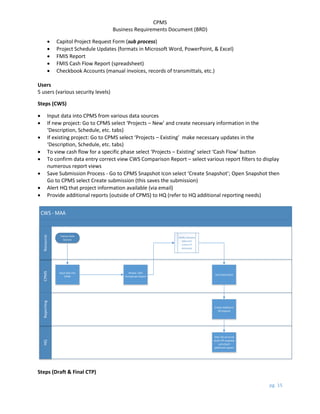
 Input data into CPMS from various data sources
 If new project: Go to CPMS select ‘Projects – New’ and create necessary information in the
‘Description, Schedule, etc. tabs)
 If existing project: Go to CPMS select ‘Projects – Existing’ make necessary updates in the
‘Description, Schedule, etc. tabs)
 To view cash flow for a specific phase select ‘Projects – Existing’ select ‘Cash Flow’ button
 To confirm data entry correct view CWS Comparison Report – select various report filters to display
numerous report views
 Save Submission Process - Go to CPMS Snapshot Icon select ‘Create Snapshot’; Open Snapshot then
Go to CPMS select Create submission (this saves the submission)
 Alert HQ that project information available (via email)
 Provide additional reports (outside of CPMS) to HQ (refer to HQ additional reporting needs)
CWS - MAA
CPMS
Resource
HQ
Reporting
Various Data
Sources
Input data into
CPMS
Review CWS
Comparison Report
Save Submission
Verify resource
data and
correct if
necessary
Create Additional
HQ Reports
Alert HQ via email
Draft CTP available
and attach
additional reports
Steps (Draft & Final CTP)
CPMS
Business Requirements Document (BRD)
pg. 16
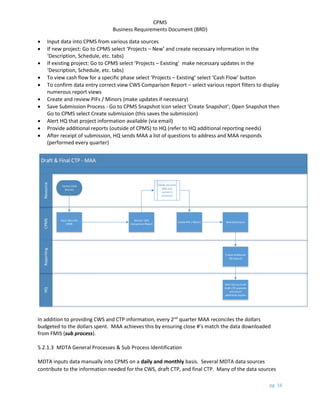
 Input data into CPMS from various data sources
 If new project: Go to CPMS select ‘Projects – New’ and create necessary information in the
‘Description, Schedule, etc. tabs)
 If existing project: Go to CPMS select ‘Projects – Existing’ make necessary updates in the
‘Description, Schedule, etc. tabs)
 To view cash flow for a specific phase select ‘Projects – Existing’ select ‘Cash Flow’ button
 To confirm data entry correct view CWS Comparison Report – select various report filters to display
numerous report views
 Create and review PIFs / Minors (make updates if necessary)
 Save Submission Process - Go to CPMS Snapshot Icon select ‘Create Snapshot’; Open Snapshot then
Go to CPMS select Create submission (this saves the submission)
 Alert HQ that project information available (via email)
 Provide additional reports (outside of CPMS) to HQ (refer to HQ additional reporting needs)
 After receipt of submission, HQ sends MAA a list of questions to address and MAA responds
(performed every quarter)
Draft & Final CTP - MAA
CPMS
Resource
HQ
Reporting
Various Data
Sources
Input data into
CPMS
Review CWS
Comparison Report
Save Submission
Verify resource
data and
correct if
necessary
Create Additional
HQ Reports
Alert HQ via email
Draft CTP available
and attach
additional reports
Create PIFs / Minors
In addition to providing CWS and CTP information, every 2nd
quarter MAA reconciles the dollars
budgeted to the dollars spent. MAA achieves this by ensuring close #’s match the data downloaded
from FMIS (sub process).
5.2.1.3 MDTA General Processes & Sub Process Identification
MDTA inputs data manually into CPMS on a daily and monthly basis. Several MDTA data sources
contribute to the information needed for the CWS, draft CTP, and final CTP. Many of the data sources
CPMS
Business Requirements Document (BRD)
pg. 17
consists of MDTA specific internal steps (sub processes). These sub processes are not specific to the
MDOT HQ CPMS general process. However, the MDTA sub processes may benefit by being explored in
future CPMS development efforts.
Data Source(s)
 Project Action Form (PAF) (this is a sub process that requires meetings, approvals, etc.)
 Monthly Project Action Form Meeting
 Quarterly Meeting (this is a sub process that depends on a completed CPMS process)
 Various spreadsheets (Finance, Engineering, etc.)
 Advertisement (Ad) / Notice to Proceed (NTP) Schedule Spreadsheet (this is a sub process that
requires reviews, approvals, etc.)
 Monthly NTP Meeting
 Solomon (MDTA uses Solomon not FMIS)
Users
2 users (admin. level security)
Steps (CWS)
 Input data into CPMS from various meetings, PAF Forms, NTP, etc.
 If new project: Review the completed Project Action Form. Go to CPMS select ‘Projects – New’ and
create necessary information in the ‘Description, Schedule, etc. tabs)
 If existing project: Review updated Project Action Form or other data sources. Go to CPMS select
‘Projects – Existing’ make necessary updates in the ‘Description, Schedule, etc. tabs)
 To view cash flow for a specific phase (construction funds not placed in until project is 60% design)
select ‘Projects – Existing’ select ‘Cash Flow’ button
 To confirm data entry correct view CWS Comparison Report – select various report filters to display
numerous report views
 Save Submission Process - Go to CPMS Snapshot Icon select ‘Create Snapshot’; Open Snapshot then
Go to CPMS select Create submission (this saves the submission)
 Alert HQ that Major and Minor project information available (via email)
 Provide additional reports (outside of CPMS) to HQ (refer to HQ additional reporting needs) (MDTA
Does not do this)
 After receipt of submission, HQ sends MDTA a list of questions to address and MDTA responds
(every quarter)
CPMS
Business Requirements Document (BRD)
pg. 18
CWS - MDTA
CPMS
Resource
HQ
Reporting
Monthly Project
Action Form
Meeting
PAC Form
Monthly NTP
Meeting
NTP Spreadsheet
Input data into
CPMS
Input data into
CPMS
Review CWS
Comparison Report
Save Submission
Verify resource
data and
correct if
necessary
Create Additional
HQ Reports
Alert HQ via email
Draft CTP available
and attach
additional reports
Various
Communicaiton
Input data into
CPMS
Steps (Draft & Final CTP)
 Input data into CPMS from various meetings, PAC Forms, NTP, etc.
 If new project: Review the completed Project Action Form. Go to CPMS select ‘Projects – New’ and
create necessary information in the ‘Description, Schedule, etc. tabs)
 If existing project: Review updated Project Action Form or other data sources. Go to CPMS select
‘Projects – Existing’ make necessary updates in the ‘Description, Schedule, etc. tabs)
 To view cash flow for a specific phase (MDTA typically retains all funds in one phase) select ‘Projects
– Existing’ select ‘Cash Flow’ button
 To confirm data entry correct view CWS Comparison Report – select various report filters to display
numerous report views
 Create and review PIFs / Minors (make updates if necessary)
 Save Submission Process - Go to CPMS Snapshot Icon select ‘Create Snapshot’; Open Snapshot then
Go to CPMS select Create submission (this saves the submission)
 Alert HQ that Major and Minor project information available (via email)
 Provide additional reports (outside of CPMS) to HQ (refer to HQ additional reporting needs)
 After receipt of submission, HQ sends MDTA a list of questions to address and MDTA responds
(performed every quarter)
CPMS
Business Requirements Document (BRD)
pg. 19
Draft & Final CTP - MDTA
CPMS
Resource
HQ
Reporting
Monthly Project
Action Form
Meeting
PAC Form
Monthly NTP
Meeting
NTP Spreadsheet
Input data into
CPMS
Input data into
CPMS
Review CWS
Comparison Report
Save Submission
Verify resource
data and
correct if
necessary
Create Additional
HQ Reports
Alert HQ via email
Final CTP available
and attach
additional reports
Create PIFs / Minors
Various
Communication
Input data into
CPMS
Steps (Quarterly Meeting) – no process flow depiction
 Pull ad hoc reports from CPMS to use during Quarterly Meeting
 Print reports and review during Quarterly Meeting (approx.150 – 200+ pages)
In addition to providing CWS and CTP information, every 2nd
quarter MDTA reconciles the dollars
budgeted to the dollars spent (sub process).
5.2.1.4 SHA General Processes & Sub Process Identification
SHA inputs data manually into CPMS on a quarterly basis. Several SHA data sources contribute to the
information needed for the CWS, draft CTP, and final CTP. Many of the data sources consists of SHA
specific internal steps (sub processes). These sub processes are not specific to the MDOT HQ CPMS
general process. However, the SHA sub processes may benefit by being explored in future CPMS
development efforts.
Data Source(s)
 Form 42 Project Data Form (this is a sub process that requires meetings, approvals, etc.)
 Quarterly Finance Report (Capital Forecasting System - CFS)
CPMS
Business Requirements Document (BRD)
pg. 20
 SHA Database (Major Projects)
 SHA Database (Minor & System Preservation Projects) (sub process)
 Form 30 (sub process)
 Financial Advertisement Schedule (sub process)
 Internal SHA Spreadsheet (contains federal and state split percentages).
Users
3 users (admin. level security)
Steps (CWS)
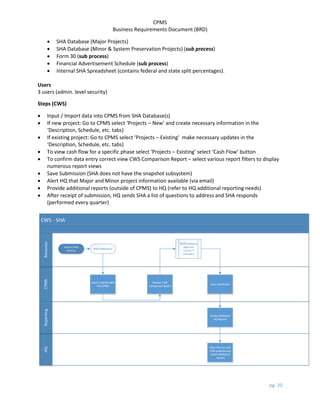
 Input / Import data into CPMS from SHA Database(s)
 If new project: Go to CPMS select ‘Projects – New’ and create necessary information in the
‘Description, Schedule, etc. tabs)
 If existing project: Go to CPMS select ‘Projects – Existing’ make necessary updates in the
‘Description, Schedule, etc. tabs)
 To view cash flow for a specific phase select ‘Projects – Existing’ select ‘Cash Flow’ button
 To confirm data entry correct view CWS Comparison Report – select various report filters to display
numerous report views
 Save Submission (SHA does not have the snapshot subsystem)
 Alert HQ that Major and Minor project information available (via email)
 Provide additional reports (outside of CPMS) to HQ (refer to HQ additional reporting needs)
 After receipt of submission, HQ sends SHA a list of questions to address and SHA responds
(performed every quarter)
CWS - SHA
CPMS
Resource
HQ
Reporting
SHADatabase(s)
Input / Importt data
into CPMS
Review CWS
Comparison Report
Save Submission
Verify resource
data and
correct if
necessary
Create Additional
HQReports
Alert HQ via email
CWS availableand
attach additional
reports
Various Data
Sources
CPMS
Business Requirements Document (BRD)
pg. 21
Steps (Draft & Final CTP)
 Input / Export data into CPMS from SHA Database(s)
 If new project: Go to CPMS select ‘Projects – New’ and create necessary information in the
‘Description, Schedule, etc. tabs)
 If existing project: Go to CPMS select ‘Projects – Existing’ make necessary updates in the
‘Description, Schedule, etc. tabs)
 To view cash flow for a specific phase select ‘Projects – Existing’ select ‘Cash Flow’ button
 To confirm data entry correct view CWS Comparison Report – select various report filters to display
numerous report views
 Create and review PIFs / Minors (make updates if necessary)
 Save Submission (SHA does not have the snapshot subsystem)
 Alert HQ that Major and Minor project information available (via email)
 Provide additional reports (outside of CPMS) to HQ (refer to HQ additional reporting needs)
 After receipt of submission, HQ sends SHA a list of questions to address and SHA responds
(performed every quarter)
Draft & Final CTP - SHA
CPMS
Resource
HQ
Reporting
SHADatabase(s)
Input / Import data
into CPMS
Review CWS
Comparison Report
Save Submission
Verify resource
data and
correct if
necessary
Create Additional
HQReports
Alert HQ via email
CWS availableand
attach additional
reports
Various Data
Sources
Create PIFs / Minors
Steps (System Preservation) – no process flow depiction
 PM creates Project Form 42 (this form details anticipated project information, requests planning
funds and / or design funds, and indicates what fund the project belongs to)
CPMS
Business Requirements Document (BRD)
pg. 22
 PM sends Project Form 42 for approval
 If approval provided, PM will use the same form to request additional funding for other project
phases (PE, Construction, etc.). Project Form 42 is an iterative process.
 Data from the approved form is moved into CFS and a request is made to add data into FMIS
(Form 30). FMIS does not capture all Project Form 42 data only the elements relevant that allow
SHA to administer payments through CFS. CFS does not capture and / or use all Project Form 42
data. However, detailed Project Form 42 data is placed into the Financial Advertisement
Schedule. This spreadsheet captures System Preservation individual project details,
advertisement data, and later phases of the project).
 The Financial Advertisement Schedule (detail view) is made available to internal SHA and MDOT
personnel. Summary only views are shared with the public, consultants, etc.
 SHA works with their PMs and Fund Managers to gather cash flow information related to the
identified master fund. This roll up data (fund data) is contained in an internal SHA spreadsheet
where federal and state split percentages are manipulated.
 Fund data is moved to the SHA Database (Minor & System Preservation Projects).
 The SHA Database information is then moved to CPMS (Refer to the SHA CPMS CWS and CTP
steps).
In addition to providing CWS and CTP information, every 2nd
quarter SHA reconciles the dollars budgeted
to the dollars spent (sub process).
5.2.1.5 MTA General Processes & Sub Process Identification
MTA inputs data manually into CPMS on a daily, weekly, and quarterly basis. Several MTA data sources
contribute to the information needed for the CWS, draft CTP, and final CTP. Many of the data sources
consists of MTA specific internal steps (sub processes). These sub processes are not specific to the
MDOT HQ CPMS general process. However, the MTA sub processes may benefit by being explored in
future CPMS development efforts.
Data Source(s)
 Project Manager Meetings and informal discussions
 Weekly FMIS download auto import into CPMS
 2nd
Quarter FMIS download
 MTA Quarterly Spreadsheet manually manipulated auto import into CPMS
 Pre-Quarterly Meetings
 CPMS Status Forms (sub process)
 MTA Federal Analysis Project Sheet (sub process)
Users
12 users (admin. level security) (varies)
Approx. 200 users (lower level security – PM and Supervisor) (varies)
Steps (CWS)
 Input data into CPMS from various data sources (numerous sub processes)
 If new or existing project: Go to Update CTP - CWS Maintenance make necessary updates in the
‘Description, Schedule, Status, Cash Flow, etc. tabs) (if add new project select button to do so)
CPMS
Business Requirements Document (BRD)
pg. 23
o To view cash flow for a specific phase select ‘Display CF’(sub process - MTA Federal
Analysis Project Sheet)
 To confirm data entry correct view CWS Comparison Report – select various report filters to display
numerous report views
 Create and review PIFs (make updates if necessary)
 Perform process to Save Submission
 Alert HQ that Major and Minor project information available (via email)
 Provide additional reports (outside of CPMS) to HQ (refer to HQ additional reporting needs)
 After receipt of submission, HQ sends MTA a list of questions to address and MTA responds (every
quarter)
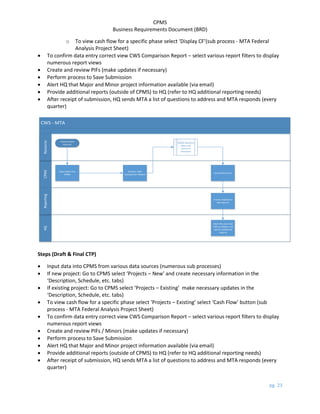
CWS - MTA
CPMS
Resource
HQ
Reporting
Various Data
Sources
Input data into
CPMS
Review CWS
Comparison Report
Save Submission
Verify resource
data and
correct if
necessary
Create Additional
HQ Reports
Alert HQ via email
CWS available and
attach additional
reports
Steps (Draft & Final CTP)
 Input data into CPMS from various data sources (numerous sub processes)
 If new project: Go to CPMS select ‘Projects – New’ and create necessary information in the
‘Description, Schedule, etc. tabs)
 If existing project: Go to CPMS select ‘Projects – Existing’ make necessary updates in the
‘Description, Schedule, etc. tabs)
 To view cash flow for a specific phase select ‘Projects – Existing’ select ‘Cash Flow’ button (sub
process - MTA Federal Analysis Project Sheet)
 To confirm data entry correct view CWS Comparison Report – select various report filters to display
numerous report views
 Create and review PIFs / Minors (make updates if necessary)
 Perform process to Save Submission
 Alert HQ that Major and Minor project information available (via email)
 Provide additional reports (outside of CPMS) to HQ (refer to HQ additional reporting needs)
 After receipt of submission, HQ sends MTA a list of questions to address and MTA responds (every
quarter)
CPMS
Business Requirements Document (BRD)
pg. 24
Draft & Final - MTA
CPMS
Resource
HQ
Reporting
Various Data
Sources
Input data into
CPMS
Review CWS
Comparison Report
Save Submission
Verify resource
data and
correct if
necessary
Create Additional
HQ Reports
Alert HQ via email
Draft CTP available
and attach
additional reports
Create PIFs / Minors
In addition to providing CWS and CTP information, every 2nd
quarter MTA reconciles the dollars
budgeted to the dollars spent. MTA achieves this by ensuring close #’s match the data downloaded
from FMIS (sub process).
5.2.1.6 MVA General Processes & Sub Process Identification
MVA inputs data manually into CPMS on a quarterly basis. MVA also inputs operation funding
information into a duplicate MVA CPMS application named CTIPP. CTIPP data is submitted to Finance
and the CIO. Finance provides MDOT HQ with general MVA operation funding information to include in
the CTP. Several MVA data sources contribute to the information needed for the CWS, draft CTP, and
final CTP. Many of the data sources consists of MVA specific internal steps (sub processes). These sub
processes are not specific to the MDOT HQ CPMS general process. However, the MVA sub processes
may benefit by being explored in future CPMS development efforts.
Data Source(s)
 Internal Agency Project Stakeholders
 Financial Management Information System (FMIS)
 Board of Public Work Agendas and Meeting Transcripts
 MDOT – Inflation Factors (yearly report)
CPMS
Business Requirements Document (BRD)
pg. 25
 MVA Access Database (Project Financial Reports) – sub process contains current FMIS data
allows comparison of CPMS data
 Project Initiation Form (sub process)
 CTIPP (sub process)
Users
1 user (admin. level security)
Steps (CWS)
 Input data into CPMS from various data sources
 If new project: Go to CPMS select ‘Projects – New’ and create necessary information in the
‘Description, Schedule, etc. tabs)
 If existing project: Go to CPMS select ‘Projects – Existing’ make necessary updates in the
‘Description, Schedule, etc. tabs)
 To view cash flow for a specific phase select ‘Projects – Existing’ select ‘Cash Flow’ button
 To confirm data entry correct view CWS Comparison Report – select various report filters to display
numerous report views
 Save Submission Process - Go to CPMS Snapshot Icon select ‘Create Snapshot’; Open Snapshot then
Go to CPMS select Create submission (this saves the submission)
 Provide additional reports (outside of CPMS) to HQ (refer to HQ additional reporting needs)
 Alert HQ that project information available (via email)
CPMS
Business Requirements Document (BRD)
pg. 26
CWS - MVA
CPMS
Resource
HQ
Reporting
VariousData
Sources
Inputdatainto
CPMS
Review CWS
Comparison Report
Save Submission
Verify resource
data and
correct if
necessary
Create Additional
HQReports
Alert HQ via email
Draft CTPavailable
and attach
additional reports
Steps (Draft & Final CTP)
 Input data into CPMS from various data sources
 If new project: Go to CPMS select ‘Projects – New’ and create necessary information in the
‘Description, Schedule, etc. tabs)
 If existing project: Go to CPMS select ‘Projects – Existing’ make necessary updates in the
‘Description, Schedule, etc. tabs)
 To view cash flow for a specific phase select ‘Projects – Existing’ select ‘Cash Flow’ button
 To confirm data entry correct view CWS Comparison Report – select various report filters to display
numerous report views
 Create and review PIFs / Minors (make updates if necessary)
 Save Submission Process - Go to CPMS Snapshot Icon select ‘Create Snapshot’; Open Snapshot then
Go to CPMS select Create submission (this saves the submission)
 Provide additional reports (outside of CPMS) to HQ (refer to HQ additional reporting needs)
 Alert HQ that project information available (via email)
 After receipt of submission, HQ sends MVA a list of questions to address and MVA responds
(performed every quarter)
CPMS
Business Requirements Document (BRD)
pg. 27
CTP Draft & Final - MVA
CPMS
Resource
HQ
Reporting
Various Data
Sources
Input data into
CPMS
Review CWS
Comparison Report
SaveSubmission
Verify resource
data and
correct if
necessary
Create Additional
HQ Reports
Alert HQ via email
Draft CTP available
and attach
additional reports
Create PIFs / Minors
In addition to providing CWS and CTP information, every 2nd
quarter MVA reconciles the dollars
budgeted to the dollars spent. MVA achieves this by ensuring close #’s match the data downloaded
from FMIS (sub process).
5.2.1.7 WMATA General Processes & Sub Process Identification
WMATA provides manual data to MDOT HQ on a quarterly basis. Several WMATA data sources
contribute to the information needed for the CWS, draft CTP, and final CTP. Many of the data sources
consists of WMATA specific internal steps (sub processes). These sub processes are not specific to the
MDOT HQ CPMS general process. However, the WMATA sub processes may benefit by being explored
in future CPMS development efforts.
Data Source(s)
 Financial information from WMATA (i.e. budget documents, quarterly bills, etc.)
 WMATA (working) Liaison Spreadsheet (sub process)
 WMATA (presentation) Liaison Spreadsheet (sub process)
 Quarterly WMATA Progress Report
 WMATA Narrative (handwritten comments included on CTP Form)
CPMS
Business Requirements Document (BRD)
pg. 28
Users
No WMATA users
Steps (CWS, 2nd
Quarter, Draft, and Final CTP)
 Prepare data from WMATA
 Alert HQ that project information available (via email)
 HQ inputs WMATA data into MDOT HQ CPMS Application
 MDOT HQ sends the WMATA liaison a list of questions to address and the WMATA liaison responds
(this may or may not be performed every quarter)
5.2.1.8 TSO General Processes & Sub Process Identification
MDOT HQ manually inputs TSO data into the MDOT HQ CPMS Application on a quarterly basis.
Data Source(s)
 Quarterly meetings with program managers
 FMIS downloads
Steps (CWS)
 Input data into CPMS from various data sources
 If new project: Go to CPMS select ‘Projects – New’ and create necessary information in the
‘Description, Schedule, etc. tabs)
 If existing project: Go to CPMS select ‘Projects – Existing’ make necessary updates in the
‘Description, Schedule, etc. tabs)
 To view cash flow for a specific phase select ‘Projects – Existing’ select ‘Cash Flow’ button
 To confirm data entry correct view CWS Comparison Report – select various report filters to display
numerous report views
 Save Submission Process - Go to CPMS Snapshot Icon select ‘Create Snapshot’; Open Snapshot then
Go to CPMS select Create submission (this saves the submission)
CWS - TSO
CPMS
Resource
Various Data
Sources
Input data into
CPMS
Review CWS
Comparison Report
Save Submission
Verify resource
data and
correct if
necessary
Steps (Draft & Final CTP)
 Input data into CPMS from various data sources
CPMS
Business Requirements Document (BRD)
pg. 29
 If new project: Go to CPMS select ‘Projects – New’ and create necessary information in the
‘Description, Schedule, etc. tabs)
 If existing project: Go to CPMS select ‘Projects – Existing’ make necessary updates in the
‘Description, Schedule, etc. tabs)
 To view cash flow for a specific phase select ‘Projects – Existing’ select ‘Cash Flow’ button
 To confirm data entry correct view CWS Comparison Report – select various report filters to display
numerous report views
 Create and review PIFs / Minors (make updates if necessary)
 Save Submission Process - Go to CPMS Snapshot Icon select ‘Create Snapshot’; Open Snapshot then
Go to CPMS select Create submission (this saves the submission)
Draft & Final CTP - TSO
CPMS
Resource
Various Data
Sources
Input data into
CPMS
Review CWS
Comparison Report
Save Submission
Verify resource
data and
correct if
necessary
Create PIFs / Minors
During the 2nd
Quarter MDOT HQ reconciles the TSO dollars budgeted to the dollars spent. MDOT HQ
achieves this by ensuring close #’s match the data downloaded from FMIS.
5.2.1.9 MDOT HQ General Processes & Sub Process Identification
MDOT HQ receives the CPMS mode specific data and manually saves the data files into the MDOT HQ
CPMS Application (access database). There are 5 MDOT HQ CPMS users.
Depending on the quarter, MDOT HQ prepares the following:
 A Quarterly CWS Document
Data Sources
 Emailed CPMS Access Files from modes
 Existing MDOT HQ CPMS Access Data
 FMIS Data
 Emailed spreadsheets, word documents, etc. from modes
Steps
 HQ contacts Mode indicating deadline for Mode submission
 Mode alerts HQ that data is available (email)
 HQ creates shared drive folder and labels folder based on appropriate time period (working quarter)
 HQ moves mode data file(s) into appropriate shared drive folder
CPMS
Business Requirements Document (BRD)
pg. 30
 HQ imports mode data file(s) into CPMS
 HQ moves mode data into appropriate working quarter then CPMS provides auto feedback
regarding # of projects, PIFs, and Minors added, etc. “Summary of Results”
 HQ performs comparison using the CPMS ‘CWS Comparison Report’
 HQ vets information with modes if necessary to determine explanations for major shifts in dollars,
etc.
 HQ creates ‘CWS Worksheet’ by running appropriate report in CPMS ‘CWS Comparison Report’
 HQ manually inputs data into ‘CWS Worksheet’ – worksheet tabs auto updated based on initial
manual input
 HQ updates each tab with cash flow changes and provides explanation (manual input)
 HQ provides ‘CWS Worksheet’ data, etc. to Finance
 HQ reviews ‘CWS Worksheet’ with Transportation Secretary
 Finance reviews HQ data and Finance analysis with Transportation Secretary
 After meeting with Transportation Secretary HQ provides Attachment A’s (attachment for each
mode) to Finance – Finance prepares funding authorization letter to modes (refer to Finance)
Office of Planning & Capital Programming (HQ) CWS Process
HQ
Mode
CPMS
CWS
Worksheet
Finance
Transportation
Secretary
Mode Alerts HQ
Submission
Available
Creates Shared
DriveFolder
Mode Submission
Moved into Shared
Folder
Data
Imported
Into CPMS
Performs
Comparison
Vet
Information
CWS Worksheet
Created
Data
Provided to
Finance
CWS Reviewed w/
Transportation
Secretary
 A 1st
Quarter Draft CTP Report and a 3rd
Quarter Final CTP Report
CPMS
Business Requirements Document (BRD)
pg. 31
The preparation of the 1st
Quarter Draft CTP Report and the 3rd
Quarter Final CTP Report picks up from
the CWS process. The additional steps incorporate the preparation of the draft and / or final CTP, the
printing of the CTP, and senior leadership review meetings. The steps to prepare the draft and / or final
CTP for printing are manual, extremely time consuming, and require the repetitive entry of redundant
information.
Additional Steps
 Review PIF information (review system generated reports) compare against CWS and vet with
mode(s) if necessary
 Review Minor information (review system generated reports) compare against CWS and vet with
mode(s) if necessary
 MDOT HQ Analyst alerts the MDOT Regional Planning & Capital Programming, Assistant Director the
CTP data is reviewed
 The Assistant Director makes comments on the hardcopy documents and meets with his team
members, when appropriate
 If simple adjustments are needed, the Assistant Director will update the data and / or spreadsheet
(if large adjustments are needed the Assistant Director will ask the analyst to perform the update)
 The Assistant Director reviews and / or prepares the CTP Introduction Section (the Introduction of
the CTP report is written in voice of Secretary of Transportation and sets the direction for CTP)
 Additional budget reports, charts, financial tables, and diagrams are generated by CPMS and various
modal and HQ sources. These items are often uploaded and / or manually input into the
appropriate CPMS areas and / or external spreadsheets.
 The Assistant Director has to manually prepare the CTP for printing by compiling and formatting the
various report sections.
 Once the Assistant Director is comfortable with the CTP document his team will meet with senior
leadership, and other interested parties (if appropriate). The team will provide a sample
presentation and feedback will be gathered from senior leaders.
 The team members and senior leadership will meet with Finance to go over the presentation. The
Assistant Director will lead the discussion if Finance has any questions and provide follow up after
the meeting, if needed. This meeting is considered a dry run before the secretary’s meeting.
 The team and senior leadership meet with the Secretary.
 No sign offs are required from the Secretary.
 Stakeholders receive hard copies and / or electronic versions
 Later if addendums are needed, the online CTP report is adjusted. In this instance, the printed CTP
report may not be the same as the online document.
5.3 Relevant Business Problems
Each modes uses CPMS to provide the standard deliverables (CWS, draft / final CTP) to MDOT
Headquarters (HQ). However, many modes have the need to use CPMS in a more robust manner to
connect with other data sources and to manage their capital program on a daily basis. These needs may
not necessarily coincide with MDOT needs but are important and specific to the mode. (Refer to Mode
Current Environment and Business Requirements Sections).
CPMS
Business Requirements Document (BRD)
pg. 32
CPMS does not address all reporting needs. Most modes provide additional reports in addition to their
quarterly CPMS submission. (Refer to Resources Section)
CPMS functionality is comprised when Microsoft Access releases a new version.
CSC contractor is retiring and no current institutional programming knowledge exists.
CSC programmed CPMS to perform the following functions:
 Manage project data and schedules
 Develop the draft CTP and final CTP
 Create the quarterly CWS
 Perform quarterly Federal Aid assumption analysis
 Forecast project cash flows
 Move data to and from other non-CPMS systems
However, the current CPMS modules do not:
 Accurately, manage project data and schedules in a manner consistent with project
management standards.
 Accurately, perform quarterly Federal Aid assumption analysis for those modes who need this
information.
 Seamlessly create draft CTP and final CTPs without extensive manual manipulation and external
input / reporting.
 Seamlessly create quarterly CWSs without extensive manual manipulation and external input /
reporting.
 Forecast project cash flows correctly based on individual mode needs.
 Provide automation to move data to and from other non – CPMS systems.
5.4 Major Functions and Capabilities Required
A new CPMS product will require the following functionality:
 Individual mode access with appropriate security and permission controls
 Ability to manage project data
 Ability to manage project schedules
 Ability to allocate, budget, and track project funding information
 Ability to use automation to develop draft CTP and final CTP reports
 Ability to use automation to create the quarterly CWS document
 Ability to perform quarterly Federal Aid assumption analysis specific to each mode
 Ability to forecast project cash flows specific to each mode
 Ability to use automation to move data into and out of CPMS into other non-CPMS systems,
spreadsheets, utilities, etc.
5.5 Impact to Other Systems and / or Processes
Stakeholders Other Systems / Processes Impacted
CPMS
Business Requirements Document (BRD)
pg. 33
MDOT HQ Emailed CPMS Access Files from modes
Existing MDOT HQ CPMS Access Data
FMIS Data
Emailed spreadsheets, word documents, etc. from modes
MPA MPA Spreadsheet
Financial data downloads (Web Focus) from FMIS
Bid, Notice to Intent, Notice to Proceed
Bi-Monthly Meetings with Executive Director, Operations, and Engineering
MAA Capitol Project Request Form
Project Schedule Updates (Word, PowerPoint, Excel)
FIMIS Report
FIMIS Cash Flow Report (spreadsheet)
Checkbook Accounts (manual invoices, records of transmittals, etc.)
MDTA Project Action Form (PAF)
Monthly Project Action Form Meeting
Quarterly Meeting
Various spreadsheets (Finance, Engineering, etc.)
Advertisement Notice to Proceed Schedule (Ad) / NTP Schedule Spreadsheet
Monthly NTP Meeting
Solomon
SHA Form 42 Project Data Form
Quarterly Finance Report (Capital Forecasting System - CFS)
SHA Database (Major Projects)
SHA Database (Minor & System Preservation Projects)
MTA Project Manager Meetings and informal discussions
Weekly FIMIS download
2nd
Quarter FIMIS download
MTA Quarterly Spreadsheet
Pre-Quarterly Meetings
CPMS Status Forms
MTA Federal Analysis Project Sheet
MVA Internal Agency Project Stakeholders
Financial Management Information System (FMIS)
Board of Public Work Agendas and Meeting Transcripts
MDOT – Inflation Factors
MVA Access Database (Project Financial Reports)
Project Initiation Form
CTIPP
WMATA Financial information from WMATA
WMATA Liaison Spreadsheet (working)
WMATA Liaison Spreadsheet (presentation)
Quarterly WMATA Progress Report
WMATA Narrative
TSO Quarterly meetings with program managers
FMIS Downloads
CPMS
Business Requirements Document (BRD)
pg. 34
5.6 Limitations, Constraints, and / or Dependencies
 CPMS project funding – MDOT may not have the funding to create a new CPMS application.
 Mode Subject Matter Expert (SME) availability – Modes may not have time to provide personnel
to assist with the project.
 Future CPMS responsibility and maintenance – Will the new CPMS application be supported by
vendors and / or internal IT resources.
 Application and server capacity – Where will the new CPMS application be housed if on internal
server or servers will they be able to handle the number of hits (demands) from users who are
simultaneously inputting and extracting data.
 Currently MDOT IT Group supports Oracle environment – Any new development will need to be
aware of the current system environment to ensure new products are compatible with the
current environment.
 The inability to gather project specific information from modes may require business process
adjustments and may not be resolved by a system fix.
5.7 Definition of Completion
Will be determined in future Functional Requirements Document and / or future Technical Specification
Document.
6.0 SCOPE
6.1 Specific Functional Capabilities to be Addressed
Provide individual mode access with appropriate security and permission controls for all mode users
Ability to manage project data
Ability to manage project schedules
Ability to allocate, budget, and track project funding information
Ability to use automation to create the quarterly CWS document
Ability to use automation to develop and correctly print draft CTP and final CTP reports
Ability to perform quarterly Federal Aid assumption analysis specific to each mode
Ability to forecast project cash flows specific to each mode
Ability to store and retrieve files and images specific to a project
Ability to use automation to move data into and out of CPMS into other non-CPMS systems, system
components, spreadsheets, etc.
Provide canned reports and customizable reports based on historical, current, and future needs
6.1.1 Statement of Business Requirements
Stakeholders provided suggestions and requests for new CPMS needs during a series of requirements
meetings. This section provides a summary of the business requirement themes captured and the
details of each requirement captured.
Business Requirements Summary:
CPMS
Business Requirements Document (BRD)
pg. 35
 Ability for all Modes to input projected, new, and existing project information
 Ability to view and adjust current and forecasted cash flows (real time)
 Ability to archive old data and have remain intact
 Ability to archive old data and reflect real time information
 Ability to view project detail from general to specific
 Ability to attribute appropriate (real time) business rules
 Ability to attribute appropriate (archived) business rules
 Ability to store documents, images, etc. and link to general and specific project detail
 Enhanced Reporting Capability (BI backend) that can mimic input needs and adjust after data
input (real time and historical)
 System Maintenance, Level of Service, and Input Agreements (MDOT HQ)
 Ability to communicate with other data sources (real time) – FMIS and mode specific data
sources
 Translation Tables and Configuration Tables needed (FMIS and mode specific)
 Easy Search Function – similar to google search (type in few characters and pull up relations)
 Ability to assign ratings and prioritize projects based off weighted goals and factors
Business Requirements Detail:
Mode suggestions / requests were categorized under specific requirement types:
BP = Business Process
DB = Database
S/P = Security and Permissions
UI = User Interface
The mode suggestions / requests resulted in the following requirement types:
Requirement Type: Total:
BP 20
DB 104
S/P 7
UI 6
Total All: 137
Stakeholders Mode Request Requirement Type
(BP, DB, S/P, UI)
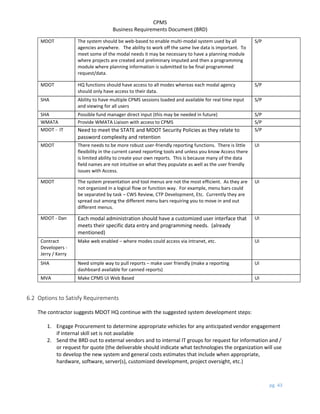
MDOT There is a need for new internal policies on inputting and maintaining data so all
modes are providing the information in a consistent manner.
BP
MDOT There should be some discussion on re-organizing project data and how it is
presented in the system. Is the way we program project information the most
effective and usable?
BP
CPMS
Business Requirements Document (BRD)
pg. 36
MDOT The field names within the current system are not the most intuitive as to what
data it represents. The re-classification of data may be necessary.
BP
MDOT - Brian SHA – (need to determine how they break out minor projects by equipment,
bridge, etc.) this is a process issue
BP
MDOT - Bob Be more intuitive have field names make more sense (translation table / data
dictionary)
BP
MDOT - Bob The ability to view SHA project specific information BP
MDOT - Dan The system should provide various automated quality control checks and
error messages to ensure project data is consistent and complete across
system functions and reports.
BP
MDOT - Dan Ability for system to log and track system maintenance items. BP
Contract
Developers -
Jerry / Kerry
Would like modes to use the appropriate CPMS system tools correctly BP
MAA Develop a universal project coding description methodology that can be used by
all modes. This will effective tracking and descriptions of projects.
BP
MPA Consider using work days in addition to $$’s BP
MPA The ability for the system to calculate a priority rating for each project
based off weighted factors and goals met. In addition, system should
also have the ability to develop budget scenarios based off those priority
ratings.
BP
MDTA Would like to incorporate Life Cycle Analysis, would like to see CPMS encompass
outside 6 years now only does 6 years – if can do this can link to life cycle
analysis that is currently owned by engineering, which is based off inspection
reports would like the ability to rank projects
BP
MDOT Finance Expand types of funds to include reimbursable funds BP
DLS Public Private Partnerships – the PIF sheets do not show all active capital
spending need to see what the private partner is budgeting for construction,
etc. – possibly may need to see actual costs (this may not be important)
BP
MDOT Audit Business needs to determine critical data entry fields that should be monitored
if they are altered
BP
MVA Need new phase descriptions for IT projects – should follow true software
development life cycle (SDLC) phases
BP
MVA Go beyond standard 6 years (forecast) BP
MVA Capture true costs of project (example: allocate employee costs against
projects, overheads, etc.) – this would give a better understanding of true
project costs
BP
MVA Ability to capture jobs created because of the project (needed for all modes).
Example – this project created this many jobs and contributed to the economic
impact to XYZ local businesses.
BP
CPMS
Business Requirements Document (BRD)
pg. 37
MDOT The ability to drill down to sub-project details. This is especially the case with
SHA, as they often use the System Preservation Project as a catch all for many
small minor projects. MTA also lumps their LOTS program funding into one
project which does not provide individual county breakdowns of funding. The
ability to breakdown some of these sub-projects for funding, facility, and
location information is needed. There was also some discussion on the ability to
program multiple project phases of under the same project rather than
separating them out as individual projects. This is more pertinent to large multi-
phase projects.
DB
MDOT The ability for the system to export data report data into excel is important. The
system currently only exports as a PDF or Word document. To analyze the data
it needs to be in excel format. Currently staff have to manually type project
information into an excel workbook.
DB
MDOT The ability for the new system to auto-generate the CWS Quarterly Review
Report would be very valuable. This is currently created outside the system in a
series of excel workbooks that are manually populated.
DB
MDOT The ability to auto-generate Attachment As would be valuable too. This is
currently produced through a workbook outside the system by manual input of
data.
DB
MDOT Analysis queries could prove to be beneficial too. For example, reports that can
generate variance analysis in which cash flow changes are over a certain dollar
figure would be helpful.
DB
MDOT There should be the ability to have a live feed to import expenditure data. FMIS
is the MDOT’s accounting system that should be interfaced. MDTA and SHA also
have external expenditure systems that they will probably want to interface
with a CPMS replacement.
DB
MDOT A % Project Completion field may be helpful to capture in the new system. DB
MDOT Some sort of ‘Flag’ ability to call out projects of similar types across modes could
be helpful for running queries.
DB
MDOT It may be beneficial to also enable summary fields to explain major project
changes from quarter to quarter cash flows.
DB
MDOT - Bill Should see all projects (with criteria to adjust) understanding what project
belongs to what in specific detail
DB
MDOT - Bill New system needs to coordinate and include STIP and TIP process DB
MDOT - Bill Provide year by year expenditure date needed – wants to run a report where
you can see expenditures by year, by quarter, by month, by day, etc. and by
other parameters should be adjustable (menu driven – dashboard)
DB
MDOT - Bill Automate CWS process (allow customized text entry and also intuitive thinking
that indicates what happened and why) Example: 1mill moved to new year and
system could indicate $ moved to new year
DB
MDOT - Bill Allow modes to select reason for variance and provide HQ ability to input
custom text to discuss reason for variance
DB
MDOT - Bill Variance analysis – would like to see major increases and why – based on $
threshold
DB
CPMS
Business Requirements Document (BRD)
pg. 38
MDOT - Bill Need method to see what we asked to be spent on a project vs what we actually
spent on a project (comparison module)
DB
MDOT - Brian Pre populate #’s from CPMS into CWS spreadsheet (automate) DB
MDOT - Brian Would like new system to have ability to create CWS as an output DB
MDOT - Brian Link the CTP Summary document to the word (intro) and charts. Link the new
system to auto populate the appropriate areas.
DB
MDOT - Brian Summary on top of CTP page generates from check boxes – Brian has to delete
and redo – would like the new system to have a text function that gives user
flexibility to create customized verbiage
DB
MDOT - Brian Wants to be able to format (text, headers, etc.) within system DB
MDOT - Brian Some reports don’t communicate in all case with the raw data – user has to
input the same #’s CPMS already has into the CPMS report areas
DB
MDOT - Brian Would like to push button to say generate CTP (produce in pdf) DB
MDOT - Bob Ad hoc more user friendly DB
MDOT - Bob Sync summary reports (Future Development should determine which summary
reports should be synched)
DB
MDOT - Bob Write queries that can bring attention to variances DB
Contract
Developers -
Jerry / Kerry
Old db’s not normalized (not adjusted to compensate for excessive database
hits / high server usage) correctly – mode run times are sporadic sometimes
slow and sometimes fast.
DB
MAA Need FMIS project contract numbers to translate / relate to 8 digit CPMS #
(creation of translation table) – developers will need to explore further
DB
MAA Ability to download FMIS data directly into the new CPMS DB
MAA Ability to download checkbook data directly into new CPMS. Note: MAA’s
Checkbook data is the accounting system used to track expenditures of their
“Other” funds (i.e. PFC, CFC, etc.)
DB
MAA Believes CPMS should be a full forecast / actual tool that allows user to:
maintain and create an inventory (long range planning) 1 – 20+ years of data of
asset and engineering data to forecast budgets, identify projects available for
alternative funding sources, project prioritization, determine what can be
funded, what could be put on hold, trigger project phases, allow projections and
actuals.
DB
MAA Ability to adjust project funding logic to fit needs at any time – leave state open
for adjustment (currently state is static and does not allow manipulation)
DB
MAA Identify fund type and grant type (this requirement may also relate to STIP/TIPP
and the obligation of funds)
DB
MAA System should track project funding with their associated contract(s) #s.
Reporting functions should enable the query of all projects funded under
a specific contract – a contract may fund several different projects.
DB
MAA Ability to create and adjust Minor dates correctly (relates to MVA requirement) DB
CPMS
Business Requirements Document (BRD)
pg. 39
MAA Search Tool – with ability to search by project name instead of scrolling down a
drop down list.
DB
MAA Need ability to view archived projects and ability to archive a project DB
MPA Would like the ability to use the automated cash flow function - At this time,
CPMS cash flow functionality does not work correctly for MPA. The system
should forecast project cash flows based on customized workday schedules.
DB
MPA CTP PIF – need reminder to “Assign Project” correctly DB
MPA Need ‘Approve Project’ tab to work correctly DB
MPA Need the ability to determine federal funds correctly (needs to be intuitive).
Future development should further explore this requirement.
DB
MPA Need ability for long range planning / programming – facility planning, etc. (go
beyond current HQ needs). Would like to answer the following question(s) –
what do I need to do in the next 15yrs if I want to build XYZ, how much $$
would I need, etc.
DB
MPA Forecast Tool – that allows potential cost estimates that supports future capital
programming (use historical $$ and work days as a benchmark to determine
future needs). The ability of the system to estimate project costs based off past
projects of similar size and scope.
DB
MDTA Would like to automate the NTP sub process into CPMS. DB
MDTA Would like the ability to create MDTA reports at any time DB
MDTA Solomon feed expenditure information into CPMS DB
MDTA Would like to get a monthly report that compares expenditures against project
cash flows on a monthly basis (need real time)
DB
MDTA Make PAF after approval downloadable into CPMS (current word form on
intranet – filled in and submitted for signatures)
DB
MDTA Report that compares sending from year to year – what did we do for the past 5
years ability to pull information from more than one snapshot (over span of
several years) see differences in budget and expenditures by all project data
fields
DB
MDTA Have the ability see projects at a glance and change without moving to each
individual project. Example: pull up table with make changes and system places
intuitively move data to appropriate places and ability to open up multiple
pages.
DB
MDTA Would like to keep CTP Tour Form DB
MDTA Need ‘what if’ forecasting analysis formulas in CPMS (business intelligence) DB
MDTA In the future may need method to track federal funds (mega project) DB
MDTA Track project funding by source (i.e. toll collections, bonds, etc.) DB
MTA Would like to have automatic audit tracking – every time $$ moved and ability
to prompt user to type in why changed (electronic footprint = user, date/time
stamp, field changed)
DB
MTA When adding project budget amount need to see project cash flow (needs to be
intuitive). Current CPMS System has these data inputs on two separate pages.
DB
CPMS
Business Requirements Document (BRD)
pg. 40
MTA Flag Federal Aid over 80% and identify some grants that are 100% - would like to
reconcile once cash flow done then ability to make 80%. Have the ability to
create automated alert messages that would indicate this cash flow change
would break the 80/20 split on Federal Funds or whatever Federal Share is
determined to be assigned to that project.
DB
MTA When a project is built would like the ability for CPMS to assign Federal Aid
eligibility status (yes or no selections)
DB
MTA Maximo (IBM) communication with CPMS (downloads, web service, etc.) –
Maximo is a Transit Asset Management System
DB
MTA Real Time FMIS connection (all quarters) with appropriate translation tables DB
MTA TEAM (Federal Grant Management System) communication with CPMS
(downloads, web service, etc.)
DB
MTA Automate Task Order Process – provide breakdown / tracking capability to
relate each line item to specific project(s) (relate fund cert to appropriate
project and then calculate correct balance that is left over)
DB
MTA Document Management System: Create Fund Cert Form – provide online
approval tracking and submit resolution to database and ability for user friendly
form printout / email, etc.
DB
MTA Propose Project Process - new projects, existing projects to gain or shift more
funds, etc. use a justification form (PAF – Project Action Form) (provide online
approval tracking and submit resolution to database and ability for user friendly
form printout / email, etc.)
DB
MTA Incorporate TIP/STIP into CPMS DB
TIP / STIP Need years federal funds appropriated, what year obligated, what year cash
flow – also need to track re-obligation – need to know separations of $$ what is
being spent when (track color of $$) – currently getting funds from a number of
sources grants, sub grants, (revenue sources) - allocations should be based on
different business rules. This need may mean: Track project Federal funding
down to the appropriation year and obligation year to meet TIP/STIP reporting
process. The system should also track re-obligated federal funds to determine
the history of how these funds have been programmed.
DB
MTA TIP/STIP, Capitol Budgeting, Federal Aid Allocation – CPMS needs to encompass
these components
DB
TIP / STIP Need to understand federal laws. Software needs to be able flexible enough to
change when laws changes and then retain historical data. Related to the
Federal Share requirements (i.e. they may change for 80/20 to 90/10 for specific
projects).
DB
TIP / STIP Wants the ability to report each quarter in a customizable report, create
exportable CPMS data and make available to MPOs
DB
SHA Auto Import SHA Database(s) into CPMS DB
SHA Financial Table (current excel spreadsheet consists of fund sources for all
projects – 1page summary) would like to automate input from individuals and
be captured in CPMS
DB
CPMS
Business Requirements Document (BRD)
pg. 41
SHA Link System Preservation database to CPMS. This db is maintained by SHA. DB
SHA Retain existing canned reports DB
SHA Projects advertised in current FY (now manual) would like to be automated;
summary of bike / pedestrian report
DB
SHA Need ability to upload images/documents quickly – document management
system that sequentially stores image/doc and stores in a central area (ability to
link image to the PIF – the DMS should be able to recognize which image
belongs to each PIF)
DB
SHA Ability to pull reports (real time) – this would cover special requests that may be
a 1x only request (need a Business Intelligence Tool – BI)
DB
SHA Need correct associations (project to improvements) need line #’s automated to
link correctly to correct project on PIF (reference PIF sheet examples)
DB
SHA CPMS Divider Sheet – link financial table to divider sheet (share data) DB
SHA Ad (Advertisement) Schedule (comes from CFS – Finance controls) would like to
link to CPMS (ex. Project # would create relation between Ad Schedule and
CPMS – ad date, bid date, ntp date would be helpful to have in CPMS as an
automatic transfer only those dates pulled over related to existing project #’s in
CPMS; but for minors need more information (80%) from Ad Schedule (need all
dates, proj desc, improvement type, project #, cost, and add if project# not
found in CPMS – match to fund if fund relevant) do not want to pull over
projects that SHA not working on
DB
SHA Ability to adjust fund allocations (real time) pull in data from FMIS, estimate
splits (forecast / intuitive system design), dashboard real time reports
DB
SHA CPMS to communicate with Financial Advertisement Schedule (spreadsheet) to
pull System Preservation project specific data
DB
WMATA Make sure comparison reports included monthly, quarterly, etc. DB
WMATA Ability to upload additional documentation into CPMS (ex. WMATA Quarterly
Report, etc.)
DB
MDOT Finance Ability to determine what the mode spent and what was spent by project –
example: This is what the mode has available to spend (from Finance) and here
is what the mode has yet to spend
DB
MDOT Finance A continuous electronic feed from FIMIS so that modes can project what they
have yet to spend
DB
MDOT Finance Finance needs ability to enter in the CTP data specific to their area (from their
excel spreadsheet – called mackey files this file houses 3 years of budget data)
to populate CTP report so that Brian and HQ don’t have to manually put it in
DB
DLS Need access to draft CTP and final CTP data and the ability to manipulate data
for DLS needs.
DB
CPMS
Business Requirements Document (BRD)
pg. 42
DLS Need actual spending by project (communication with FMIS) DB
DLS On PIF would like to see source of all funds (what fund goes with what project)
do not want to see the term ‘other fund’ used – need to see project specific
information not generic roll ups (SHA issue)
DB
DLS Need electronic data at the time of the draft and final CTP DB
DLS Need consistency between summary page and PIF sheets (dollar value and
categories)
DB
DLS Want actual spending added to PIF sheet DB
DLS Would like real time mapping in GIS available related to each project (state
using ESRI Arc GIS) to graphically represent project location (link Arc GIS to
CPMS) example: link coordinates to project for highways, MARC, and others
where appropriate
DB
DLS Ability to know when one project crosses into 1 or more jurisdictions and the
associated details
DB
MDOT Audit Audit needed on electronic footprints related to critical data fields (what was
added, if it was changed - how was it changed, when it was changed, and who
changed it)
DB
MDOT Audit Create new CPMS audit field reports that run automatically and can be accessed
by MDOT Audit.
DB
MDOT Audit Link audit report access and retrieval to existing work time capture system (add
audit report as an option to the work time capture system reporting dashboard)
DB
MVA Continued ability to produce customized Finance / Procurement Reporting –
currently found in CPMS ‘Reports’ area
DB
MVA Need ability to store project documents and relate to specific project (DMS) DB
MVA Combine forecast and actual (CPMS and CTIPP) functionalities – align / translate
budget classifications and budgetary needs between the 2 systems and FMIS (all
on same page)
DB
MVA Direct FMIS integration into CPMS DB
MVA Customized Fiscal Year End Reporting DB
MVA Ability to prioritize projects (record and rank) DB
MVA Capture Data exchanges – between major IT project data and Department of IT
(customized reporting)
DB
MDOT Ideally we would like a new system to be used across staff levels at the modes
so Project Managers can monitor and maintain their own data in the system.
This may prove to be a difficult business process change for the modes.
S/P
CPMS
Business Requirements Document (BRD)
pg. 43
MDOT The system should be web-based to enable multi-modal system used by all
agencies anywhere. The ability to work off the same live data is important. To
meet some of the modal needs it may be necessary to have a planning module
where projects are created and preliminary imputed and then a programming
module where planning information is submitted to be final programmed
request/data.
S/P
MDOT HQ functions should have access to all modes whereas each modal agency
should only have access to their data.
S/P
SHA Ability to have multiple CPMS sessions loaded and available for real time input
and viewing for all users
S/P
SHA Possible fund manager direct input (this may be needed in future) S/P
WMATA Provide WMATA Liaison with access to CPMS S/P
MDOT - IT Need to meet the STATE and MDOT Security Policies as they relate to
password complexity and retention
S/P
MDOT There needs to be more robust user-friendly reporting functions. There is little
flexibility in the current caned reporting tools and unless you know Access there
is limited ability to create your own reports. This is because many of the data
field names are not intuitive on what they populate as well as the user friendly
issues with Access.
UI
MDOT The system presentation and tool menus are not the most efficient. As they are
not organized in a logical flow or function way. For example, menu bars could
be separated by task – CWS Review, CTP Development, Etc. Currently they are
spread out among the different menu bars requiring you to move in and out
different menus.
UI
MDOT - Dan Each modal administration should have a customized user interface that
meets their specific data entry and programming needs. (already
mentioned)
UI
Contract
Developers -
Jerry / Kerry
Make web enabled – where modes could access via intranet, etc. UI
SHA Need simple way to pull reports – make user friendly (make a reporting
dashboard available for canned reports)
UI
MVA Make CPMS UI Web Based UI
6.2 Options to Satisfy Requirements
The contractor suggests MDOT HQ continue with the suggested system development steps:
1. Engage Procurement to determine appropriate vehicles for any anticipated vendor engagement
if internal skill set is not available
2. Send the BRD out to external vendors and to internal IT groups for request for information and /
or request for quote (the deliverable should indicate what technologies the organization will use
to develop the new system and general costs estimates that include when appropriate,
hardware, software, server(s), customized development, project oversight, etc.)
CPMS
Business Requirements Document (BRD)
pg. 44
3. If appropriate send out for request for proposal requesting awarded vendor to provide the
following deliverables: functional requirements document, technical specifications document,
system development, periodic system demo’s, system technical QA, system User Acceptance
Testing, system roll out to production plan, system documentation, user system training
materials, and if appropriate system maintenance plan
4. After system implementation, determine if a Stakeholder Steering Committee (or other method)
is needed to determine ongoing system enhancement development and implementation
schedules.
The new CPMS product should provide the following (but not be limited to):
 A Custom off the shelf (COTS) database
Possible Vendor(s): Oracle database or Oracle compatible database
 Custom web based input areas for each Mode and MDOT HQ that communicate (real time) with
the database
Possible Vendor(s): Awarded Development Vendor
 A dedicated server(s) and / or virtual server space that houses the database and other
components
Possible Vendor(s): Oracle
 COTS Enterprise Content Management System (CMS) – that will allow the easy storage of files
and images.
Possible Vendor(s): Ektron, Documentum, or Oracle compatible CMS
 COTS Enterprise Business Intelligence (BI) Tool – that will retain business rules / logic for all
formulas, forecasting tools, federal aid calculations, etc. in this component.
Possible Vendor(s): Oracle Business Intelligence Enterprise Edition (OBIEE)
 Custom Web Services (bridges) – created by developer(s) that allow buckles (communication
links) to all CPMS components, i.e. DB, BI Tool, CMS and create connections between FMIS, and
mode specific data sources.
Possible Vendor(s): Awarded Development Vendor
 Single Sign On (Optional) – if available, configure existing MDOT HQ and mode single sign on
protocol to new CPMS product.
Possible Vendor(s): Awarded Development Vendor
MDOT HQ Custom Input / Retrieval Page
User Login
MPA Custom Input / Retrieval Page
MAA Custom Input / Retrieval Page
MDTA Custom Input / Retrieval Page
MTA Custom Input / Retrieval Page
MVA Custom Input / Retrieval Page
SHA Custom Input / Retrieval Page
WMATA Custom Input / Retrieval Page
Database
FMIS
TIP / STIP
Other
Mode Data
Sources
CFS
BI Tool: houses business rules,
formulas, logic,
and calculations
CMS: stores and retrieves
files / images and
allows custom printing setup
MDOT Finance Custom Input / Retrieval Page
CPMS
Business Requirements Document (BRD)
pg. 45
6.3 Other Options Considered
 Do nothing – retain existing CPMS Microsoft Access databases and functionality
 Retain the existing CPMS Microsoft Access databases and functionality and build a Reporting
Tool
7.0 IMAPCT URGENCY
CPMS has reached the end of its useful life. The system is currently operating with a series of temporary
fixes and solutions that do not provide the diverse functionality needed to manage the complex MDOT
Capital Program. Capital programming staff are required to dedicate an enormous amount of time and
resources to managing and reporting on the program through various ad hoc excel spreadsheets,
manual analysis, and manual data entry.
Additionally, CPMS loses some functionality with each Microsoft Access software update. The
functionality is lost because either the function can no longer be programmed in the new software
upgrade or programming support with the skill set required is not available.
These issues compromise MDOT’s ability to effectively administer the MDOT Capital Program.
8.0 RESOURCES
The following resources assisted in the development of the BRD:
Additional Reports – Contact MDOT HQ Capital Planning Analyst to obtain copies of current mode
reports that are normally provided during the CPMS CWS and CTP periods.
Department of Transportation Secretary’s Office Audit Report – Refer to MDOT Audit for current audit
report.
Data Sources - Contact appropriate modal administration and / or MDOT HQ for the data sources
mentioned in the BRD.
MDOT IT Security Documentation – Refer to MDOT IT for current policy.
SHA Financial Advertisement Schedule – Refer to SHA to receive a link to the detailed view of the
current schedule. The schedule contains detailed System Preservation project information.
CPMS
Business Requirements Document (BRD)
pg. 46
9.0 APPROVALS
Stakeholder Signatures
Maryland Department of Transportation (MDOT)
Office of Planning & Capital Programming __________________________
Brian Martin, MDOT Regional Planning & Capital
Programming, Assistant Director

Sample BRD document which one can prepare

  • 1.
    2014 Judonne Greham Contractor, MarylandDepartment of Transportation (MDOT) 4/30/2014 Business Requirements Document (BRD) Capital Program Management System (CPMS)
  • 2.
    CPMS Business Requirements Document(BRD) pg. 1 Document Revision History Document Version – Date Description of Revisions 04/29/2014 1st Draft 04/30/2014 2nd Draft updated with new requirements, and MDOT feedback. Contributors to this Document Contributor Name Department - Role Judonne Greham MDOT Office of Planning & Capital Programming – Contract Business Analyst Dan Favarulo MDOT Office of Planning & Capital Programming – Project Manager Bill Appold MDOT Office of Planning & Capital Programming – Project Owner Brian Martin MDOT Office of Planning & Capital Programming – Project Owner Robert DiPietro MDOT Office of Planning & Capital Programming – Subject Matter Expert Andrea Anderson MDOT Office of Planning & Capital Programming – Subject Matter Expert Jerry Navratil Contract Lead Developer Kerri Griffin Contract Developer Don Sellner MDOT Finance - Subject Matter Expert Michael Mikolajczyk MDOT Finance - Subject Matter Expert Brenda Cachuela MDOT Audit - Subject Matter Expert Tony Moore Maryland Port Administration (MPA) - Subject Matter Expert Merrilyn Williams Maryland Aviation Administration (MAA) - Subject Matter Expert Suhair Alkhatib Maryland Transportation Authority (MDTA) - Subject Matter Expert Felicia Alexander Maryland State Highway Administration (SHA) - Subject Matter Expert Paul Wenck Maryland State Highway Administration (SHA) - Subject Matter Expert Perry Smith Maryland State Highway Administration (SHA) - Subject Matter Expert Brian Wilbur Maryland State Highway Administration (SHA) - Subject Matter Expert Holly Arnold Maryland Transit Administration (MTA) – Subject Matter Expert Mike Helta Maryland Transit Administration (MTA) – Subject Matter Expert Tim Herman Maryland Motor Vehicle Administration (MVA) - Subject Matter Expert Cristin Tolen Washington Metropolitan Area Transit Authority (WMATA) - Subject Matter Expert Jonathan Martin Maryland Department of Legislative Services (DLS) - Subject Matter Expert Steve McCulloch Maryland Department of Legislative Services (DLS) - Subject Matter Expert
  • 3.
    CPMS Business Requirements Document(BRD) pg. 2 Acronyms / Definitions Term Description Consolidated Transportation Program (CTP) Maryland's six-year capital budget for transportation projects. The CTP contains projects and programs across the Department, including the Maryland Aviation Administration, the Motor Vehicle Administration, the Maryland Transit Administration, the Washington Metropolitan Area Transit Authority, the Maryland State Highway Administration, the Maryland Port Administration, and the Maryland Transportation Authority. Comprehensive Work Schedule (CWS) The quarterly reporting process administered by MDOT’s Office of Capital Planning and Programming to monitor and approve state transportation capital projects and programs. CWS Worksheet Briefing document compiled in Microsoft Excel used by the Office of Planning and Capital Programming to illustrate quarterly capital cash flow changes and reasons for those changes. Financial Management Information System (FMIS) MDOT’s financial management system used by MVA, SHA, MPA, MAA, and MTA. Maryland Aviation Administration (MAA) Modal administration within MDOT that operates Baltimore/Washington International Thurgood Marshall Airport (BWI Marshall) and Martin State Airport as well as provides grant funding to regional airports. Maryland Department of Transportation (MDOT) State department that has direct coordination and oversight of all modes of transportation in Maryland. Maryland Port Administration (MPA) Modal administration within MDOT that is responsible for the operation of various public marine terminals in Baltimore as well as promotes the Port of Baltimore as a leading hub for cargo and for cruise activity. Maryland Transit Administration (MTA) Modal administration within MDOT that is responsible for providing local and regional public transit services on bus and rail, as well as grant funding and technical assistance to Locally- Operated Transit Systems (LOTS) across Maryland. Motor Vehicle Administration (MVA) Is a modal administration within MDOT that provides services for drivers and vehicles in Maryland, including registration and licensing. Maryland Transportation Authority (MDTA) Independent agency responsible for operating and maintaining the State’s eight toll facilities. The MDOT Secretary serves as Chairman of the MDTA. Solomon Maryland Transportation Authority (MDTA)’s financial management system. This system is used solely by MDTA. State Highway Administration (SHA) Modal administration within MDOT that is responsible for managing the State’s highway system. Washington Metropolitan Area Transit Authority (WMATA) Independent transportation agency responsible for operating Metrorail and Metrobus in the Washington Metropolitan Area. MDOT supports WMATA through annual operating grants in accordance with the interstate compact.
  • 4.
    CPMS Business Requirements Document(BRD) pg. 3 Table of Contents 1.0 MANAGEMENT SUMMARY...............................................................................................................5 1.1 Objectives to be Met.....................................................................................................................6 1.2 Functional Capabilities to be Addressed.......................................................................................6 1.3 Organizational Areas Affected ......................................................................................................6 1.4 Reason for Project & Project Methodology..................................................................................6 2.0 STAKEHOLDERS .................................................................................................................................8 3.0 RISK ASSESSMENT.............................................................................................................................9 4.0 ASSUMPTIONS ..................................................................................................................................9 5.0 STATEMENT OF BUSINESS REQUIREMENTS......................................................................................9 5.1 Background ...................................................................................................................................9 5.2 Current Environment ..................................................................................................................10 5.2.1 Transportation Mode CWS, Draft CTP & Final CTP Preparation.............................................12 5.2.1.1 MPA General Process & Sub Process Identification................................................................12 5.2.1.2 MAA General Processes & Sub Process Identification............................................................14 5.2.1.3 MDTA General Processes & Sub Process Identification..........................................................16 5.2.1.4 SHA General Processes & Sub Process Identification .............................................................19 5.2.1.5 MTA General Processes & Sub Process Identification............................................................22 5.2.1.6 MVA General Processes & Sub Process Identification............................................................24 5.2.1.7 WMATA General Processes & Sub Process Identification ......................................................27 5.2.1.8 TSO General Processes & Sub Process Identification .............................................................28 5.2.1.9 MDOT HQ General Processes & Sub Process Identification ...................................................29 5.3 Relevant Business Problems .......................................................................................................31 5.4 Major Functions and Capabilities Required................................................................................32 5.5 Impact to Other Systems and / or Processes..............................................................................32 5.6 Limitations, Constraints, and / or Dependencies........................................................................34 5.7 Definition of Completion ............................................................................................................34 6.0 SCOPE..............................................................................................................................................34 6.1 Specific Functional Capabilities to be Addressed .......................................................................34 6.1.1 Statement of Business Requirements.....................................................................................34 6.2 Options to Satisfy Requirements ................................................................................................43 6.3 Other Options Considered ..........................................................................................................45
  • 5.
    CPMS Business Requirements Document(BRD) pg. 4 7.0 IMAPCT URGENCY...........................................................................................................................45 8.0 RESOURCES .....................................................................................................................................45 9.0 APPROVALS .....................................................................................................................................46
  • 6.
    CPMS Business Requirements Document(BRD) pg. 5 1.0 MANAGEMENT SUMMARY The Maryland Department of Transportation (MDOT HQ) is responsible for the management of the state transportation capital program funding across various modal administrations. MDOT HQ and the various modal administrations currently use the Capital Program Management System (CPMS) to manage and report their capital program. CPMS is a series of Microsoft Access databases consisting of SQL statements and macros that control calculations, queries, reports, and other functionality. MDOT HQ is responsible for the management of CPMS through a maintenance contract with Computer Sciences Corporation (CSC). MDOT HQ inputs data and extracts data from CPMS to compile quarterly reports. Each quarter a Comprehensive Work Schedule (CWS) document is prepared. The 1st quarter a draft Consolidated Transportation Program (CTP) report is created and the 3rd quarter a final Consolidated Transportation Program (CTP) report is created from data provided from each transportation mode. The following modal administrations are represented in the CWS, draft CTP, and final CTP: Maryland Port Administration (MPA) Maryland Aviation Administration (MAA) Maryland Transportation Authority (MDTA) Maryland State Highway Administration (SHA) Maryland Transit Administration (MTA) Maryland Motor Vehicle Administration (MVA) Washington Metropolitan Area Transit Authority (WMATA) Transportation Secretary’s Office (TSO) The modes provide MDOT HQ with data that is used in the creation of the CWS, draft CTP, and the final CTP. Additionally, many modes use CPMS for the day-to-day management of their capital program to monitor and track project cash flow, status, and schedules. CPMS was created by contract developers associated with Computer Sciences Corporation (CSC). The original intent of CPMS was to:  Manage project data and schedules  Develop the draft CTP and final CTP  Create the quarterly CWS  Perform quarterly Federal Aid assumption analysis  Forecast project cash flows  Move data to and from other non-CPMS systems Each mode is assigned a Microsoft Access Database and related utilities. The mode is responsible to input project data and cash flow information into the database each quarter. The mode saves the data and provides MDOT HQ with a copy of the saved database file. MDOT HQ manually uploads the database file into the MDOT HQ CPMS Application (access database). MDOT HQ reviews the mode information and creates a CWS, a draft CTP, and / or a final CTP.
  • 7.
    CPMS Business Requirements Document(BRD) pg. 6 1.1 Objectives to be Met  Describe CPMS current state  List future CPMS business requirements  Propose solution(s) to replace existing system 1.2 Functional Capabilities to be Addressed  Business Use Current State  Future Business Requirements 1.3 Organizational Areas Affected Maryland Department of Transportation (MDOT) Office of Planning & Capital Programming Maryland Department of Transportation (MDOT) Finance Maryland Department of Transportation (MDOT) Audit Maryland Port Administration (MPA) Maryland Aviation Administration (MAA) Maryland Transportation Authority (MDTA) Maryland State Highway Administration (SHA) Maryland Transit Administration (MTA) Maryland Motor Vehicle Administration (MVA) Washington Metropolitan Area Transit Authority (WMATA) Transportation Secretary’s Office (TSO) Maryland Department of Legislative Services (DLS) 1.4 Reason for Project & Project Methodology CPMS was originally developed in the early 2000’s. Recent years various modifications and upgrades have provided temporary solutions to the growing need for a more robust and modern platform to manage the transportation capital program. MDOT is experiencing various technical glitches due to Microsoft Access software upgrades. Additionally, MDOT experienced difficulty finding contract support to maintain this legacy system. These growing issues have compromised the functionality and reliability of the system. Initially, a case study was requested. The case study was to explore in detail the current CPMS environment and based on findings suggest possible strategies to either retain the current system, modify the current system, and / or replace the current system. MDOT engaged Infojini (contractor) to provide a business analyst to create a case study. At the start of the project, MDOT HQ leadership determined that a case study was not needed to explore the current CPMS environment. MDOT HQ leadership reasoned they already understood that retaining or modifying the current system would not be viable solutions. This reasoning was explained because Microsoft Access was already determined to be an inadequate structure for their ongoing and future needs. MDOT HQ leadership and the contractor agreed to modify the project deliverable from a case study to a Business Requirements Document (BRD).
  • 8.
    CPMS Business Requirements Document(BRD) pg. 7 A BRD provides each stakeholder the opportunity to indicate how they currently use CPMS. The BRD captures future system requirements suggested by stakeholders. The CPMS BRD will provide future analysts, project managers, and developers with a path to follow when organizing development efforts. The contractor used the following strategies to create the CPMS BRD and communicate project updates:  Researched existing systems  Researched possible vendors  Reviewed existing CPMS documentation  Reviewed current CPMS functionality  Arranged meetings to document stakeholder current CPMS usage  Arranged meetings to document stakeholder future CPMS business requirements  Provided CPMS project owners with weekly project updates  Facilitated formal and informal project update meetings Before the end of the project MDOT HQ requested the contractor to add case study elements into the CPMS BRD. The final deliverable is a hybrid document that provides some case study elements and BRD elements. The contractor suggests government organizations who consider new system development use the following steps: 1. Conduct internal formal and informal information gathering / sharing discussions regarding the current system 2. Perform business process modeling efforts for those areas / individuals who contribute to the current system and / or depend on information from the current system 3. Engage Procurement to determine appropriate vehicles for any anticipated vendor engagement if internal skill set is not available 4. Conduct a formal case study and / or formal needs analysis 5. Create a BRD written with a development audience in mind that captures the current state and captures future business requirements (the document should focus on what the business would like the new system to do not how the system should do it) 6. Send the BRD out to external vendors and to internal IT groups for request for information and / or request for quote (the deliverable should indicate what technologies the organization will use to develop the new system and general costs estimates that include when appropriate, hardware, software, server(s), customized development, project oversight, etc.) 7. If appropriate send out for request for proposal requesting awarded vendor to provide the following deliverables: functional requirements document, technical specifications document, system development, periodic system demo’s, system technical QA, system User Acceptance Testing, system roll out to production plan, system documentation, user system training materials, and if appropriate system maintenance plan
  • 9.
    CPMS Business Requirements Document(BRD) pg. 8 2.0 STAKEHOLDERS Stakeholder Participants Maryland Department of Transportation (MDOT) Office of Planning & Capital Programming Brian Martin, Assistant Director William Appold, Manager, Consolidated Transportation Program Andrea Anderson, Capital Program Analyst Robert DiPietro, Capital Program Analyst Dan Favarulo, Capital Program Analyst Contract Developers Jerry Navratil Kerri Griffin Maryland Department of Transportation (MDOT) Finance Don Sellner, Policy Analyst Michael Mikolajczyk, Policy Analyst Maryland Department of Transportation (MDOT) Audit Brenda Cachuela, Director, MDOT Office of Audits Maryland Port Administration (MPA) Tony Moore Special Assistant , Office of Capital Planning Maryland Aviation Administration (MAA) Merrilyn Williams Director, Office of Capital Programs Maryland Transportation Authority (MDTA) Suhair Alkhatib Capital Program Manager, Division of Capital Planning Maryland State Highway Administration (SHA) Felicia Alexander, Office of Planning & Preliminary Engineering Paul Wenck, Office of Planning & Preliminary Engineering Perry Smith, Program Development Brian Wilbur, Program Development Maryland Transit Administration (MTA) Holly Arnold, Manager, Office of Capital Programming Mike Helta, Chief, Office of Capital Programming Maryland Motor Vehicle Administration (MVA) Tim Herman, Senior Planner, Office of Planning & Programming Washington Metropolitan Area Transit Authority (WMATA) Cristin Tolen, Acting Director, Washington Area Transit Programs Transportation Secretary’s Office (TSO) Dan Favarulo, Capital Program Analyst Maryland Department of Legislative Services (DLS) Jonathan Martin, Policy Analyst Steve McCulloch, Policy Analyst
  • 10.
    CPMS Business Requirements Document(BRD) pg. 9 3.0 RISK ASSESSMENT The Department of Transportation Secretary’s Office Audit Report dated November 2012 cited the following CPMS risks:  MDOT had not established adequate procedures to verify the accuracy of expenditure and estimated cost data recorded in CPMS by MDOT’s modals to help ensure the reliability of data used for decision making purposes.  Access to CPMS was not adequately documented or monitored as there was no formal process for documenting user access requests and approvals. The contractor, MDOT Audit, and MDOT HQ indicate the following risks:  Maryland Department of Transportation (MDOT) Office of Planning & Capital Programming (OPCP) inexperience in the management of IT system contracts. OPCP is a transportation planning and programming office and lacks the necessary expertise to continue the management of IT systems.  CPMS is not integrated into MDOT HQ systems or modal administration systems. As a result, there is often conflicting capital program information between the modal databases, the various MDOT CPMS modules, and other financial systems. 4.0 ASSUMPTIONS Section 6.1.1 Statement of Business Requirements contains duplicate business requirements under the ‘Business Requirements Detail’ area. Many of the modal administrations and MDOT HQ suggested similar business requirements. 5.0 STATEMENT OF BUSINESS REQUIREMENTS 5.1 Background Computer Sciences Corporation (CSC) created CPMS for the Maryland Department of Transportation (MDOT) Office of Planning & Capital Programming. CSC developed CPMS to:  Manage project data and schedules  Develop the draft CTP and final CTP  Create the quarterly CWS  Perform quarterly Federal Aid assumption analysis  Forecast project cash flows  Move date to and from other non-CPMS systems CSC provides system maintenance and programs new system updates. MDOT and each mode has the ability to request CSC to perform system fixes and upgrades. CSC defined CPMS as a core system with customized subsystems.
  • 11.
    CPMS Business Requirements Document(BRD) pg. 10 Name Core Subsystem Description / Function CPMS Application X A customizable mode specific Microsoft Access Database. Allows user direct input into the database through a series of Microsoft Access custom built input areas (forms). CPMS Version Update Utility X A Microsoft Access Database Macro. Allows user to run a manual macro that retrieves the latest version of the CPMS Application that resides on a shared / network server. Ad Hoc Reporting Database X A Microsoft Access Database series of open queries and reports. Allows user to query and / or pull Microsoft Access Reports from database tables found in the CPMS Application. Quarterly Snapshot X A Microsoft Access Database series of defined queries / reports. Allows user to pull and save a Microsoft Access Report specific to a defined time period. Analyze X A Microsoft Access Database defined query / reporting tool. Allows user to query and / or pull Microsoft Access Reports from database tables found in the CPMS Application with defined formulas / calculations applied. Initially, CSC created 4 distinct CPMS modules and describes them in the following manner: MDOT CPMS - consists of 1 Headquarters CPMS application, 1 version update utility, and 1 Ad Hoc subsystem. MTA CPMS – consists of 1 MTA CPMS application, 1 version update utility, 1 Ad Hoc subsystem, 1 quarterly snapshot subsystem, 1 analyze subsystem, and 1 import FA subsystem. SHA CPMS – consists of 1 SHA CPMS application, 1 version update utility, 1 Ad Hoc subsystem. Generic CPMS – consists of 1 generic CPMS application, 1 version update utility, 1 Ad Hoc subsystem, 1 quarterly snapshot subsystem. CSC created the Generic CPMS application for use by all modes except MTA and SHA. Generic CPMS versions were later transitioned into specific CPMS modules for MDTA, and MVA. CSC created and describes these updated generic CPMS modules in the following manner: MDTA – consists of 1 generic CPMS application, 1 generic version update utility, 1 customized Ad Hoc subsystem, 1 generic quarterly snapshot subsystem. MVA - consists of 1 generic CPMS application, 1 generic CPMS application used for CTIPP data, 1 generic version update utility, 1 generic Ad Hoc subsystem, 1 generic quarterly snapshot subsystem. 5.2 Current Environment CPMS is a data input and reporting tool. However, many transportation modes use CPMS for the day-to- day management of their capital program to monitor and track project status and schedules. Currently, each modal administration (except WMATA) is assigned a CPMS Module. Each mode is responsible to input project data and cash flow information into their CPMS Application (access
  • 12.
    CPMS Business Requirements Document(BRD) pg. 11 database) each quarter. The mode saves their data and then manually provides MDOT HQ with a copy of the saved database file. MDOT HQ manually uploads the database file into the MDOT HQ CPMS Application (access database). Depending on the quarter, MDOT HQ prepares the following:  A quarterly Comprehensive Work Schedule (CWS) document  A 1st quarter draft Consolidated Transportation Program (CTP) report  A 3rd quarter final Consolidated Transportation Program (CTP) report MPA Access DB (MPA CPMS Application) MAA Access DB (MAA CPMS Application) MDTA Access DB (MDTA CPMS Application) SHA Access DB (SHA CPMS Application) MTA Access DB (MTA CPMS Application) MVA Access DB (MVA CPMS Application) WMATA manual data TSO Access DB (TSO CPMS Application) MDOT HQ Access DB (MDOT HQ CPMS Application) Saved data manually uploaded to MDOT Access DB Saved data manually uploaded to MDOT Access DB Saved data manually uploaded to MDOT Access DB Saved data manually uploaded to MDOT Access DB Saved data manually uploaded to MDOT Access DB Saved data manually uploaded to MDOT Access DB Saved data manually uploaded to MDOT Access DB Saved data manually uploaded to MDOT Access DB Current CPMS Overview Quarterly Outputs: CWS Draft CTP Final CTP
  • 13.
    CPMS Business Requirements Document(BRD) pg. 12 CSC currently supports the following CPMS Modules: MDOT CPMS - consists of 1 Headquarters CPMS application, 1 version update utility, and 1 Ad Hoc subsystem. Generic CPMS – consists of 1 generic CPMS application, 1 version update utility, 1 Ad Hoc subsystem, 1 quarterly snapshot subsystem. The Generic CPMS Module is used by MPA and MAA. MTA CPMS – consists of 1 MTA CPMS application, 1 version update utility, 1 Ad Hoc subsystem, 1 quarterly snapshot subsystem, 1 analyze subsystem, and 1 import FA subsystem. SHA CPMS – consists of 1 SHA CPMS application, 1 version update utility, 1 Ad Hoc subsystem. MDTA CPMS – consists of 1 generic CPMS application, 1 generic version update utility, 1 customized Ad Hoc subsystem, 1 generic quarterly snapshot subsystem. MVA - consists of 1 generic CPMS application, 1 generic CPMS application used for CTIPP data, 1 generic version update utility, 1 generic Ad Hoc subsystem, 1 generic quarterly snapshot subsystem. TSO CPMS - consists of 1 generic CPMS application, 1 generic version update utility, 1 customized Ad Hoc subsystem, 1 generic quarterly snapshot subsystem. MDOT HQ is the only user of the TSO CPMS Module. MDOT HQ manually inputs WMATA CWS, Draft CTP, and Final CTP data into the MDOT HQ CPMS Application. Additionally, the MDOT IT Group maintains Oracle Servers and has an employee knowledge base related to Oracle servers and databases. 5.2.1 Transportation Mode CWS, Draft CTP & Final CTP Preparation Each mode prepares information to be included in the MDOT HQ deliverables: quarterly CWS, the draft CTP, and the final CTP. 5.2.1.1 MPA General Process & Sub Process Identification MPA inputs data manually into CPMS on a quarterly basis. Several MPA data sources contribute to the information needed for the CWS, draft CTP, and final CTP. Many of the data sources consists of MPA specific internal steps (sub processes). These sub processes are not specific to the MDOT HQ CPMS general process. However, the MPA sub processes may benefit by being explored in future CPMS development efforts. Data Source(s)  MPA Spreadsheet (sub process)  Financial data downloads (administered by Web Focus) from FMIS (sub process)  Bid, Notice to Intent, Notice to Proceed  Bi-Monthly Meetings with Executive Director, Operations, and Engineering MPA CPMS User(s) 1 (admin. level security) Steps (CWS)
  • 14.
    CPMS Business Requirements Document(BRD) pg. 13  Input data into MPA Spreadsheet from various data sources  Input MPA Spreadsheet data into CPMS  If new project: Go to CPMS select ‘Projects – New’ and create necessary information in the ‘Description, Schedule, etc. tabs)  If existing project: Go to CPMS select ‘Projects – Existing’ make necessary updates in the ‘Description, Schedule, etc. tabs)  Cash flow adjustments made in MPA Spreadsheet – using CPMS Override functionality to update CPMS  To confirm data entry correct view CWS Comparison Report – select various report filters to display numerous report views and to analyze quarters  Save Submission Process - Go to CPMS Snapshot Icon select ‘Create Snapshot’; Open Snapshot then Go to CPMS select Create submission (this saves the submission)  Alert HQ that Major and Minor project information available (via email)  Optional: Provide additional reports (outside of CPMS) to HQ (refer to HQ additional reporting needs) (MPA has not used this option for some time) CWS - MPA CPMS Resource HQ Reporting MPASpreadsheet Inputdata into CPMS Review CWS Comparison Report Save Submission Verify resource data and correct if necessary Create Additional HQReports Alert HQ via email CWS availableand attach additional reports Various Data Sources Steps (Draft & Final CTP)  Input data into MPA Spreadsheet from various data sources  Input MPA Spreadsheet data into CPMS  If new project: Go to CPMS select ‘Projects – New’ and create necessary information in the ‘Description, Schedule, etc. tabs)  If existing project: Go to CPMS select ‘Projects – Existing’ make necessary updates in the ‘Description, Schedule, etc. tabs)  Cash flow adjustments made in MPA Spreadsheet
  • 15.
    CPMS Business Requirements Document(BRD) pg. 14  To confirm data entry correct view CWS Comparison Report – select various report filters to display numerous report views  Create and review PIFs / Minors (make updates if necessary)  Save Submission Process - Go to CPMS Snapshot Icon select ‘Create Snapshot’; Open Snapshot then Go to CPMS select Create submission (this saves the submission)  Alert HQ that Major and Minor project information available (via email)  Provide additional reports (outside of CPMS) to HQ (refer to HQ additional reporting needs)  After receipt of submission, HQ sends MPA a list of questions to address and MPA responds (performed every quarter) Draft & Final CTP - MPA CPMS Resource HQ Reporting MPA Spreadsheet Input data into CPMS Review CWS Comparison Report Save Submission Verify resource data and correct if necessary Create Additional HQ Reports Alert HQ via email CWS available and attach additional reports Various Data Sources Create PIFs / Minors In addition to providing CWS and CTP information, every 2nd quarter MPA reconciles the dollars budgeted to the dollars spent. MPA achieves this by ensuring close #’s match the data downloaded from FMIS (sub process). 5.2.1.2 MAA General Processes & Sub Process Identification MAA inputs data manually into CPMS on a monthly basis. Several MAA data sources contribute to the information needed for the CWS, draft CTP, and final CTP. Many of the data sources consists of MAA specific internal steps (sub processes). These sub processes are not specific to the MDOT HQ CPMS general process. However, the MAA sub processes may benefit by being explored in future CPMS development efforts. Data Source(s)
  • 16.
    CPMS Business Requirements Document(BRD) pg. 15  Capitol Project Request Form (sub process)  Project Schedule Updates (formats in Microsoft Word, PowerPoint, & Excel)  FMIS Report  FMIS Cash Flow Report (spreadsheet)  Checkbook Accounts (manual invoices, records of transmittals, etc.) Users 5 users (various security levels) Steps (CWS)  Input data into CPMS from various data sources  If new project: Go to CPMS select ‘Projects – New’ and create necessary information in the ‘Description, Schedule, etc. tabs)  If existing project: Go to CPMS select ‘Projects – Existing’ make necessary updates in the ‘Description, Schedule, etc. tabs)  To view cash flow for a specific phase select ‘Projects – Existing’ select ‘Cash Flow’ button  To confirm data entry correct view CWS Comparison Report – select various report filters to display numerous report views  Save Submission Process - Go to CPMS Snapshot Icon select ‘Create Snapshot’; Open Snapshot then Go to CPMS select Create submission (this saves the submission)  Alert HQ that project information available (via email)  Provide additional reports (outside of CPMS) to HQ (refer to HQ additional reporting needs) CWS - MAA CPMS Resource HQ Reporting Various Data Sources Input data into CPMS Review CWS Comparison Report Save Submission Verify resource data and correct if necessary Create Additional HQ Reports Alert HQ via email Draft CTP available and attach additional reports Steps (Draft & Final CTP)
  • 17.
    CPMS Business Requirements Document(BRD) pg. 16  Input data into CPMS from various data sources  If new project: Go to CPMS select ‘Projects – New’ and create necessary information in the ‘Description, Schedule, etc. tabs)  If existing project: Go to CPMS select ‘Projects – Existing’ make necessary updates in the ‘Description, Schedule, etc. tabs)  To view cash flow for a specific phase select ‘Projects – Existing’ select ‘Cash Flow’ button  To confirm data entry correct view CWS Comparison Report – select various report filters to display numerous report views  Create and review PIFs / Minors (make updates if necessary)  Save Submission Process - Go to CPMS Snapshot Icon select ‘Create Snapshot’; Open Snapshot then Go to CPMS select Create submission (this saves the submission)  Alert HQ that project information available (via email)  Provide additional reports (outside of CPMS) to HQ (refer to HQ additional reporting needs)  After receipt of submission, HQ sends MAA a list of questions to address and MAA responds (performed every quarter) Draft & Final CTP - MAA CPMS Resource HQ Reporting Various Data Sources Input data into CPMS Review CWS Comparison Report Save Submission Verify resource data and correct if necessary Create Additional HQ Reports Alert HQ via email Draft CTP available and attach additional reports Create PIFs / Minors In addition to providing CWS and CTP information, every 2nd quarter MAA reconciles the dollars budgeted to the dollars spent. MAA achieves this by ensuring close #’s match the data downloaded from FMIS (sub process). 5.2.1.3 MDTA General Processes & Sub Process Identification MDTA inputs data manually into CPMS on a daily and monthly basis. Several MDTA data sources contribute to the information needed for the CWS, draft CTP, and final CTP. Many of the data sources
  • 18.
    CPMS Business Requirements Document(BRD) pg. 17 consists of MDTA specific internal steps (sub processes). These sub processes are not specific to the MDOT HQ CPMS general process. However, the MDTA sub processes may benefit by being explored in future CPMS development efforts. Data Source(s)  Project Action Form (PAF) (this is a sub process that requires meetings, approvals, etc.)  Monthly Project Action Form Meeting  Quarterly Meeting (this is a sub process that depends on a completed CPMS process)  Various spreadsheets (Finance, Engineering, etc.)  Advertisement (Ad) / Notice to Proceed (NTP) Schedule Spreadsheet (this is a sub process that requires reviews, approvals, etc.)  Monthly NTP Meeting  Solomon (MDTA uses Solomon not FMIS) Users 2 users (admin. level security) Steps (CWS)  Input data into CPMS from various meetings, PAF Forms, NTP, etc.  If new project: Review the completed Project Action Form. Go to CPMS select ‘Projects – New’ and create necessary information in the ‘Description, Schedule, etc. tabs)  If existing project: Review updated Project Action Form or other data sources. Go to CPMS select ‘Projects – Existing’ make necessary updates in the ‘Description, Schedule, etc. tabs)  To view cash flow for a specific phase (construction funds not placed in until project is 60% design) select ‘Projects – Existing’ select ‘Cash Flow’ button  To confirm data entry correct view CWS Comparison Report – select various report filters to display numerous report views  Save Submission Process - Go to CPMS Snapshot Icon select ‘Create Snapshot’; Open Snapshot then Go to CPMS select Create submission (this saves the submission)  Alert HQ that Major and Minor project information available (via email)  Provide additional reports (outside of CPMS) to HQ (refer to HQ additional reporting needs) (MDTA Does not do this)  After receipt of submission, HQ sends MDTA a list of questions to address and MDTA responds (every quarter)
  • 19.
    CPMS Business Requirements Document(BRD) pg. 18 CWS - MDTA CPMS Resource HQ Reporting Monthly Project Action Form Meeting PAC Form Monthly NTP Meeting NTP Spreadsheet Input data into CPMS Input data into CPMS Review CWS Comparison Report Save Submission Verify resource data and correct if necessary Create Additional HQ Reports Alert HQ via email Draft CTP available and attach additional reports Various Communicaiton Input data into CPMS Steps (Draft & Final CTP)  Input data into CPMS from various meetings, PAC Forms, NTP, etc.  If new project: Review the completed Project Action Form. Go to CPMS select ‘Projects – New’ and create necessary information in the ‘Description, Schedule, etc. tabs)  If existing project: Review updated Project Action Form or other data sources. Go to CPMS select ‘Projects – Existing’ make necessary updates in the ‘Description, Schedule, etc. tabs)  To view cash flow for a specific phase (MDTA typically retains all funds in one phase) select ‘Projects – Existing’ select ‘Cash Flow’ button  To confirm data entry correct view CWS Comparison Report – select various report filters to display numerous report views  Create and review PIFs / Minors (make updates if necessary)  Save Submission Process - Go to CPMS Snapshot Icon select ‘Create Snapshot’; Open Snapshot then Go to CPMS select Create submission (this saves the submission)  Alert HQ that Major and Minor project information available (via email)  Provide additional reports (outside of CPMS) to HQ (refer to HQ additional reporting needs)  After receipt of submission, HQ sends MDTA a list of questions to address and MDTA responds (performed every quarter)
  • 20.
    CPMS Business Requirements Document(BRD) pg. 19 Draft & Final CTP - MDTA CPMS Resource HQ Reporting Monthly Project Action Form Meeting PAC Form Monthly NTP Meeting NTP Spreadsheet Input data into CPMS Input data into CPMS Review CWS Comparison Report Save Submission Verify resource data and correct if necessary Create Additional HQ Reports Alert HQ via email Final CTP available and attach additional reports Create PIFs / Minors Various Communication Input data into CPMS Steps (Quarterly Meeting) – no process flow depiction  Pull ad hoc reports from CPMS to use during Quarterly Meeting  Print reports and review during Quarterly Meeting (approx.150 – 200+ pages) In addition to providing CWS and CTP information, every 2nd quarter MDTA reconciles the dollars budgeted to the dollars spent (sub process). 5.2.1.4 SHA General Processes & Sub Process Identification SHA inputs data manually into CPMS on a quarterly basis. Several SHA data sources contribute to the information needed for the CWS, draft CTP, and final CTP. Many of the data sources consists of SHA specific internal steps (sub processes). These sub processes are not specific to the MDOT HQ CPMS general process. However, the SHA sub processes may benefit by being explored in future CPMS development efforts. Data Source(s)  Form 42 Project Data Form (this is a sub process that requires meetings, approvals, etc.)  Quarterly Finance Report (Capital Forecasting System - CFS)
  • 21.
    CPMS Business Requirements Document(BRD) pg. 20  SHA Database (Major Projects)  SHA Database (Minor & System Preservation Projects) (sub process)  Form 30 (sub process)  Financial Advertisement Schedule (sub process)  Internal SHA Spreadsheet (contains federal and state split percentages). Users 3 users (admin. level security) Steps (CWS)  Input / Import data into CPMS from SHA Database(s)  If new project: Go to CPMS select ‘Projects – New’ and create necessary information in the ‘Description, Schedule, etc. tabs)  If existing project: Go to CPMS select ‘Projects – Existing’ make necessary updates in the ‘Description, Schedule, etc. tabs)  To view cash flow for a specific phase select ‘Projects – Existing’ select ‘Cash Flow’ button  To confirm data entry correct view CWS Comparison Report – select various report filters to display numerous report views  Save Submission (SHA does not have the snapshot subsystem)  Alert HQ that Major and Minor project information available (via email)  Provide additional reports (outside of CPMS) to HQ (refer to HQ additional reporting needs)  After receipt of submission, HQ sends SHA a list of questions to address and SHA responds (performed every quarter) CWS - SHA CPMS Resource HQ Reporting SHADatabase(s) Input / Importt data into CPMS Review CWS Comparison Report Save Submission Verify resource data and correct if necessary Create Additional HQReports Alert HQ via email CWS availableand attach additional reports Various Data Sources
  • 22.
    CPMS Business Requirements Document(BRD) pg. 21 Steps (Draft & Final CTP)  Input / Export data into CPMS from SHA Database(s)  If new project: Go to CPMS select ‘Projects – New’ and create necessary information in the ‘Description, Schedule, etc. tabs)  If existing project: Go to CPMS select ‘Projects – Existing’ make necessary updates in the ‘Description, Schedule, etc. tabs)  To view cash flow for a specific phase select ‘Projects – Existing’ select ‘Cash Flow’ button  To confirm data entry correct view CWS Comparison Report – select various report filters to display numerous report views  Create and review PIFs / Minors (make updates if necessary)  Save Submission (SHA does not have the snapshot subsystem)  Alert HQ that Major and Minor project information available (via email)  Provide additional reports (outside of CPMS) to HQ (refer to HQ additional reporting needs)  After receipt of submission, HQ sends SHA a list of questions to address and SHA responds (performed every quarter) Draft & Final CTP - SHA CPMS Resource HQ Reporting SHADatabase(s) Input / Import data into CPMS Review CWS Comparison Report Save Submission Verify resource data and correct if necessary Create Additional HQReports Alert HQ via email CWS availableand attach additional reports Various Data Sources Create PIFs / Minors Steps (System Preservation) – no process flow depiction  PM creates Project Form 42 (this form details anticipated project information, requests planning funds and / or design funds, and indicates what fund the project belongs to)
  • 23.
    CPMS Business Requirements Document(BRD) pg. 22  PM sends Project Form 42 for approval  If approval provided, PM will use the same form to request additional funding for other project phases (PE, Construction, etc.). Project Form 42 is an iterative process.  Data from the approved form is moved into CFS and a request is made to add data into FMIS (Form 30). FMIS does not capture all Project Form 42 data only the elements relevant that allow SHA to administer payments through CFS. CFS does not capture and / or use all Project Form 42 data. However, detailed Project Form 42 data is placed into the Financial Advertisement Schedule. This spreadsheet captures System Preservation individual project details, advertisement data, and later phases of the project).  The Financial Advertisement Schedule (detail view) is made available to internal SHA and MDOT personnel. Summary only views are shared with the public, consultants, etc.  SHA works with their PMs and Fund Managers to gather cash flow information related to the identified master fund. This roll up data (fund data) is contained in an internal SHA spreadsheet where federal and state split percentages are manipulated.  Fund data is moved to the SHA Database (Minor & System Preservation Projects).  The SHA Database information is then moved to CPMS (Refer to the SHA CPMS CWS and CTP steps). In addition to providing CWS and CTP information, every 2nd quarter SHA reconciles the dollars budgeted to the dollars spent (sub process). 5.2.1.5 MTA General Processes & Sub Process Identification MTA inputs data manually into CPMS on a daily, weekly, and quarterly basis. Several MTA data sources contribute to the information needed for the CWS, draft CTP, and final CTP. Many of the data sources consists of MTA specific internal steps (sub processes). These sub processes are not specific to the MDOT HQ CPMS general process. However, the MTA sub processes may benefit by being explored in future CPMS development efforts. Data Source(s)  Project Manager Meetings and informal discussions  Weekly FMIS download auto import into CPMS  2nd Quarter FMIS download  MTA Quarterly Spreadsheet manually manipulated auto import into CPMS  Pre-Quarterly Meetings  CPMS Status Forms (sub process)  MTA Federal Analysis Project Sheet (sub process) Users 12 users (admin. level security) (varies) Approx. 200 users (lower level security – PM and Supervisor) (varies) Steps (CWS)  Input data into CPMS from various data sources (numerous sub processes)  If new or existing project: Go to Update CTP - CWS Maintenance make necessary updates in the ‘Description, Schedule, Status, Cash Flow, etc. tabs) (if add new project select button to do so)
  • 24.
    CPMS Business Requirements Document(BRD) pg. 23 o To view cash flow for a specific phase select ‘Display CF’(sub process - MTA Federal Analysis Project Sheet)  To confirm data entry correct view CWS Comparison Report – select various report filters to display numerous report views  Create and review PIFs (make updates if necessary)  Perform process to Save Submission  Alert HQ that Major and Minor project information available (via email)  Provide additional reports (outside of CPMS) to HQ (refer to HQ additional reporting needs)  After receipt of submission, HQ sends MTA a list of questions to address and MTA responds (every quarter) CWS - MTA CPMS Resource HQ Reporting Various Data Sources Input data into CPMS Review CWS Comparison Report Save Submission Verify resource data and correct if necessary Create Additional HQ Reports Alert HQ via email CWS available and attach additional reports Steps (Draft & Final CTP)  Input data into CPMS from various data sources (numerous sub processes)  If new project: Go to CPMS select ‘Projects – New’ and create necessary information in the ‘Description, Schedule, etc. tabs)  If existing project: Go to CPMS select ‘Projects – Existing’ make necessary updates in the ‘Description, Schedule, etc. tabs)  To view cash flow for a specific phase select ‘Projects – Existing’ select ‘Cash Flow’ button (sub process - MTA Federal Analysis Project Sheet)  To confirm data entry correct view CWS Comparison Report – select various report filters to display numerous report views  Create and review PIFs / Minors (make updates if necessary)  Perform process to Save Submission  Alert HQ that Major and Minor project information available (via email)  Provide additional reports (outside of CPMS) to HQ (refer to HQ additional reporting needs)  After receipt of submission, HQ sends MTA a list of questions to address and MTA responds (every quarter)
  • 25.
    CPMS Business Requirements Document(BRD) pg. 24 Draft & Final - MTA CPMS Resource HQ Reporting Various Data Sources Input data into CPMS Review CWS Comparison Report Save Submission Verify resource data and correct if necessary Create Additional HQ Reports Alert HQ via email Draft CTP available and attach additional reports Create PIFs / Minors In addition to providing CWS and CTP information, every 2nd quarter MTA reconciles the dollars budgeted to the dollars spent. MTA achieves this by ensuring close #’s match the data downloaded from FMIS (sub process). 5.2.1.6 MVA General Processes & Sub Process Identification MVA inputs data manually into CPMS on a quarterly basis. MVA also inputs operation funding information into a duplicate MVA CPMS application named CTIPP. CTIPP data is submitted to Finance and the CIO. Finance provides MDOT HQ with general MVA operation funding information to include in the CTP. Several MVA data sources contribute to the information needed for the CWS, draft CTP, and final CTP. Many of the data sources consists of MVA specific internal steps (sub processes). These sub processes are not specific to the MDOT HQ CPMS general process. However, the MVA sub processes may benefit by being explored in future CPMS development efforts. Data Source(s)  Internal Agency Project Stakeholders  Financial Management Information System (FMIS)  Board of Public Work Agendas and Meeting Transcripts  MDOT – Inflation Factors (yearly report)
  • 26.
    CPMS Business Requirements Document(BRD) pg. 25  MVA Access Database (Project Financial Reports) – sub process contains current FMIS data allows comparison of CPMS data  Project Initiation Form (sub process)  CTIPP (sub process) Users 1 user (admin. level security) Steps (CWS)  Input data into CPMS from various data sources  If new project: Go to CPMS select ‘Projects – New’ and create necessary information in the ‘Description, Schedule, etc. tabs)  If existing project: Go to CPMS select ‘Projects – Existing’ make necessary updates in the ‘Description, Schedule, etc. tabs)  To view cash flow for a specific phase select ‘Projects – Existing’ select ‘Cash Flow’ button  To confirm data entry correct view CWS Comparison Report – select various report filters to display numerous report views  Save Submission Process - Go to CPMS Snapshot Icon select ‘Create Snapshot’; Open Snapshot then Go to CPMS select Create submission (this saves the submission)  Provide additional reports (outside of CPMS) to HQ (refer to HQ additional reporting needs)  Alert HQ that project information available (via email)
  • 27.
    CPMS Business Requirements Document(BRD) pg. 26 CWS - MVA CPMS Resource HQ Reporting VariousData Sources Inputdatainto CPMS Review CWS Comparison Report Save Submission Verify resource data and correct if necessary Create Additional HQReports Alert HQ via email Draft CTPavailable and attach additional reports Steps (Draft & Final CTP)  Input data into CPMS from various data sources  If new project: Go to CPMS select ‘Projects – New’ and create necessary information in the ‘Description, Schedule, etc. tabs)  If existing project: Go to CPMS select ‘Projects – Existing’ make necessary updates in the ‘Description, Schedule, etc. tabs)  To view cash flow for a specific phase select ‘Projects – Existing’ select ‘Cash Flow’ button  To confirm data entry correct view CWS Comparison Report – select various report filters to display numerous report views  Create and review PIFs / Minors (make updates if necessary)  Save Submission Process - Go to CPMS Snapshot Icon select ‘Create Snapshot’; Open Snapshot then Go to CPMS select Create submission (this saves the submission)  Provide additional reports (outside of CPMS) to HQ (refer to HQ additional reporting needs)  Alert HQ that project information available (via email)  After receipt of submission, HQ sends MVA a list of questions to address and MVA responds (performed every quarter)
  • 28.
    CPMS Business Requirements Document(BRD) pg. 27 CTP Draft & Final - MVA CPMS Resource HQ Reporting Various Data Sources Input data into CPMS Review CWS Comparison Report SaveSubmission Verify resource data and correct if necessary Create Additional HQ Reports Alert HQ via email Draft CTP available and attach additional reports Create PIFs / Minors In addition to providing CWS and CTP information, every 2nd quarter MVA reconciles the dollars budgeted to the dollars spent. MVA achieves this by ensuring close #’s match the data downloaded from FMIS (sub process). 5.2.1.7 WMATA General Processes & Sub Process Identification WMATA provides manual data to MDOT HQ on a quarterly basis. Several WMATA data sources contribute to the information needed for the CWS, draft CTP, and final CTP. Many of the data sources consists of WMATA specific internal steps (sub processes). These sub processes are not specific to the MDOT HQ CPMS general process. However, the WMATA sub processes may benefit by being explored in future CPMS development efforts. Data Source(s)  Financial information from WMATA (i.e. budget documents, quarterly bills, etc.)  WMATA (working) Liaison Spreadsheet (sub process)  WMATA (presentation) Liaison Spreadsheet (sub process)  Quarterly WMATA Progress Report  WMATA Narrative (handwritten comments included on CTP Form)
  • 29.
    CPMS Business Requirements Document(BRD) pg. 28 Users No WMATA users Steps (CWS, 2nd Quarter, Draft, and Final CTP)  Prepare data from WMATA  Alert HQ that project information available (via email)  HQ inputs WMATA data into MDOT HQ CPMS Application  MDOT HQ sends the WMATA liaison a list of questions to address and the WMATA liaison responds (this may or may not be performed every quarter) 5.2.1.8 TSO General Processes & Sub Process Identification MDOT HQ manually inputs TSO data into the MDOT HQ CPMS Application on a quarterly basis. Data Source(s)  Quarterly meetings with program managers  FMIS downloads Steps (CWS)  Input data into CPMS from various data sources  If new project: Go to CPMS select ‘Projects – New’ and create necessary information in the ‘Description, Schedule, etc. tabs)  If existing project: Go to CPMS select ‘Projects – Existing’ make necessary updates in the ‘Description, Schedule, etc. tabs)  To view cash flow for a specific phase select ‘Projects – Existing’ select ‘Cash Flow’ button  To confirm data entry correct view CWS Comparison Report – select various report filters to display numerous report views  Save Submission Process - Go to CPMS Snapshot Icon select ‘Create Snapshot’; Open Snapshot then Go to CPMS select Create submission (this saves the submission) CWS - TSO CPMS Resource Various Data Sources Input data into CPMS Review CWS Comparison Report Save Submission Verify resource data and correct if necessary Steps (Draft & Final CTP)  Input data into CPMS from various data sources
  • 30.
    CPMS Business Requirements Document(BRD) pg. 29  If new project: Go to CPMS select ‘Projects – New’ and create necessary information in the ‘Description, Schedule, etc. tabs)  If existing project: Go to CPMS select ‘Projects – Existing’ make necessary updates in the ‘Description, Schedule, etc. tabs)  To view cash flow for a specific phase select ‘Projects – Existing’ select ‘Cash Flow’ button  To confirm data entry correct view CWS Comparison Report – select various report filters to display numerous report views  Create and review PIFs / Minors (make updates if necessary)  Save Submission Process - Go to CPMS Snapshot Icon select ‘Create Snapshot’; Open Snapshot then Go to CPMS select Create submission (this saves the submission) Draft & Final CTP - TSO CPMS Resource Various Data Sources Input data into CPMS Review CWS Comparison Report Save Submission Verify resource data and correct if necessary Create PIFs / Minors During the 2nd Quarter MDOT HQ reconciles the TSO dollars budgeted to the dollars spent. MDOT HQ achieves this by ensuring close #’s match the data downloaded from FMIS. 5.2.1.9 MDOT HQ General Processes & Sub Process Identification MDOT HQ receives the CPMS mode specific data and manually saves the data files into the MDOT HQ CPMS Application (access database). There are 5 MDOT HQ CPMS users. Depending on the quarter, MDOT HQ prepares the following:  A Quarterly CWS Document Data Sources  Emailed CPMS Access Files from modes  Existing MDOT HQ CPMS Access Data  FMIS Data  Emailed spreadsheets, word documents, etc. from modes Steps  HQ contacts Mode indicating deadline for Mode submission  Mode alerts HQ that data is available (email)  HQ creates shared drive folder and labels folder based on appropriate time period (working quarter)  HQ moves mode data file(s) into appropriate shared drive folder
  • 31.
    CPMS Business Requirements Document(BRD) pg. 30  HQ imports mode data file(s) into CPMS  HQ moves mode data into appropriate working quarter then CPMS provides auto feedback regarding # of projects, PIFs, and Minors added, etc. “Summary of Results”  HQ performs comparison using the CPMS ‘CWS Comparison Report’  HQ vets information with modes if necessary to determine explanations for major shifts in dollars, etc.  HQ creates ‘CWS Worksheet’ by running appropriate report in CPMS ‘CWS Comparison Report’  HQ manually inputs data into ‘CWS Worksheet’ – worksheet tabs auto updated based on initial manual input  HQ updates each tab with cash flow changes and provides explanation (manual input)  HQ provides ‘CWS Worksheet’ data, etc. to Finance  HQ reviews ‘CWS Worksheet’ with Transportation Secretary  Finance reviews HQ data and Finance analysis with Transportation Secretary  After meeting with Transportation Secretary HQ provides Attachment A’s (attachment for each mode) to Finance – Finance prepares funding authorization letter to modes (refer to Finance) Office of Planning & Capital Programming (HQ) CWS Process HQ Mode CPMS CWS Worksheet Finance Transportation Secretary Mode Alerts HQ Submission Available Creates Shared DriveFolder Mode Submission Moved into Shared Folder Data Imported Into CPMS Performs Comparison Vet Information CWS Worksheet Created Data Provided to Finance CWS Reviewed w/ Transportation Secretary  A 1st Quarter Draft CTP Report and a 3rd Quarter Final CTP Report
  • 32.
    CPMS Business Requirements Document(BRD) pg. 31 The preparation of the 1st Quarter Draft CTP Report and the 3rd Quarter Final CTP Report picks up from the CWS process. The additional steps incorporate the preparation of the draft and / or final CTP, the printing of the CTP, and senior leadership review meetings. The steps to prepare the draft and / or final CTP for printing are manual, extremely time consuming, and require the repetitive entry of redundant information. Additional Steps  Review PIF information (review system generated reports) compare against CWS and vet with mode(s) if necessary  Review Minor information (review system generated reports) compare against CWS and vet with mode(s) if necessary  MDOT HQ Analyst alerts the MDOT Regional Planning & Capital Programming, Assistant Director the CTP data is reviewed  The Assistant Director makes comments on the hardcopy documents and meets with his team members, when appropriate  If simple adjustments are needed, the Assistant Director will update the data and / or spreadsheet (if large adjustments are needed the Assistant Director will ask the analyst to perform the update)  The Assistant Director reviews and / or prepares the CTP Introduction Section (the Introduction of the CTP report is written in voice of Secretary of Transportation and sets the direction for CTP)  Additional budget reports, charts, financial tables, and diagrams are generated by CPMS and various modal and HQ sources. These items are often uploaded and / or manually input into the appropriate CPMS areas and / or external spreadsheets.  The Assistant Director has to manually prepare the CTP for printing by compiling and formatting the various report sections.  Once the Assistant Director is comfortable with the CTP document his team will meet with senior leadership, and other interested parties (if appropriate). The team will provide a sample presentation and feedback will be gathered from senior leaders.  The team members and senior leadership will meet with Finance to go over the presentation. The Assistant Director will lead the discussion if Finance has any questions and provide follow up after the meeting, if needed. This meeting is considered a dry run before the secretary’s meeting.  The team and senior leadership meet with the Secretary.  No sign offs are required from the Secretary.  Stakeholders receive hard copies and / or electronic versions  Later if addendums are needed, the online CTP report is adjusted. In this instance, the printed CTP report may not be the same as the online document. 5.3 Relevant Business Problems Each modes uses CPMS to provide the standard deliverables (CWS, draft / final CTP) to MDOT Headquarters (HQ). However, many modes have the need to use CPMS in a more robust manner to connect with other data sources and to manage their capital program on a daily basis. These needs may not necessarily coincide with MDOT needs but are important and specific to the mode. (Refer to Mode Current Environment and Business Requirements Sections).
  • 33.
    CPMS Business Requirements Document(BRD) pg. 32 CPMS does not address all reporting needs. Most modes provide additional reports in addition to their quarterly CPMS submission. (Refer to Resources Section) CPMS functionality is comprised when Microsoft Access releases a new version. CSC contractor is retiring and no current institutional programming knowledge exists. CSC programmed CPMS to perform the following functions:  Manage project data and schedules  Develop the draft CTP and final CTP  Create the quarterly CWS  Perform quarterly Federal Aid assumption analysis  Forecast project cash flows  Move data to and from other non-CPMS systems However, the current CPMS modules do not:  Accurately, manage project data and schedules in a manner consistent with project management standards.  Accurately, perform quarterly Federal Aid assumption analysis for those modes who need this information.  Seamlessly create draft CTP and final CTPs without extensive manual manipulation and external input / reporting.  Seamlessly create quarterly CWSs without extensive manual manipulation and external input / reporting.  Forecast project cash flows correctly based on individual mode needs.  Provide automation to move data to and from other non – CPMS systems. 5.4 Major Functions and Capabilities Required A new CPMS product will require the following functionality:  Individual mode access with appropriate security and permission controls  Ability to manage project data  Ability to manage project schedules  Ability to allocate, budget, and track project funding information  Ability to use automation to develop draft CTP and final CTP reports  Ability to use automation to create the quarterly CWS document  Ability to perform quarterly Federal Aid assumption analysis specific to each mode  Ability to forecast project cash flows specific to each mode  Ability to use automation to move data into and out of CPMS into other non-CPMS systems, spreadsheets, utilities, etc. 5.5 Impact to Other Systems and / or Processes Stakeholders Other Systems / Processes Impacted
  • 34.
    CPMS Business Requirements Document(BRD) pg. 33 MDOT HQ Emailed CPMS Access Files from modes Existing MDOT HQ CPMS Access Data FMIS Data Emailed spreadsheets, word documents, etc. from modes MPA MPA Spreadsheet Financial data downloads (Web Focus) from FMIS Bid, Notice to Intent, Notice to Proceed Bi-Monthly Meetings with Executive Director, Operations, and Engineering MAA Capitol Project Request Form Project Schedule Updates (Word, PowerPoint, Excel) FIMIS Report FIMIS Cash Flow Report (spreadsheet) Checkbook Accounts (manual invoices, records of transmittals, etc.) MDTA Project Action Form (PAF) Monthly Project Action Form Meeting Quarterly Meeting Various spreadsheets (Finance, Engineering, etc.) Advertisement Notice to Proceed Schedule (Ad) / NTP Schedule Spreadsheet Monthly NTP Meeting Solomon SHA Form 42 Project Data Form Quarterly Finance Report (Capital Forecasting System - CFS) SHA Database (Major Projects) SHA Database (Minor & System Preservation Projects) MTA Project Manager Meetings and informal discussions Weekly FIMIS download 2nd Quarter FIMIS download MTA Quarterly Spreadsheet Pre-Quarterly Meetings CPMS Status Forms MTA Federal Analysis Project Sheet MVA Internal Agency Project Stakeholders Financial Management Information System (FMIS) Board of Public Work Agendas and Meeting Transcripts MDOT – Inflation Factors MVA Access Database (Project Financial Reports) Project Initiation Form CTIPP WMATA Financial information from WMATA WMATA Liaison Spreadsheet (working) WMATA Liaison Spreadsheet (presentation) Quarterly WMATA Progress Report WMATA Narrative TSO Quarterly meetings with program managers FMIS Downloads
  • 35.
    CPMS Business Requirements Document(BRD) pg. 34 5.6 Limitations, Constraints, and / or Dependencies  CPMS project funding – MDOT may not have the funding to create a new CPMS application.  Mode Subject Matter Expert (SME) availability – Modes may not have time to provide personnel to assist with the project.  Future CPMS responsibility and maintenance – Will the new CPMS application be supported by vendors and / or internal IT resources.  Application and server capacity – Where will the new CPMS application be housed if on internal server or servers will they be able to handle the number of hits (demands) from users who are simultaneously inputting and extracting data.  Currently MDOT IT Group supports Oracle environment – Any new development will need to be aware of the current system environment to ensure new products are compatible with the current environment.  The inability to gather project specific information from modes may require business process adjustments and may not be resolved by a system fix. 5.7 Definition of Completion Will be determined in future Functional Requirements Document and / or future Technical Specification Document. 6.0 SCOPE 6.1 Specific Functional Capabilities to be Addressed Provide individual mode access with appropriate security and permission controls for all mode users Ability to manage project data Ability to manage project schedules Ability to allocate, budget, and track project funding information Ability to use automation to create the quarterly CWS document Ability to use automation to develop and correctly print draft CTP and final CTP reports Ability to perform quarterly Federal Aid assumption analysis specific to each mode Ability to forecast project cash flows specific to each mode Ability to store and retrieve files and images specific to a project Ability to use automation to move data into and out of CPMS into other non-CPMS systems, system components, spreadsheets, etc. Provide canned reports and customizable reports based on historical, current, and future needs 6.1.1 Statement of Business Requirements Stakeholders provided suggestions and requests for new CPMS needs during a series of requirements meetings. This section provides a summary of the business requirement themes captured and the details of each requirement captured. Business Requirements Summary:
  • 36.
    CPMS Business Requirements Document(BRD) pg. 35  Ability for all Modes to input projected, new, and existing project information  Ability to view and adjust current and forecasted cash flows (real time)  Ability to archive old data and have remain intact  Ability to archive old data and reflect real time information  Ability to view project detail from general to specific  Ability to attribute appropriate (real time) business rules  Ability to attribute appropriate (archived) business rules  Ability to store documents, images, etc. and link to general and specific project detail  Enhanced Reporting Capability (BI backend) that can mimic input needs and adjust after data input (real time and historical)  System Maintenance, Level of Service, and Input Agreements (MDOT HQ)  Ability to communicate with other data sources (real time) – FMIS and mode specific data sources  Translation Tables and Configuration Tables needed (FMIS and mode specific)  Easy Search Function – similar to google search (type in few characters and pull up relations)  Ability to assign ratings and prioritize projects based off weighted goals and factors Business Requirements Detail: Mode suggestions / requests were categorized under specific requirement types: BP = Business Process DB = Database S/P = Security and Permissions UI = User Interface The mode suggestions / requests resulted in the following requirement types: Requirement Type: Total: BP 20 DB 104 S/P 7 UI 6 Total All: 137 Stakeholders Mode Request Requirement Type (BP, DB, S/P, UI) MDOT There is a need for new internal policies on inputting and maintaining data so all modes are providing the information in a consistent manner. BP MDOT There should be some discussion on re-organizing project data and how it is presented in the system. Is the way we program project information the most effective and usable? BP
  • 37.
    CPMS Business Requirements Document(BRD) pg. 36 MDOT The field names within the current system are not the most intuitive as to what data it represents. The re-classification of data may be necessary. BP MDOT - Brian SHA – (need to determine how they break out minor projects by equipment, bridge, etc.) this is a process issue BP MDOT - Bob Be more intuitive have field names make more sense (translation table / data dictionary) BP MDOT - Bob The ability to view SHA project specific information BP MDOT - Dan The system should provide various automated quality control checks and error messages to ensure project data is consistent and complete across system functions and reports. BP MDOT - Dan Ability for system to log and track system maintenance items. BP Contract Developers - Jerry / Kerry Would like modes to use the appropriate CPMS system tools correctly BP MAA Develop a universal project coding description methodology that can be used by all modes. This will effective tracking and descriptions of projects. BP MPA Consider using work days in addition to $$’s BP MPA The ability for the system to calculate a priority rating for each project based off weighted factors and goals met. In addition, system should also have the ability to develop budget scenarios based off those priority ratings. BP MDTA Would like to incorporate Life Cycle Analysis, would like to see CPMS encompass outside 6 years now only does 6 years – if can do this can link to life cycle analysis that is currently owned by engineering, which is based off inspection reports would like the ability to rank projects BP MDOT Finance Expand types of funds to include reimbursable funds BP DLS Public Private Partnerships – the PIF sheets do not show all active capital spending need to see what the private partner is budgeting for construction, etc. – possibly may need to see actual costs (this may not be important) BP MDOT Audit Business needs to determine critical data entry fields that should be monitored if they are altered BP MVA Need new phase descriptions for IT projects – should follow true software development life cycle (SDLC) phases BP MVA Go beyond standard 6 years (forecast) BP MVA Capture true costs of project (example: allocate employee costs against projects, overheads, etc.) – this would give a better understanding of true project costs BP MVA Ability to capture jobs created because of the project (needed for all modes). Example – this project created this many jobs and contributed to the economic impact to XYZ local businesses. BP
  • 38.
    CPMS Business Requirements Document(BRD) pg. 37 MDOT The ability to drill down to sub-project details. This is especially the case with SHA, as they often use the System Preservation Project as a catch all for many small minor projects. MTA also lumps their LOTS program funding into one project which does not provide individual county breakdowns of funding. The ability to breakdown some of these sub-projects for funding, facility, and location information is needed. There was also some discussion on the ability to program multiple project phases of under the same project rather than separating them out as individual projects. This is more pertinent to large multi- phase projects. DB MDOT The ability for the system to export data report data into excel is important. The system currently only exports as a PDF or Word document. To analyze the data it needs to be in excel format. Currently staff have to manually type project information into an excel workbook. DB MDOT The ability for the new system to auto-generate the CWS Quarterly Review Report would be very valuable. This is currently created outside the system in a series of excel workbooks that are manually populated. DB MDOT The ability to auto-generate Attachment As would be valuable too. This is currently produced through a workbook outside the system by manual input of data. DB MDOT Analysis queries could prove to be beneficial too. For example, reports that can generate variance analysis in which cash flow changes are over a certain dollar figure would be helpful. DB MDOT There should be the ability to have a live feed to import expenditure data. FMIS is the MDOT’s accounting system that should be interfaced. MDTA and SHA also have external expenditure systems that they will probably want to interface with a CPMS replacement. DB MDOT A % Project Completion field may be helpful to capture in the new system. DB MDOT Some sort of ‘Flag’ ability to call out projects of similar types across modes could be helpful for running queries. DB MDOT It may be beneficial to also enable summary fields to explain major project changes from quarter to quarter cash flows. DB MDOT - Bill Should see all projects (with criteria to adjust) understanding what project belongs to what in specific detail DB MDOT - Bill New system needs to coordinate and include STIP and TIP process DB MDOT - Bill Provide year by year expenditure date needed – wants to run a report where you can see expenditures by year, by quarter, by month, by day, etc. and by other parameters should be adjustable (menu driven – dashboard) DB MDOT - Bill Automate CWS process (allow customized text entry and also intuitive thinking that indicates what happened and why) Example: 1mill moved to new year and system could indicate $ moved to new year DB MDOT - Bill Allow modes to select reason for variance and provide HQ ability to input custom text to discuss reason for variance DB MDOT - Bill Variance analysis – would like to see major increases and why – based on $ threshold DB
  • 39.
    CPMS Business Requirements Document(BRD) pg. 38 MDOT - Bill Need method to see what we asked to be spent on a project vs what we actually spent on a project (comparison module) DB MDOT - Brian Pre populate #’s from CPMS into CWS spreadsheet (automate) DB MDOT - Brian Would like new system to have ability to create CWS as an output DB MDOT - Brian Link the CTP Summary document to the word (intro) and charts. Link the new system to auto populate the appropriate areas. DB MDOT - Brian Summary on top of CTP page generates from check boxes – Brian has to delete and redo – would like the new system to have a text function that gives user flexibility to create customized verbiage DB MDOT - Brian Wants to be able to format (text, headers, etc.) within system DB MDOT - Brian Some reports don’t communicate in all case with the raw data – user has to input the same #’s CPMS already has into the CPMS report areas DB MDOT - Brian Would like to push button to say generate CTP (produce in pdf) DB MDOT - Bob Ad hoc more user friendly DB MDOT - Bob Sync summary reports (Future Development should determine which summary reports should be synched) DB MDOT - Bob Write queries that can bring attention to variances DB Contract Developers - Jerry / Kerry Old db’s not normalized (not adjusted to compensate for excessive database hits / high server usage) correctly – mode run times are sporadic sometimes slow and sometimes fast. DB MAA Need FMIS project contract numbers to translate / relate to 8 digit CPMS # (creation of translation table) – developers will need to explore further DB MAA Ability to download FMIS data directly into the new CPMS DB MAA Ability to download checkbook data directly into new CPMS. Note: MAA’s Checkbook data is the accounting system used to track expenditures of their “Other” funds (i.e. PFC, CFC, etc.) DB MAA Believes CPMS should be a full forecast / actual tool that allows user to: maintain and create an inventory (long range planning) 1 – 20+ years of data of asset and engineering data to forecast budgets, identify projects available for alternative funding sources, project prioritization, determine what can be funded, what could be put on hold, trigger project phases, allow projections and actuals. DB MAA Ability to adjust project funding logic to fit needs at any time – leave state open for adjustment (currently state is static and does not allow manipulation) DB MAA Identify fund type and grant type (this requirement may also relate to STIP/TIPP and the obligation of funds) DB MAA System should track project funding with their associated contract(s) #s. Reporting functions should enable the query of all projects funded under a specific contract – a contract may fund several different projects. DB MAA Ability to create and adjust Minor dates correctly (relates to MVA requirement) DB
  • 40.
    CPMS Business Requirements Document(BRD) pg. 39 MAA Search Tool – with ability to search by project name instead of scrolling down a drop down list. DB MAA Need ability to view archived projects and ability to archive a project DB MPA Would like the ability to use the automated cash flow function - At this time, CPMS cash flow functionality does not work correctly for MPA. The system should forecast project cash flows based on customized workday schedules. DB MPA CTP PIF – need reminder to “Assign Project” correctly DB MPA Need ‘Approve Project’ tab to work correctly DB MPA Need the ability to determine federal funds correctly (needs to be intuitive). Future development should further explore this requirement. DB MPA Need ability for long range planning / programming – facility planning, etc. (go beyond current HQ needs). Would like to answer the following question(s) – what do I need to do in the next 15yrs if I want to build XYZ, how much $$ would I need, etc. DB MPA Forecast Tool – that allows potential cost estimates that supports future capital programming (use historical $$ and work days as a benchmark to determine future needs). The ability of the system to estimate project costs based off past projects of similar size and scope. DB MDTA Would like to automate the NTP sub process into CPMS. DB MDTA Would like the ability to create MDTA reports at any time DB MDTA Solomon feed expenditure information into CPMS DB MDTA Would like to get a monthly report that compares expenditures against project cash flows on a monthly basis (need real time) DB MDTA Make PAF after approval downloadable into CPMS (current word form on intranet – filled in and submitted for signatures) DB MDTA Report that compares sending from year to year – what did we do for the past 5 years ability to pull information from more than one snapshot (over span of several years) see differences in budget and expenditures by all project data fields DB MDTA Have the ability see projects at a glance and change without moving to each individual project. Example: pull up table with make changes and system places intuitively move data to appropriate places and ability to open up multiple pages. DB MDTA Would like to keep CTP Tour Form DB MDTA Need ‘what if’ forecasting analysis formulas in CPMS (business intelligence) DB MDTA In the future may need method to track federal funds (mega project) DB MDTA Track project funding by source (i.e. toll collections, bonds, etc.) DB MTA Would like to have automatic audit tracking – every time $$ moved and ability to prompt user to type in why changed (electronic footprint = user, date/time stamp, field changed) DB MTA When adding project budget amount need to see project cash flow (needs to be intuitive). Current CPMS System has these data inputs on two separate pages. DB
  • 41.
    CPMS Business Requirements Document(BRD) pg. 40 MTA Flag Federal Aid over 80% and identify some grants that are 100% - would like to reconcile once cash flow done then ability to make 80%. Have the ability to create automated alert messages that would indicate this cash flow change would break the 80/20 split on Federal Funds or whatever Federal Share is determined to be assigned to that project. DB MTA When a project is built would like the ability for CPMS to assign Federal Aid eligibility status (yes or no selections) DB MTA Maximo (IBM) communication with CPMS (downloads, web service, etc.) – Maximo is a Transit Asset Management System DB MTA Real Time FMIS connection (all quarters) with appropriate translation tables DB MTA TEAM (Federal Grant Management System) communication with CPMS (downloads, web service, etc.) DB MTA Automate Task Order Process – provide breakdown / tracking capability to relate each line item to specific project(s) (relate fund cert to appropriate project and then calculate correct balance that is left over) DB MTA Document Management System: Create Fund Cert Form – provide online approval tracking and submit resolution to database and ability for user friendly form printout / email, etc. DB MTA Propose Project Process - new projects, existing projects to gain or shift more funds, etc. use a justification form (PAF – Project Action Form) (provide online approval tracking and submit resolution to database and ability for user friendly form printout / email, etc.) DB MTA Incorporate TIP/STIP into CPMS DB TIP / STIP Need years federal funds appropriated, what year obligated, what year cash flow – also need to track re-obligation – need to know separations of $$ what is being spent when (track color of $$) – currently getting funds from a number of sources grants, sub grants, (revenue sources) - allocations should be based on different business rules. This need may mean: Track project Federal funding down to the appropriation year and obligation year to meet TIP/STIP reporting process. The system should also track re-obligated federal funds to determine the history of how these funds have been programmed. DB MTA TIP/STIP, Capitol Budgeting, Federal Aid Allocation – CPMS needs to encompass these components DB TIP / STIP Need to understand federal laws. Software needs to be able flexible enough to change when laws changes and then retain historical data. Related to the Federal Share requirements (i.e. they may change for 80/20 to 90/10 for specific projects). DB TIP / STIP Wants the ability to report each quarter in a customizable report, create exportable CPMS data and make available to MPOs DB SHA Auto Import SHA Database(s) into CPMS DB SHA Financial Table (current excel spreadsheet consists of fund sources for all projects – 1page summary) would like to automate input from individuals and be captured in CPMS DB
  • 42.
    CPMS Business Requirements Document(BRD) pg. 41 SHA Link System Preservation database to CPMS. This db is maintained by SHA. DB SHA Retain existing canned reports DB SHA Projects advertised in current FY (now manual) would like to be automated; summary of bike / pedestrian report DB SHA Need ability to upload images/documents quickly – document management system that sequentially stores image/doc and stores in a central area (ability to link image to the PIF – the DMS should be able to recognize which image belongs to each PIF) DB SHA Ability to pull reports (real time) – this would cover special requests that may be a 1x only request (need a Business Intelligence Tool – BI) DB SHA Need correct associations (project to improvements) need line #’s automated to link correctly to correct project on PIF (reference PIF sheet examples) DB SHA CPMS Divider Sheet – link financial table to divider sheet (share data) DB SHA Ad (Advertisement) Schedule (comes from CFS – Finance controls) would like to link to CPMS (ex. Project # would create relation between Ad Schedule and CPMS – ad date, bid date, ntp date would be helpful to have in CPMS as an automatic transfer only those dates pulled over related to existing project #’s in CPMS; but for minors need more information (80%) from Ad Schedule (need all dates, proj desc, improvement type, project #, cost, and add if project# not found in CPMS – match to fund if fund relevant) do not want to pull over projects that SHA not working on DB SHA Ability to adjust fund allocations (real time) pull in data from FMIS, estimate splits (forecast / intuitive system design), dashboard real time reports DB SHA CPMS to communicate with Financial Advertisement Schedule (spreadsheet) to pull System Preservation project specific data DB WMATA Make sure comparison reports included monthly, quarterly, etc. DB WMATA Ability to upload additional documentation into CPMS (ex. WMATA Quarterly Report, etc.) DB MDOT Finance Ability to determine what the mode spent and what was spent by project – example: This is what the mode has available to spend (from Finance) and here is what the mode has yet to spend DB MDOT Finance A continuous electronic feed from FIMIS so that modes can project what they have yet to spend DB MDOT Finance Finance needs ability to enter in the CTP data specific to their area (from their excel spreadsheet – called mackey files this file houses 3 years of budget data) to populate CTP report so that Brian and HQ don’t have to manually put it in DB DLS Need access to draft CTP and final CTP data and the ability to manipulate data for DLS needs. DB
  • 43.
    CPMS Business Requirements Document(BRD) pg. 42 DLS Need actual spending by project (communication with FMIS) DB DLS On PIF would like to see source of all funds (what fund goes with what project) do not want to see the term ‘other fund’ used – need to see project specific information not generic roll ups (SHA issue) DB DLS Need electronic data at the time of the draft and final CTP DB DLS Need consistency between summary page and PIF sheets (dollar value and categories) DB DLS Want actual spending added to PIF sheet DB DLS Would like real time mapping in GIS available related to each project (state using ESRI Arc GIS) to graphically represent project location (link Arc GIS to CPMS) example: link coordinates to project for highways, MARC, and others where appropriate DB DLS Ability to know when one project crosses into 1 or more jurisdictions and the associated details DB MDOT Audit Audit needed on electronic footprints related to critical data fields (what was added, if it was changed - how was it changed, when it was changed, and who changed it) DB MDOT Audit Create new CPMS audit field reports that run automatically and can be accessed by MDOT Audit. DB MDOT Audit Link audit report access and retrieval to existing work time capture system (add audit report as an option to the work time capture system reporting dashboard) DB MVA Continued ability to produce customized Finance / Procurement Reporting – currently found in CPMS ‘Reports’ area DB MVA Need ability to store project documents and relate to specific project (DMS) DB MVA Combine forecast and actual (CPMS and CTIPP) functionalities – align / translate budget classifications and budgetary needs between the 2 systems and FMIS (all on same page) DB MVA Direct FMIS integration into CPMS DB MVA Customized Fiscal Year End Reporting DB MVA Ability to prioritize projects (record and rank) DB MVA Capture Data exchanges – between major IT project data and Department of IT (customized reporting) DB MDOT Ideally we would like a new system to be used across staff levels at the modes so Project Managers can monitor and maintain their own data in the system. This may prove to be a difficult business process change for the modes. S/P
  • 44.
    CPMS Business Requirements Document(BRD) pg. 43 MDOT The system should be web-based to enable multi-modal system used by all agencies anywhere. The ability to work off the same live data is important. To meet some of the modal needs it may be necessary to have a planning module where projects are created and preliminary imputed and then a programming module where planning information is submitted to be final programmed request/data. S/P MDOT HQ functions should have access to all modes whereas each modal agency should only have access to their data. S/P SHA Ability to have multiple CPMS sessions loaded and available for real time input and viewing for all users S/P SHA Possible fund manager direct input (this may be needed in future) S/P WMATA Provide WMATA Liaison with access to CPMS S/P MDOT - IT Need to meet the STATE and MDOT Security Policies as they relate to password complexity and retention S/P MDOT There needs to be more robust user-friendly reporting functions. There is little flexibility in the current caned reporting tools and unless you know Access there is limited ability to create your own reports. This is because many of the data field names are not intuitive on what they populate as well as the user friendly issues with Access. UI MDOT The system presentation and tool menus are not the most efficient. As they are not organized in a logical flow or function way. For example, menu bars could be separated by task – CWS Review, CTP Development, Etc. Currently they are spread out among the different menu bars requiring you to move in and out different menus. UI MDOT - Dan Each modal administration should have a customized user interface that meets their specific data entry and programming needs. (already mentioned) UI Contract Developers - Jerry / Kerry Make web enabled – where modes could access via intranet, etc. UI SHA Need simple way to pull reports – make user friendly (make a reporting dashboard available for canned reports) UI MVA Make CPMS UI Web Based UI 6.2 Options to Satisfy Requirements The contractor suggests MDOT HQ continue with the suggested system development steps: 1. Engage Procurement to determine appropriate vehicles for any anticipated vendor engagement if internal skill set is not available 2. Send the BRD out to external vendors and to internal IT groups for request for information and / or request for quote (the deliverable should indicate what technologies the organization will use to develop the new system and general costs estimates that include when appropriate, hardware, software, server(s), customized development, project oversight, etc.)
  • 45.
    CPMS Business Requirements Document(BRD) pg. 44 3. If appropriate send out for request for proposal requesting awarded vendor to provide the following deliverables: functional requirements document, technical specifications document, system development, periodic system demo’s, system technical QA, system User Acceptance Testing, system roll out to production plan, system documentation, user system training materials, and if appropriate system maintenance plan 4. After system implementation, determine if a Stakeholder Steering Committee (or other method) is needed to determine ongoing system enhancement development and implementation schedules. The new CPMS product should provide the following (but not be limited to):  A Custom off the shelf (COTS) database Possible Vendor(s): Oracle database or Oracle compatible database  Custom web based input areas for each Mode and MDOT HQ that communicate (real time) with the database Possible Vendor(s): Awarded Development Vendor  A dedicated server(s) and / or virtual server space that houses the database and other components Possible Vendor(s): Oracle  COTS Enterprise Content Management System (CMS) – that will allow the easy storage of files and images. Possible Vendor(s): Ektron, Documentum, or Oracle compatible CMS  COTS Enterprise Business Intelligence (BI) Tool – that will retain business rules / logic for all formulas, forecasting tools, federal aid calculations, etc. in this component. Possible Vendor(s): Oracle Business Intelligence Enterprise Edition (OBIEE)  Custom Web Services (bridges) – created by developer(s) that allow buckles (communication links) to all CPMS components, i.e. DB, BI Tool, CMS and create connections between FMIS, and mode specific data sources. Possible Vendor(s): Awarded Development Vendor  Single Sign On (Optional) – if available, configure existing MDOT HQ and mode single sign on protocol to new CPMS product. Possible Vendor(s): Awarded Development Vendor MDOT HQ Custom Input / Retrieval Page User Login MPA Custom Input / Retrieval Page MAA Custom Input / Retrieval Page MDTA Custom Input / Retrieval Page MTA Custom Input / Retrieval Page MVA Custom Input / Retrieval Page SHA Custom Input / Retrieval Page WMATA Custom Input / Retrieval Page Database FMIS TIP / STIP Other Mode Data Sources CFS BI Tool: houses business rules, formulas, logic, and calculations CMS: stores and retrieves files / images and allows custom printing setup MDOT Finance Custom Input / Retrieval Page
  • 46.
    CPMS Business Requirements Document(BRD) pg. 45 6.3 Other Options Considered  Do nothing – retain existing CPMS Microsoft Access databases and functionality  Retain the existing CPMS Microsoft Access databases and functionality and build a Reporting Tool 7.0 IMAPCT URGENCY CPMS has reached the end of its useful life. The system is currently operating with a series of temporary fixes and solutions that do not provide the diverse functionality needed to manage the complex MDOT Capital Program. Capital programming staff are required to dedicate an enormous amount of time and resources to managing and reporting on the program through various ad hoc excel spreadsheets, manual analysis, and manual data entry. Additionally, CPMS loses some functionality with each Microsoft Access software update. The functionality is lost because either the function can no longer be programmed in the new software upgrade or programming support with the skill set required is not available. These issues compromise MDOT’s ability to effectively administer the MDOT Capital Program. 8.0 RESOURCES The following resources assisted in the development of the BRD: Additional Reports – Contact MDOT HQ Capital Planning Analyst to obtain copies of current mode reports that are normally provided during the CPMS CWS and CTP periods. Department of Transportation Secretary’s Office Audit Report – Refer to MDOT Audit for current audit report. Data Sources - Contact appropriate modal administration and / or MDOT HQ for the data sources mentioned in the BRD. MDOT IT Security Documentation – Refer to MDOT IT for current policy. SHA Financial Advertisement Schedule – Refer to SHA to receive a link to the detailed view of the current schedule. The schedule contains detailed System Preservation project information.
  • 47.
    CPMS Business Requirements Document(BRD) pg. 46 9.0 APPROVALS Stakeholder Signatures Maryland Department of Transportation (MDOT) Office of Planning & Capital Programming __________________________ Brian Martin, MDOT Regional Planning & Capital Programming, Assistant Director