Client side technologies
Microsoft Silverlight
Thomas Friese, Georg Mierau, Thomas Roffmann, Max Sträßer
Web Technologies – Prof. Dr. Ulrik Schroeder – WS 2010/111
The slides are licensed under a
Creative Commons Attribution 3.0 License
Overview
 Introduction to Silverlight
 History
 Technology
 Program structure and Syntax
 Live-Demo
Web Technologies2
Introduction
 Application framework for writing and running RIAs
 Renders XAML-based user interfaces
 Client-side execution: Browser-Plugin
 Separated Structure
 Design: XAML
 Functionality: C# / VB.NET
 Integrates multimedia, graphics, animations and interactivity
into a single runtime environment
Web Technologies3
History
 Silverlight 1.0
 JavaScript-API
 User-Input / UI-Core
 Multimedia Rendering (e.g. Mp3, WMA, WMV 8/9)
 XAML for UI creation
 Silverlight 2
 Canvas
 Containers: Stackpanel, Grid
Web Technologies4
History
 Silverlight 3
 Available for Mac OS
 Hardware-Acceleration
 Out-of-Browser Technology
 Silverlight 4
 Printer System
 Webcam, Microphone support
 Recording of audio & video
 Data Binding
Web Technologies5
Technical Concept
 Based on .NET 2.0 & Subset of WPF
 Windows Presentation Foundation
 Silverlight: WPF/E (verywhere)
 Data-Communication:
 HTTP-GET and –REST
 Web-Services
 Execution of Code in a Sandbox
Web Technologies6
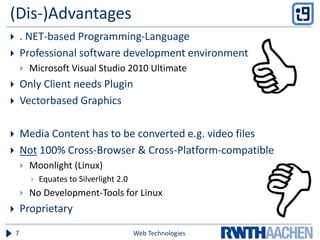
(Dis-)Advantages
 . NET-based Programming-Language
 Professional software development environment
 Microsoft Visual Studio 2010 Ultimate
 Only Client needs Plugin
 Vectorbased Graphics
 Media Content has to be converted e.g. video files
 Not 100% Cross-Browser & Cross-Platform-compatible
 Moonlight (Linux)
 Equates to Silverlight 2.0
 No Development-Tools for Linux
 Proprietary
Web Technologies7
XAML
 Extensible Application Markup Language
 Declarative XML-based language
 Created by Microsoft
 Interface design
Web Technologies8
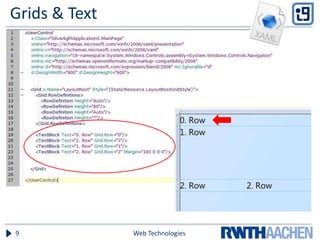
Grids & Text
Web Technologies9
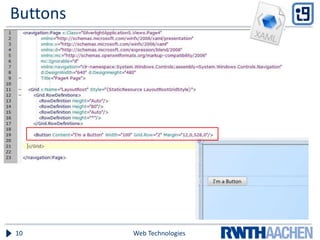
Buttons
Web Technologies10
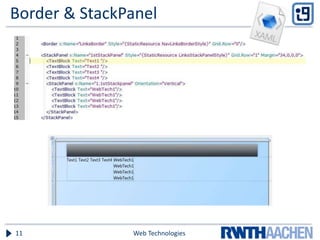
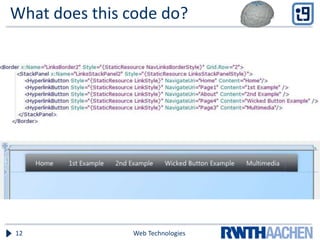
Border & StackPanel
Web Technologies11
What does this code do?
Web Technologies12
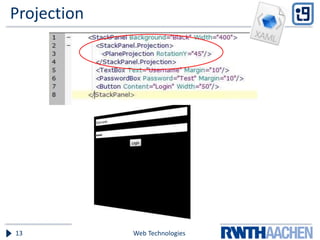
Projection
Web Technologies13
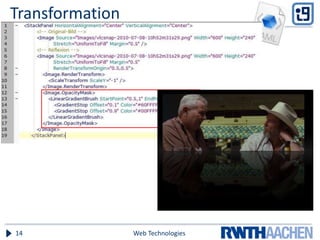
Transformation
Web Technologies14
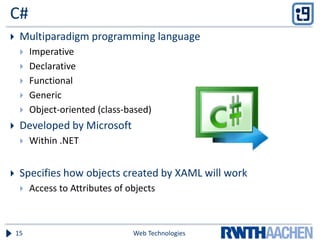
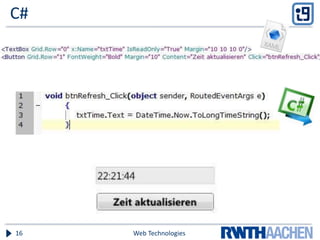
C#
 Multiparadigm programming language
 Imperative
 Declarative
 Functional
 Generic
 Object-oriented (class-based)
 Developed by Microsoft
 Within .NET
 Specifies how objects created by XAML will work
 Access to Attributes of objects
Web Technologies15
C#
Web Technologies16
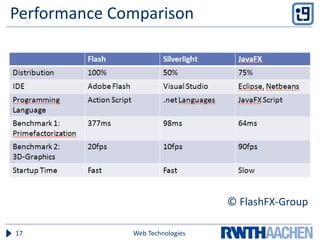
Performance Comparison
© FlashFX-Group
Web Technologies17
Why Silverlight?
 Object oriented Programming
 XAML
 Markup Language – independent from specific language
 Understood by search engines
 Flash: Barely search engine support
 Out-of-Browser installation
Web Technologies18

S1lverl1ght 25.11.10 final

  • 1.
    Client side technologies MicrosoftSilverlight Thomas Friese, Georg Mierau, Thomas Roffmann, Max Sträßer Web Technologies – Prof. Dr. Ulrik Schroeder – WS 2010/111 The slides are licensed under a Creative Commons Attribution 3.0 License
  • 2.
    Overview  Introduction toSilverlight  History  Technology  Program structure and Syntax  Live-Demo Web Technologies2
  • 3.
    Introduction  Application frameworkfor writing and running RIAs  Renders XAML-based user interfaces  Client-side execution: Browser-Plugin  Separated Structure  Design: XAML  Functionality: C# / VB.NET  Integrates multimedia, graphics, animations and interactivity into a single runtime environment Web Technologies3
  • 4.
    History  Silverlight 1.0 JavaScript-API  User-Input / UI-Core  Multimedia Rendering (e.g. Mp3, WMA, WMV 8/9)  XAML for UI creation  Silverlight 2  Canvas  Containers: Stackpanel, Grid Web Technologies4
  • 5.
    History  Silverlight 3 Available for Mac OS  Hardware-Acceleration  Out-of-Browser Technology  Silverlight 4  Printer System  Webcam, Microphone support  Recording of audio & video  Data Binding Web Technologies5
  • 6.
    Technical Concept  Basedon .NET 2.0 & Subset of WPF  Windows Presentation Foundation  Silverlight: WPF/E (verywhere)  Data-Communication:  HTTP-GET and –REST  Web-Services  Execution of Code in a Sandbox Web Technologies6
  • 7.
    (Dis-)Advantages  . NET-basedProgramming-Language  Professional software development environment  Microsoft Visual Studio 2010 Ultimate  Only Client needs Plugin  Vectorbased Graphics  Media Content has to be converted e.g. video files  Not 100% Cross-Browser & Cross-Platform-compatible  Moonlight (Linux)  Equates to Silverlight 2.0  No Development-Tools for Linux  Proprietary Web Technologies7
  • 8.
    XAML  Extensible ApplicationMarkup Language  Declarative XML-based language  Created by Microsoft  Interface design Web Technologies8
  • 9.
    Grids & Text WebTechnologies9
  • 10.
  • 11.
  • 12.
    What does thiscode do? Web Technologies12
  • 13.
  • 14.
  • 15.
    C#  Multiparadigm programminglanguage  Imperative  Declarative  Functional  Generic  Object-oriented (class-based)  Developed by Microsoft  Within .NET  Specifies how objects created by XAML will work  Access to Attributes of objects Web Technologies15
  • 16.
  • 17.
  • 18.
    Why Silverlight?  Objectoriented Programming  XAML  Markup Language – independent from specific language  Understood by search engines  Flash: Barely search engine support  Out-of-Browser installation Web Technologies18