Copyright(c)2025 NTT Corp. All Rights Reserved.
1
Running QEMU Inside Browser
Kohei Tokunaga, NTT Corporation
FOSDEM 2025 (Feb. 2)
Copyright(c)2025 NTT Corp. All Rights Reserved.
Summary
2
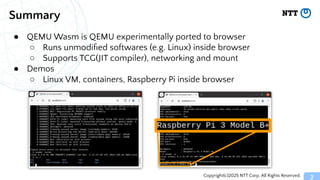
● QEMU Wasm is QEMU experimentally ported to browser
○ Runs unmodified softwares (e.g. Linux) inside browser
○ Supports TCG(JIT compiler), networking and mount
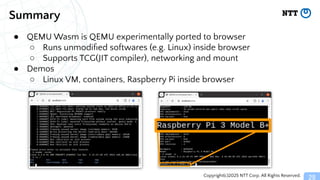
● Demos
○ Linux VM, containers, Raspberry Pi inside browser
Copyright(c)2025 NTT Corp. All Rights Reserved.
Why porting apps to browsers?
3
● Leveraging existing apps on browser (dev environment, playground,
building block, etc)
○ Ruby.wasm
○ VSCode Python for the web
○ Sqlite3 on browser
○ Postgres on browser (PGLite)
○ Swift on browser
○ Clang in browser
Copyright(c)2025 NTT Corp. All Rights Reserved.
But, porting apps to browsers is hard
4
● Existing softwares (e.g. Linux apps) need re-implementation to run
inside browsers
○ Recompilation to Wasm (or JS)
○ Some syscalls (e.g. fork/exec) might be unavailable
● Can we run unmodified applications inside browsers?
Copyright(c)2025 NTT Corp. All Rights Reserved.
5
QEMU Wasm
Copyright(c)2025 NTT Corp. All Rights Reserved.
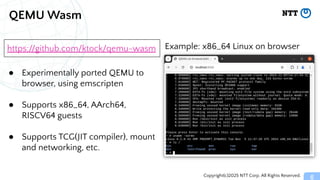
QEMU Wasm
6
● Experimentally ported QEMU to
browser, using emscripten
● Supports x86_64, AArch64,
RISCV64 guests
● Supports TCG(JIT compiler), mount
and networking, etc.
https://github.com/ktock/qemu-wasm Example: x86_64 Linux on browser
Copyright(c)2025 NTT Corp. All Rights Reserved.
Configuring flags
7
Module['arguments'] = [
'-nographic', '-m', '512M', '-accel', 'tcg,tb-size=500',
'-L', '/pack/',
'-drive', 'if=virtio,file=/pack/rootfs.bin',
'-kernel', '/pack/bzImage',
'-append', 'console=ttyS0 root=/dev/vda',
];
● Pass flags to QEMU via emscripten’s Module object in JS
● In the repo, examples are available for NW (-netdev), mount
(-virtfs), migration (-incoming) flags
Example configuration
Copyright(c)2025 NTT Corp. All Rights Reserved.
Demo
8
● x86_64 Alpine Linux inside browser
● Demo page: https://ktock.github.io/qemu-wasm-demo/
Copyright(c)2025 NTT Corp. All Rights Reserved.
9
How it works?
Copyright(c)2025 NTT Corp. All Rights Reserved.
How it works?
10
● QEMU (qemu-system-*) is compiled using emscripten
● Dependencies (e.g. kernel and rootfs) are packaged using
emscripten’s --preload
● Relies on browser APIs for JIT and networking (described later)
Copyright(c)2025 NTT Corp. All Rights Reserved.
QEMU TCG (Tiny Code Generator)
11
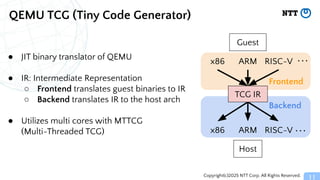
● JIT binary translator of QEMU
● IR: Intermediate Representation
○ Frontend translates guest binaries to IR
○ Backend translates IR to the host arch
● Utilizes multi cores with MTTCG
(Multi-Threaded TCG)
x86 ARM RISC-V
x86 ARM RISC-V
Frontend
Backend
Guest
Host
・・・
・・・
TCG IR
Copyright(c)2025 NTT Corp. All Rights Reserved.
Wasm TCG backend
12
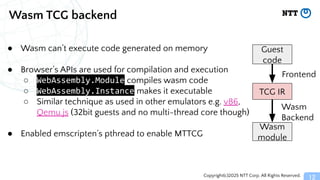
● Wasm can’t execute code generated on memory
● Browser’s APIs are used for compilation and execution
○ WebAssembly.Module compiles wasm code
○ WebAssembly.Instance makes it executable
○ Similar technique as used in other emulators e.g. v86,
Qemu.js (32bit guests and no multi-thread core though)
● Enabled emscripten’s pthread to enable MTTCG
TCG IR
Frontend
Wasm
Backend
Wasm
module
Guest
code
Copyright(c)2025 NTT Corp. All Rights Reserved.
TCG IR to Wasm translation
13
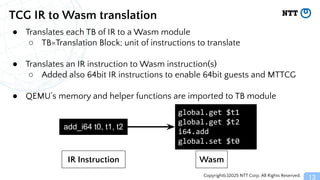
add_i64 t0, t1, t2
global.get $t1
global.get $t2
i64.add
global.set $t0
IR Instruction Wasm
● Translates each TB of IR to a Wasm module
○ TB=Translation Block; unit of instructions to translate
● Translates an IR instruction to Wasm instruction(s)
○ Added also 64bit IR instructions to enable 64bit guests and MTTCG
● QEMU’s memory and helper functions are imported to TB module
Copyright(c)2025 NTT Corp. All Rights Reserved.
Mitigation for limitations of compiling modules
14
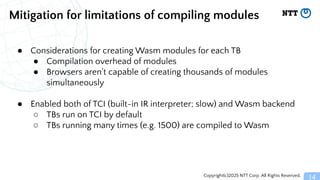
● Considerations for creating Wasm modules for each TB
● Compilation overhead of modules
● Browsers aren’t capable of creating thousands of modules
simultaneously
● Enabled both of TCI (built-in IR interpreter; slow) and Wasm backend
○ TBs run on TCI by default
○ TBs running many times (e.g. 1500) are compiled to Wasm
Copyright(c)2025 NTT Corp. All Rights Reserved.
Performance
15
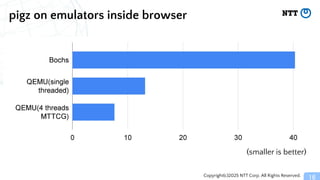
● Measured duration of compressing 10MB random data using pigz on
emulated x86_64 guest
○ pigz is gzip implementation with multi processor support[1]
● Compared QEMU Wasm and Bochs ported to browser[2]
○ Bochs is a portable x86 emulator with interpreter approach
■ we’ve ported this to browser using emscripten
● Browser: Chrome 130.0.6723.58
● Host: Intel(R) Core(TM) i7-10510U CPU @ 1.80GHz (8 cores)
● Script:
https://github.com/ktock/container2wasm/commit/07260a2297ffc4ff40ca07dc6c558e4a8f56c154
[1] http://zlib.net/pigz/
[2] https://github.com/ktock/Bochs/tree/c2w-wasm
Copyright(c)2025 NTT Corp. All Rights Reserved.
pigz on emulators inside browser
16
(smaller is better)
Copyright(c)2025 NTT Corp. All Rights Reserved.
Mounting filesystem
17
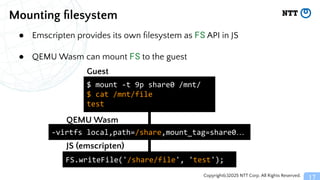
● Emscripten provides its own filesystem as FS API in JS
● QEMU Wasm can mount FS to the guest
$ mount -t 9p share0 /mnt/
$ cat /mnt/file
test
Guest
QEMU Wasm
JS (emscripten)
-virtfs local,path=/share,mount_tag=share0…
FS.writeFile('/share/file', 'test');
Copyright(c)2025 NTT Corp. All Rights Reserved.
Networking
18
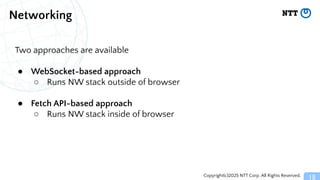
Two approaches are available
● WebSocket-based approach
○ Runs NW stack outside of browser
● Fetch API-based approach
○ Runs NW stack inside of browser
Copyright(c)2025 NTT Corp. All Rights Reserved.
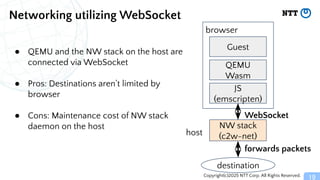
Networking utilizing WebSocket
19
● QEMU and the NW stack on the host are
connected via WebSocket
● Pros: Destinations aren’t limited by
browser
● Cons: Maintenance cost of NW stack
daemon on the host
QEMU
Wasm
JS
(emscripten)
Guest
browser
NW stack
(c2w-net)
forwards packets
WebSocket
host
destination
Copyright(c)2025 NTT Corp. All Rights Reserved.
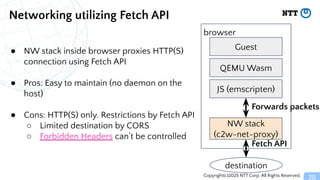
Networking utilizing Fetch API
20
QEMU Wasm
JS (emscripten)
Guest
browser
NW stack
(c2w-net-proxy)
Fetch API
destination
● NW stack inside browser proxies HTTP(S)
connection using Fetch API
● Pros: Easy to maintain (no daemon on the
host)
● Cons: HTTP(S) only. Restrictions by Fetch API
○ Limited destination by CORS
○ Forbidden Headers can’t be controlled
Forwards packets
Copyright(c)2025 NTT Corp. All Rights Reserved.
21
Demos
Copyright(c)2025 NTT Corp. All Rights Reserved.
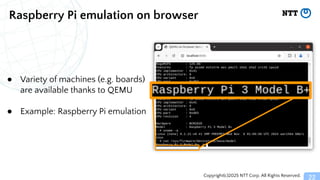
Raspberry Pi emulation on browser
22
● Variety of machines (e.g. boards)
are available thanks to QEMU
● Example: Raspberry Pi emulation
Copyright(c)2025 NTT Corp. All Rights Reserved.
Demo
23
● Raspberry Pi inside browser
● Demo page: https://ktock.github.io/qemu-wasm-demo/
Copyright(c)2025 NTT Corp. All Rights Reserved.
Containers on browser with container2wasm
24
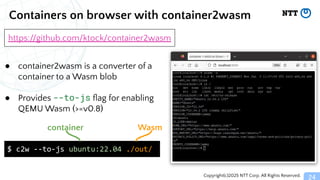
● container2wasm is a converter of a
container to a Wasm blob
● Provides --to-js flag for enabling
QEMU Wasm (>=v0.8)
$ c2w --to-js ubuntu:22.04 ./out/
container Wasm
https://github.com/ktock/container2wasm
Copyright(c)2025 NTT Corp. All Rights Reserved.
Demo
25
● Running a container inside browser
● Docs:
https://github.com/ktock/container2wasm/tree/v0.8.0/examples/em
scripten
Copyright(c)2025 NTT Corp. All Rights Reserved.
Future works
26
● Performance & stability improvement for Wasm backend
○ Still slower than other backends. Further improvement is needed.
● Integration with more QEMU features
○ More guest architectures, machines, graphics…
○ User mode QEMU
● Integration with ecosystem
○ Accessing package repos (e.g. apk, apt, ...) and container registries from
browser (w/ CORS restriction)
Copyright(c)2025 NTT Corp. All Rights Reserved.
Related works
27
● v86: https://github.com/copy/v86
○ x86-compatible on-browser CPU emulator by Fabian Hemmer
○ Supports wide variety of guest OSes (including Windows)
○ Supports JIT translation using browser APIs
○ No support for x86_64 guests
● Qemu.js: https://github.com/atrosinenko/qemujs
○ QEMU ported to browser by Anatoly Trosinenko
○ Supports JIT translation (TCG) using browser APIs
○ Single-threaded, no support for 64bit guests
Copyright(c)2025 NTT Corp. All Rights Reserved.
Summary
28
● QEMU Wasm is QEMU experimentally ported to browser
○ Runs unmodified softwares (e.g. Linux) inside browser
○ Supports TCG(JIT compiler), networking and mount
● Demos
○ Linux VM, containers, Raspberry Pi inside browser

Running QEMU Inside Browser.............

  • 1.
    Copyright(c)2025 NTT Corp.All Rights Reserved. 1 Running QEMU Inside Browser Kohei Tokunaga, NTT Corporation FOSDEM 2025 (Feb. 2)
  • 2.
    Copyright(c)2025 NTT Corp.All Rights Reserved. Summary 2 ● QEMU Wasm is QEMU experimentally ported to browser ○ Runs unmodified softwares (e.g. Linux) inside browser ○ Supports TCG(JIT compiler), networking and mount ● Demos ○ Linux VM, containers, Raspberry Pi inside browser
  • 3.
    Copyright(c)2025 NTT Corp.All Rights Reserved. Why porting apps to browsers? 3 ● Leveraging existing apps on browser (dev environment, playground, building block, etc) ○ Ruby.wasm ○ VSCode Python for the web ○ Sqlite3 on browser ○ Postgres on browser (PGLite) ○ Swift on browser ○ Clang in browser
  • 4.
    Copyright(c)2025 NTT Corp.All Rights Reserved. But, porting apps to browsers is hard 4 ● Existing softwares (e.g. Linux apps) need re-implementation to run inside browsers ○ Recompilation to Wasm (or JS) ○ Some syscalls (e.g. fork/exec) might be unavailable ● Can we run unmodified applications inside browsers?
  • 5.
    Copyright(c)2025 NTT Corp.All Rights Reserved. 5 QEMU Wasm
  • 6.
    Copyright(c)2025 NTT Corp.All Rights Reserved. QEMU Wasm 6 ● Experimentally ported QEMU to browser, using emscripten ● Supports x86_64, AArch64, RISCV64 guests ● Supports TCG(JIT compiler), mount and networking, etc. https://github.com/ktock/qemu-wasm Example: x86_64 Linux on browser
  • 7.
    Copyright(c)2025 NTT Corp.All Rights Reserved. Configuring flags 7 Module['arguments'] = [ '-nographic', '-m', '512M', '-accel', 'tcg,tb-size=500', '-L', '/pack/', '-drive', 'if=virtio,file=/pack/rootfs.bin', '-kernel', '/pack/bzImage', '-append', 'console=ttyS0 root=/dev/vda', ]; ● Pass flags to QEMU via emscripten’s Module object in JS ● In the repo, examples are available for NW (-netdev), mount (-virtfs), migration (-incoming) flags Example configuration
  • 8.
    Copyright(c)2025 NTT Corp.All Rights Reserved. Demo 8 ● x86_64 Alpine Linux inside browser ● Demo page: https://ktock.github.io/qemu-wasm-demo/
  • 9.
    Copyright(c)2025 NTT Corp.All Rights Reserved. 9 How it works?
  • 10.
    Copyright(c)2025 NTT Corp.All Rights Reserved. How it works? 10 ● QEMU (qemu-system-*) is compiled using emscripten ● Dependencies (e.g. kernel and rootfs) are packaged using emscripten’s --preload ● Relies on browser APIs for JIT and networking (described later)
  • 11.
    Copyright(c)2025 NTT Corp.All Rights Reserved. QEMU TCG (Tiny Code Generator) 11 ● JIT binary translator of QEMU ● IR: Intermediate Representation ○ Frontend translates guest binaries to IR ○ Backend translates IR to the host arch ● Utilizes multi cores with MTTCG (Multi-Threaded TCG) x86 ARM RISC-V x86 ARM RISC-V Frontend Backend Guest Host ・・・ ・・・ TCG IR
  • 12.
    Copyright(c)2025 NTT Corp.All Rights Reserved. Wasm TCG backend 12 ● Wasm can’t execute code generated on memory ● Browser’s APIs are used for compilation and execution ○ WebAssembly.Module compiles wasm code ○ WebAssembly.Instance makes it executable ○ Similar technique as used in other emulators e.g. v86, Qemu.js (32bit guests and no multi-thread core though) ● Enabled emscripten’s pthread to enable MTTCG TCG IR Frontend Wasm Backend Wasm module Guest code
  • 13.
    Copyright(c)2025 NTT Corp.All Rights Reserved. TCG IR to Wasm translation 13 add_i64 t0, t1, t2 global.get $t1 global.get $t2 i64.add global.set $t0 IR Instruction Wasm ● Translates each TB of IR to a Wasm module ○ TB=Translation Block; unit of instructions to translate ● Translates an IR instruction to Wasm instruction(s) ○ Added also 64bit IR instructions to enable 64bit guests and MTTCG ● QEMU’s memory and helper functions are imported to TB module
  • 14.
    Copyright(c)2025 NTT Corp.All Rights Reserved. Mitigation for limitations of compiling modules 14 ● Considerations for creating Wasm modules for each TB ● Compilation overhead of modules ● Browsers aren’t capable of creating thousands of modules simultaneously ● Enabled both of TCI (built-in IR interpreter; slow) and Wasm backend ○ TBs run on TCI by default ○ TBs running many times (e.g. 1500) are compiled to Wasm
  • 15.
    Copyright(c)2025 NTT Corp.All Rights Reserved. Performance 15 ● Measured duration of compressing 10MB random data using pigz on emulated x86_64 guest ○ pigz is gzip implementation with multi processor support[1] ● Compared QEMU Wasm and Bochs ported to browser[2] ○ Bochs is a portable x86 emulator with interpreter approach ■ we’ve ported this to browser using emscripten ● Browser: Chrome 130.0.6723.58 ● Host: Intel(R) Core(TM) i7-10510U CPU @ 1.80GHz (8 cores) ● Script: https://github.com/ktock/container2wasm/commit/07260a2297ffc4ff40ca07dc6c558e4a8f56c154 [1] http://zlib.net/pigz/ [2] https://github.com/ktock/Bochs/tree/c2w-wasm
  • 16.
    Copyright(c)2025 NTT Corp.All Rights Reserved. pigz on emulators inside browser 16 (smaller is better)
  • 17.
    Copyright(c)2025 NTT Corp.All Rights Reserved. Mounting filesystem 17 ● Emscripten provides its own filesystem as FS API in JS ● QEMU Wasm can mount FS to the guest $ mount -t 9p share0 /mnt/ $ cat /mnt/file test Guest QEMU Wasm JS (emscripten) -virtfs local,path=/share,mount_tag=share0… FS.writeFile('/share/file', 'test');
  • 18.
    Copyright(c)2025 NTT Corp.All Rights Reserved. Networking 18 Two approaches are available ● WebSocket-based approach ○ Runs NW stack outside of browser ● Fetch API-based approach ○ Runs NW stack inside of browser
  • 19.
    Copyright(c)2025 NTT Corp.All Rights Reserved. Networking utilizing WebSocket 19 ● QEMU and the NW stack on the host are connected via WebSocket ● Pros: Destinations aren’t limited by browser ● Cons: Maintenance cost of NW stack daemon on the host QEMU Wasm JS (emscripten) Guest browser NW stack (c2w-net) forwards packets WebSocket host destination
  • 20.
    Copyright(c)2025 NTT Corp.All Rights Reserved. Networking utilizing Fetch API 20 QEMU Wasm JS (emscripten) Guest browser NW stack (c2w-net-proxy) Fetch API destination ● NW stack inside browser proxies HTTP(S) connection using Fetch API ● Pros: Easy to maintain (no daemon on the host) ● Cons: HTTP(S) only. Restrictions by Fetch API ○ Limited destination by CORS ○ Forbidden Headers can’t be controlled Forwards packets
  • 21.
    Copyright(c)2025 NTT Corp.All Rights Reserved. 21 Demos
  • 22.
    Copyright(c)2025 NTT Corp.All Rights Reserved. Raspberry Pi emulation on browser 22 ● Variety of machines (e.g. boards) are available thanks to QEMU ● Example: Raspberry Pi emulation
  • 23.
    Copyright(c)2025 NTT Corp.All Rights Reserved. Demo 23 ● Raspberry Pi inside browser ● Demo page: https://ktock.github.io/qemu-wasm-demo/
  • 24.
    Copyright(c)2025 NTT Corp.All Rights Reserved. Containers on browser with container2wasm 24 ● container2wasm is a converter of a container to a Wasm blob ● Provides --to-js flag for enabling QEMU Wasm (>=v0.8) $ c2w --to-js ubuntu:22.04 ./out/ container Wasm https://github.com/ktock/container2wasm
  • 25.
    Copyright(c)2025 NTT Corp.All Rights Reserved. Demo 25 ● Running a container inside browser ● Docs: https://github.com/ktock/container2wasm/tree/v0.8.0/examples/em scripten
  • 26.
    Copyright(c)2025 NTT Corp.All Rights Reserved. Future works 26 ● Performance & stability improvement for Wasm backend ○ Still slower than other backends. Further improvement is needed. ● Integration with more QEMU features ○ More guest architectures, machines, graphics… ○ User mode QEMU ● Integration with ecosystem ○ Accessing package repos (e.g. apk, apt, ...) and container registries from browser (w/ CORS restriction)
  • 27.
    Copyright(c)2025 NTT Corp.All Rights Reserved. Related works 27 ● v86: https://github.com/copy/v86 ○ x86-compatible on-browser CPU emulator by Fabian Hemmer ○ Supports wide variety of guest OSes (including Windows) ○ Supports JIT translation using browser APIs ○ No support for x86_64 guests ● Qemu.js: https://github.com/atrosinenko/qemujs ○ QEMU ported to browser by Anatoly Trosinenko ○ Supports JIT translation (TCG) using browser APIs ○ Single-threaded, no support for 64bit guests
  • 28.
    Copyright(c)2025 NTT Corp.All Rights Reserved. Summary 28 ● QEMU Wasm is QEMU experimentally ported to browser ○ Runs unmodified softwares (e.g. Linux) inside browser ○ Supports TCG(JIT compiler), networking and mount ● Demos ○ Linux VM, containers, Raspberry Pi inside browser