Reverse Engineering
Swift Apps
Michael Gianarakis
Rootcon X 2016
# whoami
@mgianarakis
Director of SpiderLabs APAC at Trustwave
SecTalks Organiser (@SecTalks_BNE)
Flat Duck Justice Warrior #ducksec
Motivation
• Seeing more and more Swift being used in apps that we test (fan
boys like me tend to adopt new Apple technology quickly)
• Google is even considering using Swift as a first class language
on Android… (http://thenextweb.com/dd/2016/04/07/google-
facebook-uber-swift/)
• Wanted to dive into some of the key differences with Swift and
look at the challenges with respect to Swift app pen testing
• Focus is on “black box” app pen testing - for a deeper dive into
Swift language RE I recommend Ryan Stortz’s talk at Infiltrate
(http://infiltratecon.com/archives/swift_Ryan_Stortz.pdf)
How Does Swift Affect Testing?
• Will dive into the detail in the presentation but the
reality is not much in most areas, quite a bit in others?
• Most issues in iOS and OS X apps are due to poor
design decisions or misconfiguration and incorrect
implementation of Apple and third party frameworks
and libraries.
• The main thing that has changed is how you reverse
engineer the application
Quick Overview of
Swift
What is Swift?
• Compiled language created by Apple
• Released publicly in 2014 at WWDC and has seen
multiple revisions since.
• Open source with official implementations for iOS,
OS X and Linux.
• Intended to replace Objective-C eventually
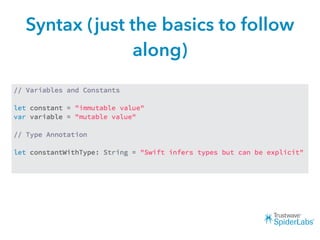
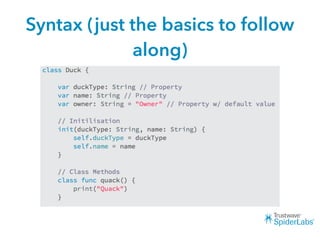
Syntax (just the basics to follow
along)
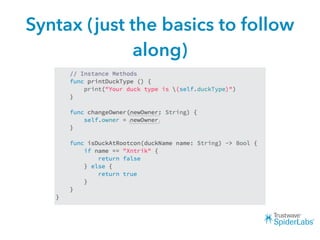
Syntax (just the basics to follow
along)
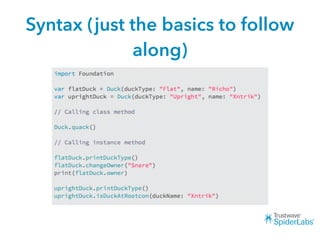
Syntax (just the basics to follow
along)
Syntax (just the basics to follow
along)
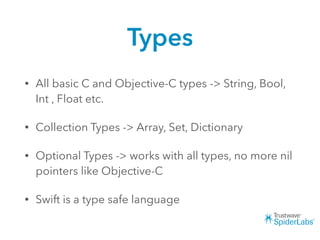
Types
• All basic C and Objective-C types -> String, Bool,
Int , Float etc.
• Collection Types -> Array, Set, Dictionary
• Optional Types -> works with all types, no more nil
pointers like Objective-C
• Swift is a type safe language
Objective-C Compatibility
• Objective-C compatibility and interoperability
• Uses the same runtime environment
• Still supports C and C++ in the same app but
can’t be called from Swift like Objective-C
• Can allow for some dynamic features and
runtime manipulation
Other Language Features
• Barely scratched the surface
• Structs, Protocols, Extensions, Closures,
Enumerations, Optionals, Generics, Type Casting,
Access Control, Error Handling, Assertions….
• Automatic Reference Counting
• Unicode…
• var 💩 = 💩 💩 💩 💩 💩 ()
Other Language Features
Challenges Reversing
Swift Apps
Challenges
• Less dynamic than Objective-C
• Less flexible than Objective-C in some areas
• Can make it harder to do some of the standard tasks you
would do on a standard app pen test
• Less of an issue now because most Swift apps will include
be mixed with Objective-C
• Limited tooling
• We will explore this in more detail
Challenges
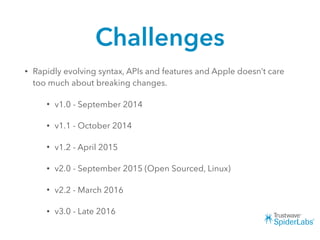
• Rapidly evolving syntax, APIs and features and Apple doesn’t care
too much about breaking changes.
• v1.0 - September 2014
• v1.1 - October 2014
• v1.2 - April 2015
• v2.0 - September 2015 (Open Sourced, Linux)
• v2.2 - March 2016
• v3.0 - Late 2016
Reversing Swift Apps
• Two primary reverse engineering activities when
conducting a “black box” pen test
• Dumping and analysing class information
from the binary
• Retrieving information at runtime using
debuggers, function hooking, tracing etc.
Retrieving Class
Information
Class Dump?
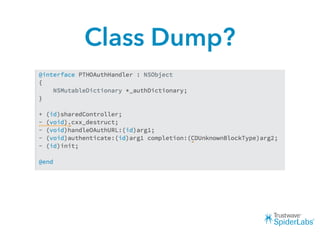
• The most common and easiest way to retrieve
class data from an Objective-C binary is the class-
dump utility
• class-dump-z retrieves class information and
formats to look like the equivalent of an Objective-
C header file
• Usually one of the first things you do when looking
at an app
Class Dump?
Class Dump?
What next?
• So class-dump-z doesn’t work with Swift binaries :(
• Now what?
• Let’s start diving into the binary
Symbol Table
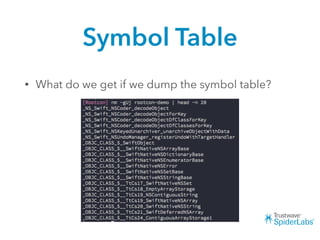
• What do we get if we dump the symbol table?
Symbol Table
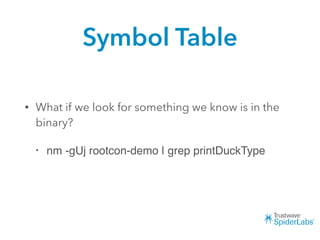
• What if we look for something we know is in the
binary?
• nm -gUj rootcon-demo | grep printDuckType
Symbol Table
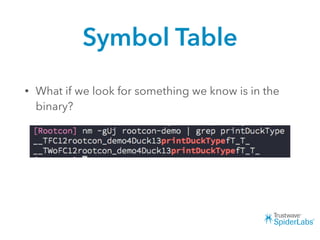
• What if we look for something we know is in the
binary?
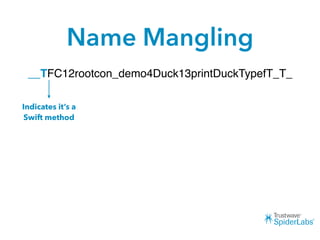
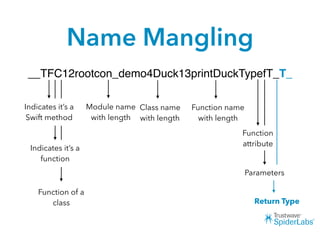
Name Mangling
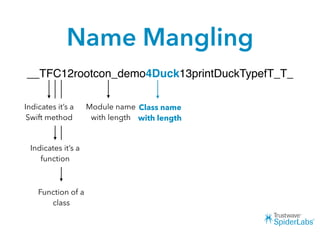
• Looks promising but it’s a far cry from the output
of class-dump and is kind of hard to make out
• Swift stores metadata about a function in it’s
symbols in the process “mangling” the name.
Name Mangling
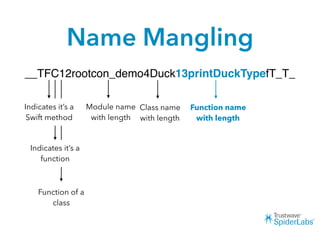
__TFC12rootcon_demo4Duck13printDuckTypefT_T_
Indicates it’s a
Swift method
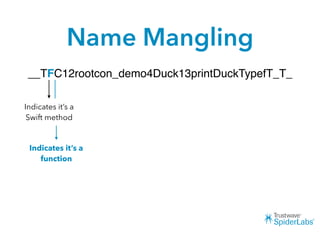
Name Mangling
__TFC12rootcon_demo4Duck13printDuckTypefT_T_
Indicates it’s a
Swift method
Indicates it’s a
function
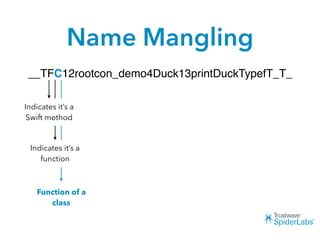
Name Mangling
__TFC12rootcon_demo4Duck13printDuckTypefT_T_
Indicates it’s a
Swift method
Indicates it’s a
function
Function of a
class
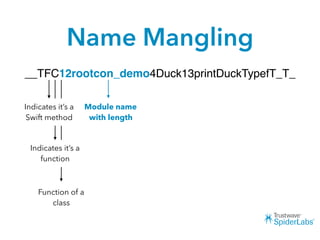
Name Mangling
__TFC12rootcon_demo4Duck13printDuckTypefT_T_
Indicates it’s a
Swift method
Indicates it’s a
function
Function of a
class
Module name
with length
Name Mangling
__TFC12rootcon_demo4Duck13printDuckTypefT_T_
Indicates it’s a
Swift method
Indicates it’s a
function
Function of a
class
Module name
with length
Class name
with length
Name Mangling
__TFC12rootcon_demo4Duck13printDuckTypefT_T_
Indicates it’s a
Swift method
Indicates it’s a
function
Function of a
class
Module name
with length
Class name
with length
Function name
with length
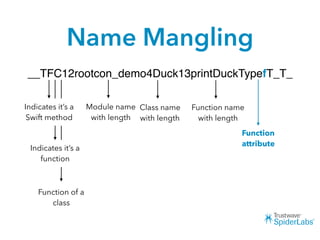
Name Mangling
__TFC12rootcon_demo4Duck13printDuckTypefT_T_
Indicates it’s a
Swift method
Indicates it’s a
function
Function of a
class
Module name
with length
Class name
with length
Function name
with length
Function
attribute
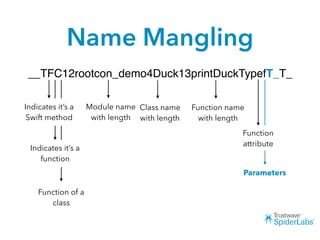
Name Mangling
__TFC12rootcon_demo4Duck13printDuckTypefT_T_
Indicates it’s a
Swift method
Indicates it’s a
function
Function of a
class
Module name
with length
Class name
with length
Function name
with length
Function
attribute
Parameters
Name Mangling
__TFC12rootcon_demo4Duck13printDuckTypefT_T_
Indicates it’s a
Swift method
Indicates it’s a
function
Function of a
class
Module name
with length
Class name
with length
Function name
with length
Function
attribute
Parameters
Return Type
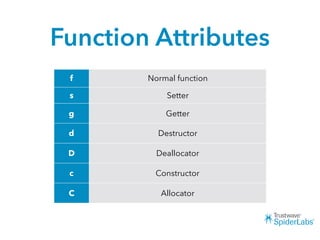
Function Attributes
f Normal function
s Setter
g Getter
d Destructor
D Deallocator
c Constructor
C Allocator
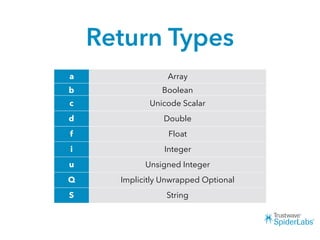
Return Types
a Array
b Boolean
c Unicode Scalar
d Double
f Float
i Integer
u Unsigned Integer
Q Implicitly Unwrapped Optional
S String
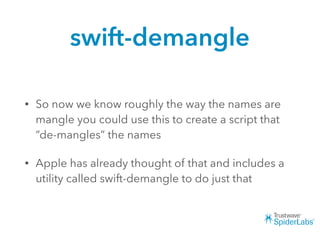
swift-demangle
• So now we know roughly the way the names are
mangle you could use this to create a script that
“de-mangles” the names
• Apple has already thought of that and includes a
utility called swift-demangle to do just that
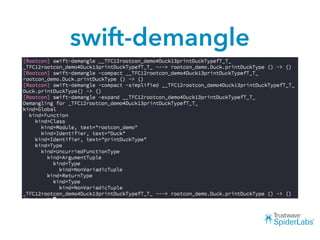
swift-demangle
swift-demangle
• With nm and swift-demangle and some shell
scripting you should be able to easily grab the
function signatures from an app
• Should be all you need to get basically the same
information you would from class-dump to start
assessing the app
class-dump-s
• Hacked together script that demangles names and
formats the output to approximate the output of
class-dump
• Written in Swift
Demo
Stripped Binaries
• CAVEAT: If the developer stripped symbols from
the binary then these techniques obviously won’t
work.
• Reverse engineering stripped binaries is a bit
more complicated
Objective-C Compatibility
• Part of the reason it’s much easier to get class
information from Objective-C binaries is because
it’s necessary for the Objective-C runtime to have
that info
• So what happens when you import Objective-C
frameworks or use Objective-C in your app?
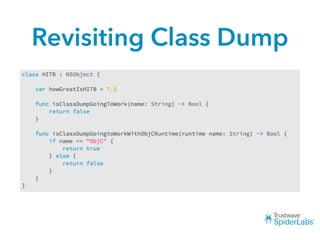
Revisiting Class Dump
• The latest branch of class-dump by Steven Nygard
(the original class-dump utility) has limited support
for Swift.
• Need to download and build from source (no
binary release yet)
• https://github.com/nygard/class-dump
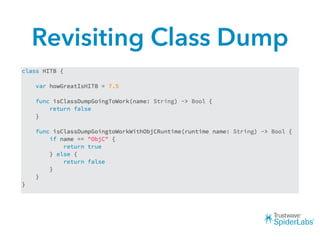
Revisiting Class Dump
Demo
Revisiting Class Dump
Other Options
Other Options
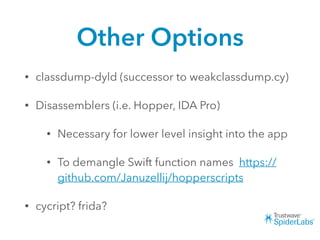
• classdump-dyld (successor to weakclassdump.cy)
• Disassemblers (i.e. Hopper, IDA Pro)
• Necessary for lower level insight into the app
• To demangle Swift function names https://
github.com/Januzellij/hopperscripts
• cycript? frida?
Function Hooking
Hooking Swift Methods
• Still possible.
• Much easier with in mixed Swift/Objective-C
binaries.
• Can still write tweaks with Mobile Substrate.
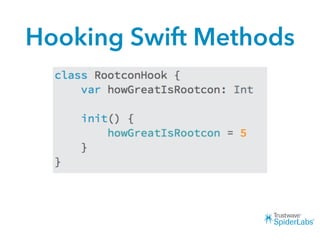
Hooking Swift Methods
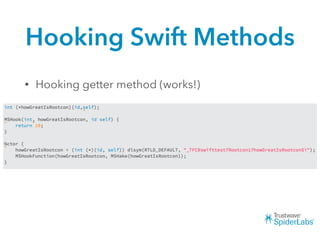
• Hooking getter method (works!)
Hooking Swift Methods
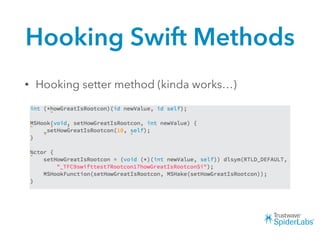
• Hooking setter method (kinda works…)
Hooking Swift Methods
• Certain functions in Swift are inlined and the class
constructor is one of them (which is directly setting
the instance variable)
• So in this case the setter will only be called again
by the top level code.
• If you call from there it works.
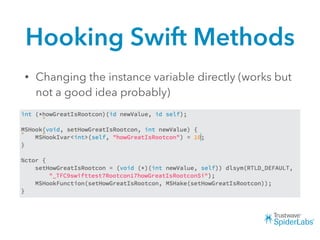
Hooking Swift Methods
• Changing the instance variable directly (works but
not a good idea probably)
Wrap Up
Wrap Up
• So not all hope is lost when it comes to your
standard pen test workflows with Swift apps
• A bit more of a pain in the arse if you don’t get
access to the source code
• Most issues in iOS and OS X apps are due to poor
design decisions or misconfiguration and incorrect
implementation of Apple and third party
frameworks and libraries.
Next Steps
• Improve the class-dump-s script :)
• Remove dependency on swift-demagle
• Ivars, stripped binaries?
• Runtime inspection
• cycript works but not as straightforward as with Objective-C
• LLDB works well if you are familiar with it
• Will hopefully write a blog post soon
Q&A?

Rootcon X - Reverse Engineering Swift Applications

  • 1.
    Reverse Engineering Swift Apps MichaelGianarakis Rootcon X 2016
  • 2.
    # whoami @mgianarakis Director ofSpiderLabs APAC at Trustwave SecTalks Organiser (@SecTalks_BNE) Flat Duck Justice Warrior #ducksec
  • 3.
    Motivation • Seeing moreand more Swift being used in apps that we test (fan boys like me tend to adopt new Apple technology quickly) • Google is even considering using Swift as a first class language on Android… (http://thenextweb.com/dd/2016/04/07/google- facebook-uber-swift/) • Wanted to dive into some of the key differences with Swift and look at the challenges with respect to Swift app pen testing • Focus is on “black box” app pen testing - for a deeper dive into Swift language RE I recommend Ryan Stortz’s talk at Infiltrate (http://infiltratecon.com/archives/swift_Ryan_Stortz.pdf)
  • 4.
    How Does SwiftAffect Testing? • Will dive into the detail in the presentation but the reality is not much in most areas, quite a bit in others? • Most issues in iOS and OS X apps are due to poor design decisions or misconfiguration and incorrect implementation of Apple and third party frameworks and libraries. • The main thing that has changed is how you reverse engineer the application
  • 5.
  • 6.
    What is Swift? •Compiled language created by Apple • Released publicly in 2014 at WWDC and has seen multiple revisions since. • Open source with official implementations for iOS, OS X and Linux. • Intended to replace Objective-C eventually
  • 7.
    Syntax (just thebasics to follow along)
  • 8.
    Syntax (just thebasics to follow along)
  • 9.
    Syntax (just thebasics to follow along)
  • 10.
    Syntax (just thebasics to follow along)
  • 11.
    Types • All basicC and Objective-C types -> String, Bool, Int , Float etc. • Collection Types -> Array, Set, Dictionary • Optional Types -> works with all types, no more nil pointers like Objective-C • Swift is a type safe language
  • 12.
    Objective-C Compatibility • Objective-Ccompatibility and interoperability • Uses the same runtime environment • Still supports C and C++ in the same app but can’t be called from Swift like Objective-C • Can allow for some dynamic features and runtime manipulation
  • 13.
    Other Language Features •Barely scratched the surface • Structs, Protocols, Extensions, Closures, Enumerations, Optionals, Generics, Type Casting, Access Control, Error Handling, Assertions…. • Automatic Reference Counting • Unicode… • var 💩 = 💩 💩 💩 💩 💩 ()
  • 14.
  • 15.
  • 16.
    Challenges • Less dynamicthan Objective-C • Less flexible than Objective-C in some areas • Can make it harder to do some of the standard tasks you would do on a standard app pen test • Less of an issue now because most Swift apps will include be mixed with Objective-C • Limited tooling • We will explore this in more detail
  • 17.
    Challenges • Rapidly evolvingsyntax, APIs and features and Apple doesn’t care too much about breaking changes. • v1.0 - September 2014 • v1.1 - October 2014 • v1.2 - April 2015 • v2.0 - September 2015 (Open Sourced, Linux) • v2.2 - March 2016 • v3.0 - Late 2016
  • 18.
    Reversing Swift Apps •Two primary reverse engineering activities when conducting a “black box” pen test • Dumping and analysing class information from the binary • Retrieving information at runtime using debuggers, function hooking, tracing etc.
  • 19.
  • 20.
    Class Dump? • Themost common and easiest way to retrieve class data from an Objective-C binary is the class- dump utility • class-dump-z retrieves class information and formats to look like the equivalent of an Objective- C header file • Usually one of the first things you do when looking at an app
  • 21.
  • 22.
  • 23.
    What next? • Soclass-dump-z doesn’t work with Swift binaries :( • Now what? • Let’s start diving into the binary
  • 24.
    Symbol Table • Whatdo we get if we dump the symbol table?
  • 25.
    Symbol Table • Whatif we look for something we know is in the binary? • nm -gUj rootcon-demo | grep printDuckType
  • 26.
    Symbol Table • Whatif we look for something we know is in the binary?
  • 27.
    Name Mangling • Lookspromising but it’s a far cry from the output of class-dump and is kind of hard to make out • Swift stores metadata about a function in it’s symbols in the process “mangling” the name.
  • 28.
  • 29.
  • 30.
    Name Mangling __TFC12rootcon_demo4Duck13printDuckTypefT_T_ Indicates it’sa Swift method Indicates it’s a function Function of a class
  • 31.
    Name Mangling __TFC12rootcon_demo4Duck13printDuckTypefT_T_ Indicates it’sa Swift method Indicates it’s a function Function of a class Module name with length
  • 32.
    Name Mangling __TFC12rootcon_demo4Duck13printDuckTypefT_T_ Indicates it’sa Swift method Indicates it’s a function Function of a class Module name with length Class name with length
  • 33.
    Name Mangling __TFC12rootcon_demo4Duck13printDuckTypefT_T_ Indicates it’sa Swift method Indicates it’s a function Function of a class Module name with length Class name with length Function name with length
  • 34.
    Name Mangling __TFC12rootcon_demo4Duck13printDuckTypefT_T_ Indicates it’sa Swift method Indicates it’s a function Function of a class Module name with length Class name with length Function name with length Function attribute
  • 35.
    Name Mangling __TFC12rootcon_demo4Duck13printDuckTypefT_T_ Indicates it’sa Swift method Indicates it’s a function Function of a class Module name with length Class name with length Function name with length Function attribute Parameters
  • 36.
    Name Mangling __TFC12rootcon_demo4Duck13printDuckTypefT_T_ Indicates it’sa Swift method Indicates it’s a function Function of a class Module name with length Class name with length Function name with length Function attribute Parameters Return Type
  • 37.
    Function Attributes f Normalfunction s Setter g Getter d Destructor D Deallocator c Constructor C Allocator
  • 38.
    Return Types a Array bBoolean c Unicode Scalar d Double f Float i Integer u Unsigned Integer Q Implicitly Unwrapped Optional S String
  • 39.
    swift-demangle • So nowwe know roughly the way the names are mangle you could use this to create a script that “de-mangles” the names • Apple has already thought of that and includes a utility called swift-demangle to do just that
  • 40.
  • 41.
    swift-demangle • With nmand swift-demangle and some shell scripting you should be able to easily grab the function signatures from an app • Should be all you need to get basically the same information you would from class-dump to start assessing the app
  • 42.
    class-dump-s • Hacked togetherscript that demangles names and formats the output to approximate the output of class-dump • Written in Swift
  • 43.
  • 44.
    Stripped Binaries • CAVEAT:If the developer stripped symbols from the binary then these techniques obviously won’t work. • Reverse engineering stripped binaries is a bit more complicated
  • 45.
    Objective-C Compatibility • Partof the reason it’s much easier to get class information from Objective-C binaries is because it’s necessary for the Objective-C runtime to have that info • So what happens when you import Objective-C frameworks or use Objective-C in your app?
  • 46.
    Revisiting Class Dump •The latest branch of class-dump by Steven Nygard (the original class-dump utility) has limited support for Swift. • Need to download and build from source (no binary release yet) • https://github.com/nygard/class-dump
  • 47.
  • 48.
  • 49.
  • 50.
  • 51.
  • 52.
  • 53.
    Other Options • classdump-dyld(successor to weakclassdump.cy) • Disassemblers (i.e. Hopper, IDA Pro) • Necessary for lower level insight into the app • To demangle Swift function names https:// github.com/Januzellij/hopperscripts • cycript? frida?
  • 54.
  • 55.
    Hooking Swift Methods •Still possible. • Much easier with in mixed Swift/Objective-C binaries. • Can still write tweaks with Mobile Substrate.
  • 56.
  • 57.
    Hooking Swift Methods •Hooking getter method (works!)
  • 58.
    Hooking Swift Methods •Hooking setter method (kinda works…)
  • 59.
    Hooking Swift Methods •Certain functions in Swift are inlined and the class constructor is one of them (which is directly setting the instance variable) • So in this case the setter will only be called again by the top level code. • If you call from there it works.
  • 60.
    Hooking Swift Methods •Changing the instance variable directly (works but not a good idea probably)
  • 61.
  • 62.
    Wrap Up • Sonot all hope is lost when it comes to your standard pen test workflows with Swift apps • A bit more of a pain in the arse if you don’t get access to the source code • Most issues in iOS and OS X apps are due to poor design decisions or misconfiguration and incorrect implementation of Apple and third party frameworks and libraries.
  • 63.
    Next Steps • Improvethe class-dump-s script :) • Remove dependency on swift-demagle • Ivars, stripped binaries? • Runtime inspection • cycript works but not as straightforward as with Objective-C • LLDB works well if you are familiar with it • Will hopefully write a blog post soon
  • 64.