Root Cause Analysis
in Excel®
with ThinkReliability®
David J. Williamson, PhD, PMP, ITIL
Wednesday, February 27, 2019
1:00 pm
Description and Bio
Root Cause Analysis in Excel® with ThinkReliability®
with David Williamson
Get an overview of a powerful systems thinking
approach to root cause analysis with some real world
examples. The Cause Mapping process and free Excel®
template from ThinkReliability® can be used to facilitate
effective root cause analysis in lean process
improvement and many other kinds of projects.
Learning Objectives
Applying a systems thinking approach to root cause
analysis.
Introduction to a process and tool that can be used for
many types of projects.
Trademarks
Excel® is a registered trademark of Microsoft.
ThinkReliability® is a registered trademark of Novem,
Inc.
David Williamson
Root Cause Analysis in Excel® with ThinkReliability®
Dr. Williamson is a Managing Principal Consultant with
Leverage Point, an IT project and service management
consulting firm, and an instructor in Virginia Tech’s
department of Continuing and Professional Education.
He has over 30 years experience in retail, ecommerce,
health care, education, local, state, and federal
government, equipment maintenance and reliability,
telecommunications, and software development. He
was the Founding President of the Project Management
Institute’s Southwest Virginia Chapter in 2003. He is also
an adjunct instructor at Colorado State University--
Global Campus and Walden University.
Contact Info
David J. Williamson, PhD, PMP, ITIL
Principal Consultant, Leverage Point, LLC
Adjunct Instructor, VT CPE
540-632-1982
david.williamson@leverage-point.com
djwmson@vt.edu
www.linkedin.com/in/davidjwilliamson
Root Cause Analysis in Excel® with ThinkReliability® 2
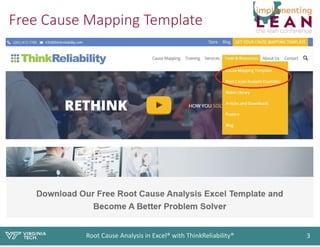
Free Cause Mapping Template
Root Cause Analysis in Excel® with ThinkReliability® 3
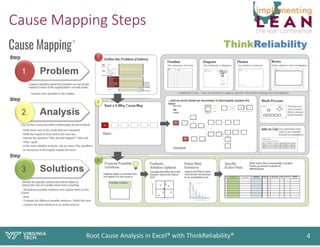
Cause Mapping Steps
Root Cause Analysis in Excel® with ThinkReliability® 4
Worksheets
Root Cause Analysis in Excel® with ThinkReliability® 5
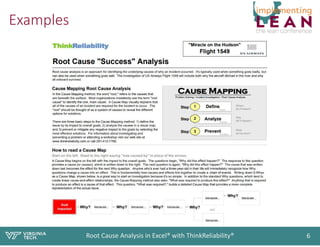
Examples
Root Cause Analysis in Excel® with ThinkReliability® 6

Root Cause Analysis with ThinkReliability®

  • 1.
    Root Cause Analysis inExcel® with ThinkReliability® David J. Williamson, PhD, PMP, ITIL Wednesday, February 27, 2019 1:00 pm
  • 2.
    Description and Bio RootCause Analysis in Excel® with ThinkReliability® with David Williamson Get an overview of a powerful systems thinking approach to root cause analysis with some real world examples. The Cause Mapping process and free Excel® template from ThinkReliability® can be used to facilitate effective root cause analysis in lean process improvement and many other kinds of projects. Learning Objectives Applying a systems thinking approach to root cause analysis. Introduction to a process and tool that can be used for many types of projects. Trademarks Excel® is a registered trademark of Microsoft. ThinkReliability® is a registered trademark of Novem, Inc. David Williamson Root Cause Analysis in Excel® with ThinkReliability® Dr. Williamson is a Managing Principal Consultant with Leverage Point, an IT project and service management consulting firm, and an instructor in Virginia Tech’s department of Continuing and Professional Education. He has over 30 years experience in retail, ecommerce, health care, education, local, state, and federal government, equipment maintenance and reliability, telecommunications, and software development. He was the Founding President of the Project Management Institute’s Southwest Virginia Chapter in 2003. He is also an adjunct instructor at Colorado State University-- Global Campus and Walden University. Contact Info David J. Williamson, PhD, PMP, ITIL Principal Consultant, Leverage Point, LLC Adjunct Instructor, VT CPE 540-632-1982 david.williamson@leverage-point.com djwmson@vt.edu www.linkedin.com/in/davidjwilliamson Root Cause Analysis in Excel® with ThinkReliability® 2
  • 3.
    Free Cause MappingTemplate Root Cause Analysis in Excel® with ThinkReliability® 3
  • 4.
    Cause Mapping Steps RootCause Analysis in Excel® with ThinkReliability® 4
  • 5.
    Worksheets Root Cause Analysisin Excel® with ThinkReliability® 5
  • 6.
    Examples Root Cause Analysisin Excel® with ThinkReliability® 6