All trademarks and registered trademarks are the property of their respective owners.© HelpSystems LLC. All rights reserved.
Learn to manage QSYSOPR messages without losing your mind
How to Confront Your IBM i
Message Queues
HelpSystems LLC. All rights reserved.
Your Hosts
Chuck Losinski
Director of Automation Technology
HelpSystems
Broadcasting live from Eden Prairie, Minnesota USA
Sara Williams
Research Technical Consultant
HelpSystems
All trademarks and registered trademarks are the property of their respective owners.© HelpSystems LLC. All rights reserved.
HelpSystems LLC. All rights reserved.
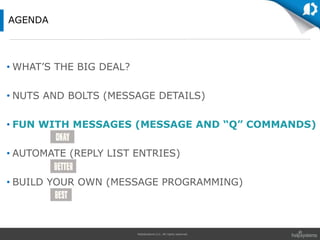
• WHAT’S THE BIG DEAL?
• NUTS AND BOLTS (MESSAGE DETAILS)
• FUN WITH MESSAGES (MESSAGE AND “Q” COMMANDS)
• AUTOMATE (REPLY LIST ENTRIES)
• BUILD YOUR OWN (MESSAGE PROGRAMMING)
AGENDA
HelpSystems LLC. All rights reserved.
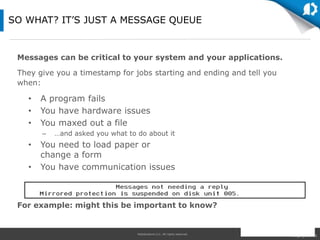
Messages can be critical to your system and your applications.
They give you a timestamp for jobs starting and ending and tell you
when:
For example: might this be important to know?
SO WHAT? IT’S JUST A MESSAGE QUEUE
• A program fails
• You have hardware issues
• You maxed out a file
– …and asked you what to do about it
• You need to load paper or
change a form
• You have communication issues
HelpSystems LLC. All rights reserved.
• WHAT’S THE BIG DEAL?
• NUTS AND BOLTS (MESSAGE DETAILS)
• FUN WITH MESSAGES (MESSAGE AND “Q” COMMANDS)
• AUTOMATE (REPLY LIST ENTRIES)
• BUILD YOUR OWN (MESSAGE PROGRAMMING)
AGENDA
HelpSystems LLC. All rights reserved.
• Message ID
• Severity 00-99
• Type – Info or Inquiry
• Date/Time
• Text – Usually helpful
• Reply Values – Predefined
PARTS OF A MESSAGE
Note: Press F1 on a message for additional information. Press
F9 for message details.
HelpSystems LLC. All rights reserved.
• Pass information from:
– The operating system
– A program
– A user
• Examples:
– Job completed normally
– Device PRT03 no longer communicating
– Password not correct for user profile
– But also: disk failure, storage threshold exceeded! Critical
not to miss!
INFORMATIONAL MESSAGES
HelpSystems LLC. All rights reserved.
• Messages that require a response from:
– The system
– A program
– A user
• Examples:
– Active file found on this volume (C I)
– Load next tape volume on device
TAP01 (C G)
– End of forms on PRT03 (C H I PAGE 1-9999999)
INQUIRY MESSAGES
HelpSystems LLC. All rights reserved.
• Read the message text and make sure you select the
appropriate reply
• Examples:
– C = (C) Cancel or (C) Continue
– I = (I) Ignore
– G = (G) Go or (G) Get-In
– R = (R) Retry
– D = (D) Dump
MESSAGE REPLIES
HelpSystems LLC. All rights reserved.
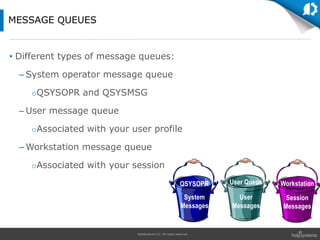
• Different types of message queues:
– System operator message queue
QSYSOPR and QSYSMSG
– User message queue
Associated with your user profile
– Workstation message queue
Associated with your session
MESSAGE QUEUES
QSYSOPR User Queue Workstation
System
Messages
User
Messages
Session
Messages
HelpSystems LLC. All rights reserved.
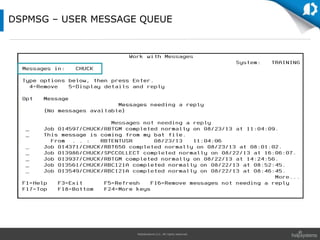
DSPMSG – USER MESSAGE QUEUE
HelpSystems LLC. All rights reserved.
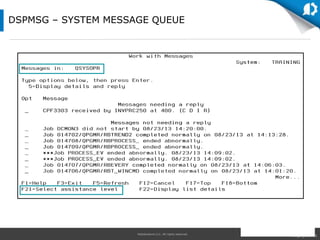
DSPMSG – SYSTEM MESSAGE QUEUE
HelpSystems LLC. All rights reserved.
1. Message files: system vs. application
2. Message details: severity, replies, etc.
3. Message queue contents and options
LIVE DEMO
HelpSystems LLC. All rights reserved.
• WHAT’S THE BIG DEAL?
• NUTS AND BOLTS (MESSAGE DETAILS)
• FUN WITH MESSAGES (MESSAGE AND “Q” COMMANDS)
• AUTOMATE (REPLY LIST ENTRIES)
• BUILD YOUR OWN (MESSAGE PROGRAMMING)
AGENDA
HelpSystems LLC. All rights reserved.
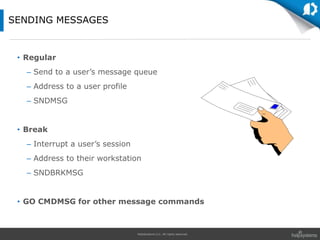
• Regular
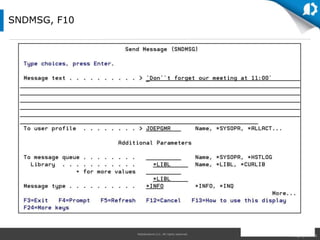
– Send to a user’s message queue
– Address to a user profile
– SNDMSG
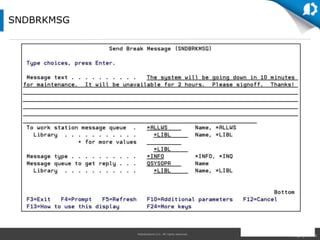
• Break
– Interrupt a user’s session
– Address to their workstation
– SNDBRKMSG
• GO CMDMSG for other message commands
SENDING MESSAGES
HelpSystems LLC. All rights reserved.
SNDMSG, F10
HelpSystems LLC. All rights reserved.
SNDBRKMSG
HelpSystems LLC. All rights reserved.
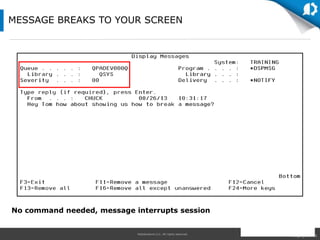
No command needed, message interrupts session
MESSAGE BREAKS TO YOUR SCREEN
HelpSystems LLC. All rights reserved.
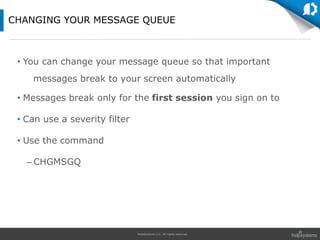
• You can change your message queue so that important
messages break to your screen automatically
• Messages break only for the first session you sign on to
• Can use a severity filter
• Use the command
– CHGMSGQ
CHANGING YOUR MESSAGE QUEUE
HelpSystems LLC. All rights reserved.
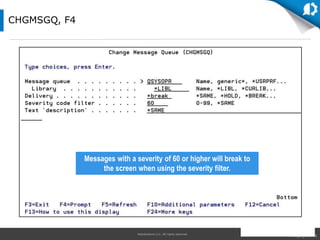
CHGMSGQ, F4
Messages with a severity of 60 or higher will break to
the screen when using the severity filter.
HelpSystems LLC. All rights reserved.
1. Sending messages
2. Receiving messages
3. Break messages
LIVE DEMO
HelpSystems LLC. All rights reserved.
• WHAT’S THE BIG DEAL?
• NUTS AND BOLTS (MESSAGE DETAILS)
• FUN WITH MESSAGES (MESSAGE AND “Q” COMMANDS)
• AUTOMATE (REPLY LIST ENTRIES)
• BUILD YOUR OWN (MESSAGE PROGRAMMING)
AGENDA
HelpSystems LLC. All rights reserved.
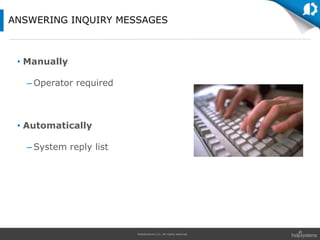
• Manually
– Operator required
• Automatically
– System reply list
ANSWERING INQUIRY MESSAGES
HelpSystems LLC. All rights reserved.
Manually:
• Some messages require that you take some action or
investigate the problem before answering the message
OPERATOR REQUIRED
HelpSystems LLC. All rights reserved.
Automatically:
• The system can handle some messages automatically
• The system reply list will answer messages using a default
answer as soon as the message arrives on the message
queue
– The message data must match the comparison data
• Job generating message must have…
– Job attribute INQMSGRPY(*SYSRPYL)
SYSTEM REPLY LIST
HelpSystems LLC. All rights reserved.
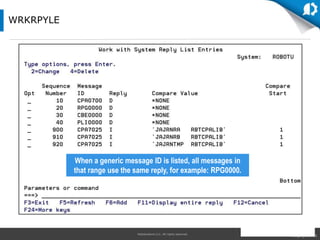
WRKRPYLE
When a generic message ID is listed, all messages in
that range use the same reply, for example: RPG0000.
HelpSystems LLC. All rights reserved.
1. Build an automatic reply
2. Using comparison data
3. How would you test this?
LIVE DEMO
HelpSystems LLC. All rights reserved.
• WHAT’S THE BIG DEAL?
• NUTS AND BOLTS (MESSAGE DETAILS)
• FUN WITH MESSAGES (MESSAGE AND “Q” COMMANDS)
• AUTOMATE (REPLY LIST ENTRIES)
• BUILD YOUR OWN (MESSAGE PROGRAMMING)
AGENDA
HelpSystems LLC. All rights reserved.
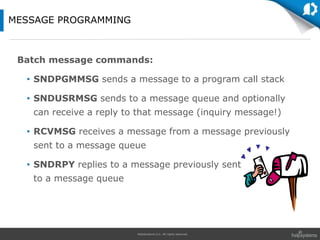
Batch message commands:
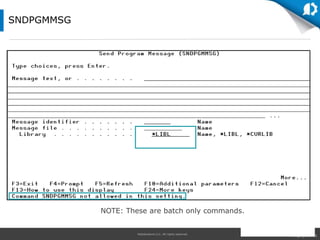
• SNDPGMMSG sends a message to a program call stack
• SNDUSRMSG sends to a message queue and optionally
can receive a reply to that message (inquiry message!)
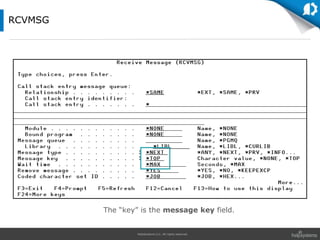
• RCVMSG receives a message from a message previously
sent to a message queue
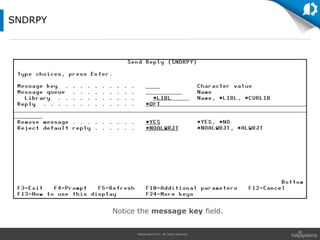
• SNDRPY replies to a message previously sent
to a message queue
MESSAGE PROGRAMMING
HelpSystems LLC. All rights reserved.
SNDPGMMSG
NOTE: These are batch only commands.
HelpSystems LLC. All rights reserved.
RCVMSG
The “key” is the message key field.
HelpSystems LLC. All rights reserved.
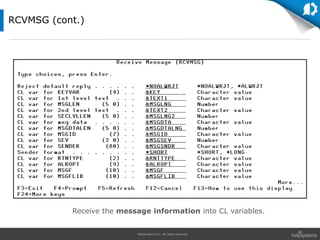
RCVMSG (cont.)
Receive the message information into CL variables.
HelpSystems LLC. All rights reserved.
SNDRPY
Notice the message key field.
HelpSystems LLC. All rights reserved.
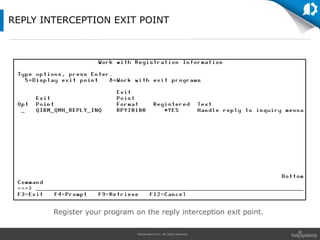
REPLY INTERCEPTION EXIT POINT
Register your program on the reply interception exit point.
HelpSystems LLC. All rights reserved.
1. A simple message interception program
2. Registering the message program
3. Generating test messages with a CL program
LIVE DEMO
HelpSystems LLC. All rights reserved.
• Messages are a big deal and should not be ignored
– Your users are depending on you!
• Reply list entries will get you started
• Automation is the key
– Consider a commercial message management package
– Specifically designed for message handling and escalation
– Robot solution
QUESTIONS?
All trademarks and registered trademarks are the property of their respective owners.© HelpSystems LLC. All rights reserved.
Thank you for attending!
Contact Information
Website:
www.helpsystems.com/robot
Telephone:
800-328-1000 sales
+1 952-933-0609 support
Presenters:
chuck.losinski@helpsystems.com
sara.williams@helpsystems.com
Chuck Losinski
Director of Automation Technology
HelpSystems
Sara Williams
Research Technical Consultant
HelpSystems

How to Confront Your IBM i Message Queues

  • 1.
    All trademarks andregistered trademarks are the property of their respective owners.© HelpSystems LLC. All rights reserved. Learn to manage QSYSOPR messages without losing your mind How to Confront Your IBM i Message Queues
  • 2.
    HelpSystems LLC. Allrights reserved. Your Hosts Chuck Losinski Director of Automation Technology HelpSystems Broadcasting live from Eden Prairie, Minnesota USA Sara Williams Research Technical Consultant HelpSystems
  • 3.
    All trademarks andregistered trademarks are the property of their respective owners.© HelpSystems LLC. All rights reserved.
  • 4.
    HelpSystems LLC. Allrights reserved. • WHAT’S THE BIG DEAL? • NUTS AND BOLTS (MESSAGE DETAILS) • FUN WITH MESSAGES (MESSAGE AND “Q” COMMANDS) • AUTOMATE (REPLY LIST ENTRIES) • BUILD YOUR OWN (MESSAGE PROGRAMMING) AGENDA
  • 5.
    HelpSystems LLC. Allrights reserved. Messages can be critical to your system and your applications. They give you a timestamp for jobs starting and ending and tell you when: For example: might this be important to know? SO WHAT? IT’S JUST A MESSAGE QUEUE • A program fails • You have hardware issues • You maxed out a file – …and asked you what to do about it • You need to load paper or change a form • You have communication issues
  • 6.
    HelpSystems LLC. Allrights reserved. • WHAT’S THE BIG DEAL? • NUTS AND BOLTS (MESSAGE DETAILS) • FUN WITH MESSAGES (MESSAGE AND “Q” COMMANDS) • AUTOMATE (REPLY LIST ENTRIES) • BUILD YOUR OWN (MESSAGE PROGRAMMING) AGENDA
  • 7.
    HelpSystems LLC. Allrights reserved. • Message ID • Severity 00-99 • Type – Info or Inquiry • Date/Time • Text – Usually helpful • Reply Values – Predefined PARTS OF A MESSAGE Note: Press F1 on a message for additional information. Press F9 for message details.
  • 8.
    HelpSystems LLC. Allrights reserved. • Pass information from: – The operating system – A program – A user • Examples: – Job completed normally – Device PRT03 no longer communicating – Password not correct for user profile – But also: disk failure, storage threshold exceeded! Critical not to miss! INFORMATIONAL MESSAGES
  • 9.
    HelpSystems LLC. Allrights reserved. • Messages that require a response from: – The system – A program – A user • Examples: – Active file found on this volume (C I) – Load next tape volume on device TAP01 (C G) – End of forms on PRT03 (C H I PAGE 1-9999999) INQUIRY MESSAGES
  • 10.
    HelpSystems LLC. Allrights reserved. • Read the message text and make sure you select the appropriate reply • Examples: – C = (C) Cancel or (C) Continue – I = (I) Ignore – G = (G) Go or (G) Get-In – R = (R) Retry – D = (D) Dump MESSAGE REPLIES
  • 11.
    HelpSystems LLC. Allrights reserved. • Different types of message queues: – System operator message queue QSYSOPR and QSYSMSG – User message queue Associated with your user profile – Workstation message queue Associated with your session MESSAGE QUEUES QSYSOPR User Queue Workstation System Messages User Messages Session Messages
  • 12.
    HelpSystems LLC. Allrights reserved. DSPMSG – USER MESSAGE QUEUE
  • 13.
    HelpSystems LLC. Allrights reserved. DSPMSG – SYSTEM MESSAGE QUEUE
  • 14.
    HelpSystems LLC. Allrights reserved. 1. Message files: system vs. application 2. Message details: severity, replies, etc. 3. Message queue contents and options LIVE DEMO
  • 15.
    HelpSystems LLC. Allrights reserved. • WHAT’S THE BIG DEAL? • NUTS AND BOLTS (MESSAGE DETAILS) • FUN WITH MESSAGES (MESSAGE AND “Q” COMMANDS) • AUTOMATE (REPLY LIST ENTRIES) • BUILD YOUR OWN (MESSAGE PROGRAMMING) AGENDA
  • 16.
    HelpSystems LLC. Allrights reserved. • Regular – Send to a user’s message queue – Address to a user profile – SNDMSG • Break – Interrupt a user’s session – Address to their workstation – SNDBRKMSG • GO CMDMSG for other message commands SENDING MESSAGES
  • 17.
    HelpSystems LLC. Allrights reserved. SNDMSG, F10
  • 18.
    HelpSystems LLC. Allrights reserved. SNDBRKMSG
  • 19.
    HelpSystems LLC. Allrights reserved. No command needed, message interrupts session MESSAGE BREAKS TO YOUR SCREEN
  • 20.
    HelpSystems LLC. Allrights reserved. • You can change your message queue so that important messages break to your screen automatically • Messages break only for the first session you sign on to • Can use a severity filter • Use the command – CHGMSGQ CHANGING YOUR MESSAGE QUEUE
  • 21.
    HelpSystems LLC. Allrights reserved. CHGMSGQ, F4 Messages with a severity of 60 or higher will break to the screen when using the severity filter.
  • 22.
    HelpSystems LLC. Allrights reserved. 1. Sending messages 2. Receiving messages 3. Break messages LIVE DEMO
  • 23.
    HelpSystems LLC. Allrights reserved. • WHAT’S THE BIG DEAL? • NUTS AND BOLTS (MESSAGE DETAILS) • FUN WITH MESSAGES (MESSAGE AND “Q” COMMANDS) • AUTOMATE (REPLY LIST ENTRIES) • BUILD YOUR OWN (MESSAGE PROGRAMMING) AGENDA
  • 24.
    HelpSystems LLC. Allrights reserved. • Manually – Operator required • Automatically – System reply list ANSWERING INQUIRY MESSAGES
  • 25.
    HelpSystems LLC. Allrights reserved. Manually: • Some messages require that you take some action or investigate the problem before answering the message OPERATOR REQUIRED
  • 26.
    HelpSystems LLC. Allrights reserved. Automatically: • The system can handle some messages automatically • The system reply list will answer messages using a default answer as soon as the message arrives on the message queue – The message data must match the comparison data • Job generating message must have… – Job attribute INQMSGRPY(*SYSRPYL) SYSTEM REPLY LIST
  • 27.
    HelpSystems LLC. Allrights reserved. WRKRPYLE When a generic message ID is listed, all messages in that range use the same reply, for example: RPG0000.
  • 28.
    HelpSystems LLC. Allrights reserved. 1. Build an automatic reply 2. Using comparison data 3. How would you test this? LIVE DEMO
  • 29.
    HelpSystems LLC. Allrights reserved. • WHAT’S THE BIG DEAL? • NUTS AND BOLTS (MESSAGE DETAILS) • FUN WITH MESSAGES (MESSAGE AND “Q” COMMANDS) • AUTOMATE (REPLY LIST ENTRIES) • BUILD YOUR OWN (MESSAGE PROGRAMMING) AGENDA
  • 30.
    HelpSystems LLC. Allrights reserved. Batch message commands: • SNDPGMMSG sends a message to a program call stack • SNDUSRMSG sends to a message queue and optionally can receive a reply to that message (inquiry message!) • RCVMSG receives a message from a message previously sent to a message queue • SNDRPY replies to a message previously sent to a message queue MESSAGE PROGRAMMING
  • 31.
    HelpSystems LLC. Allrights reserved. SNDPGMMSG NOTE: These are batch only commands.
  • 32.
    HelpSystems LLC. Allrights reserved. RCVMSG The “key” is the message key field.
  • 33.
    HelpSystems LLC. Allrights reserved. RCVMSG (cont.) Receive the message information into CL variables.
  • 34.
    HelpSystems LLC. Allrights reserved. SNDRPY Notice the message key field.
  • 35.
    HelpSystems LLC. Allrights reserved. REPLY INTERCEPTION EXIT POINT Register your program on the reply interception exit point.
  • 36.
    HelpSystems LLC. Allrights reserved. 1. A simple message interception program 2. Registering the message program 3. Generating test messages with a CL program LIVE DEMO
  • 37.
    HelpSystems LLC. Allrights reserved. • Messages are a big deal and should not be ignored – Your users are depending on you! • Reply list entries will get you started • Automation is the key – Consider a commercial message management package – Specifically designed for message handling and escalation – Robot solution QUESTIONS?
  • 38.
    All trademarks andregistered trademarks are the property of their respective owners.© HelpSystems LLC. All rights reserved. Thank you for attending! Contact Information Website: www.helpsystems.com/robot Telephone: 800-328-1000 sales +1 952-933-0609 support Presenters: chuck.losinski@helpsystems.com sara.williams@helpsystems.com Chuck Losinski Director of Automation Technology HelpSystems Sara Williams Research Technical Consultant HelpSystems