Lauren Mills 
Media AS Coursework – Risk Assessment 
Risk Chance of it happening 1-10 What is put in place to 
prevent these from happening 
Battery runs out on the 
camera 
7 Before going out on locations 
to film, always ensure the 
camera has been charging the 
previous day or night before. If 
possible, carry extra batteries, 
for a battery charged camera 
in case the batteries are to run 
out 
Camera Breaks 3 Always ensure the camera is 
secured either by a tripod or 
on a neck strap to prevent the 
camera from falling from a 
high distance and breaking 
Files do not save 5 Make sure before files are 
deleted from the camera or 
shared area that information 
and files are backed up into a 
spare folder or back up folder 
Weather 5 Before going out on location to 
film, make sure you check the 
weather forecast to ensure 
that the weather will be 
suitable to film in. If rain is to 
occur whilst filming, make sure 
the correct waterproof 
equipment is provide to 
prevent water damage from 
taking place 
Debris in the road 5 Before filming the characters, 
always check that the 
environment surrounding you 
is safe, e.g. smooth and debris 
free to prevent accidents from 
happening 
Wires 7 Wires can be dangerous if not 
placed right, ensure that all 
wires are out of the way from 
walking paths and equipment 
to prevent people from falling 
over the wires 
Computers 6 Whilst editing the footage 
taken, make sure that you are 
not on the computer for a long 
duration of time as it can lead 
to headache or affecting your 
eyes. Take a short break when 
on the computer.
Lauren Mills

Risk assessment

  • 1.
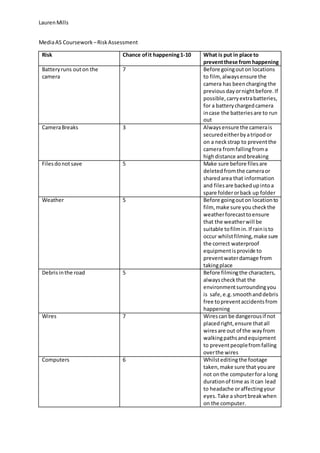
    Lauren Mills MediaAS Coursework – Risk Assessment Risk Chance of it happening 1-10 What is put in place to prevent these from happening Battery runs out on the camera 7 Before going out on locations to film, always ensure the camera has been charging the previous day or night before. If possible, carry extra batteries, for a battery charged camera in case the batteries are to run out Camera Breaks 3 Always ensure the camera is secured either by a tripod or on a neck strap to prevent the camera from falling from a high distance and breaking Files do not save 5 Make sure before files are deleted from the camera or shared area that information and files are backed up into a spare folder or back up folder Weather 5 Before going out on location to film, make sure you check the weather forecast to ensure that the weather will be suitable to film in. If rain is to occur whilst filming, make sure the correct waterproof equipment is provide to prevent water damage from taking place Debris in the road 5 Before filming the characters, always check that the environment surrounding you is safe, e.g. smooth and debris free to prevent accidents from happening Wires 7 Wires can be dangerous if not placed right, ensure that all wires are out of the way from walking paths and equipment to prevent people from falling over the wires Computers 6 Whilst editing the footage taken, make sure that you are not on the computer for a long duration of time as it can lead to headache or affecting your eyes. Take a short break when on the computer.
  • 2.