
Rich GUI Testing Made Easy Functional Testing of Swing and JavaFX GUIs Yvonne Wang Price Guidewire Alex Ruiz Oracle tweet: @alexRuiz
Overall Presentation Goal Learn an easy, quick and natural way to write robust and compact tests for Java-based Rich GUIs: Swing and JavaFX
Agenda Why testing GUIs is difficult?  Requirements for robust GUI testing Writing testable GUIs Top-3 must-have features in a GUI testing library Introducing FEST, an open source library for GUI testing Coding Demos Troubleshooting GUI test failures Conclusion
Agenda Why testing GUIs is difficult?   Requirements for robust GUI testing Writing testable GUIs Top-3 must-have features in a GUI testing library Introducing FEST, an open source library for GUI testing Coding Demos Troubleshooting GUI test failures Conclusion
Why GUI testing is difficult? Ideally, tests must be automated, but GUIs are designed for humans Conventional unit testing is not suitable for testing GUIs: GUI components are usually composed of more than one class The room for potential interactions with a GUI is huge Conventional test coverage is not enough to cover all user interaction scenarios
Agenda Why testing GUIs is difficult?  Requirements for robust GUI testing Writing testable GUIs Top-3 must-have features in a GUI testing library Introducing FEST, an open source library for GUI testing Coding Demos Troubleshooting GUI test failures Conclusion
Requirements for robust GUI testing Being able to simulate user input  Having a reliable mechanism for finding GUI components  Being able to tolerate changes in Component position Component size Layout
Agenda Why testing GUIs is difficult?  Requirements for robust GUI testing Writing testable GUIs Top-3 must-have features in a GUI testing library Introducing FEST, an open source library for GUI testing Coding Demos Troubleshooting GUI test failures Conclusion
Writing testable GUIs Keep the UI layer as thin as possible Use a unique name for GUI components Do not test default component behavior  Concentrate on testing the expected behavior of your GUI
Agenda Why testing GUIs is difficult?  Requirements for robust GUI testing Writing testable GUIs Top-3 must-have features in a GUI testing library Introducing FEST, an open source library for GUI testing Coding Demos Troubleshooting GUI test failures Conclusion
Top-3 must-have features in a GUI testing library Intuitive API for test creation Concise and easy-to-read API Ability to aid developers troubleshoot test failures
Agenda Why testing GUIs is difficult?  Requirements for robust GUI testing Writing testable GUIs Top-3 must-have features in a GUI testing library Introducing FEST, an open source library for GUI testing Coding Demos Troubleshooting GUI test failures Conclusion
Introducing FEST Supports functional Swing and JavaFX GUI testing Website:  http://fest.easytesting.org   Its API provides a fluent interface Supports component lookup by name, by type and by custom search criteria Open Source project (Apache 2.0 license) Supports both TestNG and JUnit Simplifies troubleshooting GUI test failures
Agenda Why testing GUIs is difficult?  Requirements for robust GUI testing Writing testable GUIs Top-3 must-have features in a GUI testing library Introducing FEST, an open source library for GUI testing Coding Demos Troubleshooting GUI test failures Conclusion
Our demo application: an RSS reader Provides simple business logic Its user interface includes: Complex GUI components like  JTree  and  JTable   Time-consuming tasks:  Database access Retrieval of web feeds from the Internet Drag ‘n drop
Agenda Why testing GUIs is difficult?  Requirements for robust GUI testing Writing testable GUIs Top-3 must-have features in a GUI testing library Introducing FEST, an open source library for GUI testing Coding Demos Troubleshooting GUI test failures Conclusion
Failures may be due to: Environmental conditions A GUI component could not be found More than one GUI component satisfied the given search criteria Programming defect Troubleshooting failures
Failure due to environmental conditions Typical example: scheduled anti-virus software scan starts in the middle of our test session A screenshot of the desktop at the moment of failure can help us determine if an environmental condition was responsible for the failure Troubleshooting failures
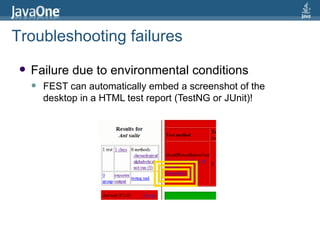
Failure due to environmental conditions FEST can automatically embed a screenshot of the desktop in a HTML test report (TestNG or JUnit)! Troubleshooting failures
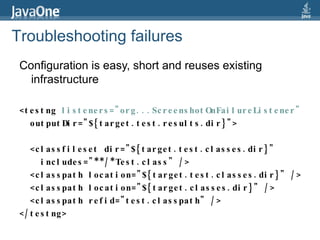
Configuration is easy, short and reuses existing infrastructure <testng  listeners=&quot;org...ScreenshotOnFailureListener&quot;   outputDir=&quot;${target.test.results.dir}&quot;> <classfileset dir=&quot;${target.test.classes.dir}&quot;  includes=&quot;**/*Test.class&quot; />  <classpath location=&quot;${target.test.classes.dir}&quot; />  <classpath location=&quot;${target.classes.dir}&quot; />  <classpath refid=&quot;test.classpath&quot; />  </testng> Troubleshooting failures
Failure due to GUI component not found For example, looking for a button with name “ok” in a dialog that does not contain such button! Having access to the current component hierarchy can help us figure out why a component could not be found FEST includes the current component hierarchy when throwing a  ComponentLookupException Troubleshooting failures
Unable to find component using matcher org.fest.swing.core.NameMatcher[name='label', requireShowing=false]. Troubleshooting failures
Unable to find component using matcher org.fest.swing.core.NameMatcher[name='label', requireShowing=false]. Component hierarchy: org.fest.test.MainWindow[name='frame0', title='BasicComponentFinderTest', enabled=true, visible=true, showing=true] javax.swing.JRootPane[] javax.swing.JPanel[name='null.glassPane'] javax.swing.JPanel[name='null.contentPane'] javax.swing.JButton[name='button', text='A Button', enabled=true, visible=true, showing=true] Troubleshooting failures
Failure due to more than one GUI component satisfies a lookup condition For example, looking up a button with name “ok” in a dialog We have accidentally named two buttons with the same name! Once again, FEST assists us by providing the list of found components in the thrown  ComponentLookupException Troubleshooting failures
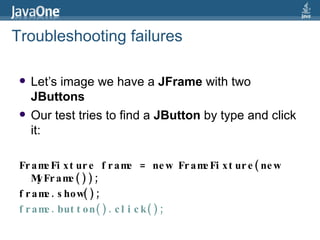
Let’s image we have a  JFrame  with two  JButtons Our test tries to find a  JButton  by type and click it: FrameFixture frame = new FrameFixture(new MyFrame());  frame.show(); frame.button().click(); Troubleshooting failures
Will throw the exception: org.fest.swing.exception.ComponentLookupException: Found more than one component using matcher org.fest.swing.core.TypeMatcher[type=javax.swing.JButton, requireShowing=false]. Troubleshooting failures
Will throw the exception: org.fest.swing.exception.ComponentLookupException: Found more than one component using matcher org.fest.swing.core.TypeMatcher[type=javax.swing.JButton, requireShowing=false]. Found:  javax.swing.JButton[name='first', text='First Button', enabled=true]  javax.swing.JButton[name='second', text='Second Button', enabled=true] Troubleshooting failures
Agenda Why testing GUIs is difficult?  Requirements for robust GUI testing Writing testable GUIs Top-3 must-have features in a GUI testing library Introducing FEST, an open source library for GUI testing Coding Demos Troubleshooting GUI test failures Conclusion
Wait! What about JavaFX?
JavaFX 2.0: Java APIs Java APIs means: TestNG/JUnit Code coverage tools (Cobertura, Clover) Code quality tools (FindBugs, Checkstyle) Faster development of GUI functional testing tools
Roadmap We will continue supporting Swing testing Since Swing support is mature, we can focus on JavaFX testing Release date? Unknown Please remember: we work on our own spare time
Conclusion GUI testing is necessary for improving the quality of our applications For GUIs, functional testing is more suitable than unit testing  Successful testing strategy: Create testable GUIs Write robust GUI tests Pick the right testing tool for your needs (e.g. FEST) Happy testing!

Rich GUI Testing: Swing and JavaFX

  • 1.
    Rich GUI TestingMade Easy Functional Testing of Swing and JavaFX GUIs Yvonne Wang Price Guidewire Alex Ruiz Oracle tweet: @alexRuiz
  • 2.
    Overall Presentation GoalLearn an easy, quick and natural way to write robust and compact tests for Java-based Rich GUIs: Swing and JavaFX
  • 3.
    Agenda Why testingGUIs is difficult? Requirements for robust GUI testing Writing testable GUIs Top-3 must-have features in a GUI testing library Introducing FEST, an open source library for GUI testing Coding Demos Troubleshooting GUI test failures Conclusion
  • 4.
    Agenda Why testingGUIs is difficult? Requirements for robust GUI testing Writing testable GUIs Top-3 must-have features in a GUI testing library Introducing FEST, an open source library for GUI testing Coding Demos Troubleshooting GUI test failures Conclusion
  • 5.
    Why GUI testingis difficult? Ideally, tests must be automated, but GUIs are designed for humans Conventional unit testing is not suitable for testing GUIs: GUI components are usually composed of more than one class The room for potential interactions with a GUI is huge Conventional test coverage is not enough to cover all user interaction scenarios
  • 6.
    Agenda Why testingGUIs is difficult? Requirements for robust GUI testing Writing testable GUIs Top-3 must-have features in a GUI testing library Introducing FEST, an open source library for GUI testing Coding Demos Troubleshooting GUI test failures Conclusion
  • 7.
    Requirements for robustGUI testing Being able to simulate user input Having a reliable mechanism for finding GUI components Being able to tolerate changes in Component position Component size Layout
  • 8.
    Agenda Why testingGUIs is difficult? Requirements for robust GUI testing Writing testable GUIs Top-3 must-have features in a GUI testing library Introducing FEST, an open source library for GUI testing Coding Demos Troubleshooting GUI test failures Conclusion
  • 9.
    Writing testable GUIsKeep the UI layer as thin as possible Use a unique name for GUI components Do not test default component behavior Concentrate on testing the expected behavior of your GUI
  • 10.
    Agenda Why testingGUIs is difficult? Requirements for robust GUI testing Writing testable GUIs Top-3 must-have features in a GUI testing library Introducing FEST, an open source library for GUI testing Coding Demos Troubleshooting GUI test failures Conclusion
  • 11.
    Top-3 must-have featuresin a GUI testing library Intuitive API for test creation Concise and easy-to-read API Ability to aid developers troubleshoot test failures
  • 12.
    Agenda Why testingGUIs is difficult? Requirements for robust GUI testing Writing testable GUIs Top-3 must-have features in a GUI testing library Introducing FEST, an open source library for GUI testing Coding Demos Troubleshooting GUI test failures Conclusion
  • 13.
    Introducing FEST Supportsfunctional Swing and JavaFX GUI testing Website: http://fest.easytesting.org Its API provides a fluent interface Supports component lookup by name, by type and by custom search criteria Open Source project (Apache 2.0 license) Supports both TestNG and JUnit Simplifies troubleshooting GUI test failures
  • 14.
    Agenda Why testingGUIs is difficult? Requirements for robust GUI testing Writing testable GUIs Top-3 must-have features in a GUI testing library Introducing FEST, an open source library for GUI testing Coding Demos Troubleshooting GUI test failures Conclusion
  • 15.
    Our demo application:an RSS reader Provides simple business logic Its user interface includes: Complex GUI components like JTree and JTable Time-consuming tasks: Database access Retrieval of web feeds from the Internet Drag ‘n drop
  • 16.
    Agenda Why testingGUIs is difficult? Requirements for robust GUI testing Writing testable GUIs Top-3 must-have features in a GUI testing library Introducing FEST, an open source library for GUI testing Coding Demos Troubleshooting GUI test failures Conclusion
  • 17.
    Failures may bedue to: Environmental conditions A GUI component could not be found More than one GUI component satisfied the given search criteria Programming defect Troubleshooting failures
  • 18.
    Failure due toenvironmental conditions Typical example: scheduled anti-virus software scan starts in the middle of our test session A screenshot of the desktop at the moment of failure can help us determine if an environmental condition was responsible for the failure Troubleshooting failures
  • 19.
    Failure due toenvironmental conditions FEST can automatically embed a screenshot of the desktop in a HTML test report (TestNG or JUnit)! Troubleshooting failures
  • 20.
    Configuration is easy,short and reuses existing infrastructure <testng listeners=&quot;org...ScreenshotOnFailureListener&quot; outputDir=&quot;${target.test.results.dir}&quot;> <classfileset dir=&quot;${target.test.classes.dir}&quot; includes=&quot;**/*Test.class&quot; /> <classpath location=&quot;${target.test.classes.dir}&quot; /> <classpath location=&quot;${target.classes.dir}&quot; /> <classpath refid=&quot;test.classpath&quot; /> </testng> Troubleshooting failures
  • 21.
    Failure due toGUI component not found For example, looking for a button with name “ok” in a dialog that does not contain such button! Having access to the current component hierarchy can help us figure out why a component could not be found FEST includes the current component hierarchy when throwing a ComponentLookupException Troubleshooting failures
  • 22.
    Unable to findcomponent using matcher org.fest.swing.core.NameMatcher[name='label', requireShowing=false]. Troubleshooting failures
  • 23.
    Unable to findcomponent using matcher org.fest.swing.core.NameMatcher[name='label', requireShowing=false]. Component hierarchy: org.fest.test.MainWindow[name='frame0', title='BasicComponentFinderTest', enabled=true, visible=true, showing=true] javax.swing.JRootPane[] javax.swing.JPanel[name='null.glassPane'] javax.swing.JPanel[name='null.contentPane'] javax.swing.JButton[name='button', text='A Button', enabled=true, visible=true, showing=true] Troubleshooting failures
  • 24.
    Failure due tomore than one GUI component satisfies a lookup condition For example, looking up a button with name “ok” in a dialog We have accidentally named two buttons with the same name! Once again, FEST assists us by providing the list of found components in the thrown ComponentLookupException Troubleshooting failures
  • 25.
    Let’s image wehave a JFrame with two JButtons Our test tries to find a JButton by type and click it: FrameFixture frame = new FrameFixture(new MyFrame()); frame.show(); frame.button().click(); Troubleshooting failures
  • 26.
    Will throw theexception: org.fest.swing.exception.ComponentLookupException: Found more than one component using matcher org.fest.swing.core.TypeMatcher[type=javax.swing.JButton, requireShowing=false]. Troubleshooting failures
  • 27.
    Will throw theexception: org.fest.swing.exception.ComponentLookupException: Found more than one component using matcher org.fest.swing.core.TypeMatcher[type=javax.swing.JButton, requireShowing=false]. Found: javax.swing.JButton[name='first', text='First Button', enabled=true] javax.swing.JButton[name='second', text='Second Button', enabled=true] Troubleshooting failures
  • 28.
    Agenda Why testingGUIs is difficult? Requirements for robust GUI testing Writing testable GUIs Top-3 must-have features in a GUI testing library Introducing FEST, an open source library for GUI testing Coding Demos Troubleshooting GUI test failures Conclusion
  • 29.
  • 30.
    JavaFX 2.0: JavaAPIs Java APIs means: TestNG/JUnit Code coverage tools (Cobertura, Clover) Code quality tools (FindBugs, Checkstyle) Faster development of GUI functional testing tools
  • 31.
    Roadmap We willcontinue supporting Swing testing Since Swing support is mature, we can focus on JavaFX testing Release date? Unknown Please remember: we work on our own spare time
  • 32.
    Conclusion GUI testingis necessary for improving the quality of our applications For GUIs, functional testing is more suitable than unit testing Successful testing strategy: Create testable GUIs Write robust GUI tests Pick the right testing tool for your needs (e.g. FEST) Happy testing!