iResizer - Rescale Photos without 
Rescaling the Subject
Do you know you can rescale photos without rescaling the
subject? Probably not.
Intelligent Resizer, popularly known as ‘iResizer’ enables new
smart ways of resizing images without cropping the content.
About iResizer
Intelligent Resizer enables new smart ways of resizing
images without cropping the content.
It is very easy for anyone to do with just a few simple steps.
Here are 4 features that you might find it helpful –
1.Fix Aspect Ratio without Warping
Intelligent Resizer (iResizer) allows you to “fix” the aspect ratio
of a photo.
Want to change from 4:3 to 16:9? No problem.
iResizer folds the image in such a way so that it will still look
natural and will retain the quality of the original.
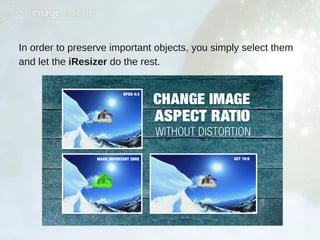
In order to preserve important objects, you simply select them
and let the iResizer do the rest.
2.Make Unwanted Spacing Go Away
You can change the spacing between objects with iResizer.
It gently folds the picture making unnecessary spacing go away.
You do not need any precise editing.
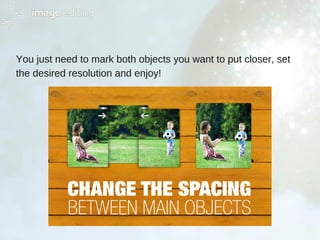
You just need to mark both objects you want to put closer, set
the desired resolution and enjoy!
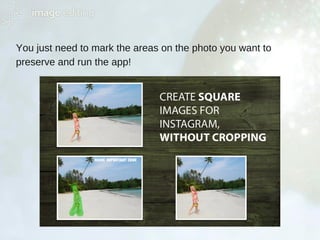
3.Instagram Friendly
Instagram accepts only square photos, and trying to upload
hundreds of 4:3 photos can be a pain.
With iResizer, you can easily create 1:1 photo without cropping.
You just need to mark the areas on the photo you want to
preserve and run the app!
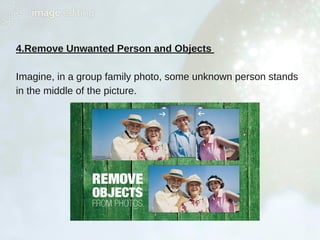
4.Remove Unwanted Person and Objects
Imagine, in a group family photo, some unknown person stands
in the middle of the picture.
From persons spoiling group photo to background garbage or
unwanted landscape objects – make all of them disappear with
iResizer.
How it works
iResizer avoids distortion of the important parts of an image.
It also can be used to remove portion of the image in a
consistent way.
Top Reasons to Use iResizer
Match the aspect ratio of your photos and your prints
Change the spacing between main objects
Remove objects from photos
Change image aspect ratio
Fit entire photos on Instagram without cropping
Easy to use
Work perfectly to create square photos
Get impressive results by using this extremely useful graphic
and photo editor.
iResizer is a handy content-aware scaling tool that makes your
images fit particular aspect ratios without cropping.
To learn more about Photoshop Effects and other Image editing Tips & Tricks
Visit
www.imagediting.com
www.metrodesk.com.bd
Follow us
Write us
support@imageediting.com

Rescale Photos with iResizer

  • 1.
    iResizer - RescalePhotos without  Rescaling the Subject
  • 2.
    Do you knowyou can rescale photos without rescaling the subject? Probably not. Intelligent Resizer, popularly known as ‘iResizer’ enables new smart ways of resizing images without cropping the content.
  • 3.
    About iResizer Intelligent Resizerenables new smart ways of resizing images without cropping the content. It is very easy for anyone to do with just a few simple steps. Here are 4 features that you might find it helpful –
  • 4.
    1.Fix Aspect Ratiowithout Warping Intelligent Resizer (iResizer) allows you to “fix” the aspect ratio of a photo. Want to change from 4:3 to 16:9? No problem. iResizer folds the image in such a way so that it will still look natural and will retain the quality of the original.
  • 5.
    In order topreserve important objects, you simply select them and let the iResizer do the rest.
  • 6.
    2.Make Unwanted SpacingGo Away You can change the spacing between objects with iResizer. It gently folds the picture making unnecessary spacing go away. You do not need any precise editing.
  • 7.
    You just needto mark both objects you want to put closer, set the desired resolution and enjoy!
  • 8.
    3.Instagram Friendly Instagram acceptsonly square photos, and trying to upload hundreds of 4:3 photos can be a pain. With iResizer, you can easily create 1:1 photo without cropping.
  • 9.
    You just needto mark the areas on the photo you want to preserve and run the app!
  • 10.
    4.Remove Unwanted Personand Objects Imagine, in a group family photo, some unknown person stands in the middle of the picture.
  • 11.
    From persons spoilinggroup photo to background garbage or unwanted landscape objects – make all of them disappear with iResizer. How it works iResizer avoids distortion of the important parts of an image. It also can be used to remove portion of the image in a consistent way.
  • 12.
    Top Reasons toUse iResizer Match the aspect ratio of your photos and your prints Change the spacing between main objects Remove objects from photos Change image aspect ratio Fit entire photos on Instagram without cropping Easy to use Work perfectly to create square photos
  • 13.
    Get impressive resultsby using this extremely useful graphic and photo editor. iResizer is a handy content-aware scaling tool that makes your images fit particular aspect ratios without cropping.
  • 14.
    To learn moreabout Photoshop Effects and other Image editing Tips & Tricks Visit www.imagediting.com www.metrodesk.com.bd Follow us Write us support@imageediting.com