1	
  |	
  28	
  
Report from the trenches:
Using SOA integrated gateway at the
city of Rotterdam
Lonneke Dikmans
October 15th 2013 | UKOUG Apps
2	
  |	
  28	
  
Introduction
Agenda
●  Integrating with Oracle EBS
●  Case
●  Conclusion
●  Future developments
Who am I
●  Consultant and managing partner at Vennster
●  Specializing in SOA and integration
●  Oracle Ace Director
3	
  |	
  28	
  
Integrating your packaged App | Use Cases
Use data
●  For example from HR system to determine approval chain
Use functionality (fine grained)
●  For example using Oracle Time control in your custom application
Expose services (coarse grained)
●  For example to change an address or to fill out an expense report
4	
  |	
  28	
  
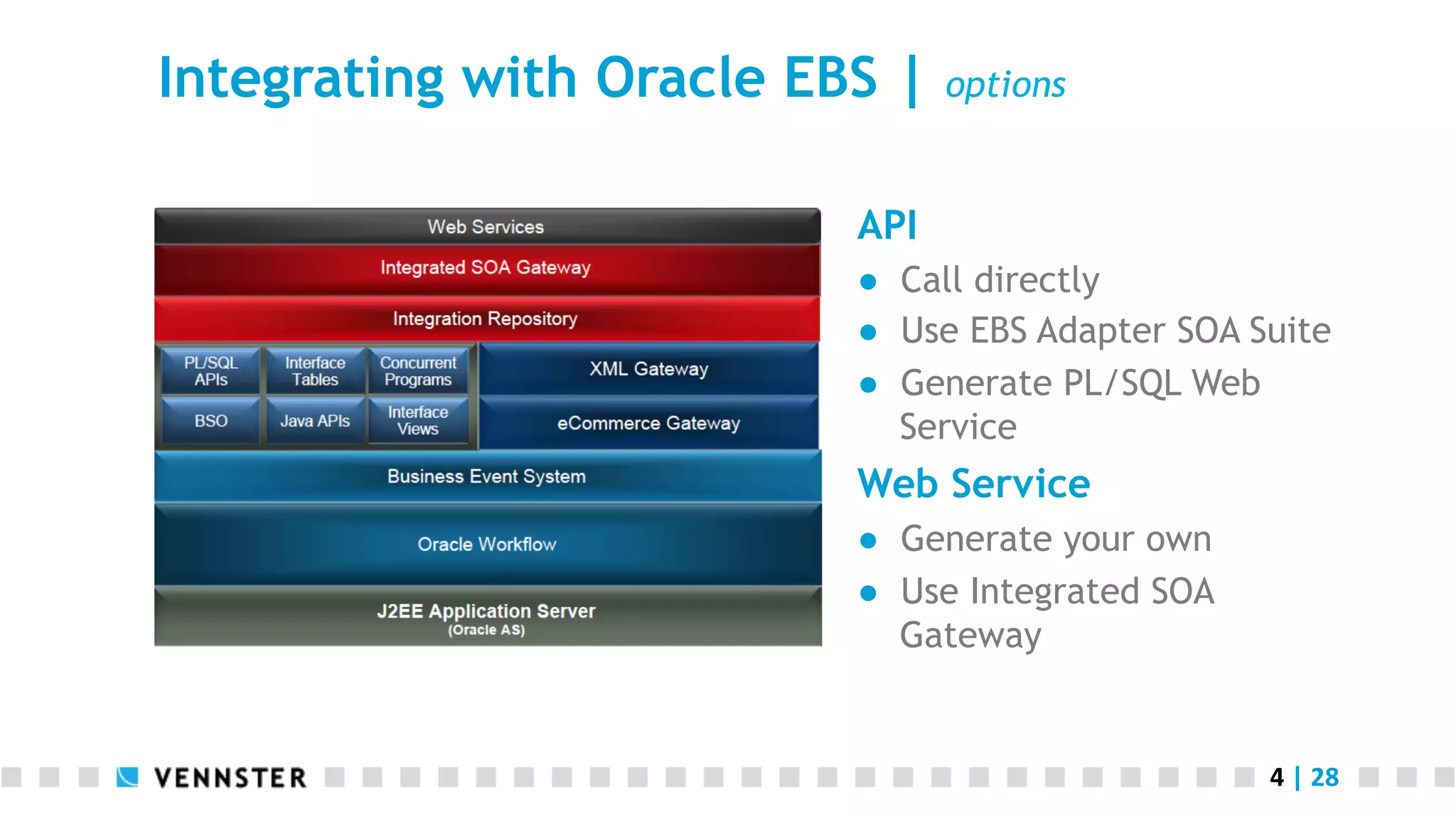
Integrating with Oracle EBS | options
API
●  Call directly
●  Use EBS Adapter SOA Suite
●  Generate PL/SQL Web
Service
Web Service
●  Generate your own
●  Use Integrated SOA
Gateway
5	
  |	
  28	
  
Intermezzo | What is a Web Service
“A software system designed to support interoperable
machine-to-machine interaction over a network. It has an
interface described in a machine-processable format
(specifically WSDL). Other systems interact with the Web
service in a manner prescribed by its description using
SOAP messages, typically using HTTP with an XML
serialization in conjunction with other Web-related
standards.” (W3C)
6	
  |	
  28	
  
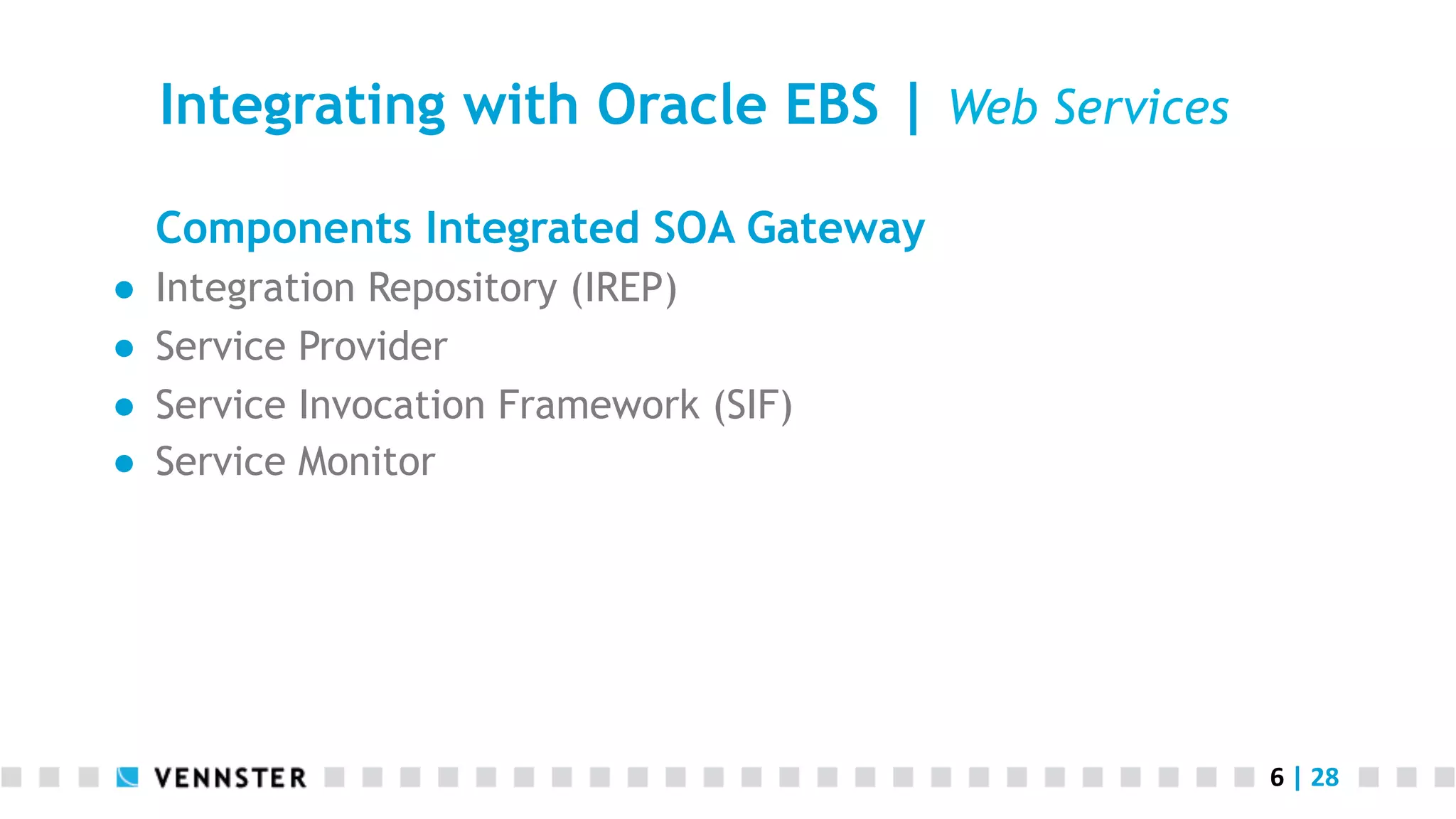
Integrating with Oracle EBS | Web Services
Components Integrated SOA Gateway
●  Integration Repository (IREP)
●  Service Provider
●  Service Invocation Framework (SIF)
●  Service Monitor
7	
  |	
  28	
  
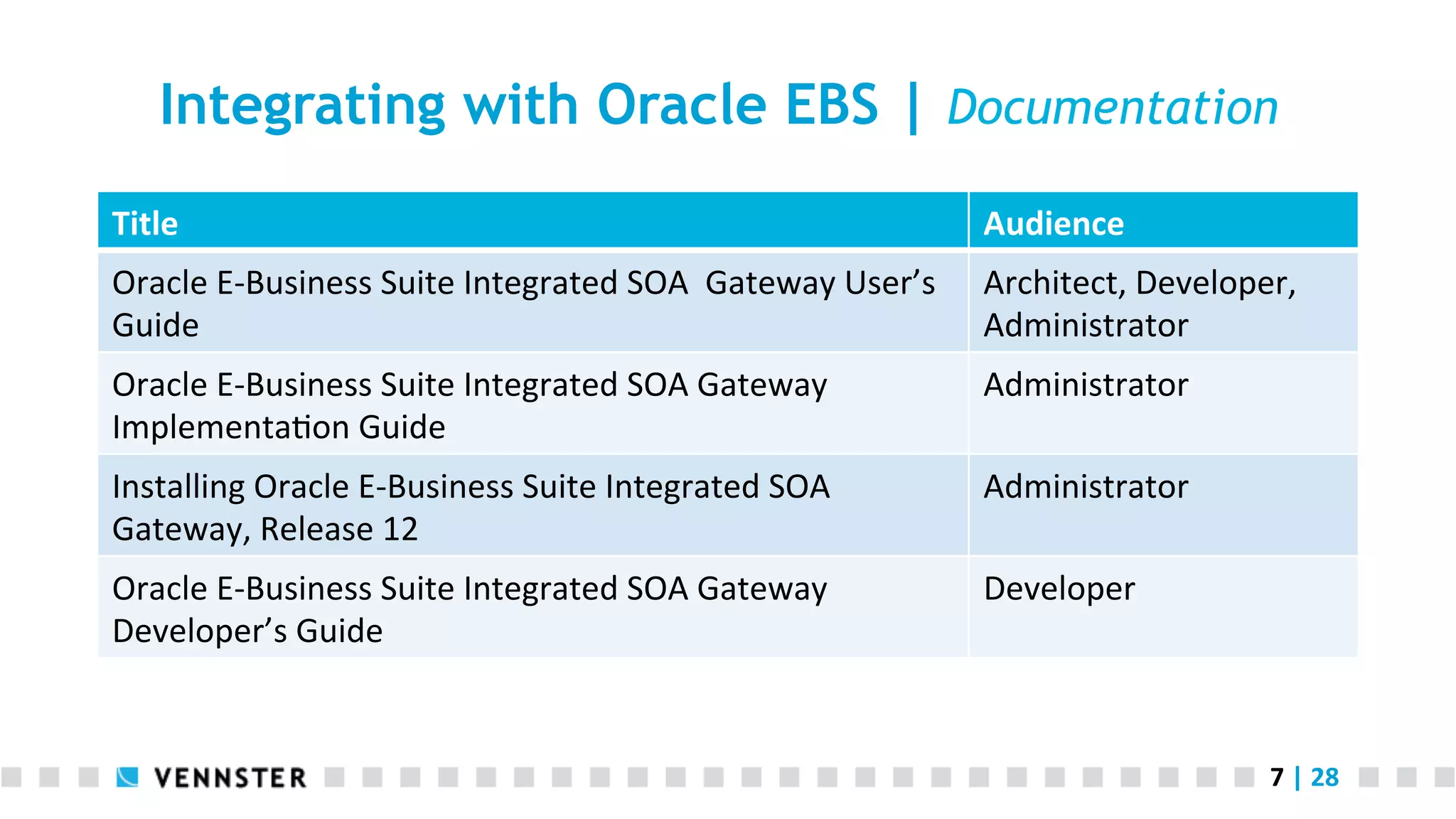
Integrating with Oracle EBS | Documentation
Title	
   Audience	
  
Oracle	
  E-­‐Business	
  Suite	
  Integrated	
  SOA	
  	
  Gateway	
  User’s	
  
Guide	
  
Architect,	
  Developer,	
  
Administrator	
  
Oracle	
  E-­‐Business	
  Suite	
  Integrated	
  SOA	
  Gateway	
  
ImplementaAon	
  Guide	
  
Administrator	
  
Installing	
  Oracle	
  E-­‐Business	
  Suite	
  Integrated	
  SOA	
  
Gateway,	
  Release	
  12	
  
Administrator	
  
Oracle	
  E-­‐Business	
  Suite	
  Integrated	
  SOA	
  Gateway	
  
Developer’s	
  Guide	
  
Developer	
  
8	
  |	
  28	
  
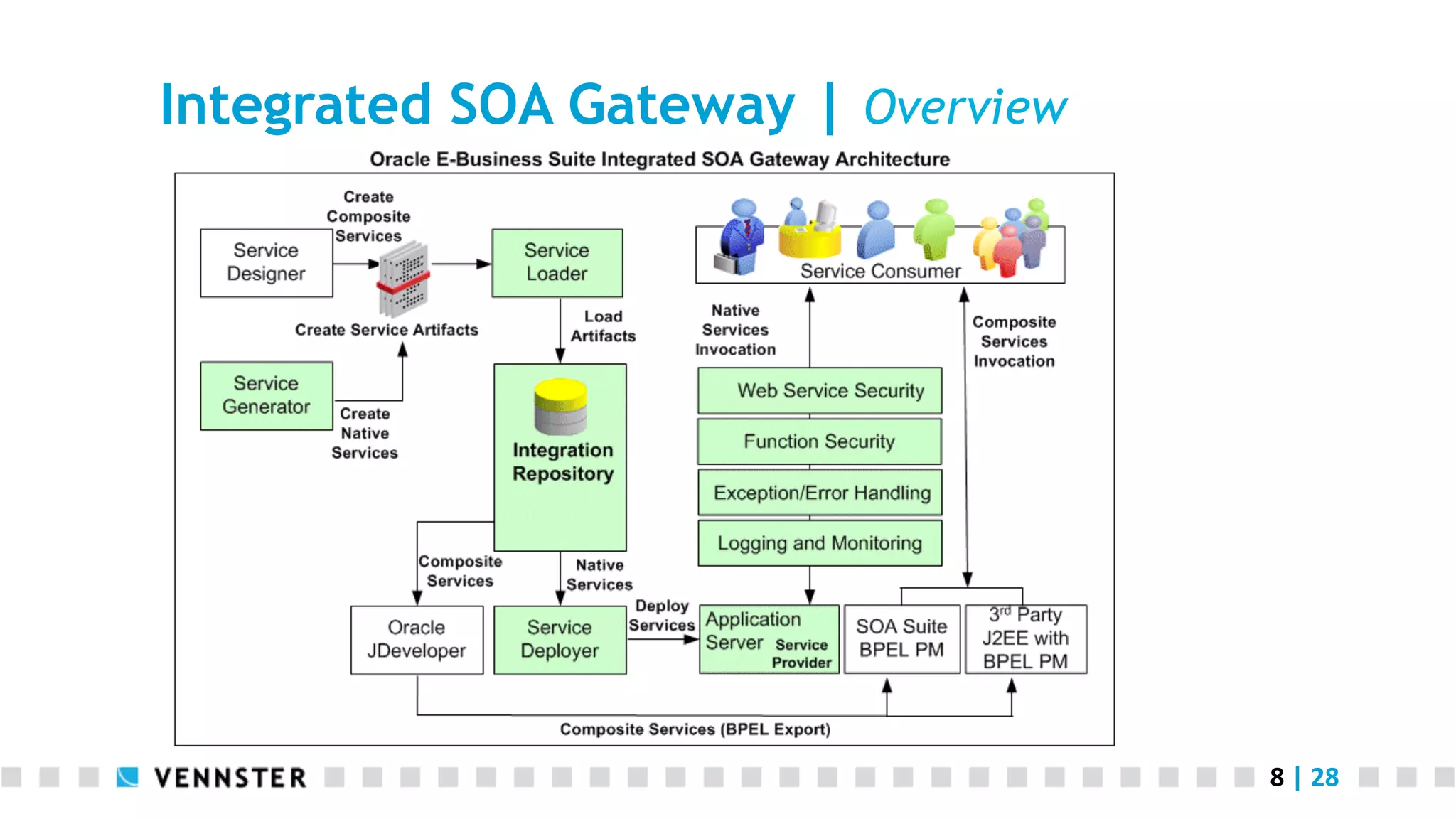
Integrated SOA Gateway | Overview
9	
  |	
  28	
  
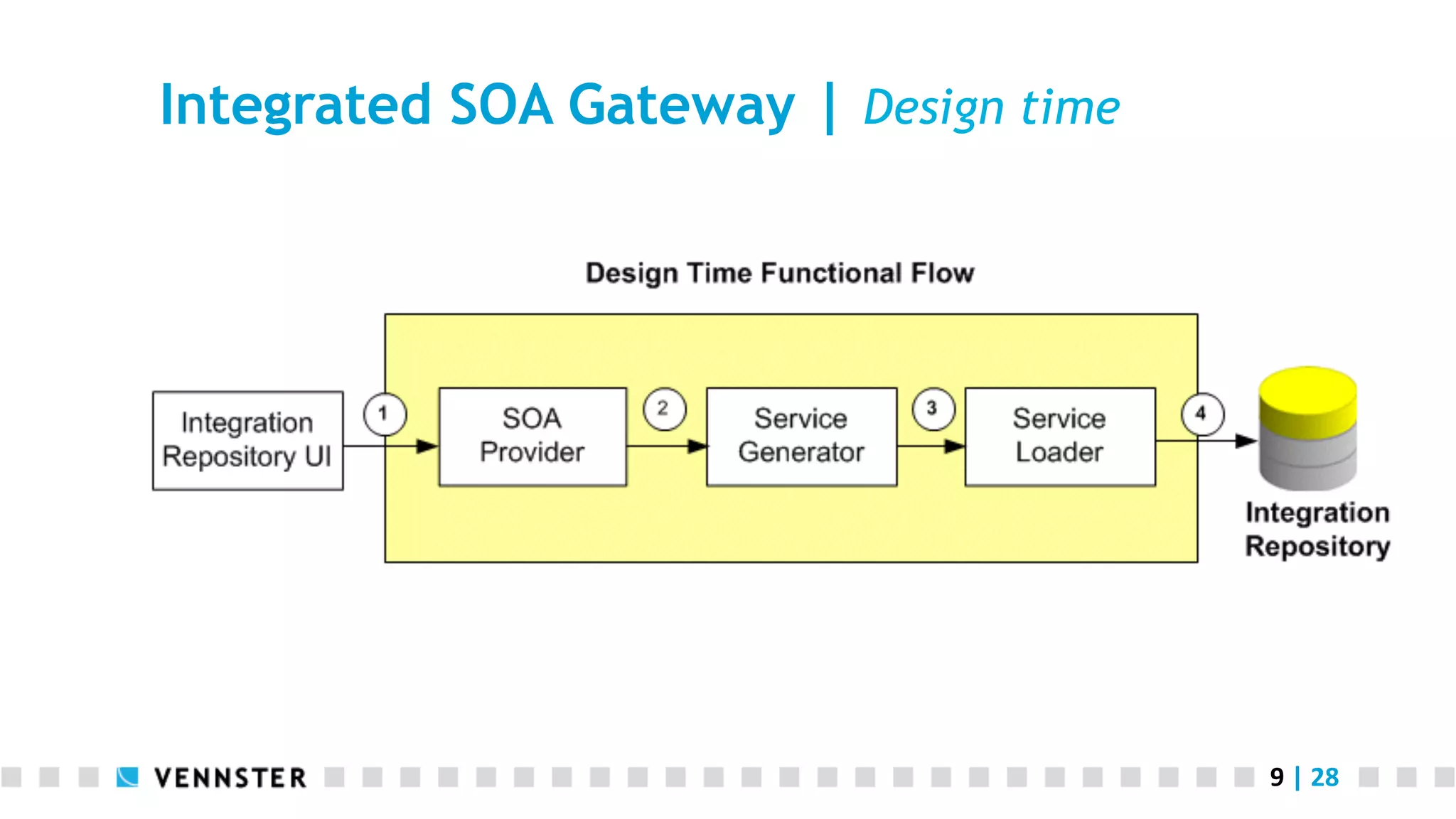
Integrated SOA Gateway | Design time
10	
  |	
  28	
  
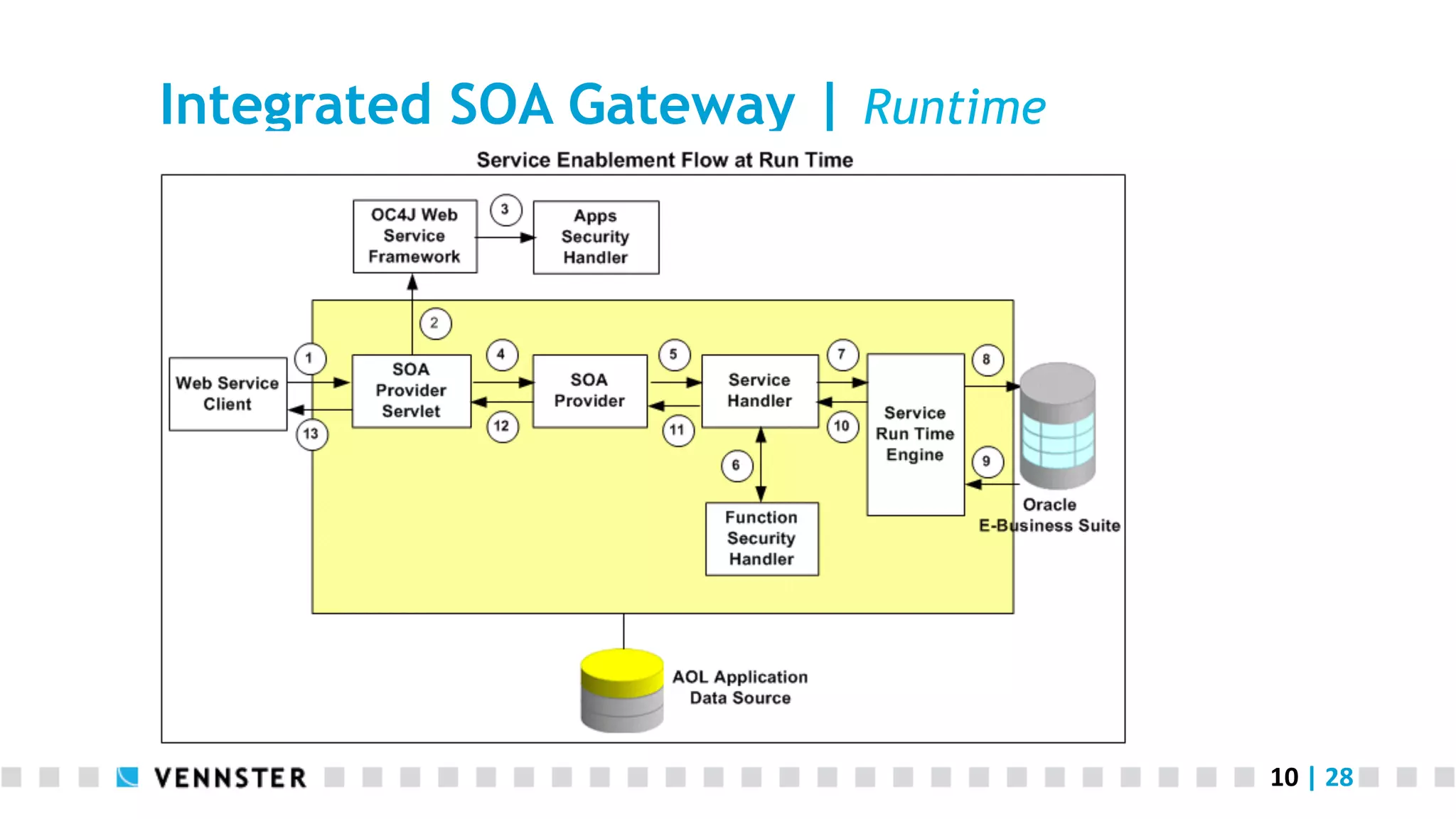
Integrated SOA Gateway | Runtime
11	
  |	
  28	
  
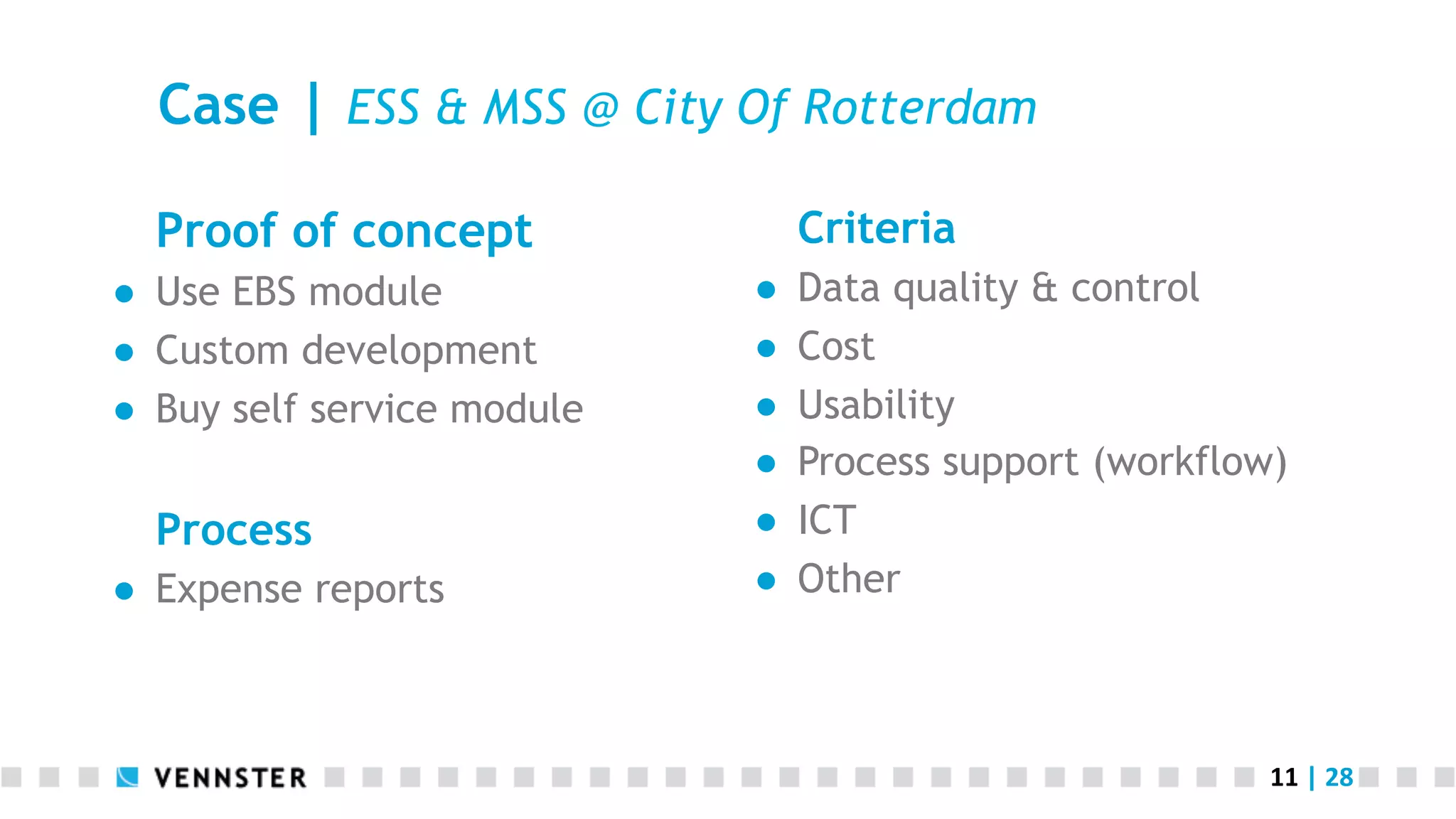
Case | ESS & MSS @ City Of Rotterdam
Proof of concept
●  Use EBS module
●  Custom development
●  Buy self service module
Process
●  Expense reports
Criteria
●  Data quality & control
●  Cost
●  Usability
●  Process support (workflow)
●  ICT
●  Other
12	
  |	
  28	
  
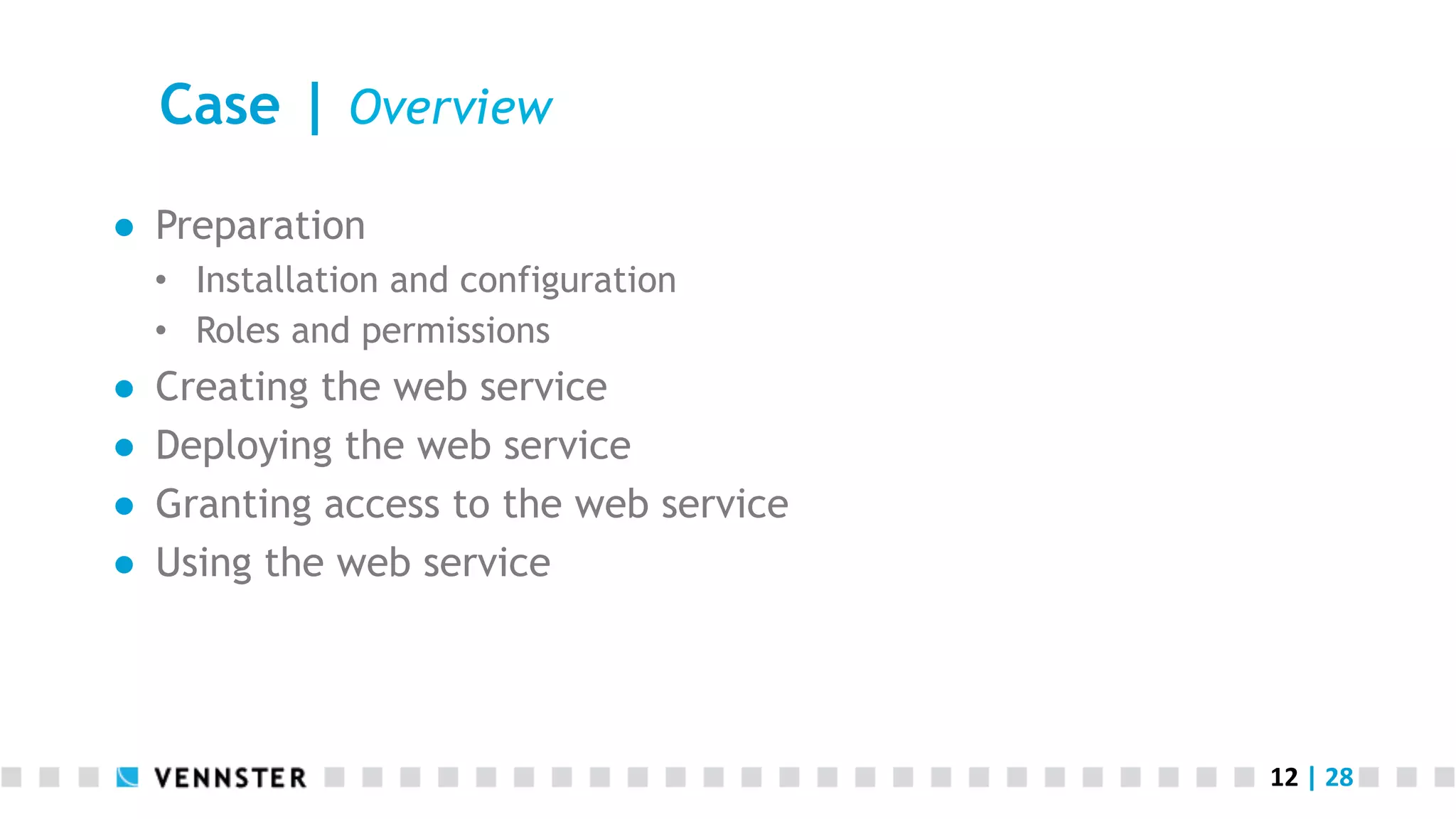
Case | Overview
●  Preparation
‱  Installation and configuration
‱  Roles and permissions
●  Creating the web service
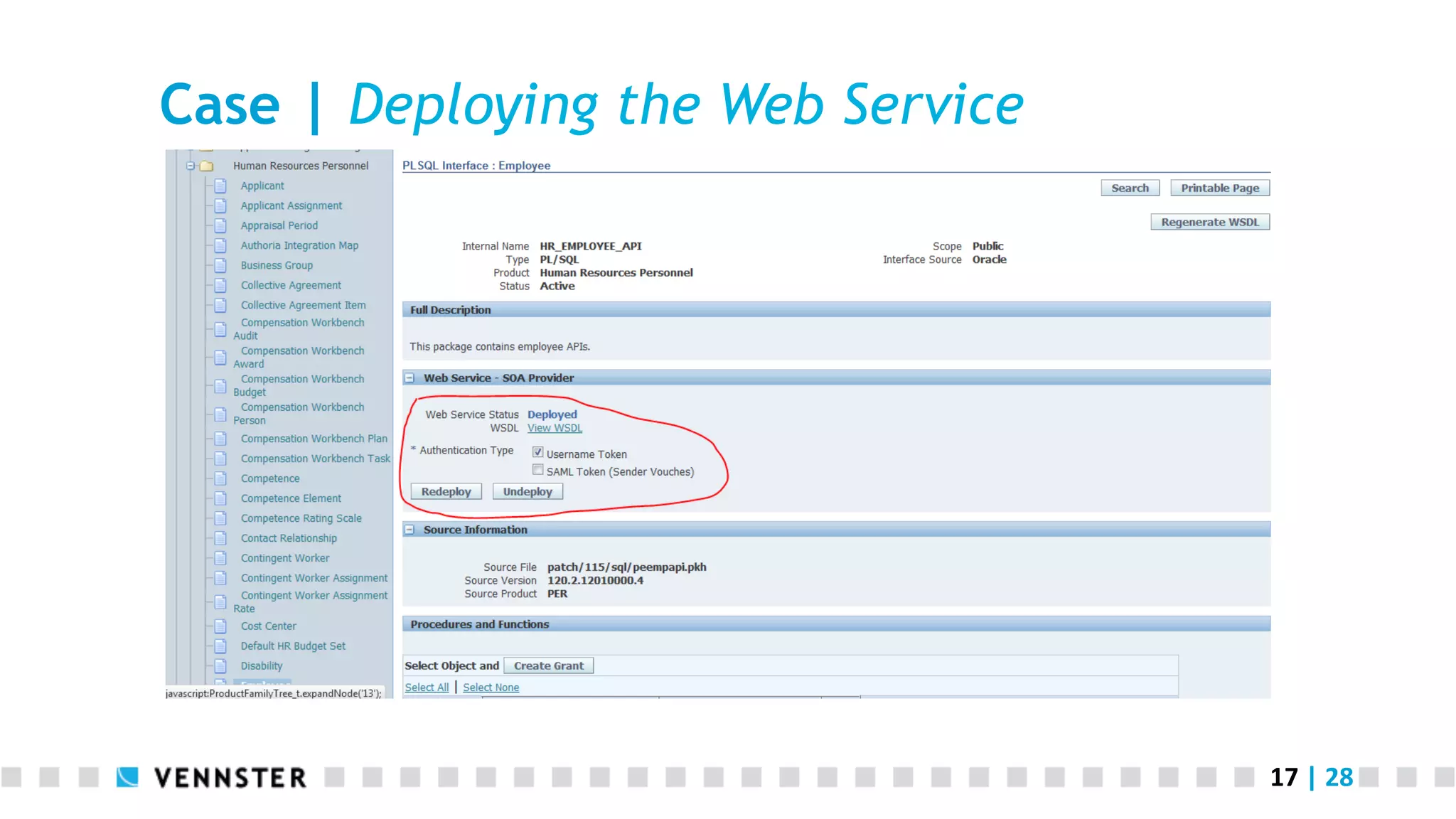
●  Deploying the web service
●  Granting access to the web service
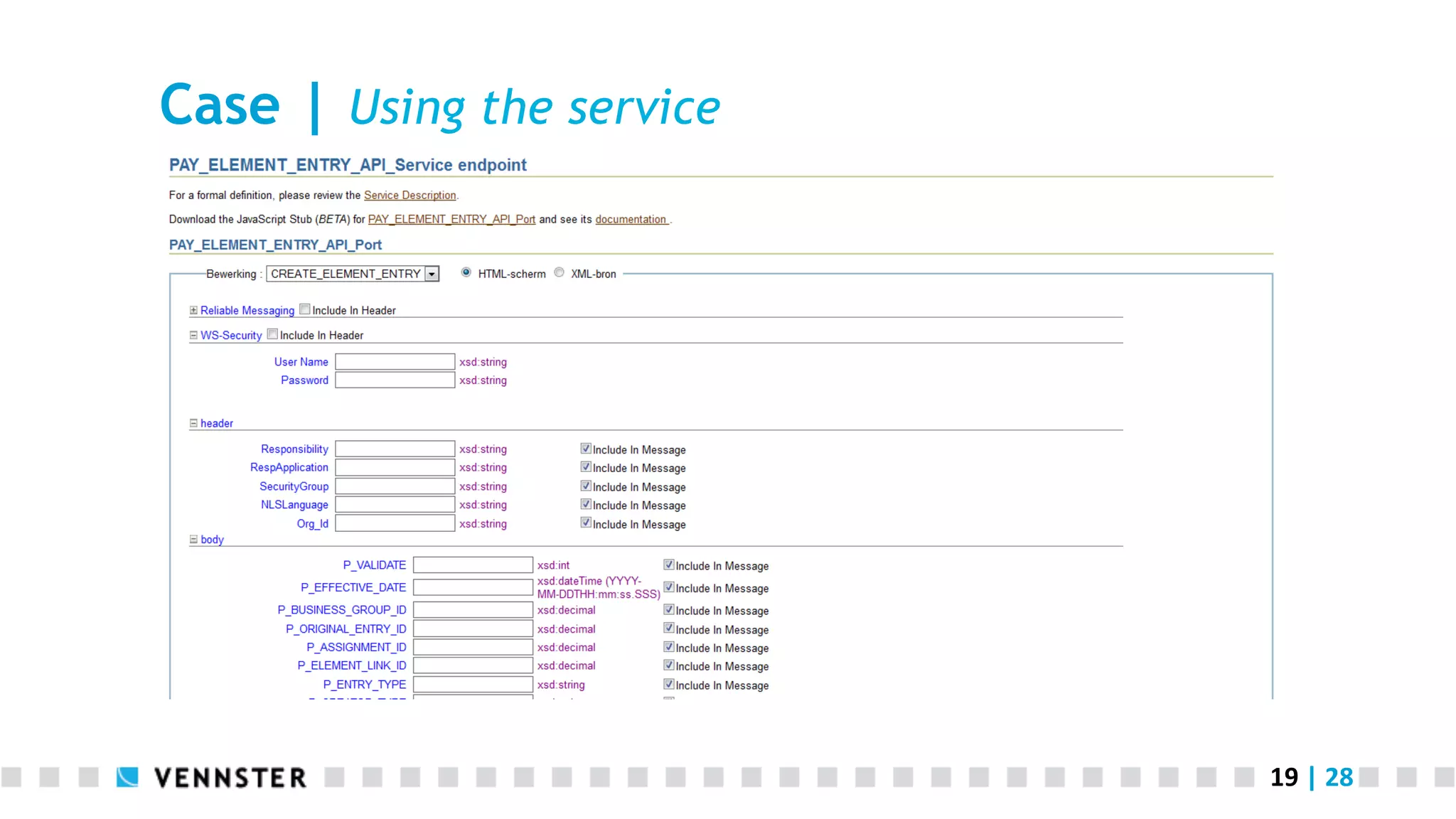
●  Using the web service
13	
  |	
  28	
  
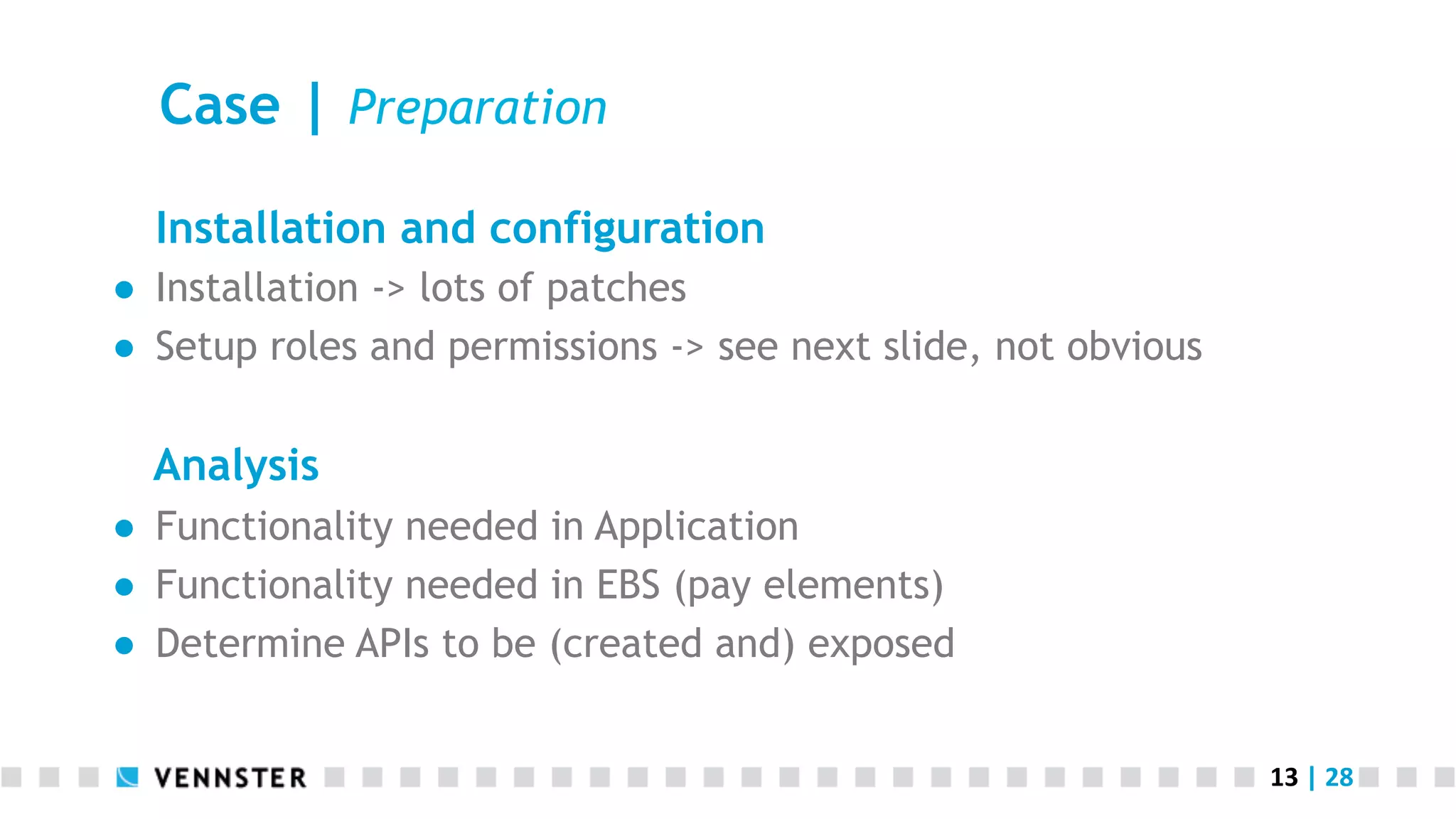
Case | Preparation
Installation and configuration
●  Installation -> lots of patches
●  Setup roles and permissions -> see next slide, not obvious
Analysis
●  Functionality needed in Application
●  Functionality needed in EBS (pay elements)
●  Determine APIs to be (created and) exposed
14	
  |	
  28	
  
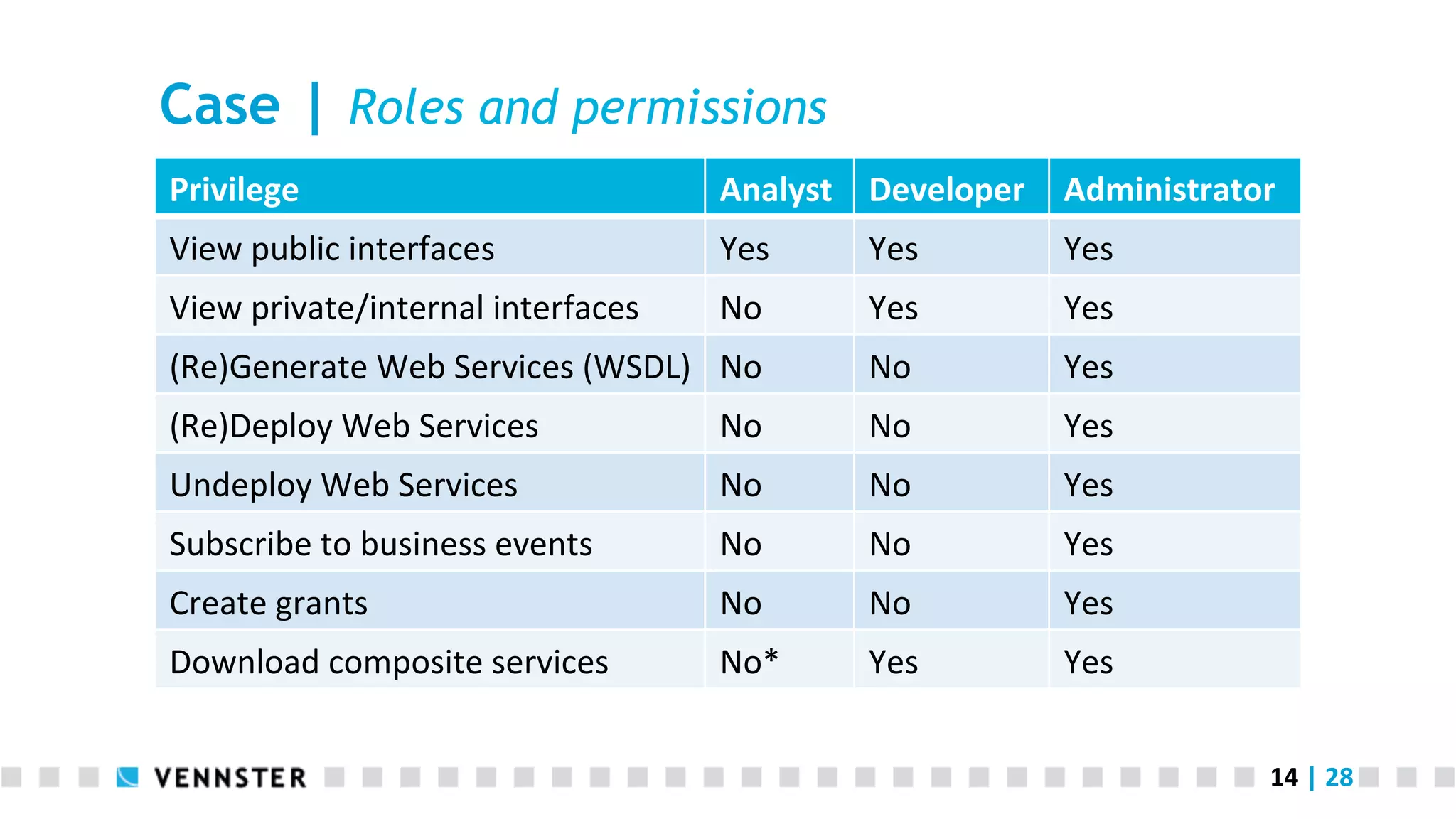
Case | Roles and permissions
Privilege	
   Analyst	
   Developer	
   Administrator	
  
View	
  public	
  interfaces	
   Yes	
   Yes	
   Yes	
  
View	
  private/internal	
  interfaces	
   No	
   Yes	
   Yes	
  
(Re)Generate	
  Web	
  Services	
  (WSDL)	
   No	
   No	
   Yes	
  
(Re)Deploy	
  Web	
  Services	
   No	
   No	
   Yes	
  
Undeploy	
  Web	
  Services	
   No	
   No	
   Yes	
  
Subscribe	
  to	
  business	
  events	
   No	
   No	
   Yes	
  
Create	
  grants	
   No	
   No	
   Yes	
  
Download	
  composite	
  services	
   No*	
  	
   Yes	
   Yes	
  
15	
  |	
  28	
  
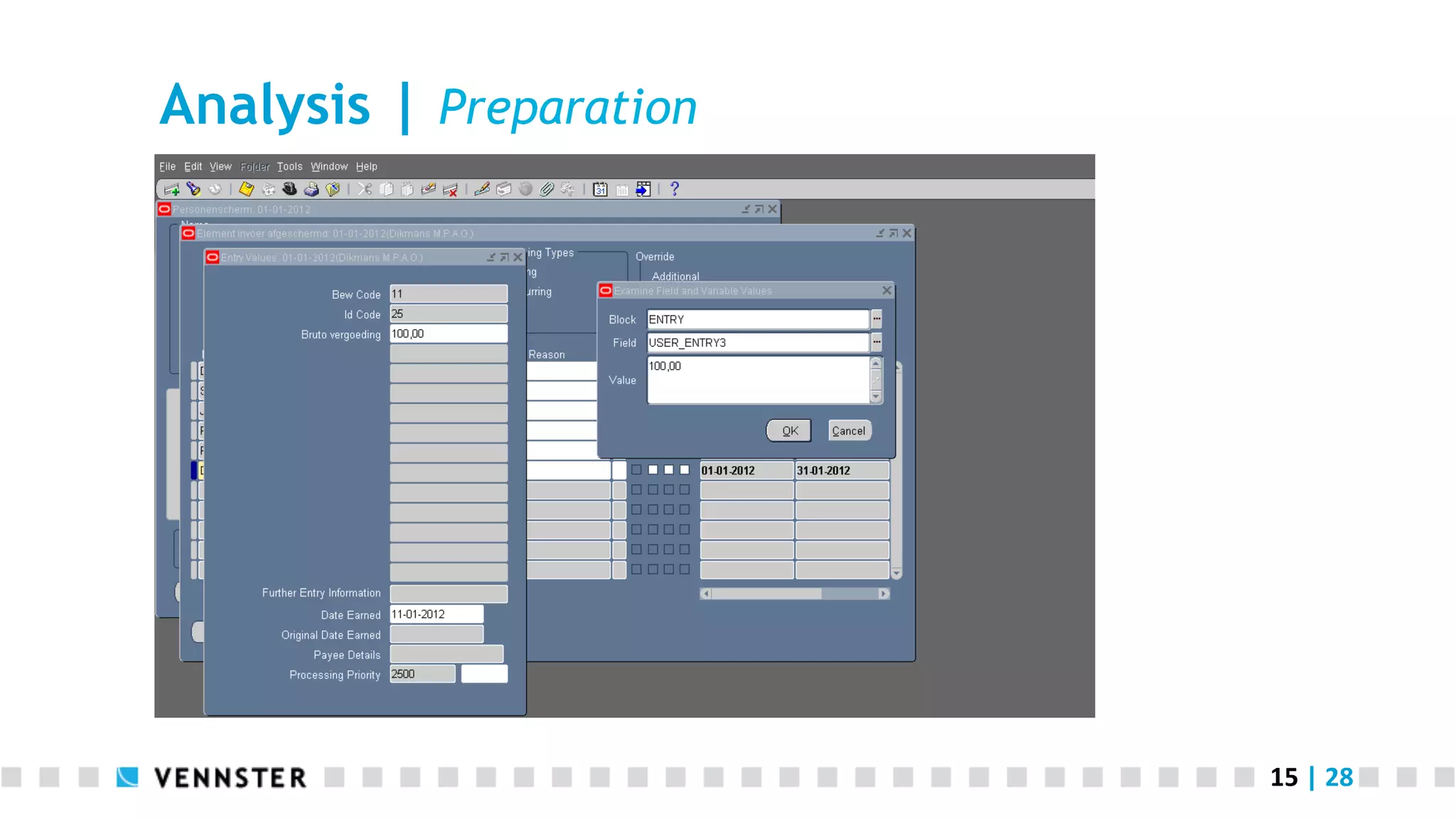
Analysis | Preparation
16	
  |	
  28	
  
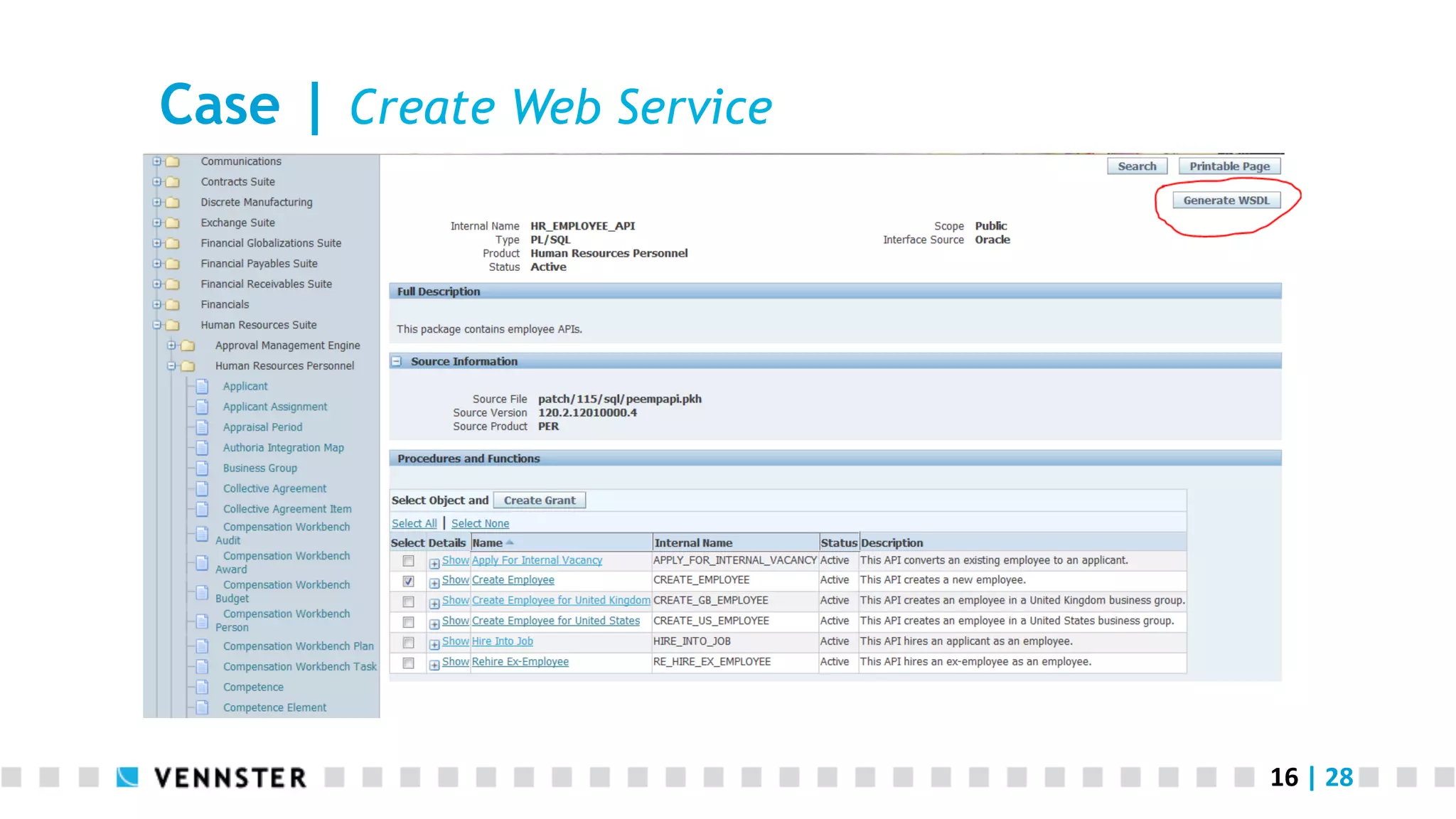
Case | Create Web Service
17	
  |	
  28	
  
Case | Deploying the Web Service
18	
  |	
  28	
  
Case | Granting access
Authentication & authorization
●  Use create Grant option
●  Create one user, for example ‘selfsvc’ that has access (system
account)
=> Note that this is on top of the information that is sent in the
message!
19	
  |	
  28	
  
Case | Using the service
20	
  |	
  28	
  
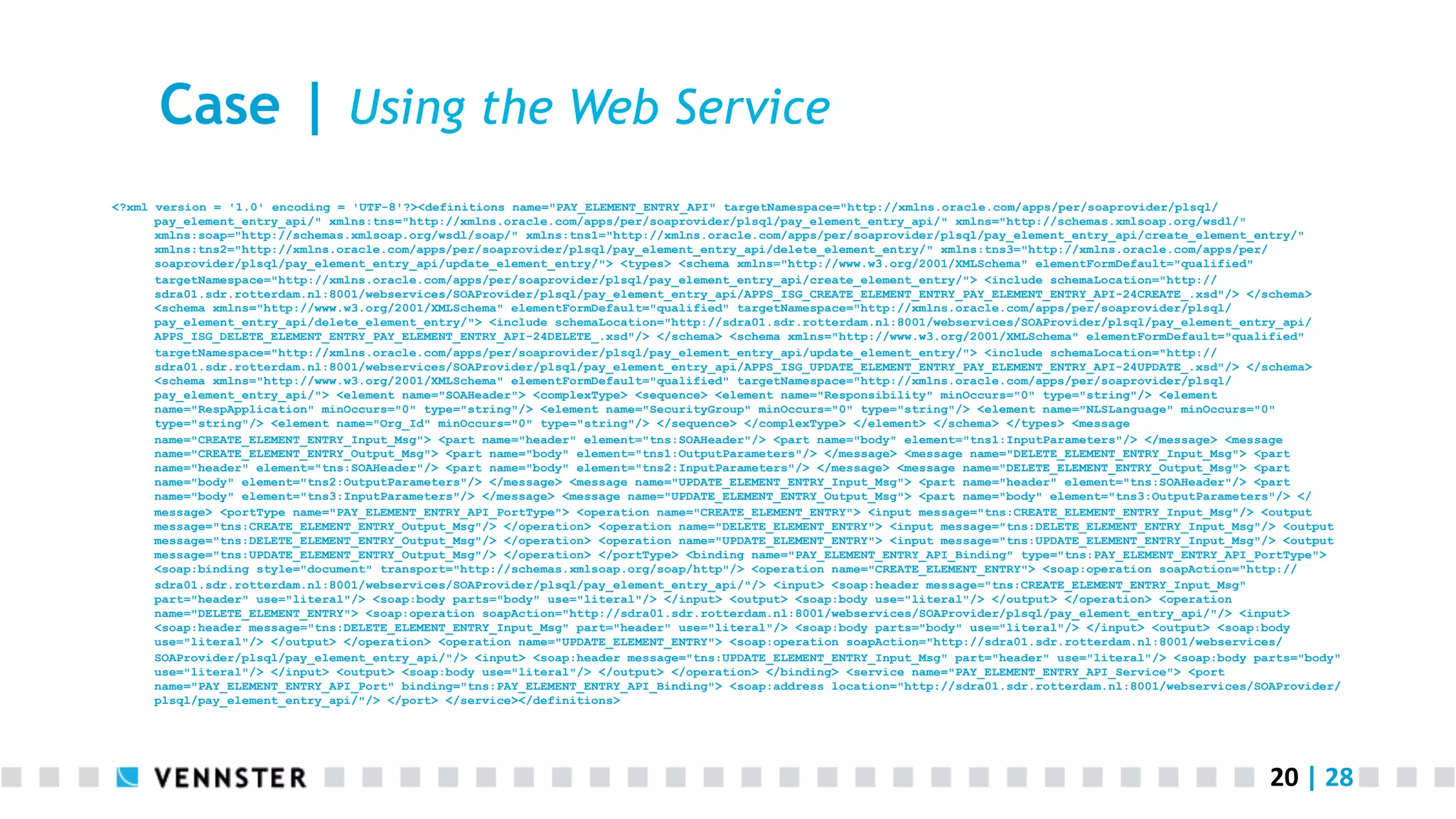
Case | Using the Web Service
<?xml version = '1.0' encoding = 'UTF-8'?><definitions name="PAY_ELEMENT_ENTRY_API" targetNamespace="http://xmlns.oracle.com/apps/per/soaprovider/plsql/
pay_element_entry_api/" xmlns:tns="http://xmlns.oracle.com/apps/per/soaprovider/plsql/pay_element_entry_api/" xmlns="http://schemas.xmlsoap.org/wsdl/"
xmlns:soap="http://schemas.xmlsoap.org/wsdl/soap/" xmlns:tns1="http://xmlns.oracle.com/apps/per/soaprovider/plsql/pay_element_entry_api/create_element_entry/"
xmlns:tns2="http://xmlns.oracle.com/apps/per/soaprovider/plsql/pay_element_entry_api/delete_element_entry/" xmlns:tns3="http://xmlns.oracle.com/apps/per/
soaprovider/plsql/pay_element_entry_api/update_element_entry/"> <types> <schema xmlns="http://www.w3.org/2001/XMLSchema" elementFormDefault="qualified"
targetNamespace="http://xmlns.oracle.com/apps/per/soaprovider/plsql/pay_element_entry_api/create_element_entry/"> <include schemaLocation="http://
sdra01.sdr.rotterdam.nl:8001/webservices/SOAProvider/plsql/pay_element_entry_api/APPS_ISG_CREATE_ELEMENT_ENTRY_PAY_ELEMENT_ENTRY_API-24CREATE_.xsd"/> </schema>
<schema xmlns="http://www.w3.org/2001/XMLSchema" elementFormDefault="qualified" targetNamespace="http://xmlns.oracle.com/apps/per/soaprovider/plsql/
pay_element_entry_api/delete_element_entry/"> <include schemaLocation="http://sdra01.sdr.rotterdam.nl:8001/webservices/SOAProvider/plsql/pay_element_entry_api/
APPS_ISG_DELETE_ELEMENT_ENTRY_PAY_ELEMENT_ENTRY_API-24DELETE_.xsd"/> </schema> <schema xmlns="http://www.w3.org/2001/XMLSchema" elementFormDefault="qualified"
targetNamespace="http://xmlns.oracle.com/apps/per/soaprovider/plsql/pay_element_entry_api/update_element_entry/"> <include schemaLocation="http://
sdra01.sdr.rotterdam.nl:8001/webservices/SOAProvider/plsql/pay_element_entry_api/APPS_ISG_UPDATE_ELEMENT_ENTRY_PAY_ELEMENT_ENTRY_API-24UPDATE_.xsd"/> </schema>
<schema xmlns="http://www.w3.org/2001/XMLSchema" elementFormDefault="qualified" targetNamespace="http://xmlns.oracle.com/apps/per/soaprovider/plsql/
pay_element_entry_api/"> <element name="SOAHeader"> <complexType> <sequence> <element name="Responsibility" minOccurs="0" type="string"/> <element
name="RespApplication" minOccurs="0" type="string"/> <element name="SecurityGroup" minOccurs="0" type="string"/> <element name="NLSLanguage" minOccurs="0"
type="string"/> <element name="Org_Id" minOccurs="0" type="string"/> </sequence> </complexType> </element> </schema> </types> <message
name="CREATE_ELEMENT_ENTRY_Input_Msg"> <part name="header" element="tns:SOAHeader"/> <part name="body" element="tns1:InputParameters"/> </message> <message
name="CREATE_ELEMENT_ENTRY_Output_Msg"> <part name="body" element="tns1:OutputParameters"/> </message> <message name="DELETE_ELEMENT_ENTRY_Input_Msg"> <part
name="header" element="tns:SOAHeader"/> <part name="body" element="tns2:InputParameters"/> </message> <message name="DELETE_ELEMENT_ENTRY_Output_Msg"> <part
name="body" element="tns2:OutputParameters"/> </message> <message name="UPDATE_ELEMENT_ENTRY_Input_Msg"> <part name="header" element="tns:SOAHeader"/> <part
name="body" element="tns3:InputParameters"/> </message> <message name="UPDATE_ELEMENT_ENTRY_Output_Msg"> <part name="body" element="tns3:OutputParameters"/> </
message> <portType name="PAY_ELEMENT_ENTRY_API_PortType"> <operation name="CREATE_ELEMENT_ENTRY"> <input message="tns:CREATE_ELEMENT_ENTRY_Input_Msg"/> <output
message="tns:CREATE_ELEMENT_ENTRY_Output_Msg"/> </operation> <operation name="DELETE_ELEMENT_ENTRY"> <input message="tns:DELETE_ELEMENT_ENTRY_Input_Msg"/> <output
message="tns:DELETE_ELEMENT_ENTRY_Output_Msg"/> </operation> <operation name="UPDATE_ELEMENT_ENTRY"> <input message="tns:UPDATE_ELEMENT_ENTRY_Input_Msg"/> <output
message="tns:UPDATE_ELEMENT_ENTRY_Output_Msg"/> </operation> </portType> <binding name="PAY_ELEMENT_ENTRY_API_Binding" type="tns:PAY_ELEMENT_ENTRY_API_PortType">
<soap:binding style="document" transport="http://schemas.xmlsoap.org/soap/http"/> <operation name="CREATE_ELEMENT_ENTRY"> <soap:operation soapAction="http://
sdra01.sdr.rotterdam.nl:8001/webservices/SOAProvider/plsql/pay_element_entry_api/"/> <input> <soap:header message="tns:CREATE_ELEMENT_ENTRY_Input_Msg"
part="header" use="literal"/> <soap:body parts="body" use="literal"/> </input> <output> <soap:body use="literal"/> </output> </operation> <operation
name="DELETE_ELEMENT_ENTRY"> <soap:operation soapAction="http://sdra01.sdr.rotterdam.nl:8001/webservices/SOAProvider/plsql/pay_element_entry_api/"/> <input>
<soap:header message="tns:DELETE_ELEMENT_ENTRY_Input_Msg" part="header" use="literal"/> <soap:body parts="body" use="literal"/> </input> <output> <soap:body
use="literal"/> </output> </operation> <operation name="UPDATE_ELEMENT_ENTRY"> <soap:operation soapAction="http://sdra01.sdr.rotterdam.nl:8001/webservices/
SOAProvider/plsql/pay_element_entry_api/"/> <input> <soap:header message="tns:UPDATE_ELEMENT_ENTRY_Input_Msg" part="header" use="literal"/> <soap:body parts="body"
use="literal"/> </input> <output> <soap:body use="literal"/> </output> </operation> </binding> <service name="PAY_ELEMENT_ENTRY_API_Service"> <port
name="PAY_ELEMENT_ENTRY_API_Port" binding="tns:PAY_ELEMENT_ENTRY_API_Binding"> <soap:address location="http://sdra01.sdr.rotterdam.nl:8001/webservices/SOAProvider/
plsql/pay_element_entry_api/"/> </port> </service></definitions>
21	
  |	
  28	
  
Case | Use the Web Service
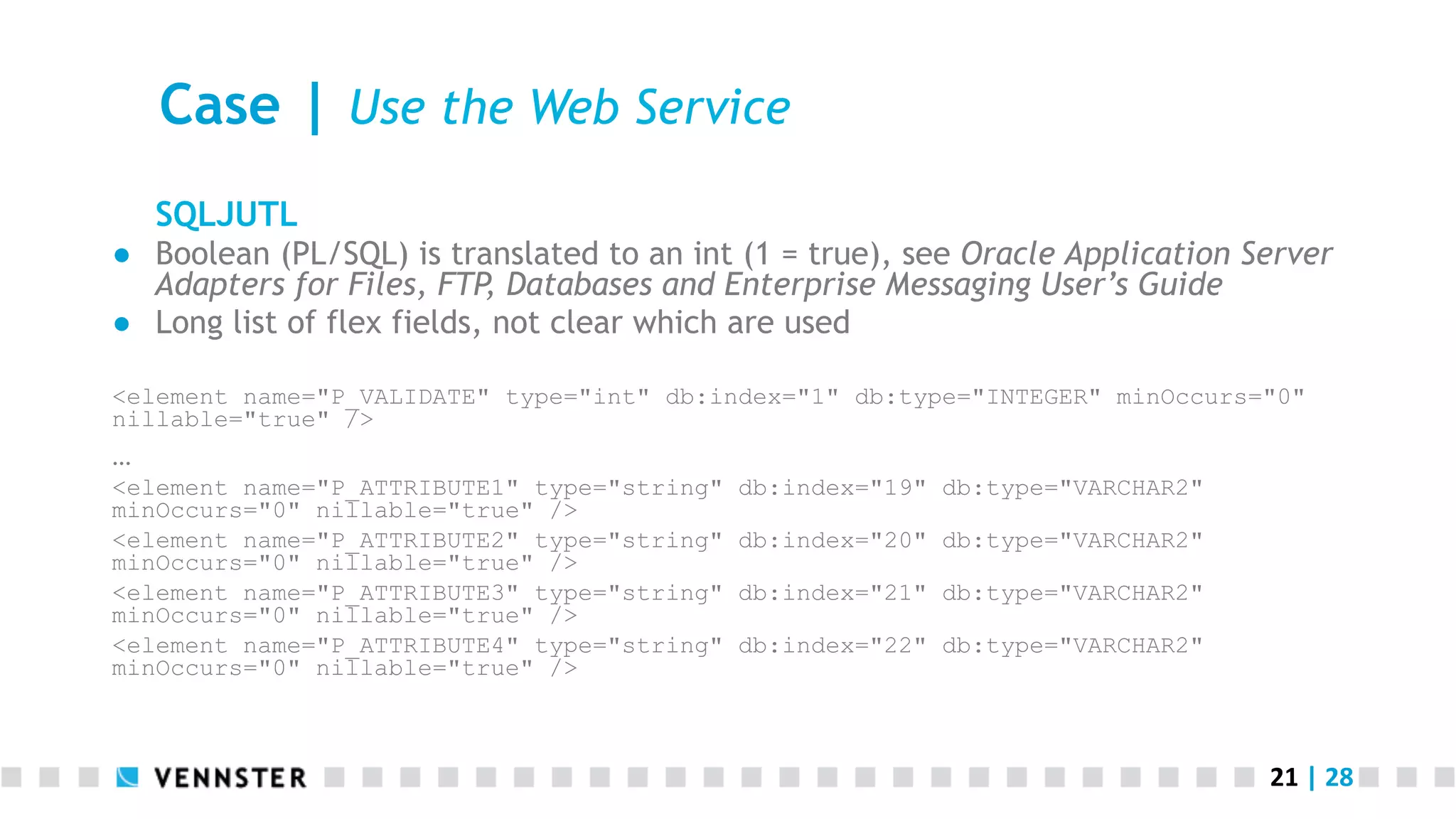
SQLJUTL
●  Boolean (PL/SQL) is translated to an int (1 = true), see Oracle Application Server
Adapters for Files, FTP, Databases and Enterprise Messaging User’s Guide
●  Long list of flex fields, not clear which are used
<element name="P_VALIDATE" type="int" db:index="1" db:type="INTEGER" minOccurs="0"
nillable="true" />


<element name="P_ATTRIBUTE1" type="string" db:index="19" db:type="VARCHAR2"
minOccurs="0" nillable="true" />
<element name="P_ATTRIBUTE2" type="string" db:index="20" db:type="VARCHAR2"
minOccurs="0" nillable="true" />
<element name="P_ATTRIBUTE3" type="string" db:index="21" db:type="VARCHAR2"
minOccurs="0" nillable="true" />
<element name="P_ATTRIBUTE4" type="string" db:index="22" db:type="VARCHAR2"
minOccurs="0" nillable="true" />
22	
  |	
  28	
  
Case | Using the Web Service
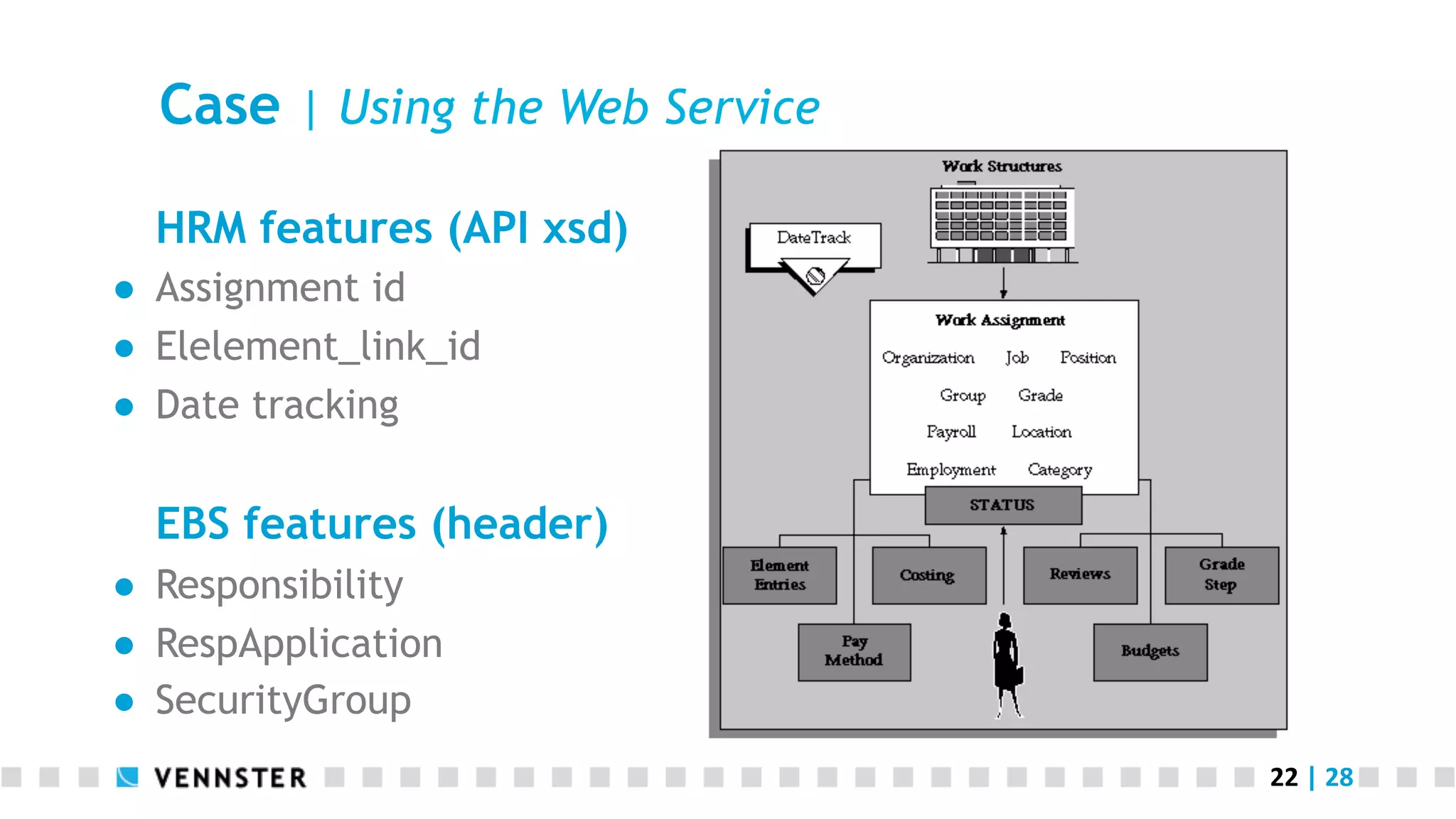
HRM features (API xsd)
●  Assignment id
●  Elelement_link_id
●  Date tracking
EBS features (header)
●  Responsibility
●  RespApplication
●  SecurityGroup
23	
  |	
  28	
  
Conclusion | design decisions
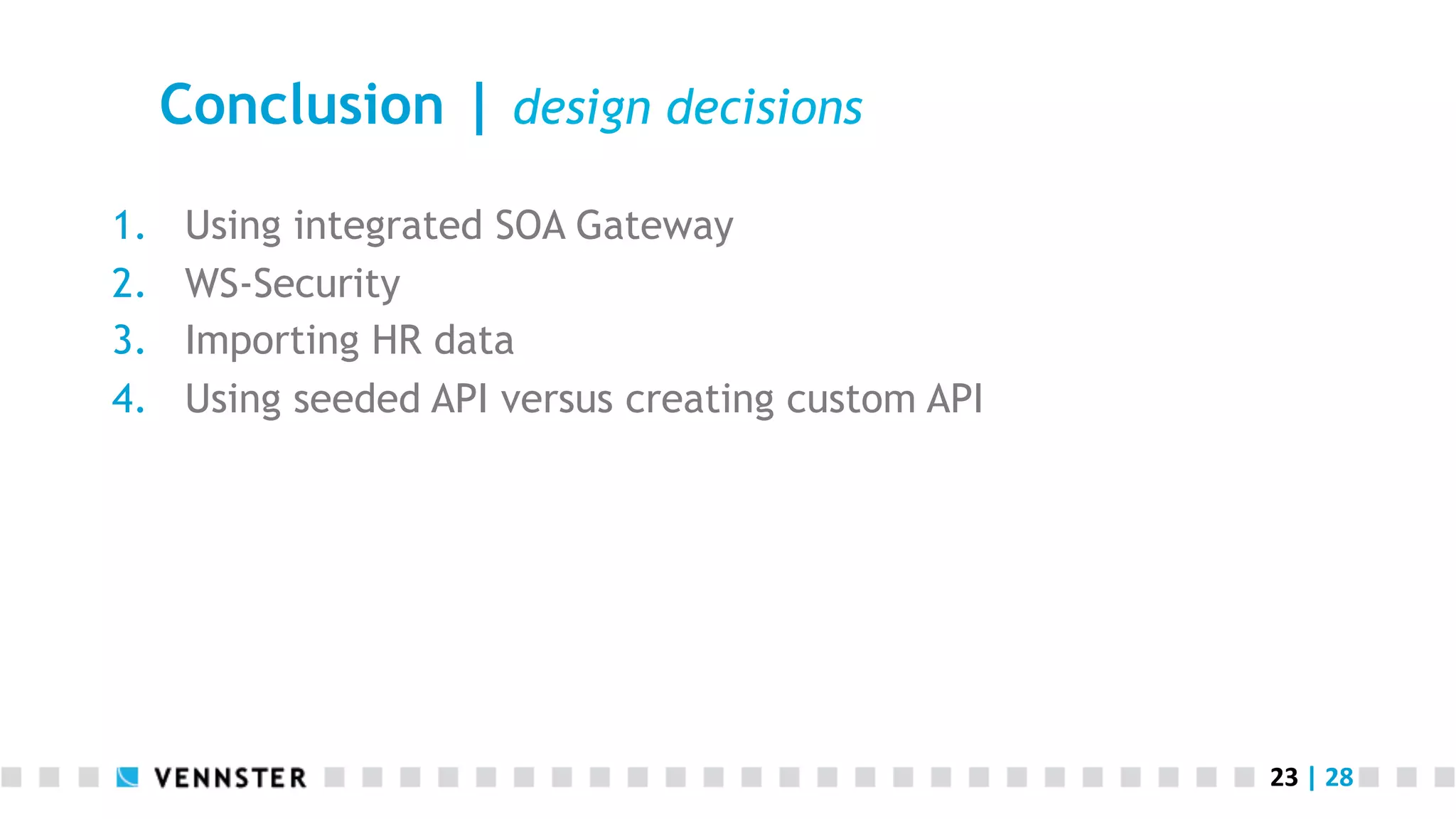
1.  Using integrated SOA Gateway
2.  WS-Security
3.  Importing HR data
4.  Using seeded API versus creating custom API
24	
  |	
  28	
  
Conclusion | Knowledge needed
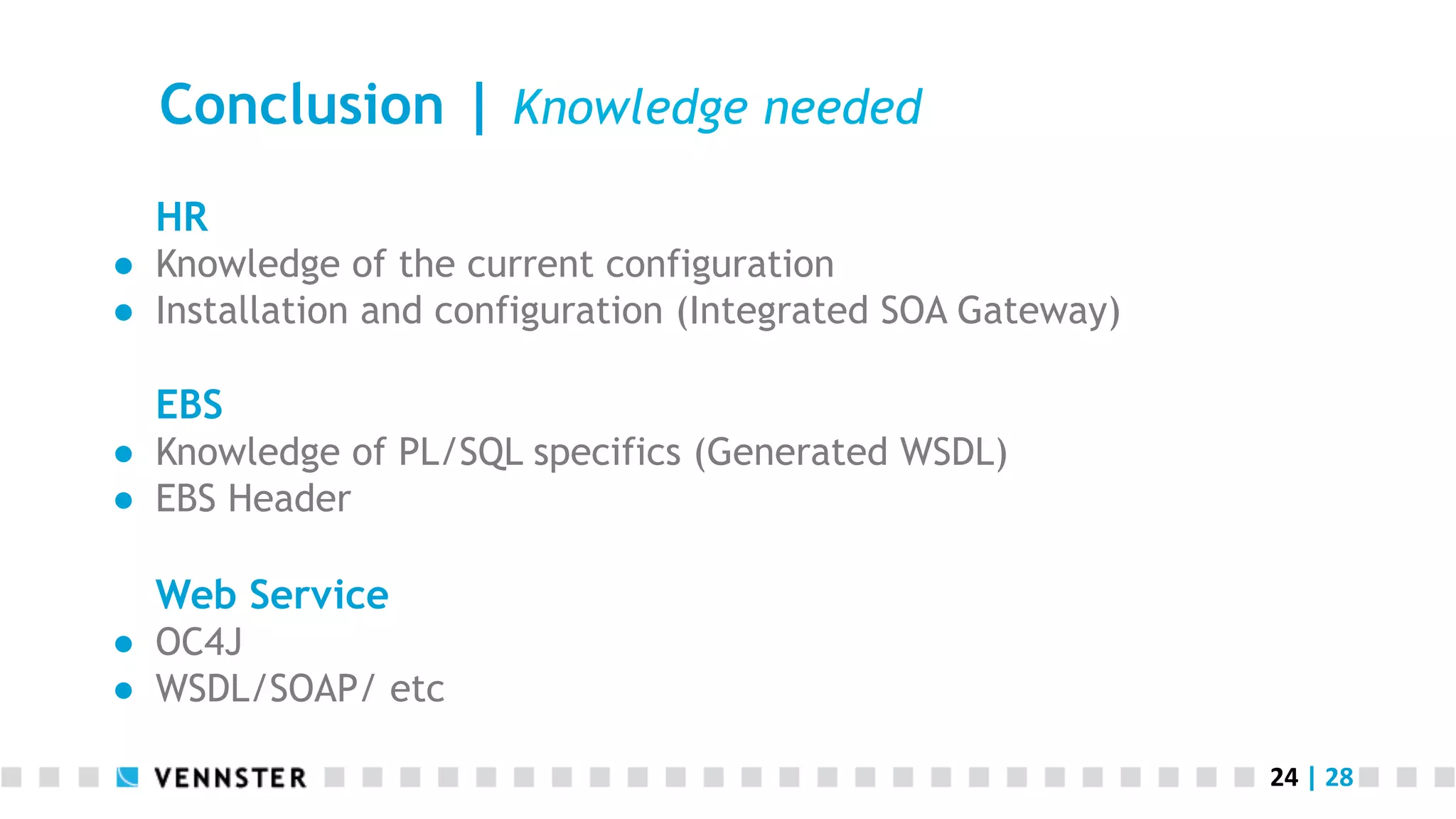
HR
●  Knowledge of the current configuration
●  Installation and configuration (Integrated SOA Gateway)
EBS
●  Knowledge of PL/SQL specifics (Generated WSDL)
●  EBS Header
Web Service
●  OC4J
●  WSDL/SOAP/ etc
25	
  |	
  28	
  
Conclusion | Advantages of Approach
Integration repository
●  List of APIs that are exposed as Web Service
●  No knowledge of Web Services needed to generate them
‱  But you need that knowledge to troubleshoot!
‱  But you need that knowledge to test them!
‱  But you need that knowledge to use them!
●  Control access (with grants)
●  WS – Security is built in
26	
  |	
  28	
  
Developments | EBS 12.2
WebLogic Server
●  Part of Fusion Middleware 11g
SOA Suite 11g instead of SOA Suite 10g
●  All web services are run with Oracle SOA Suite 11g
●  Support for asynchronous PL/SQL Web Services
27	
  |	
  28	
  
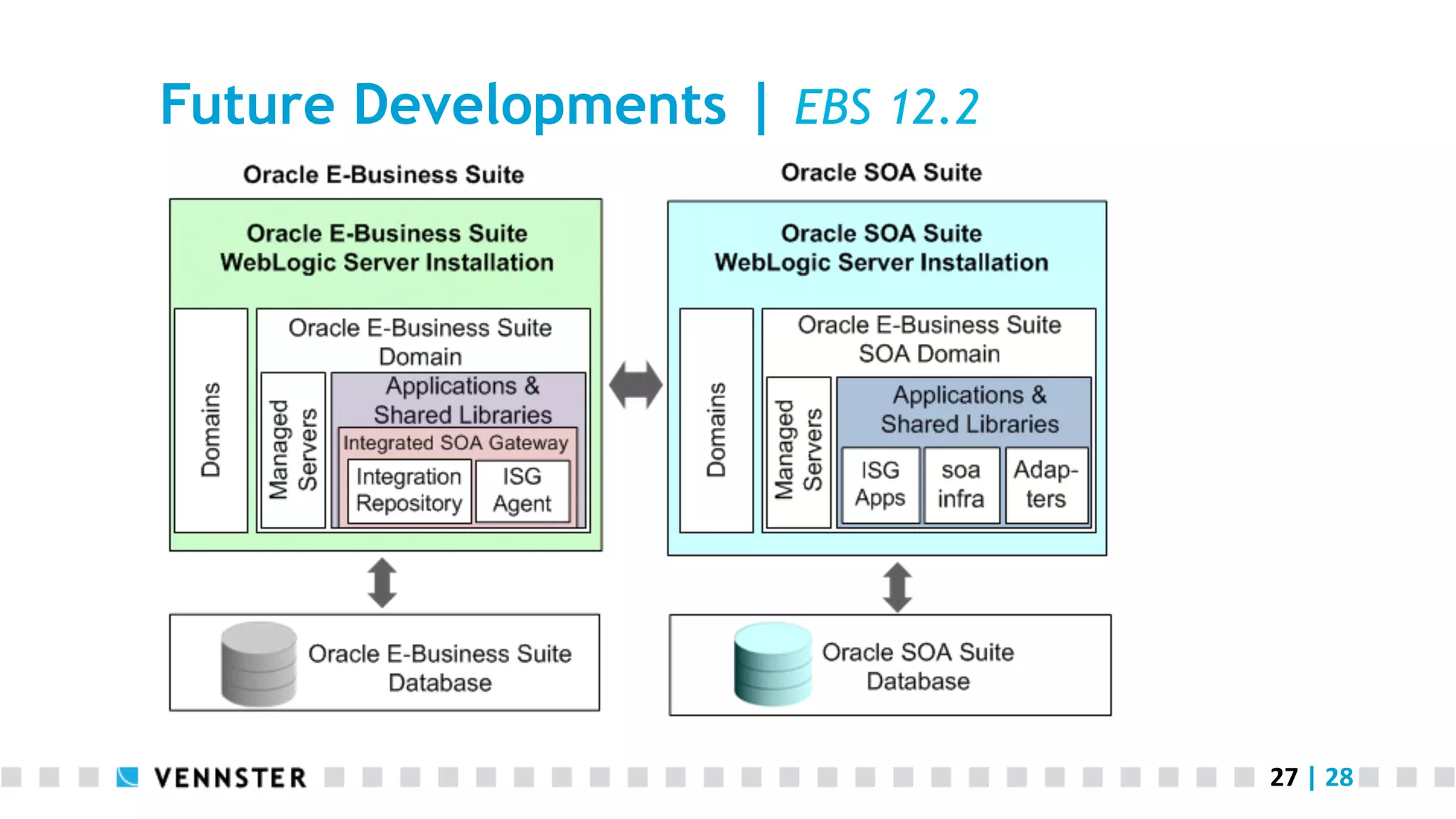
Future Developments | EBS 12.2
28	
  |	
  28	
  
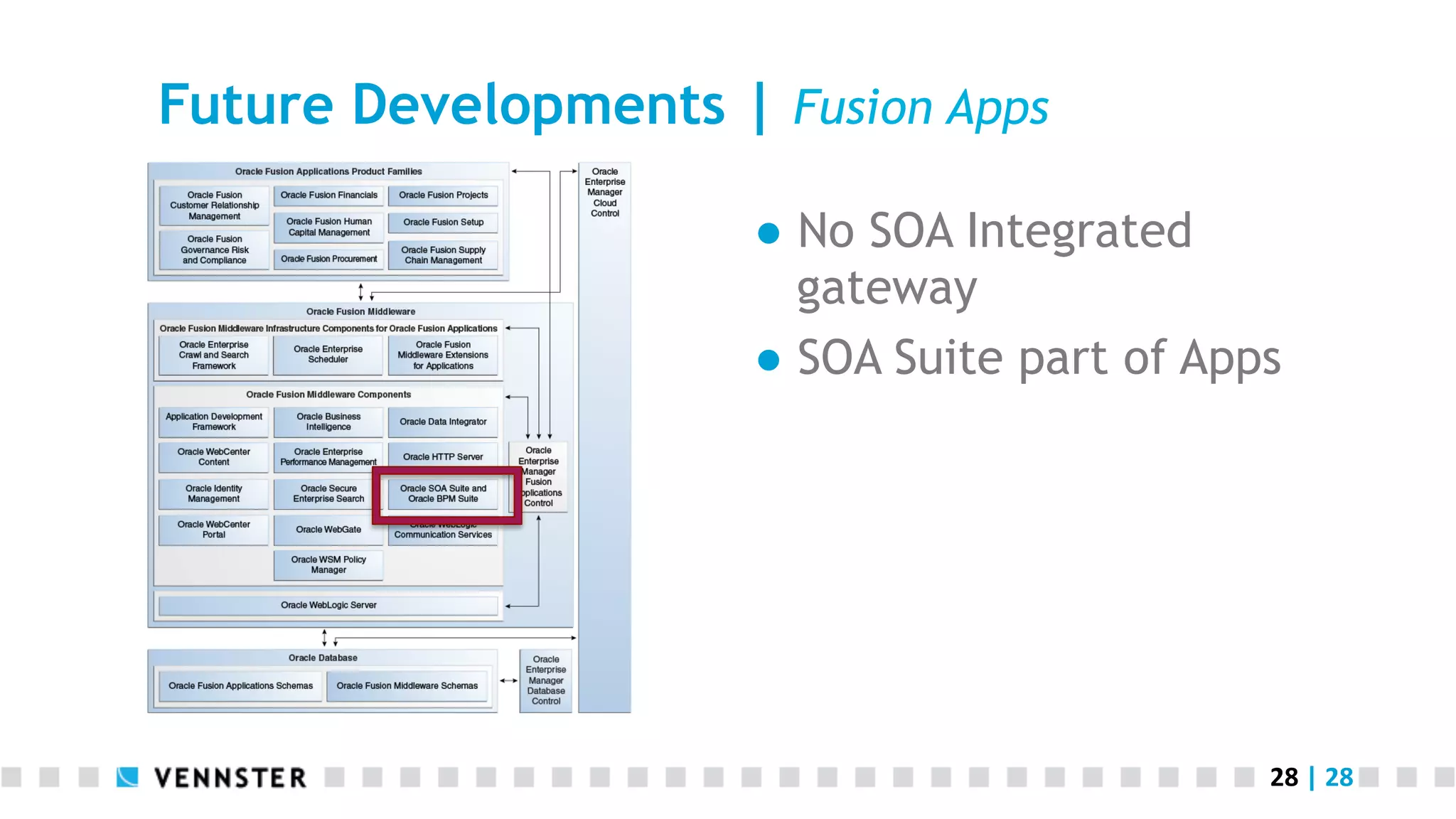
Future Developments | Fusion Apps
●  No SOA Integrated
gateway
●  SOA Suite part of Apps
29	
  |	
  28	
  
Report from the trenches:
Using SOA integrated gateway at the
city of Rotterdam
Lonneke Dikmans
October 15th 2013 | UKOUG Apps

Report from the trenches: Using SOA Integrated Gateway

  • 1.
    1  |  28   Report from the trenches: Using SOA integrated gateway at the city of Rotterdam Lonneke Dikmans October 15th 2013 | UKOUG Apps
  • 2.
    2  |  28   Introduction Agenda ●  Integrating with Oracle EBS ●  Case ●  Conclusion ●  Future developments Who am I ●  Consultant and managing partner at Vennster ●  Specializing in SOA and integration ●  Oracle Ace Director
  • 3.
    3  |  28   Integrating your packaged App | Use Cases Use data ●  For example from HR system to determine approval chain Use functionality (fine grained) ●  For example using Oracle Time control in your custom application Expose services (coarse grained) ●  For example to change an address or to fill out an expense report
  • 4.
    4  |  28   Integrating with Oracle EBS | options API ●  Call directly ●  Use EBS Adapter SOA Suite ●  Generate PL/SQL Web Service Web Service ●  Generate your own ●  Use Integrated SOA Gateway
  • 5.
    5  |  28   Intermezzo | What is a Web Service “A software system designed to support interoperable machine-to-machine interaction over a network. It has an interface described in a machine-processable format (specifically WSDL). Other systems interact with the Web service in a manner prescribed by its description using SOAP messages, typically using HTTP with an XML serialization in conjunction with other Web-related standards.” (W3C)
  • 6.
    6  |  28   Integrating with Oracle EBS | Web Services Components Integrated SOA Gateway ●  Integration Repository (IREP) ●  Service Provider ●  Service Invocation Framework (SIF) ●  Service Monitor
  • 7.
    7  |  28   Integrating with Oracle EBS | Documentation Title   Audience   Oracle  E-­‐Business  Suite  Integrated  SOA    Gateway  User’s   Guide   Architect,  Developer,   Administrator   Oracle  E-­‐Business  Suite  Integrated  SOA  Gateway   ImplementaAon  Guide   Administrator   Installing  Oracle  E-­‐Business  Suite  Integrated  SOA   Gateway,  Release  12   Administrator   Oracle  E-­‐Business  Suite  Integrated  SOA  Gateway   Developer’s  Guide   Developer  
  • 8.
    8  |  28   Integrated SOA Gateway | Overview
  • 9.
    9  |  28   Integrated SOA Gateway | Design time
  • 10.
    10  |  28   Integrated SOA Gateway | Runtime
  • 11.
    11  |  28   Case | ESS & MSS @ City Of Rotterdam Proof of concept ●  Use EBS module ●  Custom development ●  Buy self service module Process ●  Expense reports Criteria ●  Data quality & control ●  Cost ●  Usability ●  Process support (workflow) ●  ICT ●  Other
  • 12.
    12  |  28   Case | Overview ●  Preparation ‱  Installation and configuration ‱  Roles and permissions ●  Creating the web service ●  Deploying the web service ●  Granting access to the web service ●  Using the web service
  • 13.
    13  |  28   Case | Preparation Installation and configuration ●  Installation -> lots of patches ●  Setup roles and permissions -> see next slide, not obvious Analysis ●  Functionality needed in Application ●  Functionality needed in EBS (pay elements) ●  Determine APIs to be (created and) exposed
  • 14.
    14  |  28   Case | Roles and permissions Privilege   Analyst   Developer   Administrator   View  public  interfaces   Yes   Yes   Yes   View  private/internal  interfaces   No   Yes   Yes   (Re)Generate  Web  Services  (WSDL)   No   No   Yes   (Re)Deploy  Web  Services   No   No   Yes   Undeploy  Web  Services   No   No   Yes   Subscribe  to  business  events   No   No   Yes   Create  grants   No   No   Yes   Download  composite  services   No*     Yes   Yes  
  • 15.
    15  |  28   Analysis | Preparation
  • 16.
    16  |  28   Case | Create Web Service
  • 17.
    17  |  28   Case | Deploying the Web Service
  • 18.
    18  |  28   Case | Granting access Authentication & authorization ●  Use create Grant option ●  Create one user, for example ‘selfsvc’ that has access (system account) => Note that this is on top of the information that is sent in the message!
  • 19.
    19  |  28   Case | Using the service
  • 20.
    20  |  28   Case | Using the Web Service <?xml version = '1.0' encoding = 'UTF-8'?><definitions name="PAY_ELEMENT_ENTRY_API" targetNamespace="http://xmlns.oracle.com/apps/per/soaprovider/plsql/ pay_element_entry_api/" xmlns:tns="http://xmlns.oracle.com/apps/per/soaprovider/plsql/pay_element_entry_api/" xmlns="http://schemas.xmlsoap.org/wsdl/" xmlns:soap="http://schemas.xmlsoap.org/wsdl/soap/" xmlns:tns1="http://xmlns.oracle.com/apps/per/soaprovider/plsql/pay_element_entry_api/create_element_entry/" xmlns:tns2="http://xmlns.oracle.com/apps/per/soaprovider/plsql/pay_element_entry_api/delete_element_entry/" xmlns:tns3="http://xmlns.oracle.com/apps/per/ soaprovider/plsql/pay_element_entry_api/update_element_entry/"> <types> <schema xmlns="http://www.w3.org/2001/XMLSchema" elementFormDefault="qualified" targetNamespace="http://xmlns.oracle.com/apps/per/soaprovider/plsql/pay_element_entry_api/create_element_entry/"> <include schemaLocation="http:// sdra01.sdr.rotterdam.nl:8001/webservices/SOAProvider/plsql/pay_element_entry_api/APPS_ISG_CREATE_ELEMENT_ENTRY_PAY_ELEMENT_ENTRY_API-24CREATE_.xsd"/> </schema> <schema xmlns="http://www.w3.org/2001/XMLSchema" elementFormDefault="qualified" targetNamespace="http://xmlns.oracle.com/apps/per/soaprovider/plsql/ pay_element_entry_api/delete_element_entry/"> <include schemaLocation="http://sdra01.sdr.rotterdam.nl:8001/webservices/SOAProvider/plsql/pay_element_entry_api/ APPS_ISG_DELETE_ELEMENT_ENTRY_PAY_ELEMENT_ENTRY_API-24DELETE_.xsd"/> </schema> <schema xmlns="http://www.w3.org/2001/XMLSchema" elementFormDefault="qualified" targetNamespace="http://xmlns.oracle.com/apps/per/soaprovider/plsql/pay_element_entry_api/update_element_entry/"> <include schemaLocation="http:// sdra01.sdr.rotterdam.nl:8001/webservices/SOAProvider/plsql/pay_element_entry_api/APPS_ISG_UPDATE_ELEMENT_ENTRY_PAY_ELEMENT_ENTRY_API-24UPDATE_.xsd"/> </schema> <schema xmlns="http://www.w3.org/2001/XMLSchema" elementFormDefault="qualified" targetNamespace="http://xmlns.oracle.com/apps/per/soaprovider/plsql/ pay_element_entry_api/"> <element name="SOAHeader"> <complexType> <sequence> <element name="Responsibility" minOccurs="0" type="string"/> <element name="RespApplication" minOccurs="0" type="string"/> <element name="SecurityGroup" minOccurs="0" type="string"/> <element name="NLSLanguage" minOccurs="0" type="string"/> <element name="Org_Id" minOccurs="0" type="string"/> </sequence> </complexType> </element> </schema> </types> <message name="CREATE_ELEMENT_ENTRY_Input_Msg"> <part name="header" element="tns:SOAHeader"/> <part name="body" element="tns1:InputParameters"/> </message> <message name="CREATE_ELEMENT_ENTRY_Output_Msg"> <part name="body" element="tns1:OutputParameters"/> </message> <message name="DELETE_ELEMENT_ENTRY_Input_Msg"> <part name="header" element="tns:SOAHeader"/> <part name="body" element="tns2:InputParameters"/> </message> <message name="DELETE_ELEMENT_ENTRY_Output_Msg"> <part name="body" element="tns2:OutputParameters"/> </message> <message name="UPDATE_ELEMENT_ENTRY_Input_Msg"> <part name="header" element="tns:SOAHeader"/> <part name="body" element="tns3:InputParameters"/> </message> <message name="UPDATE_ELEMENT_ENTRY_Output_Msg"> <part name="body" element="tns3:OutputParameters"/> </ message> <portType name="PAY_ELEMENT_ENTRY_API_PortType"> <operation name="CREATE_ELEMENT_ENTRY"> <input message="tns:CREATE_ELEMENT_ENTRY_Input_Msg"/> <output message="tns:CREATE_ELEMENT_ENTRY_Output_Msg"/> </operation> <operation name="DELETE_ELEMENT_ENTRY"> <input message="tns:DELETE_ELEMENT_ENTRY_Input_Msg"/> <output message="tns:DELETE_ELEMENT_ENTRY_Output_Msg"/> </operation> <operation name="UPDATE_ELEMENT_ENTRY"> <input message="tns:UPDATE_ELEMENT_ENTRY_Input_Msg"/> <output message="tns:UPDATE_ELEMENT_ENTRY_Output_Msg"/> </operation> </portType> <binding name="PAY_ELEMENT_ENTRY_API_Binding" type="tns:PAY_ELEMENT_ENTRY_API_PortType"> <soap:binding style="document" transport="http://schemas.xmlsoap.org/soap/http"/> <operation name="CREATE_ELEMENT_ENTRY"> <soap:operation soapAction="http:// sdra01.sdr.rotterdam.nl:8001/webservices/SOAProvider/plsql/pay_element_entry_api/"/> <input> <soap:header message="tns:CREATE_ELEMENT_ENTRY_Input_Msg" part="header" use="literal"/> <soap:body parts="body" use="literal"/> </input> <output> <soap:body use="literal"/> </output> </operation> <operation name="DELETE_ELEMENT_ENTRY"> <soap:operation soapAction="http://sdra01.sdr.rotterdam.nl:8001/webservices/SOAProvider/plsql/pay_element_entry_api/"/> <input> <soap:header message="tns:DELETE_ELEMENT_ENTRY_Input_Msg" part="header" use="literal"/> <soap:body parts="body" use="literal"/> </input> <output> <soap:body use="literal"/> </output> </operation> <operation name="UPDATE_ELEMENT_ENTRY"> <soap:operation soapAction="http://sdra01.sdr.rotterdam.nl:8001/webservices/ SOAProvider/plsql/pay_element_entry_api/"/> <input> <soap:header message="tns:UPDATE_ELEMENT_ENTRY_Input_Msg" part="header" use="literal"/> <soap:body parts="body" use="literal"/> </input> <output> <soap:body use="literal"/> </output> </operation> </binding> <service name="PAY_ELEMENT_ENTRY_API_Service"> <port name="PAY_ELEMENT_ENTRY_API_Port" binding="tns:PAY_ELEMENT_ENTRY_API_Binding"> <soap:address location="http://sdra01.sdr.rotterdam.nl:8001/webservices/SOAProvider/ plsql/pay_element_entry_api/"/> </port> </service></definitions>
  • 21.
    21  |  28   Case | Use the Web Service SQLJUTL ●  Boolean (PL/SQL) is translated to an int (1 = true), see Oracle Application Server Adapters for Files, FTP, Databases and Enterprise Messaging User’s Guide ●  Long list of flex fields, not clear which are used <element name="P_VALIDATE" type="int" db:index="1" db:type="INTEGER" minOccurs="0" nillable="true" /> 
 <element name="P_ATTRIBUTE1" type="string" db:index="19" db:type="VARCHAR2" minOccurs="0" nillable="true" /> <element name="P_ATTRIBUTE2" type="string" db:index="20" db:type="VARCHAR2" minOccurs="0" nillable="true" /> <element name="P_ATTRIBUTE3" type="string" db:index="21" db:type="VARCHAR2" minOccurs="0" nillable="true" /> <element name="P_ATTRIBUTE4" type="string" db:index="22" db:type="VARCHAR2" minOccurs="0" nillable="true" />
  • 22.
    22  |  28   Case | Using the Web Service HRM features (API xsd) ●  Assignment id ●  Elelement_link_id ●  Date tracking EBS features (header) ●  Responsibility ●  RespApplication ●  SecurityGroup
  • 23.
    23  |  28   Conclusion | design decisions 1.  Using integrated SOA Gateway 2.  WS-Security 3.  Importing HR data 4.  Using seeded API versus creating custom API
  • 24.
    24  |  28   Conclusion | Knowledge needed HR ●  Knowledge of the current configuration ●  Installation and configuration (Integrated SOA Gateway) EBS ●  Knowledge of PL/SQL specifics (Generated WSDL) ●  EBS Header Web Service ●  OC4J ●  WSDL/SOAP/ etc
  • 25.
    25  |  28   Conclusion | Advantages of Approach Integration repository ●  List of APIs that are exposed as Web Service ●  No knowledge of Web Services needed to generate them ‱  But you need that knowledge to troubleshoot! ‱  But you need that knowledge to test them! ‱  But you need that knowledge to use them! ●  Control access (with grants) ●  WS – Security is built in
  • 26.
    26  |  28   Developments | EBS 12.2 WebLogic Server ●  Part of Fusion Middleware 11g SOA Suite 11g instead of SOA Suite 10g ●  All web services are run with Oracle SOA Suite 11g ●  Support for asynchronous PL/SQL Web Services
  • 27.
    27  |  28   Future Developments | EBS 12.2
  • 28.
    28  |  28   Future Developments | Fusion Apps ●  No SOA Integrated gateway ●  SOA Suite part of Apps
  • 29.
    29  |  28   Report from the trenches: Using SOA integrated gateway at the city of Rotterdam Lonneke Dikmans October 15th 2013 | UKOUG Apps