React JS: A Secret Preview
Prashant Sharma
https://www.linkedin.com/in/response2prashant
Agendas
1. Introduction
2. What is React JS?
3. What is Single Page Application?
4. Why React is better than other SPA?
5. React JS Setup
6. React JSX
7. ES6 Arrow Function
8. React Components
9. Component Life Cycle
10. Error Boundaries
11. React Higher Order Component (hoc)
12. Axios in React
to be continued….
12. Redux
13. Advantages of React JS
14. Disadvantages of React JS
● React is a front-end library developed by Facebook, in the year 2013.
● It is used for handling the view layer for web and mobile apps.
● ReactJS allows us to create reusable UI components.
● It is currently one of the most popular JavaScript libraries and has a
strong foundation and large community behind it.
Introduction
● React is a library for building composable user interfaces.
● It encourages the creation of reusable UI components, which present
data that changes over time.
● React abstracts away the DOM from you, offering a simpler
programming model and better performance.
● React can also render on the server using Node, and it can power
native apps using React Native.
● React implements one-way reactive data flow, which reduces the
boilerplate and is easier to reason about than traditional data binding.
What is React JS ?
What is Single Page Applications?
A single-page application is an app that works inside a browser and does
not require page reloading during use.
You are using this type of applications every day. These are for instance:
Gmail, Google Maps, Facebook and GitHub.
● There are various Single Page Applications Frameworks like Angularjs,
Reactjs and Vuejs.
● Angularjs is a MVC framework . Angularjs is complicated in comparison
to Reactjs and Vuejs but proper documentation available.
● Reactjs is a library not a framework and easy to learn but proper
documentation is not available.
Why React is better than other
SPAs?
...to be continue
● High level of flexibility and maximum of responsiveness.
● Vue js describes itself as “The Progressive JavaScript Frameworks”
and easy to learn in comparison to Angularjs and Reactjs.
● Lack of full english documentation.
● Vue js might have issues while integrating into huge projects.
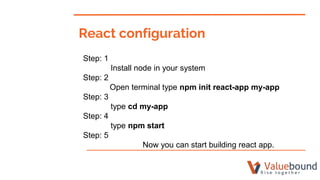
Step: 1
Install node in your system
Step: 2
Open terminal type npm init react-app my-app
Step: 3
type cd my-app
Step: 4
type npm start
Step: 5
Now you can start building react app.
React configuration
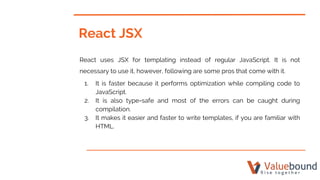
React JSX
React uses JSX for templating instead of regular JavaScript. It is not
necessary to use it, however, following are some pros that come with it.
1. It is faster because it performs optimization while compiling code to
JavaScript.
2. It is also type-safe and most of the errors can be caught during
compilation.
3. It makes it easier and faster to write templates, if you are familiar with
HTML.
...to be continued
import React, {Component} from 'react';
import Layout from './components/Layout/Layout.js';
import BurgerBuilder from './containers/BurgerBuilder/BurgerBuilder';
import { BrowserRouter, Route, link} from 'react-router-dom';
class App extends Component {
render() {
return (
<div>
<BrowserRouter>
<Layout>
<Route path="/" exact component={BurgerBuilder} />
</Layout>
</BrowserRouter>
</div>
);
}
}
export default App;
ES6 Arrow Function
arrowfunctionExample = () => {
return(
<div>Something</div>
);
}
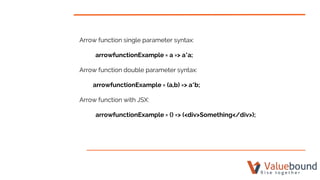
Arrow function single parameter syntax:
arrowfunctionExample = a => a*a;
Arrow function double parameter syntax:
arrowfunctionExample = (a,b) => a*b;
Arrow function with JSX:
arrowfunctionExample = () => (<div>Something</div>);
….to be continued
Arrow function with multiple line:
arrowfunctionExample = (a, b) =>{
const c = a+b;
return (
<div>Something {c}</div>
);
}
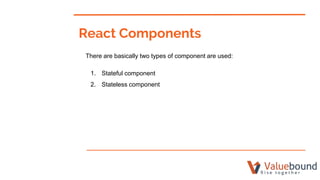
React Components
There are basically two types of component are used:
1. Stateful component
2. Stateless component
...to be continued
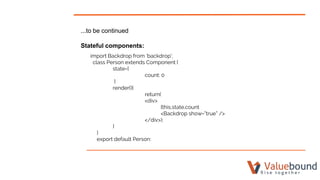
Stateful components:
import Backdrop from ‘backdrop’;
class Person extends Component {
state={
count: 0
}
render(){
return(
<div>
{this.state.count
<Backdrop show=”true” />
</div>);
}
}
export default Person:
...to be continued
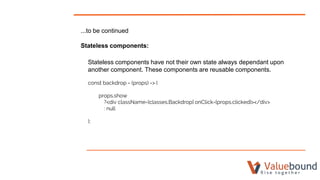
Stateless components:
Stateless components have not their own state always dependant upon
another component. These components are reusable components.
const backdrop = (props) => (
props.show
?<div className={classes.Backdrop} onClick={props.clicked}></div>
: null
);
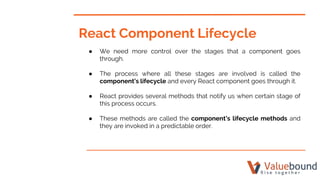
React Component Lifecycle
● We need more control over the stages that a component goes
through.
● The process where all these stages are involved is called the
component’s lifecycle and every React component goes through it.
● React provides several methods that notify us when certain stage of
this process occurs.
● These methods are called the component’s lifecycle methods and
they are invoked in a predictable order.
...to be continued
Basically all the React component’s lifecyle methods can be split in four
phases: initialization, mounting, updating and unmounting. Let’s take a
closer look at each one of them.
Initialization
The initialization phase is where we define defaults and initial values for
this.props and this.state by implementing getDefaultProps() and
getInitialState() respectively.
...to be continued
Mounting
Mounting is the process that occurs when a component is being inserted
into the DOM. This phase has two methods that we can hook up with:
componentWillMount() and componentDidMount().
componentWillMount() method is first called in this phase.
componentDidMount() is invoked second in this phase.
...to be continued
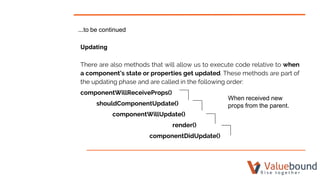
Updating
There are also methods that will allow us to execute code relative to when
a component’s state or properties get updated. These methods are part of
the updating phase and are called in the following order:
componentWillReceiveProps()
shouldComponentUpdate()
componentWillUpdate()
render()
componentDidUpdate()
When received new
props from the parent.
...to be continued
Unmounting
In this phase React provide us with only one method:
● componentWillUnmount()
It is called immediately before the component is unmounted
from the DOM.
Error Boundaries
● A JavaScript error in a part of the UI shouldn’t break the whole app.
● To solve this problem for React users, React 16 introduces a new
concept of an “error boundary”.
● Error boundaries are React components that catch JavaScript errors
anywhere in their child component tree, log those errors, and display a
fallback UI instead of the component tree that crashed.
● Error boundaries catch errors during rendering, in lifecycle methods,
and in constructors of the whole tree below them.
...to be continued
class ErroBoundary extends React.Component{
state= {
hasError: false
}
componentDidCatch(error, info){
//Display fallback, UI
this,setState({hasError:true});
// You can also log error to an error reporting service
logErrorToMyService(error, info);
}
render(){
if(this.state.hasError){
return (<div>Something went wrong</div>);
}
return this.props.children;
}
}
...to be continued
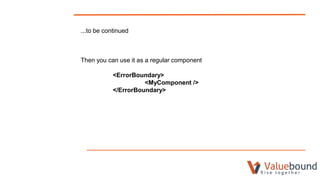
Then you can use it as a regular component
<ErrorBoundary>
<MyComponent />
</ErrorBoundary>
React Higher Order Component
● A higher-order component in React is a pattern used to share common
functionality between components without repeating code.
● A higher-order component is actually not a component though, it is a
function.
● A HOC function takes a component as an argument and returns a
component.
● It transforms a component into another component and adds
additional data or functionality.
...to be continued
const NewComponent = (BaseComponent) => {
// ... create new component from old one and update
return UpdatedComponent
}
Axios in React
● Every project needs to interact with a REST API at some stage.
● Axios provides interaction with REST API.
● With the help of AXIOS you can send GET, POST, PUT and DELETE
request to the REST API and render response to our app.
● Axios is promise based.
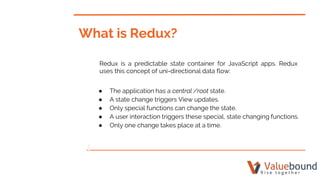
What is Redux?
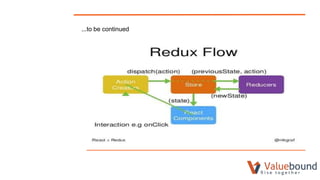
Redux is a predictable state container for JavaScript apps. Redux
uses this concept of uni-directional data flow:
● The application has a central /root state.
● A state change triggers View updates.
● Only special functions can change the state.
● A user interaction triggers these special, state changing functions.
● Only one change takes place at a time.
...to be continued
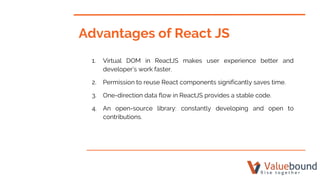
Advantages of React JS
1. Virtual DOM in ReactJS makes user experience better and
developer’s work faster.
2. Permission to reuse React components significantly saves time.
3. One-direction data flow in ReactJS provides a stable code.
4. An open-source library: constantly developing and open to
contributions.
Disadvantages of React
1. High pace of development.
2. Poor documentation.
3. ‘HTML in my JavaScript!’ – JSX as a barrier.
Thank you

React JS: A Secret Preview

  • 1.
    React JS: ASecret Preview Prashant Sharma https://www.linkedin.com/in/response2prashant
  • 2.
    Agendas 1. Introduction 2. Whatis React JS? 3. What is Single Page Application? 4. Why React is better than other SPA? 5. React JS Setup 6. React JSX 7. ES6 Arrow Function 8. React Components 9. Component Life Cycle 10. Error Boundaries 11. React Higher Order Component (hoc) 12. Axios in React
  • 3.
    to be continued…. 12.Redux 13. Advantages of React JS 14. Disadvantages of React JS
  • 4.
    ● React isa front-end library developed by Facebook, in the year 2013. ● It is used for handling the view layer for web and mobile apps. ● ReactJS allows us to create reusable UI components. ● It is currently one of the most popular JavaScript libraries and has a strong foundation and large community behind it. Introduction
  • 5.
    ● React isa library for building composable user interfaces. ● It encourages the creation of reusable UI components, which present data that changes over time. ● React abstracts away the DOM from you, offering a simpler programming model and better performance. ● React can also render on the server using Node, and it can power native apps using React Native. ● React implements one-way reactive data flow, which reduces the boilerplate and is easier to reason about than traditional data binding. What is React JS ?
  • 6.
    What is SinglePage Applications? A single-page application is an app that works inside a browser and does not require page reloading during use. You are using this type of applications every day. These are for instance: Gmail, Google Maps, Facebook and GitHub.
  • 7.
    ● There arevarious Single Page Applications Frameworks like Angularjs, Reactjs and Vuejs. ● Angularjs is a MVC framework . Angularjs is complicated in comparison to Reactjs and Vuejs but proper documentation available. ● Reactjs is a library not a framework and easy to learn but proper documentation is not available. Why React is better than other SPAs?
  • 8.
    ...to be continue ●High level of flexibility and maximum of responsiveness. ● Vue js describes itself as “The Progressive JavaScript Frameworks” and easy to learn in comparison to Angularjs and Reactjs. ● Lack of full english documentation. ● Vue js might have issues while integrating into huge projects.
  • 9.
    Step: 1 Install nodein your system Step: 2 Open terminal type npm init react-app my-app Step: 3 type cd my-app Step: 4 type npm start Step: 5 Now you can start building react app. React configuration
  • 10.
    React JSX React usesJSX for templating instead of regular JavaScript. It is not necessary to use it, however, following are some pros that come with it. 1. It is faster because it performs optimization while compiling code to JavaScript. 2. It is also type-safe and most of the errors can be caught during compilation. 3. It makes it easier and faster to write templates, if you are familiar with HTML.
  • 11.
    ...to be continued importReact, {Component} from 'react'; import Layout from './components/Layout/Layout.js'; import BurgerBuilder from './containers/BurgerBuilder/BurgerBuilder'; import { BrowserRouter, Route, link} from 'react-router-dom'; class App extends Component { render() { return ( <div> <BrowserRouter> <Layout> <Route path="/" exact component={BurgerBuilder} /> </Layout> </BrowserRouter> </div> ); } } export default App;
  • 12.
    ES6 Arrow Function arrowfunctionExample= () => { return( <div>Something</div> ); }
  • 13.
    Arrow function singleparameter syntax: arrowfunctionExample = a => a*a; Arrow function double parameter syntax: arrowfunctionExample = (a,b) => a*b; Arrow function with JSX: arrowfunctionExample = () => (<div>Something</div>);
  • 14.
    ….to be continued Arrowfunction with multiple line: arrowfunctionExample = (a, b) =>{ const c = a+b; return ( <div>Something {c}</div> ); }
  • 15.
    React Components There arebasically two types of component are used: 1. Stateful component 2. Stateless component
  • 16.
    ...to be continued Statefulcomponents: import Backdrop from ‘backdrop’; class Person extends Component { state={ count: 0 } render(){ return( <div> {this.state.count <Backdrop show=”true” /> </div>); } } export default Person:
  • 17.
    ...to be continued Statelesscomponents: Stateless components have not their own state always dependant upon another component. These components are reusable components. const backdrop = (props) => ( props.show ?<div className={classes.Backdrop} onClick={props.clicked}></div> : null );
  • 18.
    React Component Lifecycle ●We need more control over the stages that a component goes through. ● The process where all these stages are involved is called the component’s lifecycle and every React component goes through it. ● React provides several methods that notify us when certain stage of this process occurs. ● These methods are called the component’s lifecycle methods and they are invoked in a predictable order.
  • 19.
    ...to be continued Basicallyall the React component’s lifecyle methods can be split in four phases: initialization, mounting, updating and unmounting. Let’s take a closer look at each one of them. Initialization The initialization phase is where we define defaults and initial values for this.props and this.state by implementing getDefaultProps() and getInitialState() respectively.
  • 20.
    ...to be continued Mounting Mountingis the process that occurs when a component is being inserted into the DOM. This phase has two methods that we can hook up with: componentWillMount() and componentDidMount(). componentWillMount() method is first called in this phase. componentDidMount() is invoked second in this phase.
  • 21.
    ...to be continued Updating Thereare also methods that will allow us to execute code relative to when a component’s state or properties get updated. These methods are part of the updating phase and are called in the following order: componentWillReceiveProps() shouldComponentUpdate() componentWillUpdate() render() componentDidUpdate() When received new props from the parent.
  • 22.
    ...to be continued Unmounting Inthis phase React provide us with only one method: ● componentWillUnmount() It is called immediately before the component is unmounted from the DOM.
  • 23.
    Error Boundaries ● AJavaScript error in a part of the UI shouldn’t break the whole app. ● To solve this problem for React users, React 16 introduces a new concept of an “error boundary”. ● Error boundaries are React components that catch JavaScript errors anywhere in their child component tree, log those errors, and display a fallback UI instead of the component tree that crashed. ● Error boundaries catch errors during rendering, in lifecycle methods, and in constructors of the whole tree below them.
  • 24.
    ...to be continued classErroBoundary extends React.Component{ state= { hasError: false } componentDidCatch(error, info){ //Display fallback, UI this,setState({hasError:true}); // You can also log error to an error reporting service logErrorToMyService(error, info); } render(){ if(this.state.hasError){ return (<div>Something went wrong</div>); } return this.props.children; } }
  • 25.
    ...to be continued Thenyou can use it as a regular component <ErrorBoundary> <MyComponent /> </ErrorBoundary>
  • 26.
    React Higher OrderComponent ● A higher-order component in React is a pattern used to share common functionality between components without repeating code. ● A higher-order component is actually not a component though, it is a function. ● A HOC function takes a component as an argument and returns a component. ● It transforms a component into another component and adds additional data or functionality.
  • 27.
    ...to be continued constNewComponent = (BaseComponent) => { // ... create new component from old one and update return UpdatedComponent }
  • 28.
    Axios in React ●Every project needs to interact with a REST API at some stage. ● Axios provides interaction with REST API. ● With the help of AXIOS you can send GET, POST, PUT and DELETE request to the REST API and render response to our app. ● Axios is promise based.
  • 29.
    What is Redux? Reduxis a predictable state container for JavaScript apps. Redux uses this concept of uni-directional data flow: ● The application has a central /root state. ● A state change triggers View updates. ● Only special functions can change the state. ● A user interaction triggers these special, state changing functions. ● Only one change takes place at a time.
  • 30.
  • 31.
    Advantages of ReactJS 1. Virtual DOM in ReactJS makes user experience better and developer’s work faster. 2. Permission to reuse React components significantly saves time. 3. One-direction data flow in ReactJS provides a stable code. 4. An open-source library: constantly developing and open to contributions.
  • 32.
    Disadvantages of React 1.High pace of development. 2. Poor documentation. 3. ‘HTML in my JavaScript!’ – JSX as a barrier.
  • 33.