Introduction to
React
Day - 1
=
2
React Js
React is a javascript library for building
interactive User Interface( UI ).
3
4
Lorem Ipsum
Lorem IpsumLorem Ipsum
Lorem Ipsum Lorem Ipsum Lorem Ipsum
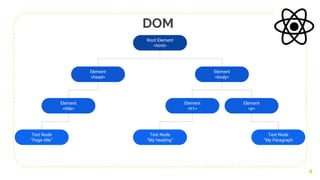
Root Element
<html>
Element
<body>
Element
<head>
Element
<title>
Element
<h1>
Element
<p>
Text Node
“Page title”
Text Node
“My heading”
Text Node
“My Paragraph
DOM
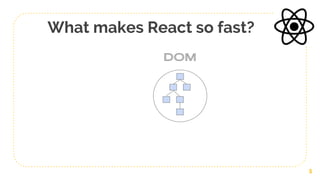
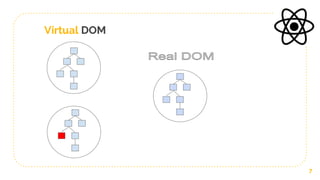
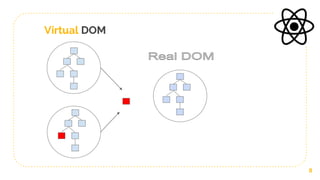
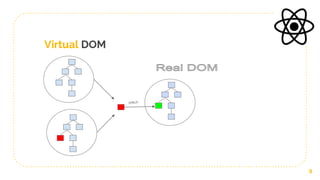
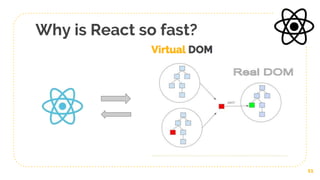
What makes React so fast?
5
6
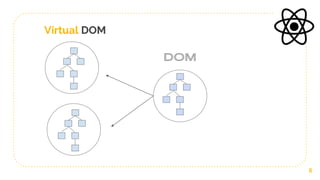
Virtual DOM
Virtual DOM
7
8
Virtual DOM
9
patch
Virtual DOM
10
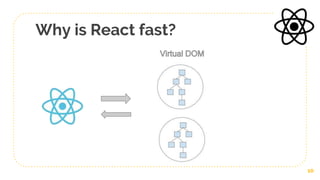
Why is React fast?
11
Why is React so fast?
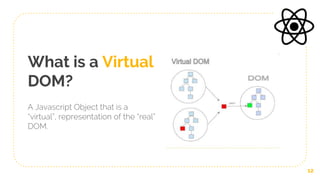
What is a Virtual
DOM?
A Javascript Object that is a
“virtual”, representation of the “real”
DOM.
12
Why use react?
● Updates and renders only the elements that
change/update in the DOM( hence quick rendering )
● Build encapsulated components that manage their own
state.
● React can also render on the server using Node and
powerful mobile apps using react native.
13
History of React
● Created by Jordan Walke, a software engineer at
Facebook
● First deployed on Facebook's newsfeed in 2011 and later
on Instagram.com in 2012
● Open-sourced at JSConf US in May 2013
● Facebook announced React Fiber, on April 18, 2017
● React 360 V1.0.0 was released to the public on April 19,
2017
14
1- Add React in a Minute (Using React Scripts )
2- Using create-react-app
3- Using Parcel
4- Using Webpack and Babel
Set up React App
15
Day - 2
=
16
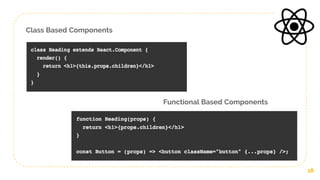
Class Based Components
Extend React Component Class and
it requires us to use render()
React Components
Functional Based Components
Are pure JavaScript function that
accepts props as its argument, and
returns some JSX
17
Components allow you to split the UI into independent reusable pieces of
JS codes.
Class Based Components
Functional Based Components
18
JSX ( JavaScript-XML )
● JSX is a XML-like syntax extension to JavaScript that creates
React elements.
● Its makes your code human readable, otherwise we had to
use React.createElement()
● Gives us expressiveness of JavaScript along with HTML like
template syntax.
19
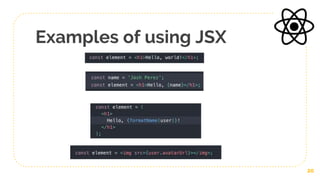
Examples of using JSX
20
State of a Component
21
Virtual DOM
State of a Component
22
Virtual DOM
State of a Component
23
Virtual DOM
State of a Component
24
Virtual DOM
setState()
State of a Component
25
Virtual DOM
setState()
State of a Component
26
Virtual DOM
setState()
State of a Component
27
setState()
patch
Virtual DOM
What is a component
state?
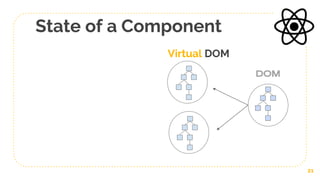
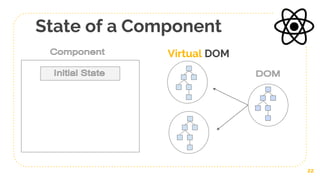
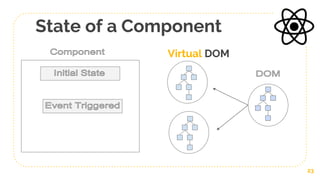
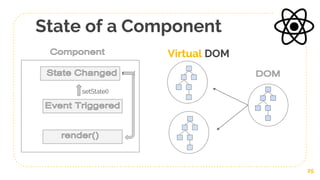
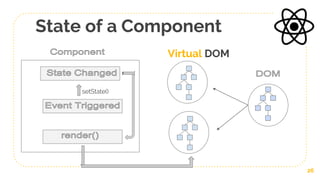
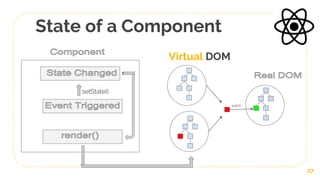
● A State of a component is an object, that holds some
information that may change throughout the component
lifecycle.
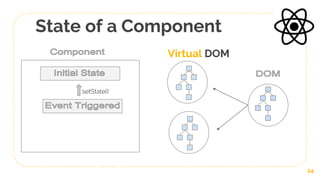
● We define initial state and then we just have to notify that the
state is changed and the react will automatically render the
those changes on the front end behind the scenes.
● Every time the state changes the changes get re rendered so
the UI( front end ) changes automatically.
28
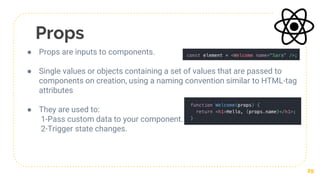
Props
● Props are inputs to components.
● Single values or objects containing a set of values that are passed to
components on creation, using a naming convention similar to HTML-tag
attributes
● They are used to:
1-Pass custom data to your component.
2-Trigger state changes.
29
Important Points
● React may batch multiple setState() calls into a single update
for performance.
● Because this.props and this.state may be updated
asynchronously, you should not rely on their values for
calculating the next state
● State is local or encapsulated. It is not accessible to any
component other than the one that owns and sets it.
● A component may choose to pass its state down as props to
its child components
● Imagine a component tree as a waterfall of props, each
component’s state is like an additional water source that
joins it at an arbitrary point but also flows down
30
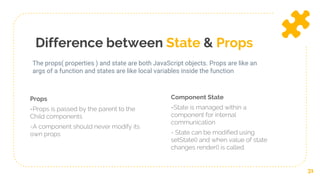
Difference between State & Props
Props
=Props is passed by the parent to the
Child components
-A component should never modify its
own props
Component State
=State is managed within a
component for internal
communication
- State can be modified using
setState() and when value of state
changes render() is called.
31
The props( properties ) and state are both JavaScript objects. Props are like an
args of a function and states are like local variables inside the function
Parent, Child &
Nested Components
32
Create & Handle
Routes
33
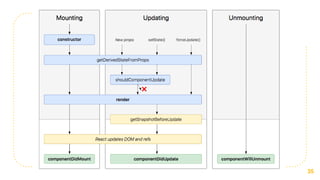
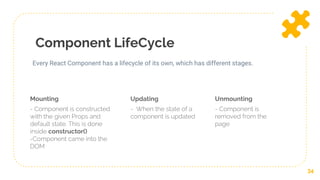
Component LifeCycle
Mounting
- Component is constructed
with the given Props and
default state. This is done
inside constructor()
-Component came into the
DOM
Updating
- When the state of a
component is updated
34
Every React Component has a lifecycle of its own, which has different stages.
Unmounting
- Component is
removed from the
page
35
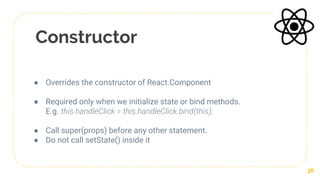
Constructor
● Overrides the constructor of React.Component
● Required only when we initialize state or bind methods.
E.g. this.handleClick = this.handleClick.bind(this);
● Call super(props) before any other statement.
● Do not call setState() inside it
36
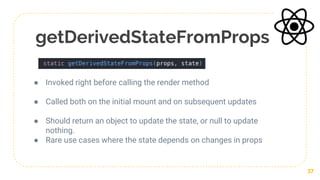
getDerivedStateFromProps
● Invoked right before calling the render method
● Called both on the initial mount and on subsequent updates
● Should return an object to update the state, or null to update
nothing.
● Rare use cases where the state depends on changes in props
37
ComponentDidMount
● Load data from a remote endpoint
● Calling setState() here will trigger an extra rendering, but it
will happen before the browser updates the screen.
38
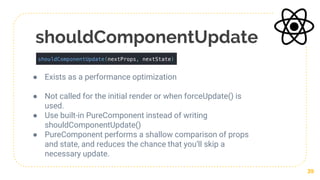
shouldComponentUpdate
● Exists as a performance optimization
● Not called for the initial render or when forceUpdate() is
used.
● Use built-in PureComponent instead of writing
shouldComponentUpdate()
● PureComponent performs a shallow comparison of props
and state, and reduces the chance that you’ll skip a
necessary update.
39
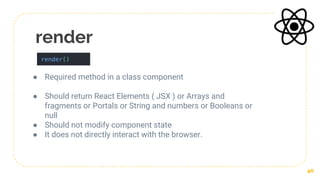
render
● Required method in a class component
● Should return React Elements ( JSX ) or Arrays and
fragments or Portals or String and numbers or Booleans or
null
● Should not modify component state
● It does not directly interact with the browser.
40
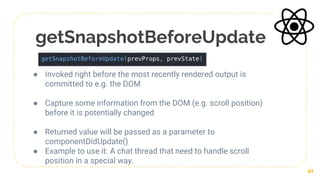
getSnapshotBeforeUpdate
● Invoked right before the most recently rendered output is
committed to e.g. the DOM
● Capture some information from the DOM (e.g. scroll position)
before it is potentially changed
● Returned value will be passed as a parameter to
componentDidUpdate()
● Example to use it: A chat thread that need to handle scroll
position in a special way.
41
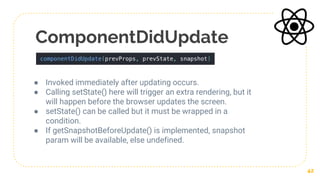
ComponentDidUpdate
● Invoked immediately after updating occurs.
● Calling setState() here will trigger an extra rendering, but it
will happen before the browser updates the screen.
● setState() can be called but it must be wrapped in a
condition.
● If getSnapshotBeforeUpdate() is implemented, snapshot
param will be available, else undefined.
42
ComponentWillUnmount
● invoked immediately before a component is unmounted.
● For e.g. Invalidating timers, canceling network requests, or
cleaning up any subscriptions.

● should not call setState() as component will never be
rerendered.
43
Handling forms and
input values
44
Arrow functions and
Spread Operators
45
Day - 3
=
46
Reconciliation
● When a component’s props or state change,
React decides whether an actual DOM update is necessary
by comparing,
newly returned element = previously rendered one. ?
When they are not equal, React will update the DOM
47
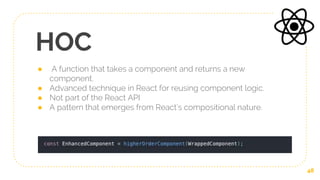
HOC
● A function that takes a component and returns a new
component.
● Advanced technique in React for reusing component logic.
● Not part of the React API
● A pattern that emerges from React’s compositional nature.
48
Pure Components
● React.PureComponent implements it with a shallow prop
and state comparison and does not re-render if the they
don’t change.
● So it handles shouldComponentUpdate() for you
● Does not re-render if nextState = prevState
49
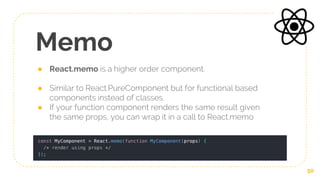
Memo
● React.memo is a higher order component.
● Similar to React.PureComponent but for functional based
components instead of classes.
● If your function component renders the same result given
the same props, you can wrap it in a call to React.memo
50
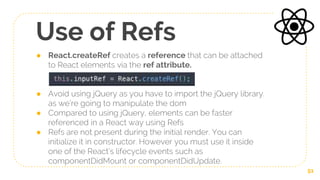
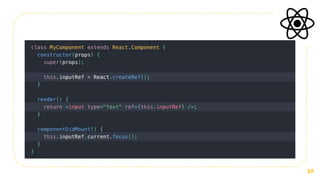
Use of Refs
● React.createRef creates a reference that can be attached
to React elements via the ref attribute.
● Avoid using jQuery as you have to import the jQuery library.
as we’re going to manipulate the dom
● Compared to using jQuery, elements can be faster
referenced in a React way using Refs
● Refs are not present during the initial render. You can
initialize it in constructor. However you must use it inside
one of the React’s lifecycle events such as
componentDidMount or componentDidUpdate.
51
52
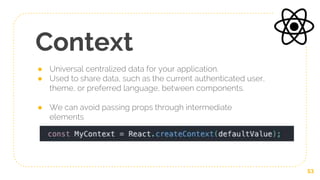
Context
● Universal centralized data for your application.
● Used to share data, such as the current authenticated user,
theme, or preferred language, between components.
● We can avoid passing props through intermediate
elements
53
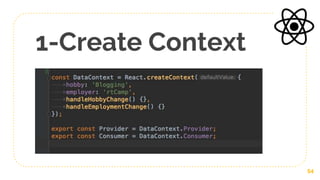
1-Create Context
54
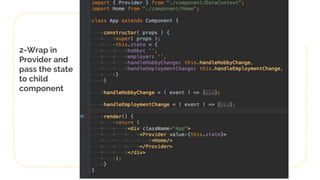
2-Wrap in
Provider and
pass the state
to child
component
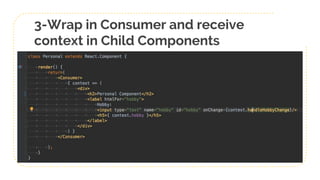
3-Wrap in Consumer and receive
context in Child Components
Pros of Context
● Set context on top and all the components in the middle
don’t have to know anything about it
● The one down at the bottom can access it
● Fills the same need as redux.
57
Cons of Context
● Makes debugging difficult
● Difficult to figure out what caused the error when you cannot
see the data in the child components that is not importing
Context
● You have to look at all the components which are
Consuming it to figure out which one of them caused the
problem
● Use context only when you have to.
58
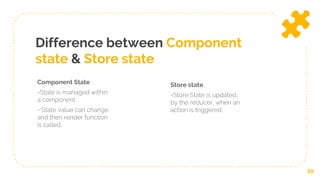
Difference between Component
state & Store state
Component State
=State is managed within
a component
- State value can change,
and then render function
is called.
Store state
=Store State is updated,
by the reducer, when an
action is triggered.
59
60
Thanks!
Any questions?
@imranhsayed
@imran_.sayed

React workshop

  • 1.
  • 2.
  • 3.
    React Js React isa javascript library for building interactive User Interface( UI ). 3
  • 4.
    4 Lorem Ipsum Lorem IpsumLoremIpsum Lorem Ipsum Lorem Ipsum Lorem Ipsum Lorem Ipsum Lorem Ipsum Lorem Ipsum Root Element <html> Element <body> Element <head> Element <title> Element <h1> Element <p> Text Node “Page title” Text Node “My heading” Text Node “My Paragraph DOM
  • 5.
    What makes Reactso fast? 5
  • 6.
  • 7.
  • 8.
  • 9.
  • 10.
  • 11.
  • 12.
    What is aVirtual DOM? A Javascript Object that is a “virtual”, representation of the “real” DOM. 12
  • 13.
    Why use react? ●Updates and renders only the elements that change/update in the DOM( hence quick rendering ) ● Build encapsulated components that manage their own state. ● React can also render on the server using Node and powerful mobile apps using react native. 13
  • 14.
    History of React ●Created by Jordan Walke, a software engineer at Facebook ● First deployed on Facebook's newsfeed in 2011 and later on Instagram.com in 2012 ● Open-sourced at JSConf US in May 2013 ● Facebook announced React Fiber, on April 18, 2017 ● React 360 V1.0.0 was released to the public on April 19, 2017 14
  • 15.
    1- Add Reactin a Minute (Using React Scripts ) 2- Using create-react-app 3- Using Parcel 4- Using Webpack and Babel Set up React App 15
  • 16.
  • 17.
    Class Based Components ExtendReact Component Class and it requires us to use render() React Components Functional Based Components Are pure JavaScript function that accepts props as its argument, and returns some JSX 17 Components allow you to split the UI into independent reusable pieces of JS codes.
  • 18.
  • 19.
    JSX ( JavaScript-XML) ● JSX is a XML-like syntax extension to JavaScript that creates React elements. ● Its makes your code human readable, otherwise we had to use React.createElement() ● Gives us expressiveness of JavaScript along with HTML like template syntax. 19
  • 20.
  • 21.
    State of aComponent 21 Virtual DOM
  • 22.
    State of aComponent 22 Virtual DOM
  • 23.
    State of aComponent 23 Virtual DOM
  • 24.
    State of aComponent 24 Virtual DOM setState()
  • 25.
    State of aComponent 25 Virtual DOM setState()
  • 26.
    State of aComponent 26 Virtual DOM setState()
  • 27.
    State of aComponent 27 setState() patch Virtual DOM
  • 28.
    What is acomponent state? ● A State of a component is an object, that holds some information that may change throughout the component lifecycle. ● We define initial state and then we just have to notify that the state is changed and the react will automatically render the those changes on the front end behind the scenes. ● Every time the state changes the changes get re rendered so the UI( front end ) changes automatically. 28
  • 29.
    Props ● Props areinputs to components. ● Single values or objects containing a set of values that are passed to components on creation, using a naming convention similar to HTML-tag attributes ● They are used to: 1-Pass custom data to your component. 2-Trigger state changes. 29
  • 30.
    Important Points ● Reactmay batch multiple setState() calls into a single update for performance. ● Because this.props and this.state may be updated asynchronously, you should not rely on their values for calculating the next state ● State is local or encapsulated. It is not accessible to any component other than the one that owns and sets it. ● A component may choose to pass its state down as props to its child components ● Imagine a component tree as a waterfall of props, each component’s state is like an additional water source that joins it at an arbitrary point but also flows down 30
  • 31.
    Difference between State& Props Props =Props is passed by the parent to the Child components -A component should never modify its own props Component State =State is managed within a component for internal communication - State can be modified using setState() and when value of state changes render() is called. 31 The props( properties ) and state are both JavaScript objects. Props are like an args of a function and states are like local variables inside the function
  • 32.
  • 33.
  • 34.
    Component LifeCycle Mounting - Componentis constructed with the given Props and default state. This is done inside constructor() -Component came into the DOM Updating - When the state of a component is updated 34 Every React Component has a lifecycle of its own, which has different stages. Unmounting - Component is removed from the page
  • 35.
  • 36.
    Constructor ● Overrides theconstructor of React.Component ● Required only when we initialize state or bind methods. E.g. this.handleClick = this.handleClick.bind(this); ● Call super(props) before any other statement. ● Do not call setState() inside it 36
  • 37.
    getDerivedStateFromProps ● Invoked rightbefore calling the render method ● Called both on the initial mount and on subsequent updates ● Should return an object to update the state, or null to update nothing. ● Rare use cases where the state depends on changes in props 37
  • 38.
    ComponentDidMount ● Load datafrom a remote endpoint ● Calling setState() here will trigger an extra rendering, but it will happen before the browser updates the screen. 38
  • 39.
    shouldComponentUpdate ● Exists asa performance optimization ● Not called for the initial render or when forceUpdate() is used. ● Use built-in PureComponent instead of writing shouldComponentUpdate() ● PureComponent performs a shallow comparison of props and state, and reduces the chance that you’ll skip a necessary update. 39
  • 40.
    render ● Required methodin a class component ● Should return React Elements ( JSX ) or Arrays and fragments or Portals or String and numbers or Booleans or null ● Should not modify component state ● It does not directly interact with the browser. 40
  • 41.
    getSnapshotBeforeUpdate ● Invoked rightbefore the most recently rendered output is committed to e.g. the DOM ● Capture some information from the DOM (e.g. scroll position) before it is potentially changed ● Returned value will be passed as a parameter to componentDidUpdate() ● Example to use it: A chat thread that need to handle scroll position in a special way. 41
  • 42.
    ComponentDidUpdate ● Invoked immediatelyafter updating occurs. ● Calling setState() here will trigger an extra rendering, but it will happen before the browser updates the screen. ● setState() can be called but it must be wrapped in a condition. ● If getSnapshotBeforeUpdate() is implemented, snapshot param will be available, else undefined. 42
  • 43.
    ComponentWillUnmount ● invoked immediatelybefore a component is unmounted. ● For e.g. Invalidating timers, canceling network requests, or cleaning up any subscriptions. ● should not call setState() as component will never be rerendered. 43
  • 44.
  • 45.
  • 46.
  • 47.
    Reconciliation ● When acomponent’s props or state change, React decides whether an actual DOM update is necessary by comparing, newly returned element = previously rendered one. ? When they are not equal, React will update the DOM 47
  • 48.
    HOC ● A functionthat takes a component and returns a new component. ● Advanced technique in React for reusing component logic. ● Not part of the React API ● A pattern that emerges from React’s compositional nature. 48
  • 49.
    Pure Components ● React.PureComponentimplements it with a shallow prop and state comparison and does not re-render if the they don’t change. ● So it handles shouldComponentUpdate() for you ● Does not re-render if nextState = prevState 49
  • 50.
    Memo ● React.memo isa higher order component. ● Similar to React.PureComponent but for functional based components instead of classes. ● If your function component renders the same result given the same props, you can wrap it in a call to React.memo 50
  • 51.

    Use of Refs ●React.createRef creates a reference that can be attached to React elements via the ref attribute. ● Avoid using jQuery as you have to import the jQuery library. as we’re going to manipulate the dom ● Compared to using jQuery, elements can be faster referenced in a React way using Refs ● Refs are not present during the initial render. You can initialize it in constructor. However you must use it inside one of the React’s lifecycle events such as componentDidMount or componentDidUpdate. 51
  • 52.
  • 53.
    Context ● Universal centralizeddata for your application. ● Used to share data, such as the current authenticated user, theme, or preferred language, between components. ● We can avoid passing props through intermediate elements 53
  • 54.
  • 55.
    2-Wrap in Provider and passthe state to child component
  • 56.
    3-Wrap in Consumerand receive context in Child Components
  • 57.
    Pros of Context ●Set context on top and all the components in the middle don’t have to know anything about it ● The one down at the bottom can access it ● Fills the same need as redux. 57
  • 58.
    Cons of Context ●Makes debugging difficult ● Difficult to figure out what caused the error when you cannot see the data in the child components that is not importing Context ● You have to look at all the components which are Consuming it to figure out which one of them caused the problem ● Use context only when you have to. 58
  • 59.
    Difference between Component state& Store state Component State =State is managed within a component - State value can change, and then render function is called. Store state =Store State is updated, by the reducer, when an action is triggered. 59
  • 60.