COURSE TITLE: PROGRAMMINGFOR PROBLEM
SOLVING USING PYTHON
Mulla Arshiya
Asst. Professor
School of Engineering
2.
10/24/2025
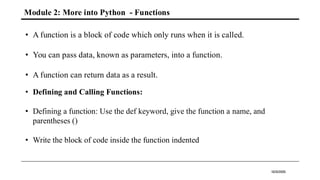
Module 2: Moreinto Python - Functions
• A function is a block of code which only runs when it is called.
• You can pass data, known as parameters, into a function.
• A function can return data as a result.
• Defining and Calling Functions:
• Defining a function: Use the def keyword, give the function a name, and
parentheses ()
• Write the block of code inside the function indented
3.
10/24/2025
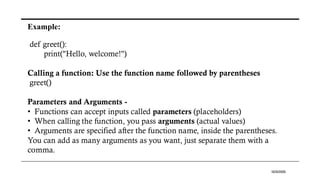
Example:
def greet():
print("Hello, welcome!")
Callinga function: Use the function name followed by parentheses
greet()
Parameters and Arguments -
• Functions can accept inputs called parameters (placeholders)
• When calling the function, you pass arguments (actual values)
• Arguments are specified after the function name, inside the parentheses.
You can add as many arguments as you want, just separate them with a
comma.
4.
10/24/2025
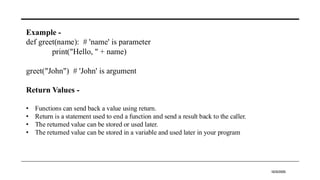
Example -
def greet(name):# 'name' is parameter
print("Hello, " + name)
greet("John") # 'John' is argument
Return Values -
• Functions can send back a value using return.
• Return is a statement used to end a function and send a result back to the caller.
• The returned value can be stored or used later.
• The returned value can be stored in a variable and used later in your program
5.
10/24/2025
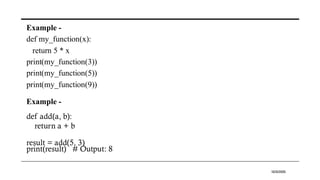
Example -
def my_function(x):
return5 * x
print(my_function(3))
print(my_function(5))
print(my_function(9))
Example -
def add(a, b):
return a + b
result = add(5, 3)
print(result) # Output: 8
6.
10/24/2025
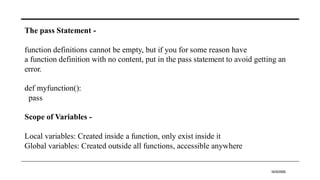
The pass Statement-
function definitions cannot be empty, but if you for some reason have
a function definition with no content, put in the pass statement to avoid getting an
error.
def myfunction():
pass
Scope of Variables -
Local variables: Created inside a function, only exist inside it
Global variables: Created outside all functions, accessible anywhere
7.
10/24/2025
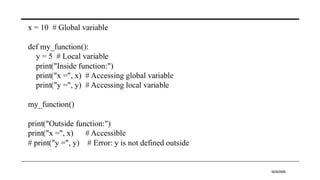
x = 10# Global variable
def my_function():
y = 5 # Local variable
print("Inside function:")
print("x =", x) # Accessing global variable
print("y =", y) # Accessing local variable
my_function()
print("Outside function:")
print("x =", x) # Accessible
# print("y =", y) # Error: y is not defined outside
8.
10/24/2025
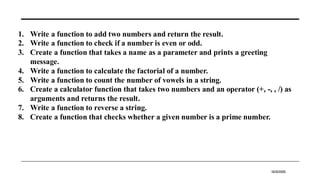
1. Write afunction to add two numbers and return the result.
2. Write a function to check if a number is even or odd.
3. Create a function that takes a name as a parameter and prints a greeting
message.
4. Write a function to calculate the factorial of a number.
5. Write a function to count the number of vowels in a string.
6. Create a calculator function that takes two numbers and an operator (+, -, , /) as
arguments and returns the result.
7. Write a function to reverse a string.
8. Create a function that checks whether a given number is a prime number.
9.
10/24/2025
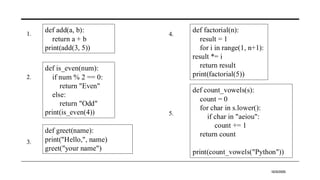
def add(a, b):
returna + b
print(add(3, 5))
def is_even(num):
if num % 2 == 0:
return "Even"
else:
return "Odd"
print(is_even(4))
def greet(name):
print("Hello,", name)
greet("your name")
def factorial(n):
result = 1
for i in range(1, n+1):
result *= i
return result
print(factorial(5))
def count_vowels(s):
count = 0
for char in s.lower():
if char in "aeiou":
count += 1
return count
print(count_vowels("Python"))
1.
2.
3.
4.
5.
10.
10/24/2025
def calculator(a, b,op):
if op == '+':
return a + b
elif op == '-':
return a - b
elif op == '*':
return a * b
elif op == '/':
return a / b
else:
return "Invalid
operator"
print(calculator(10, 2,
'*'))
def reverse_string(s):
return s[::-1]
print(reverse_string("hello"))
def is_prime(n):
if n <= 1:
return False
for i in range(2, n):
if n % i == 0:
return False
return True
print(is_prime(7))
6.
7.
8.
11.
10/24/2025
Python Lists -
•A list is a collection of ordered, mutable items.
• Lists can hold elements of different data types: integers, strings, floats, even other
lists.
• Lists are defined using square brackets [].
Eg: fruits = ["apple", "banana", "cherry"]
List Items -
• List items are ordered, changeable, and allow duplicate values.
• List items are indexed, the first item has index [0], the second item has
index [1] etc.
12.
10/24/2025
Creating a List-
# Empty list
my_list = []
# List of numbers
numbers = [1, 2, 3, 4, 5]
# Mixed data types
mixed = [10, "hello", 3.14, True]
Accessing Elements -
• Using indexing (starts from 0)
fruits = ["apple", "banana", "cherry"]
print(fruits[0]) # Output: apple
• Negative Indexing(Satrts from –1)
print(fruits[-1]) # Output: cherry (last
item)
13.
10/24/2025
Eg : my_list= [1, 2, 3]
Method Meaning / Purpose Example Result
append(x)
Adds item x at the end of the
list
my_list.append(4) [1, 2, 3, 4]
insert(i, x) Inserts item x at index i my_list.insert(1, 100) [1, 100, 2, 3]
extend(iterable)
Adds all elements from
another iterable
my_list.extend([5, 6]) [1, 2, 3, 5, 6]
remove(x)
Removes the first occurrence
of x
my_list.remove(2) [1, 3] (if 2 exists)
pop()
Removes and returns the last
item
my_list.pop()
Returns 3, List
becomes [1, 2]
pop(i)
Removes and returns the
item at index i
my_list.pop(1)
Returns 2, List
becomes [1, 3]
Manipulating Lists
14.
10/24/2025
clear()
Removes all itemsfrom the
list
my_list.clear() [] (Empty list)
index(x)
Returns index of first
occurrence of x
my_list.index(3) 2 (if 3 is at index 2)
count(x)
Counts how many times x
occurs in list
my_list.count(2) 1 (if 2 appears once)
sort()
Sorts the list in ascending
order (in-place)
my_list.sort() [1, 2, 3]
sort(reverse=True)
Sorts the list in descending
order
my_list.sort(reverse=Tru
e)
[3, 2, 1]
reverse() Reverses the list my_list.reverse()
[3, 2, 1] (if original was
[1, 2, 3])
copy()
Returns a shallow copy of
the list
new_list =
my_list.copy()
new_list is [1, 2, 3]
15.
10/24/2025
List Slicing inPython -
• The process of accessing a specified portion or subset of a list for some action
while leaving the rest of the list alone.
• Slicing never includes the end index — it goes up to but not including that
index.
Eg: my_list=[10,20,30,40,50,60]
Syntax Meaning Example Code Result
my_list[start:]
Elements from start
to end
my_list[2:] [30, 40, 50, 60]
my_list[:end]
Elements from
beginning to end-1
my_list[:3] [10, 20, 30]
my_list[start:end]
Elements from start
to end-1
my_list[1:4] [20, 30, 40]
16.
10/24/2025
my_list[start:end:step]
Elements from startto
end-1 skipping by
step
my_list[1:5:2] [20, 40]
my_list[::-1] Reverses the list my_list[::-1] [60, 50, 40, 30, 20, 10]
my_list[-1] Last element my_list[-1] 60
my_list[-2:] Last two elements my_list[-2:] [50, 60]
my_list[:-2] All except last two
elements
my_list[:-2] [10, 20, 30, 40]
17.
10/24/2025
Python - LoopLists
You can loop through the list items by using a for loop.
Eg:
thislist = ["apple", "banana", "cherry"]
for x in thislist:
print(x)
Loop Through the Index Numbers
Use the range() and len() functions to create a suitable iterable
Eg:
thislist = ["apple", "banana", "cherry"]
for i in range(len(thislist)):
print(thislist[i])
18.
10/24/2025
Using a WhileLoop
You can loop through the list items by using a while loop.
Use the len() function to determine the length of the list, then start at 0 and loop your
way through the list items by referring to their indexes.
Remember to increase the index by 1 after each iteration.
Eg:
thislist = ["apple", "banana", "cherry"]
i = 0
while i < len(thislist):
print(thislist[i])
i = i + 1
19.
10/24/2025
Python - ListComprehension
List comprehension offers a shorter syntax when you want to create a new list based on the
values of an existing list.
Based on a list of fruits, you want a new list, containing only the fruits with the letter "a" in
the name.
List comprehension
Syntax : [expression for item in iterable]
• expression: What to do with each item. This can be a value or a calculation.
• item: A variable representing each element in the iterable.
• iterable: The existing sequence (like a list or range) you are looping over.
squares = [x**2 for x in range(5)]
# squares will be [0, 1, 4, 9, 16]
squares = []
for x in range(5):
squares.append(x**2)
20.
10/24/2025
Adding a condition
newlist= [expression for item in iterable if condition == True]
➢ even_numbers = [x for x in range(10) if x % 2 == 0]
# even_numbers will be [0, 2, 4, 6, 8]
even_numbers = []
for x in range(10):
if x % 2 == 0:
even_numbers.append(x)
even_odd_list = []
for x in range(5):
if x % 2 == 0:
even_odd_list.append("Even")
else:
even_odd_list.append("Odd")
• Using if/else in a list comprehension
[value_if_true if condition else value_if_false for item in iterable]
➢ even_odd_list = ["Even" if x % 2 == 0 else "Odd" for x in
range(5)]
• # even_odd_list will be ['Even', 'Odd', 'Even', 'Odd', 'Even']
➢ fruits = ["apple", "banana", "cherry", "kiwi", "mango"]
newlist = [x.upper() for x in fruits]
print(newlist)
21.
10/24/2025
1. Create alist of 5 fruits and print the list.
2. Print the first and last elements of this list: colors = ["red", "blue", "green", "yellow",
"purple"].
3. Take 3 numbers as input from the user and store them in a list. Then print the list.
Input: Enter numbers: 2, 4, 6
Output: List: [2, 4, 6]
4. Create a list with repeated numbers and count how many times a specific number
appears.
Input: List = [2, 3, 4, 2, 5, 2], Number = 2
Output: 2 appears 3 times
5. Check if an element exists in a list using in operator.
22.
10/24/2025
fruits = ["apple","banana", "mango",
"orange", "grapes"]
print(fruits)
colors = ["red", "blue", "green",
"yellow", "purple"]
print("First:", colors[0])
print("Last:", colors[-1])
numbers = []
for i in range(3):
num = int(input("Enter a number: "))
numbers.append(num)
print("List:", numbers)
lst = [2, 3, 4, 2, 5, 2]
num = 2
count = lst.count(num)
print(f"{num} appears {count} times")
colors = ["red", "blue", "green"]
print("red" in colors)
print("black" in colors)
1.
2.
3.
4.
5.
23.
10/24/2025
1. Insert anew element at the second position in the list [1, 3, 4, 5] and print the
updated list.
2. Delete the last element from a list of 5 numbers and print the updated list.
3. Take a list of 5 student names as input and print each name using a for loop.
4. Sort a list of numbers in descending order and print it.
Input: [5, 2, 9, 1, 7]
Output: [9, 7, 5, 2, 1]
5. Remove duplicates from a list and print the new list.
24.
10/24/2025
lst = [1,3, 4, 5]
lst.insert(1, 2)
print(lst)
numbers = [10, 20, 30,
40, 50]
numbers.pop()
print(numbers)
names = []
for i in range(5):
name = input("Enter name: ")
names.append(name)
for name in names:
print(name)
numbers = [5, 2, 9, 1, 7]
numbers.sort(reverse=True)
print(numbers)
nums = [1, 2, 2, 3, 4, 4, 5]
unique = list(set(nums))
print(unique)
1.
2.
3.
4.
5.
25.
10/24/2025
1. Write aprogram that takes a list of numbers and returns a new list with only even
numbers using list comprehension.
2. Create a list of squares for numbers from 1 to 10 using list comprehension.
3. Take a list of names and return only names that start with 'A'.
Input: ['Ankit', 'Raj', 'Arya', 'Meera']
Output: ['Ankit', 'Arya']
4. Create a program to remove all negative numbers from a list using list
comprehension.
Input: [4, -3, 9, -2, 0, 6]
Output: [4, 9, 0, 6]
5. Reverse a list without using the reverse() method.
26.
10/24/2025
numbers = [1,2, 3, 4, 5, 6, 7, 8, 9, 10]
evens = [num for num in numbers if num %
2 == 0]
print(evens)
squares = [x**2 for x in range(1, 11)]
print(squares)
names = ['Ankit', 'Raj', 'Arya', 'Meera']
a_names = [name for name in names if
name.startswith('A')]
print(a_names)
numbers = [4, -3, 9, -2, 0, 6]
positives = [num for num in
numbers if num >= 0]
print(positives)
lst = [1, 2, 3, 4, 5]
reversed_list = lst[::-1]
print(reversed_list)
1.
2.
3.
4.
5.
![10/24/2025
def calculator(a, b, op):
if op == '+':
return a + b
elif op == '-':
return a - b
elif op == '*':
return a * b
elif op == '/':
return a / b
else:
return "Invalid
operator"
print(calculator(10, 2,
'*'))
def reverse_string(s):
return s[::-1]
print(reverse_string("hello"))
def is_prime(n):
if n <= 1:
return False
for i in range(2, n):
if n % i == 0:
return False
return True
print(is_prime(7))
6.
7.
8.](https://image.slidesharecdn.com/pythonmodule2-251031072734-7eb9dda8/85/PythonModule-02-school-of-engineering-10-320.jpg)
![10/24/2025
Python Lists -
• A list is a collection of ordered, mutable items.
• Lists can hold elements of different data types: integers, strings, floats, even other
lists.
• Lists are defined using square brackets [].
Eg: fruits = ["apple", "banana", "cherry"]
List Items -
• List items are ordered, changeable, and allow duplicate values.
• List items are indexed, the first item has index [0], the second item has
index [1] etc.](https://image.slidesharecdn.com/pythonmodule2-251031072734-7eb9dda8/85/PythonModule-02-school-of-engineering-11-320.jpg)
![10/24/2025
Creating a List -
# Empty list
my_list = []
# List of numbers
numbers = [1, 2, 3, 4, 5]
# Mixed data types
mixed = [10, "hello", 3.14, True]
Accessing Elements -
• Using indexing (starts from 0)
fruits = ["apple", "banana", "cherry"]
print(fruits[0]) # Output: apple
• Negative Indexing(Satrts from –1)
print(fruits[-1]) # Output: cherry (last
item)](https://image.slidesharecdn.com/pythonmodule2-251031072734-7eb9dda8/85/PythonModule-02-school-of-engineering-12-320.jpg)
![10/24/2025
Eg : my_list = [1, 2, 3]
Method Meaning / Purpose Example Result
append(x)
Adds item x at the end of the
list
my_list.append(4) [1, 2, 3, 4]
insert(i, x) Inserts item x at index i my_list.insert(1, 100) [1, 100, 2, 3]
extend(iterable)
Adds all elements from
another iterable
my_list.extend([5, 6]) [1, 2, 3, 5, 6]
remove(x)
Removes the first occurrence
of x
my_list.remove(2) [1, 3] (if 2 exists)
pop()
Removes and returns the last
item
my_list.pop()
Returns 3, List
becomes [1, 2]
pop(i)
Removes and returns the
item at index i
my_list.pop(1)
Returns 2, List
becomes [1, 3]
Manipulating Lists](https://image.slidesharecdn.com/pythonmodule2-251031072734-7eb9dda8/85/PythonModule-02-school-of-engineering-13-320.jpg)
![10/24/2025
clear()
Removes all items from the
list
my_list.clear() [] (Empty list)
index(x)
Returns index of first
occurrence of x
my_list.index(3) 2 (if 3 is at index 2)
count(x)
Counts how many times x
occurs in list
my_list.count(2) 1 (if 2 appears once)
sort()
Sorts the list in ascending
order (in-place)
my_list.sort() [1, 2, 3]
sort(reverse=True)
Sorts the list in descending
order
my_list.sort(reverse=Tru
e)
[3, 2, 1]
reverse() Reverses the list my_list.reverse()
[3, 2, 1] (if original was
[1, 2, 3])
copy()
Returns a shallow copy of
the list
new_list =
my_list.copy()
new_list is [1, 2, 3]](https://image.slidesharecdn.com/pythonmodule2-251031072734-7eb9dda8/85/PythonModule-02-school-of-engineering-14-320.jpg)
![10/24/2025
List Slicing in Python -
• The process of accessing a specified portion or subset of a list for some action
while leaving the rest of the list alone.
• Slicing never includes the end index — it goes up to but not including that
index.
Eg: my_list=[10,20,30,40,50,60]
Syntax Meaning Example Code Result
my_list[start:]
Elements from start
to end
my_list[2:] [30, 40, 50, 60]
my_list[:end]
Elements from
beginning to end-1
my_list[:3] [10, 20, 30]
my_list[start:end]
Elements from start
to end-1
my_list[1:4] [20, 30, 40]](https://image.slidesharecdn.com/pythonmodule2-251031072734-7eb9dda8/85/PythonModule-02-school-of-engineering-15-320.jpg)
![10/24/2025
my_list[start:end:step]
Elements from start to
end-1 skipping by
step
my_list[1:5:2] [20, 40]
my_list[::-1] Reverses the list my_list[::-1] [60, 50, 40, 30, 20, 10]
my_list[-1] Last element my_list[-1] 60
my_list[-2:] Last two elements my_list[-2:] [50, 60]
my_list[:-2] All except last two
elements
my_list[:-2] [10, 20, 30, 40]](https://image.slidesharecdn.com/pythonmodule2-251031072734-7eb9dda8/85/PythonModule-02-school-of-engineering-16-320.jpg)
![10/24/2025
Python - Loop Lists
You can loop through the list items by using a for loop.
Eg:
thislist = ["apple", "banana", "cherry"]
for x in thislist:
print(x)
Loop Through the Index Numbers
Use the range() and len() functions to create a suitable iterable
Eg:
thislist = ["apple", "banana", "cherry"]
for i in range(len(thislist)):
print(thislist[i])](https://image.slidesharecdn.com/pythonmodule2-251031072734-7eb9dda8/85/PythonModule-02-school-of-engineering-17-320.jpg)
![10/24/2025
Using a While Loop
You can loop through the list items by using a while loop.
Use the len() function to determine the length of the list, then start at 0 and loop your
way through the list items by referring to their indexes.
Remember to increase the index by 1 after each iteration.
Eg:
thislist = ["apple", "banana", "cherry"]
i = 0
while i < len(thislist):
print(thislist[i])
i = i + 1](https://image.slidesharecdn.com/pythonmodule2-251031072734-7eb9dda8/85/PythonModule-02-school-of-engineering-18-320.jpg)
![10/24/2025
Python - List Comprehension
List comprehension offers a shorter syntax when you want to create a new list based on the
values of an existing list.
Based on a list of fruits, you want a new list, containing only the fruits with the letter "a" in
the name.
List comprehension
Syntax : [expression for item in iterable]
• expression: What to do with each item. This can be a value or a calculation.
• item: A variable representing each element in the iterable.
• iterable: The existing sequence (like a list or range) you are looping over.
squares = [x**2 for x in range(5)]
# squares will be [0, 1, 4, 9, 16]
squares = []
for x in range(5):
squares.append(x**2)](https://image.slidesharecdn.com/pythonmodule2-251031072734-7eb9dda8/85/PythonModule-02-school-of-engineering-19-320.jpg)
![10/24/2025
Adding a condition
newlist = [expression for item in iterable if condition == True]
➢ even_numbers = [x for x in range(10) if x % 2 == 0]
# even_numbers will be [0, 2, 4, 6, 8]
even_numbers = []
for x in range(10):
if x % 2 == 0:
even_numbers.append(x)
even_odd_list = []
for x in range(5):
if x % 2 == 0:
even_odd_list.append("Even")
else:
even_odd_list.append("Odd")
• Using if/else in a list comprehension
[value_if_true if condition else value_if_false for item in iterable]
➢ even_odd_list = ["Even" if x % 2 == 0 else "Odd" for x in
range(5)]
• # even_odd_list will be ['Even', 'Odd', 'Even', 'Odd', 'Even']
➢ fruits = ["apple", "banana", "cherry", "kiwi", "mango"]
newlist = [x.upper() for x in fruits]
print(newlist)](https://image.slidesharecdn.com/pythonmodule2-251031072734-7eb9dda8/85/PythonModule-02-school-of-engineering-20-320.jpg)
![10/24/2025
1. Create a list of 5 fruits and print the list.
2. Print the first and last elements of this list: colors = ["red", "blue", "green", "yellow",
"purple"].
3. Take 3 numbers as input from the user and store them in a list. Then print the list.
Input: Enter numbers: 2, 4, 6
Output: List: [2, 4, 6]
4. Create a list with repeated numbers and count how many times a specific number
appears.
Input: List = [2, 3, 4, 2, 5, 2], Number = 2
Output: 2 appears 3 times
5. Check if an element exists in a list using in operator.](https://image.slidesharecdn.com/pythonmodule2-251031072734-7eb9dda8/85/PythonModule-02-school-of-engineering-21-320.jpg)
![10/24/2025
fruits = ["apple", "banana", "mango",
"orange", "grapes"]
print(fruits)
colors = ["red", "blue", "green",
"yellow", "purple"]
print("First:", colors[0])
print("Last:", colors[-1])
numbers = []
for i in range(3):
num = int(input("Enter a number: "))
numbers.append(num)
print("List:", numbers)
lst = [2, 3, 4, 2, 5, 2]
num = 2
count = lst.count(num)
print(f"{num} appears {count} times")
colors = ["red", "blue", "green"]
print("red" in colors)
print("black" in colors)
1.
2.
3.
4.
5.](https://image.slidesharecdn.com/pythonmodule2-251031072734-7eb9dda8/85/PythonModule-02-school-of-engineering-22-320.jpg)
![10/24/2025
1. Insert a new element at the second position in the list [1, 3, 4, 5] and print the
updated list.
2. Delete the last element from a list of 5 numbers and print the updated list.
3. Take a list of 5 student names as input and print each name using a for loop.
4. Sort a list of numbers in descending order and print it.
Input: [5, 2, 9, 1, 7]
Output: [9, 7, 5, 2, 1]
5. Remove duplicates from a list and print the new list.](https://image.slidesharecdn.com/pythonmodule2-251031072734-7eb9dda8/85/PythonModule-02-school-of-engineering-23-320.jpg)
![10/24/2025
lst = [1, 3, 4, 5]
lst.insert(1, 2)
print(lst)
numbers = [10, 20, 30,
40, 50]
numbers.pop()
print(numbers)
names = []
for i in range(5):
name = input("Enter name: ")
names.append(name)
for name in names:
print(name)
numbers = [5, 2, 9, 1, 7]
numbers.sort(reverse=True)
print(numbers)
nums = [1, 2, 2, 3, 4, 4, 5]
unique = list(set(nums))
print(unique)
1.
2.
3.
4.
5.](https://image.slidesharecdn.com/pythonmodule2-251031072734-7eb9dda8/85/PythonModule-02-school-of-engineering-24-320.jpg)
![10/24/2025
1. Write a program that takes a list of numbers and returns a new list with only even
numbers using list comprehension.
2. Create a list of squares for numbers from 1 to 10 using list comprehension.
3. Take a list of names and return only names that start with 'A'.
Input: ['Ankit', 'Raj', 'Arya', 'Meera']
Output: ['Ankit', 'Arya']
4. Create a program to remove all negative numbers from a list using list
comprehension.
Input: [4, -3, 9, -2, 0, 6]
Output: [4, 9, 0, 6]
5. Reverse a list without using the reverse() method.](https://image.slidesharecdn.com/pythonmodule2-251031072734-7eb9dda8/85/PythonModule-02-school-of-engineering-25-320.jpg)
![10/24/2025
numbers = [1, 2, 3, 4, 5, 6, 7, 8, 9, 10]
evens = [num for num in numbers if num %
2 == 0]
print(evens)
squares = [x**2 for x in range(1, 11)]
print(squares)
names = ['Ankit', 'Raj', 'Arya', 'Meera']
a_names = [name for name in names if
name.startswith('A')]
print(a_names)
numbers = [4, -3, 9, -2, 0, 6]
positives = [num for num in
numbers if num >= 0]
print(positives)
lst = [1, 2, 3, 4, 5]
reversed_list = lst[::-1]
print(reversed_list)
1.
2.
3.
4.
5.](https://image.slidesharecdn.com/pythonmodule2-251031072734-7eb9dda8/85/PythonModule-02-school-of-engineering-26-320.jpg)


