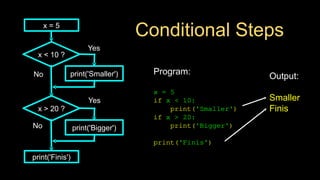
Conditional Steps
Output:
Smaller
Finis
Program:
x =5
if x < 10:
print('Smaller')
if x > 20:
print('Bigger')
print('Finis')
x = 5
x < 10 ?
print('Smaller')
x > 20 ?
print('Bigger')
print('Finis')
Yes
No
Yes
No
3.
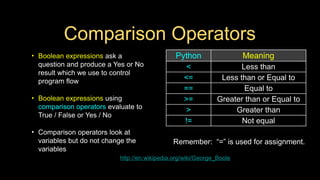
Comparison Operators
• Booleanexpressions ask a
question and produce a Yes or No
result which we use to control
program flow
• Boolean expressions using
comparison operators evaluate to
True / False or Yes / No
• Comparison operators look at
variables but do not change the
variables
http://en.wikipedia.org/wiki/George_Boole
Remember: “=” is used for assignment.
Python Meaning
< Less than
<= Less than or Equal to
== Equal to
>= Greater than or Equal to
> Greater than
!= Not equal
4.
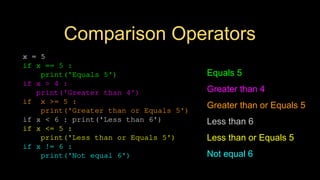
Comparison Operators
x =5
if x == 5 :
print('Equals 5')
if x > 4 :
print('Greater than 4')
if x >= 5 :
print('Greater than or Equals 5')
if x < 6 : print('Less than 6')
if x <= 5 :
print('Less than or Equals 5')
if x != 6 :
print('Not equal 6')
Equals 5
Greater than 4
Greater than or Equals 5
Less than 6
Less than or Equals 5
Not equal 6
5.
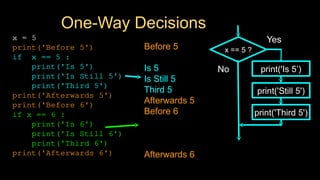
One-Way Decisions
x =5
print('Before 5')
if x == 5 :
print('Is 5')
print('Is Still 5')
print('Third 5')
print('Afterwards 5')
print('Before 6')
if x == 6 :
print('Is 6')
print('Is Still 6')
print('Third 6')
print('Afterwards 6')
Before 5
Is 5
Is Still 5
Third 5
Afterwards 5
Before 6
Afterwards 6
x == 5 ?
Yes
print('Still 5')
print('Third 5')
No print('Is 5’)
6.
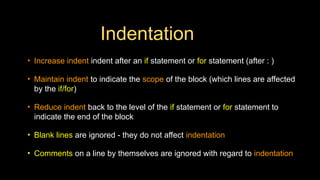
Indentation
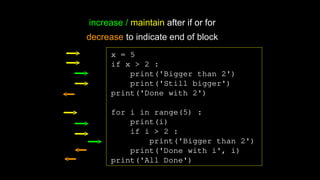
• Increase indentindent after an if statement or for statement (after : )
• Maintain indent to indicate the scope of the block (which lines are affected
by the if/for)
• Reduce indent back to the level of the if statement or for statement to
indicate the end of the block
• Blank lines are ignored - they do not affect indentation
• Comments on a line by themselves are ignored with regard to indentation
7.
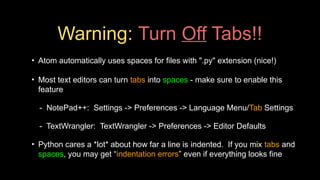
Warning: Turn OffTabs!!
• Atom automatically uses spaces for files with ".py" extension (nice!)
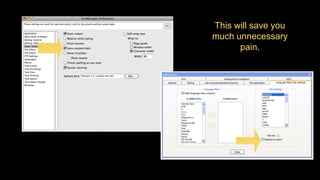
• Most text editors can turn tabs into spaces - make sure to enable this
feature
- NotePad++: Settings -> Preferences -> Language Menu/Tab Settings
- TextWrangler: TextWrangler -> Preferences -> Editor Defaults
• Python cares a *lot* about how far a line is indented. If you mix tabs and
spaces, you may get “indentation errors” even if everything looks fine
x = 5
ifx > 2 :
print('Bigger than 2')
print('Still bigger')
print('Done with 2')
for i in range(5) :
print(i)
if i > 2 :
print('Bigger than 2')
print('Done with i', i)
print('All Done')
increase / maintain after if or for
decrease to indicate end of block
10.
x = 5
ifx > 2 :
print('Bigger than 2')
print('Still bigger')
print('Done with 2')
for i in range(5) :
print(i)
if i > 2 :
print('Bigger than 2')
print('Done with i', i)
print('All Done')
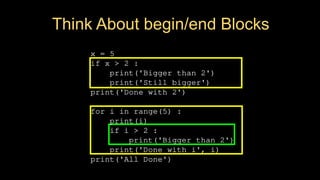
Think About begin/end Blocks
11.
x = 42
ifx > 1 :
print('More than one')
if x < 100 :
print('Less than 100')
print('All done')
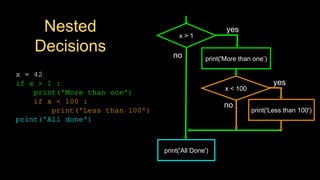
Nested
Decisions
x > 1
print('More than one’)
x < 100
print('Less than 100')
print('All Done')
yes
yes
no
no
12.
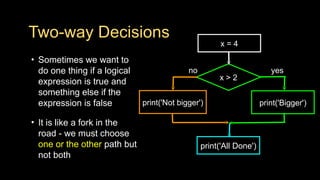
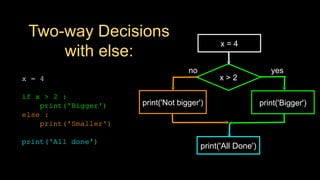
Two-way Decisions
• Sometimeswe want to
do one thing if a logical
expression is true and
something else if the
expression is false
• It is like a fork in the
road - we must choose
one or the other path but
not both
x > 2
print('Bigger')
yes
no
x = 4
print('Not bigger')
print('All Done')
13.
Two-way Decisions
with else:
x> 2
print('Bigger')
yes
no
x = 4
print('All Done')
x = 4
if x > 2 :
print('Bigger')
else :
print('Smaller')
print('All done')
print('Not bigger')
14.
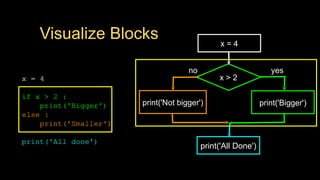
Visualize Blocks
x =4
if x > 2 :
print('Bigger')
else :
print('Smaller')
print('All done')
x > 2
print('Bigger')
yes
no
x = 4
print('All Done')
print('Not bigger')
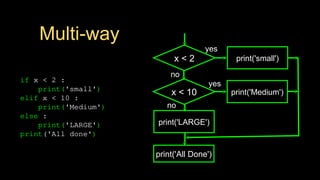
Multi-way
if x <2 :
print('small')
elif x < 10 :
print('Medium')
else :
print('LARGE')
print('All done')
x < 2 print('small')
yes
no
print('All Done')
x < 10 print('Medium')
yes
print('LARGE')
no
17.
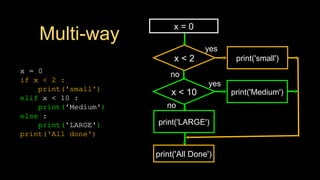
Multi-way
x = 0
ifx < 2 :
print('small')
elif x < 10 :
print('Medium')
else :
print('LARGE')
print('All done')
x < 2 print('small')
yes
no
print('All Done')
x < 10 print('Medium')
yes
print('LARGE')
no
x = 0
18.
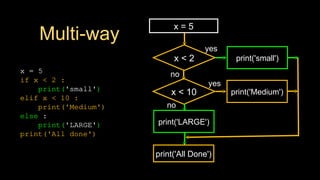
Multi-way
x = 5
ifx < 2 :
print('small')
elif x < 10 :
print('Medium')
else :
print('LARGE')
print('All done')
x < 2 print('small')
yes
no
print('All Done')
x < 10 print('Medium')
yes
print('LARGE')
no
x = 5
19.
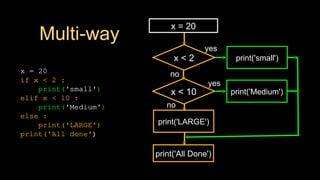
Multi-way
x = 20
ifx < 2 :
print('small')
elif x < 10 :
print('Medium')
else :
print('LARGE')
print('All done')
x < 2 print('small')
yes
no
print('All Done')
x < 10 print('Medium')
yes
print('LARGE')
no
x = 20
20.
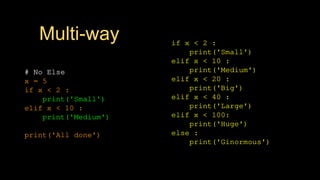
Multi-way
# No Else
x= 5
if x < 2 :
print('Small')
elif x < 10 :
print('Medium')
print('All done')
if x < 2 :
print('Small')
elif x < 10 :
print('Medium')
elif x < 20 :
print('Big')
elif x < 40 :
print('Large')
elif x < 100:
print('Huge')
else :
print('Ginormous')
21.
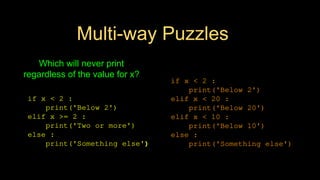
Multi-way Puzzles
if x< 2 :
print('Below 2')
elif x < 20 :
print('Below 20')
elif x < 10 :
print('Below 10')
else :
print('Something else')
if x < 2 :
print('Below 2')
elif x >= 2 :
print('Two or more')
else :
print('Something else')
Which will never print
regardless of the value for x?
22.
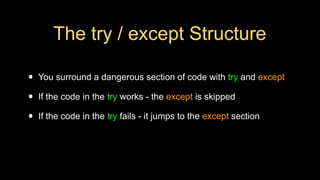
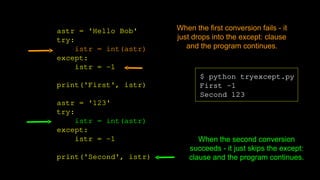
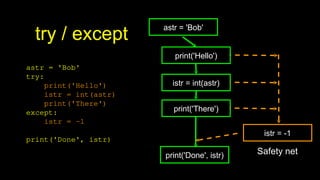
The try /except Structure
• You surround a dangerous section of code with try and except
• If the code in the try works - the except is skipped
• If the code in the try fails - it jumps to the except section
23.
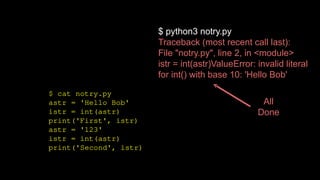
$ cat notry.py
astr= 'Hello Bob'
istr = int(astr)
print('First', istr)
astr = '123'
istr = int(astr)
print('Second', istr)
$ python3 notry.py
Traceback (most recent call last):
File "notry.py", line 2, in <module>
istr = int(astr)ValueError: invalid literal
for int() with base 10: 'Hello Bob'
All
Done
24.
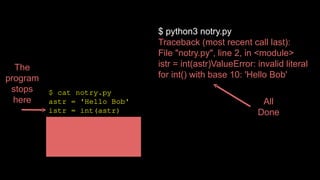
$ cat notry.py
astr= 'Hello Bob'
istr = int(astr)
print('First', istr)
astr = '123'
istr = int(astr)
print('Second', istr)
$ python3 notry.py
Traceback (most recent call last):
File "notry.py", line 2, in <module>
istr = int(astr)ValueError: invalid literal
for int() with base 10: 'Hello Bob'
All
Done
The
program
stops
here
astr = 'HelloBob'
try:
istr = int(astr)
except:
istr = -1
print('First', istr)
astr = '123'
try:
istr = int(astr)
except:
istr = -1
print('Second', istr)
$ python tryexcept.py
First -1
Second 123
When the first conversion fails - it
just drops into the except: clause
and the program continues.
When the second conversion
succeeds - it just skips the except:
clause and the program continues.
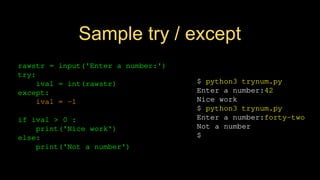
Sample try /except
$ python3 trynum.py
Enter a number:42
Nice work
$ python3 trynum.py
Enter a number:forty-two
Not a number
$
rawstr = input('Enter a number:')
try:
ival = int(rawstr)
except:
ival = -1
if ival > 0 :
print('Nice work')
else:
print('Not a number')
30.
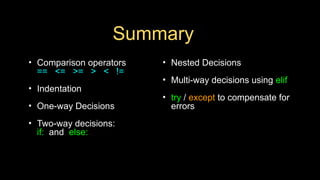
Summary
• Comparison operators
==<= >= > < !=
• Indentation
• One-way Decisions
• Two-way decisions:
if: and else:
• Nested Decisions
• Multi-way decisions using elif
• try / except to compensate for
errors
31.
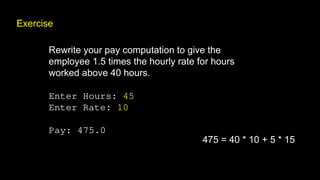
Exercise
Rewrite your paycomputation to give the
employee 1.5 times the hourly rate for hours
worked above 40 hours.
Enter Hours: 45
Enter Rate: 10
Pay: 475.0
475 = 40 * 10 + 5 * 15
32.
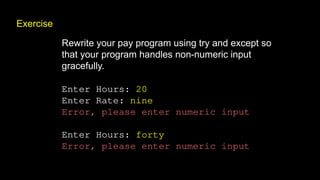
Exercise
Rewrite your payprogram using try and except so
that your program handles non-numeric input
gracefully.
Enter Hours: 20
Enter Rate: nine
Error, please enter numeric input
Enter Hours: forty
Error, please enter numeric input
33.
Acknowledgements / Contributions
Theseslides are Copyright 2010- Charles R. Severance (
www.dr-chuck.com) of the University of Michigan School of
Information and made available under a Creative Commons
Attribution 4.0 License. Please maintain this last slide in all
copies of the document to comply with the attribution
requirements of the license. If you make a change, feel free to
add your name and organization to the list of contributors on this
page as you republish the materials.
Initial Development: Charles Severance, University of Michigan
School of Information
… Insert new Contributors and Translators here
...
Editor's Notes
#1 Note from Chuck. If you are using these materials, you can remove the UM logo and replace it with your own, but please retain the CC-BY logo on the first page as well as retain the acknowledgement page(s).


![[DSC Europe 25] Marcos Heidemann - Beyond the Hype: Making AI Coding Assistan...](https://cdn.slidesharecdn.com/ss_thumbnails/eexkhvldrjsopspdjbur-marcos-heidemann-beyond-the-hype-getting-real-value-out-of-ai-assisted-coding-260121115910-7e9d41ec-thumbnail.jpg?width=640&height=640&fit=bounds)


![[DSC Europe 25] Milos Belcevic - Product Professional's Journey to Full-Stack...](https://cdn.slidesharecdn.com/ss_thumbnails/1zovd6fgsycdg4wvgvls-milos-belcevic-product-professionals-journey-to-full-stack-product-developer-260123083019-d993120d-thumbnail.jpg?width=640&height=640&fit=bounds)
![[DSC Europe 25] Andrzej Kowalczyk - AI - how to start small and grow in the f...](https://cdn.slidesharecdn.com/ss_thumbnails/oy1zmo94qv6vpcqjvno2-andrzej-kowalczyk-ai-how-to-start-small-and-grow-in-the-future-1-260119121559-cf093b23-thumbnail.jpg?width=640&height=640&fit=bounds)
![[DSC Europe 25] Ratko Nikolic - BI with AI: Automating Business Intelligence ...](https://cdn.slidesharecdn.com/ss_thumbnails/ecd7hahhq6qiwefuoiyw-dsc2025-ratko-nikolic-ai-data-analyst-260119101519-54d52956-thumbnail.jpg?width=640&height=640&fit=bounds)


![[DSC Europe 25] Laila Kakar - Leveraging AI for Strategic Excellence: Enhanci...](https://cdn.slidesharecdn.com/ss_thumbnails/eykmhrtsqmaaftwkexh7-dsc-lailakakar-1-260119101520-5f3b5616-thumbnail.jpg?width=640&height=640&fit=bounds)

![[DSC Europe 25] Dubravko Culibrk - Deep Learning for Mammography.pptx](https://cdn.slidesharecdn.com/ss_thumbnails/yiscimuktacgqoiu4dkp-deep-learning-for-mammography-260119121559-aad59182-thumbnail.jpg?width=640&height=640&fit=bounds)

![[DSC Europe 25] Bojan Banjac - AI is always right when it comes to the matter...](https://cdn.slidesharecdn.com/ss_thumbnails/syoxtqierpydwxm5srcb-4-bojan-banjac-ai-is-always-right-when-it-comes-to-the-matters-of-taste-260119101519-694ee7d7-thumbnail.jpg?width=640&height=640&fit=bounds)
