http://www.tutorialspoint.com/python/python_modules.htm Copyright © tutorialspoint.com
PYTHON MODULES
A module allows youto logically organize your Pythoncode. Grouping related code into a module makes the
code easier to understand and use. A module is a Pythonobject witharbitrarily named attributes that youcanbind
and reference.
Simply, a module is a file consisting of Pythoncode. A module candefine functions, classes and variables. A
module canalso include runnable code.
Example:
The Pythoncode for a module named aname normally resides ina file named aname.py. Here's anexample of a
simple module, support.py
def print_func( par ):
print "Hello : ", par
return
The import Statement:
Youcanuse any Pythonsource file as a module by executing animport statement insome other Pythonsource
file. The import has the following syntax:
import module1[, module2[,... moduleN]
Whenthe interpreter encounters animport statement, it imports the module if the module is present inthe search
path. A searchpathis a list of directories that the interpreter searches before importing a module. For example,
to import the module hello.py, youneed to put the following command at the top of the script:
#!/usr/bin/python
# Import module support
import support
# Now you can call defined function that module as follows
support.print_func("Zara")
Whenthe above code is executed, it produces the following result:
Hello : Zara
A module is loaded only once, regardless of the number of times it is imported. This prevents the module
executionfromhappening over and over againif multiple imports occur.
The from...import Statement
Python's from statement lets youimport specific attributes froma module into the current namespace. The
from...import has the following syntax:
from modname import name1[, name2[, ... nameN]]
For example, to import the functionfibonaccifromthe module fib, use the following statement:
from fib import fibonacci
This statement does not import the entire module fib into the current namespace; it just introduces the item
fibonaccifromthe module fib into the globalsymboltable of the importing module.
The from...import * Statement:
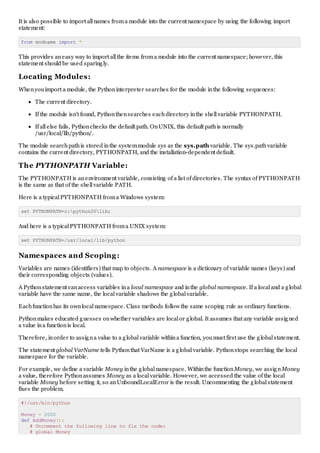
It is also possible to import allnames froma module into the current namespace by using the following import
statement:
from modname import *
This provides aneasy way to import allthe items froma module into the current namespace; however, this
statement should be used sparingly.
Locating Modules:
Whenyouimport a module, the Pythoninterpreter searches for the module inthe following sequences:
The current directory.
If the module isn't found, Pythonthensearches eachdirectory inthe shellvariable PYTHONPATH.
If allelse fails, Pythonchecks the default path. OnUNIX, this default pathis normally
/usr/local/lib/python/.
The module searchpathis stored inthe systemmodule sys as the sys.path variable. The sys.pathvariable
contains the current directory, PYTHONPATH, and the installation-dependent default.
The PYTHONPATH Variable:
The PYTHONPATH is anenvironment variable, consisting of a list of directories. The syntax of PYTHONPATH
is the same as that of the shellvariable PATH.
Here is a typicalPYTHONPATH froma Windows system:
set PYTHONPATH=c:python20lib;
And here is a typicalPYTHONPATH froma UNIX system:
set PYTHONPATH=/usr/local/lib/python
Namespaces and Scoping:
Variables are names (identifiers) that map to objects. A namespace is a dictionary of variable names (keys) and
their corresponding objects (values).
A Pythonstatement canaccess variables ina local namespace and inthe global namespace. If a localand a global
variable have the same name, the localvariable shadows the globalvariable.
Eachfunctionhas its ownlocalnamespace. Class methods follow the same scoping rule as ordinary functions.
Pythonmakes educated guesses onwhether variables are localor global. It assumes that any variable assigned
a value ina functionis local.
Therefore, inorder to assigna value to a globalvariable withina function, youmust first use the globalstatement.
The statement global VarName tells Pythonthat VarName is a globalvariable. Pythonstops searching the local
namespace for the variable.
For example, we define a variable Money inthe globalnamespace. Withinthe functionMoney, we assignMoney
a value, therefore Pythonassumes Money as a localvariable. However, we accessed the value of the local
variable Money before setting it, so anUnboundLocalError is the result. Uncommenting the globalstatement
fixes the problem.
#!/usr/bin/python
Money = 2000
def AddMoney():
# Uncomment the following line to fix the code:
# global Money
Money = Money + 1
print Money
AddMoney()
print Money
The dir( ) Function:
The dir() built-infunctionreturns a sorted list of strings containing the names defined by a module.
The list contains the names of allthe modules, variables and functions that are defined ina module. Following is a
simple example:
#!/usr/bin/python
# Import built-in module math
import math
content = dir(math)
print content;
Whenthe above code is executed, it produces the following result:
['__doc__', '__file__', '__name__', 'acos', 'asin', 'atan',
'atan2', 'ceil', 'cos', 'cosh', 'degrees', 'e', 'exp',
'fabs', 'floor', 'fmod', 'frexp', 'hypot', 'ldexp', 'log',
'log10', 'modf', 'pi', 'pow', 'radians', 'sin', 'sinh',
'sqrt', 'tan', 'tanh']
Here, the specialstring variable __name__ is the module's name, and __file__ is the filename fromwhichthe
module was loaded.
The globals() and locals() Functions:
The globals() and locals() functions canbe used to returnthe names inthe globaland localnamespaces
depending onthe locationfromwhere they are called.
If locals() is called fromwithina function, it willreturnallthe names that canbe accessed locally fromthat function.
If globals() is called fromwithina function, it willreturnallthe names that canbe accessed globally fromthat
function.
The returntype of boththese functions is dictionary. Therefore, names canbe extracted using the keys()
function.
The reload() Function:
Whenthe module is imported into a script, the code inthe top-levelportionof a module is executed only once.
Therefore, if youwant to reexecute the top-levelcode ina module, youcanuse the reload() function. The
reload() functionimports a previously imported module again. The syntax of the reload() functionis this:
reload(module_name)
Here, module_name is the name of the module youwant to reload and not the string containing the module name.
For example, to reload hello module, do the following:
reload(hello)
Packages in Python:
A package is a hierarchicalfile directory structure that defines a single Pythonapplicationenvironment that
consists of modules and subpackages and sub-subpackages, and so on.
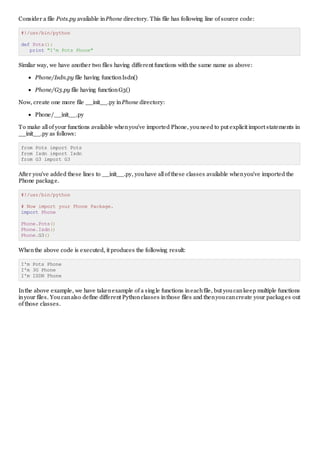
Consider a file Pots.py available inPhone directory. This file has following line of source code:
#!/usr/bin/python
def Pots():
print "I'm Pots Phone"
Similar way, we have another two files having different functions withthe same name as above:
Phone/Isdn.py file having functionIsdn()
Phone/G3.py file having functionG3()
Now, create one more file __init__.py inPhone directory:
Phone/__init__.py
To make allof your functions available whenyou've imported Phone, youneed to put explicit import statements in
__init__.py as follows:
from Pots import Pots
from Isdn import Isdn
from G3 import G3
After you've added these lines to __init__.py, youhave allof these classes available whenyou've imported the
Phone package.
#!/usr/bin/python
# Now import your Phone Package.
import Phone
Phone.Pots()
Phone.Isdn()
Phone.G3()
Whenthe above code is executed, it produces the following result:
I'm Pots Phone
I'm 3G Phone
I'm ISDN Phone
Inthe above example, we have takenexample of a single functions ineachfile, but youcankeep multiple functions
inyour files. Youcanalso define different Pythonclasses inthose files and thenyoucancreate your packages out
of those classes.

Python modules

  • 1.
    http://www.tutorialspoint.com/python/python_modules.htm Copyright ©tutorialspoint.com PYTHON MODULES A module allows youto logically organize your Pythoncode. Grouping related code into a module makes the code easier to understand and use. A module is a Pythonobject witharbitrarily named attributes that youcanbind and reference. Simply, a module is a file consisting of Pythoncode. A module candefine functions, classes and variables. A module canalso include runnable code. Example: The Pythoncode for a module named aname normally resides ina file named aname.py. Here's anexample of a simple module, support.py def print_func( par ): print "Hello : ", par return The import Statement: Youcanuse any Pythonsource file as a module by executing animport statement insome other Pythonsource file. The import has the following syntax: import module1[, module2[,... moduleN] Whenthe interpreter encounters animport statement, it imports the module if the module is present inthe search path. A searchpathis a list of directories that the interpreter searches before importing a module. For example, to import the module hello.py, youneed to put the following command at the top of the script: #!/usr/bin/python # Import module support import support # Now you can call defined function that module as follows support.print_func("Zara") Whenthe above code is executed, it produces the following result: Hello : Zara A module is loaded only once, regardless of the number of times it is imported. This prevents the module executionfromhappening over and over againif multiple imports occur. The from...import Statement Python's from statement lets youimport specific attributes froma module into the current namespace. The from...import has the following syntax: from modname import name1[, name2[, ... nameN]] For example, to import the functionfibonaccifromthe module fib, use the following statement: from fib import fibonacci This statement does not import the entire module fib into the current namespace; it just introduces the item fibonaccifromthe module fib into the globalsymboltable of the importing module. The from...import * Statement:
  • 2.
    It is alsopossible to import allnames froma module into the current namespace by using the following import statement: from modname import * This provides aneasy way to import allthe items froma module into the current namespace; however, this statement should be used sparingly. Locating Modules: Whenyouimport a module, the Pythoninterpreter searches for the module inthe following sequences: The current directory. If the module isn't found, Pythonthensearches eachdirectory inthe shellvariable PYTHONPATH. If allelse fails, Pythonchecks the default path. OnUNIX, this default pathis normally /usr/local/lib/python/. The module searchpathis stored inthe systemmodule sys as the sys.path variable. The sys.pathvariable contains the current directory, PYTHONPATH, and the installation-dependent default. The PYTHONPATH Variable: The PYTHONPATH is anenvironment variable, consisting of a list of directories. The syntax of PYTHONPATH is the same as that of the shellvariable PATH. Here is a typicalPYTHONPATH froma Windows system: set PYTHONPATH=c:python20lib; And here is a typicalPYTHONPATH froma UNIX system: set PYTHONPATH=/usr/local/lib/python Namespaces and Scoping: Variables are names (identifiers) that map to objects. A namespace is a dictionary of variable names (keys) and their corresponding objects (values). A Pythonstatement canaccess variables ina local namespace and inthe global namespace. If a localand a global variable have the same name, the localvariable shadows the globalvariable. Eachfunctionhas its ownlocalnamespace. Class methods follow the same scoping rule as ordinary functions. Pythonmakes educated guesses onwhether variables are localor global. It assumes that any variable assigned a value ina functionis local. Therefore, inorder to assigna value to a globalvariable withina function, youmust first use the globalstatement. The statement global VarName tells Pythonthat VarName is a globalvariable. Pythonstops searching the local namespace for the variable. For example, we define a variable Money inthe globalnamespace. Withinthe functionMoney, we assignMoney a value, therefore Pythonassumes Money as a localvariable. However, we accessed the value of the local variable Money before setting it, so anUnboundLocalError is the result. Uncommenting the globalstatement fixes the problem. #!/usr/bin/python Money = 2000 def AddMoney(): # Uncomment the following line to fix the code: # global Money
  • 3.
    Money = Money+ 1 print Money AddMoney() print Money The dir( ) Function: The dir() built-infunctionreturns a sorted list of strings containing the names defined by a module. The list contains the names of allthe modules, variables and functions that are defined ina module. Following is a simple example: #!/usr/bin/python # Import built-in module math import math content = dir(math) print content; Whenthe above code is executed, it produces the following result: ['__doc__', '__file__', '__name__', 'acos', 'asin', 'atan', 'atan2', 'ceil', 'cos', 'cosh', 'degrees', 'e', 'exp', 'fabs', 'floor', 'fmod', 'frexp', 'hypot', 'ldexp', 'log', 'log10', 'modf', 'pi', 'pow', 'radians', 'sin', 'sinh', 'sqrt', 'tan', 'tanh'] Here, the specialstring variable __name__ is the module's name, and __file__ is the filename fromwhichthe module was loaded. The globals() and locals() Functions: The globals() and locals() functions canbe used to returnthe names inthe globaland localnamespaces depending onthe locationfromwhere they are called. If locals() is called fromwithina function, it willreturnallthe names that canbe accessed locally fromthat function. If globals() is called fromwithina function, it willreturnallthe names that canbe accessed globally fromthat function. The returntype of boththese functions is dictionary. Therefore, names canbe extracted using the keys() function. The reload() Function: Whenthe module is imported into a script, the code inthe top-levelportionof a module is executed only once. Therefore, if youwant to reexecute the top-levelcode ina module, youcanuse the reload() function. The reload() functionimports a previously imported module again. The syntax of the reload() functionis this: reload(module_name) Here, module_name is the name of the module youwant to reload and not the string containing the module name. For example, to reload hello module, do the following: reload(hello) Packages in Python: A package is a hierarchicalfile directory structure that defines a single Pythonapplicationenvironment that consists of modules and subpackages and sub-subpackages, and so on.
  • 4.
    Consider a filePots.py available inPhone directory. This file has following line of source code: #!/usr/bin/python def Pots(): print "I'm Pots Phone" Similar way, we have another two files having different functions withthe same name as above: Phone/Isdn.py file having functionIsdn() Phone/G3.py file having functionG3() Now, create one more file __init__.py inPhone directory: Phone/__init__.py To make allof your functions available whenyou've imported Phone, youneed to put explicit import statements in __init__.py as follows: from Pots import Pots from Isdn import Isdn from G3 import G3 After you've added these lines to __init__.py, youhave allof these classes available whenyou've imported the Phone package. #!/usr/bin/python # Now import your Phone Package. import Phone Phone.Pots() Phone.Isdn() Phone.G3() Whenthe above code is executed, it produces the following result: I'm Pots Phone I'm 3G Phone I'm ISDN Phone Inthe above example, we have takenexample of a single functions ineachfile, but youcankeep multiple functions inyour files. Youcanalso define different Pythonclasses inthose files and thenyoucancreate your packages out of those classes.