OUTLINE
Module
More on Modules
Executing Modules as script
dir() function
Module
• A module is a file containing Python definitions and
statements.
• The file name is the module name with the suffix .py
appended.
• Within a module, the module’s name (as a string) is
available as the value of the global variable __name__.
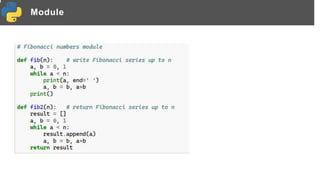
• For instance, use your favorite text editor to create a file
called fibo.py in the current directory with the following
contents:
Module
Module
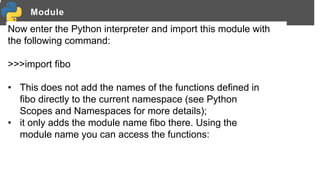
Now enter the Python interpreter and import this module with
the following command:
>>>import fibo
• This does not add the names of the functions defined in
fibo directly to the current namespace (see Python
Scopes and Namespaces for more details);
• it only adds the module name fibo there. Using the
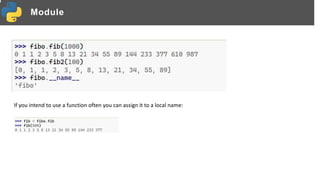
module name you can access the functions:
Module
If you intend to use a function often you can assign it to a local name:
More on Module
• A module can contain executable statements as well as
function definitions.
• These statements are intended to initialize the module.
• They are executed only the first time the module name is
encountered in an import statement.
• Each module has its own private namespace, which is
used as the global namespace by all function s defined
in the module.
• Thus, the author of a module can use global variables in
the module without worrying about accidental clashes
with a user’s global variables.
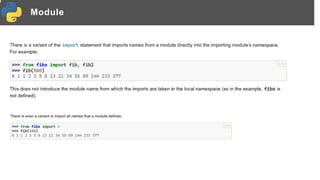
Module
Modules can import other modules. It is customary but not
required to place all import statements at the beginning of a
module (or script, for that matter). The imported module names,
if placed at the top level of a module (outside any functions or
classes), are added to the module’s global namespace.
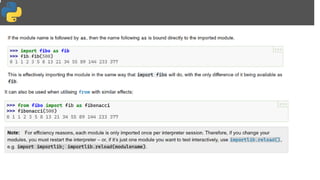
Module
Module
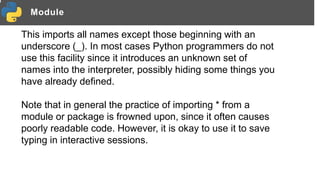
This imports all names except those beginning with an
underscore (_). In most cases Python programmers do not
use this facility since it introduces an unknown set of
names into the interpreter, possibly hiding some things you
have already defined.
Note that in general the practice of importing * from a
module or package is frowned upon, since it often causes
poorly readable code. However, it is okay to use it to save
typing in interactive sessions.
Executing modules as scripts
This is often used either to provide a convenient user interface to a module, or for testing purposes
(running the module as a script executes a test suite).
The Module Search Path
“Compiled” Python files
Standard Modules
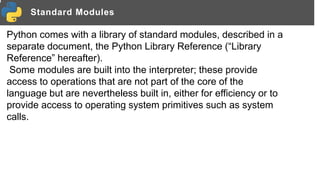
Python comes with a library of standard modules, described in a
separate document, the Python Library Reference (“Library
Reference” hereafter).
Some modules are built into the interpreter; these provide
access to operations that are not part of the core of the
language but are nevertheless built in, either for efficiency or to
provide access to operating system primitives such as system
calls.
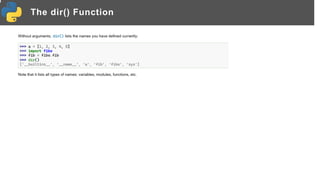
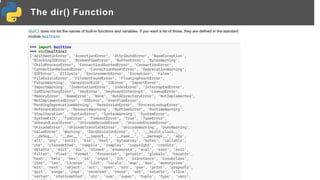
The dir() Function
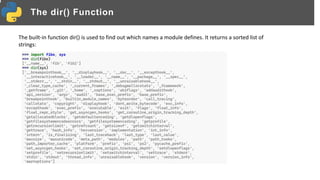
The built-in function dir() is used to find out which names a module defines. It returns a sorted list of
strings:
The dir() Function
The dir() Function
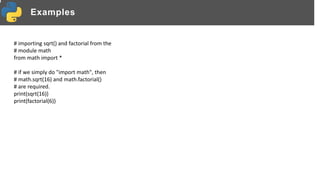
Examples
# importing sqrt() and factorial from the
# module math
from math import *
# if we simply do "import math", then
# math.sqrt(16) and math.factorial()
# are required.
print(sqrt(16))
print(factorial(6))
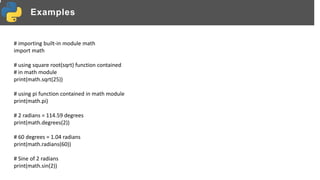
Examples
# importing built-in module math
import math
# using square root(sqrt) function contained
# in math module
print(math.sqrt(25))
# using pi function contained in math module
print(math.pi)
# 2 radians = 114.59 degrees
print(math.degrees(2))
# 60 degrees = 1.04 radians
print(math.radians(60))
# Sine of 2 radians
print(math.sin(2))
Examples
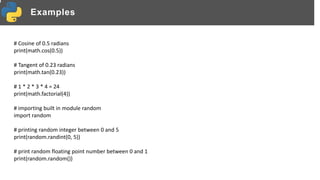
# Cosine of 0.5 radians
print(math.cos(0.5))
# Tangent of 0.23 radians
print(math.tan(0.23))
# 1 * 2 * 3 * 4 = 24
print(math.factorial(4))
# importing built in module random
import random
# printing random integer between 0 and 5
print(random.randint(0, 5))
# print random floating point number between 0 and 1
print(random.random())
Examples
# random number between 0 and 100
print(random.random() * 100)
List = [1, 4, True, 800, "python", 27, "hello"]
# using choice function in random module for choosing
# a random element from a set such as a list
print(random.choice(List))
# importing built in module datetime
import datetime
from datetime import date
import time
# Returns the number of seconds since the
# Unix Epoch, January 1st 1970
print(time.time())
Examples
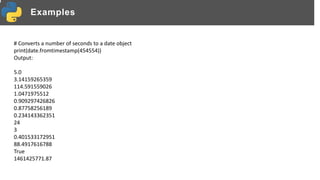
# Converts a number of seconds to a date object
print(date.fromtimestamp(454554))
Output:
5.0
3.14159265359
114.591559026
1.0471975512
0.909297426826
0.87758256189
0.234143362351
24
3
0.401533172951
88.4917616788
True
1461425771.87
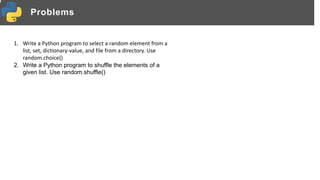
Problems
1. Write a Python program to select a random element from a
list, set, dictionary-value, and file from a directory. Use
random.choice()
2. Write a Python program to shuffle the elements of a
given list. Use random.shuffle()

Python Modules, executing modules as script.pptx

  • 1.
    OUTLINE Module More on Modules ExecutingModules as script dir() function
  • 2.
    Module • A moduleis a file containing Python definitions and statements. • The file name is the module name with the suffix .py appended. • Within a module, the module’s name (as a string) is available as the value of the global variable __name__. • For instance, use your favorite text editor to create a file called fibo.py in the current directory with the following contents:
  • 3.
  • 4.
    Module Now enter thePython interpreter and import this module with the following command: >>>import fibo • This does not add the names of the functions defined in fibo directly to the current namespace (see Python Scopes and Namespaces for more details); • it only adds the module name fibo there. Using the module name you can access the functions:
  • 5.
    Module If you intendto use a function often you can assign it to a local name:
  • 6.
    More on Module •A module can contain executable statements as well as function definitions. • These statements are intended to initialize the module. • They are executed only the first time the module name is encountered in an import statement. • Each module has its own private namespace, which is used as the global namespace by all function s defined in the module. • Thus, the author of a module can use global variables in the module without worrying about accidental clashes with a user’s global variables.
  • 7.
    Module Modules can importother modules. It is customary but not required to place all import statements at the beginning of a module (or script, for that matter). The imported module names, if placed at the top level of a module (outside any functions or classes), are added to the module’s global namespace.
  • 8.
  • 9.
    Module This imports allnames except those beginning with an underscore (_). In most cases Python programmers do not use this facility since it introduces an unknown set of names into the interpreter, possibly hiding some things you have already defined. Note that in general the practice of importing * from a module or package is frowned upon, since it often causes poorly readable code. However, it is okay to use it to save typing in interactive sessions.
  • 11.
    Executing modules asscripts This is often used either to provide a convenient user interface to a module, or for testing purposes (running the module as a script executes a test suite).
  • 12.
  • 13.
  • 14.
    Standard Modules Python comeswith a library of standard modules, described in a separate document, the Python Library Reference (“Library Reference” hereafter). Some modules are built into the interpreter; these provide access to operations that are not part of the core of the language but are nevertheless built in, either for efficiency or to provide access to operating system primitives such as system calls.
  • 15.
    The dir() Function Thebuilt-in function dir() is used to find out which names a module defines. It returns a sorted list of strings:
  • 16.
  • 17.
  • 18.
    Examples # importing sqrt()and factorial from the # module math from math import * # if we simply do "import math", then # math.sqrt(16) and math.factorial() # are required. print(sqrt(16)) print(factorial(6))
  • 19.
    Examples # importing built-inmodule math import math # using square root(sqrt) function contained # in math module print(math.sqrt(25)) # using pi function contained in math module print(math.pi) # 2 radians = 114.59 degrees print(math.degrees(2)) # 60 degrees = 1.04 radians print(math.radians(60)) # Sine of 2 radians print(math.sin(2))
  • 20.
    Examples # Cosine of0.5 radians print(math.cos(0.5)) # Tangent of 0.23 radians print(math.tan(0.23)) # 1 * 2 * 3 * 4 = 24 print(math.factorial(4)) # importing built in module random import random # printing random integer between 0 and 5 print(random.randint(0, 5)) # print random floating point number between 0 and 1 print(random.random())
  • 21.
    Examples # random numberbetween 0 and 100 print(random.random() * 100) List = [1, 4, True, 800, "python", 27, "hello"] # using choice function in random module for choosing # a random element from a set such as a list print(random.choice(List)) # importing built in module datetime import datetime from datetime import date import time # Returns the number of seconds since the # Unix Epoch, January 1st 1970 print(time.time())
  • 22.
    Examples # Converts anumber of seconds to a date object print(date.fromtimestamp(454554)) Output: 5.0 3.14159265359 114.591559026 1.0471975512 0.909297426826 0.87758256189 0.234143362351 24 3 0.401533172951 88.4917616788 True 1461425771.87
  • 23.
    Problems 1. Write aPython program to select a random element from a list, set, dictionary-value, and file from a directory. Use random.choice() 2. Write a Python program to shuffle the elements of a given list. Use random.shuffle()