Variables & Assignment
Lecture 2
Announcements for Today
If Not Done Already
• Install Python
§ Make sure right version
§ Make sure Kivy works
• Register your iClicker
• Sign into CMS
§ Fill out the Survey
§ Complete AI Quiz
Lab 1
• Labs are due at next class
§ So lab 1 is due now
§ By end of the lab section
§ Try to finish them before
• Makes T/W a little tight
§ Only 2 days (not 5)
§ Will keep them small
• Getting behind is bad!
8/25/22 Variables & Assignments 2
Helping You Succeed in this Class
• Consultants. Phillips 318 (after hours)
§ Daily office hours (see website) with consultants
§ Very useful when working on assignments
• AEW Workshops. Additional discussion course
§ Runs parallel to this class – completely optional
§ See website; talk to advisors in Olin 167.
• Ed Discussions. Forum to ask and answer questions
§ Go here first before sending question in e-mail
• Office Hours. Talk to the professor!
§ Couches in Statler Balcony between classes
8/25/22 Variables & Assignments 3
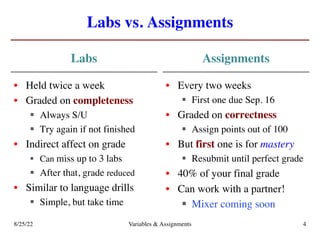
Labs vs. Assignments
Labs
• Held twice a week
• Graded on completeness
§ Always S/U
§ Try again if not finished
• Indirect affect on grade
§ Can miss up to 3 labs
§ After that, grade reduced
• Similar to language drills
§ Simple, but take time
Assignments
• Every two weeks
§ First one due Sep. 16
• Graded on correctness
§ Assign points out of 100
• But first one is for mastery
§ Resubmit until perfect grade
• 40% of your final grade
• Can work with a partner!
§ Mixer coming soon
8/25/22 Variables & Assignments 4
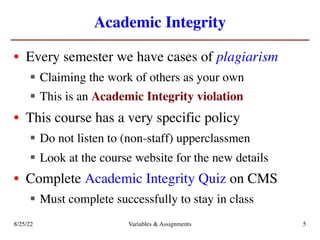
Academic Integrity
• Every semester we have cases of plagiarism
§ Claiming the work of others as your own
§ This is an Academic Integrity violation
• This course has a very specific policy
§ Do not listen to (non-staff) upperclassmen
§ Look at the course website for the new details
• Complete Academic Integrity Quiz on CMS
§ Must complete successfully to stay in class
8/25/22 Variables & Assignments 5
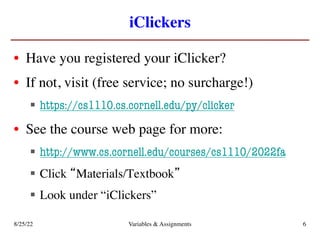
iClickers
• Have you registered your iClicker?
• If not, visit (free service; no surcharge!)
§ https://cs1110.cs.cornell.edu/py/clicker
• See the course web page for more:
§ http://www.cs.cornell.edu/courses/cs1110/2022fa
§ Click “Materials/Textbook”
§ Look under “iClickers”
8/25/22 Variables & Assignments 6
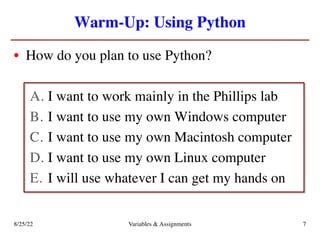
Warm-Up: Using Python
• How do you plan to use Python?
A. I want to work mainly in the Phillips lab
B. I want to use my own Windows computer
C. I want to use my own Macintosh computer
D. I want to use my own Linux computer
E. I will use whatever I can get my hands on
8/25/22 Variables & Assignments 7
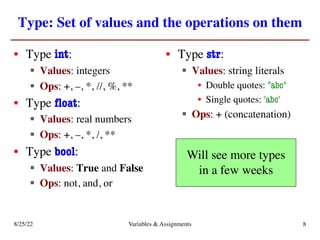
Type: Set of values and the operations on them
• Type int:
§ Values: integers
§ Ops: +, –, *, //, %, **
• Type float:
§ Values: real numbers
§ Ops: +, –, *, /, **
• Type bool:
§ Values: True and False
§ Ops: not, and, or
• Type str:
§ Values: string literals
• Double quotes: "abc"
• Single quotes: 'abc'
§ Ops: + (concatenation)
Will see more types
in a few weeks
8/25/22 Variables & Assignments 8
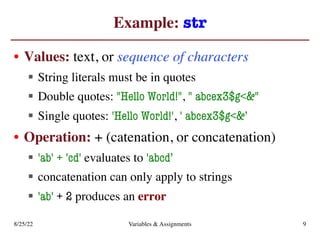
Example: str
• Values: text, or sequence of characters
§ String literals must be in quotes
§ Double quotes: "Hello World!", " abcex3$g<&"
§ Single quotes: 'Hello World!', ' abcex3$g<&’
• Operation: + (catenation, or concatenation)
§ 'ab' + 'cd' evaluates to 'abcd’
§ concatenation can only apply to strings
§ 'ab' + 2 produces an error
8/25/22 Variables & Assignments 9
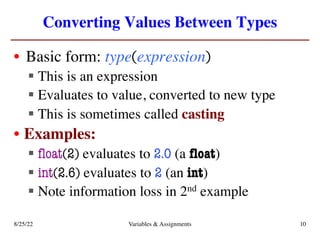
Converting Values Between Types
• Basic form: type(expression)
§ This is an expression
§ Evaluates to value, converted to new type
§ This is sometimes called casting
• Examples:
§ float(2) evaluates to 2.0 (a float)
§ int(2.6) evaluates to 2 (an int)
§ Note information loss in 2nd example
8/25/22 Variables & Assignments 10
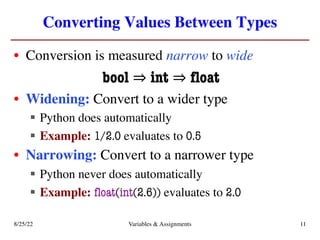
Converting Values Between Types
• Conversion is measured narrow to wide
bool ⇒ int ⇒ float
• Widening: Convert to a wider type
§ Python does automatically
§ Example: 1/2.0 evaluates to 0.5
• Narrowing: Convert to a narrower type
§ Python never does automatically
§ Example: float(int(2.6)) evaluates to 2.0
8/25/22 Variables & Assignments 11
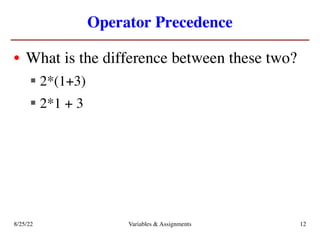
Operator Precedence
• What is the difference between these two?
§ 2*(1+3)
§ 2*1 + 3
8/25/22 Variables & Assignments 12
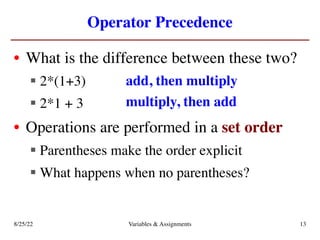
Operator Precedence
• What is the difference between these two?
§ 2*(1+3)
§ 2*1 + 3
• Operations are performed in a set order
§ Parentheses make the order explicit
§ What happens when no parentheses?
add, then multiply
multiply, then add
8/25/22 Variables & Assignments 13
Operator Precedence
• What is the difference between these two?
§ 2*(1+3)
§ 2*1 + 3
• Operations are performed in a set order
§ Parentheses make the order explicit
§ What happens when no parentheses?
add, then multiply
multiply, then add
8/25/22 Variables & Assignments 14
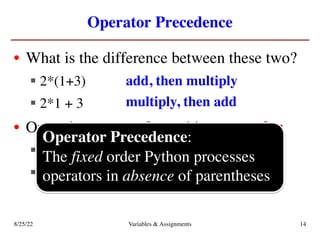
Operator Precedence:
The fixed order Python processes
operators in absence of parentheses
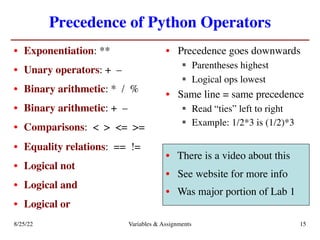
Precedence of Python Operators
• Exponentiation: **
• Unary operators: + –
• Binary arithmetic: * / %
• Binary arithmetic: + –
• Comparisons: < > <= >=
• Equality relations: == !=
• Logical not
• Logical and
• Logical or
• Precedence goes downwards
§ Parentheses highest
§ Logical ops lowest
• Same line = same precedence
§ Read “ties” left to right
§ Example: 1/2*3 is (1/2)*3
• There is a video about this
• See website for more info
• Was major portion of Lab 1
8/25/22 Variables & Assignments 15
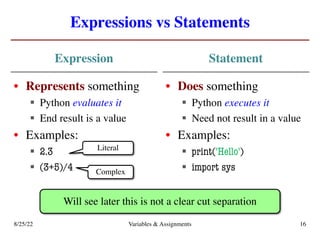
Expressions vs Statements
Expression
• Represents something
§ Python evaluates it
§ End result is a value
• Examples:
§ 2.3
§ (3+5)/4
Statement
• Does something
§ Python executes it
§ Need not result in a value
• Examples:
§ print('Hello')
§ import sys
Will see later this is not a clear cut separation
Literal
Complex
8/25/22 Variables & Assignments 16
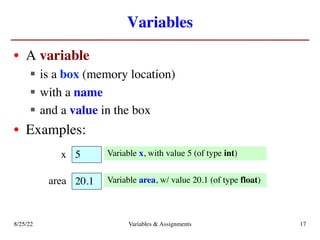
Variables
• A variable
§ is a box (memory location)
§ with a name
§ and a value in the box
• Examples:
5
x Variable x, with value 5 (of type int)
20.1
area Variable area, w/ value 20.1 (of type float)
8/25/22 Variables & Assignments 17
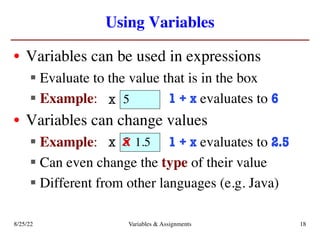
Using Variables
• Variables can be used in expressions
§ Evaluate to the value that is in the box
§ Example: 1 + x evaluates to 6
• Variables can change values
§ Example: 1 + x evaluates to 2.5
§ Can even change the type of their value
§ Different from other languages (e.g. Java)
5
x
5
x 1.5
x
8/25/22 Variables & Assignments 18
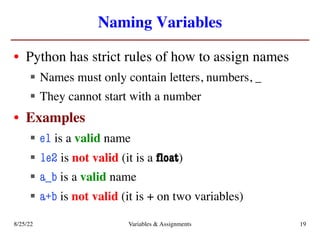
Naming Variables
• Python has strict rules of how to assign names
§ Names must only contain letters, numbers, _
§ They cannot start with a number
• Examples
§ e1 is a valid name
§ 1e2 is not valid (it is a float)
§ a_b is a valid name
§ a+b is not valid (it is + on two variables)
8/25/22 Variables & Assignments 19
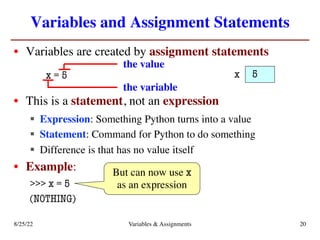
Variables and Assignment Statements
• Variables are created by assignment statements
x = 5
• This is a statement, not an expression
§ Expression: Something Python turns into a value
§ Statement: Command for Python to do something
§ Difference is that has no value itself
• Example:
>>> x = 5
(NOTHING)
x
the value
the variable
5
But can now use x
as an expression
8/25/22 Variables & Assignments 20
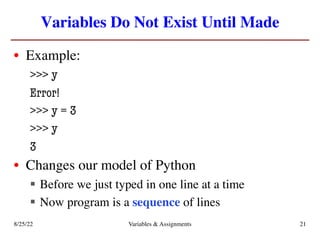
Variables Do Not Exist Until Made
• Example:
>>> y
Error!
>>> y = 3
>>> y
3
• Changes our model of Python
§ Before we just typed in one line at a time
§ Now program is a sequence of lines
8/25/22 Variables & Assignments 21
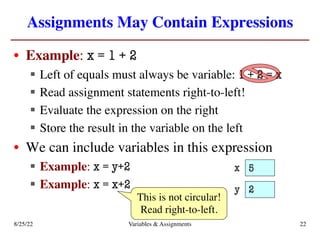
Assignments May Contain Expressions
• Example: x = 1 + 2
§ Left of equals must always be variable: 1 + 2 = x
§ Read assignment statements right-to-left!
§ Evaluate the expression on the right
§ Store the result in the variable on the left
• We can include variables in this expression
§ Example: x = y+2
§ Example: x = x+2
This is not circular!
Read right-to-left.
x 5
y 2
8/25/22 Variables & Assignments 22
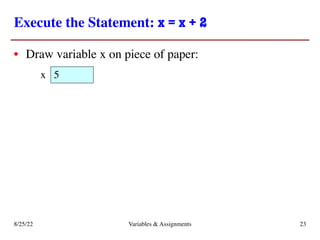
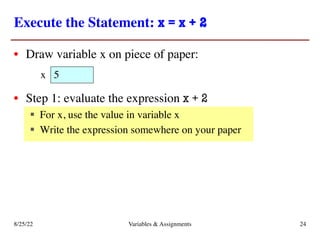
Execute the Statement: x = x + 2
• Draw variable x on piece of paper:
5
x
8/25/22 Variables & Assignments 23
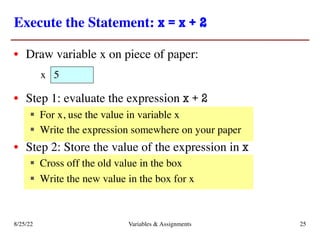
Execute the Statement: x = x + 2
• Draw variable x on piece of paper:
• Step 1: evaluate the expression x + 2
§ For x, use the value in variable x
§ Write the expression somewhere on your paper
5
x
8/25/22 Variables & Assignments 24
Execute the Statement: x = x + 2
• Draw variable x on piece of paper:
• Step 1: evaluate the expression x + 2
§ For x, use the value in variable x
§ Write the expression somewhere on your paper
• Step 2: Store the value of the expression in x
§ Cross off the old value in the box
§ Write the new value in the box for x
5
x
8/25/22 Variables & Assignments 25
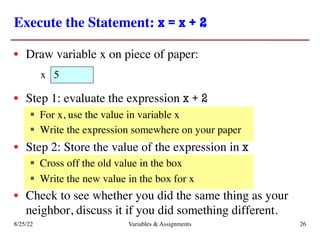
Execute the Statement: x = x + 2
• Draw variable x on piece of paper:
• Step 1: evaluate the expression x + 2
§ For x, use the value in variable x
§ Write the expression somewhere on your paper
• Step 2: Store the value of the expression in x
§ Cross off the old value in the box
§ Write the new value in the box for x
• Check to see whether you did the same thing as your
neighbor, discuss it if you did something different.
5
x
8/25/22 Variables & Assignments 26
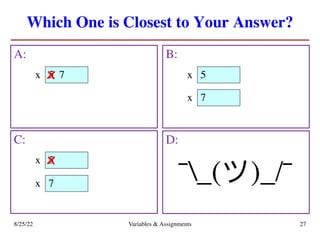
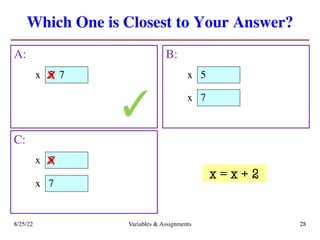
Which One is Closest to Your Answer?
A: B:
8/25/22 Variables & Assignments 27
C: D:
¯_(ツ)_/¯
5
x 7
x 5
x
5
x x
7
x
7
x
Which One is Closest to Your Answer?
A: B:
8/25/22 Variables & Assignments 28
C:
5
x 7
x 5
x
5
x x
7
x
7
x
✓
x = x + 2
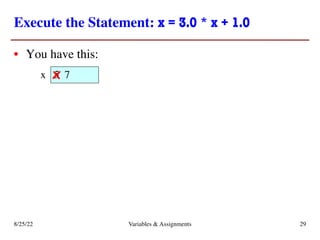
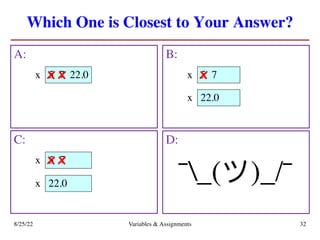
Execute the Statement: x = 3.0 * x + 1.0
• You have this:
5
x 7
8/25/22 Variables & Assignments 29
x
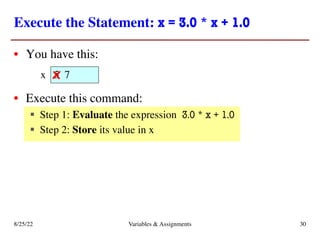
Execute the Statement: x = 3.0 * x + 1.0
• You have this:
• Execute this command:
§ Step 1: Evaluate the expression 3.0 * x + 1.0
§ Step 2: Store its value in x
5
x 7
8/25/22 Variables & Assignments 30
x
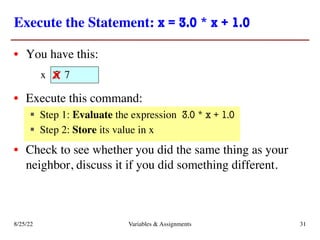
Execute the Statement: x = 3.0 * x + 1.0
• You have this:
• Execute this command:
§ Step 1: Evaluate the expression 3.0 * x + 1.0
§ Step 2: Store its value in x
• Check to see whether you did the same thing as your
neighbor, discuss it if you did something different.
5
x 7
8/25/22 Variables & Assignments 31
x
Which One is Closest to Your Answer?
A: B:
8/25/22 Variables & Assignments 32
C: D:
¯_(ツ)_/¯
5
x 7
x 5
x
5
x x
22.0
x
22.0
x
22.0
x 7
x
7
x
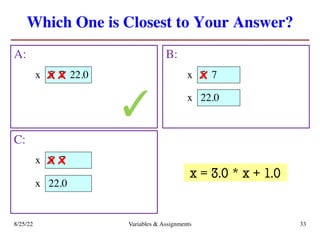
Which One is Closest to Your Answer?
A: B:
8/25/22 Variables & Assignments 33
C:
5
x 7
x 5
x
5
x x
22.0
x
22.0
x
22.0
x 7
x
7
x
✓
x = 3.0 * x + 1.0
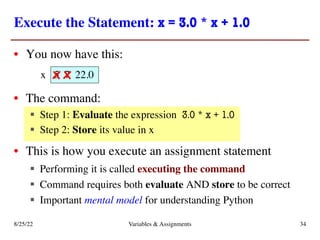
Execute the Statement: x = 3.0 * x + 1.0
• You now have this:
• The command:
§ Step 1: Evaluate the expression 3.0 * x + 1.0
§ Step 2: Store its value in x
• This is how you execute an assignment statement
§ Performing it is called executing the command
§ Command requires both evaluate AND store to be correct
§ Important mental model for understanding Python
5
x 7 22.0
8/25/22 Variables & Assignments 34
x x
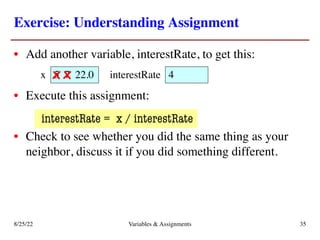
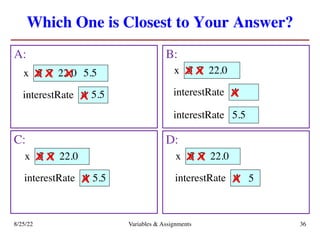
Exercise: Understanding Assignment
• Add another variable, interestRate, to get this:
• Execute this assignment:
interestRate = x / interestRate
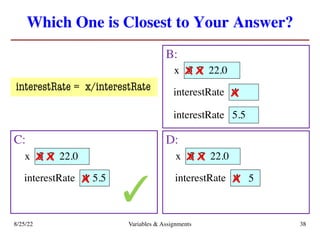
• Check to see whether you did the same thing as your
neighbor, discuss it if you did something different.
4
interestRate
5
x 7 22.0
8/25/22 Variables & Assignments 35
x x
Which One is Closest to Your Answer?
A: B:
8/25/22 Variables & Assignments 36
C: D:
4
interestRate
5
x 7 22.0
x x 5.5
x
5.5
x 4
interestRate
5
x 7 22.0
x x
x
4
interestRate
5
x 7 22.0
x x
5.5
x 4
interestRate
5
x 7 22.0
x x
5
x
5.5
interestRate
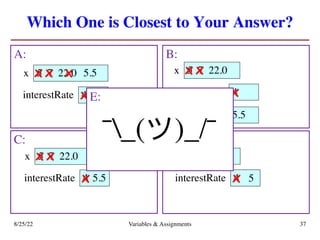
Which One is Closest to Your Answer?
A: B:
8/25/22 Variables & Assignments 37
C: D:
4
interestRate
5
x 7 22.0
x x 5.5
x
5.5
x 4
interestRate
5
x 7 22.0
x x
x
4
interestRate
5
x 7 22.0
x x
5.5
x 4
interestRate
5
x 7 22.0
x x
5
x
5.5
interestRate
E:
¯_(ツ)_/¯
Which One is Closest to Your Answer?
B:
8/25/22 Variables & Assignments 38
C: D:
4
interestRate
5
x 7 22.0
x x
x
4
interestRate
5
x 7 22.0
x x
5.5
x 4
interestRate
5
x 7 22.0
x x
5
x
5.5
interestRate
✓
interestRate = x/interestRate
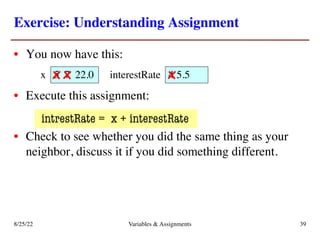
Exercise: Understanding Assignment
• You now have this:
• Execute this assignment:
intrestRate = x + interestRate
• Check to see whether you did the same thing as your
neighbor, discuss it if you did something different.
4
interestRate 5.5
5
x 7 22.0
8/25/22 Variables & Assignments 39
x x x
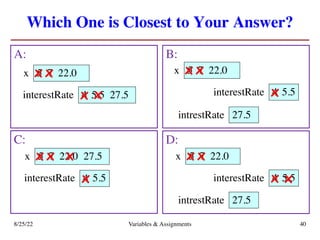
Which One is Closest to Your Answer?
A: B:
8/25/22 Variables & Assignments 40
C: D:
4
interestRate
5
x 7 22.0
x x
5.5
x 4
interestRate
5
x 7 22.0
x x
x
interestRate
5
x 7 22.0
x x
interestRate
5
x 7 22.0
x x
27.5
intrestRate
5.5
4
x 5.5
27.5
intrestRate
x
27.5
x
4 5.5
x
27.5
x
Which One is Closest to Your Answer?
A: B:
8/25/22 Variables & Assignments 41
C: D:
4
interestRate
5
x 7 22.0
x x
5.5
x 4
interestRate
5
x 7 22.0
x x
x
interestRate
5
x 7 22.0
x x
interestRate
5
x 7 22.0
x x
27.5
intrestRate
5.5
4
x 5.5
27.5
intrestRate
x
27.5
x
4 5.5
x
27.5
x
E:
¯_(ツ)_/¯
Which One is Closest to Your Answer?
A: B:
8/25/22 Variables & Assignments 42
4
interestRate
5
x 7 22.0
x x
5.5
x 4
interestRate
5
x 7 22.0
x x
x
27.5
intrestRate
5.5
27.5
x
✓
intrestRate = x + interestRate
^
e
Which One is Closest to Your Answer?
A: B:
8/25/22 Variables & Assignments 43
4
interestRate
5
x 7 22.0
x x
5.5
x 4
interestRate
5
x 7 22.0
x x
x
27.5
intrestRate
5.5
27.5
x
✓
intrestRate = x + interestRate
^
e
Spelling mistakes in
Python are bad!!
Dynamic Typing
• Python is a dynamically typed language
§ Variables can hold values of any type
§ Variables can hold different types at different times
• The following is acceptable in Python:
>>> x = 1
>>> x = x / 2.0
• Alternative is a statically typed language
§ Each variable restricted to values of just one type
§ This is true in Java , C, C++, etc.
8/25/22 Variables & Assignments 44
ç x contains an int value
ç x now contains a float value
Dynamic Typing
• Often want to track the type in a variable
§ What is the result of evaluating x / y?
§ Depends on whether x, y are int or float values
• Use expression type(<expression>) to get type
§ type(2) evaluates to <type 'int'>
§ type(x) evaluates to type of contents of x
• Can use in a boolean expression to test type
§ type('abc') == str evaluates to True
8/25/22 Variables & Assignments 45

Python Lecture Slides Variables and Assignments

  • 1.
  • 2.
    Announcements for Today IfNot Done Already • Install Python § Make sure right version § Make sure Kivy works • Register your iClicker • Sign into CMS § Fill out the Survey § Complete AI Quiz Lab 1 • Labs are due at next class § So lab 1 is due now § By end of the lab section § Try to finish them before • Makes T/W a little tight § Only 2 days (not 5) § Will keep them small • Getting behind is bad! 8/25/22 Variables & Assignments 2
  • 3.
    Helping You Succeedin this Class • Consultants. Phillips 318 (after hours) § Daily office hours (see website) with consultants § Very useful when working on assignments • AEW Workshops. Additional discussion course § Runs parallel to this class – completely optional § See website; talk to advisors in Olin 167. • Ed Discussions. Forum to ask and answer questions § Go here first before sending question in e-mail • Office Hours. Talk to the professor! § Couches in Statler Balcony between classes 8/25/22 Variables & Assignments 3
  • 4.
    Labs vs. Assignments Labs •Held twice a week • Graded on completeness § Always S/U § Try again if not finished • Indirect affect on grade § Can miss up to 3 labs § After that, grade reduced • Similar to language drills § Simple, but take time Assignments • Every two weeks § First one due Sep. 16 • Graded on correctness § Assign points out of 100 • But first one is for mastery § Resubmit until perfect grade • 40% of your final grade • Can work with a partner! § Mixer coming soon 8/25/22 Variables & Assignments 4
  • 5.
    Academic Integrity • Everysemester we have cases of plagiarism § Claiming the work of others as your own § This is an Academic Integrity violation • This course has a very specific policy § Do not listen to (non-staff) upperclassmen § Look at the course website for the new details • Complete Academic Integrity Quiz on CMS § Must complete successfully to stay in class 8/25/22 Variables & Assignments 5
  • 6.
    iClickers • Have youregistered your iClicker? • If not, visit (free service; no surcharge!) § https://cs1110.cs.cornell.edu/py/clicker • See the course web page for more: § http://www.cs.cornell.edu/courses/cs1110/2022fa § Click “Materials/Textbook” § Look under “iClickers” 8/25/22 Variables & Assignments 6
  • 7.
    Warm-Up: Using Python •How do you plan to use Python? A. I want to work mainly in the Phillips lab B. I want to use my own Windows computer C. I want to use my own Macintosh computer D. I want to use my own Linux computer E. I will use whatever I can get my hands on 8/25/22 Variables & Assignments 7
  • 8.
    Type: Set ofvalues and the operations on them • Type int: § Values: integers § Ops: +, –, *, //, %, ** • Type float: § Values: real numbers § Ops: +, –, *, /, ** • Type bool: § Values: True and False § Ops: not, and, or • Type str: § Values: string literals • Double quotes: "abc" • Single quotes: 'abc' § Ops: + (concatenation) Will see more types in a few weeks 8/25/22 Variables & Assignments 8
  • 9.
    Example: str • Values:text, or sequence of characters § String literals must be in quotes § Double quotes: "Hello World!", " abcex3$g<&" § Single quotes: 'Hello World!', ' abcex3$g<&’ • Operation: + (catenation, or concatenation) § 'ab' + 'cd' evaluates to 'abcd’ § concatenation can only apply to strings § 'ab' + 2 produces an error 8/25/22 Variables & Assignments 9
  • 10.
    Converting Values BetweenTypes • Basic form: type(expression) § This is an expression § Evaluates to value, converted to new type § This is sometimes called casting • Examples: § float(2) evaluates to 2.0 (a float) § int(2.6) evaluates to 2 (an int) § Note information loss in 2nd example 8/25/22 Variables & Assignments 10
  • 11.
    Converting Values BetweenTypes • Conversion is measured narrow to wide bool ⇒ int ⇒ float • Widening: Convert to a wider type § Python does automatically § Example: 1/2.0 evaluates to 0.5 • Narrowing: Convert to a narrower type § Python never does automatically § Example: float(int(2.6)) evaluates to 2.0 8/25/22 Variables & Assignments 11
  • 12.
    Operator Precedence • Whatis the difference between these two? § 2*(1+3) § 2*1 + 3 8/25/22 Variables & Assignments 12
  • 13.
    Operator Precedence • Whatis the difference between these two? § 2*(1+3) § 2*1 + 3 • Operations are performed in a set order § Parentheses make the order explicit § What happens when no parentheses? add, then multiply multiply, then add 8/25/22 Variables & Assignments 13
  • 14.
    Operator Precedence • Whatis the difference between these two? § 2*(1+3) § 2*1 + 3 • Operations are performed in a set order § Parentheses make the order explicit § What happens when no parentheses? add, then multiply multiply, then add 8/25/22 Variables & Assignments 14 Operator Precedence: The fixed order Python processes operators in absence of parentheses
  • 15.
    Precedence of PythonOperators • Exponentiation: ** • Unary operators: + – • Binary arithmetic: * / % • Binary arithmetic: + – • Comparisons: < > <= >= • Equality relations: == != • Logical not • Logical and • Logical or • Precedence goes downwards § Parentheses highest § Logical ops lowest • Same line = same precedence § Read “ties” left to right § Example: 1/2*3 is (1/2)*3 • There is a video about this • See website for more info • Was major portion of Lab 1 8/25/22 Variables & Assignments 15
  • 16.
    Expressions vs Statements Expression •Represents something § Python evaluates it § End result is a value • Examples: § 2.3 § (3+5)/4 Statement • Does something § Python executes it § Need not result in a value • Examples: § print('Hello') § import sys Will see later this is not a clear cut separation Literal Complex 8/25/22 Variables & Assignments 16
  • 17.
    Variables • A variable §is a box (memory location) § with a name § and a value in the box • Examples: 5 x Variable x, with value 5 (of type int) 20.1 area Variable area, w/ value 20.1 (of type float) 8/25/22 Variables & Assignments 17
  • 18.
    Using Variables • Variablescan be used in expressions § Evaluate to the value that is in the box § Example: 1 + x evaluates to 6 • Variables can change values § Example: 1 + x evaluates to 2.5 § Can even change the type of their value § Different from other languages (e.g. Java) 5 x 5 x 1.5 x 8/25/22 Variables & Assignments 18
  • 19.
    Naming Variables • Pythonhas strict rules of how to assign names § Names must only contain letters, numbers, _ § They cannot start with a number • Examples § e1 is a valid name § 1e2 is not valid (it is a float) § a_b is a valid name § a+b is not valid (it is + on two variables) 8/25/22 Variables & Assignments 19
  • 20.
    Variables and AssignmentStatements • Variables are created by assignment statements x = 5 • This is a statement, not an expression § Expression: Something Python turns into a value § Statement: Command for Python to do something § Difference is that has no value itself • Example: >>> x = 5 (NOTHING) x the value the variable 5 But can now use x as an expression 8/25/22 Variables & Assignments 20
  • 21.
    Variables Do NotExist Until Made • Example: >>> y Error! >>> y = 3 >>> y 3 • Changes our model of Python § Before we just typed in one line at a time § Now program is a sequence of lines 8/25/22 Variables & Assignments 21
  • 22.
    Assignments May ContainExpressions • Example: x = 1 + 2 § Left of equals must always be variable: 1 + 2 = x § Read assignment statements right-to-left! § Evaluate the expression on the right § Store the result in the variable on the left • We can include variables in this expression § Example: x = y+2 § Example: x = x+2 This is not circular! Read right-to-left. x 5 y 2 8/25/22 Variables & Assignments 22
  • 23.
    Execute the Statement:x = x + 2 • Draw variable x on piece of paper: 5 x 8/25/22 Variables & Assignments 23
  • 24.
    Execute the Statement:x = x + 2 • Draw variable x on piece of paper: • Step 1: evaluate the expression x + 2 § For x, use the value in variable x § Write the expression somewhere on your paper 5 x 8/25/22 Variables & Assignments 24
  • 25.
    Execute the Statement:x = x + 2 • Draw variable x on piece of paper: • Step 1: evaluate the expression x + 2 § For x, use the value in variable x § Write the expression somewhere on your paper • Step 2: Store the value of the expression in x § Cross off the old value in the box § Write the new value in the box for x 5 x 8/25/22 Variables & Assignments 25
  • 26.
    Execute the Statement:x = x + 2 • Draw variable x on piece of paper: • Step 1: evaluate the expression x + 2 § For x, use the value in variable x § Write the expression somewhere on your paper • Step 2: Store the value of the expression in x § Cross off the old value in the box § Write the new value in the box for x • Check to see whether you did the same thing as your neighbor, discuss it if you did something different. 5 x 8/25/22 Variables & Assignments 26
  • 27.
    Which One isClosest to Your Answer? A: B: 8/25/22 Variables & Assignments 27 C: D: ¯_(ツ)_/¯ 5 x 7 x 5 x 5 x x 7 x 7 x
  • 28.
    Which One isClosest to Your Answer? A: B: 8/25/22 Variables & Assignments 28 C: 5 x 7 x 5 x 5 x x 7 x 7 x ✓ x = x + 2
  • 29.
    Execute the Statement:x = 3.0 * x + 1.0 • You have this: 5 x 7 8/25/22 Variables & Assignments 29 x
  • 30.
    Execute the Statement:x = 3.0 * x + 1.0 • You have this: • Execute this command: § Step 1: Evaluate the expression 3.0 * x + 1.0 § Step 2: Store its value in x 5 x 7 8/25/22 Variables & Assignments 30 x
  • 31.
    Execute the Statement:x = 3.0 * x + 1.0 • You have this: • Execute this command: § Step 1: Evaluate the expression 3.0 * x + 1.0 § Step 2: Store its value in x • Check to see whether you did the same thing as your neighbor, discuss it if you did something different. 5 x 7 8/25/22 Variables & Assignments 31 x
  • 32.
    Which One isClosest to Your Answer? A: B: 8/25/22 Variables & Assignments 32 C: D: ¯_(ツ)_/¯ 5 x 7 x 5 x 5 x x 22.0 x 22.0 x 22.0 x 7 x 7 x
  • 33.
    Which One isClosest to Your Answer? A: B: 8/25/22 Variables & Assignments 33 C: 5 x 7 x 5 x 5 x x 22.0 x 22.0 x 22.0 x 7 x 7 x ✓ x = 3.0 * x + 1.0
  • 34.
    Execute the Statement:x = 3.0 * x + 1.0 • You now have this: • The command: § Step 1: Evaluate the expression 3.0 * x + 1.0 § Step 2: Store its value in x • This is how you execute an assignment statement § Performing it is called executing the command § Command requires both evaluate AND store to be correct § Important mental model for understanding Python 5 x 7 22.0 8/25/22 Variables & Assignments 34 x x
  • 35.
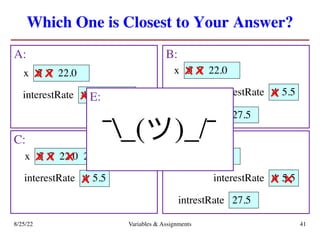
    Exercise: Understanding Assignment •Add another variable, interestRate, to get this: • Execute this assignment: interestRate = x / interestRate • Check to see whether you did the same thing as your neighbor, discuss it if you did something different. 4 interestRate 5 x 7 22.0 8/25/22 Variables & Assignments 35 x x
  • 36.
    Which One isClosest to Your Answer? A: B: 8/25/22 Variables & Assignments 36 C: D: 4 interestRate 5 x 7 22.0 x x 5.5 x 5.5 x 4 interestRate 5 x 7 22.0 x x x 4 interestRate 5 x 7 22.0 x x 5.5 x 4 interestRate 5 x 7 22.0 x x 5 x 5.5 interestRate
  • 37.
    Which One isClosest to Your Answer? A: B: 8/25/22 Variables & Assignments 37 C: D: 4 interestRate 5 x 7 22.0 x x 5.5 x 5.5 x 4 interestRate 5 x 7 22.0 x x x 4 interestRate 5 x 7 22.0 x x 5.5 x 4 interestRate 5 x 7 22.0 x x 5 x 5.5 interestRate E: ¯_(ツ)_/¯
  • 38.
    Which One isClosest to Your Answer? B: 8/25/22 Variables & Assignments 38 C: D: 4 interestRate 5 x 7 22.0 x x x 4 interestRate 5 x 7 22.0 x x 5.5 x 4 interestRate 5 x 7 22.0 x x 5 x 5.5 interestRate ✓ interestRate = x/interestRate
  • 39.
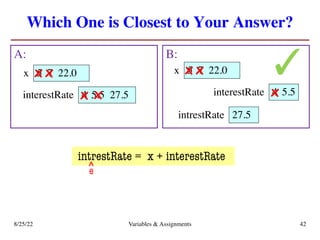
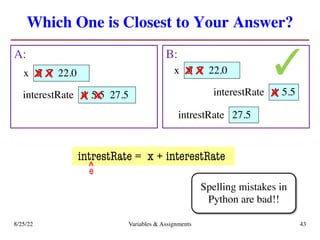
    Exercise: Understanding Assignment •You now have this: • Execute this assignment: intrestRate = x + interestRate • Check to see whether you did the same thing as your neighbor, discuss it if you did something different. 4 interestRate 5.5 5 x 7 22.0 8/25/22 Variables & Assignments 39 x x x
  • 40.
    Which One isClosest to Your Answer? A: B: 8/25/22 Variables & Assignments 40 C: D: 4 interestRate 5 x 7 22.0 x x 5.5 x 4 interestRate 5 x 7 22.0 x x x interestRate 5 x 7 22.0 x x interestRate 5 x 7 22.0 x x 27.5 intrestRate 5.5 4 x 5.5 27.5 intrestRate x 27.5 x 4 5.5 x 27.5 x
  • 41.
    Which One isClosest to Your Answer? A: B: 8/25/22 Variables & Assignments 41 C: D: 4 interestRate 5 x 7 22.0 x x 5.5 x 4 interestRate 5 x 7 22.0 x x x interestRate 5 x 7 22.0 x x interestRate 5 x 7 22.0 x x 27.5 intrestRate 5.5 4 x 5.5 27.5 intrestRate x 27.5 x 4 5.5 x 27.5 x E: ¯_(ツ)_/¯
  • 42.
    Which One isClosest to Your Answer? A: B: 8/25/22 Variables & Assignments 42 4 interestRate 5 x 7 22.0 x x 5.5 x 4 interestRate 5 x 7 22.0 x x x 27.5 intrestRate 5.5 27.5 x ✓ intrestRate = x + interestRate ^ e
  • 43.
    Which One isClosest to Your Answer? A: B: 8/25/22 Variables & Assignments 43 4 interestRate 5 x 7 22.0 x x 5.5 x 4 interestRate 5 x 7 22.0 x x x 27.5 intrestRate 5.5 27.5 x ✓ intrestRate = x + interestRate ^ e Spelling mistakes in Python are bad!!
  • 44.
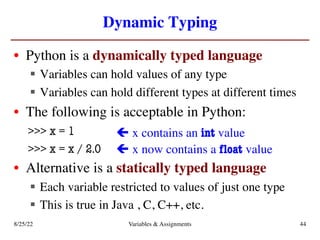
    Dynamic Typing • Pythonis a dynamically typed language § Variables can hold values of any type § Variables can hold different types at different times • The following is acceptable in Python: >>> x = 1 >>> x = x / 2.0 • Alternative is a statically typed language § Each variable restricted to values of just one type § This is true in Java , C, C++, etc. 8/25/22 Variables & Assignments 44 ç x contains an int value ç x now contains a float value
  • 45.
    Dynamic Typing • Oftenwant to track the type in a variable § What is the result of evaluating x / y? § Depends on whether x, y are int or float values • Use expression type(<expression>) to get type § type(2) evaluates to <type 'int'> § type(x) evaluates to type of contents of x • Can use in a boolean expression to test type § type('abc') == str evaluates to True 8/25/22 Variables & Assignments 45