Creative Commons License
This work is licensed under a Creative Commons Attribution 4.0 International License.
BS GIS Instructor: Inzamam Baig
Lecture 7
Fundamentals of Programming
Python Errors and Exceptions
We can make certain mistakes while writing a program that lead
to errors when we try to run it.
A python program terminates as soon as it encounters an
unhandled error.
These errors can be broadly classified into two classes:
• Syntax errors
• Logical errors (Exceptions)
Python Syntax Errors
Error caused by not following the proper structure (syntax) of the
language is called syntax error or parsing error
if a < 3
File "<interactive input>", line 1
if a < 3
^
SyntaxError: invalid syntax
Exceptions
Errors that occur at runtime (after passing the syntax test) are
called exceptions or logical errors
For instance, they occur when we try to open a file(for reading)
that does not exist (FileNotFoundError),
,when trying to divide a number by zero (ZeroDivisionError),
or try to import a module that does not exist (ImportError)
Whenever these types of runtime errors occur,
Python creates an exception object. If not handled properly, it
prints a traceback to that error along with some details about why
that error occurred
1 / 0
Traceback (most recent call last):
File "<string>", line 301, in runcode
File "<interactive input>", line 1, in <module>
ZeroDivisionError: division by zero
open("imaginary.txt")
Traceback (most recent call last):
File "<string>", line 301, in runcode
File "<interactive input>", line 1, in <module>
FileNotFoundError: [Errno 2] No such file or directory:
'imaginary.txt'
Built-in Exceptions
Illegal operations can raise exceptions.
There are plenty of built-in exceptions in Python
print(dir(locals()['__builtins__']))
Try Catch
Python Exceptions can be handled using try catch block
If there is no try catch block, python will try stops the current
process and passes it to the calling process until it is handled. If
not handled, the program will crash.
Try Catch
In Python, exceptions can be handled using a try statement
The critical operation which can raise an exception is placed
inside the try clause
The code that handles the exceptions is written in the except
clause
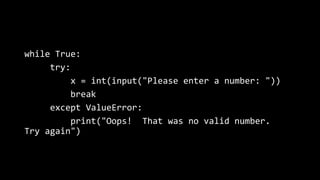
while True:
try:
x = int(input("Please enter a number: "))
break
except ValueError:
print("Oops! That was no valid number.
Try again")
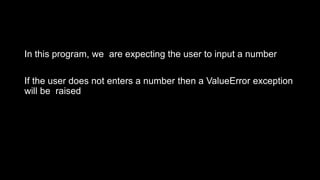
In this program, we are expecting the user to input a number
If the user does not enters a number then a ValueError exception
will be raised
Exception Class
def this_fails():
x = 1/0
try:
this_fails()
except Exception as err:
print('Handling run-time error:', err)
Catching Specific Exceptions
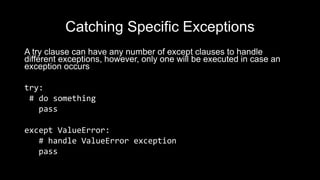
A try clause can have any number of except clauses to handle
different exceptions, however, only one will be executed in case an
exception occurs
try:
# do something
pass
except ValueError:
# handle ValueError exception
pass
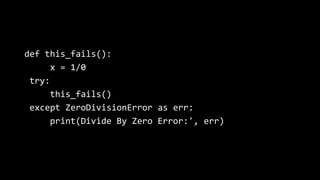
def this_fails():
x = 1/0
try:
this_fails()
except ZeroDivisionError as err:
print(Divide By Zero Error:', err)
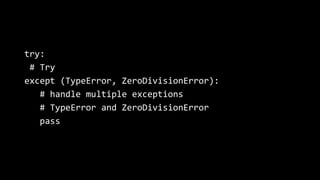
try:
# Try
except (TypeError, ZeroDivisionError):
# handle multiple exceptions
# TypeError and ZeroDivisionError
pass
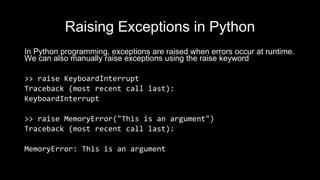
Raising Exceptions in Python
In Python programming, exceptions are raised when errors occur at runtime.
We can also manually raise exceptions using the raise keyword
>> raise KeyboardInterrupt
Traceback (most recent call last):
KeyboardInterrupt
>> raise MemoryError("This is an argument")
Traceback (most recent call last):
MemoryError: This is an argument
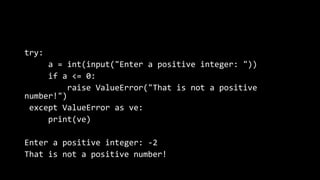
try:
a = int(input("Enter a positive integer: "))
if a <= 0:
raise ValueError("That is not a positive
number!")
except ValueError as ve:
print(ve)
Enter a positive integer: -2
That is not a positive number!
Else in try catch
In some situations, you might want to run a certain block of code if the code
block inside try ran without any errors.
For these cases, you can use the optional else keyword with the try
statement
try:
f = open('filename.txt','r')
except Exception as e:
print('Some exception in opening the file')
else:
f.close()
Python finally block
The try statement in Python can have an optional finally clause.
This clause is executed no matter what, and is generally used to
release external resources
For example, we may be connected to a remote data center
through the network or working with a file or a Graphical User
Interface (GUI)
try:
f = open("test.txt",encoding = 'utf-8')
# perform file operations
finally:
f.close()

Python Lecture 7

  • 1.
    Creative Commons License Thiswork is licensed under a Creative Commons Attribution 4.0 International License. BS GIS Instructor: Inzamam Baig Lecture 7 Fundamentals of Programming
  • 2.
    Python Errors andExceptions We can make certain mistakes while writing a program that lead to errors when we try to run it. A python program terminates as soon as it encounters an unhandled error. These errors can be broadly classified into two classes: • Syntax errors • Logical errors (Exceptions)
  • 3.
    Python Syntax Errors Errorcaused by not following the proper structure (syntax) of the language is called syntax error or parsing error if a < 3 File "<interactive input>", line 1 if a < 3 ^ SyntaxError: invalid syntax
  • 4.
    Exceptions Errors that occurat runtime (after passing the syntax test) are called exceptions or logical errors For instance, they occur when we try to open a file(for reading) that does not exist (FileNotFoundError), ,when trying to divide a number by zero (ZeroDivisionError), or try to import a module that does not exist (ImportError)
  • 5.
    Whenever these typesof runtime errors occur, Python creates an exception object. If not handled properly, it prints a traceback to that error along with some details about why that error occurred
  • 6.
    1 / 0 Traceback(most recent call last): File "<string>", line 301, in runcode File "<interactive input>", line 1, in <module> ZeroDivisionError: division by zero open("imaginary.txt") Traceback (most recent call last): File "<string>", line 301, in runcode File "<interactive input>", line 1, in <module> FileNotFoundError: [Errno 2] No such file or directory: 'imaginary.txt'
  • 7.
    Built-in Exceptions Illegal operationscan raise exceptions. There are plenty of built-in exceptions in Python print(dir(locals()['__builtins__']))
  • 8.
    Try Catch Python Exceptionscan be handled using try catch block If there is no try catch block, python will try stops the current process and passes it to the calling process until it is handled. If not handled, the program will crash.
  • 9.
    Try Catch In Python,exceptions can be handled using a try statement The critical operation which can raise an exception is placed inside the try clause The code that handles the exceptions is written in the except clause
  • 10.
    while True: try: x =int(input("Please enter a number: ")) break except ValueError: print("Oops! That was no valid number. Try again")
  • 11.
    In this program,we are expecting the user to input a number If the user does not enters a number then a ValueError exception will be raised
  • 12.
    Exception Class def this_fails(): x= 1/0 try: this_fails() except Exception as err: print('Handling run-time error:', err)
  • 13.
    Catching Specific Exceptions Atry clause can have any number of except clauses to handle different exceptions, however, only one will be executed in case an exception occurs try: # do something pass except ValueError: # handle ValueError exception pass
  • 14.
    def this_fails(): x =1/0 try: this_fails() except ZeroDivisionError as err: print(Divide By Zero Error:', err)
  • 15.
    try: # Try except (TypeError,ZeroDivisionError): # handle multiple exceptions # TypeError and ZeroDivisionError pass
  • 16.
    Raising Exceptions inPython In Python programming, exceptions are raised when errors occur at runtime. We can also manually raise exceptions using the raise keyword >> raise KeyboardInterrupt Traceback (most recent call last): KeyboardInterrupt >> raise MemoryError("This is an argument") Traceback (most recent call last): MemoryError: This is an argument
  • 17.
    try: a = int(input("Entera positive integer: ")) if a <= 0: raise ValueError("That is not a positive number!") except ValueError as ve: print(ve) Enter a positive integer: -2 That is not a positive number!
  • 18.
    Else in trycatch In some situations, you might want to run a certain block of code if the code block inside try ran without any errors. For these cases, you can use the optional else keyword with the try statement try: f = open('filename.txt','r') except Exception as e: print('Some exception in opening the file') else: f.close()
  • 19.
    Python finally block Thetry statement in Python can have an optional finally clause. This clause is executed no matter what, and is generally used to release external resources For example, we may be connected to a remote data center through the network or working with a file or a Graphical User Interface (GUI)
  • 20.
    try: f = open("test.txt",encoding= 'utf-8') # perform file operations finally: f.close()

Editor's Notes

  • #8 We can view all the built-in exceptions using the built-in local() function
  • #9 or example, let us consider a program where we have a function A that calls function B, which in turn calls function C. If an exception occurs in function C but is not handled in C, the exception passes to B and then to A
  • #12 we print the name of the exception using the exc_info() function inside sys module. We can see that a causes ValueError and 0 causes ZeroDivisionError
  • #16 We can use a tuple of values to specify multiple exceptions in an except clause