Exception Handling
1) A Python programterminates as soon as it encounters an error.
2) In Python, an error can be a syntaxerror or logical errors and
exceptions.
3) When these exceptions occur, it causes the currentprocess to
stop and passes it to the calling process until it is handled.
4) If not handled, ourprogram will crash.
Sr.No. Exception Name & Description
1
Exception
Base class for all exceptions
2
StopIteration
Raised when the next() method of an iterator does not point to any object.
3
SystemExit
Raised by the sys.exit() function.
4
StandardError
Base class for all built-in exceptions except StopIteration and SystemExit.
5
ArithmeticError
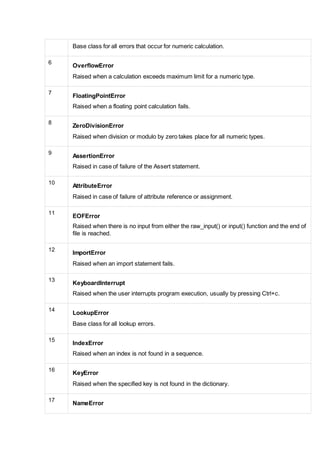
Base class for all errors that occur for numeric calculation.
6
OverflowError
Raised when a calculation exceeds maximum limit for a numeric type.
7
FloatingPointError
Raised when a floating point calculation fails.
8
ZeroDivisionError
Raised when division or modulo by zero takes place for all numeric types.
9
AssertionError
Raised in case of failure of the Assert statement.
10
AttributeError
Raised in case of failure of attribute reference or assignment.
11
EOFError
Raised when there is no input from either the raw_input() or input() function and the end of
file is reached.
12
ImportError
Raised when an import statement fails.
13
KeyboardInterrupt
Raised when the user interrupts program execution, usually by pressing Ctrl+c.
14
LookupError
Base class for all lookup errors.
15
IndexError
Raised when an index is not found in a sequence.
16
KeyError
Raised when the specified key is not found in the dictionary.
17
NameError
Raised when an identifier is not found in the local or global namespace.
18
UnboundLocalError
Raised when trying to access a local variable in a function or method but no value has
been assigned to it.
19
EnvironmentError
Base class for all exceptions that occur outside the Python environment.
20
IOError
Raised when an input/ output operation fails, such as the print statement or the open()
function when trying to open a file that does not exist.
21
IOError
Raised for operating system-related errors.
22
SyntaxError
Raised when there is an error in Python syntax.
23
IndentationError
Raised when indentation is not specified properly.
24
SystemError
Raised when the interpreter finds an internal problem, but when this error is encountered
the Python interpreter does not exit.
25
SystemExit
Raised when Python interpreter is quit by using the sys.exit() function. If not handled in
the code, causes the interpreter to exit.
26
TypeError
Raised when an operation or function is attempted that is invalid for the specified data
type.
27
ValueError
Raised when the built-in function for a data type has the valid type of arguments, but the
arguments have invalid values specified.
28
RuntimeError
Raised when a generated error does not fall into any category.
29
NotImplementedError
Raised when an abstract method that needs to be implemented in an inherited class is not
actually implemented.
Detecting and HandlingExceptions
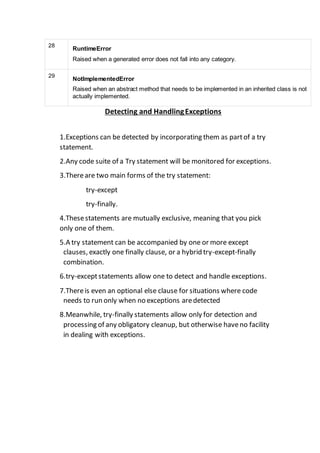
1.Exceptions can be detected by incorporating them as partof a try
statement.
2.Any code suite of a Try statement will be monitored for exceptions.
3.Thereare two main forms of the try statement:
try-except
try-finally.
4.Thesestatements are mutually exclusive, meaning that you pick
only one of them.
5.A try statement can be accompanied by one or more except
clauses, exactly one finally clause, or a hybrid try-except-finally
combination.
6.try-exceptstatements allow one to detect and handle exceptions.
7.Thereis even an optional else clause for situations where code
needs to run only when no exceptions aredetected
8.Meanwhile, try-finally statements allow only for detection and
processing of any obligatory cleanup, but otherwise haveno facility
in dealing with exceptions.
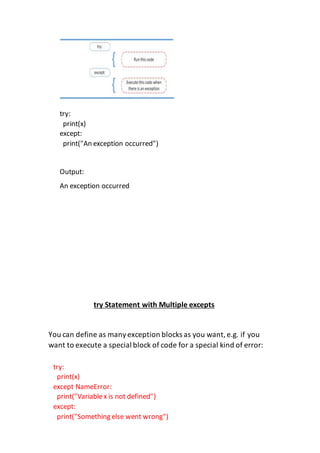
try:
print(x)
except:
print("An exception occurred")
Output:
An exception occurred
try Statement with Multiple excepts
You can define as manyexception blocks as you want,e.g. if you
want to execute a special block of code for a special kind of error:
try:
print(x)
except NameError:
print("Variablex is not defined")
except:
print("Something else went wrong")
Else:
n Python,using the else statement,you can instruct a program to
execute a certain block of code onlyin the absence of exceptions.
Raising an Exception:
We can use raiseto throw an exception if a condition occurs.
The statement can be complemented with a custom exception.
x = 10
if x > 5:
raise Exception('x should not exceed 5. The value of x was:
{}'.format(x))
Traceback (mostrecent call last):
try:
print("Hello")
except:
print("Something went wrong")
else:
print("Nothing went wrong")
File <“input”>, line 4, in <module>
Exception: x should not exceed 5. The value of x was: 10
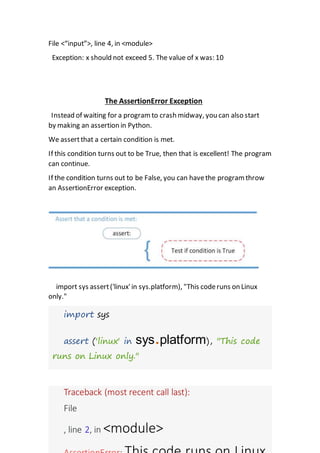
The AssertionError Exception
Instead of waiting for a program to crash midway, you can also start
by making an assertion in Python.
We assertthat a certain condition is met.
If this condition turns out to be True, then that is excellent! The program
can continue.
If the condition turns out to be False, you can havethe program throw
an AssertionError exception.
import sys assert('linux'in sys.platform), "This coderuns on Linux
only."
Traceback (most recent call last):
File
, line 2, in <module>
import sys
assert ('linux' in sys.platform), "This code
runs on Linux only."
Finally:
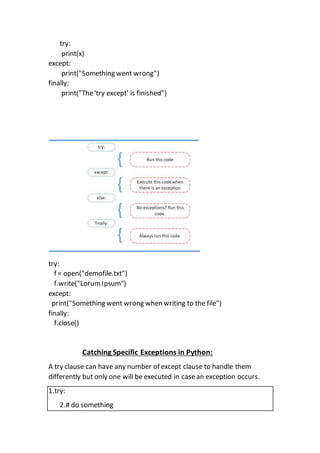
The finally block, if specified, will be executed regardless if the try block
raises an error or not.
Example
try:
print(x)
except:
print("Something went wrong")
finally:
print("The'try except' is finished")
try:
f = open("demofile.txt")
f.write("Lorum Ipsum")
except:
print("Something went wrong when writing to the file")
finally:
f.close()
Catching Specific Exceptions in Python:
A try clause can have any number of except clause to handle them
differently but only one will be executed in casean exception occurs.
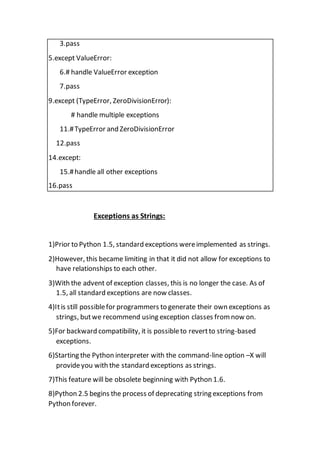
1.try:
2.# do something
3.pass
5.except ValueError:
6.# handle ValueError exception
7.pass
9.except (TypeError, ZeroDivisionError):
# handle multiple exceptions
11.#TypeError and ZeroDivisionError
12.pass
14.except:
15.#handle all other exceptions
16.pass
Exceptions as Strings:
1)Prior to Python 1.5, standard exceptions wereimplemented as strings.
2)However, this became limiting in that it did not allow for exceptions to
have relationships to each other.
3)With the advent of exception classes, this is no longer the case. As of
1.5, all standard exceptions are now classes.
4)Itis still possiblefor programmers to generate their own exceptions as
strings, butwe recommend using exception classes from now on.
5)For backward compatibility, it is possibleto revertto string-based
exceptions.
6)Starting the Python interpreter with the command-line option –X will
provideyou with the standard exceptions as strings.
7)This feature will be obsolete beginning with Python 1.6.
8)Python 2.5 begins the process of deprecating string exceptions from
Python forever.
9)In 2.5, raiseof string exceptions generates a warning.
10)In 2.6, thecatching of string exceptions results in a warning.
11)Sincethey are rarely used and are being deprecated
12)You may use an external or third party module, which may still have
string exceptions.
13)String exceptions are a bad idea anyway
Raising Exceptions
1)The interpreter was responsiblefor raising all of the exceptions we
have seen so far.
2)Theseexist as a result of encountering an error during execution.
3)A programmer writing an API may also wish to throw an exception on
erroneous input, for example, so Python provides a mechanism for the
programmer to explicitly generate an exception: the raisestatement.
Raise Statements
1.Syntaxand Common Usage
2.The raisestatement is quite flexible with the arguments it supports.
The general syntaxfor raise is:
raise [SomeException [, args [, traceback]]]
3.The firstargument, SomeException, is the name of the exception to
raise
4.If present, it musteither be a string, class, or instance .
5.SomeException must be given if any of the other arguments (args or
traceback) are present.
6.The second expression contains optional args (aka parameters, values)
for the exception.
7.This value is either a single objector a tuple of objects.
8.In mostcases, the single argumentconsists of a string indicating the
causeof the error.
9.When a tuple is given, it usually equates to an error string, an error
number, and perhaps an error location, such as a file, etc.
10.Thefinal argument, TRaceback, is also optional.
11.This third argument is usefulif you wantto reraisean exception.
12.Arguments thatare absentare represented by the value None.
Assertions
Assertions arediagnostic predicates that mustevaluate to Boolean true;
otherwise, an exception is raised to indicate that the expression is false.
assertStatement:
The assertstatement evaluates a Python expression, taking no action if
the assertion succeeds, butotherwiseraising an AssertionError
exception.
The syntax for assertis:
assert expression [, arguments]
>>> assert 1 == 0, 'One does notequalzero silly!‘
Traceback (innermostlast):
File "<stdin>", line 1, in ?
AssertionError: One doesnot equalzero silly!
Why exceptions(now)?
There is no doubt that errors will be around as long as softwareis
around.
Execution environments havechanged, and so has our need to adapt
error-handling.
The ability to handle errors moreimportant
users areno longer the only ones directly running applications.
As the Internetand online electronic commerce become more pervasive,
Web servers willbe the primary users of application software.
This means that applications cannot justfail or crash anymore, because
if they do, systemerrors translateto browser errors, and thesein turn
lead to frustrated users.
Losing eyeballs means losing revenue and potentially significant
amounts of irrecoverablebusiness.

Exception handlingpdf

  • 1.
    Exception Handling 1) APython programterminates as soon as it encounters an error. 2) In Python, an error can be a syntaxerror or logical errors and exceptions. 3) When these exceptions occur, it causes the currentprocess to stop and passes it to the calling process until it is handled. 4) If not handled, ourprogram will crash. Sr.No. Exception Name & Description 1 Exception Base class for all exceptions 2 StopIteration Raised when the next() method of an iterator does not point to any object. 3 SystemExit Raised by the sys.exit() function. 4 StandardError Base class for all built-in exceptions except StopIteration and SystemExit. 5 ArithmeticError
  • 2.
    Base class forall errors that occur for numeric calculation. 6 OverflowError Raised when a calculation exceeds maximum limit for a numeric type. 7 FloatingPointError Raised when a floating point calculation fails. 8 ZeroDivisionError Raised when division or modulo by zero takes place for all numeric types. 9 AssertionError Raised in case of failure of the Assert statement. 10 AttributeError Raised in case of failure of attribute reference or assignment. 11 EOFError Raised when there is no input from either the raw_input() or input() function and the end of file is reached. 12 ImportError Raised when an import statement fails. 13 KeyboardInterrupt Raised when the user interrupts program execution, usually by pressing Ctrl+c. 14 LookupError Base class for all lookup errors. 15 IndexError Raised when an index is not found in a sequence. 16 KeyError Raised when the specified key is not found in the dictionary. 17 NameError
  • 3.
    Raised when anidentifier is not found in the local or global namespace. 18 UnboundLocalError Raised when trying to access a local variable in a function or method but no value has been assigned to it. 19 EnvironmentError Base class for all exceptions that occur outside the Python environment. 20 IOError Raised when an input/ output operation fails, such as the print statement or the open() function when trying to open a file that does not exist. 21 IOError Raised for operating system-related errors. 22 SyntaxError Raised when there is an error in Python syntax. 23 IndentationError Raised when indentation is not specified properly. 24 SystemError Raised when the interpreter finds an internal problem, but when this error is encountered the Python interpreter does not exit. 25 SystemExit Raised when Python interpreter is quit by using the sys.exit() function. If not handled in the code, causes the interpreter to exit. 26 TypeError Raised when an operation or function is attempted that is invalid for the specified data type. 27 ValueError Raised when the built-in function for a data type has the valid type of arguments, but the arguments have invalid values specified.
  • 4.
    28 RuntimeError Raised when agenerated error does not fall into any category. 29 NotImplementedError Raised when an abstract method that needs to be implemented in an inherited class is not actually implemented. Detecting and HandlingExceptions 1.Exceptions can be detected by incorporating them as partof a try statement. 2.Any code suite of a Try statement will be monitored for exceptions. 3.Thereare two main forms of the try statement: try-except try-finally. 4.Thesestatements are mutually exclusive, meaning that you pick only one of them. 5.A try statement can be accompanied by one or more except clauses, exactly one finally clause, or a hybrid try-except-finally combination. 6.try-exceptstatements allow one to detect and handle exceptions. 7.Thereis even an optional else clause for situations where code needs to run only when no exceptions aredetected 8.Meanwhile, try-finally statements allow only for detection and processing of any obligatory cleanup, but otherwise haveno facility in dealing with exceptions.
  • 5.
    try: print(x) except: print("An exception occurred") Output: Anexception occurred try Statement with Multiple excepts You can define as manyexception blocks as you want,e.g. if you want to execute a special block of code for a special kind of error: try: print(x) except NameError: print("Variablex is not defined") except: print("Something else went wrong")
  • 6.
    Else: n Python,using theelse statement,you can instruct a program to execute a certain block of code onlyin the absence of exceptions. Raising an Exception: We can use raiseto throw an exception if a condition occurs. The statement can be complemented with a custom exception. x = 10 if x > 5: raise Exception('x should not exceed 5. The value of x was: {}'.format(x)) Traceback (mostrecent call last): try: print("Hello") except: print("Something went wrong") else: print("Nothing went wrong")
  • 7.
    File <“input”>, line4, in <module> Exception: x should not exceed 5. The value of x was: 10 The AssertionError Exception Instead of waiting for a program to crash midway, you can also start by making an assertion in Python. We assertthat a certain condition is met. If this condition turns out to be True, then that is excellent! The program can continue. If the condition turns out to be False, you can havethe program throw an AssertionError exception. import sys assert('linux'in sys.platform), "This coderuns on Linux only." Traceback (most recent call last): File , line 2, in <module> import sys assert ('linux' in sys.platform), "This code runs on Linux only."
  • 8.
    Finally: The finally block,if specified, will be executed regardless if the try block raises an error or not. Example
  • 9.
    try: print(x) except: print("Something went wrong") finally: print("The'tryexcept' is finished") try: f = open("demofile.txt") f.write("Lorum Ipsum") except: print("Something went wrong when writing to the file") finally: f.close() Catching Specific Exceptions in Python: A try clause can have any number of except clause to handle them differently but only one will be executed in casean exception occurs. 1.try: 2.# do something
  • 10.
    3.pass 5.except ValueError: 6.# handleValueError exception 7.pass 9.except (TypeError, ZeroDivisionError): # handle multiple exceptions 11.#TypeError and ZeroDivisionError 12.pass 14.except: 15.#handle all other exceptions 16.pass Exceptions as Strings: 1)Prior to Python 1.5, standard exceptions wereimplemented as strings. 2)However, this became limiting in that it did not allow for exceptions to have relationships to each other. 3)With the advent of exception classes, this is no longer the case. As of 1.5, all standard exceptions are now classes. 4)Itis still possiblefor programmers to generate their own exceptions as strings, butwe recommend using exception classes from now on. 5)For backward compatibility, it is possibleto revertto string-based exceptions. 6)Starting the Python interpreter with the command-line option –X will provideyou with the standard exceptions as strings. 7)This feature will be obsolete beginning with Python 1.6. 8)Python 2.5 begins the process of deprecating string exceptions from Python forever.
  • 11.
    9)In 2.5, raiseofstring exceptions generates a warning. 10)In 2.6, thecatching of string exceptions results in a warning. 11)Sincethey are rarely used and are being deprecated 12)You may use an external or third party module, which may still have string exceptions. 13)String exceptions are a bad idea anyway Raising Exceptions 1)The interpreter was responsiblefor raising all of the exceptions we have seen so far. 2)Theseexist as a result of encountering an error during execution. 3)A programmer writing an API may also wish to throw an exception on erroneous input, for example, so Python provides a mechanism for the programmer to explicitly generate an exception: the raisestatement. Raise Statements 1.Syntaxand Common Usage 2.The raisestatement is quite flexible with the arguments it supports. The general syntaxfor raise is: raise [SomeException [, args [, traceback]]] 3.The firstargument, SomeException, is the name of the exception to raise 4.If present, it musteither be a string, class, or instance . 5.SomeException must be given if any of the other arguments (args or traceback) are present.
  • 12.
    6.The second expressioncontains optional args (aka parameters, values) for the exception. 7.This value is either a single objector a tuple of objects. 8.In mostcases, the single argumentconsists of a string indicating the causeof the error. 9.When a tuple is given, it usually equates to an error string, an error number, and perhaps an error location, such as a file, etc. 10.Thefinal argument, TRaceback, is also optional. 11.This third argument is usefulif you wantto reraisean exception. 12.Arguments thatare absentare represented by the value None. Assertions Assertions arediagnostic predicates that mustevaluate to Boolean true; otherwise, an exception is raised to indicate that the expression is false. assertStatement: The assertstatement evaluates a Python expression, taking no action if the assertion succeeds, butotherwiseraising an AssertionError exception. The syntax for assertis: assert expression [, arguments] >>> assert 1 == 0, 'One does notequalzero silly!‘ Traceback (innermostlast): File "<stdin>", line 1, in ? AssertionError: One doesnot equalzero silly!
  • 13.
    Why exceptions(now)? There isno doubt that errors will be around as long as softwareis around. Execution environments havechanged, and so has our need to adapt error-handling. The ability to handle errors moreimportant users areno longer the only ones directly running applications. As the Internetand online electronic commerce become more pervasive, Web servers willbe the primary users of application software. This means that applications cannot justfail or crash anymore, because if they do, systemerrors translateto browser errors, and thesein turn lead to frustrated users. Losing eyeballs means losing revenue and potentially significant amounts of irrecoverablebusiness.