Looping in Python
Iterationstatements(loop) are used to execute a block of statements as long as the
condition is true. Loops statements are used when we need to run same code again and
again. Python supports two types of repetition structure :
1. while loop
2. for loop
2.
while loop
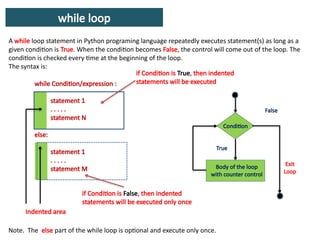
A whileloop statement in Python programing language repeatedly executes statement(s) as long as a
given condition is True. When the condition becomes False, the control will come out of the loop. The
condition is checked every time at the beginning of the loop.
The syntax is:
while Condition/expression :
statement 1
. . . . .
statement N
else:
statement 1
. . . . .
statement M
Condition
Body of the loop
with counter control
True
False
if Condition is True, then indented
statements will be executed
Indented area
if Condition is False, then indented
statements will be executed only once
Note. The else part of the while loop is optional and execute only once.
Exit
Loop
3.
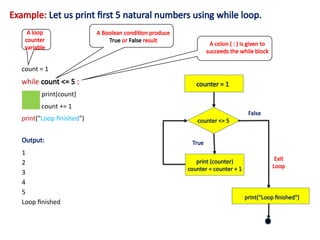
Example: Let usprint first 5 natural numbers using while loop.
count = 1
while count <= 5 :
print(count)
count += 1
print("Loop finished")
A Boolean condition produce
True or False result
A colon ( : ) is given to
succeeds the while block
Output:
1
2
3
4
5
Loop finished
A loop
counter
variable
counter <= 5
print (counter)
counter = counter + 1
True
False
Exit
Loop
counter = 1
print("Loop finished")
4.
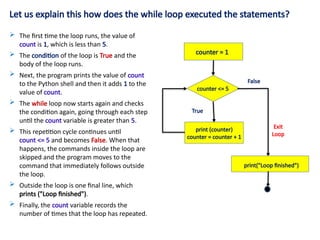
Let us explainthis how does the while loop executed the statements?
counter <= 5
print (counter)
counter = counter + 1
True
False
Exit
Loop
counter = 1
print("Loop finished")
The first time the loop runs, the value of
count is 1, which is less than 5.
The condition of the loop is True and the
body of the loop runs.
Next, the program prints the value of count
to the Python shell and then it adds 1 to the
value of count.
The while loop now starts again and checks
the condition again, going through each step
until the count variable is greater than 5.
This repetition cycle continues until
count <= 5 and becomes False. When that
happens, the commands inside the loop are
skipped and the program moves to the
command that immediately follows outside
the loop.
Outside the loop is one final line, which
prints ("Loop finished").
Finally, the count variable records the
number of times that the loop has repeated.
5.
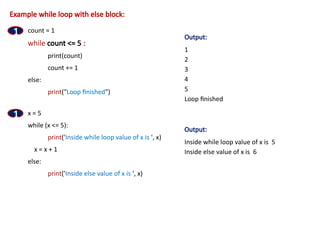
Example while loopwith else block:
count = 1
while count <= 5 :
print(count)
count += 1
else:
print("Loop finished")
1
x = 5
while (x <= 5):
print('Inside while loop value of x is ', x)
x = x + 1
else:
print('Inside else value of x is ', x)
1
Output:
1
2
3
4
5
Loop finished
Output:
Inside while loop value of x is 5
Inside else value of x is 6
6.
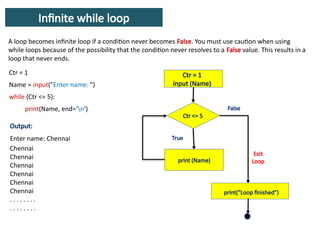
Infinite while loop
Aloop becomes infinite loop if a condition never becomes False. You must use caution when using
while loops because of the possibility that the condition never resolves to a False value. This results in a
loop that never ends.
Ctr <= 5
print (Name)
True
False
Exit
Loop
Ctr = 1
input (Name)
print("Loop finished")
Ctr = 1
Name = input("Enter name: ")
while (Ctr <= 5):
print(Name, end='n')
Output:
Enter name: Chennai
Chennai
Chennai
Chennai
Chennai
Chennai
Chennai
. . . . . . . .
. . . . . . . .
7.
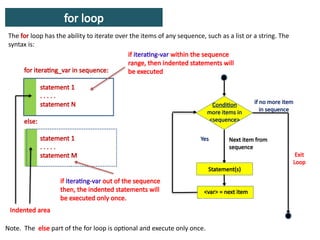
for loop
The forloop has the ability to iterate over the items of any sequence, such as a list or a string. The
syntax is:
for iterating_var in sequence:
statement 1
. . . . .
statement N
else:
statement 1
. . . . .
statement M
if iterating-var within the sequence
range, then indented statements will
be executed
Indented area
if iterating-var out of the sequence
then, the indented statements will
be executed only once.
Note. The else part of the for loop is optional and execute only once.
Condition
more items in
<sequence>
Yes
if no more item
in sequence
Exit
Loop
<var> = next item
Next item from
sequence
Statement(s)
8.
What is sequence?
Sequenceis set of value such as a list or a string. Python has a function range() which holds set of
values or sequences.
Python range() function is used to iterate over a sequence of numbers by specifying a numeric end
value within its parameters. The general format is:
range( [ start, ] stop[, step])
Start is the
starting no.
of the range
stop is the
last number
of the range
step is the
increment.
Here,
start and step are optional.
start is the staring number of range. If the start
argument is omitted, it defaults to 0.
stop is the last number of range. That is the exact
end position is: stop – 1.
step is the increment.
Example:
>>> range(10)
[0, 1, 2, 3, 4, 5, 6, 7, 8, 9]
>>> range(5, 10)
[5, 6, 7, 8, 9]
>>> range(0, 10, 3)
[0, 3, 6, 9]
>>> range(–10, –100, –30)
[–10, –40, –70]
9.
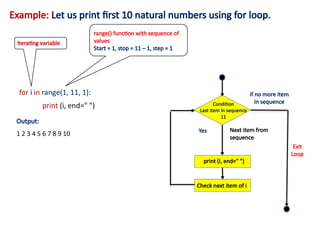
Example: Let usprint first 10 natural numbers using for loop.
for i in range(1, 11, 1):
print (i, end=" ")
range() function with sequence of
values
Start = 1, stop = 11 – 1, step = 1
Output:
1 2 3 4 5 6 7 8 9 10
Iterating variable
Condition
Last item in sequence
11
Yes
if no more item
in sequence
Exit
Loop
print (i, end=" ")
Next item from
sequence
Check next item of i
10.
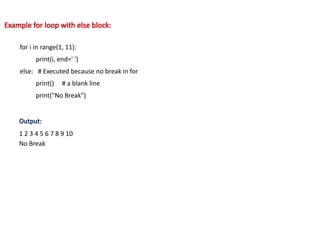
Example for loopwith else block:
for i in range(1, 11):
print(i, end=' ')
else: # Executed because no break in for
print() # a blank line
print("No Break")
Output:
1 2 3 4 5 6 7 8 9 10
No Break
11.
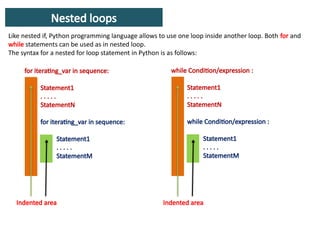
Nested loops
Like nestedif, Python programming language allows to use one loop inside another loop. Both for and
while statements can be used as in nested loop.
The syntax for a nested for loop statement in Python is as follows:
for iterating_var in sequence:
Statement1
. . . . .
StatementN
for iterating_var in sequence:
Statement1
. . . . .
StatementM
while Condition/expression :
Statement1
. . . . .
StatementN
while Condition/expression :
Statement1
. . . . .
StatementM
Indented area Indented area
12.
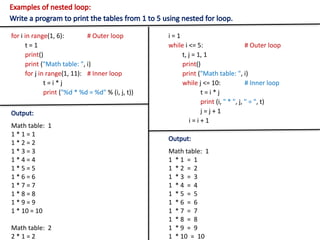
Examples of nestedloop:
Write a program to print the tables from 1 to 5 using nested for loop.
for i in range(1, 6): # Outer loop
t = 1
print()
print ("Math table: ", i)
for j in range(1, 11): # Inner loop
t = i * j
print ("%d * %d = %d" % (i, j, t))
Output:
Math table: 1
1 * 1 = 1
1 * 2 = 2
1 * 3 = 3
1 * 4 = 4
1 * 5 = 5
1 * 6 = 6
1 * 7 = 7
1 * 8 = 8
1 * 9 = 9
1 * 10 = 10
Math table: 2
2 * 1 = 2
i = 1
while i <= 5: # Outer loop
t, j = 1, 1
print()
print ("Math table: ", i)
while j <= 10: # Inner loop
t = i * j
print (i, " * ", j, " = ", t)
j = j + 1
i = i + 1
Output:
Math table: 1
1 * 1 = 1
1 * 2 = 2
1 * 3 = 3
1 * 4 = 4
1 * 5 = 5
1 * 6 = 6
1 * 7 = 7
1 * 8 = 8
1 * 9 = 9
1 * 10 = 10
13.
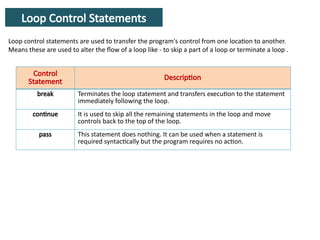
Loop Control Statements
Loopcontrol statements are used to transfer the program's control from one location to another.
Means these are used to alter the flow of a loop like - to skip a part of a loop or terminate a loop .
Control
Statement
Description
break Terminates the loop statement and transfers execution to the statement
immediately following the loop.
continue It is used to skip all the remaining statements in the loop and move
controls back to the top of the loop.
pass This statement does nothing. It can be used when a statement is
required syntactically but the program requires no action.
14.
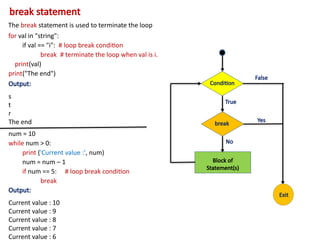
break statement
The breakstatement is used to terminate the loop
for val in "string":
if val == "i": # loop break condition
break # terminate the loop when val is i.
print(val)
print("The end")
Output:
s
t
r
The end
num = 10
while num > 0:
print ('Current value :', num)
num = num – 1
if num == 5: # loop break condition
break
Output:
Current value : 10
Current value : 9
Current value : 8
Current value : 7
Current value : 6
Condition
True
False
Block of
Statement(s)
break
Yes
No
Exit
15.
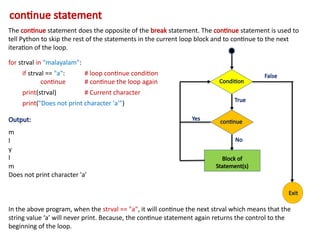
continue statement
The continuestatement does the opposite of the break statement. The continue statement is used to
tell Python to skip the rest of the statements in the current loop block and to continue to the next
iteration of the loop.
for strval in "malayalam":
if strval == "a": # loop continue condition
continue # continue the loop again
print(strval) # Current character
print("Does not print character 'a'")
Output:
m
l
y
l
m
Does not print character 'a'
In the above program, when the strval == "a", it will continue the next strval which means that the
string value ‘a’ will never print. Because, the continue statement again returns the control to the
beginning of the loop.
Condition
True
False
Block of
Statement(s)
continue
Yes
No
Exit
16.
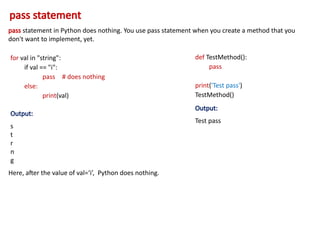
pass statement
pass statementin Python does nothing. You use pass statement when you create a method that you
don't want to implement, yet.
for val in "string":
if val == "i":
pass # does nothing
else:
print(val)
Output:
s
t
r
n
g
Here, after the value of val=‘i’, Python does nothing.
def TestMethod():
pass
print('Test pass')
TestMethod()
Output:
Test pass
Editor's Notes
#2 In last few sections, we learnt about the assignment (=) operator that how values are assigned into variables.
![What is sequence?
Sequence is set of value such as a list or a string. Python has a function range() which holds set of
values or sequences.
Python range() function is used to iterate over a sequence of numbers by specifying a numeric end
value within its parameters. The general format is:
range( [ start, ] stop[, step])
Start is the
starting no.
of the range
stop is the
last number
of the range
step is the
increment.
Here,
start and step are optional.
start is the staring number of range. If the start
argument is omitted, it defaults to 0.
stop is the last number of range. That is the exact
end position is: stop – 1.
step is the increment.
Example:
>>> range(10)
[0, 1, 2, 3, 4, 5, 6, 7, 8, 9]
>>> range(5, 10)
[5, 6, 7, 8, 9]
>>> range(0, 10, 3)
[0, 3, 6, 9]
>>> range(–10, –100, –30)
[–10, –40, –70]](https://image.slidesharecdn.com/python10looping-251227205924-10d7c5bf/85/python-learning-basic-Python_10_Looping-pptx-8-320.jpg)