Loops in Python
Programming Language
Submitted By:
Maghfoor Ahmad
MCA TYC 2nd Sem
Roll No: 27512100052
Introduction
Sometimes, there is a need to tell a computer
to repeat an action without writing separate
code for each repetition. In programming, this
concept is called loops.
Loops
A loop can be used to tell a program to execute
statements repeatedly. Or we can say that a loop
repeatedly executes the same set of instructions
until a termination condition is met.
Loops changes the control flow of program
that’s why they are also called Control Structure.
Why is it important?
Suppose that you need to display a
string (e.g., Good Morning! ) a
hundred times.
It would be tedious to write this
statement a hundred times:
print(“Good Morning!“)
.
.
.
.
print(“Good Morning!“)
Fortunately, We have loops. Using a loop control statement, you simply tell the
computer to display a string a hundred times without having to code the print
statement a hundred times, as follows:
for i in range (0,100):
print(“Good Morning!")
This will write the Good Morning! hundred times as follows:
Good Morning!
Good Morning!
Good Morning!
Good Morning!
Good Morning!
.
.
.
Good Morning!
Good Morning!
Output:
Python programming language provides
following types of loops to handle looping
requirements. They are:
● While Loop
● For Loop
● Nested Loop
Let’s understand each of the loops
mentioned above.
Type of Loops
While Loop
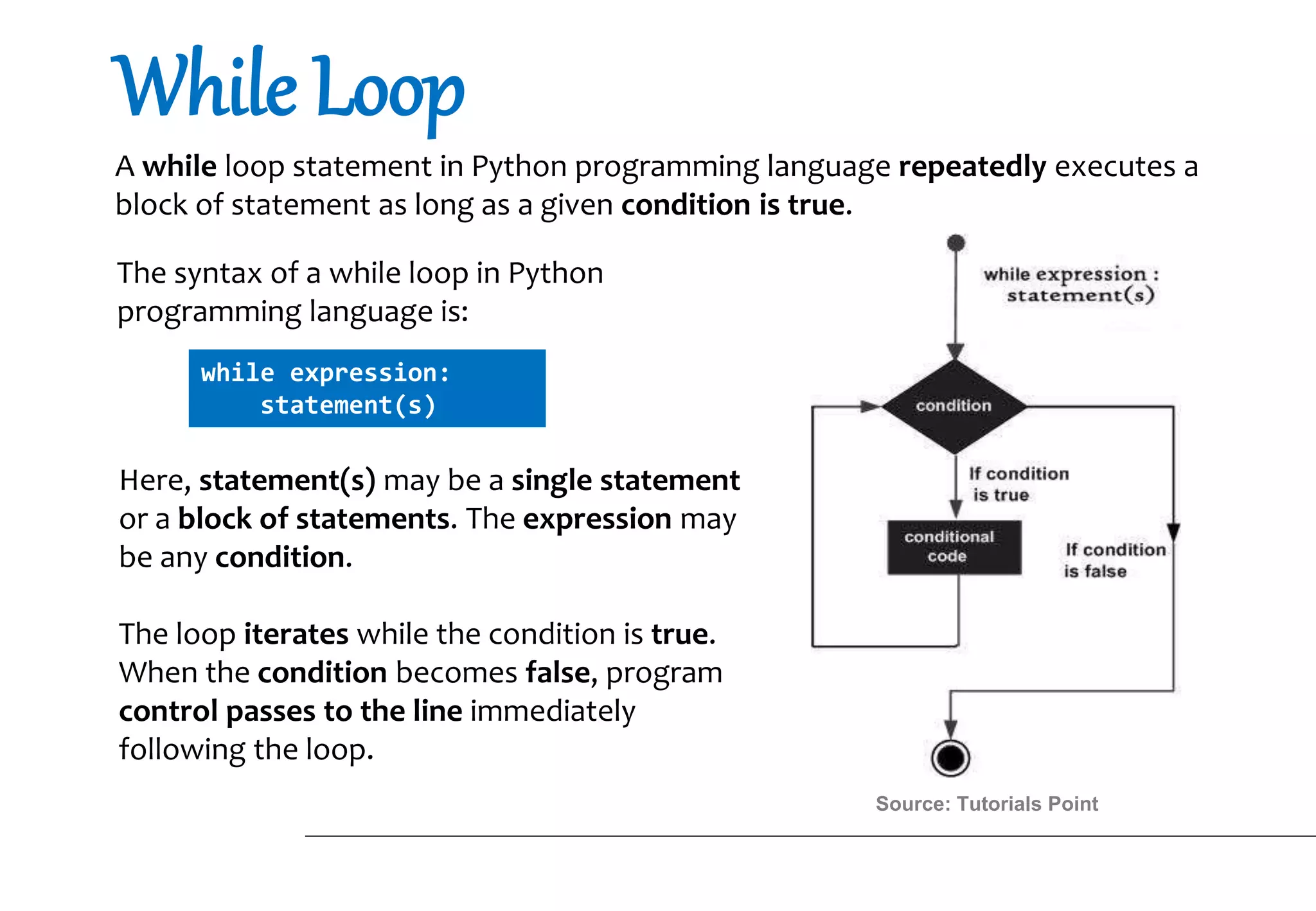
A while loop statement in Python programming language repeatedly executes a
block of statement as long as a given condition is true.
while expression:
statement(s)
Here, statement(s) may be a single statement
or a block of statements. The expression may
be any condition.
The loop iterates while the condition is true.
When the condition becomes false, program
control passes to the line immediately
following the loop.
The syntax of a while loop in Python
programming language is:
Source: Tutorials Point
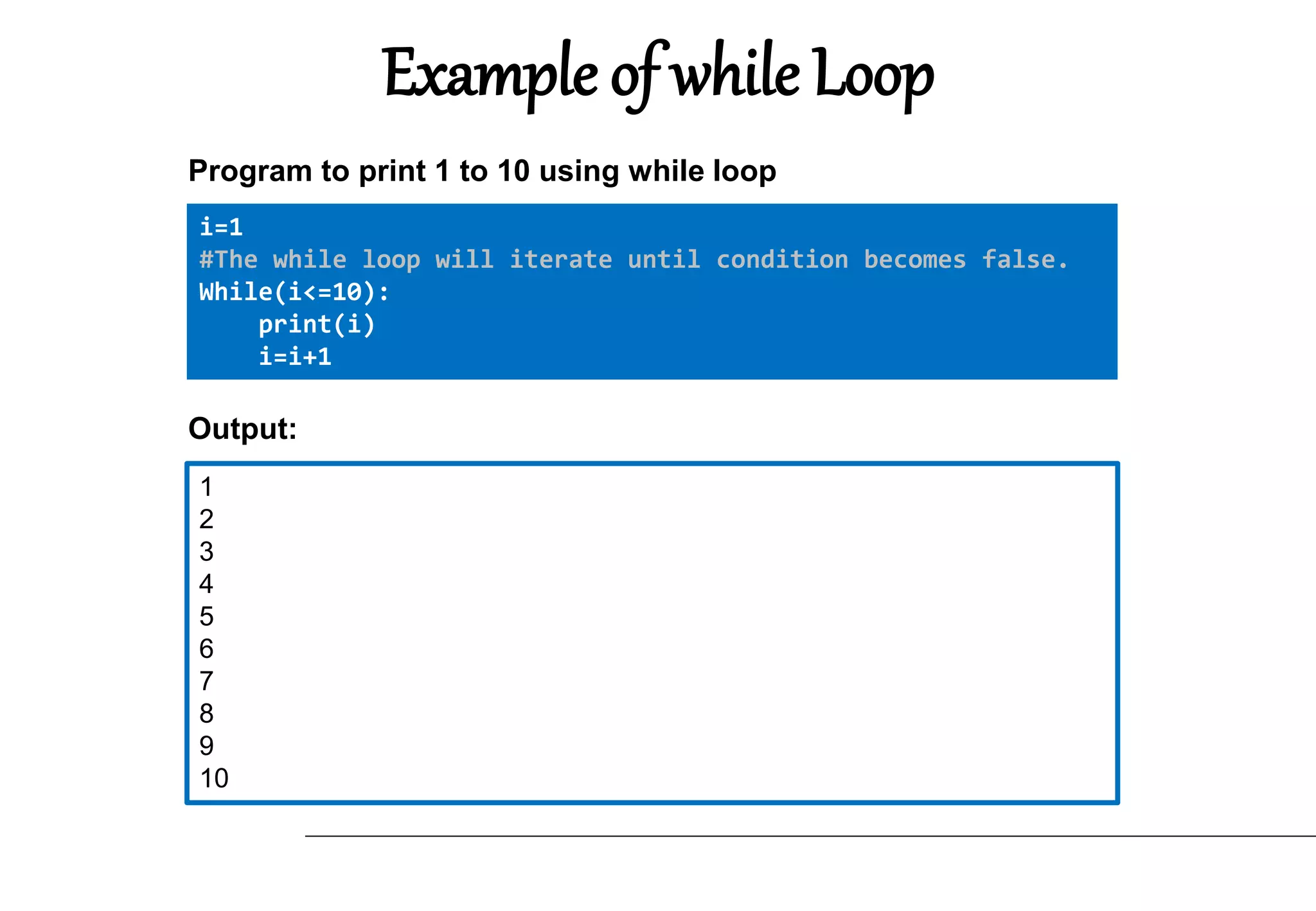
Example of while Loop
i=1
#The while loop will iterate until condition becomes false.
While(i<=10):
print(i)
i=i+1
Program to print 1 to 10 using while loop
1
2
3
4
5
6
7
8
9
10
Output:
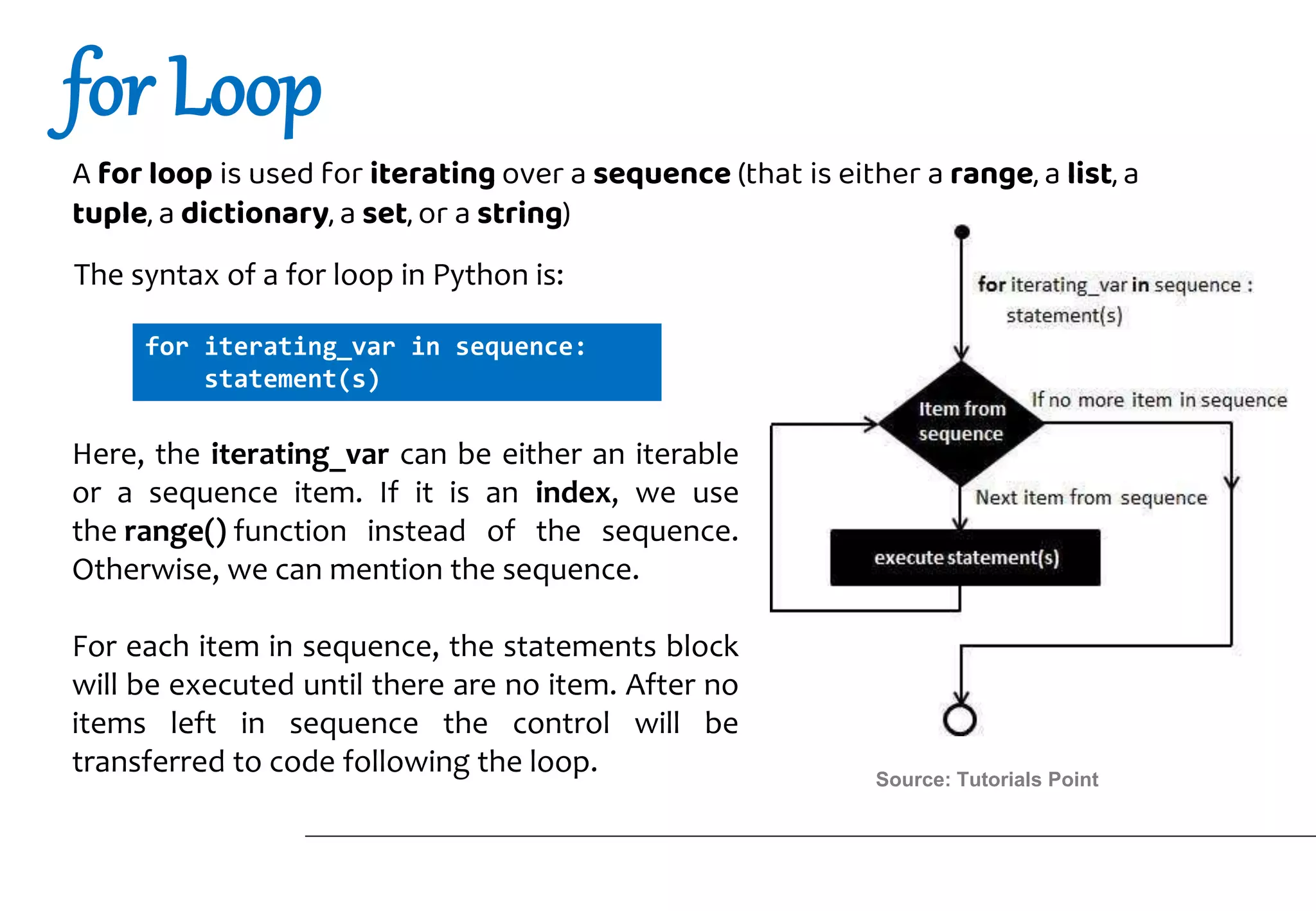
for Loop
A for loop is used for iterating over a sequence (that is either a range, a list, a
tuple, a dictionary, a set, or a string)
for iterating_var in sequence:
statement(s)
Here, the iterating_var can be either an iterable
or a sequence item. If it is an index, we use
the range() function instead of the sequence.
Otherwise, we can mention the sequence.
For each item in sequence, the statements block
will be executed until there are no item. After no
items left in sequence the control will be
transferred to code following the loop.
The syntax of a for loop in Python is:
Source: Tutorials Point
Example of for Loop
fruits = ["apple", "banana", "cherry"]
for x in fruits:
print(x)
LIST: Program to print each fruit in a fruit list:
apple
banana
cherry
Output:
for i in range(0,3):
print("Hello")
Range: Program to print “Hello” 3 times:
Hello
Hello
Hello
Output:
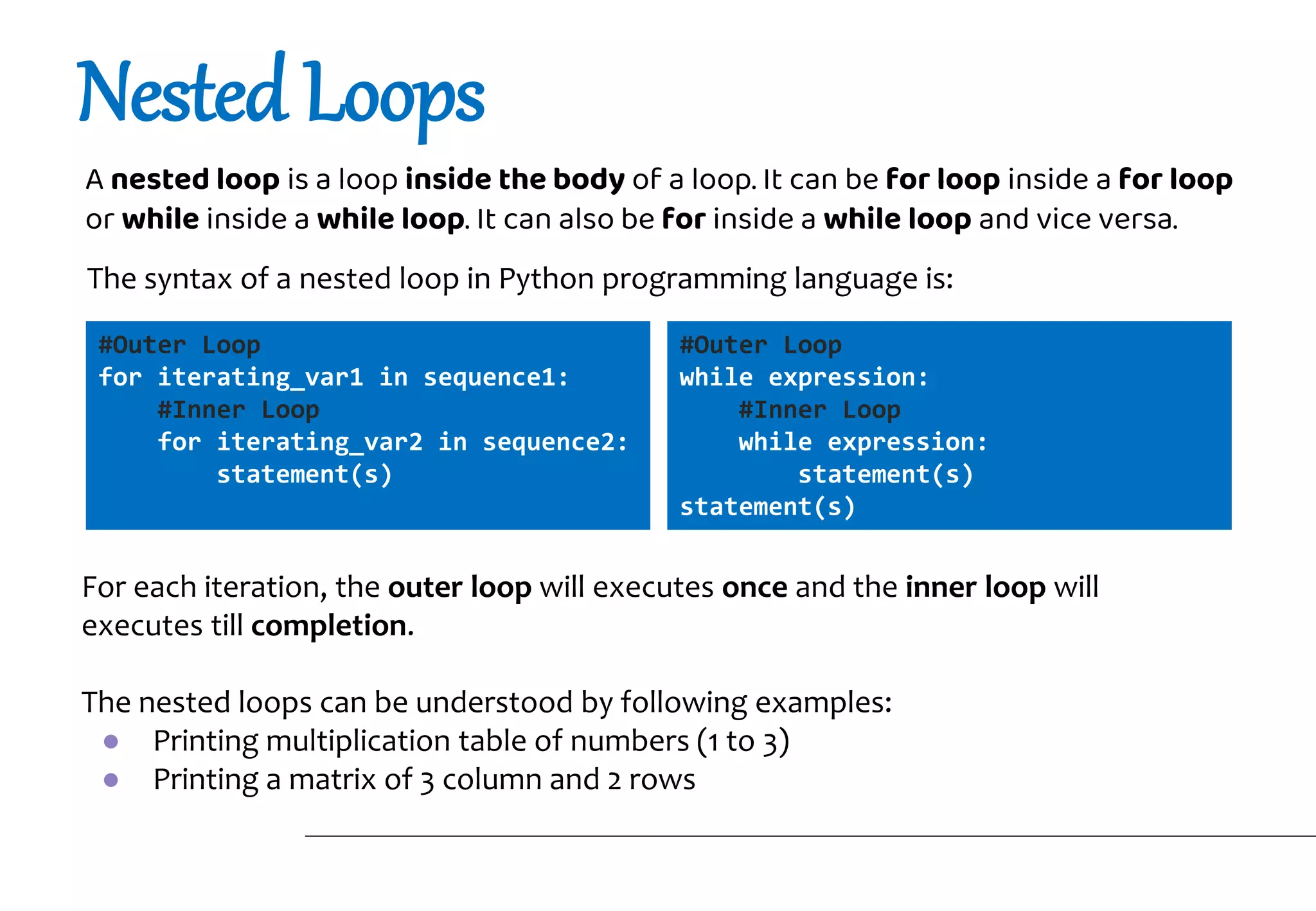
Nested Loops
A nested loop is a loop inside the body of a loop. It can be for loop inside a for loop
or while inside a while loop. It can also be for inside a while loop and vice versa.
#Outer Loop
for iterating_var1 in sequence1:
#Inner Loop
for iterating_var2 in sequence2:
statement(s)
For each iteration, the outer loop will executes once and the inner loop will
executes till completion.
The nested loops can be understood by following examples:
● Printing multiplication table of numbers (1 to 3)
● Printing a matrix of 3 column and 2 rows
The syntax of a nested loop in Python programming language is:
#Outer Loop
while expression:
#Inner Loop
while expression:
statement(s)
statement(s)
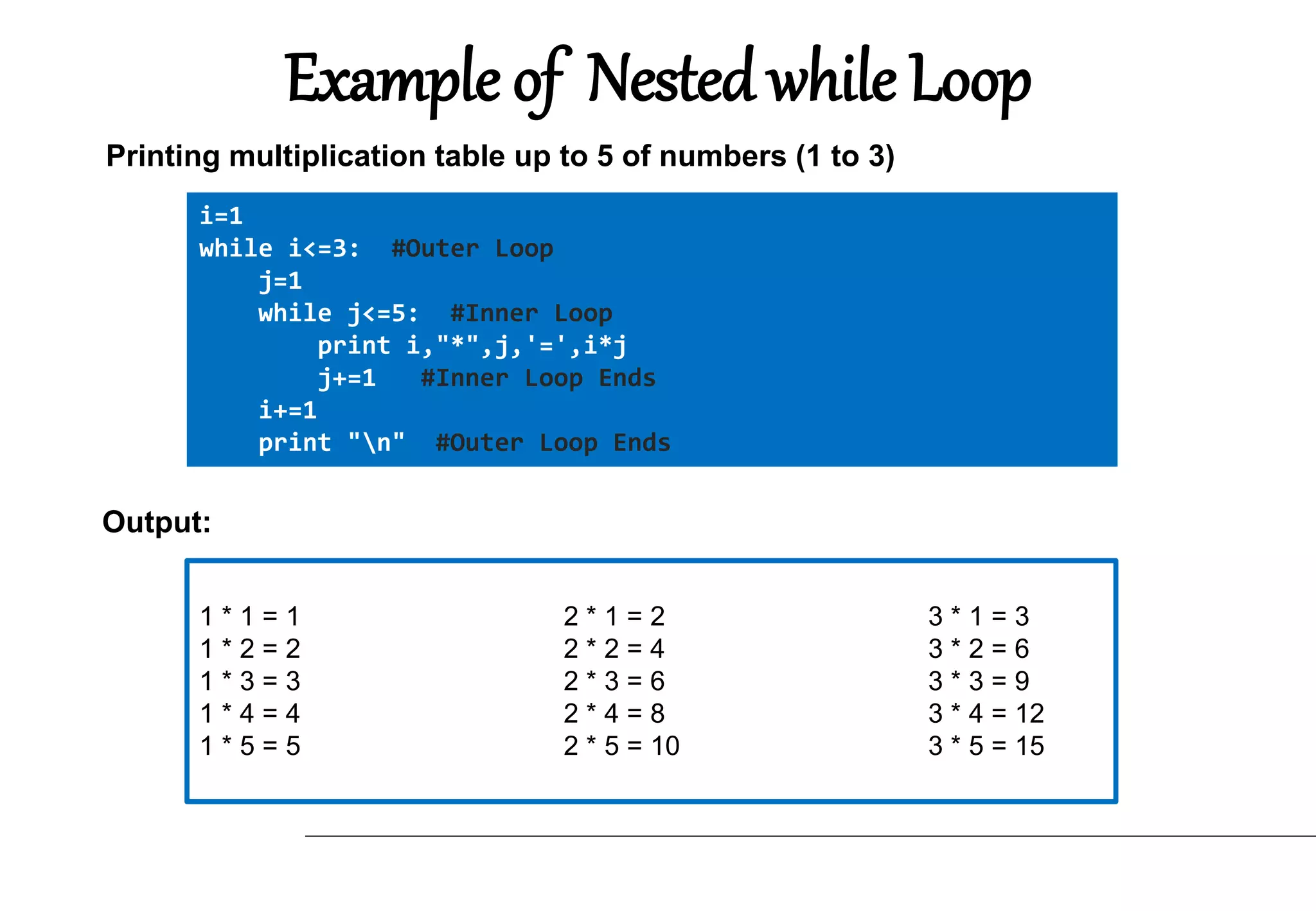
Example of Nested while Loop
i=1
while i<=3: #Outer Loop
j=1
while j<=5: #Inner Loop
print i,"*",j,'=',i*j
j+=1 #Inner Loop Ends
i+=1
print "n" #Outer Loop Ends
Printing multiplication table up to 5 of numbers (1 to 3)
1 * 1 = 1 2 * 1 = 2 3 * 1 = 3
1 * 2 = 2 2 * 2 = 4 3 * 2 = 6
1 * 3 = 3 2 * 3 = 6 3 * 3 = 9
1 * 4 = 4 2 * 4 = 8 3 * 4 = 12
1 * 5 = 5 2 * 5 = 10 3 * 5 = 15
Output:
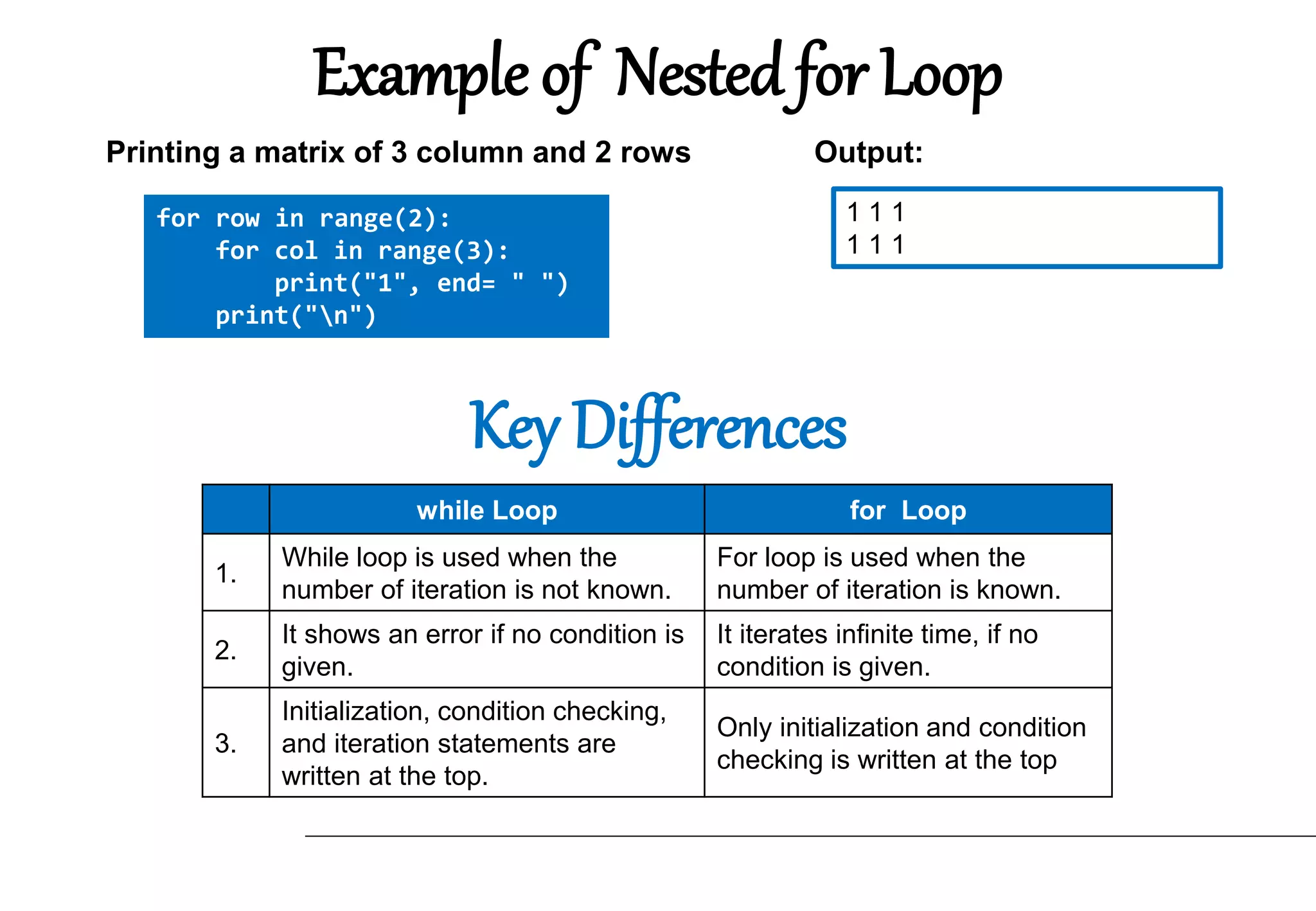
Example of Nested for Loop
for row in range(2):
for col in range(3):
print("1", end= " ")
print("n")
Printing a matrix of 3 column and 2 rows
1 1 1
1 1 1
Output:
while Loop for Loop
1.
While loop is used when the
number of iteration is not known.
For loop is used when the
number of iteration is known.
2.
It shows an error if no condition is
given.
It iterates infinite time, if no
condition is given.
3.
Initialization, condition checking,
and iteration statements are
written at the top.
Only initialization and condition
checking is written at the top
Key Differences
Thankyou!
1. Reddy, Priyanka. “Introduction to Loops in Coding”. Codingal, 2021.
https://www.codingal.com/blog/coding-for-kids/loops-in-programming/
2. Ansari, Rumman. “C Programming Loop Introduction”. Atnyla, 2019.
https://www.atnyla.com/tutorial/loop-introduction-in-c/1/194
3. Gupta, Raghav, Nishant, Priyanka Gupta, and Naveen Sharma. Computational
Problem Solving With Programming In Python. Kalyani Publishers, 2019.
4. “Pyhton - Loops”. Tutorials Point.
https://www.tutorialspoint.com/python/python_loops.htm
5. “Pyhton while Loop Statements”. Tutorials Point.
https://www.tutorialspoint.com/python/python_loops.htm
6. “Python For Loops”. W3 Schools.
https://www.w3schools.com/python/python_for_loops.asp
7. Vishal. “Nested Loops in Python”. Pynative, 2021.
https://pynative.com/python-nested-loops/#h-what-is-a-nested-loop-in-python
Bibliography

Loops in Python.pptx

  • 1.
    Loops in Python ProgrammingLanguage Submitted By: Maghfoor Ahmad MCA TYC 2nd Sem Roll No: 27512100052
  • 2.
    Introduction Sometimes, there isa need to tell a computer to repeat an action without writing separate code for each repetition. In programming, this concept is called loops. Loops A loop can be used to tell a program to execute statements repeatedly. Or we can say that a loop repeatedly executes the same set of instructions until a termination condition is met. Loops changes the control flow of program that’s why they are also called Control Structure.
  • 3.
    Why is itimportant? Suppose that you need to display a string (e.g., Good Morning! ) a hundred times. It would be tedious to write this statement a hundred times: print(“Good Morning!“) print(“Good Morning!“) print(“Good Morning!“) . . . . print(“Good Morning!“)
  • 4.
    Fortunately, We haveloops. Using a loop control statement, you simply tell the computer to display a string a hundred times without having to code the print statement a hundred times, as follows: for i in range (0,100): print(“Good Morning!") This will write the Good Morning! hundred times as follows: Good Morning! Good Morning! Good Morning! Good Morning! Good Morning! . . . Good Morning! Good Morning! Output:
  • 5.
    Python programming languageprovides following types of loops to handle looping requirements. They are: ● While Loop ● For Loop ● Nested Loop Let’s understand each of the loops mentioned above. Type of Loops
  • 6.
    While Loop A whileloop statement in Python programming language repeatedly executes a block of statement as long as a given condition is true. while expression: statement(s) Here, statement(s) may be a single statement or a block of statements. The expression may be any condition. The loop iterates while the condition is true. When the condition becomes false, program control passes to the line immediately following the loop. The syntax of a while loop in Python programming language is: Source: Tutorials Point
  • 7.
    Example of whileLoop i=1 #The while loop will iterate until condition becomes false. While(i<=10): print(i) i=i+1 Program to print 1 to 10 using while loop 1 2 3 4 5 6 7 8 9 10 Output:
  • 8.
    for Loop A forloop is used for iterating over a sequence (that is either a range, a list, a tuple, a dictionary, a set, or a string) for iterating_var in sequence: statement(s) Here, the iterating_var can be either an iterable or a sequence item. If it is an index, we use the range() function instead of the sequence. Otherwise, we can mention the sequence. For each item in sequence, the statements block will be executed until there are no item. After no items left in sequence the control will be transferred to code following the loop. The syntax of a for loop in Python is: Source: Tutorials Point
  • 9.
    Example of forLoop fruits = ["apple", "banana", "cherry"] for x in fruits: print(x) LIST: Program to print each fruit in a fruit list: apple banana cherry Output: for i in range(0,3): print("Hello") Range: Program to print “Hello” 3 times: Hello Hello Hello Output:
  • 10.
    Nested Loops A nestedloop is a loop inside the body of a loop. It can be for loop inside a for loop or while inside a while loop. It can also be for inside a while loop and vice versa. #Outer Loop for iterating_var1 in sequence1: #Inner Loop for iterating_var2 in sequence2: statement(s) For each iteration, the outer loop will executes once and the inner loop will executes till completion. The nested loops can be understood by following examples: ● Printing multiplication table of numbers (1 to 3) ● Printing a matrix of 3 column and 2 rows The syntax of a nested loop in Python programming language is: #Outer Loop while expression: #Inner Loop while expression: statement(s) statement(s)
  • 11.
    Example of Nestedwhile Loop i=1 while i<=3: #Outer Loop j=1 while j<=5: #Inner Loop print i,"*",j,'=',i*j j+=1 #Inner Loop Ends i+=1 print "n" #Outer Loop Ends Printing multiplication table up to 5 of numbers (1 to 3) 1 * 1 = 1 2 * 1 = 2 3 * 1 = 3 1 * 2 = 2 2 * 2 = 4 3 * 2 = 6 1 * 3 = 3 2 * 3 = 6 3 * 3 = 9 1 * 4 = 4 2 * 4 = 8 3 * 4 = 12 1 * 5 = 5 2 * 5 = 10 3 * 5 = 15 Output:
  • 12.
    Example of Nestedfor Loop for row in range(2): for col in range(3): print("1", end= " ") print("n") Printing a matrix of 3 column and 2 rows 1 1 1 1 1 1 Output: while Loop for Loop 1. While loop is used when the number of iteration is not known. For loop is used when the number of iteration is known. 2. It shows an error if no condition is given. It iterates infinite time, if no condition is given. 3. Initialization, condition checking, and iteration statements are written at the top. Only initialization and condition checking is written at the top Key Differences
  • 13.
  • 14.
    1. Reddy, Priyanka.“Introduction to Loops in Coding”. Codingal, 2021. https://www.codingal.com/blog/coding-for-kids/loops-in-programming/ 2. Ansari, Rumman. “C Programming Loop Introduction”. Atnyla, 2019. https://www.atnyla.com/tutorial/loop-introduction-in-c/1/194 3. Gupta, Raghav, Nishant, Priyanka Gupta, and Naveen Sharma. Computational Problem Solving With Programming In Python. Kalyani Publishers, 2019. 4. “Pyhton - Loops”. Tutorials Point. https://www.tutorialspoint.com/python/python_loops.htm 5. “Pyhton while Loop Statements”. Tutorials Point. https://www.tutorialspoint.com/python/python_loops.htm 6. “Python For Loops”. W3 Schools. https://www.w3schools.com/python/python_for_loops.asp 7. Vishal. “Nested Loops in Python”. Pynative, 2021. https://pynative.com/python-nested-loops/#h-what-is-a-nested-loop-in-python Bibliography