Python in easy way It includes different data type
1.
Sort List Alphanumerically
•List objects have a sort() method that will sort
the list alphanumerically, ascending, by default:
• Example
• Sort the list alphabetically:
• thislist = ["orange", "mango", "kiwi",
"pineapple", "banana"]
thislist.sort()
print(thislist)
• Example
• Sortthe list descending:
• thislist = [100, 50, 65, 82, 23]
thislist.sort(reverse = True)
print(thislist)
8.
Case Insensitive Sort
•By default the sort() method is case sensitive,
resulting in all capital letters being sorted before
lower case letters:
• Example
• Case sensitive sorting can give an unexpected
result:
• thislist = ["banana", "Orange", "Kiwi", "cherry"]
thislist.sort()
print(thislist)
• So ifyou want a case-insensitive sort function,
use str.lower as a key function:
• Example
• Perform a case-insensitive sort of the list:
• thislist = ["banana", "Orange", "Kiwi",
"cherry"]
thislist.sort(key = str.lower)
print(thislist)
Reverse Order
• Whatif you want to reverse the order of a list,
regardless of the alphabet?
• The reverse() method reverses the current sorting
order of the elements.
• Example
• Reverse the order of the list items:
• thislist = ["banana", "Orange", "Kiwi", "cherry"]
thislist.reverse()
print(thislist)
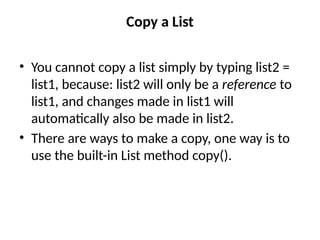
Copy a List
•You cannot copy a list simply by typing list2 =
list1, because: list2 will only be a reference to
list1, and changes made in list1 will
automatically also be made in list2.
• There are ways to make a copy, one way is to
use the built-in List method copy().
15.
• Example
• Makea copy of a list with the copy() method:
• thislist = ["apple", "banana", "cherry"]
mylist = thislist.copy()
print(mylist)
• Another wayto make a copy is to use the
built-in method list().
• Example
• Make a copy of a list with the list() method:
• thislist = ["apple", "banana", "cherry"]
mylist = list(thislist)
print(mylist)
Join Two Lists
•There are several ways to join, or concatenate, two or
more lists in Python.
• One of the easiest ways are by using the + operator.
• Example
• Join two list:
• list1 = ["a", "b", "c"]
list2 = [1, 2, 3]
list3 = list1 + list2
print(list3)
• Another wayto join two lists is by appending all the items from
list2 into list1, one by one:
• Example
• Append list2 into list1:
• list1 = ["a", "b" , "c"]
list2 = [1, 2, 3]
for x in list2:
list1.append(x)
print(list1)
• Or youcan use the extend() method, which purpose is
to add elements from one list to another list:
• Example
• Use the extend() method to add list2 at the end of list1:
• list1 = ["a", "b" , "c"]
list2 = [1, 2, 3]
list1.extend(list2)
print(list1)
Excercise
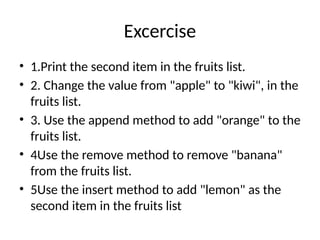
• 1.Print thesecond item in the fruits list.
• 2. Change the value from "apple" to "kiwi", in the
fruits list.
• 3. Use the append method to add "orange" to the
fruits list.
• 4Use the remove method to remove "banana"
from the fruits list.
• 5Use the insert method to add "lemon" as the
second item in the fruits list
27.
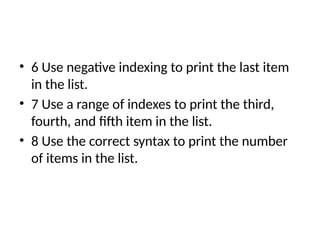
• 6 Usenegative indexing to print the last item
in the list.
• 7 Use a range of indexes to print the third,
fourth, and fifth item in the list.
• 8 Use the correct syntax to print the number
of items in the list.
![Sort List Alphanumerically
• List objects have a sort() method that will sort
the list alphanumerically, ascending, by default:
• Example
• Sort the list alphabetically:
• thislist = ["orange", "mango", "kiwi",
"pineapple", "banana"]
thislist.sort()
print(thislist)](https://image.slidesharecdn.com/python9-250730091632-135b09e3/85/Python-in-easy-way-It-includes-different-data-type-1-320.jpg)
![Sort List Alphanumerically
• List objects have a sort() method that will sort
the list alphanumerically, ascending, by default:
• Example
• Sort the list alphabetically:
• thislist = ["orange", "mango", "kiwi",
"pineapple", "banana"]
thislist.sort()
print(thislist)](https://image.slidesharecdn.com/python9-250730091632-135b09e3/75/Python-in-easy-way-It-includes-different-data-type-1-2048.jpg)
![• Output
thislist = ["orange", "mango", "kiwi",
"pineapple", "banana"]
thislist.sort()
print(thislist)
• ['banana', 'kiwi', 'mango', 'orange',
'pineapple']](https://image.slidesharecdn.com/python9-250730091632-135b09e3/85/Python-in-easy-way-It-includes-different-data-type-2-320.jpg)
![• Example
• Sort the list numerically:
• thislist = [100, 50, 65, 82, 23]
thislist.sort()
print(thislist)](https://image.slidesharecdn.com/python9-250730091632-135b09e3/85/Python-in-easy-way-It-includes-different-data-type-3-320.jpg)
![• Output
• [23, 50, 65, 82, 100]](https://image.slidesharecdn.com/python9-250730091632-135b09e3/85/Python-in-easy-way-It-includes-different-data-type-4-320.jpg)
![Sort Descending
• To sort descending, use the keyword argument
reverse = True:
• Example
• Sort the list descending:
• thislist = ["orange", "mango", "kiwi",
"pineapple", "banana"]
thislist.sort(reverse = True)
print(thislist)](https://image.slidesharecdn.com/python9-250730091632-135b09e3/85/Python-in-easy-way-It-includes-different-data-type-5-320.jpg)
![• Output
• ['pineapple', 'orange', 'mango', 'kiwi',
'banana']](https://image.slidesharecdn.com/python9-250730091632-135b09e3/85/Python-in-easy-way-It-includes-different-data-type-6-320.jpg)
![• Example
• Sort the list descending:
• thislist = [100, 50, 65, 82, 23]
thislist.sort(reverse = True)
print(thislist)](https://image.slidesharecdn.com/python9-250730091632-135b09e3/85/Python-in-easy-way-It-includes-different-data-type-7-320.jpg)
![Case Insensitive Sort
• By default the sort() method is case sensitive,
resulting in all capital letters being sorted before
lower case letters:
• Example
• Case sensitive sorting can give an unexpected
result:
• thislist = ["banana", "Orange", "Kiwi", "cherry"]
thislist.sort()
print(thislist)](https://image.slidesharecdn.com/python9-250730091632-135b09e3/85/Python-in-easy-way-It-includes-different-data-type-8-320.jpg)
![• Output
• ['Kiwi', 'Orange', 'banana', 'cherry']](https://image.slidesharecdn.com/python9-250730091632-135b09e3/85/Python-in-easy-way-It-includes-different-data-type-9-320.jpg)
![• So if you want a case-insensitive sort function,
use str.lower as a key function:
• Example
• Perform a case-insensitive sort of the list:
• thislist = ["banana", "Orange", "Kiwi",
"cherry"]
thislist.sort(key = str.lower)
print(thislist)](https://image.slidesharecdn.com/python9-250730091632-135b09e3/85/Python-in-easy-way-It-includes-different-data-type-10-320.jpg)
![• Output
• ['banana', 'cherry', 'Kiwi', 'Orange']](https://image.slidesharecdn.com/python9-250730091632-135b09e3/85/Python-in-easy-way-It-includes-different-data-type-11-320.jpg)
![Reverse Order
• What if you want to reverse the order of a list,
regardless of the alphabet?
• The reverse() method reverses the current sorting
order of the elements.
• Example
• Reverse the order of the list items:
• thislist = ["banana", "Orange", "Kiwi", "cherry"]
thislist.reverse()
print(thislist)](https://image.slidesharecdn.com/python9-250730091632-135b09e3/85/Python-in-easy-way-It-includes-different-data-type-12-320.jpg)
![• Output
• ['cherry', 'Kiwi', 'Orange', 'banana']](https://image.slidesharecdn.com/python9-250730091632-135b09e3/85/Python-in-easy-way-It-includes-different-data-type-13-320.jpg)
![• Example
• Make a copy of a list with the copy() method:
• thislist = ["apple", "banana", "cherry"]
mylist = thislist.copy()
print(mylist)](https://image.slidesharecdn.com/python9-250730091632-135b09e3/85/Python-in-easy-way-It-includes-different-data-type-15-320.jpg)
![• Output
• ['apple', 'banana', 'cherry']](https://image.slidesharecdn.com/python9-250730091632-135b09e3/85/Python-in-easy-way-It-includes-different-data-type-16-320.jpg)
![• Another way to make a copy is to use the
built-in method list().
• Example
• Make a copy of a list with the list() method:
• thislist = ["apple", "banana", "cherry"]
mylist = list(thislist)
print(mylist)](https://image.slidesharecdn.com/python9-250730091632-135b09e3/85/Python-in-easy-way-It-includes-different-data-type-17-320.jpg)
![• Output
• ['apple', 'banana', 'cherry']](https://image.slidesharecdn.com/python9-250730091632-135b09e3/85/Python-in-easy-way-It-includes-different-data-type-18-320.jpg)
![Join Two Lists
• There are several ways to join, or concatenate, two or
more lists in Python.
• One of the easiest ways are by using the + operator.
• Example
• Join two list:
• list1 = ["a", "b", "c"]
list2 = [1, 2, 3]
list3 = list1 + list2
print(list3)](https://image.slidesharecdn.com/python9-250730091632-135b09e3/85/Python-in-easy-way-It-includes-different-data-type-19-320.jpg)
![• Output
• ['a', 'b', 'c', 1, 2, 3]](https://image.slidesharecdn.com/python9-250730091632-135b09e3/85/Python-in-easy-way-It-includes-different-data-type-20-320.jpg)
![• Another way to join two lists is by appending all the items from
list2 into list1, one by one:
• Example
• Append list2 into list1:
• list1 = ["a", "b" , "c"]
list2 = [1, 2, 3]
for x in list2:
list1.append(x)
print(list1)](https://image.slidesharecdn.com/python9-250730091632-135b09e3/85/Python-in-easy-way-It-includes-different-data-type-21-320.jpg)
![• Output
• ['a', 'b', 'c', 1, 2, 3]](https://image.slidesharecdn.com/python9-250730091632-135b09e3/85/Python-in-easy-way-It-includes-different-data-type-22-320.jpg)
![• Or you can use the extend() method, which purpose is
to add elements from one list to another list:
• Example
• Use the extend() method to add list2 at the end of list1:
• list1 = ["a", "b" , "c"]
list2 = [1, 2, 3]
list1.extend(list2)
print(list1)](https://image.slidesharecdn.com/python9-250730091632-135b09e3/85/Python-in-easy-way-It-includes-different-data-type-23-320.jpg)
![• Output
• ['a', 'b', 'c', 1, 2, 3]](https://image.slidesharecdn.com/python9-250730091632-135b09e3/85/Python-in-easy-way-It-includes-different-data-type-24-320.jpg)