Download to read offline

![www.1stepgrow.com
>>> a[2]
3
>>> a[0:2]
array([1, 2])
>>> b[0:2,1]
array([ 2., 5.])
>>> b[:1]
array([[1.5, 2., 3.]])
>>> c[1,...]
array([[[ 3., 2., 1.],
[ 4., 5., 6.]]])
>>> a[ : :-1]
array([3, 2, 1])
>>> b[1,2]
6.0
Select the element at
the 2nd index 3
Select items at index 0
and 1
Select items at rows 0
and 1 in column 1
Select all items at row 0
(equivalent to b[0:1, :])
Same as [1,:,:]
Reversed array a
Select the element at
row 1 column 2
(equivalent to b[1][2])
Subsetting, Slicing, Indexing
Subsetting
Slicing](https://image.slidesharecdn.com/pythondatasciencecheatsheetnumpybasics3-250201050514-d8b84c44/85/Python-Data-Science-Cheat-Sheet-NumPy-Basics-3-pdf-3-320.jpg)
![www.1stepgrow.com
>>> a[a<2]
array([1])
>>> b[[1, 0, 1, 0],[0, 1, 2, 0]]
array([ 4. , 2. , 6. , 1.5])
>>> b[[1, 0, 1, 0]][:,[0,1,2,0]]
array([[ 4. ,5. , 6. , 4. ],
[ 1.5, 2. , 3. , 1.5],
[ 4. , 5. , 6. , 4. ],
[ 1.5, 2. , 3. , 1.5]])
Select elements from
a less than 2
Select elements (1,0),
(0,1),(1,2) and (0,0)
Select a subset of the
matrix’s rows and columns
Subsetting, Slicing, Indexing
Boolean Indexing
Fancy Indexing](https://image.slidesharecdn.com/pythondatasciencecheatsheetnumpybasics3-250201050514-d8b84c44/85/Python-Data-Science-Cheat-Sheet-NumPy-Basics-3-pdf-4-320.jpg)


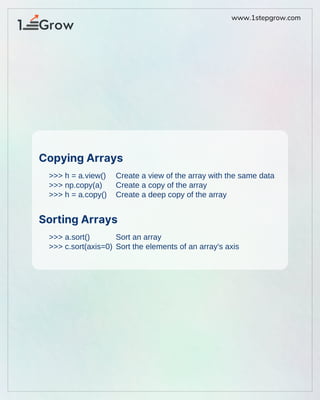
The document provides an overview of basic numpy operations in Python for data science, including creating views and copies of arrays, sorting arrays, and various indexing techniques. It highlights functionalities like subsetting, slicing, boolean indexing, and fancy indexing, along with examples for each. Additionally, it promotes 1StepGrow Academy for further learning and career development.


![NUMPY [Autosaved] .pptx](https://cdn.slidesharecdn.com/ss_thumbnails/numpyautosaved-240106041504-989a0cc3-thumbnail.jpg?width=640&height=640&fit=bounds)


