AVINASH KR. JANGIR
                 (j.avinash@outlook.com)
        Joint Masters, MDM (m1) first semester
B.K. Birla institute of Engineering & Technology, Pilani


                  www.bkbiet.ac.in
SEMINAR

Tutorial of python
www.bkbiet.ac.in
Outline
      What is Python
      Python Advantages
      Who uses Python
      Syntax
      Object orientation
      Python under windows
      IDLE
      Variables and built-in types


And so on......................................
www.bkbiet.ac.in
What is Python?
Python is a remarkably powerful dynamic programming language that is used in a
wide variety of application domains. Python is often compared to Tcl, Perl, Ruby,
Scheme or Java. Some of its key distinguishing features include.

   very clear, readable syntax
   strong introspection capabilities
   intuitive object orientation
   natural expression of procedural code
   full modularity, supporting hierarchical packages
   exception-based error handling
   very high level dynamic data types
   extensive standard libraries and third party modules for virtually every task
   extensions and modules easily written in C, C++ (or Java for Jython, or .NET languages
    for IronPython)
   embeddable within applications as a scripting interface
Why named “python”

       Father of python - Guido van Rossum


                     MONTY PYTHON
www.bkbiet.ac.in
Python Advantages

   Elegant syntax

   Safe

   Object-oriented

   Powerful

   Portable

   Free
www.bkbiet.ac.in
Python philosophy

   Coherence
       not hard to read, write and maintain

   power

   scope
       rapid development + large systems

   objects

   integration
       hybrid systems
www.bkbiet.ac.in
Python features
no compiling or linking             rapid development cycle

no type declarations                simpler, shorter, more flexible

automatic memory management         garbage collection

high-level data types and operations fast development

object-oriented programming         code structuring and reuse, C++

embedding and extending in C        mixed language systems

classes, modules, exceptions        "programming-in-the-large" support

dynamic loading of C modules        simplified extensions, smaller binaries

dynamic reloading of C modules      programs can be modified without stopping
www.bkbiet.ac.in
Uses of Python
   shell tools
       system admin tools, command line programs
   extension-language work
   rapid prototyping and development
   language-based modules
       instead of special-purpose parsers
   graphical user interfaces
   database access
   distributed programming
   Internet scripting
www.bkbiet.ac.in
Python is simple


 >>>print "Hello World!"                        Python
 #include <iostream.h>
 int main()
 {                                              C++
 cout << "Hello World!";
 }

 public class helloWorld
 {
      public static void main(String [] args)   Java
      {
      System.out.println("Hello World!");
      }
 }
www.bkbiet.ac.in
Python is fun & practical
   Lack of type declaration
   Huge library of modules
   Widespread use in industry
   Available for all the major platforms (Windows, MacOS,
    Linux, Unix, BeOS, Java)
www.bkbiet.ac.in
Who uses Python
   Google
   NASA
   Rackspace
   Industrial Light & Magic
   Intel, cisco, Hp for hardware testing
   Jp Morgan chase, UBS for financial marketing
   iRobot
www.bkbiet.ac.in
Syntax - Indentation
www.bkbiet.ac.in
Python under Windows

   Use IDLE to edit and run script files

   Or, use Jedit to edit and run script files (setup required)

   Or, use the Python command line window (for interactive
    work)

   Or, double-click an existing Python file to run it
       However, if results print to 'standard out', then problematic

       Use the ‘raw_input’ trick

       Not a problem if graphics output
www.bkbiet.ac.in
IDLE

   Graphical User Interface (GUI)
   Interactive Development Environment (IDE) for Python

   Useful under Windows and Unix
   Not required; use another editor if you want to
   Written in Python, using Tk
   Named for Eric Idle, member of Monty Python
www.bkbiet.ac.in
IDLE start-up message

    Python 2.7.3 (#51, Dec 5 2012, 20:22:39) [MSC v.1200 32 bit (Intel)] on win32
    Type "copyright", "credits" or "license()" for more information.

          ****************************************************************
          Personal firewall software may warn about the connection IDLE
          makes to its sub-process using this computer's internal loopback
          interface. This connection is not visible on any external
          interface and no data is sent to or received from the Internet.
          ****************************************************************

    IDLE 1.0.2
    >>>

    Version number shown
    Interactive mode:
          Awaits commands from the user
          Commands must be valid Python code
          Useful for tests and messing about
    Try the commands:
          copyright
          credits
          license()
www.bkbiet.ac.in
          Part 1:
Variables and built-in types
www.bkbiet.ac.in
                           Hello world!

>>> print 'Hello world!'
Hello world!


>>> a = 'Hello world!'
>>> print a
Hello world!
www.bkbiet.ac.in
Variables and types
>>> a = 'Hello world!'            # this is an assignment statement
>>> print a
'Hello world!'
>>> type(a)                       # expression: outputs the value in interactive mode
<type 'str'>

   Variables are created when they are assigned
   No declaration required
   The variable name is case sensitive: ‘val’ is not the same as ‘Val’
   The type of the variable is determined by Python
   A variable can be reassigned to whatever, whenever

>>> n = 12                                              >>> n = 'apa'
>>> print n                                             >>> print n
12                                                      'apa'
>>> type(n)                                             >>> type(n)
<type 'int'>                                            <type 'str'>

>>> n = 12.0
>>> type(n)
<type 'float'>
www.bkbiet.ac.in
Numbers
•   Integers: 12 0 -12987 0123 0X1A2
     –   Type ‘int’
     –   Can’t be larger than 2**31
     –   Octal literals begin with 0 - 0980(0981 illegal!)
     –   Hex literals begin with 0X, contain 0-9 and A-F


•   Floating point: 12.03 1E1 -1.54E-21
     –   Type ‘float’
     –   Same precision and magnitude as C double


•   Long integers: 10294L
     –   Type ‘long’
     –   Any magnitude
     –   Python usually handles conversions from int to long


•   Complex numbers: 1+3J
     –   Type ‘complex’
www.bkbiet.ac.in
Numeric expressions

   The usual numeric expression operators: +, -, /, *, **, %, //
   Precedence and parentheses work as expected


>>> 12+5                                             >>> 4 + 5.5
17                                                   9.5
>>> 12+5*2                                           >>> 1 + 3.0**2
22                                                   10.0
>>> (12+5)*2                                         >>> 1+2j + 3-4j
34                                                   (4-2j)


>>> a=12+5
>>> print a
17
>>> b = 12.4 + a                     # 'a' converted to float automatically
>>> b                                # uses function 'repr'
29.399999999999999
>>> print b                          # uses function 'str'
29.4
www.bkbiet.ac.in
Boolean expressions
   ‘True’ and ‘ False’ are predefined values; actually integers 1 and 0
   Value 0 is considered False, all other values True
   The usual Boolean expression operators: not, and, or

>>> True or False
True
>>> not ((True and False) or True)
False
>>> True * 12
12
>>> 0 and 1
0

   Comparison operators produce Boolean values
   The usual suspects: <, <=, >, >=, ==, !=
>>> 12<13
True
>>> 12>13
False
>>> 12<=12
True
>>> 12!=13
True
www.bkbiet.ac.in
String
>>> a = 'Hello world!'
>>> b = "Hello world!"
>>> a == b
True

>>> a = "Per's lecture"
>>> print a
Per's lecture


     Single quotes or double quotes can be used for string literals
     Produces exactly the same value
     Special characters in string literals: n newline, t tab, others
     Triple quotes useful for large chunks of text in program code
    >>> a = "One line.nAnother line."
    >>> print a
    One line.
    Another line.

>>> b = """One line,
another line."""
>>> print b
One line,
another line.
www.bkbiet.ac.in
String conversions

    >>> a = "58"                                                     >>> f = float('1.2e-3')
    >>> type(a)                                                      >>> f                 # uses 'repr'
    <type 'str'>                                                     0.0011999999999999999
    >>> b=int(a)                                                     >>> print f           # uses 'str'
    >>> b                                                            0.0012
    58                                                               >>> eval('23-12')
    >>> type(b)                                                      11
    <type 'int'>

     Convert data types using functions ‘str’, ‘int’, ‘float’
     ‘repr’ is a variant of ‘str’
          intended for strict, code-like representation of values
          ‘str’ usually gives nicer-looking representation
     Function ‘eval’ interprets a string as a Python expression
>>> c = int('blah')            # what happens when something illegal is done?
Traceback (most recent call last):
  File "<pyshell#34>", line 1, in -toplevel-
    c = int('blah')
ValueError: invalid literal for int(): blah
www.bkbiet.ac.in
String operations
     Common string operations on page 75 in ‘Learning Python’
    >>> a = "Part 1"
    >>> b = "and part 2"
    >>> a + ' ' + b              # concatenation, adding strings
    'Part 1 and part 2'
    >>> s = a * 2                # repeat and concatenate string
    >>> print s
    Part 1Part 1

    >>> s[0]                     # index: one single character, offset 0 (zero)
    'P'
    >>> s[0:4]                   # slice: part of string
    'Part‘
    >>> s[5:]                    # leave out one boundary: to the end
    '1Part 1'
    >>> >>> s[6:-1]              # negative index counts from the end
    'Part '

    >>> len(s)                   # function ‘len’ to get length of string
    12
    >>> 'p' in s                 # membership test
    False
    >>> 'P' in s
    True
    >>> 'Part' in s              # also works for substrings (new feature)
    True
www.bkbiet.ac.in
    Changing strings. Not!
    >>> s[0] = 'B'
    Traceback (most recent call last):
      File "<pyshell#68>", line 1, in -toplevel-
        s[0] = 'B'
    TypeError: object doesn't support item assignment


     A string cannot be changed in Python! Immutable
     Good reasons for this; more later
     Create new strings from bits and pieces of old


    >>> s = 'B' + s[1:]
    >>> s
    'Bart 1Part 1'


     Recreating strings may use a lot of computing power
     If you need to create many new strings, learn string formatting (more later)
     List processing can often be used to make string handling more efficient
www.bkbiet.ac.in
String methods
     Strings have a set of built-in methods
     No method ever changes the original string!
     Several methods produce new strings
     A list on page 91 in ‘Learning Python’
    >>> s = 'a string, with stuff'
    >>> s.count('st')                               # how many substrings?
    2
    >>> s.find('stu')                               # give location of substring, if any
    15
    >>> three = '3'
    >>> three.isdigit()                             # only digit characters in string?
    True

    >>> supper = s.upper()                          # convert to upper case
    >>> supper
    'A STRING, WITH STUFF'
    >>> s.rjust(30)                                 # right justify by adding blanks
    '          a string, with stuff'
    >>> "newlinesnnn".strip()                    # a string literal also has methods!
    'newlines'

    >>> s.replace('stuff', 'characters') # replace substring (all occurrences)
    'a string, with characters'
    >>> s.replace('s', 'X', 1)         # replace only once
    'a Xtring, with stuff'
www.bkbiet.ac.in
List
   Ordered collection of objects; array
   Heterogenous; may contain mix of objects of any type
>>> r = [1, 2.0, 3, 5]             # list literal; different types of values
>>> r
[1, 2.0, 3, 5]
>>> type(r)
<type 'list'>

>>> r[1]                           # access by index; offset 0 (zero)
2.0
>>> r[-1]                          # negative index counts from end
5

>>> r[1:3]                         # a slice out of a list; gives another list
[2.0, 3]

>>>   w = r + [10, 19]             # concatenate lists; gives another list
>>>   w
[1,   2.0, 3, 5, 10, 19]
>>>   r                            # original list unchanged; w and r are different
[1,   2.0, 3, 5]

>>> t = [0.0] * 10           # create an initial vector using repetition
>>> t
[0.0, 0.0, 0.0, 0.0, 0.0, 0.0, 0.0, 0.0, 0.0, 0.0]
www.bkbiet.ac.in
List operations
     Lists are mutable; can be changed in-place
     Lists are dynamic; size may be changed
    >>>   r = [1, 2.0, 3, 5]
    >>>   r[3] = 'word'               # replace an item by index
    >>>   r
    [1,   2.0, 3, 'word']

    >>> r[0] = [9, 8]                 # lists can be nested
    >>> r
    [[9, 8], 2.0, 3, 'word']

    >>>   r[0:3] = [1, 2, 5, 6]       # change a slice of list; may change list length
    >>>   r
    [1,   2, 5, 6, 'word']
    >>>   r[1:3] = []                 # remove items by setting slice to empty list
    >>>   r
    [1,   6, 'word']

    >>> len(r)                        # length of list; number of items
    3

    >>> 6 in r                        # membership test
    True
    >>> r.index(6)                    # search for position; bombs if item not in list
    1
www.bkbiet.ac.in
List methods, part 1
     Lists have a set of built-in methods
     Some methods change the list in-place

    >>>   r = [1, 2.0, 3, 5]
    >>>   r.append('thing')              # add a single item to the end
    >>>   r
    [1,   2.0, 3, 5, 'thing']
    >>>   r.append(['another', 'list']) # list treated as a single item
    >>>   r
    [1,   2.0, 3, 5, 'thing', ['another', 'list']]

    >>>   r = [1, 2.0, 3, 5]
    >>>   r.extend(['item', 'another'])       # list items appended one by one
    >>>   r
    [1,   2.0, 3, 5, 'item', 'another']

    >>> k = r.pop()                           # remove last item from list and return
    >>> k
    'another'
    >>> r
    [1, 2.0, 3, 5, 'item']

     Methods 'append' and 'pop' can be used to implement a stack
www.bkbiet.ac.in
List methods, part 2
   Use the built-in 'sort' method: efficient
   The list is sorted in-place; a new list is not produced!

>>> r = [2, 5, -1, 0, 20]
>>> r.sort()
>>> r
[-1, 0, 2, 5, 20]

>>> w = ['apa', '1', '2', '1234']
>>> w.sort()                                  # strings: lexical sort using ASCII order
>>> w
['1', '1234', '2', 'apa']

>>> w.reverse()                               # how to flip a list; in-place!
>>> w
['apa', '2', '1234', '1']

>>> v = w[:]                                  # first create a copy of the list
>>> v.reverse()                               # then reverse the copy
>>> v                                         # use same technique for sort
['1', '1234', '2', 'apa']
>>> w
['apa', '2', '1234', '1']
www.bkbiet.ac.in
    Converting lists between strings
    >>> s = 'biovitrum'                                     # create a string
    >>> w = list(s)                                         # convert into a list of char's
    >>> w
    ['b', 'i', 'o', 'v', 'i', 't', 'r', 'u', 'm']
    >>> w.reverse()
    >>> w
    ['m', 'u', 'r', 't', 'i', 'v', 'o', 'i', 'b']
    >>> r = ''.join(w)                                      # join using empty string
    >>> r
    'murtivoib'
    >>> d = '-'.join(w)                                     # join using dash char
    >>> d
    'm-u-r-t-i-v-o-i-b'


    >>> s = 'a few words'
    >>> w = s.split()                     # splits at white-space (blank, newline)
    >>> w
    ['a', 'few', 'words']

     'split' is useful for simple parsing
     Otherwise use regular expression module 're'; later
    >>> ' | '.join(w)                  # use any string with method 'join'
    'a | few | words'
www.bkbiet.ac.in
Objects, names and references
   All values are objects
   A variable is a name referencing an object
   An object may have several names referencing it
   Important when modifying objects in-place!
   You may have to make proper copies to get the effect you want
   For immutable objects (numbers, strings), this is never a problem


      >>>   a   =   [1, 3, 2]                              a
      >>>   b   =   a                                                   [1, 3, 2]
      >>>   c   =   b[0:2]
      >>>   d   =   b[:]                                   b

                                                           c            [1, 3]
      >>> b.sort()         # 'a' is affected!
      >>> a
      [1, 2, 3]                                            d            [1, 3, 2]
www.bkbiet.ac.in
Dictionary
     An unordered collection of key/value pairs
     Each key maps to a value
     Also called "mapping", "hash table" or "lookup table"
    >>> h = {'key': 12, 'nyckel': 'word'}
    >>> h['key']                                               # access by key
    12
    >>> h.has_key('nyckel')
    True

    >>> h['Per'] = 'Kraulis'                          # adding a key/value
    >>> h
    {'nyckel': 'word', 'Per': 'Kraulis', 'key': 12} # the output order is random
    >>> h['Per'] = 'Johansson'                        # replaces the value
    >>> h
    {'nyckel': 'word', 'Per': 'Johansson', 'key': 12}
     The key is
          Usually an integer or a string
          Should (must!) be an immutable object
          May be any object that is 'hashable' (more later)
          Any key occurs at most once in a dictionary!
     The value may be any object
          Values may occur many times
www.bkbiet.ac.in
                            Forgetting things: 'del'


   Use command 'del' to get rid of stuff
   Command! Not function!
   Actually removes variables (names), not objects

>>> a = 'thing'                                           # define a variable
>>> a
'thing'
>>> del a                                                 # forget about the variable
>>> a
Traceback (most recent call last):
  File "<pyshell#182>", line 1, in -toplevel-
    a
NameError: name 'a' is not defined

>>> h = {'key': 12, 'nyckel': 'word'}
>>> del h['key']                                      # remove the key and its value
>>> h
{'nyckel': 'word'}

>>>   r = [1, 3, 2]
>>>   del r[1]                                        # another way of removing list items
>>>   r
[1,   2]
www.bkbiet.ac.in
Forgetting things: garbage collection
   What happens to the object when its name is ’del’ed, or
    reassigned to another object?
   Don’t worry, be happy!
   The Python systems detects when an object is ’lost in space’
      It keeps track of the number of references to it
   The object’s memory gets reclaimed; garbage collection
   A few problematic special cases; cyclical references
www.bkbiet.ac.in
Dictionary methods, part 1
>>> h = {'key': 12, 'nyckel': 'word'}
>>> 'Per' in h                       # test if key in dictionary
False
>>> h['Per']
Traceback (most recent call last):
  File "<pyshell#192>", line 1, in -toplevel-
    h['Per']
KeyError: 'Per'


>>> h.get('Per', 'unknown')          # return value, or default if not found
'unknown'
>>> h.get('key', 'unknown')
12


>>> h.keys()                  # all keys in a list; unordered
['nyckel', 'key']
>>> h.values()                # all values in a list; unordered
['word', 12]


>>> len(h)                    # number of keys in dictionary
2
www.bkbiet.ac.in
Dictionary methods, part 2

>>> g = h.copy()             # a separate copy of the dictionary
>>> del h['key']
>>> h
{'nyckel': 'word'}
>>> g
{'nyckel': 'word', 'key': 12}


>>> h['Per'] = 'Johansson'
>>> h
{'nyckel': 'word', 'Per': 'Johansson'}
>>> h.update(g)                          # add or update all key/value from g
>>> h
{'nyckel': 'word', 'key': 12, 'Per': 'Johansson'}
www.bkbiet.ac.in
Tuple
     Same as list, except immutable
     Once created, can't be changed
     Some functions return tuples
    >>> t = (1, 3, 2)
    >>> t[1]                           # access by index; offset 0 (zero)
    3

    >>>   (a, b, c) = t                # tuple assignment (unpacking)
    >>>   a
    1
    >>>   b
    3
    >>>   a, b, c                      # actually a tuple expression!
    (1,   3, 2)

    >>> a, b = b, a                    # neat trick to swap values
    >>> a, b
    (3, 1)

    >>>   r = list(t)                  # convert tuple to a list
    >>>   r
    [1,   3, 2]
    >>>   tuple(r)                     # convert list to a tuple
    (1,   3, 2)
www.bkbiet.ac.in
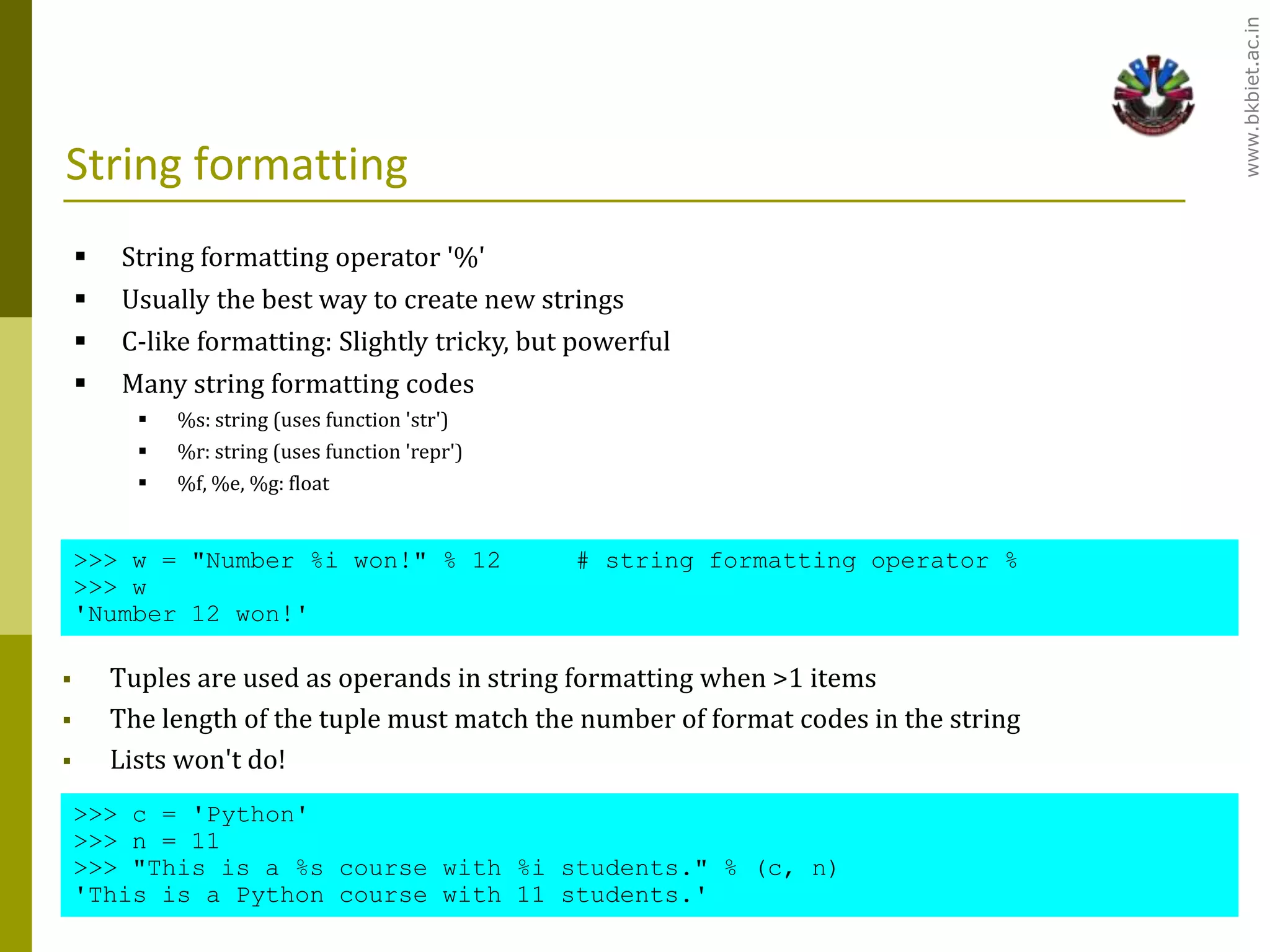
String formatting
       String formatting operator '%'
       Usually the best way to create new strings
       C-like formatting: Slightly tricky, but powerful
       Many string formatting codes
             %s: string (uses function 'str')
             %r: string (uses function 'repr')
             %f, %e, %g: float


    >>> w = "Number %i won!" % 12                 # string formatting operator %
    >>> w
    'Number 12 won!'

       Tuples are used as operands in string formatting when >1 items
       The length of the tuple must match the number of format codes in the string
       Lists won't do!
    >>> c = 'Python'
    >>> n = 11
    >>> "This is a %s course with %i students." % (c, n)
    'This is a Python course with 11 students.'
Part 2:
Statements


   www.bkbiet.ac.in
www.bkbiet.ac.in
Write scripts in IDLE
   Now we need to write proper scripts, saved in files
   In IDLE:
        'File'
        'New Window'
        Do immediately 'Save as…'
             Browse to directory 'Desktop'
             Create a directory 'Python course'
             Go down into it
             Enter the file name 't1.py'
             Save
   Work in the window called 't1.py‘
Enter the following code:
"file t1.py"                    # this is a documentation string
print "Hello world!"

        Save the file: Ctrl-S, or menu 'File', 'Save'
        Run the script: F5, or menu 'Run', 'Run Module'
www.bkbiet.ac.in
'if' statement; block structure
   The Python feature that one either loves or hates
   Block structure is determined by indentation

   Edit a new script file 't2.py'
        In window 't1.py' do 'File', 'New Window', then 'Save As…
   Use the 'if' statement:
"file t2.py"

person = 'Luke'

if person == 'Per':
    status = 'Pythonist'
elif person == 'Luke':
    status = 'Jedi knight'
else:
    status = 'unknown'

print person, status

   Note that the IDLE editor helps with indentation
   Run the script (F5)
www.bkbiet.ac.in
Dictionary often better than if… elif…
   Particularly with many hardcoded choices (elif's)…

"file t3.py"

status_map = {'Luke': 'Jedi Knight',
              'Per': 'Pythonist'}

person = 'Luke'

print person, status_map.get(person, 'unknown')


   More compact, and more efficient
   This pattern is very useful
www.bkbiet.ac.in
Built-in types and their Boolean interpretations

 int      0            False       All built-in types can be used directly in 'if'
                                    statements
          -1           True
          124          True        Zero-valued numbers are False
                                   All other numbers are True
 float    0.0          False
 str      ""           False       Empty containers (str, list, dict) are False
                                   All other container values are True
          "False"      True !
 dict     {}           False       Use function 'bool' to get explicit value

          {'key': 'val'} True
 list     []           False
          [False]      True !
www.bkbiet.ac.in
'for' statement
   Repetition of a block of statements
   Iterate through a sequence (list, tuple, string, iterator)

"file t4.py"

s = 0
for i in [0, 1, 2, 3, 4, 5, 6, 7, 8]:                  # walk through list, assign to i
    s = s + i
    if s > 10:
        break                                          # quit 'for' loop, jump to after it

print "i=%i, s=%i" % (i, s)

"file t5.py"

r = []
for c in 'this is a string with blanks':               # walks through string, char by char
    if c == ' ': continue                              # skip rest of block, continue loop
    r.append(c)

print ''.join(r)
www.bkbiet.ac.in
Built-in functions 'range' and 'xrange'
   Built-in functions 'range' and 'xrange' useful with 'for'
   'range' creates a list
   Warning: may use lots of memory; inefficient!

>>>   range(9)                                   # start=0, step=1 by default
[0,   1, 2, 3, 4, 5, 6, 7, 8]
>>>   range(1, 12, 3)                            # explicit start, end, step
[1,   4, 7, 10]
>>>   range(10**9)                               # MemoryError!

   'xrange' creates an iterator, which works like a list
   Very memory-efficient!

"file t6.py"

s = 0
for i in xrange(100000):
    if i % 19 == 0:                              # remainder: evenly divisible with 19?
        s = s + i

print s
www.bkbiet.ac.in
'while' statement
   Repetition of a block of statements
   Loop until test becomes false, or 'break'

"file t7.py"

r = []
n = 0
last = 20

while n <= last:                  # any expression interpretable as Boolean
    r.append(str(n))
    n += 3

print ', '.join(r)
www.bkbiet.ac.in
Optional 'else' block in loops
     'else' block executed if no 'break' encountered
     May often replace success/failure flags
     Valid in 'for' and 'while' loops
    "file t8.py"

    r = [1, 3, 10, 98, -2, 48]

    for i in r:
        if i < 0:
            print 'input contains negative value!'
            break                   # this skips out of loop, including 'else'
        else:
            pass                    # do-nothing statement
    else:                           # do if loop ended normally
        print 'input is OK'

     'pass' statement does absolutely nothing
     May be useful as placeholder for unwritten code
     A few cases where required (more later)
Thank You 

Python avinash

  • 1.
    AVINASH KR. JANGIR (j.avinash@outlook.com) Joint Masters, MDM (m1) first semester B.K. Birla institute of Engineering & Technology, Pilani www.bkbiet.ac.in
  • 2.
  • 3.
    www.bkbiet.ac.in Outline  What is Python  Python Advantages  Who uses Python  Syntax  Object orientation  Python under windows  IDLE  Variables and built-in types And so on......................................
  • 4.
    www.bkbiet.ac.in What is Python? Pythonis a remarkably powerful dynamic programming language that is used in a wide variety of application domains. Python is often compared to Tcl, Perl, Ruby, Scheme or Java. Some of its key distinguishing features include.  very clear, readable syntax  strong introspection capabilities  intuitive object orientation  natural expression of procedural code  full modularity, supporting hierarchical packages  exception-based error handling  very high level dynamic data types  extensive standard libraries and third party modules for virtually every task  extensions and modules easily written in C, C++ (or Java for Jython, or .NET languages for IronPython)  embeddable within applications as a scripting interface
  • 5.
    Why named “python” Father of python - Guido van Rossum MONTY PYTHON
  • 6.
    www.bkbiet.ac.in Python Advantages  Elegant syntax  Safe  Object-oriented  Powerful  Portable  Free
  • 7.
    www.bkbiet.ac.in Python philosophy  Coherence  not hard to read, write and maintain  power  scope  rapid development + large systems  objects  integration  hybrid systems
  • 8.
    www.bkbiet.ac.in Python features no compilingor linking rapid development cycle no type declarations simpler, shorter, more flexible automatic memory management garbage collection high-level data types and operations fast development object-oriented programming code structuring and reuse, C++ embedding and extending in C mixed language systems classes, modules, exceptions "programming-in-the-large" support dynamic loading of C modules simplified extensions, smaller binaries dynamic reloading of C modules programs can be modified without stopping
  • 9.
    www.bkbiet.ac.in Uses of Python  shell tools  system admin tools, command line programs  extension-language work  rapid prototyping and development  language-based modules  instead of special-purpose parsers  graphical user interfaces  database access  distributed programming  Internet scripting
  • 10.
    www.bkbiet.ac.in Python is simple >>>print "Hello World!" Python #include <iostream.h> int main() { C++ cout << "Hello World!"; } public class helloWorld { public static void main(String [] args) Java { System.out.println("Hello World!"); } }
  • 11.
    www.bkbiet.ac.in Python is fun& practical  Lack of type declaration  Huge library of modules  Widespread use in industry  Available for all the major platforms (Windows, MacOS, Linux, Unix, BeOS, Java)
  • 12.
    www.bkbiet.ac.in Who uses Python  Google  NASA  Rackspace  Industrial Light & Magic  Intel, cisco, Hp for hardware testing  Jp Morgan chase, UBS for financial marketing  iRobot
  • 13.
  • 14.
    www.bkbiet.ac.in Python under Windows  Use IDLE to edit and run script files  Or, use Jedit to edit and run script files (setup required)  Or, use the Python command line window (for interactive work)  Or, double-click an existing Python file to run it  However, if results print to 'standard out', then problematic  Use the ‘raw_input’ trick  Not a problem if graphics output
  • 15.
    www.bkbiet.ac.in IDLE  Graphical User Interface (GUI)  Interactive Development Environment (IDE) for Python  Useful under Windows and Unix  Not required; use another editor if you want to  Written in Python, using Tk  Named for Eric Idle, member of Monty Python
  • 16.
    www.bkbiet.ac.in IDLE start-up message Python 2.7.3 (#51, Dec 5 2012, 20:22:39) [MSC v.1200 32 bit (Intel)] on win32 Type "copyright", "credits" or "license()" for more information. **************************************************************** Personal firewall software may warn about the connection IDLE makes to its sub-process using this computer's internal loopback interface. This connection is not visible on any external interface and no data is sent to or received from the Internet. **************************************************************** IDLE 1.0.2 >>>  Version number shown  Interactive mode:  Awaits commands from the user  Commands must be valid Python code  Useful for tests and messing about  Try the commands:  copyright  credits  license()
  • 17.
    www.bkbiet.ac.in Part 1: Variables and built-in types
  • 18.
    www.bkbiet.ac.in Hello world! >>> print 'Hello world!' Hello world! >>> a = 'Hello world!' >>> print a Hello world!
  • 19.
    www.bkbiet.ac.in Variables and types >>>a = 'Hello world!' # this is an assignment statement >>> print a 'Hello world!' >>> type(a) # expression: outputs the value in interactive mode <type 'str'>  Variables are created when they are assigned  No declaration required  The variable name is case sensitive: ‘val’ is not the same as ‘Val’  The type of the variable is determined by Python  A variable can be reassigned to whatever, whenever >>> n = 12 >>> n = 'apa' >>> print n >>> print n 12 'apa' >>> type(n) >>> type(n) <type 'int'> <type 'str'> >>> n = 12.0 >>> type(n) <type 'float'>
  • 20.
    www.bkbiet.ac.in Numbers • Integers: 12 0 -12987 0123 0X1A2 – Type ‘int’ – Can’t be larger than 2**31 – Octal literals begin with 0 - 0980(0981 illegal!) – Hex literals begin with 0X, contain 0-9 and A-F • Floating point: 12.03 1E1 -1.54E-21 – Type ‘float’ – Same precision and magnitude as C double • Long integers: 10294L – Type ‘long’ – Any magnitude – Python usually handles conversions from int to long • Complex numbers: 1+3J – Type ‘complex’
  • 21.
    www.bkbiet.ac.in Numeric expressions  The usual numeric expression operators: +, -, /, *, **, %, //  Precedence and parentheses work as expected >>> 12+5 >>> 4 + 5.5 17 9.5 >>> 12+5*2 >>> 1 + 3.0**2 22 10.0 >>> (12+5)*2 >>> 1+2j + 3-4j 34 (4-2j) >>> a=12+5 >>> print a 17 >>> b = 12.4 + a # 'a' converted to float automatically >>> b # uses function 'repr' 29.399999999999999 >>> print b # uses function 'str' 29.4
  • 22.
    www.bkbiet.ac.in Boolean expressions  ‘True’ and ‘ False’ are predefined values; actually integers 1 and 0  Value 0 is considered False, all other values True  The usual Boolean expression operators: not, and, or >>> True or False True >>> not ((True and False) or True) False >>> True * 12 12 >>> 0 and 1 0  Comparison operators produce Boolean values  The usual suspects: <, <=, >, >=, ==, != >>> 12<13 True >>> 12>13 False >>> 12<=12 True >>> 12!=13 True
  • 23.
    www.bkbiet.ac.in String >>> a ='Hello world!' >>> b = "Hello world!" >>> a == b True >>> a = "Per's lecture" >>> print a Per's lecture  Single quotes or double quotes can be used for string literals  Produces exactly the same value  Special characters in string literals: n newline, t tab, others  Triple quotes useful for large chunks of text in program code >>> a = "One line.nAnother line." >>> print a One line. Another line. >>> b = """One line, another line.""" >>> print b One line, another line.
  • 24.
    www.bkbiet.ac.in String conversions >>> a = "58" >>> f = float('1.2e-3') >>> type(a) >>> f # uses 'repr' <type 'str'> 0.0011999999999999999 >>> b=int(a) >>> print f # uses 'str' >>> b 0.0012 58 >>> eval('23-12') >>> type(b) 11 <type 'int'>  Convert data types using functions ‘str’, ‘int’, ‘float’  ‘repr’ is a variant of ‘str’  intended for strict, code-like representation of values  ‘str’ usually gives nicer-looking representation  Function ‘eval’ interprets a string as a Python expression >>> c = int('blah') # what happens when something illegal is done? Traceback (most recent call last): File "<pyshell#34>", line 1, in -toplevel- c = int('blah') ValueError: invalid literal for int(): blah
  • 25.
    www.bkbiet.ac.in String operations  Common string operations on page 75 in ‘Learning Python’ >>> a = "Part 1" >>> b = "and part 2" >>> a + ' ' + b # concatenation, adding strings 'Part 1 and part 2' >>> s = a * 2 # repeat and concatenate string >>> print s Part 1Part 1 >>> s[0] # index: one single character, offset 0 (zero) 'P' >>> s[0:4] # slice: part of string 'Part‘ >>> s[5:] # leave out one boundary: to the end '1Part 1' >>> >>> s[6:-1] # negative index counts from the end 'Part ' >>> len(s) # function ‘len’ to get length of string 12 >>> 'p' in s # membership test False >>> 'P' in s True >>> 'Part' in s # also works for substrings (new feature) True
  • 26.
    www.bkbiet.ac.in Changing strings. Not! >>> s[0] = 'B' Traceback (most recent call last): File "<pyshell#68>", line 1, in -toplevel- s[0] = 'B' TypeError: object doesn't support item assignment  A string cannot be changed in Python! Immutable  Good reasons for this; more later  Create new strings from bits and pieces of old >>> s = 'B' + s[1:] >>> s 'Bart 1Part 1'  Recreating strings may use a lot of computing power  If you need to create many new strings, learn string formatting (more later)  List processing can often be used to make string handling more efficient
  • 27.
    www.bkbiet.ac.in String methods  Strings have a set of built-in methods  No method ever changes the original string!  Several methods produce new strings  A list on page 91 in ‘Learning Python’ >>> s = 'a string, with stuff' >>> s.count('st') # how many substrings? 2 >>> s.find('stu') # give location of substring, if any 15 >>> three = '3' >>> three.isdigit() # only digit characters in string? True >>> supper = s.upper() # convert to upper case >>> supper 'A STRING, WITH STUFF' >>> s.rjust(30) # right justify by adding blanks ' a string, with stuff' >>> "newlinesnnn".strip() # a string literal also has methods! 'newlines' >>> s.replace('stuff', 'characters') # replace substring (all occurrences) 'a string, with characters' >>> s.replace('s', 'X', 1) # replace only once 'a Xtring, with stuff'
  • 28.
    www.bkbiet.ac.in List  Ordered collection of objects; array  Heterogenous; may contain mix of objects of any type >>> r = [1, 2.0, 3, 5] # list literal; different types of values >>> r [1, 2.0, 3, 5] >>> type(r) <type 'list'> >>> r[1] # access by index; offset 0 (zero) 2.0 >>> r[-1] # negative index counts from end 5 >>> r[1:3] # a slice out of a list; gives another list [2.0, 3] >>> w = r + [10, 19] # concatenate lists; gives another list >>> w [1, 2.0, 3, 5, 10, 19] >>> r # original list unchanged; w and r are different [1, 2.0, 3, 5] >>> t = [0.0] * 10 # create an initial vector using repetition >>> t [0.0, 0.0, 0.0, 0.0, 0.0, 0.0, 0.0, 0.0, 0.0, 0.0]
  • 29.
    www.bkbiet.ac.in List operations  Lists are mutable; can be changed in-place  Lists are dynamic; size may be changed >>> r = [1, 2.0, 3, 5] >>> r[3] = 'word' # replace an item by index >>> r [1, 2.0, 3, 'word'] >>> r[0] = [9, 8] # lists can be nested >>> r [[9, 8], 2.0, 3, 'word'] >>> r[0:3] = [1, 2, 5, 6] # change a slice of list; may change list length >>> r [1, 2, 5, 6, 'word'] >>> r[1:3] = [] # remove items by setting slice to empty list >>> r [1, 6, 'word'] >>> len(r) # length of list; number of items 3 >>> 6 in r # membership test True >>> r.index(6) # search for position; bombs if item not in list 1
  • 30.
    www.bkbiet.ac.in List methods, part1  Lists have a set of built-in methods  Some methods change the list in-place >>> r = [1, 2.0, 3, 5] >>> r.append('thing') # add a single item to the end >>> r [1, 2.0, 3, 5, 'thing'] >>> r.append(['another', 'list']) # list treated as a single item >>> r [1, 2.0, 3, 5, 'thing', ['another', 'list']] >>> r = [1, 2.0, 3, 5] >>> r.extend(['item', 'another']) # list items appended one by one >>> r [1, 2.0, 3, 5, 'item', 'another'] >>> k = r.pop() # remove last item from list and return >>> k 'another' >>> r [1, 2.0, 3, 5, 'item']  Methods 'append' and 'pop' can be used to implement a stack
  • 31.
    www.bkbiet.ac.in List methods, part2  Use the built-in 'sort' method: efficient  The list is sorted in-place; a new list is not produced! >>> r = [2, 5, -1, 0, 20] >>> r.sort() >>> r [-1, 0, 2, 5, 20] >>> w = ['apa', '1', '2', '1234'] >>> w.sort() # strings: lexical sort using ASCII order >>> w ['1', '1234', '2', 'apa'] >>> w.reverse() # how to flip a list; in-place! >>> w ['apa', '2', '1234', '1'] >>> v = w[:] # first create a copy of the list >>> v.reverse() # then reverse the copy >>> v # use same technique for sort ['1', '1234', '2', 'apa'] >>> w ['apa', '2', '1234', '1']
  • 32.
    www.bkbiet.ac.in Converting lists between strings >>> s = 'biovitrum' # create a string >>> w = list(s) # convert into a list of char's >>> w ['b', 'i', 'o', 'v', 'i', 't', 'r', 'u', 'm'] >>> w.reverse() >>> w ['m', 'u', 'r', 't', 'i', 'v', 'o', 'i', 'b'] >>> r = ''.join(w) # join using empty string >>> r 'murtivoib' >>> d = '-'.join(w) # join using dash char >>> d 'm-u-r-t-i-v-o-i-b' >>> s = 'a few words' >>> w = s.split() # splits at white-space (blank, newline) >>> w ['a', 'few', 'words']  'split' is useful for simple parsing  Otherwise use regular expression module 're'; later >>> ' | '.join(w) # use any string with method 'join' 'a | few | words'
  • 33.
    www.bkbiet.ac.in Objects, names andreferences  All values are objects  A variable is a name referencing an object  An object may have several names referencing it  Important when modifying objects in-place!  You may have to make proper copies to get the effect you want  For immutable objects (numbers, strings), this is never a problem >>> a = [1, 3, 2] a >>> b = a [1, 3, 2] >>> c = b[0:2] >>> d = b[:] b c [1, 3] >>> b.sort() # 'a' is affected! >>> a [1, 2, 3] d [1, 3, 2]
  • 34.
    www.bkbiet.ac.in Dictionary  An unordered collection of key/value pairs  Each key maps to a value  Also called "mapping", "hash table" or "lookup table" >>> h = {'key': 12, 'nyckel': 'word'} >>> h['key'] # access by key 12 >>> h.has_key('nyckel') True >>> h['Per'] = 'Kraulis' # adding a key/value >>> h {'nyckel': 'word', 'Per': 'Kraulis', 'key': 12} # the output order is random >>> h['Per'] = 'Johansson' # replaces the value >>> h {'nyckel': 'word', 'Per': 'Johansson', 'key': 12}  The key is  Usually an integer or a string  Should (must!) be an immutable object  May be any object that is 'hashable' (more later)  Any key occurs at most once in a dictionary!  The value may be any object  Values may occur many times
  • 35.
    www.bkbiet.ac.in Forgetting things: 'del'  Use command 'del' to get rid of stuff  Command! Not function!  Actually removes variables (names), not objects >>> a = 'thing' # define a variable >>> a 'thing' >>> del a # forget about the variable >>> a Traceback (most recent call last): File "<pyshell#182>", line 1, in -toplevel- a NameError: name 'a' is not defined >>> h = {'key': 12, 'nyckel': 'word'} >>> del h['key'] # remove the key and its value >>> h {'nyckel': 'word'} >>> r = [1, 3, 2] >>> del r[1] # another way of removing list items >>> r [1, 2]
  • 36.
    www.bkbiet.ac.in Forgetting things: garbagecollection  What happens to the object when its name is ’del’ed, or reassigned to another object?  Don’t worry, be happy!  The Python systems detects when an object is ’lost in space’  It keeps track of the number of references to it  The object’s memory gets reclaimed; garbage collection  A few problematic special cases; cyclical references
  • 37.
    www.bkbiet.ac.in Dictionary methods, part1 >>> h = {'key': 12, 'nyckel': 'word'} >>> 'Per' in h # test if key in dictionary False >>> h['Per'] Traceback (most recent call last): File "<pyshell#192>", line 1, in -toplevel- h['Per'] KeyError: 'Per' >>> h.get('Per', 'unknown') # return value, or default if not found 'unknown' >>> h.get('key', 'unknown') 12 >>> h.keys() # all keys in a list; unordered ['nyckel', 'key'] >>> h.values() # all values in a list; unordered ['word', 12] >>> len(h) # number of keys in dictionary 2
  • 38.
    www.bkbiet.ac.in Dictionary methods, part2 >>> g = h.copy() # a separate copy of the dictionary >>> del h['key'] >>> h {'nyckel': 'word'} >>> g {'nyckel': 'word', 'key': 12} >>> h['Per'] = 'Johansson' >>> h {'nyckel': 'word', 'Per': 'Johansson'} >>> h.update(g) # add or update all key/value from g >>> h {'nyckel': 'word', 'key': 12, 'Per': 'Johansson'}
  • 39.
    www.bkbiet.ac.in Tuple  Same as list, except immutable  Once created, can't be changed  Some functions return tuples >>> t = (1, 3, 2) >>> t[1] # access by index; offset 0 (zero) 3 >>> (a, b, c) = t # tuple assignment (unpacking) >>> a 1 >>> b 3 >>> a, b, c # actually a tuple expression! (1, 3, 2) >>> a, b = b, a # neat trick to swap values >>> a, b (3, 1) >>> r = list(t) # convert tuple to a list >>> r [1, 3, 2] >>> tuple(r) # convert list to a tuple (1, 3, 2)
  • 40.
    www.bkbiet.ac.in String formatting  String formatting operator '%'  Usually the best way to create new strings  C-like formatting: Slightly tricky, but powerful  Many string formatting codes  %s: string (uses function 'str')  %r: string (uses function 'repr')  %f, %e, %g: float >>> w = "Number %i won!" % 12 # string formatting operator % >>> w 'Number 12 won!'  Tuples are used as operands in string formatting when >1 items  The length of the tuple must match the number of format codes in the string  Lists won't do! >>> c = 'Python' >>> n = 11 >>> "This is a %s course with %i students." % (c, n) 'This is a Python course with 11 students.'
  • 41.
    Part 2: Statements www.bkbiet.ac.in
  • 42.
    www.bkbiet.ac.in Write scripts inIDLE  Now we need to write proper scripts, saved in files  In IDLE:  'File'  'New Window'  Do immediately 'Save as…'  Browse to directory 'Desktop'  Create a directory 'Python course'  Go down into it  Enter the file name 't1.py'  Save  Work in the window called 't1.py‘ Enter the following code: "file t1.py" # this is a documentation string print "Hello world!"  Save the file: Ctrl-S, or menu 'File', 'Save'  Run the script: F5, or menu 'Run', 'Run Module'
  • 43.
    www.bkbiet.ac.in 'if' statement; blockstructure  The Python feature that one either loves or hates  Block structure is determined by indentation  Edit a new script file 't2.py'  In window 't1.py' do 'File', 'New Window', then 'Save As…  Use the 'if' statement: "file t2.py" person = 'Luke' if person == 'Per': status = 'Pythonist' elif person == 'Luke': status = 'Jedi knight' else: status = 'unknown' print person, status  Note that the IDLE editor helps with indentation  Run the script (F5)
  • 44.
    www.bkbiet.ac.in Dictionary often betterthan if… elif…  Particularly with many hardcoded choices (elif's)… "file t3.py" status_map = {'Luke': 'Jedi Knight', 'Per': 'Pythonist'} person = 'Luke' print person, status_map.get(person, 'unknown')  More compact, and more efficient  This pattern is very useful
  • 45.
    www.bkbiet.ac.in Built-in types andtheir Boolean interpretations int 0 False  All built-in types can be used directly in 'if' statements -1 True 124 True  Zero-valued numbers are False  All other numbers are True float 0.0 False str "" False  Empty containers (str, list, dict) are False  All other container values are True "False" True ! dict {} False  Use function 'bool' to get explicit value {'key': 'val'} True list [] False [False] True !
  • 46.
    www.bkbiet.ac.in 'for' statement  Repetition of a block of statements  Iterate through a sequence (list, tuple, string, iterator) "file t4.py" s = 0 for i in [0, 1, 2, 3, 4, 5, 6, 7, 8]: # walk through list, assign to i s = s + i if s > 10: break # quit 'for' loop, jump to after it print "i=%i, s=%i" % (i, s) "file t5.py" r = [] for c in 'this is a string with blanks': # walks through string, char by char if c == ' ': continue # skip rest of block, continue loop r.append(c) print ''.join(r)
  • 47.
    www.bkbiet.ac.in Built-in functions 'range'and 'xrange'  Built-in functions 'range' and 'xrange' useful with 'for'  'range' creates a list  Warning: may use lots of memory; inefficient! >>> range(9) # start=0, step=1 by default [0, 1, 2, 3, 4, 5, 6, 7, 8] >>> range(1, 12, 3) # explicit start, end, step [1, 4, 7, 10] >>> range(10**9) # MemoryError!  'xrange' creates an iterator, which works like a list  Very memory-efficient! "file t6.py" s = 0 for i in xrange(100000): if i % 19 == 0: # remainder: evenly divisible with 19? s = s + i print s
  • 48.
    www.bkbiet.ac.in 'while' statement  Repetition of a block of statements  Loop until test becomes false, or 'break' "file t7.py" r = [] n = 0 last = 20 while n <= last: # any expression interpretable as Boolean r.append(str(n)) n += 3 print ', '.join(r)
  • 49.
    www.bkbiet.ac.in Optional 'else' blockin loops  'else' block executed if no 'break' encountered  May often replace success/failure flags  Valid in 'for' and 'while' loops "file t8.py" r = [1, 3, 10, 98, -2, 48] for i in r: if i < 0: print 'input contains negative value!' break # this skips out of loop, including 'else' else: pass # do-nothing statement else: # do if loop ended normally print 'input is OK'  'pass' statement does absolutely nothing  May be useful as placeholder for unwritten code  A few cases where required (more later)
  • 50.